lock HONDA HR-V 2016 2.G Owners Manual
[x] Cancel search | Manufacturer: HONDA, Model Year: 2016, Model line: HR-V, Model: HONDA HR-V 2016 2.GPages: 489, PDF Size: 26.59 MB
Page 240 of 489
239
uuCustomized Features u
Continued
Features
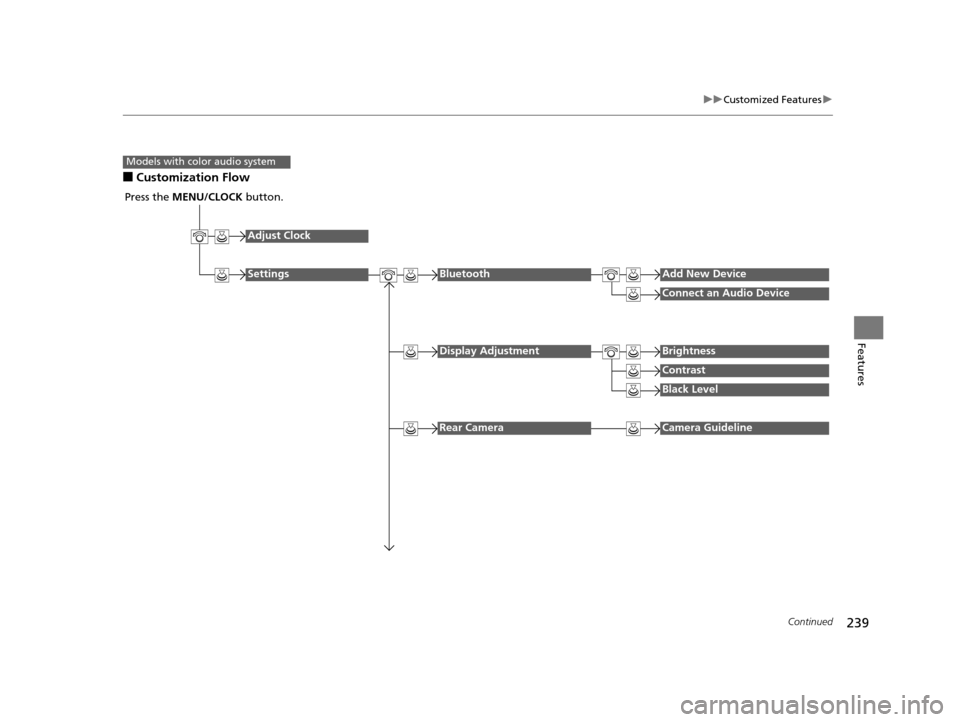
■Customization Flow
Models with color audio system
Press the MENU/CLOCK button.
Adjust Clock
SettingsBluetoothAdd New Device
Connect an Audio Device
Display AdjustmentBrightness
Contrast
Black Level
Rear CameraCamera Guideline
15 HR-V GAS-31T7A6000.book 239 ページ 2015年6月29日 月曜日 午前11時36分
Page 241 of 489
240
uuCustomized Features u
Features
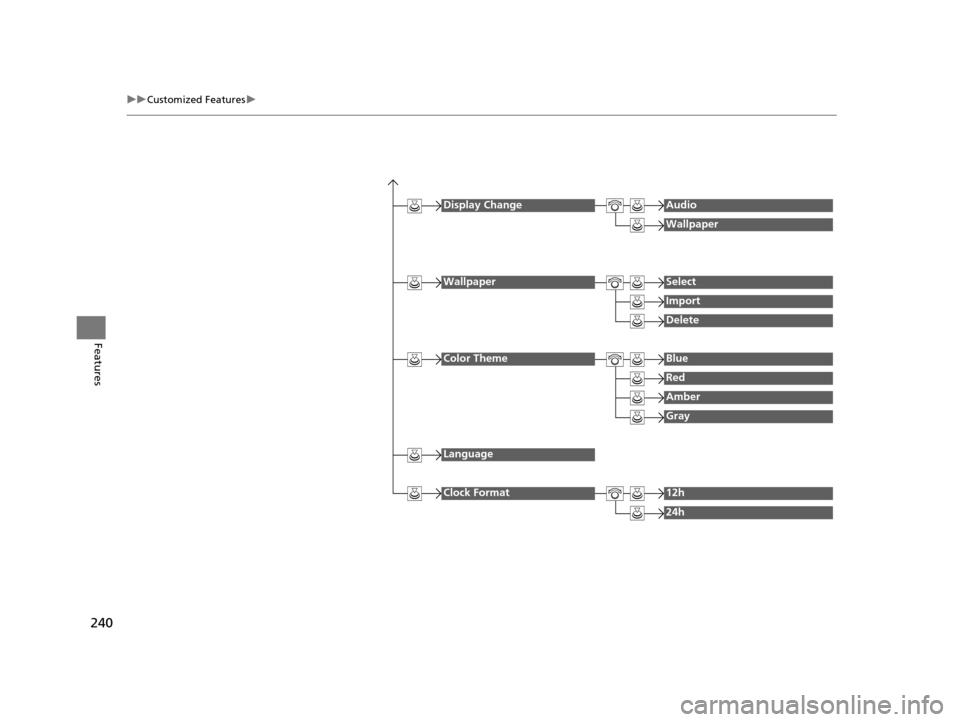
Display ChangeAudio
Wallpaper
WallpaperSelect
Import
Delete
Color ThemeBlue
Red
Amber
Gray
Language
Clock Format12h
24h
15 HR-V GAS-31T7A6000.book 240 ページ 2015年6月29日 月曜日 午前11時36分
Page 243 of 489
242
uuCustomized Features u
Features
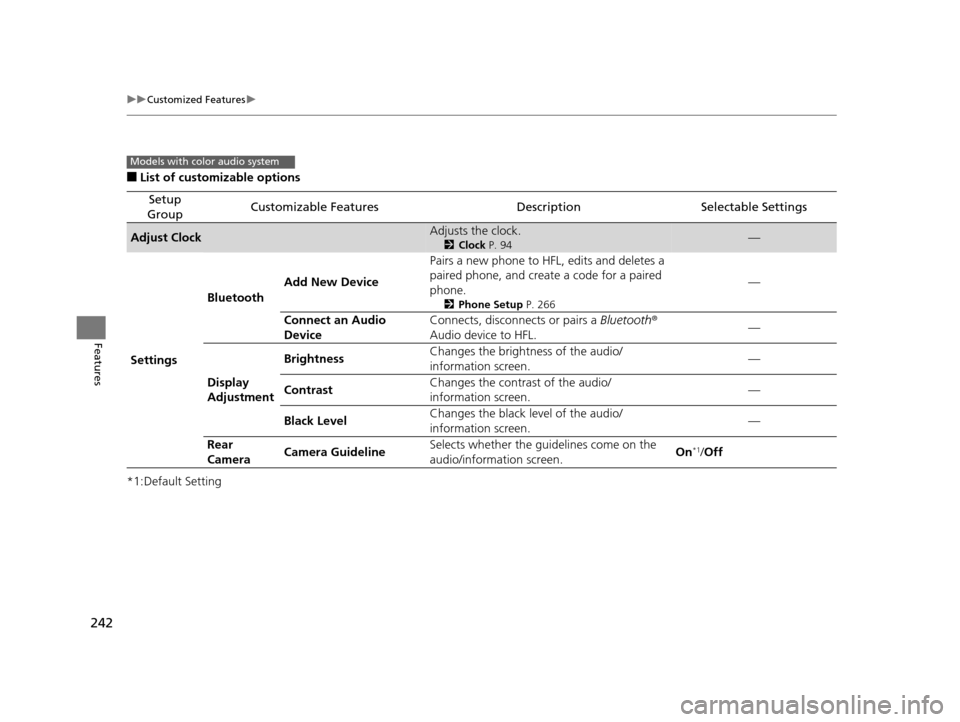
■List of customizable options
*1:Default Setting
Setup
GroupCustomizable FeaturesDescriptionSelectable Settings
Adjust ClockAdjusts the clock.
2 Clock P. 94—
Settings Bluetooth
Add New Device Pairs a new phone to HFL, edits and deletes a
paired phone, and create a code for a paired
phone.
2
Phone Setup P. 266
—
Connect an Audio
Device Connects, disconnects or pairs a Bluetooth
®
Audio device to HFL. —
Display
Adjustment Brightness
Changes the brightness of the audio/
information screen. —
Contrast Changes the contrast of the audio/
information screen.
—
Black Level Changes the black level of the audio/
information screen. —
Rear
Camera Camera Guideline
Selects whether the guidelines come on the
audio/information screen. On
*1/
Off
Models with color audio system
15 HR-V GAS-31T7A6000.book 242 ページ 2015年6月29日 月曜日 午前11時36分
Page 244 of 489
243
uuCustomized Features u
Continued
Features
*1:Default Setting
Setup
GroupCustomizable FeaturesDescriptionSelectable Settings
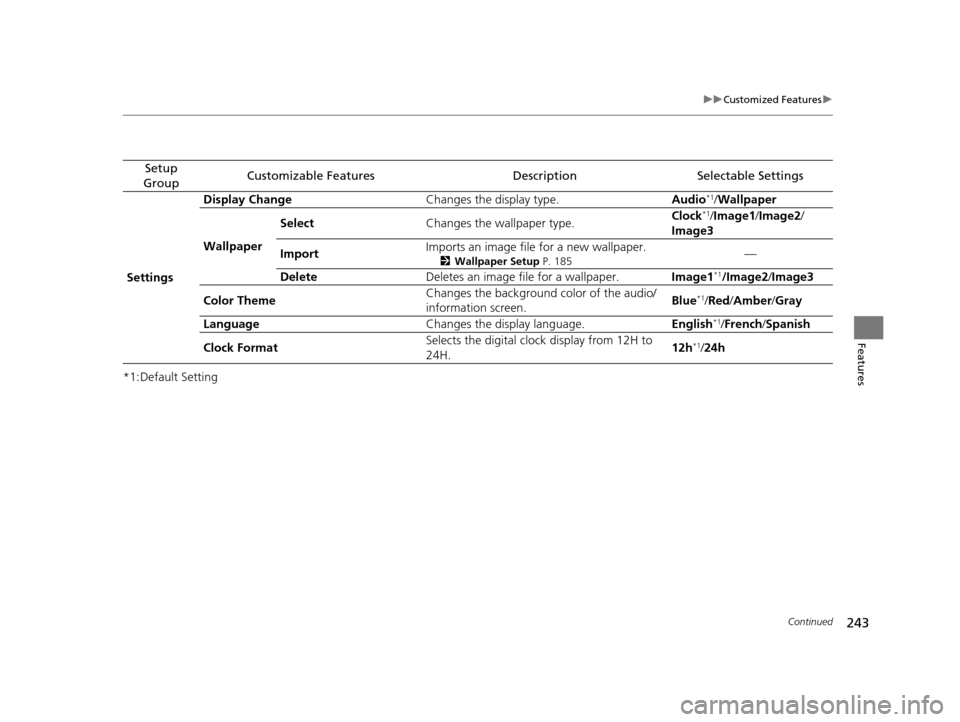
Settings Display Change
Changes the display type. Audio
*1/Wallpaper
Wallpaper Select
Changes the wallpaper type. Clock*1/
Image1/ Image2/
Image3
Import Imports an image file for a new wallpaper.
2
Wallpaper Setup P. 185—
Delete Deletes an image file for a wallpaper. Image1
*1/Image2/Image3
Color Theme Changes the background color of the audio/
information screen.
Blue
*1/
Red /Amber /Gray
Language Changes the display language. English
*1/French /Spanish
Clock Format Selects the digital clock display from 12H to
24H. 12h
*1/
24h
15 HR-V GAS-31T7A6000.book 243 ページ 2015年6月29日 月曜日 午前11時36分
Page 247 of 489
246
uuCustomized Features u
Features
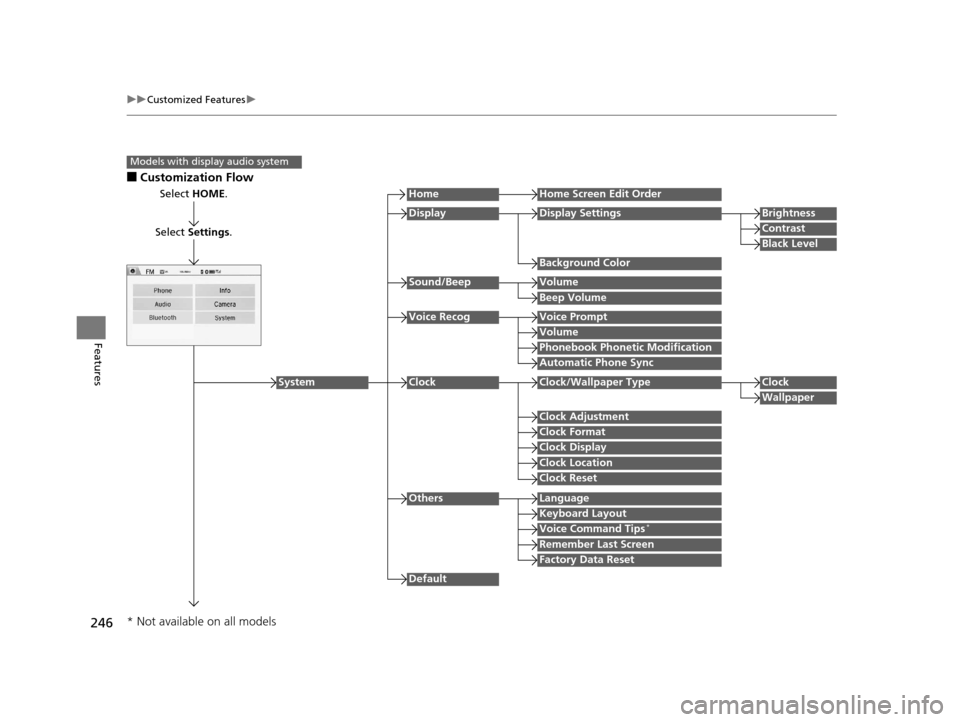
■Customization Flow
Models with display audio system
Select HOME.
Select Settings .
HomeHome Screen Edit Order
Background Color
DisplayDisplay SettingsBrightness
Contrast
Black Level
Beep Volume
Sound/BeepVolume
Volume
Voice RecogVoice Prompt
Automatic Phone Sync
Phonebook Phonetic Modification
Default
Factory Data Reset
Clock Format
ClockClock/Wallpaper TypeClock
Wallpaper
Clock Adjustment
Clock Display
Clock Location
Clock Reset
Keyboard Layout
OthersLanguage
Remember Last Screen
Voice Command Tips*
System
* Not available on all models
15 HR-V GAS-31T7A6000.book 246 ページ 2015年6月29日 月曜日 午前11時36分
Page 249 of 489
248
uuCustomized Features u
Features
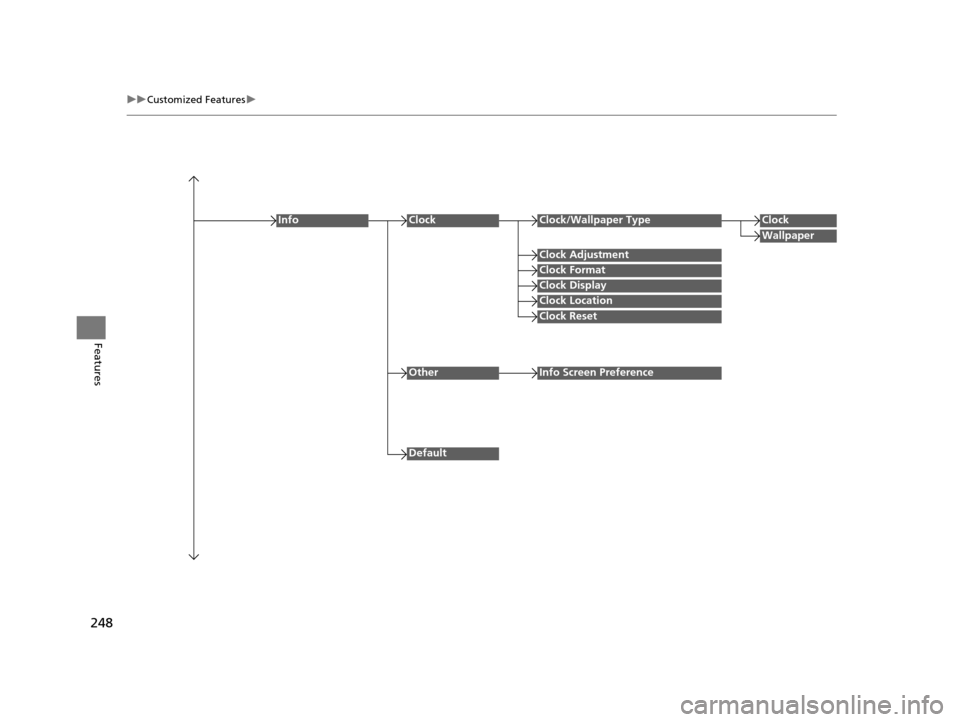
Clock Format
ClockClock/Wallpaper TypeClock
Wallpaper
Clock Adjustment
Clock Display
Clock Location
Clock Reset
Info
Default
OtherInfo Screen Preference
15 HR-V GAS-31T7A6000.book 248 ページ 2015年6月29日 月曜日 午前11時36分
Page 253 of 489
252
uuCustomized Features u
Features
*1:Default Setting
Setup
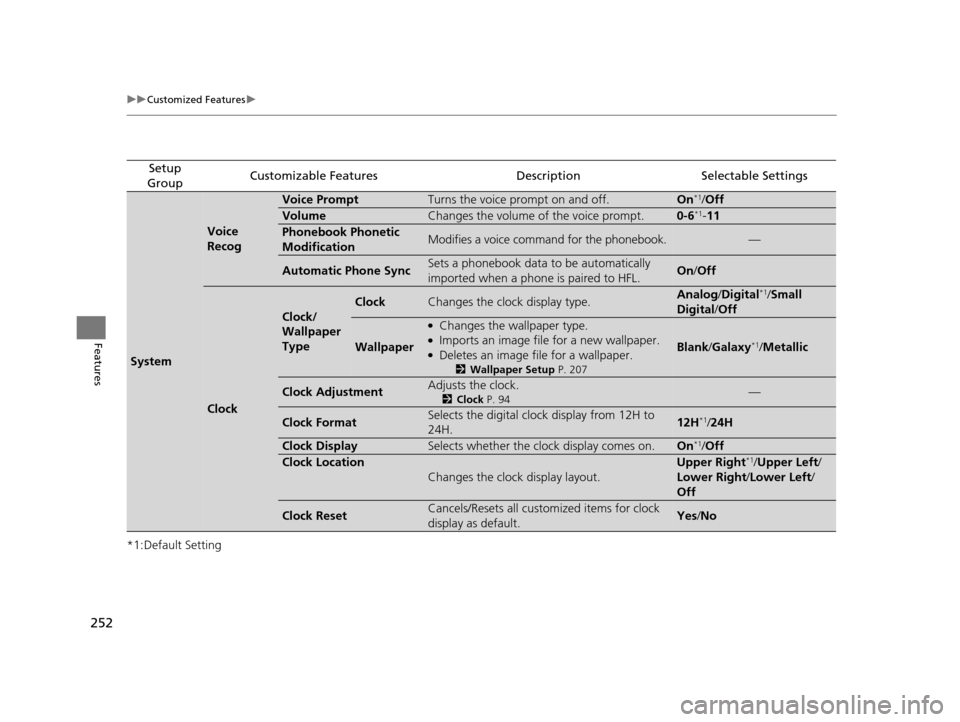
GroupCustomizable FeaturesDescriptionSelectable Settings
System
Voice
Recog
Voice PromptTurns the voice prompt on and off.On*1/ Off
VolumeChanges the volume of the voice prompt.0-6*1-11
Phonebook Phonetic
ModificationModifies a voice command for the phonebook.—
Automatic Phone SyncSets a phonebook data to be automatically
imported when a phone is paired to HFL.On/Off
Clock
Clock/
Wallpaper
Type
ClockChanges the clock display type.Analog /Digital*1/ Small
Digital /Off
Wallpaper
●Changes the wallpaper type.●Imports an image file for a new wallpaper.●Deletes an image file for a wallpaper.
2 Wallpaper Setup P. 207
Blank/Galaxy*1/Metallic
Clock AdjustmentAdjusts the clock.
2 Clock P. 94—
Clock FormatSelects the digital clock display from 12H to
24H.12H*1/24H
Clock DisplaySelects whether the cl ock display comes on.On*1/Off
Clock Location
Changes the clock display layout.
Upper Right*1/Upper Left/
Lower Right/ Lower Left/
Off
Clock ResetCancels/Resets all customized items for clock
display as default.Yes /No
15 HR-V GAS-31T7A6000.book 252 ページ 2015年6月29日 月曜日 午前11時36分
Page 256 of 489
255
uuCustomized Features u
Continued
Features
*1:Default Setting
Setup
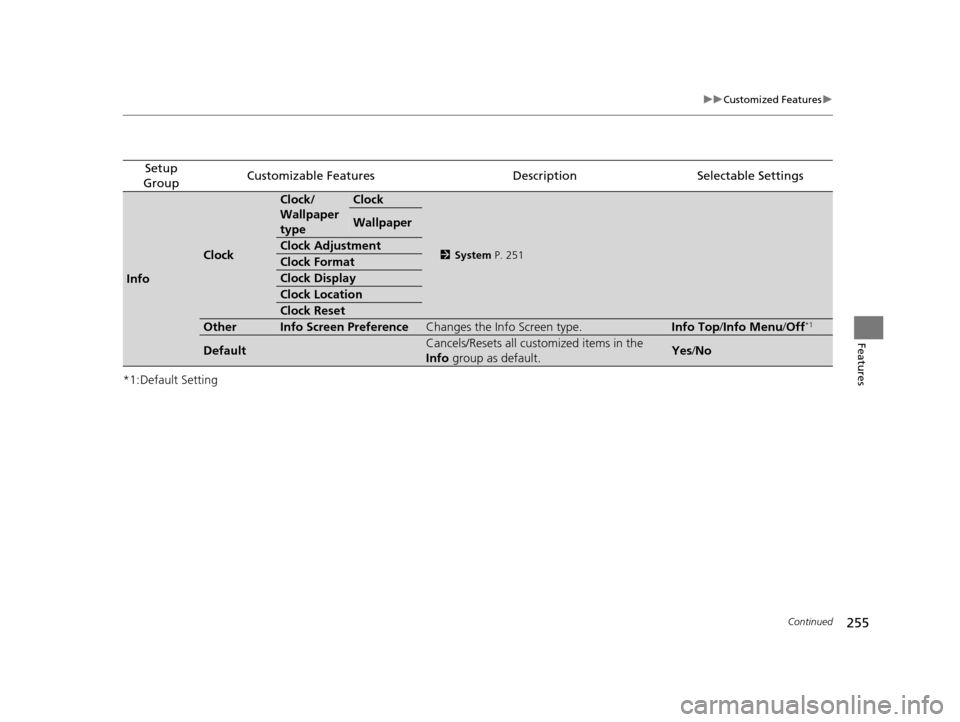
GroupCustomizable FeaturesDescriptionSelectable Settings
Info
Clock
Clock/
Wallpaper
typeClock
2 System P. 251
Wallpaper
Clock Adjustment
Clock Format
Clock Display
Clock Location
Clock Reset
OtherInfo Screen PreferenceChanges the Info Screen type.Info Top /Info Menu/ Off*1
DefaultCancels/Resets all customized items in the
Info group as default.Yes/No
15 HR-V GAS-31T7A6000.book 255 ページ 2015年6月29日 月曜日 午前11時36分
Page 314 of 489
313
Driving
This chapter discusses driving, refueling, and information on items such as accessories.
Before Driving
Driving Preparation ................................... 314
Maximum Load Limit ................................ 317
Towing a Trailer Towing Your Vehicle ................................. 320
Off-Highway Driving Guidelines ............... 323
When Driving
Starting the Engine ................................... 325
Starting the Engine ................................... 328
Precautions While Driving ......................... 332
Continuously Variable Transmission
*......... 333
Shifting ..................................................... 334
Models without smart entry system
Models with smart entry system
Continuously variable transmission models
without paddle shifters
Shifting .......................................................... 336
Shifting .......................................................... 340
ECON Button
*................................................ 343
Cruise Control ................................................ 344
Forward Collision Warning (FCW)
*................. 347
Lane Departure Warning (LDW)*.................... 351
Vehicle Stability Assist (VSA ®), aka Electronic Stability
Control (ESC), System .................................. 354
LaneWatch
TM*................................................ 356Real Time AWD with Intelligent Control SystemTM*.... 358Tire Pressure Monitoring System (TPMS) ......... 359
Tire Pressure Monitoring System (TPMS) - Required Federal Explanation ...................................... 361
Continuously variable transmission models
with paddle shifters
Manual transmission models
Braking
Brake System ........................................ 363
Anti-lock Brake System (ABS) ................ 369
Brake Assist System .............................. 370
Parking Your Vehicle When Stopped ..................................... 371
Multi-View Rear Camera ....................... 372
Refueling Fuel Information ................................... 374
How to Refuel ...................................... 375
Fuel Economy Improving Fuel Economy....................... 376
Accessories and Modifications Accessories ........................................... 377
Modifications ....................................... 377
* Not available on all models
15 HR-V GAS-31T7A6000.book 313 ページ 2015年6月29日 月曜日 午前11時36分
Page 315 of 489
314
Driving
Before Driving
Driving Preparation
Check the following items before you start driving.
• Make sure there are no obstructions on the windows, door mirrors, exterior
lights, or other parts of the vehicle.
u Remove any frost, snow, or ice.
u Remove any snow on the roof, as this can slip down and obstruct your field of
vision while driving. If frozen solid , remove ice once it has softened.
u When removing ice from around the wheels, be sure not to damage the wheel
or wheel components.
• Make sure the hood is securely closed.
u If the hood opens while driving, your front view will be blocked.
• Make sure the tires are in good condition.
u Check air pressure, check for damage and excessive wear.
2 Checking and Maintaining Tires P. 411
•Make sure there are no people or ob jects behind or around the vehicle.
u There are blind spots from the inside.
■Exterior Checks1Exterior Checks
NOTICE
When doors are frozen s hut, use warm water around
the door edges to melt any ice. Do not try to force
them open, as this can damage the rubber trim
around the doors. When done, wipe dry to avoid
further freezing.
Do not pour warm water into the key cylinder.
You will be unable to insert the key if the water
freezes in the hole.
Heat from the engine and exhaust can ignite
flammable material s left under the hood, causing a
fire. If you've parked y our vehicle for an extended
period, inspect and remove any debris that may have
collected, such as dried grass and leaves that have
fallen or have been carried in for use as a nest by a
small animal. Also check under the hood for leftover
flammable materials after you or someone else has
performed maintenance on your vehicle.
15 HR-V GAS-31T7A6000.book 314 ページ 2015年6月29日 月曜日 午前11時36分