Econ button HONDA HR-V 2016 2.G Owner's Manual
[x] Cancel search | Manufacturer: HONDA, Model Year: 2016, Model line: HR-V, Model: HONDA HR-V 2016 2.GPages: 489, PDF Size: 26.59 MB
Page 102 of 489
Continued101
uuLocking and Unlocking the Doors uLocking/Unlocking the Doors from the Outside
Controls
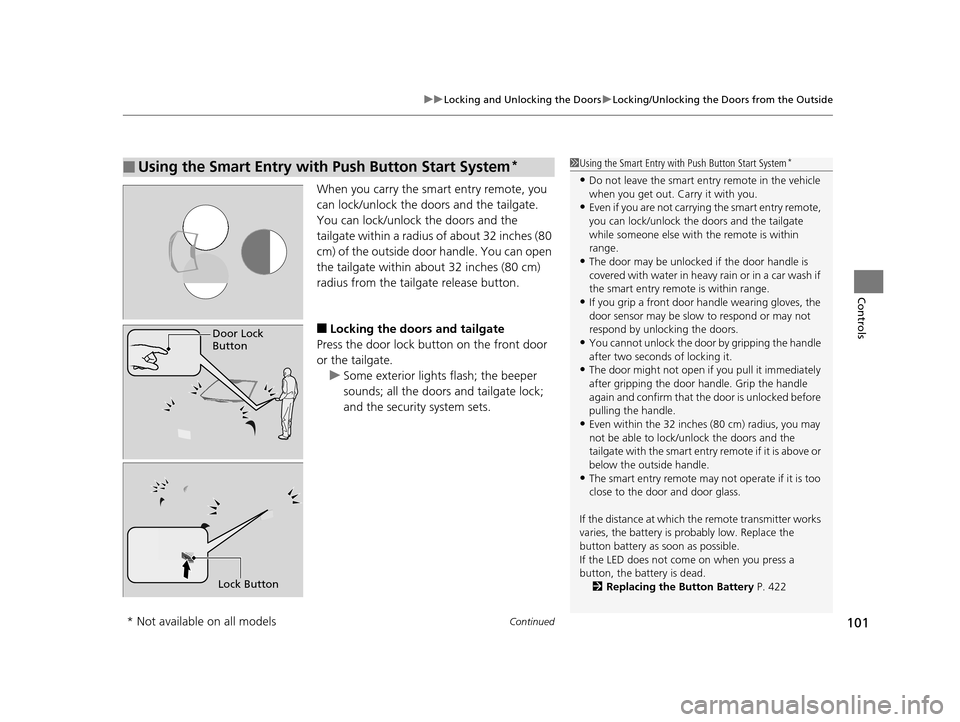
When you carry the sm art entry remote, you
can lock/unlock the doors and the tailgate.
You can lock/unlock the doors and the
tailgate within a radius of about 32 inches (80
cm) of the outside door handle. You can open
the tailgate within about 32 inches (80 cm)
radius from the tailgate release button.
■Locking the doors and tailgate
Press the door lock button on the front door
or the tailgate.
u Some exterior lights flash; the beeper
sounds; all the doors and tailgate lock;
and the security system sets.
■Using the Smart Entry with Push Button Start System*1Using the Smart Entry with Push Button Start System*
•Do not leave the smart entry remote in the vehicle
when you get out. Carry it with you.
•Even if you are not carrying the smart entry remote,
you can lock/unlock the doors and the tailgate
while someone else with the remote is within
range.
•The door may be unlocked if the door handle is
covered with water in heavy rain or in a car wash if
the smart entry remote is within range.
•If you grip a front door handle wearing gloves, the
door sensor may be slow to respond or may not
respond by unlocking the doors.
•You cannot unlock the door by gripping the handle
after two seconds of locking it.
•The door might not open if you pull it immediately
after gripping the door handle. Grip the handle
again and confirm that th e door is unlocked before
pulling the handle.
•Even within the 32 inches (80 cm) radius, you may
not be able to lock/unlock the doors and the
tailgate with the smart entry remote if it is above or
below the outside handle.
•The smart entry remote may not operate if it is too
close to the door and door glass.
If the distance at which the remote transmitter works
varies, the battery is probably low. Replace the
button battery as soon as possible.
If the LED does not come on when you press a
button, the battery is dead. 2 Replacing the Button Battery P. 422
Door Lock
Button
Lock Button
* Not available on all models
15 HR-V GAS-31T7A6000.book 101 ページ 2015年6月29日 月曜日 午前11時36分
Page 103 of 489
uuLocking and Unlocking the Doors uLocking/Unlocking the Doors from the Outside
102
Controls
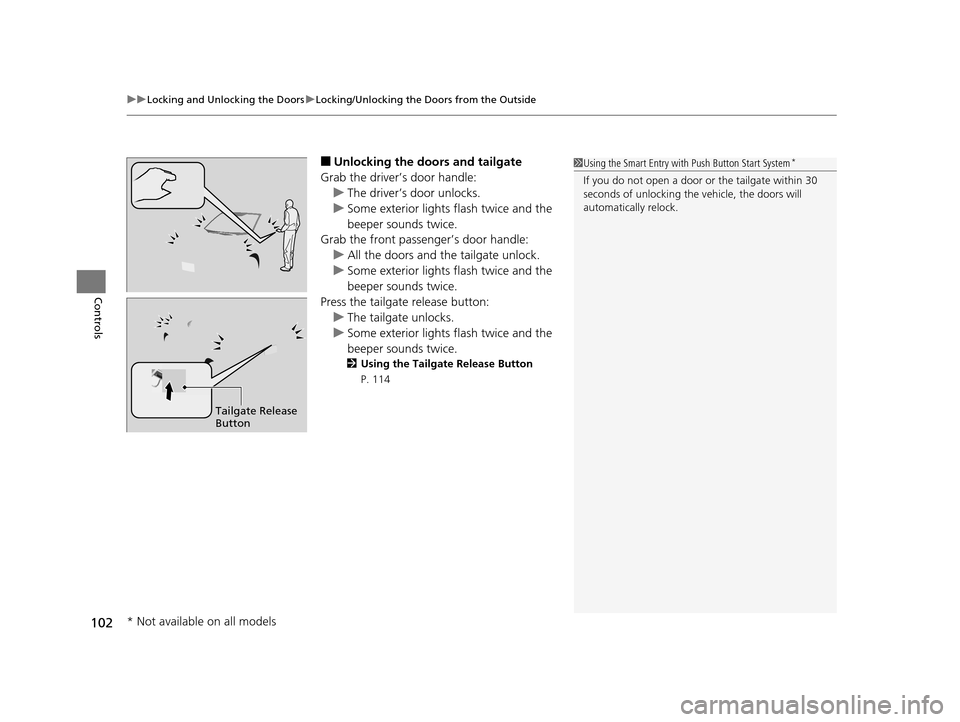
■Unlocking the doors and tailgate
Grab the driver’s door handle: u The driver’s door unlocks.
u Some exterior lights flash twice and the
beeper sounds twice.
Grab the front passenger’s door handle:
u All the doors and the tailgate unlock.
u Some exterior lights flash twice and the
beeper sounds twice.
Press the tailgate release button: u The tailgate unlocks.
u Some exterior lights flash twice and the
beeper sounds twice.
2 Using the Tailgate Release Button
P. 114
1 Using the Smart Entry with Push Button Start System*
If you do not open a door or the tailgate within 30
seconds of unlocking the vehicle, the doors will
automatically relock.
Tailgate Release
Button
* Not available on all models
15 HR-V GAS-31T7A6000.book 102 ページ 2015年6月29日 月曜日 午前11時36分
Page 112 of 489
111
uuLocking and Unlocking the Doors uCustomizing the Auto Door Locking/Unlocking Setting
Continued
Controls
*1 : Default setting
*2 : Models without smart entry system
*3 : Models with smart entry system
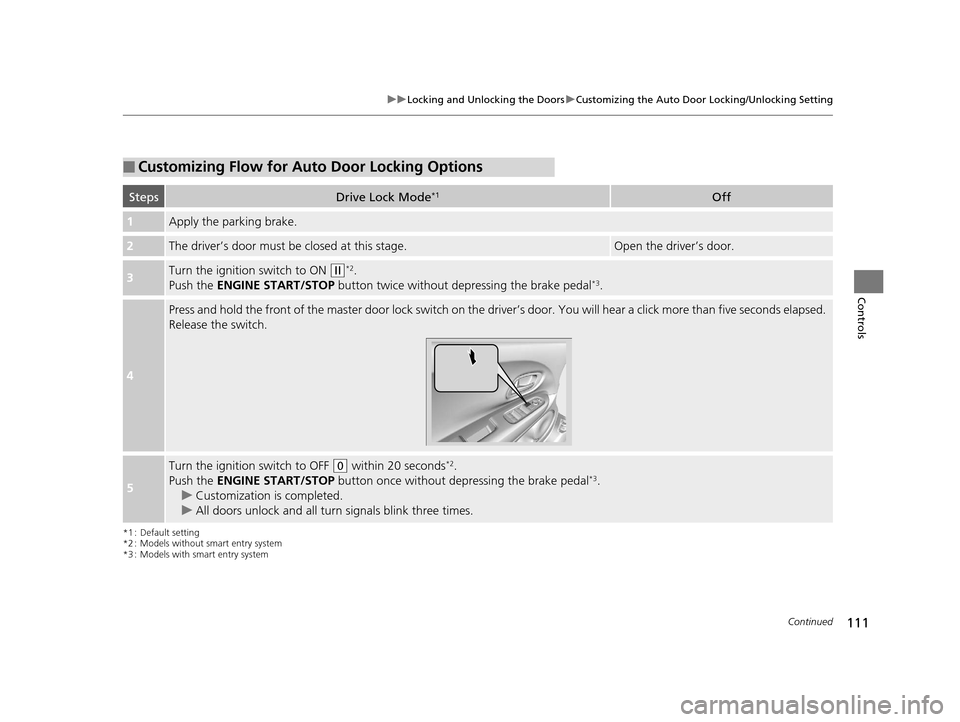
■Customizing Flow for Auto Door Locking Options
StepsDrive Lock Mode*1Off
1Apply the parking brake.
2The driver’s door must be closed at this stage.Open the driver’s door.
3Turn the ignition switch to ON (w*2.
Push the ENGINE START/STOP button twice without depressing the brake pedal*3.
4
Press and hold the front of the master door lock switch on the driver’s door. You will hear a click more than five seconds elapsed.
Release the switch.
5
Turn the ignition switch to OFF (0 within 20 seconds*2.
Push the ENGINE START/STOP button once without depressing the brake pedal*3.
u Customization is completed.
u All doors unlock and all turn signals blink three times.
15 HR-V GAS-31T7A6000.book 111 ページ 2015年6月29日 月曜日 午前11時36分
Page 113 of 489
112
uuLocking and Unlocking the Doors uCustomizing the Auto Door Locking/Unlocking Setting
Controls
*1 : Default setting
*2 : Models without smart entry system
*3 : Models with smart entry system
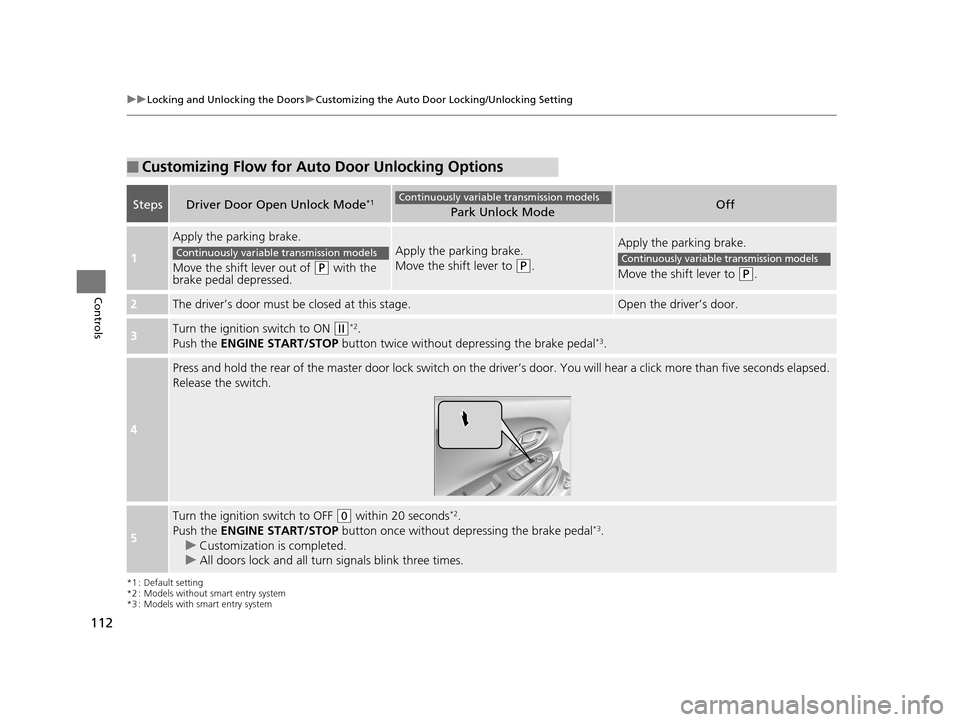
■Customizing Flow for Auto Door Unlocking Options
StepsDriver Door Open Unlock Mode*1Park Unlock ModeOff
1
Apply the parking brake.
Move the shift lever out of
(P with the
brake pedal depressed.
Apply the parking brake.
Move the shift lever to
(P.
Apply the parking brake.
Move the shift lever to
(P.
2The driver’s door must be closed at this stage.Open the driver’s door.
3Turn the ignition switch to ON (w*2.
Push the ENGINE START/STOP button twice without de pressing the brake pedal*3.
4
Press and hold the rear of the master door lock switch on the driv er’s door. You will hear a click more than five seconds elapsed.
Release the switch.
5
Turn the ignition switch to OFF (0 within 20 seconds*2.
Push the ENGINE START/STOP button once without depressing the brake pedal*3.
u Customization is completed.
u All doors lock and all turn signals blink three times.
Continuously variable transmission models
Continuously variable transmission modelsContinuously variable transmission models
15 HR-V GAS-31T7A6000.book 112 ページ 2015年6月29日 月曜日 午前11時36分
Page 119 of 489
118
uuSecurity System uSecurity System Alarm
Controls
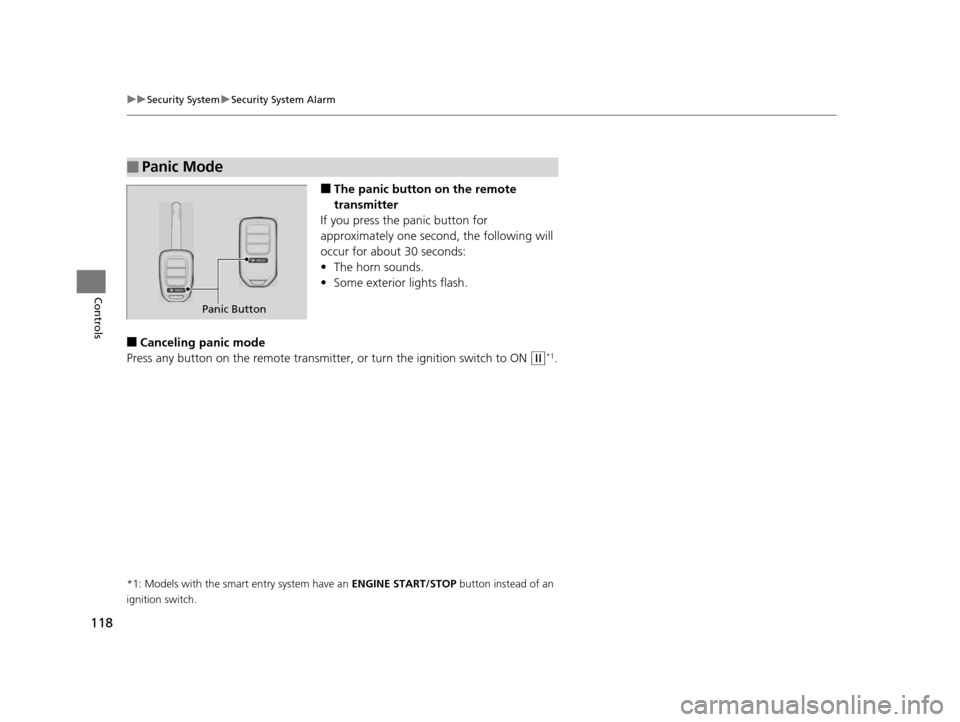
■The panic button on the remote
transmitter
If you press the panic button for
approximately one seco nd, the following will
occur for about 30 seconds:
• The horn sounds.
• Some exterior lights flash.
■Canceling panic mode
Press any button on the remote transmitter, or turn the ignition switch to ON
(w*1.
*1: Models with the smart entry system have an ENGINE START/STOP button instead of an
ignition switch.
■Panic Mode
Panic Button
15 HR-V GAS-31T7A6000.book 118 ページ 2015年6月29日 月曜日 午前11時36分
Page 130 of 489
129
uuOperating the Switches Around the Steering Wheel uLight Switches
Controls
The headlights automatically come on when the wipers are used several times within
a certain intervals with the headlight switch in AUTO.
The headlights automatically go off a few mi nutes later if the wipers are stopped.
The headlights, all other exterior lights, and the instrument panel lights turn off 15
seconds after you remove the key or set the power mode to VEHICLE OFF (LOCK),
take the remote with you, and close the driver's door.
If you turn the igniti on switch to LOCK
(0*1 with the headlight switch on, but do
not open the door, the lights tu rn off after 10 minutes (3 minutes, if the switch is in
the AUTO position).
The lights turn on again when you unlock or open the driver's door. If you unlock
the door, but do not open it within 15 seconds, the lights go off. If you open the
driver's door, you will hear a lights on reminder chime.
*1: Models with the smart entry system have an ENGINE START/STOP button instead of an
ignition switch.
■Headlight Integration with Wipers*
■Automatic Lighting Off Feature
1 Headlight Integration with Wipers*
This feature activates while the headlights are off in
AUTO .
The instrument panel brightness does not change
when the headlights come on.
When the ambient light is at dark, the automatic
lighting control feature over rides, and the headlights
come on with or without the wipers sweeping more
than several times.
* Not available on all models
15 HR-V GAS-31T7A6000.book 129 ページ 2015年6月29日 月曜日 午前11時36分
Page 135 of 489
134
uuOperating the Switches Around the Steering Wheel uBrightness Control
Controls
Brightness Control
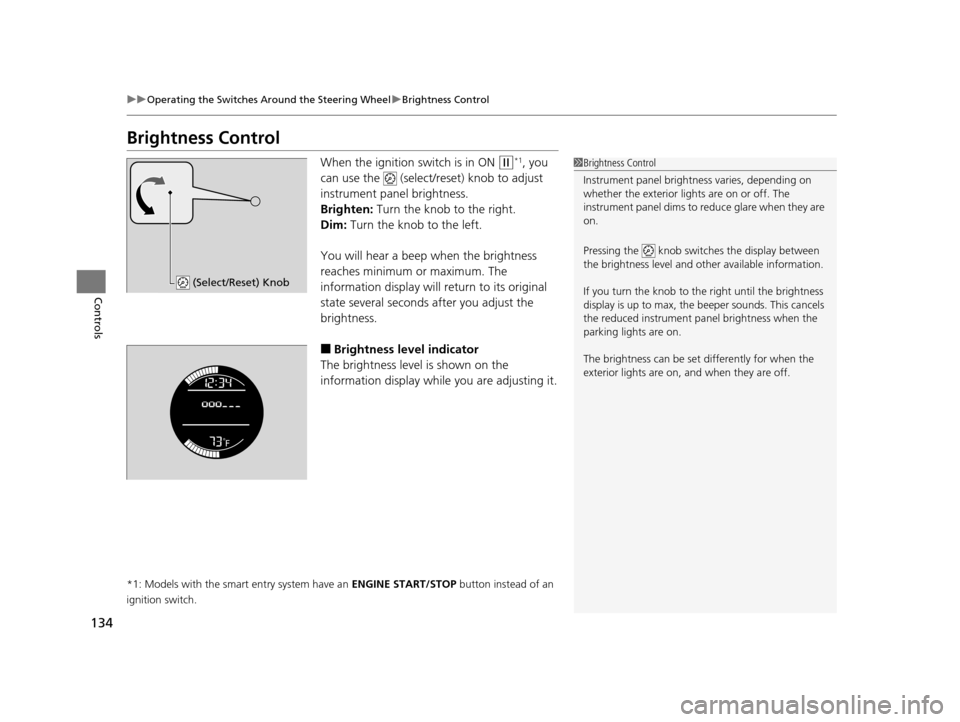
When the ignition switch is in ON (w*1, you
can use the (select/reset) knob to adjust
instrument panel brightness.
Brighten: Turn the knob to the right.
Dim: Turn the knob to the left.
You will hear a beep when the brightness
reaches minimum or maximum. The
information display will return to its original
state several seconds after you adjust the
brightness.
■Brightness level indicator
The brightness level is shown on the
information display while you are adjusting it.
*1: Models with the smart entry system have an ENGINE START/STOP button instead of an
ignition switch.
1 Brightness Control
Instrument panel brightne ss varies, depending on
whether the exterior lights are on or off. The
instrument panel dims to reduce glare when they are
on.
Pressing the knob switch es the display between
the brightness level and ot her available information.
If you turn the knob to the right until the brightness
display is up to max, the beeper sounds. This cancels
the reduced instrument panel brightness when the
parking lights are on.
The brightness can be set differently for when the
exterior lights are on, and when they are off.
(Select/Reset) Knob
15 HR-V GAS-31T7A6000.book 134 ページ 2015年6月29日 月曜日 午前11時36分
Page 151 of 489
150
Controls
Interior Lights/Interior Convenience Items
Interior Lights
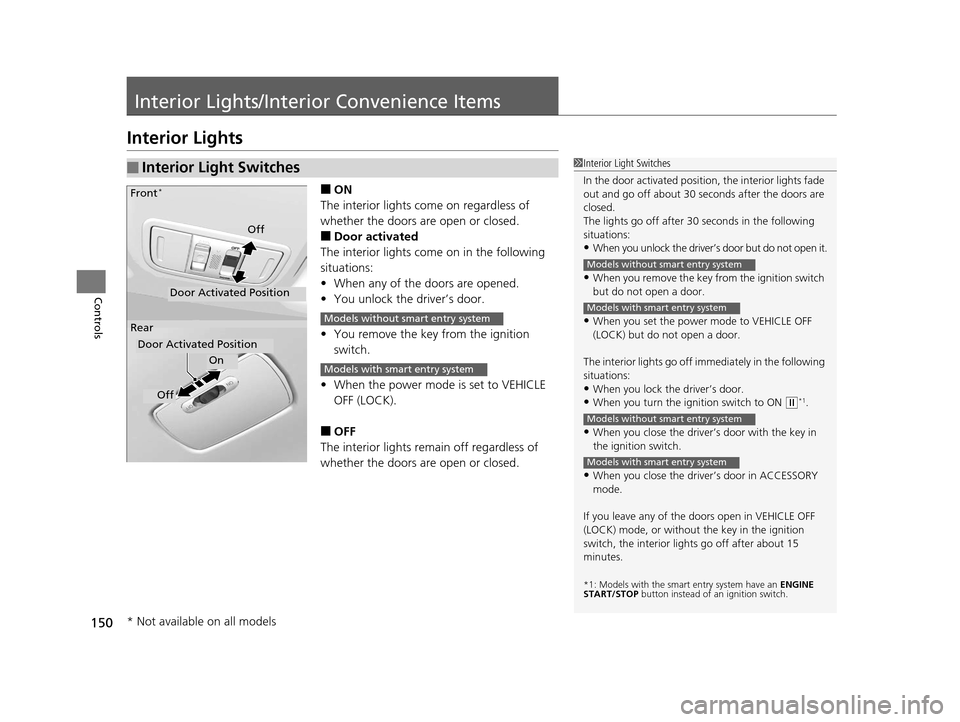
■ON
The interior lights come on regardless of
whether the doors are open or closed.
■Door activated
The interior lights come on in the following
situations:
• When any of the doors are opened.
• You unlock the driver’s door.
• You remove the key from the ignition
switch.
• When the power mode is set to VEHICLE
OFF (LOCK).
■OFF
The interior lights remain off regardless of
whether the doors are open or closed.
■Interior Light Switches1 Interior Light Switches
In the door activated position, the interior lights fade
out and go off about 30 se conds after the doors are
closed.
The lights go off after 30 seconds in the following
situations:
•When you unlock the driver’s door but do not open it.
•When you remove the key from the ignition switch
but do not open a door.
•When you set the power mode to VEHICLE OFF
(LOCK) but do not open a door.
The interior lights go off i mmediately in the following
situations:
•When you lock the driver’s door.
•When you turn the ignition switch to ON ( w*1.
•When you close the driver’s door with the key in
the ignition switch.
•When you close the driver’s door in ACCESSORY
mode.
If you leave any of the doors open in VEHICLE OFF
(LOCK) mode, or without the key in the ignition
switch, the interior li ghts go off after about 15
minutes.
*1: Models with the sma rt entry system have an ENGINE
START/STOP button instead of an ignition switch.
Models without smart entry system
Models with smart entry system
Models without smart entry system
Models with smart entry system
On
Off
Door Activated Position
Front
*
Rear
Door Activated Position
Off
Models without smart entry system
Models with smart entry system
* Not available on all models
15 HR-V GAS-31T7A6000.book 150 ページ 2015年6月29日 月曜日 午前11時36分
Page 165 of 489
uuHeating and Cooling System*uUsing Vents, Heating and A/C
164
Controls
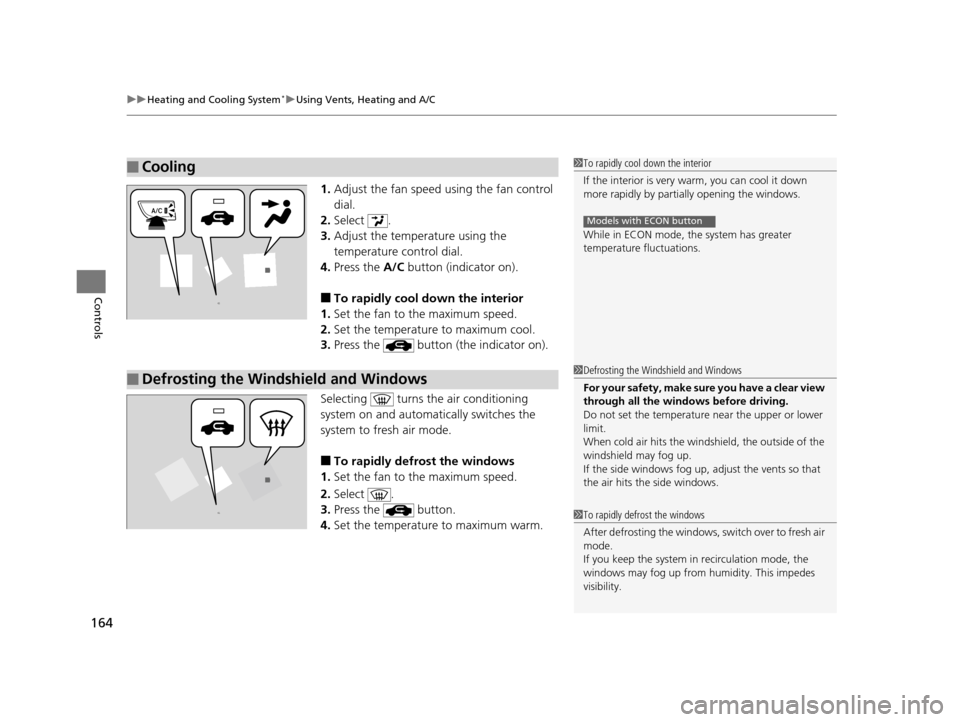
1. Adjust the fan speed using the fan control
dial.
2. Select .
3. Adjust the temperature using the
temperature control dial.
4. Press the A/C button (indicator on).
■To rapidly cool down the interior
1. Set the fan to the maximum speed.
2. Set the temperature to maximum cool.
3. Press the button (the indicator on).
Selecting turns th e air conditioning
system on and automa tically switches the
system to fresh air mode.
■To rapidly defrost the windows
1. Set the fan to the maximum speed.
2. Select .
3. Press the button.
4. Set the temperature to maximum warm.
■Cooling1To rapidly cool down the interior
If the interior is very warm, you can cool it down
more rapidly by parti ally opening the windows.
While in ECON mode, the system has greater
temperature fluctuations.
Models with ECON button
■Defrosting the Windshield and Windows1 Defrosting the Windshield and Windows
For your safety, make sure you have a clear view
through all the windows before driving.
Do not set the temperatur e near the upper or lower
limit.
When cold air hits the windshield, the outside of the
windshield may fog up.
If the side windows fog up, adjust the vents so that
the air hits th e side windows.
1To rapidly defrost the windows
After defrosting the windows, switch over to fresh air
mode.
If you keep the system in recirculation mode, the
windows may fog up from humidity. This impedes
visibility.
15 HR-V GAS-31T7A6000.book 164 ページ 2015年6月29日 月曜日 午前11時36分
Page 167 of 489
uuClimate Control System*uUsing Automatic Climate Control
166
Controls
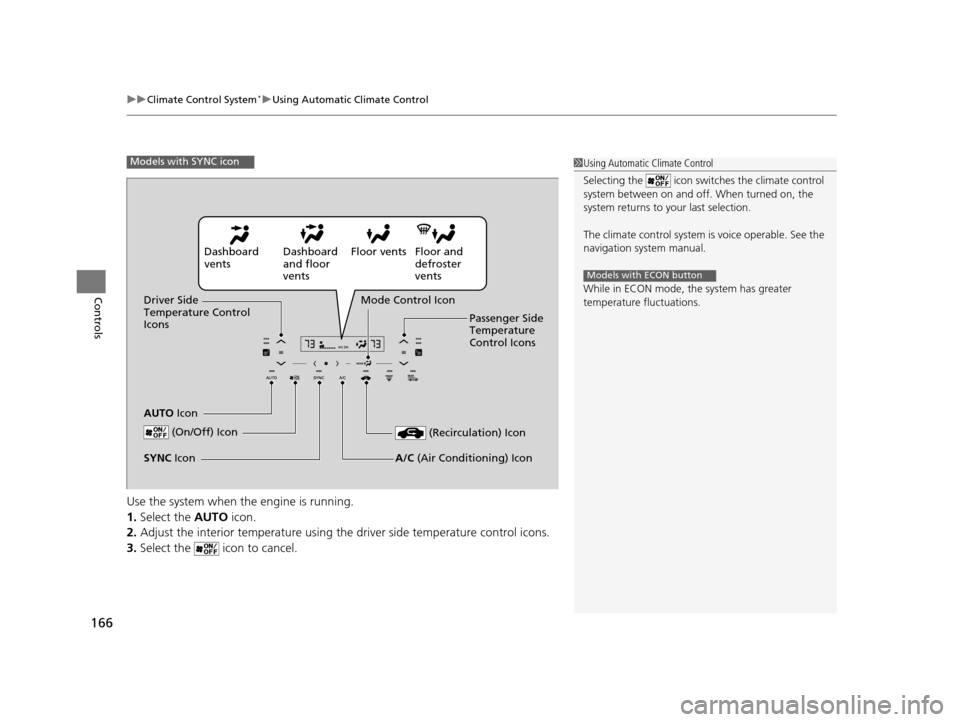
Use the system when the engine is running.
1. Select the AUTO icon.
2. Adjust the interior temperature using th e driver side temperature control icons.
3. Select the icon to cancel.
1Using Automatic Climate Control
Selecting the icon switches the climate control
system between on and off. When turned on, the
system returns to your last selection.
The climate control system is voice operable. See the
navigation sy stem manual.
While in ECON mode, the system has greater
temperature fluctuations.
Models with ECON button
Models with SYNC icon
Dashboard
vents Dashboard
and floor
ventsFloor vents Floor and
defroster
vents
Driver Side
Temperature Control
Icons
AUTO Icon Mode Control Icon
Passenger Side
Temperature
Control Icons
(On/Off) Icon
(Recirculation) Icon
A/C (Air Conditioning) IconSYNC Icon
15 HR-V GAS-31T7A6000.book 166 ページ 2015年6月29日 月曜日 午前11時36分