door lock HONDA HR-V 2016 2.G Owner's Guide
[x] Cancel search | Manufacturer: HONDA, Model Year: 2016, Model line: HR-V, Model: HONDA HR-V 2016 2.GPages: 489, PDF Size: 26.59 MB
Page 115 of 489
114
uuOpening and Closing the Tailgate uUsing the Tailgate Release Button
Controls
Using the Tailgate Release Button
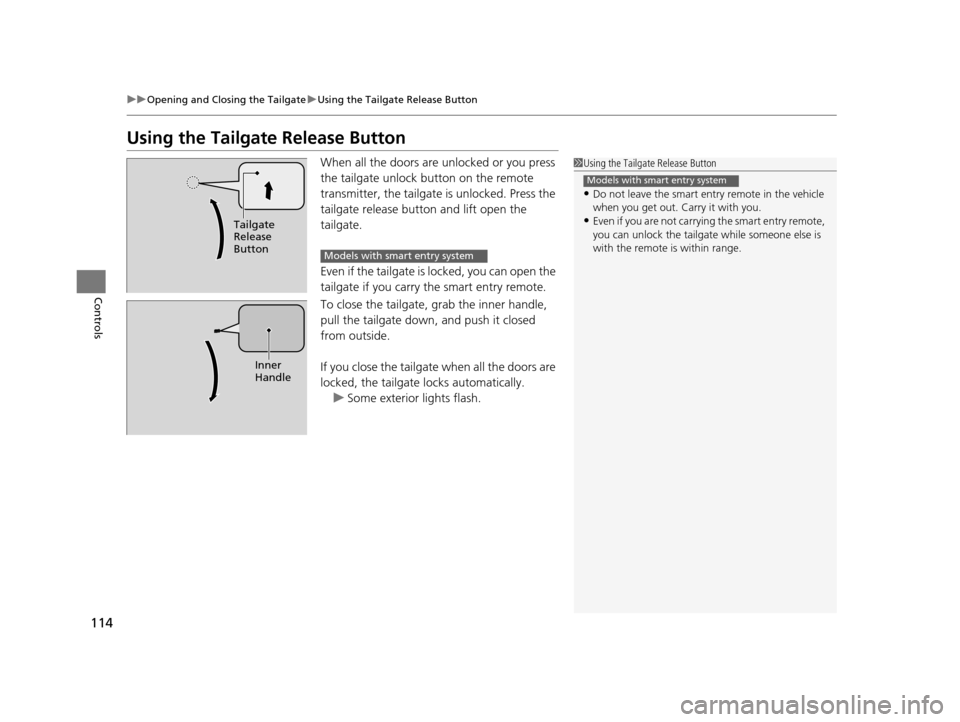
When all the doors are unlocked or you press
the tailgate unlock button on the remote
transmitter, the tailgate is unlocked. Press the
tailgate release button and lift open the
tailgate.
Even if the tailgate is locked, you can open the
tailgate if you carry the smart entry remote.
To close the tailgate, grab the inner handle,
pull the tailgate down, and push it closed
from outside.
If you close the tailgate when all the doors are
locked, the tailgate locks automatically.
u Some exterior lights flash.1Using the Tailgate Release Button
•Do not leave the smart entry remote in the vehicle
when you get out. Carry it with you.
•Even if you are not carrying the smart entry remote,
you can unlock the tailgate while someone else is
with the remote is within range.
Models with smart entry system
Tailgate
Release
Button
Models with smart entry system
Inner
Handle
15 HR-V GAS-31T7A6000.book 114 ページ 2015年6月29日 月曜日 午前11時36分
Page 118 of 489
Continued117
uuSecurity System uSecurity System Alarm
Controls
■To deactivate the security system alarm
Unlock the vehicle using the remote transmi tter or smart entry remote, or turn the
ignition switch to ON
(w*1. The system, along with the horn and flashing lights, is
deactivated.
■Setting the security system alarm
The security system alarm automatically sets when the following conditions have
been met:
• The ignition switch is in LOCK
(0*1, and the key has been removed from the
ignition switch.
• The hood is closed.
• All doors and the tailgate are locked from outside with the key, remote
transmitter, or smart entry system.
■When the security system alarm sets
The security system alarm indicator in the instrument panel blinks. When the
blinking interval changes after about 15 se conds, the security system alarm is set.
■To cancel the security system alarm
The security system alarm is canceled when the vehicle is unlocked using the remote
transmitter or smart entry system, or th e ignition switch is turned to ON
(w*1. The
security system alarm indicato r goes off at the same time.
*1: Models with the smart entry system have an ENGINE START/STOP button instead of an
ignition switch.
1 Security System Alarm
Do not set the security system alarm when someone
is in the vehicle or a window is open. The system can
accidentally activate when:
•Unlocking the door with the lock tab.•Opening the hood with the hood release handle.
•Moving the shift lever out of ( P.
If the battery goes dead after you have set the
security system alarm, the security alarm may go off
once the battery is re charged or replaced.
If this occurs, deactivate the security system alarm by
unlocking a door using the ke y, remote transmitter,
or smart entry system.
Do not attempt to alter th is system or add another
device to it.
Continuously variable transmission models
15 HR-V GAS-31T7A6000.book 117 ページ 2015年6月29日 月曜日 午前11時36分
Page 120 of 489
119Continued
Controls
Opening and Closing the Windows
Opening/Closing the Power Windows
The power windows can be opened and clos ed when the ignition switch is in ON
(w*1, using the switches on the doors. The driver’s side switches can be used to
open and close all of the windows.
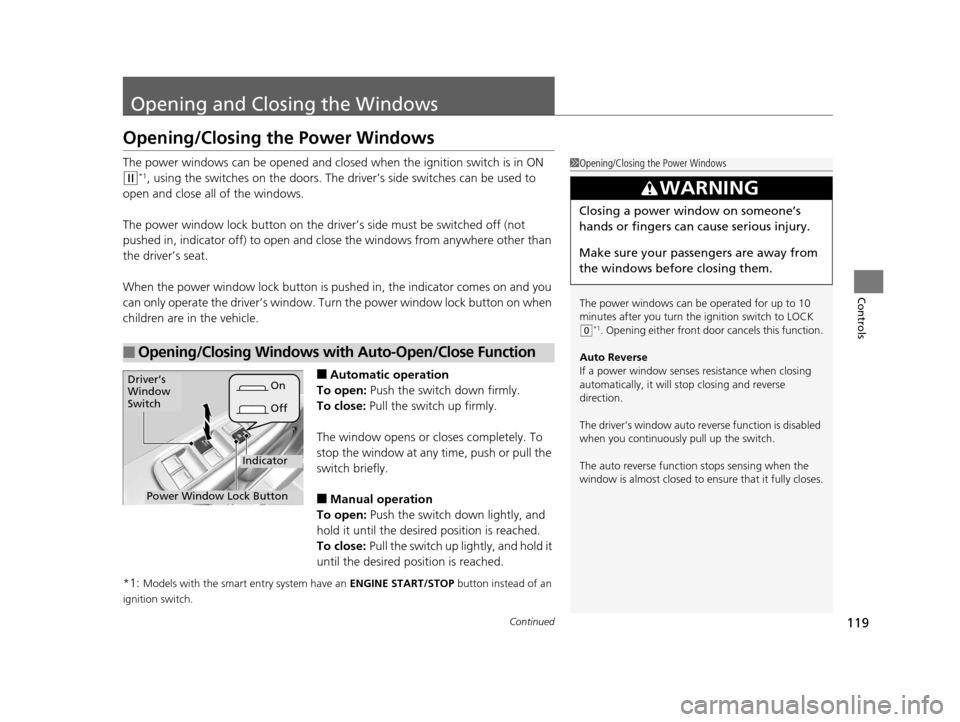
The power window lock button on the driver’s side must be switched off (not
pushed in, indicator off) to open and cl ose the windows from anywhere other than
the driver’s seat.
When the power window lock button is pushed in, the indicator comes on and you
can only operate the driver’s window. Turn the power window lock button on when
children are in the vehicle.
■Automatic operation
To open: Push the switch down firmly.
To close: Pull the switch up firmly.
The window opens or closes completely. To
stop the window at any time, push or pull the
switch briefly.
■Manual operation
To open: Push the switch down lightly, and
hold it until the desired position is reached.
To close: Pull the switch up lightly, and hold it
until the desired position is reached.
*1:
Models with the smart entry system have an ENGINE START/STOP button instead of an
ignition switch.
■Opening/Closing Windows with Auto-Open/Close Function
1 Opening/Closing the Power Windows
The power windows can be operated for up to 10
minutes after you turn the ignition switch to LOCK
(0*1. Opening either front door cancels this function.
Auto Reverse
If a power window senses resistance when closing
automatically, it will stop closing and reverse
direction.
The driver’s window auto re verse function is disabled
when you continuously pull up the switch.
The auto reverse function stops sensing when the
window is almost closed to en sure that it fully closes.
3WARNING
Closing a power window on someone’s
hands or fingers can cause serious injury.
Make sure your passengers are away from
the windows before closing them.
Power Window Lock Button
Driver’s
Window
Switch
OffOn
Indicator
15 HR-V GAS-31T7A6000.book 119 ページ 2015年6月29日 月曜日 午前11時36分
Page 122 of 489
121
Controls
Opening and Closing the Moonroof*
You can only operate the moonroof when the ignition switch is in ON (w*1. Use the
switch in the front of the ceiling to open and close the moonroof.
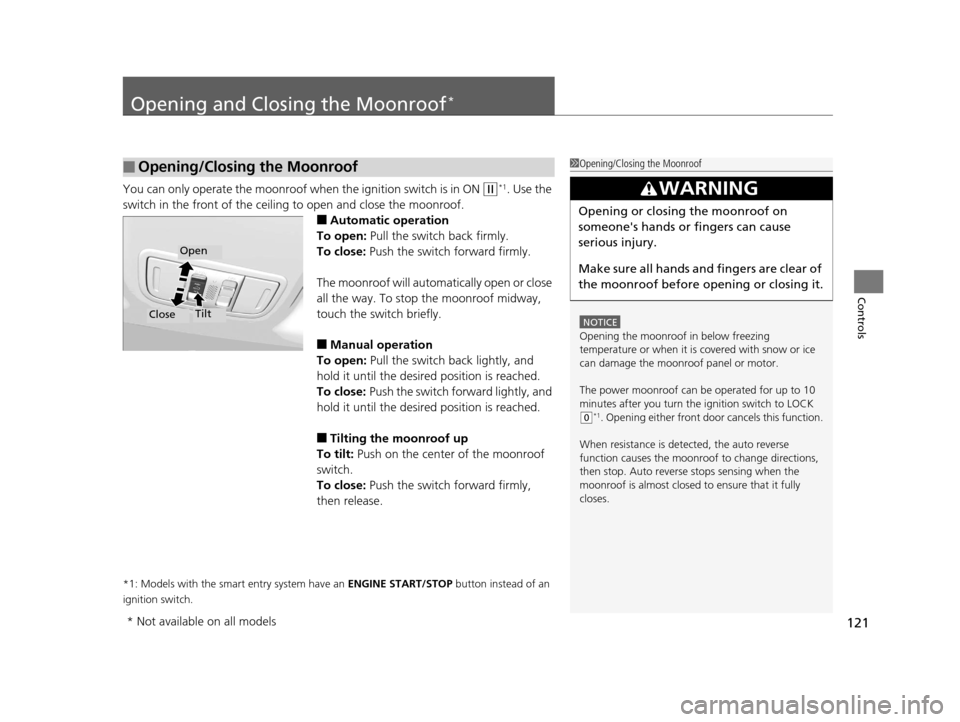
■Automatic operation
To open: Pull the switch back firmly.
To close: Push the switch forward firmly.
The moonroof will automatically open or close
all the way. To stop the moonroof midway,
touch the switch briefly.
■Manual operation
To open: Pull the switch back lightly, and
hold it until the desired position is reached.
To close: Push the switch fo rward lightly, and
hold it until the desired position is reached.
■Tilting the moonroof up
To tilt: Push on the center of the moonroof
switch.
To close: Push the switch forward firmly,
then release.
*1: Models with the smart entry system have an ENGINE START/STOP button instead of an
ignition switch.
■Opening/Closing the Moonroof1 Opening/Closing the Moonroof
NOTICE
Opening the moonroof in below freezing
temperature or when it is covered with snow or ice
can damage the moonroof panel or motor.
The power moonroof can be operated for up to 10
minutes after you turn the ignition switch to LOCK
( 0*1. Opening either front door cancels this function.
When resistance is detected, the auto reverse
function causes the moonroof to change directions,
then stop. Auto reverse stops sensing when the
moonroof is almost closed to ensure that it fully
closes.
3WARNING
Opening or closing the moonroof on
someone's hands or fingers can cause
serious injury.
Make sure all hands and fingers are clear of
the moonroof before opening or closing it.
Open
CloseTilt
* Not available on all models
15 HR-V GAS-31T7A6000.book 121 ページ 2015年6月29日 月曜日 午前11時36分
Page 123 of 489
122
Controls
Operating the Switches Around the Steering Wheel
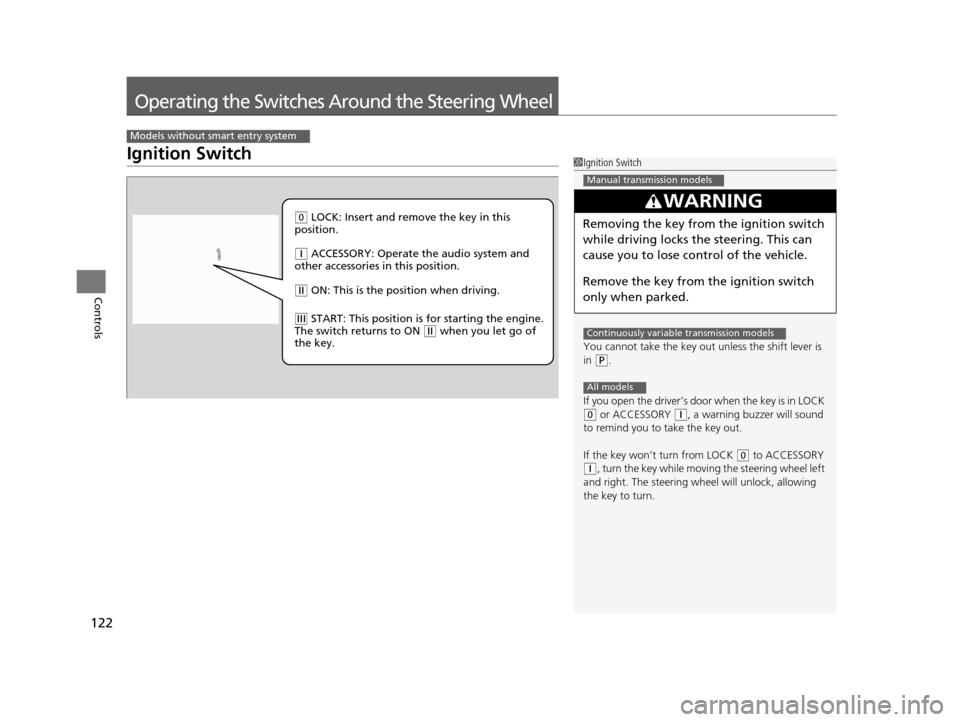
Ignition Switch
Models without smart entry system
1Ignition Switch
You cannot take the key out unless the shift lever is
in
( P.
If you open the driver’s door when the key is in LOCK
(0 or ACCESSORY ( q, a warning buzzer will sound
to remind you to take the key out.
If the key won’t turn from LOCK
( 0 to ACCESSORY
(q, turn the key while moving the steering wheel left
and right. The steering wh eel will unlock, allowing
the key to turn.
3WARNING
Removing the key from the ignition switch
while driving locks the steering. This can
cause you to lose control of the vehicle.
Remove the key from the ignition switch
only when parked.
Manual transmission models
Continuously variable transmission models
All models
( 0 LOCK: Insert and remove the key in this
position.
( q ACCESSORY: Operate the audio system and
other accessories in this position.
( w ON: This is the position when driving.
(e START: This position is for starting the engine.
The switch returns to ON ( w when you let go of
the key.
15 HR-V GAS-31T7A6000.book 122 ページ 2015年6月29日 月曜日 午前11時36分
Page 124 of 489
123
uuOperating the Switches Around the Steering Wheel uENGINE START/STOP Button
Continued
Controls
ENGINE START/STOP Button
*1 : Except U.S. models with continuously variable transmission
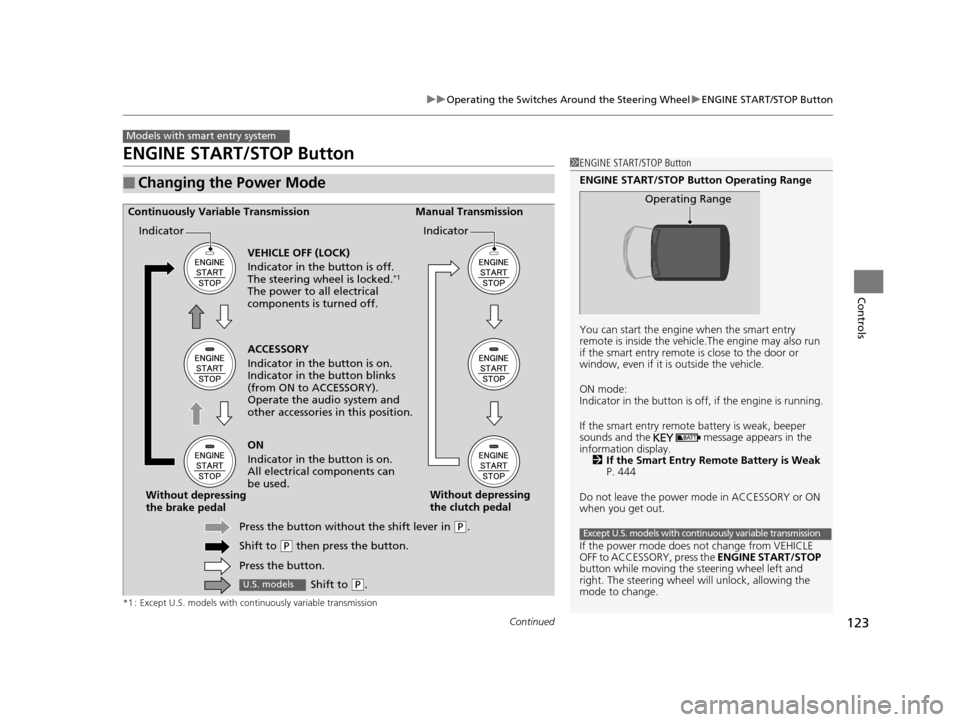
■Changing the Power Mode
Models with smart entry system
1ENGINE START/STOP Button
ENGINE START/STOP Button Operating Range
You can start the engine when the smart entry
remote is inside the vehicl e.The engine may also run
if the smart entry remote is close to the door or
window, even if it is outside the vehicle.
ON mode:
Indicator in the button is of f, if the engine is running.
If the smart entry remote battery is weak, beeper
sounds and the message appears in the
information display. 2 If the Smart Entry Remote Battery is Weak
P. 444
Do not leave the power mode in ACCESSORY or ON
when you get out.
If the power mode does not change from VEHICLE
OFF to ACCESSORY, press the ENGINE START/STOP
button while moving the st eering wheel left and
right. The steering wheel will unlock, allowing the
mode to change.
Operating Range
Except U.S. models with continuously variable transmission
ACCESSORY
Indicator in the button is on.
Indicator in th e button blinks
(from ON to ACCESSORY).
Operate the audio system and
other accessories in this position.
Continuously Variable Transmission Manual Transmission
VEHICLE OFF (LOCK)
Indicator in the button is off.
The steering wheel is locked.
*1
The power to all electrical
components is turned off.
ON
Indicator in the button is on.
All electrical components can
be used.
Press the button withou t the shift lever in
(P.
Shift to
( P then press the button.
Press the button.
Without depressing
the brake pedal
Without depressing
the clutch pedal
Indicator Indicator
Shift to (
P.U.S. models
15 HR-V GAS-31T7A6000.book 123 ページ 2015年6月29日 月曜日 午前11時36分
Page 125 of 489
124
uuOperating the Switches Around the Steering Wheel uENGINE START/STOP Button
Controls
If you leave the vehicle for 30 to 60 minutes with the shift lever in (P*1 and the
power mode in ACCESSORY, the vehicle automa tically goes into the mode similar to
VEHICLE OFF (LOCK) to avoid the battery drain.
When in this mode:
The steering wheel does not lock.
You cannot lock or unlock doors with th e remote transmitter or the smart entry
system.
Press the ENGINE START/STOP button to switch the mode to VEHICLE OFF (LOCK).
*1: Continuously variable transmission models
■Automatic Power Off
Except U.S. models with continuously variable transmission
15 HR-V GAS-31T7A6000.book 124 ページ 2015年6月29日 月曜日 午前11時36分
Page 128 of 489
127
uuOperating the Switches Around the Steering Wheel uTurn Signals
Continued
Controls
Turn Signals
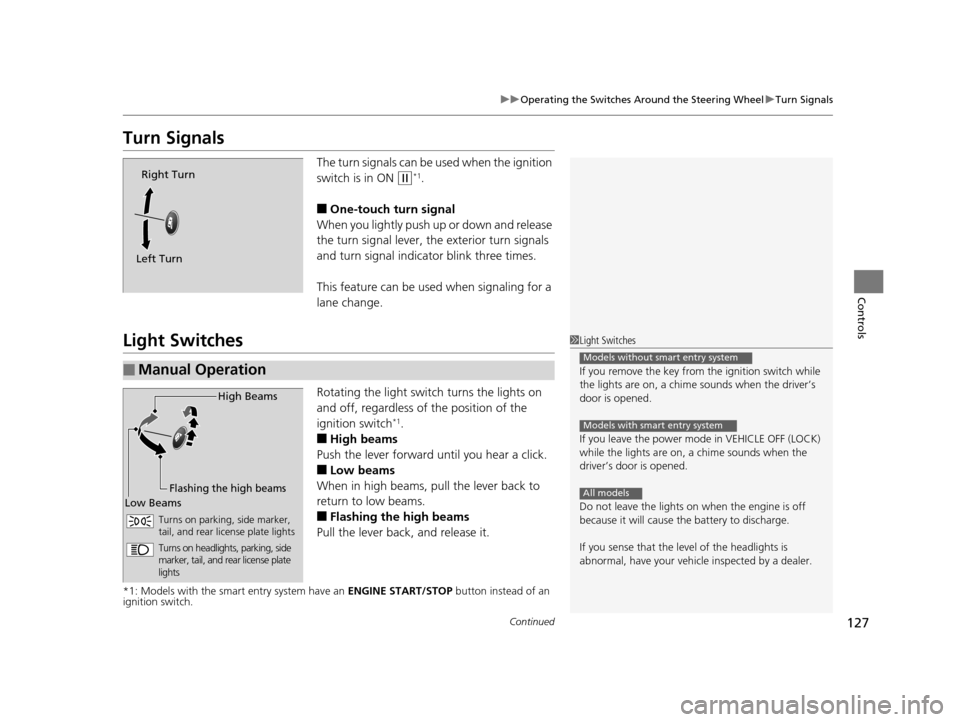
The turn signals can be used when the ignition
switch is in ON
(w*1.
■One-touch turn signal
When you lightly push up or down and release
the turn signal lever, th e exterior turn signals
and turn signal indicator blink three times.
This feature can be used when signaling for a
lane change.
Light Switches
Rotating the light switch turns the lights on
and off, regardless of the position of the
ignition switch
*1.
■High beams
Push the lever forward until you hear a click.
■Low beams
When in high beams, pull the lever back to
return to low beams.
■Flashing the high beams
Pull the lever back, and release it.
*1: Models with the smart entry system have an ENGINE START/STOP button instead of an
ignition switch.
Right Turn
Left Turn
■Manual Operation
1 Light Switches
If you remove the key from the ignition switch while
the lights are on, a chime sounds when the driver’s
door is opened.
If you leave the power mode in VEHICLE OFF (LOCK)
while the lights are on, a chime sounds when the
driver’s door is opened.
Do not leave the lights on when the engine is off
because it will cause the battery to discharge.
If you sense that the le vel of the headlights is
abnormal, have your vehicle inspected by a dealer.
Models without smart entry system
Models with smart entry system
All models
High Beams
Flashing the high beams
Low Beams
Turns on parking, side marker,
tail, and rear license plate lights
Turns on headlights, parking, side
marker, tail, and rear license plate
lights
15 HR-V GAS-31T7A6000.book 127 ページ 2015年6月29日 月曜日 午前11時36分
Page 130 of 489
129
uuOperating the Switches Around the Steering Wheel uLight Switches
Controls
The headlights automatically come on when the wipers are used several times within
a certain intervals with the headlight switch in AUTO.
The headlights automatically go off a few mi nutes later if the wipers are stopped.
The headlights, all other exterior lights, and the instrument panel lights turn off 15
seconds after you remove the key or set the power mode to VEHICLE OFF (LOCK),
take the remote with you, and close the driver's door.
If you turn the igniti on switch to LOCK
(0*1 with the headlight switch on, but do
not open the door, the lights tu rn off after 10 minutes (3 minutes, if the switch is in
the AUTO position).
The lights turn on again when you unlock or open the driver's door. If you unlock
the door, but do not open it within 15 seconds, the lights go off. If you open the
driver's door, you will hear a lights on reminder chime.
*1: Models with the smart entry system have an ENGINE START/STOP button instead of an
ignition switch.
■Headlight Integration with Wipers*
■Automatic Lighting Off Feature
1 Headlight Integration with Wipers*
This feature activates while the headlights are off in
AUTO .
The instrument panel brightness does not change
when the headlights come on.
When the ambient light is at dark, the automatic
lighting control feature over rides, and the headlights
come on with or without the wipers sweeping more
than several times.
* Not available on all models
15 HR-V GAS-31T7A6000.book 129 ページ 2015年6月29日 月曜日 午前11時36分
Page 151 of 489
150
Controls
Interior Lights/Interior Convenience Items
Interior Lights
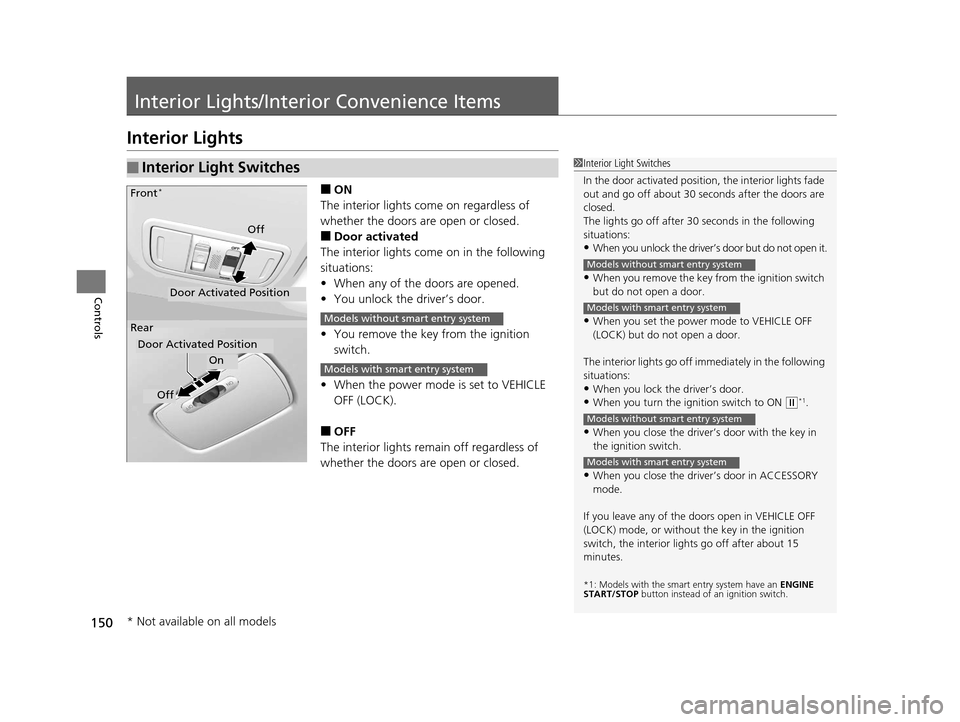
■ON
The interior lights come on regardless of
whether the doors are open or closed.
■Door activated
The interior lights come on in the following
situations:
• When any of the doors are opened.
• You unlock the driver’s door.
• You remove the key from the ignition
switch.
• When the power mode is set to VEHICLE
OFF (LOCK).
■OFF
The interior lights remain off regardless of
whether the doors are open or closed.
■Interior Light Switches1 Interior Light Switches
In the door activated position, the interior lights fade
out and go off about 30 se conds after the doors are
closed.
The lights go off after 30 seconds in the following
situations:
•When you unlock the driver’s door but do not open it.
•When you remove the key from the ignition switch
but do not open a door.
•When you set the power mode to VEHICLE OFF
(LOCK) but do not open a door.
The interior lights go off i mmediately in the following
situations:
•When you lock the driver’s door.
•When you turn the ignition switch to ON ( w*1.
•When you close the driver’s door with the key in
the ignition switch.
•When you close the driver’s door in ACCESSORY
mode.
If you leave any of the doors open in VEHICLE OFF
(LOCK) mode, or without the key in the ignition
switch, the interior li ghts go off after about 15
minutes.
*1: Models with the sma rt entry system have an ENGINE
START/STOP button instead of an ignition switch.
Models without smart entry system
Models with smart entry system
Models without smart entry system
Models with smart entry system
On
Off
Door Activated Position
Front
*
Rear
Door Activated Position
Off
Models without smart entry system
Models with smart entry system
* Not available on all models
15 HR-V GAS-31T7A6000.book 150 ページ 2015年6月29日 月曜日 午前11時36分