ignition HONDA HR-V 2016 2.G Service Manual
[x] Cancel search | Manufacturer: HONDA, Model Year: 2016, Model line: HR-V, Model: HONDA HR-V 2016 2.GPages: 489, PDF Size: 26.59 MB
Page 130 of 489
129
uuOperating the Switches Around the Steering Wheel uLight Switches
Controls
The headlights automatically come on when the wipers are used several times within
a certain intervals with the headlight switch in AUTO.
The headlights automatically go off a few mi nutes later if the wipers are stopped.
The headlights, all other exterior lights, and the instrument panel lights turn off 15
seconds after you remove the key or set the power mode to VEHICLE OFF (LOCK),
take the remote with you, and close the driver's door.
If you turn the igniti on switch to LOCK
(0*1 with the headlight switch on, but do
not open the door, the lights tu rn off after 10 minutes (3 minutes, if the switch is in
the AUTO position).
The lights turn on again when you unlock or open the driver's door. If you unlock
the door, but do not open it within 15 seconds, the lights go off. If you open the
driver's door, you will hear a lights on reminder chime.
*1: Models with the smart entry system have an ENGINE START/STOP button instead of an
ignition switch.
■Headlight Integration with Wipers*
■Automatic Lighting Off Feature
1 Headlight Integration with Wipers*
This feature activates while the headlights are off in
AUTO .
The instrument panel brightness does not change
when the headlights come on.
When the ambient light is at dark, the automatic
lighting control feature over rides, and the headlights
come on with or without the wipers sweeping more
than several times.
* Not available on all models
15 HR-V GAS-31T7A6000.book 129 ページ 2015年6月29日 月曜日 午前11時36分
Page 132 of 489
131
uuOperating the Switches Around the Steering Wheel uDaytime Running Lights
Controls
Daytime Running Lights
The headlights come on slightly dimmer th an normal when the following conditions
have been met:
• The ignition switch is in ON
(w*1.
• The headlight switch is off, or in .
• The parking brake is released.
The lights remain on even if you set th e parking brake. Turning off the ignition
switch or setting the power mode to VEHI CLE OFF will turn off the daytime running
lights.
The headlights return to the original brightness once the headlight switch is turned
on.
*1: Models with the smart entry system have an ENGINE START/STOP button instead of an
ignition switch.
15 HR-V GAS-31T7A6000.book 131 ページ 2015年6月29日 月曜日 午前11時36分
Page 133 of 489
132
uuOperating the Switches Around the Steering Wheel uWipers and Washers
Controls
Wipers and Washers
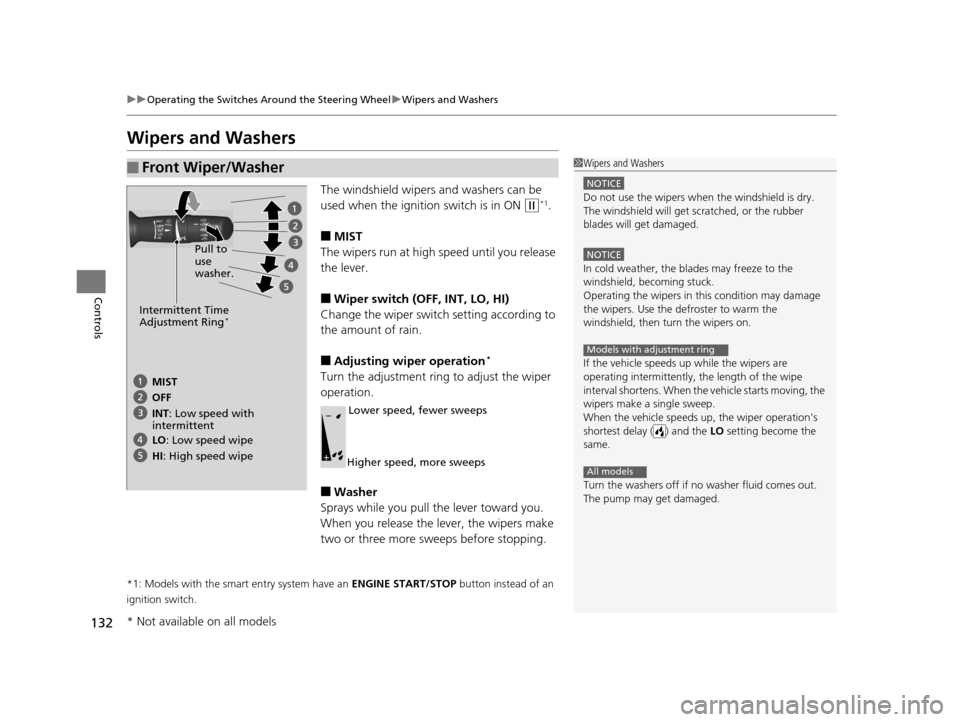
The windshield wipers and washers can be
used when the ignition switch is in ON
(w*1.
■MIST
The wipers run at high speed until you release
the lever.
■Wiper switch (OFF, INT, LO, HI)
Change the wiper switch setting according to
the amount of rain.
■Adjusting wiper operation*
Turn the adjustment ring to adjust the wiper
operation.
■Washer
Sprays while you pull the lever toward you.
When you release the lever, the wipers make
two or three more sweeps before stopping.
*1: Models with the smart entry system have an ENGINE START/STOP button instead of an
ignition switch.
■Front Wiper/Washer1 Wipers and Washers
NOTICE
Do not use the wipers when the windshield is dry.
The windshield will get sc ratched, or the rubber
blades will get damaged.
NOTICE
In cold weather, the blades may freeze to the
windshield, becoming stuck.
Operating the wipers in th is condition may damage
the wipers. Use the defroster to warm the
windshield, then turn the wipers on.
If the vehicle speeds up while the wipers are
operating intermittently, the length of the wipe
interval shortens. When the vehicle starts moving, the
wipers make a single sweep.
When the vehicle speeds up, the wiper operation's
shortest delay ( ) and the LO setting become the
same.
Turn the washers off if no washer fluid comes out.
The pump may get damaged.
Models with adjustment ring
All models
Pull to
use
washer.
MIST
INT: Low speed with
intermittent OFF
LO : Low speed wipe
HI: High speed wipe
Intermittent Time
Adjustment Ring*
Lower speed, fewer sweeps
Higher speed, more sweeps
* Not available on all models
15 HR-V GAS-31T7A6000.book 132 ページ 2015年6月29日 月曜日 午前11時36分
Page 134 of 489
133
uuOperating the Switches Around the Steering Wheel uWipers and Washers
Controls
The rear wiper and washer can be used when
the ignition switch is in ON
(w*1.
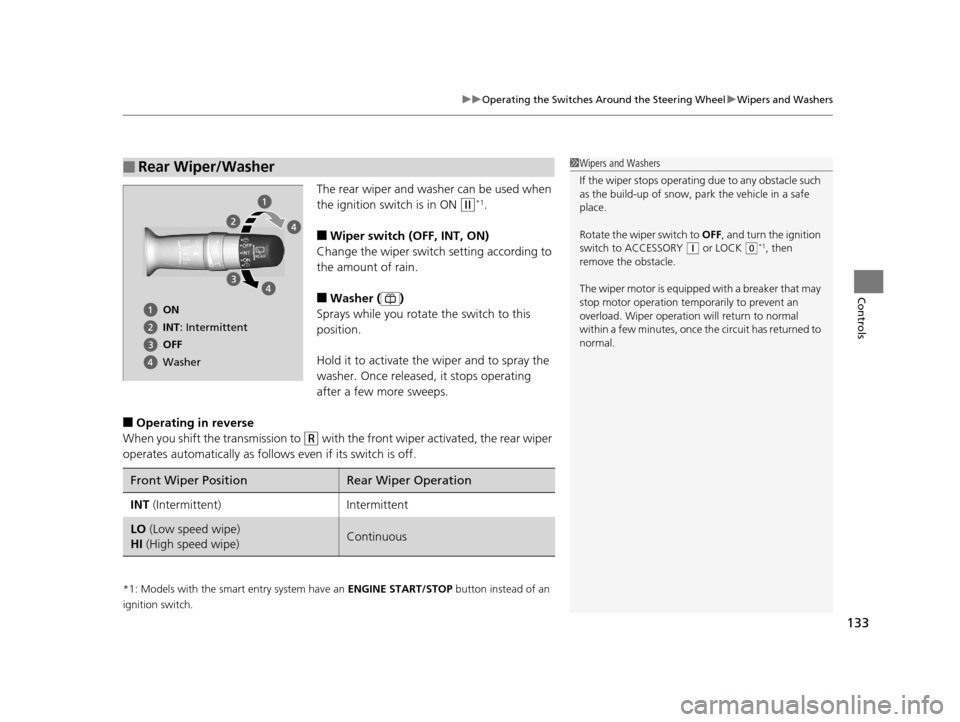
■Wiper switch (OFF, INT, ON)
Change the wiper switch setting according to
the amount of rain.
■Washer ( )
Sprays while you rotate the switch to this
position.
Hold it to activate th e wiper and to spray the
washer. Once released, it stops operating
after a few more sweeps.
■Operating in reverse
When you shift the transmission to
(R with the front wiper activated, the rear wiper
operates automatically as follows even if its switch is off.
*1: Models with the smart entry system have an ENGINE START/STOP button instead of an
ignition switch.
■Rear Wiper/Washer1 Wipers and Washers
If the wiper stops operating due to any obstacle such
as the build-up of snow, park the vehicle in a safe
place.
Rotate the wiper switch to OFF, and turn the ignition
switch to ACCESSORY
( q or LOCK (0*1, then
remove the obstacle.
The wiper motor is equipped with a breaker that may
stop motor operation temp orarily to prevent an
overload. Wiper operation will return to normal
within a few minutes, once the circuit has returned to
normal.
ON
INT: Intermittent
OFF
Washer
Front Wiper PositionRear Wiper Operation
INT (Intermittent)Intermittent
LO (Low speed wipe)
HI (High speed wipe)Continuous
15 HR-V GAS-31T7A6000.book 133 ページ 2015年6月29日 月曜日 午前11時36分
Page 135 of 489
134
uuOperating the Switches Around the Steering Wheel uBrightness Control
Controls
Brightness Control
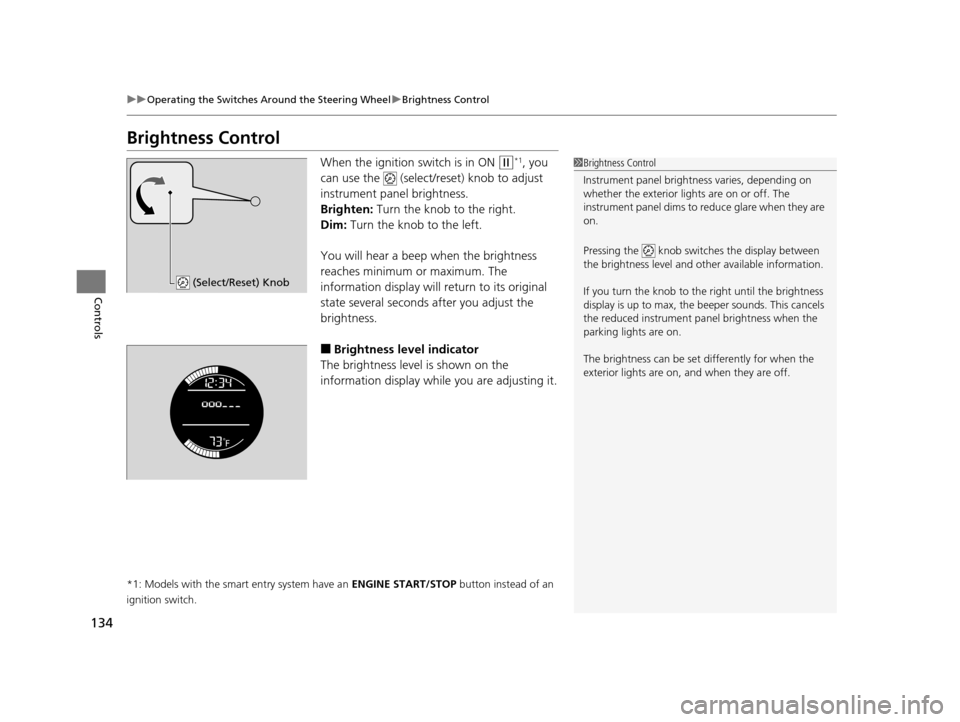
When the ignition switch is in ON (w*1, you
can use the (select/reset) knob to adjust
instrument panel brightness.
Brighten: Turn the knob to the right.
Dim: Turn the knob to the left.
You will hear a beep when the brightness
reaches minimum or maximum. The
information display will return to its original
state several seconds after you adjust the
brightness.
■Brightness level indicator
The brightness level is shown on the
information display while you are adjusting it.
*1: Models with the smart entry system have an ENGINE START/STOP button instead of an
ignition switch.
1 Brightness Control
Instrument panel brightne ss varies, depending on
whether the exterior lights are on or off. The
instrument panel dims to reduce glare when they are
on.
Pressing the knob switch es the display between
the brightness level and ot her available information.
If you turn the knob to the right until the brightness
display is up to max, the beeper sounds. This cancels
the reduced instrument panel brightness when the
parking lights are on.
The brightness can be set differently for when the
exterior lights are on, and when they are off.
(Select/Reset) Knob
15 HR-V GAS-31T7A6000.book 134 ページ 2015年6月29日 月曜日 午前11時36分
Page 136 of 489
135
uuOperating the Switches Around the Steering Wheel uDefogger/Heated Door Mirror*/Heater Windshield*
Continued
Controls
Defogger/Heated Door Mirror*/Heater Windshield*
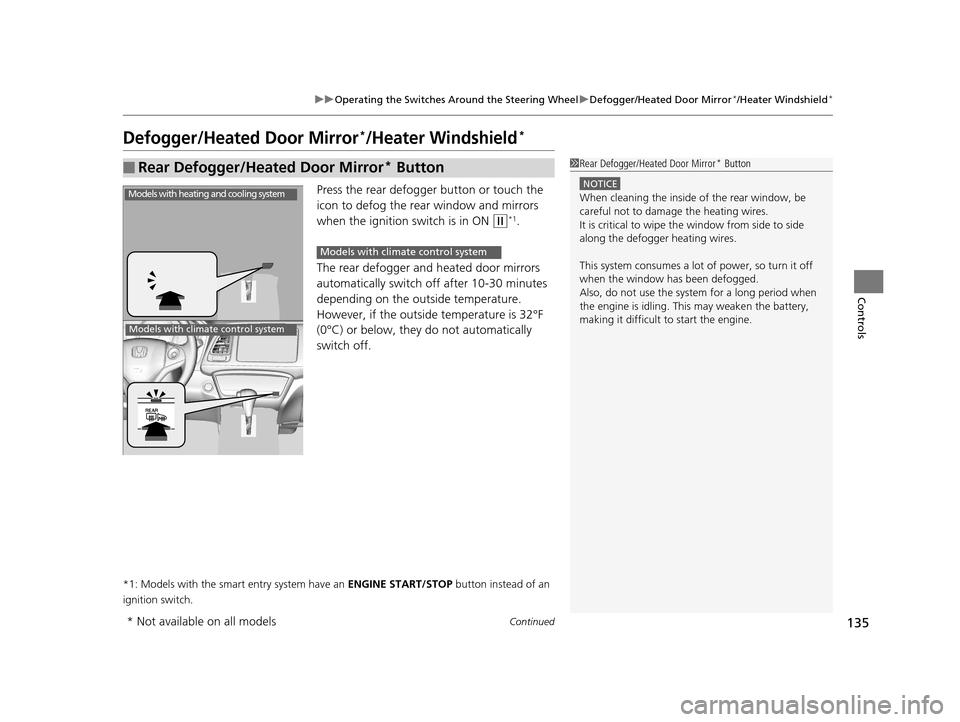
Press the rear defogger button or touch the
icon to defog the rear window and mirrors
when the ignition switch is in ON
(w*1.
The rear defogger and heated door mirrors
automatically switch of f after 10-30 minutes
depending on the outside temperature.
However, if the outsid e temperature is 32°F
(0°C) or below, they do not automatically
switch off.
*1: Models with the smart entry system have an ENGINE START/STOP button instead of an
ignition switch.
■Rear Defogger/Heated Door Mirror* Button1 Rear Defogger/Heated Door Mirror* Button
NOTICE
When cleaning the inside of the rear window, be
careful not to damage the heating wires.
It is critical to wipe the window from side to side
along the defogger heating wires.
This system consumes a lot of power, so turn it off
when the window has been defogged.
Also, do not use the system for a long period when
the engine is idling. This may weaken the battery,
making it difficult to start the engine.Models with heating and cooling system
Models with climate control system
Models with climate control system
* Not available on all models
15 HR-V GAS-31T7A6000.book 135 ページ 2015年6月29日 月曜日 午前11時36分
Page 137 of 489
uuOperating the Switches Around the Steering Wheel uDefogger/Heated Door Mirror*/Heater Windshield*
136
Controls
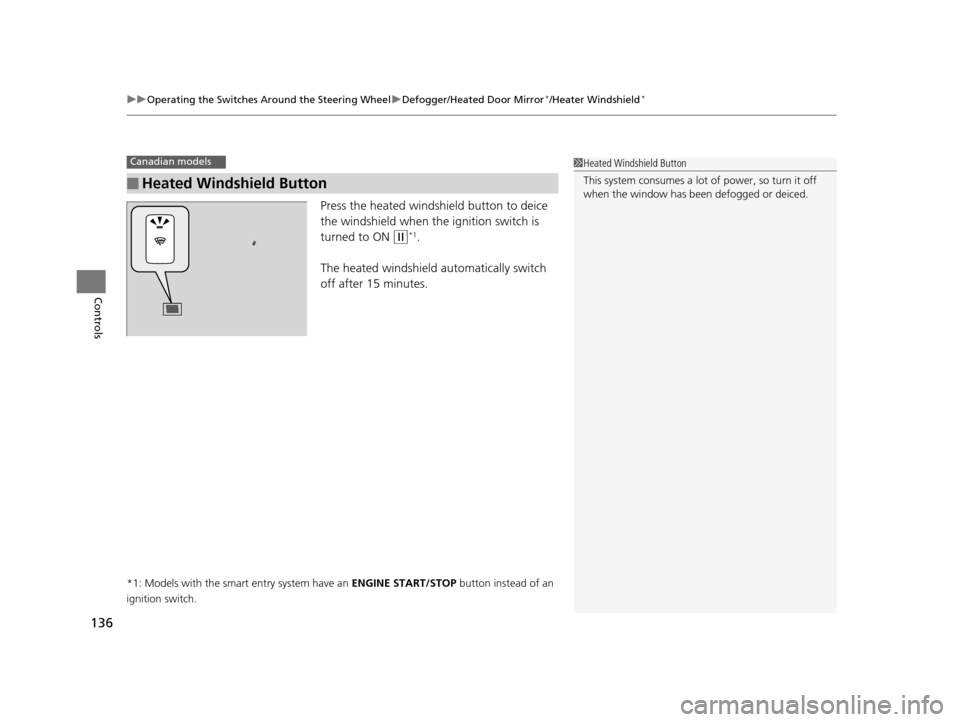
Press the heated windshield button to deice
the windshield when the ignition switch is
turned to ON
(w*1.
The heated windshield automatically switch
off after 15 minutes.
*1: Models with the smart entry system have an ENGINE START/STOP button instead of an
ignition switch.
■Heated Windshield Button
Canadian models1 Heated Windshield Button
This system consumes a lot of power, so turn it off
when the window has been defogged or deiced.
15 HR-V GAS-31T7A6000.book 136 ページ 2015年6月29日 月曜日 午前11時36分
Page 140 of 489
139
uuAdjusting the Mirrors uPower Door Mirrors
Controls
Power Door Mirrors
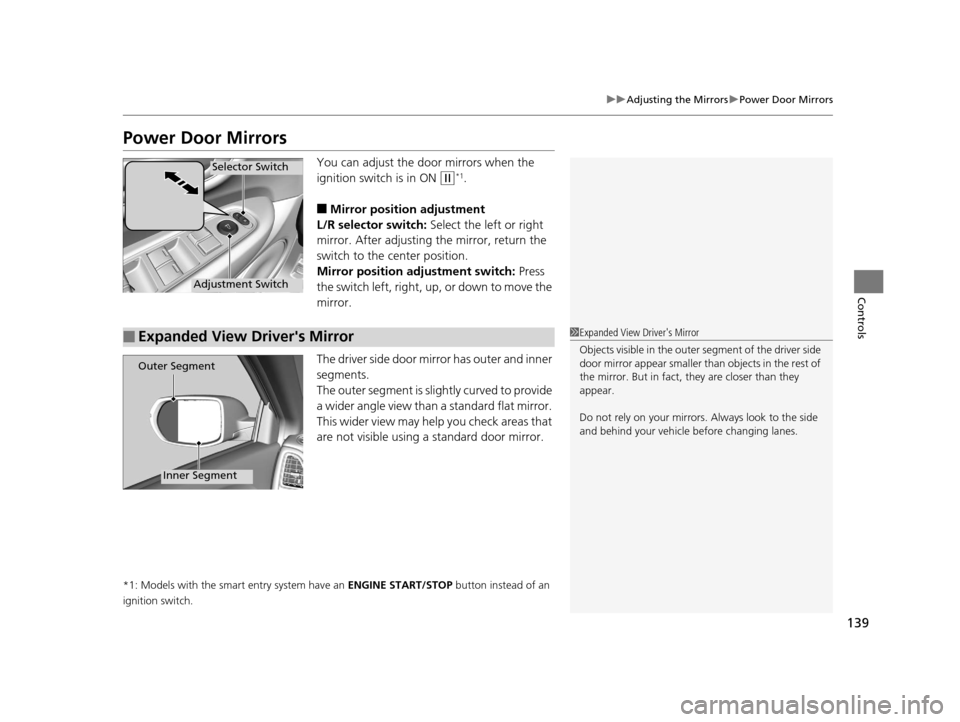
You can adjust the door mirrors when the
ignition switch is in ON
(w*1.
■Mirror position adjustment
L/R selector switch: Select the left or right
mirror. After adjusting the mirror, return the
switch to the center position.
Mirror positi on adjustment switch: Press
the switch left, right, up, or down to move the
mirror.
The driver side door mirror has outer and inner
segments.
The outer segment is slig htly curved to provide
a wider angle view than a standard flat mirror.
This wider view may help you check areas that
are not visible using a standard door mirror.
*1: Models with the smart entry system have an ENGINE START/STOP button instead of an
ignition switch.
Selector Switch
Adjustment Switch
■Expanded View Driver's Mirror1 Expanded View Driver's Mirror
Objects visible in the outer segment of the driver side
door mirror appear smaller than objects in the rest of
the mirror. But in fact, they are closer than they
appear.
Do not rely on your mirrors. Always look to the side
and behind your vehicle before changing lanes.
Outer Segment
Inner Segment
15 HR-V GAS-31T7A6000.book 139 ページ 2015年6月29日 月曜日 午前11時36分
Page 151 of 489
150
Controls
Interior Lights/Interior Convenience Items
Interior Lights
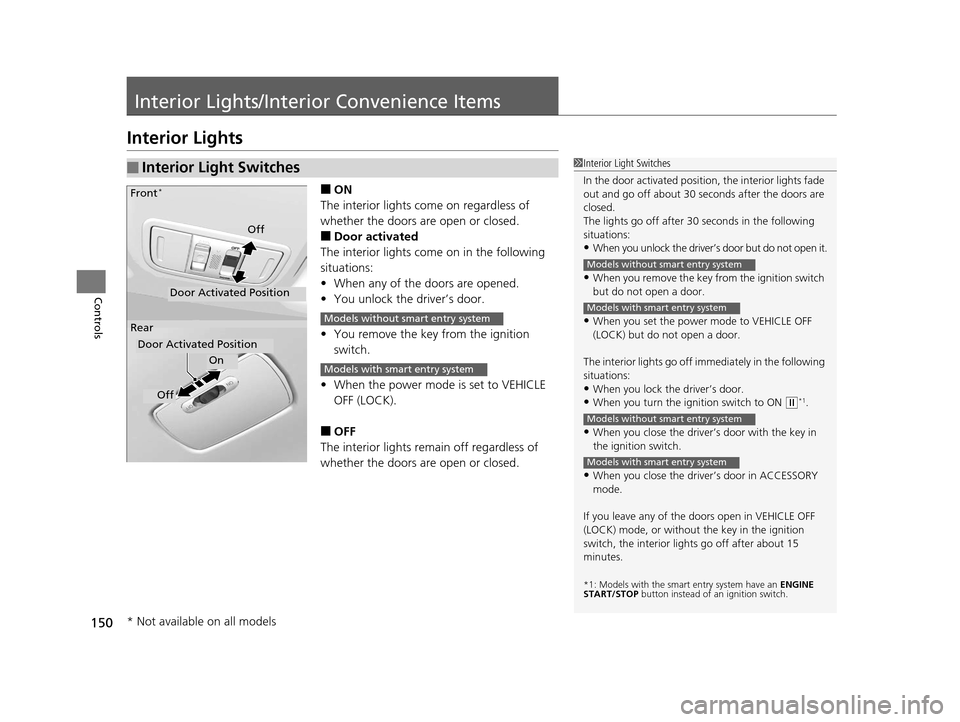
■ON
The interior lights come on regardless of
whether the doors are open or closed.
■Door activated
The interior lights come on in the following
situations:
• When any of the doors are opened.
• You unlock the driver’s door.
• You remove the key from the ignition
switch.
• When the power mode is set to VEHICLE
OFF (LOCK).
■OFF
The interior lights remain off regardless of
whether the doors are open or closed.
■Interior Light Switches1 Interior Light Switches
In the door activated position, the interior lights fade
out and go off about 30 se conds after the doors are
closed.
The lights go off after 30 seconds in the following
situations:
•When you unlock the driver’s door but do not open it.
•When you remove the key from the ignition switch
but do not open a door.
•When you set the power mode to VEHICLE OFF
(LOCK) but do not open a door.
The interior lights go off i mmediately in the following
situations:
•When you lock the driver’s door.
•When you turn the ignition switch to ON ( w*1.
•When you close the driver’s door with the key in
the ignition switch.
•When you close the driver’s door in ACCESSORY
mode.
If you leave any of the doors open in VEHICLE OFF
(LOCK) mode, or without the key in the ignition
switch, the interior li ghts go off after about 15
minutes.
*1: Models with the sma rt entry system have an ENGINE
START/STOP button instead of an ignition switch.
Models without smart entry system
Models with smart entry system
Models without smart entry system
Models with smart entry system
On
Off
Door Activated Position
Front
*
Rear
Door Activated Position
Off
Models without smart entry system
Models with smart entry system
* Not available on all models
15 HR-V GAS-31T7A6000.book 150 ページ 2015年6月29日 月曜日 午前11時36分
Page 157 of 489
uuInterior Lights/Interior Convenience Items uInterior Convenience Items
156
Controls
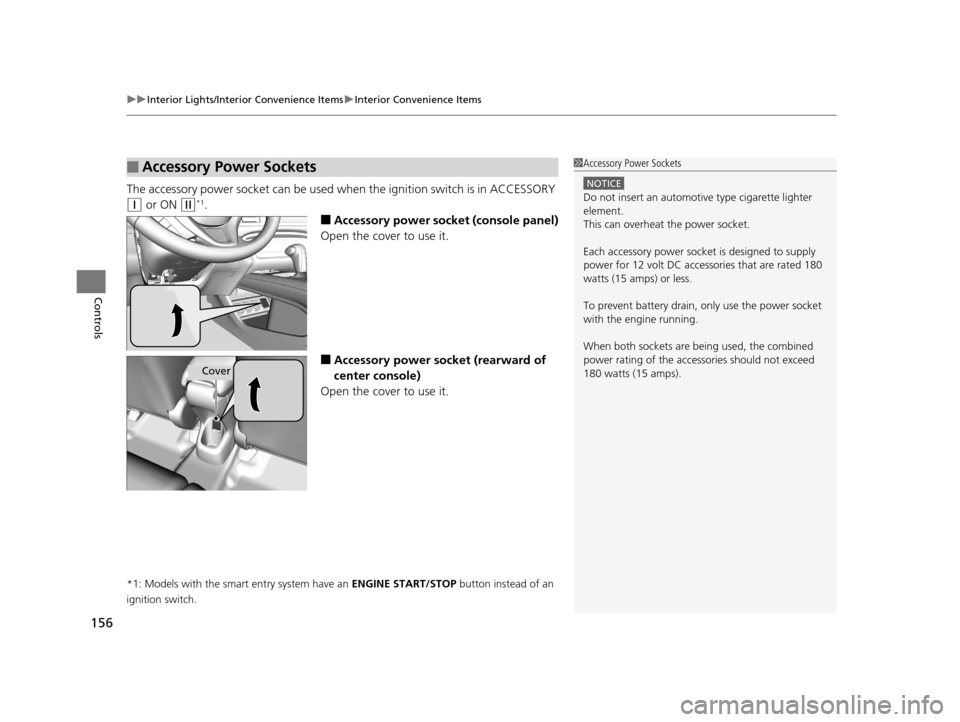
The accessory power socket can be used wh en the ignition switch is in ACCESSORY
(q or ON (w*1.
■Accessory power socket (console panel)
Open the cover to use it.
■Accessory power socket (rearward of
center console)
Open the cover to use it.
*1: Models with the smart entry system have an ENGINE START/STOP button instead of an
ignition switch.
■Accessory Power Sockets1 Accessory Power Sockets
NOTICE
Do not insert an automotive type cigarette lighter
element.
This can overheat the power socket.
Each accessory power soc ket is designed to supply
power for 12 volt DC access ories that are rated 180
watts (15 amps) or less.
To prevent battery drain, only use the power socket
with the engine running.
When both sockets are being used, the combined
power rating of the accessories should not exceed
180 watts (15 amps).
Cover
15 HR-V GAS-31T7A6000.book 156 ページ 2015年6月29日 月曜日 午前11時36分