ad blue HONDA HR-V 2017 2.G Owner's Manual
[x] Cancel search | Manufacturer: HONDA, Model Year: 2017, Model line: HR-V, Model: HONDA HR-V 2017 2.GPages: 489, PDF Size: 29.22 MB
Page 230 of 489
229
uuAudio System Basic Operation uSmartphone Apps
Features
Smartphone Apps
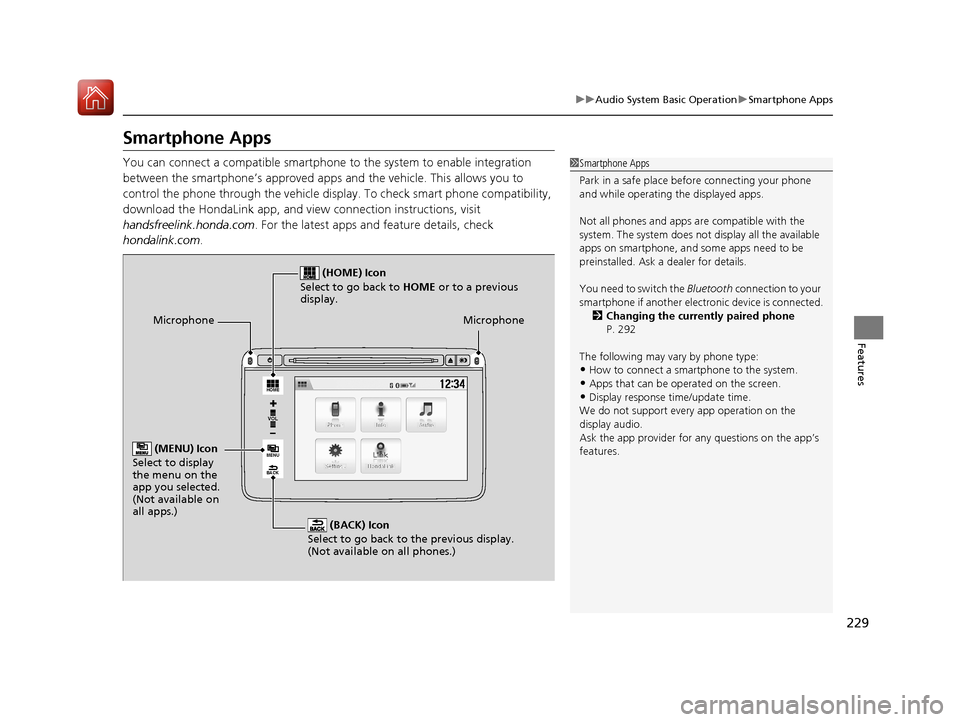
You can connect a compatible smartphone to the system to enable integration
between the smartphone’s appr oved apps and the vehicle. This allows you to
control the phone through the vehicle display. To check smart phone compatibility,
download the HondaLink app, and view connection instructions, visit
handsfreelink.honda.com . For the latest apps and feature details, check
hondalink.com .1Smartphone Apps
Park in a safe place be fore connecting your phone
and while operating the displayed apps.
Not all phones and apps ar e compatible with the
system. The system does not display all the available
apps on smartphone, and so me apps need to be
preinstalled. Ask a dealer for details.
You need to switch the Bluetooth connection to your
smartphone if another electr onic device is connected.
2 Changing the currently paired phone
P. 292
The following may vary by phone type:
•How to connect a smartphone to the system.
•Apps that can be operated on the screen.•Display response ti me/update time.
We do not support every app operation on the
display audio.
Ask the app provider for an y questions on the app’s
features.
VOL
HOME
MENU
BACK
Microphone
(BACK) Icon
Select to go back to the previous display.
(Not available on all phones.)
(HOME) Icon
Select to go back to HOME or to a previous
display.
(MENU) Icon
Select to display
the menu on the
app you selected.
(Not available on
all apps.)
Microphone
17 HR-V HDMC-31T7A6100.book 229 ページ 2016年7月20日 水曜日 午前9時50分
Page 231 of 489
230
uuAudio System Basic Operation uSiri ® Eyes Free
Features
Siri ® Eyes Free
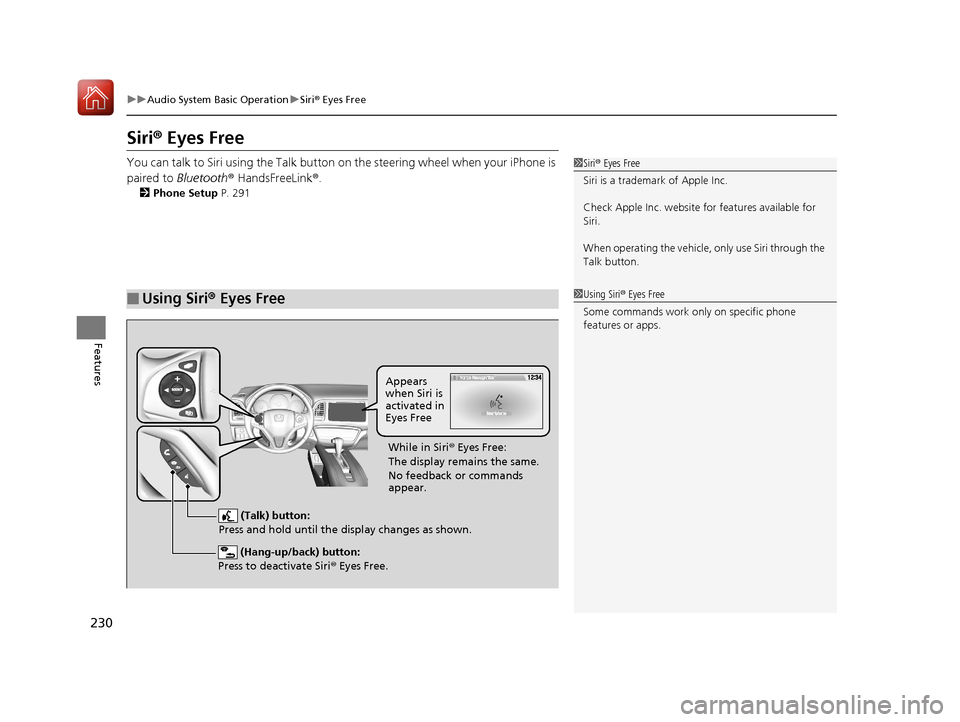
You can talk to Siri using the Talk button on the steering wheel when your iPhone is
paired to Bluetooth ® HandsFreeLink ®.
2 Phone Setup P. 291
■Using Siri® Eyes Free
1Siri ® Eyes Free
Siri is a trademark of Apple Inc.
Check Apple Inc. website for features available for
Siri.
When operating the vehicle, only us e Siri through the
Talk button.
1 Using Siri ® Eyes Free
Some commands work only on specific phone
features or apps.
(Hang-up/back) button:
Press to deactivate Siri ® Eyes Free.
(Talk) button:
Press and hold until the display changes as shown.
Appears
when Siri is
activated in
Eyes Free
While in Siri ® Eyes Free:
The display remains the same.
No feedback or commands
appear.
17 HR-V HDMC-31T7A6100.book 230 ページ 2016年7月20日 水曜日 午前9時50分
Page 235 of 489
234
uuAudio Error Messages uPandora®
Features
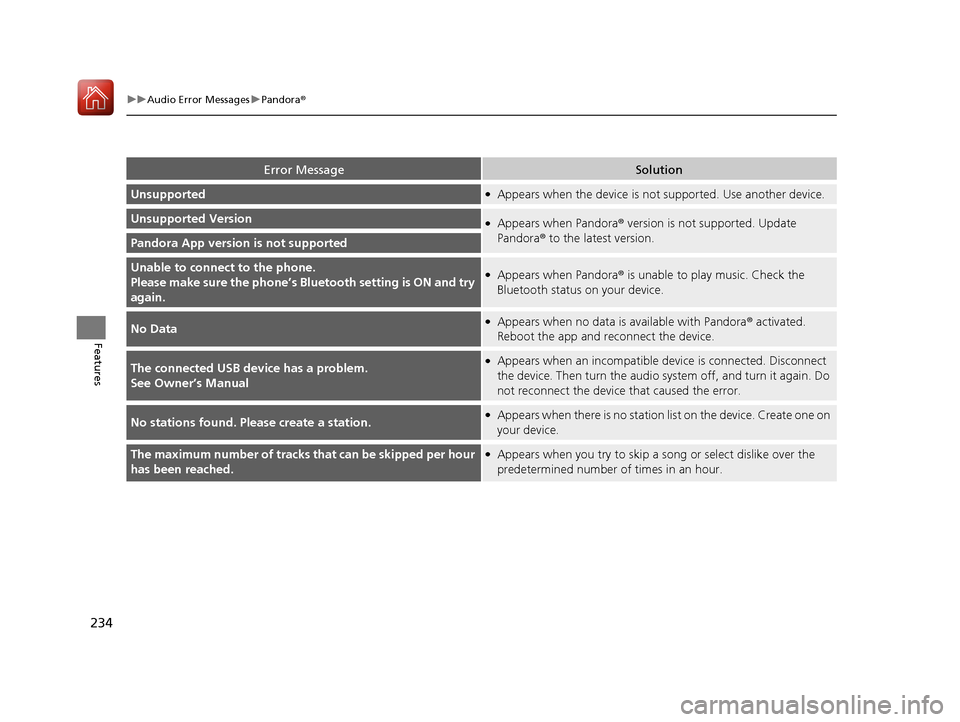
Error MessageSolution
Unsupported●Appears when the device is not supported. Use another device.
Unsupported Version●Appears when Pandora ® version is not supported. Update
Pandora ® to the latest version.
Pandora App version is not supported
Unable to connec t to the phone.
Please make sure the phone’s Bl uetooth setting is ON and try
again.●Appears when Pandora ® is unable to play music. Check the
Bluetooth status on your device.
No Data●Appears when no data is available with Pandora® activated.
Reboot the app and reconnect the device.
The connected USB device has a problem.
See Owner’s Manual●Appears when an incompatible device is connected. Disconnect
the device. Then turn the audio system off, and turn it again. Do
not reconnect the device that caused the error.
No stations found. Please create a station.●Appears when there is no station list on the device. Create one on
your device.
The maximum number of tracks that can be skipped per hour
has been reached.●Appears when you try to skip a s ong or select dislike over the
predetermined number of times in an hour.
17 HR-V HDMC-31T7A6100.book 234 ページ 2016年7月20日 水曜日 午前9時50分
Page 240 of 489
239
uuCustomized Features u
Continued
Features
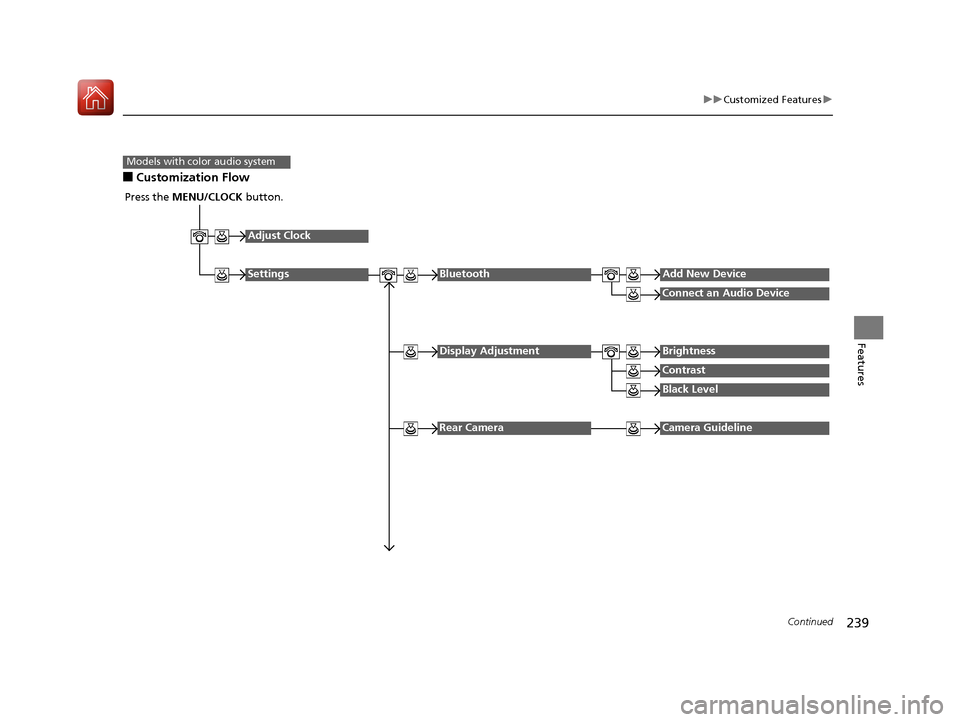
■Customization Flow
Models with color audio system
Press the MENU/CLOCK button.
Adjust Clock
SettingsBluetoothAdd New Device
Connect an Audio Device
Display AdjustmentBrightness
Contrast
Black Level
Rear CameraCamera Guideline
17 HR-V HDMC-31T7A6100.book 239 ページ 2016年7月20日 水曜日 午前9時50分
Page 241 of 489
240
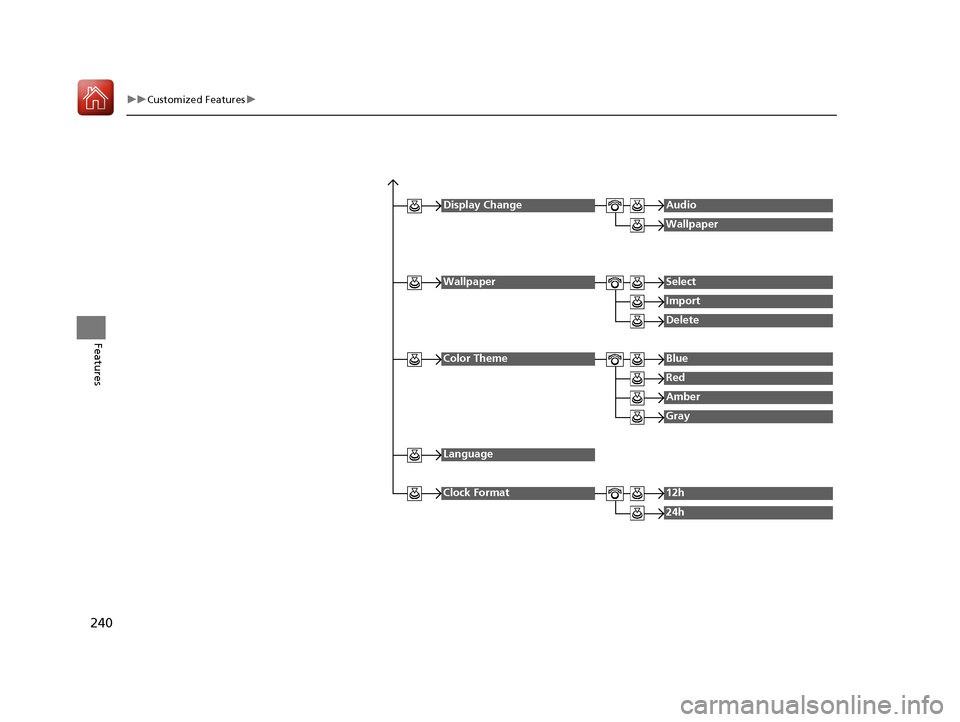
uuCustomized Features u
Features
Display ChangeAudio
Wallpaper
WallpaperSelect
Import
Delete
Color ThemeBlue
Red
Amber
Gray
Language
Clock Format12h
24h
17 HR-V HDMC-31T7A6100.book 240 ページ 2016年7月20日 水曜日 午前9時50分
Page 242 of 489
241
uuCustomized Features u
Continued
Features
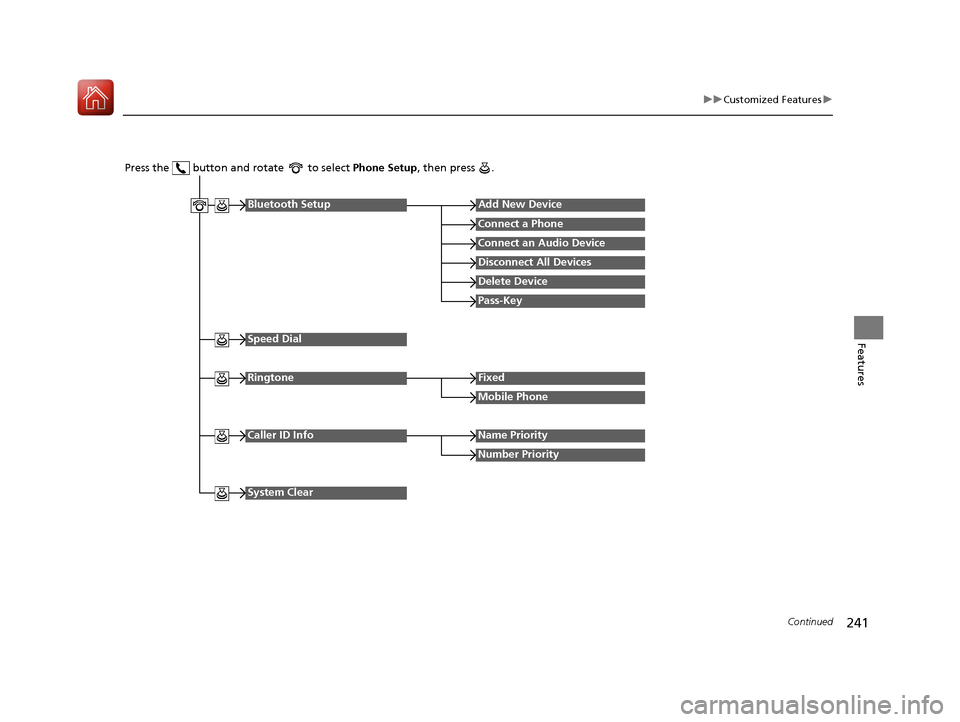
Press the button and rotate to select Phone Setup, then press .
RingtoneFixed
Mobile Phone
Bluetooth SetupAdd New Device
Connect a Phone
Connect an Audio Device
Disconnect All Devices
Delete Device
Pass-Key
Speed Dial
Caller ID InfoName Priority
Number Priority
System Clear
17 HR-V HDMC-31T7A6100.book 241 ページ 2016年7月20日 水曜日 午前9時50分
Page 243 of 489
242
uuCustomized Features u
Features
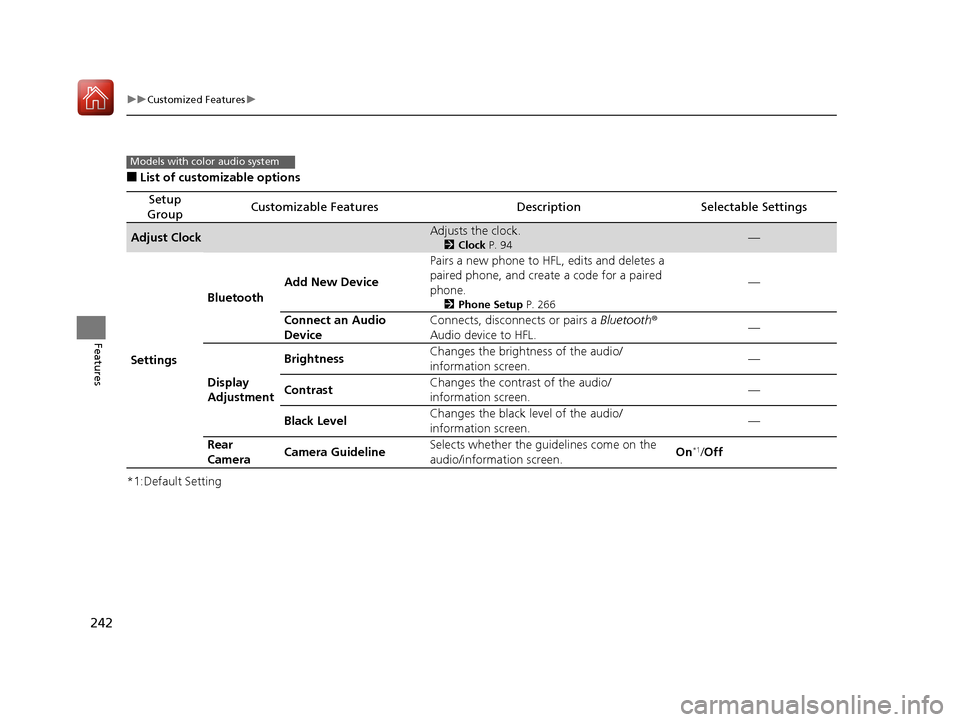
■List of customizable options
*1:Default Setting
Setup
GroupCustomizable FeaturesDescriptionSelectable Settings
Adjust ClockAdjusts the clock.
2 Clock P. 94—
Settings Bluetooth
Add New Device Pairs a new phone to HFL, edits and deletes a
paired phone, and create a code for a paired
phone.
2
Phone Setup P. 266
—
Connect an Audio
Device Connects, disconnects or pairs a Bluetooth
®
Audio device to HFL. —
Display
Adjustment Brightness
Changes the brightness of the audio/
information screen. —
Contrast Changes the contrast of the audio/
information screen.
—
Black Level Changes the black level of the audio/
information screen. —
Rear
Camera Camera Guideline
Selects whether the guidelines come on the
audio/information screen. On
*1/
Off
Models with color audio system
17 HR-V HDMC-31T7A6100.book 242 ページ 2016年7月20日 水曜日 午前9時50分
Page 244 of 489
243
uuCustomized Features u
Continued
Features
*1:Default Setting
Setup
GroupCustomizable FeaturesDescriptionSelectable Settings
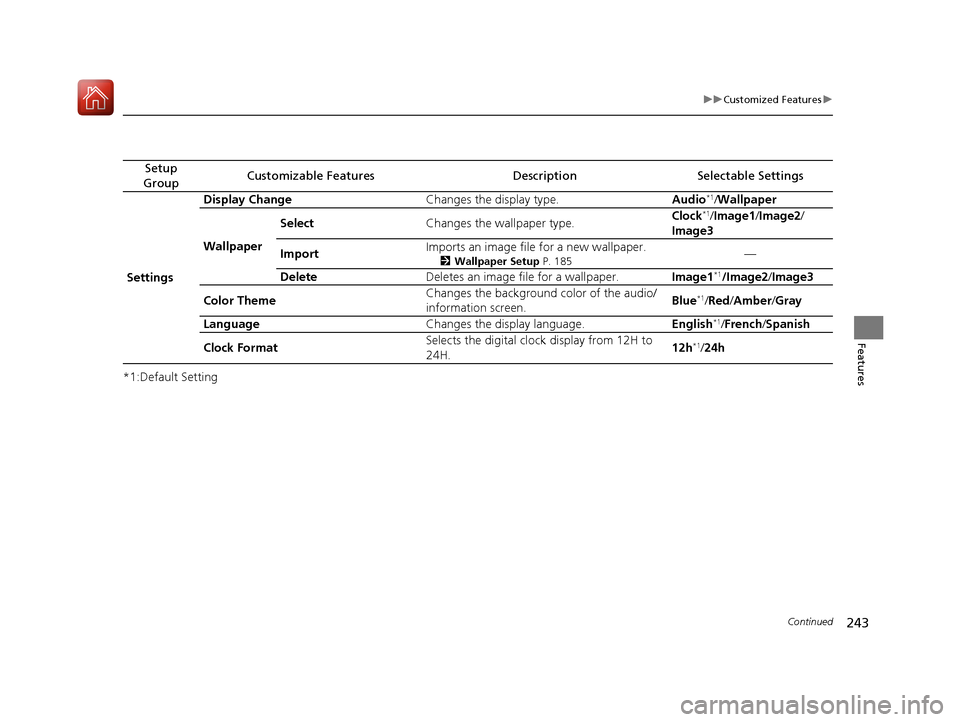
Settings Display Change
Changes the display type. Audio
*1/Wallpaper
Wallpaper Select
Changes the wallpaper type. Clock*1/
Image1/ Image2/
Image3
Import Imports an image file for a new wallpaper.
2
Wallpaper Setup P. 185—
Delete Deletes an image file for a wallpaper. Image1
*1/Image2/Image3
Color Theme Changes the background color of the audio/
information screen.
Blue
*1/
Red /Amber /Gray
Language Changes the display language. English
*1/French /Spanish
Clock Format Selects the digital clock display from 12H to
24H. 12h
*1/
24h
17 HR-V HDMC-31T7A6100.book 243 ページ 2016年7月20日 水曜日 午前9時50分
Page 245 of 489
244
uuCustomized Features u
Features
*1:Default Setting
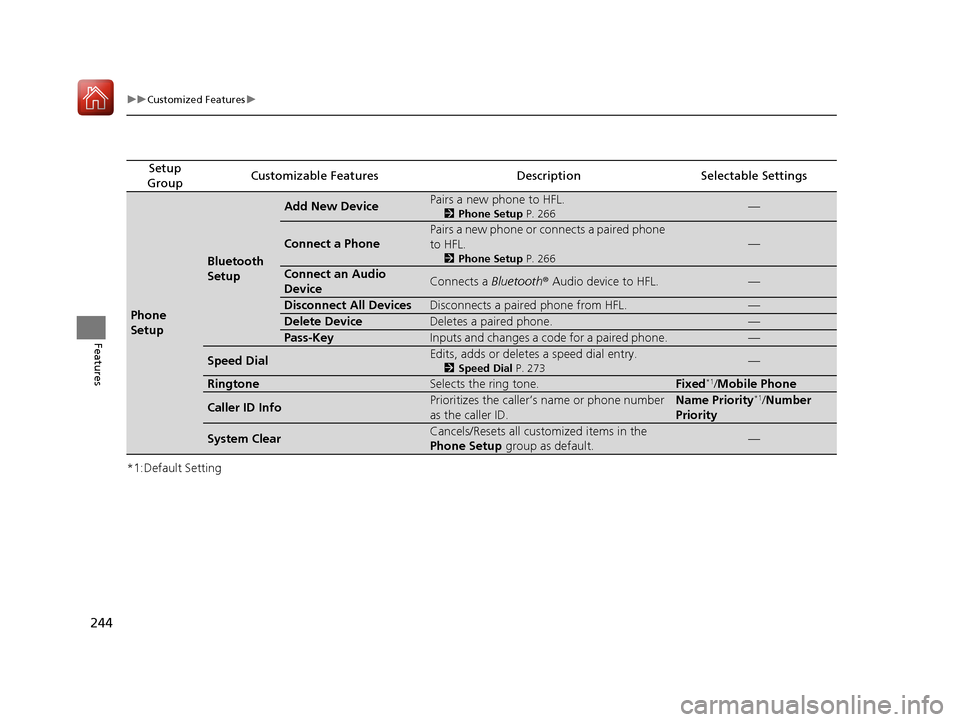
Setup
GroupCustomizable FeaturesDescriptionSelectable Settings
Phone
Setup
Bluetooth
Setup
Add New DevicePairs a new phone to HFL.
2 Phone Setup P. 266—
Connect a Phone
Pairs a new phone or connects a paired phone
to HFL.
2Phone Setup P. 266
—
Connect an Audio
DeviceConnects a Bluetooth® Audio device to HFL.—
Disconnect All DevicesDisconnects a paired phone from HFL.—
Delete DeviceDeletes a paired phone.—
Pass-KeyInputs and changes a code for a paired phone.—
Speed DialEdits, adds or deletes a speed dial entry.
2Speed Dial P. 273—
RingtoneSelects the ring tone.Fixed*1/Mobile Phone
Caller ID InfoPrioritizes the caller’s name or phone number
as the caller ID.Name Priority*1/ Number
Priority
System ClearCancels/Resets all customized items in the
Phone Setup group as default.—
17 HR-V HDMC-31T7A6100.book 244 ページ 2016年7月20日 水曜日 午前9時50分
Page 248 of 489
![HONDA HR-V 2017 2.G Owners Manual 247
uuCustomized Features u
Continued
Features
*1 : May change depending on your currently selected source.
Sound
Color
Tint
Audio
Audio Source Pop-Up
[Your selected media] Cover Art*1
Color
Display A](/img/13/5941/w960_5941-247.png "HONDA HR-V 2017 2.G Owners Manual 247
uuCustomized Features u
Continued
Features
*1 : May change depending on your currently selected source.
Sound
Color
Tint
Audio
Audio Source Pop-Up
[Your selected media] Cover Art*1
Color
Display A")
247
uuCustomized Features u
Continued
Features
*1 : May change depending on your currently selected source.
Sound
Color
Tint
Audio
Audio Source Pop-Up
[Your selected media] Cover Art*1
Color
Display Adjustment*1DisplayBrightness
Contrast
Black Level
Aspect Ratio Adjustment*1
Change Bluetooth Audio Device*1
Bluetooth Device List*1
Default
17 HR-V HDMC-31T7A6100.book 247 ページ 2016年7月20日 水曜日 午前9時50分