wheel HONDA HR-V 2017 2.G Owner's Guide
[x] Cancel search | Manufacturer: HONDA, Model Year: 2017, Model line: HR-V, Model: HONDA HR-V 2017 2.GPages: 489, PDF Size: 29.22 MB
Page 141 of 489
140
Controls
Adjusting the Seats
Front Seats
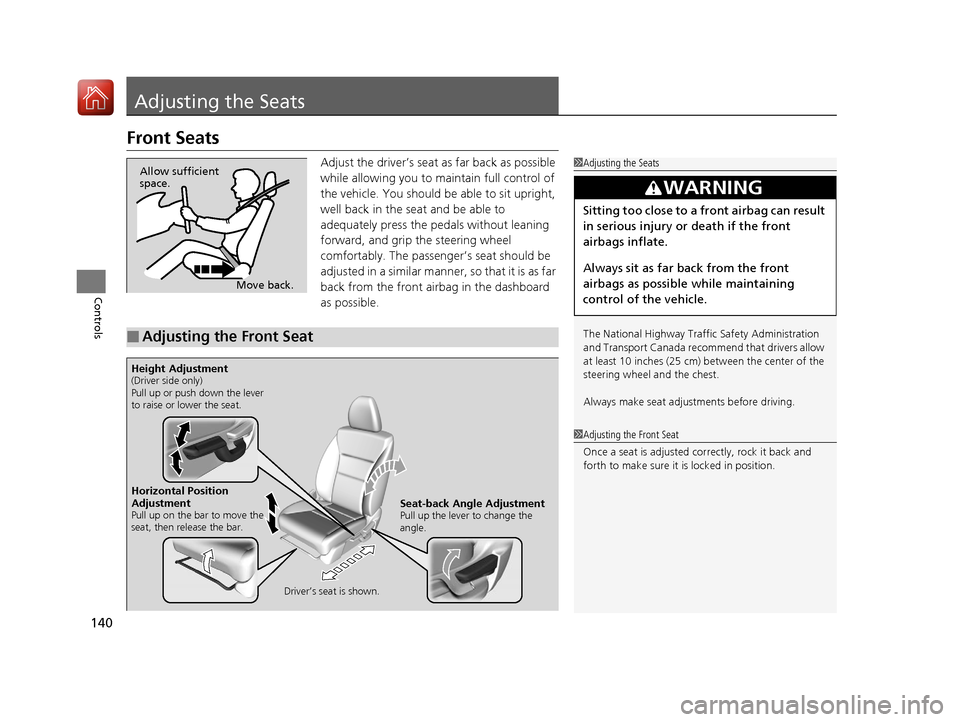
Adjust the driver’s seat as far back as possible
while allowing you to maintain full control of
the vehicle. You should be able to sit upright,
well back in the seat and be able to
adequately press the pedals without leaning
forward, and grip the steering wheel
comfortably. The passenger’s seat should be
adjusted in a similar manner, so that it is as far
back from the front airbag in the dashboard
as possible.1Adjusting the Seats
The National Highway Traffic Safety Administration
and Transport Cana da recommend that drivers allow
at least 10 inches (25 cm) between the center of the
steering wheel and the chest.
Always make seat adjustments before driving.
3WARNING
Sitting too close to a front airbag can result
in serious injury or death if the front
airbags inflate.
Always sit as far back from the front
airbags as possible while maintaining
control of the vehicle.
Move back.
Allow sufficient
space.
■Adjusting the Front Seat
1
Adjusting the Front Seat
Once a seat is adjusted co rrectly, rock it back and
forth to make sure it is locked in position.
Horizontal Position
Adjustment
Pull up on the bar to move the
seat, then release the bar.
Driver’s seat is shown.Seat-back Angle AdjustmentPull up the lever to change the
angle.
Height Adjustment(Driver side only)
Pull up or push down the lever
to raise or lower the seat.
17 HR-V HDMC-31T7A6100.book 140 ページ 2016年7月20日 水曜日 午前9時50分
Page 142 of 489
141
uuAdjusting the Seats uFront Seats
Controls
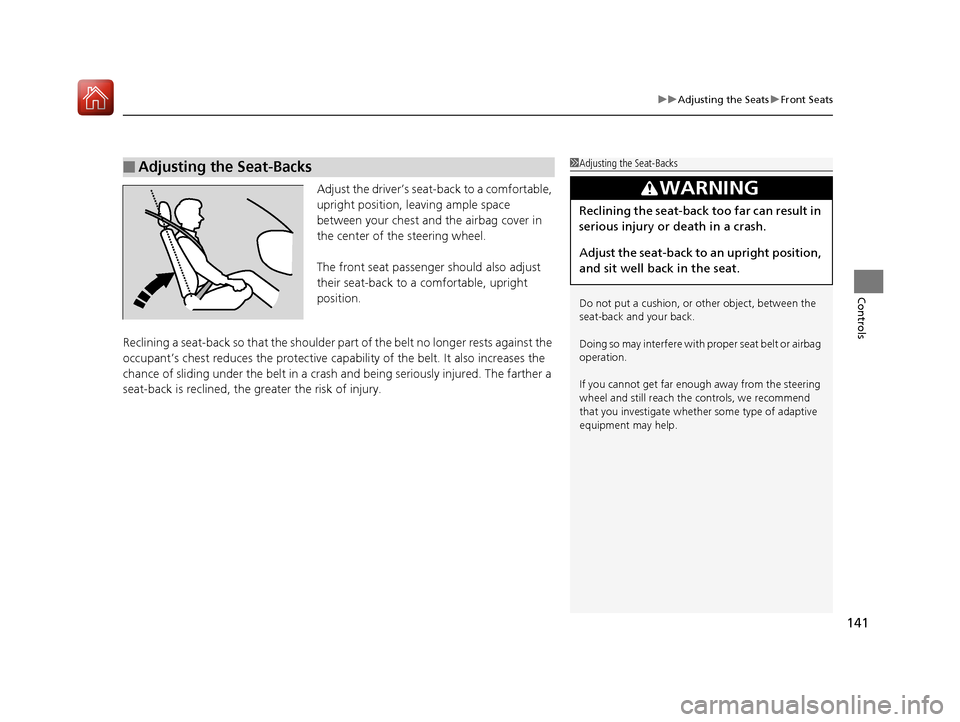
Adjust the driver’s seat -back to a comfortable,
upright position, leaving ample space
between your chest and the airbag cover in
the center of the steering wheel.
The front seat passenger should also adjust
their seat-back to a comfortable, upright
position.
Reclining a seat-back so that the shoulder part of the belt no longer rests against the
occupant’s chest reduces the protective capa bility of the belt. It also increases the
chance of sliding under the belt in a crash and being seriously injured. The farther a
seat-back is reclined, the gr eater the risk of injury.
■Adjusting the Seat-Backs1Adjusting the Seat-Backs
Do not put a cushion, or other object, between the
seat-back and your back.
Doing so may interfere with proper seat belt or airbag
operation.
If you cannot get far e nough away from the steering
wheel and still reach th e controls, we recommend
that you investigate whether some type of adaptive
equipment may help.
3WARNING
Reclining the seat-back too far can result in
serious injury or death in a crash.
Adjust the seat-back to an upright position,
and sit well back in the seat.
17 HR-V HDMC-31T7A6100.book 141 ページ 2016年7月20日 水曜日 午前9時50分
Page 177 of 489
176
Features
Audio System
About Your Audio System
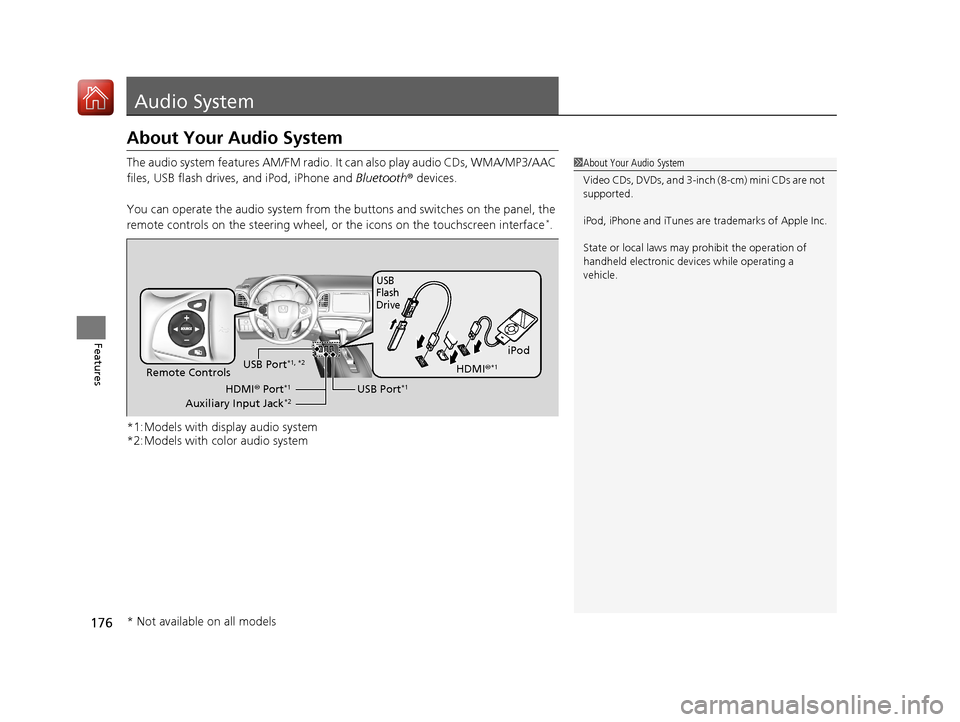
The audio system features AM/FM radio. It can also play audio CDs, WMA/MP3/AAC
files, USB flash drives, and iPod, iPhone and Bluetooth® devices.
You can operate the audio system from the buttons and switches on the panel, the
remote controls on the steering wheel, or the icons on the touchscreen interface
*.
*1:Models with display audio system
*2:Models with color audio system
1 About Your Audio System
Video CDs, DVDs, and 3-inch (8-cm) mini CDs are not
supported.
iPod, iPhone and iTunes are trademarks of Apple Inc.
State or local laws may pr ohibit the operation of
handheld electronic devi ces while operating a
vehicle.
iPod
USB
Flash
Drive
USB Port*1Remote Controls
HDMI® Port*1
Auxiliary Input Jack*2
USB Port*1, *2HDMI ®*1
* Not available on all models
17 HR-V HDMC-31T7A6100.book 176 ページ 2016年7月20日 水曜日 午前9時50分
Page 182 of 489
181
uuAudio System uAudio Remote Controls
Features
Steering Wheel (Menu) Button
• When listening to the radio
Press : To display the menu items. You can select Scan, Save Preset, or
Seek.
• When listening to a CD or USB flash drive
Press : To display the menu items. You can select Scan, Repeat , or Random .
• When listening to an iPod
Press : To display the menu items. You can select Repeat or Shuffle .
• When listening to a Bluetooth® Audio
Press : To display the menu items. You can select Pause or Play .
• When listening to a Pandora ®
*
Press : To display the menu items. You can select Bookmark, or Play/Pause .
1Audio Remote Controls
The button is available only when the audio
mode is FM, AM, CD, USB, iPod, Pandora®
*, AhaTM *,
or Bluetooth ® Audio.
Models with display audio system
* Not available on all models
17 HR-V HDMC-31T7A6100.book 181 ページ 2016年7月20日 水曜日 午前9時50分
Page 183 of 489
182
Features
Audio System Basic Operation
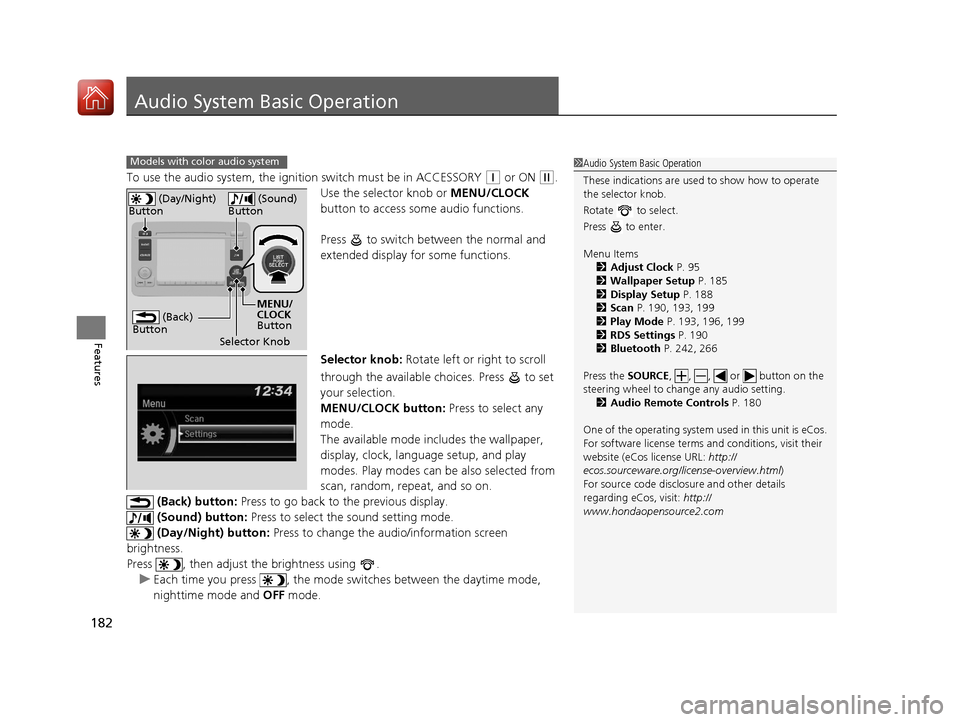
To use the audio system, the ignition switch must be in ACCESSORY (q or ON (w.
Use the selector knob or MENU/CLOCK
button to access some audio functions.
Press to switch between the normal and
extended display fo r some functions.
Selector knob: Rotate left or right to scroll
through the available choices. Press to set
your selection.
MENU/CLOCK button: Press to select any
mode.
The available mode includes the wallpaper,
display, clock, langu age setup, and play
modes. Play modes can be also selected from
scan, random, repeat, and so on.
(Back) button: Press to go back to the previous display.
(Sound) button: Press to select the sound setting mode.
(Day/Night) button: Press to change the audio/information screen
brightness.
Press , then adjust th e brightness using .
u Each time you press , the mode switches between the daytime mode,
nighttime mode and OFF mode.
Models with color audio system1Audio System Basic Operation
These indications are used to show how to operate
the selector knob.
Rotate to select.
Press to enter.
Menu Items 2 Adjust Clock P. 95
2 Wallpaper Setup P. 185
2 Display Setup P. 188
2 Scan P. 190, 193, 199
2 Play Mode P. 193, 196, 199
2 RDS Settings P. 190
2 Bluetooth P. 242, 266
Press the SOURCE, , , or button on the
steering wheel to cha nge any audio setting.
2 Audio Remote Controls P. 180
One of the operating system us ed in this unit is eCos.
For software license terms a nd conditions, visit their
website (eCos license URL: http://
ecos.sourceware.org/l icense-overview.html)
For source code disclo sure and other details
regarding eCos, visit: http://
www.hondaopensource2.com
(Back)
Button
Selector Knob MENU/
CLOCK
Button
(Day/Night)
Button
(Sound)
Button
17 HR-V HDMC-31T7A6100.book 182 ページ 2016年7月20日 水曜日 午前9時50分
Page 191 of 489
uuAudio System Basic Operation uPlaying AM/FM Radio
190
Features
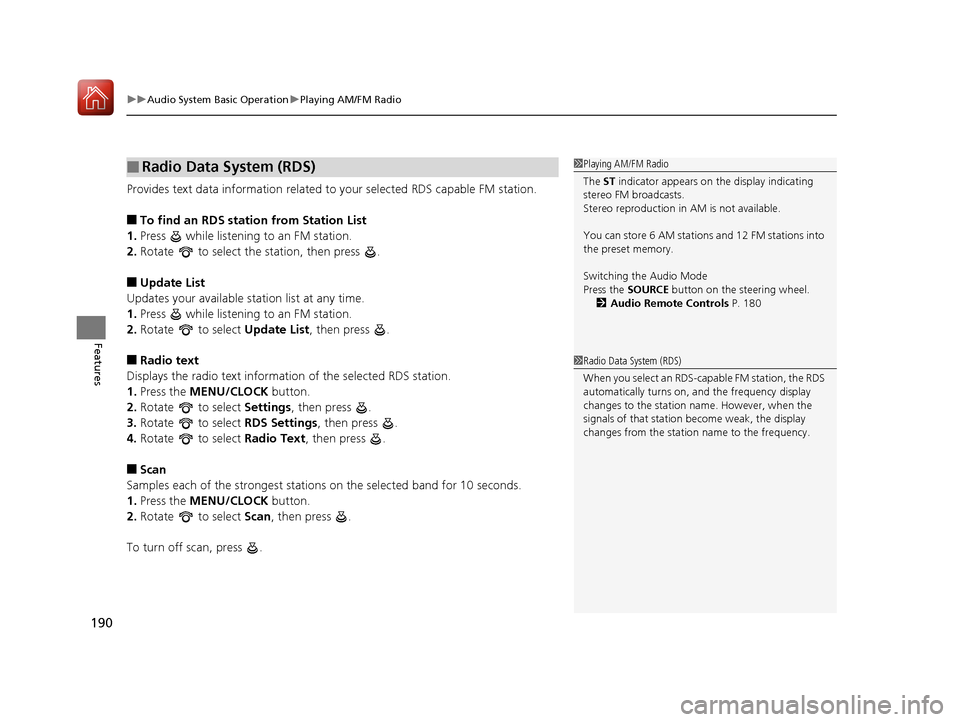
Provides text data information related to your selected RDS capable FM station.
■To find an RDS station from Station List
1. Press while listening to an FM station.
2. Rotate to select the station, then press .
■Update List
Updates your available station list at any time.
1. Press while listening to an FM station.
2. Rotate to select Update List, then press .
■Radio text
Displays the radio text informat ion of the selected RDS station.
1. Press the MENU/CLOCK button.
2. Rotate to select Settings, then press .
3. Rotate to select RDS Settings, then press .
4. Rotate to select Radio Text, then press .
■Scan
Samples each of the strongest stations on the selected band for 10 seconds.
1. Press the MENU/CLOCK button.
2. Rotate to select Scan, then press .
To turn off scan, press .
■Radio Data System (RDS)1 Playing AM/FM Radio
The ST indicator appears on the display indicating
stereo FM broadcasts.
Stereo reproduction in AM is not available.
You can store 6 AM stations and 12 FM stations into
the preset memory.
Switching the Audio Mode
Press the SOURCE button on the steering wheel.
2 Audio Remote Controls P. 180
1Radio Data System (RDS)
When you select an RDS-capable FM station, the RDS
automatically turns on, and the frequency display
changes to the station name. However, when the
signals of that station become weak, the display
changes from the statio n name to the frequency.
17 HR-V HDMC-31T7A6100.book 190 ページ 2016年7月20日 水曜日 午前9時50分
Page 205 of 489
204
uuAudio System Basic Operation uAudio/Information Screen
Features
Audio/Information Screen
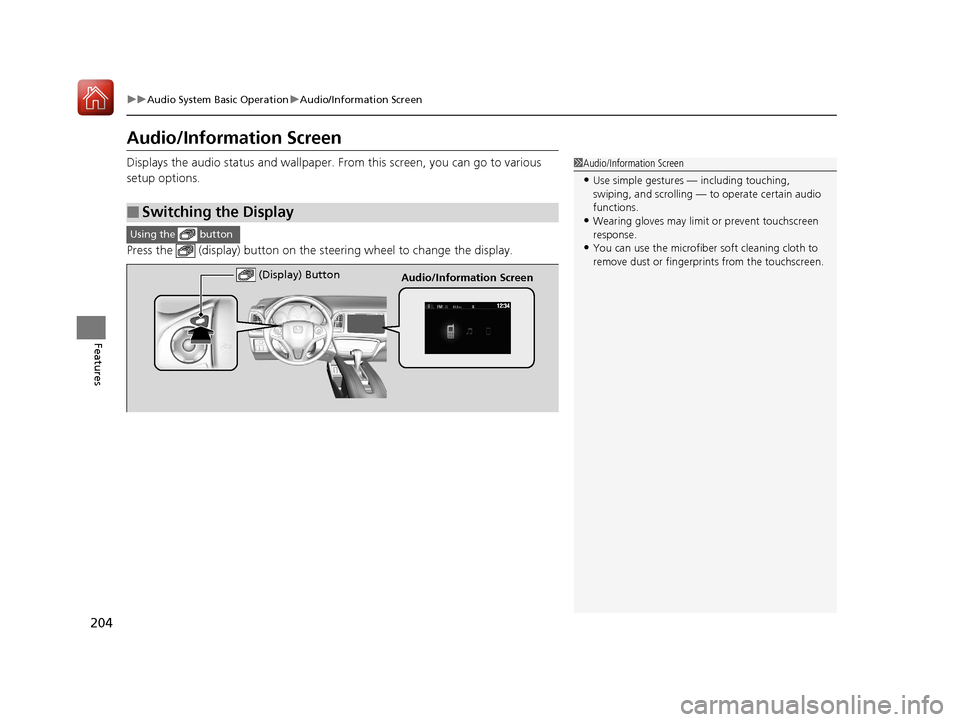
Displays the audio status and wallpaper. From this screen, you can go to various
setup options.
Press the (display) button on the st eering wheel to change the display.
■Switching the Display
1Audio/Information Screen
•Use simple gestures — including touching,
swiping, and scrolling — to operate certain audio
functions.
•Wearing gloves may limit or prevent touchscreen
response.
•You can use the microfiber soft cleaning cloth to
remove dust or fingerprints from the touchscreen.
Using the button
(Display) ButtonAudio/Information Screen
17 HR-V HDMC-31T7A6100.book 204 ページ 2016年7月20日 水曜日 午前9時50分
Page 213 of 489
uuAudio System Basic Operation uPlaying AM/FM Radio
212
Features
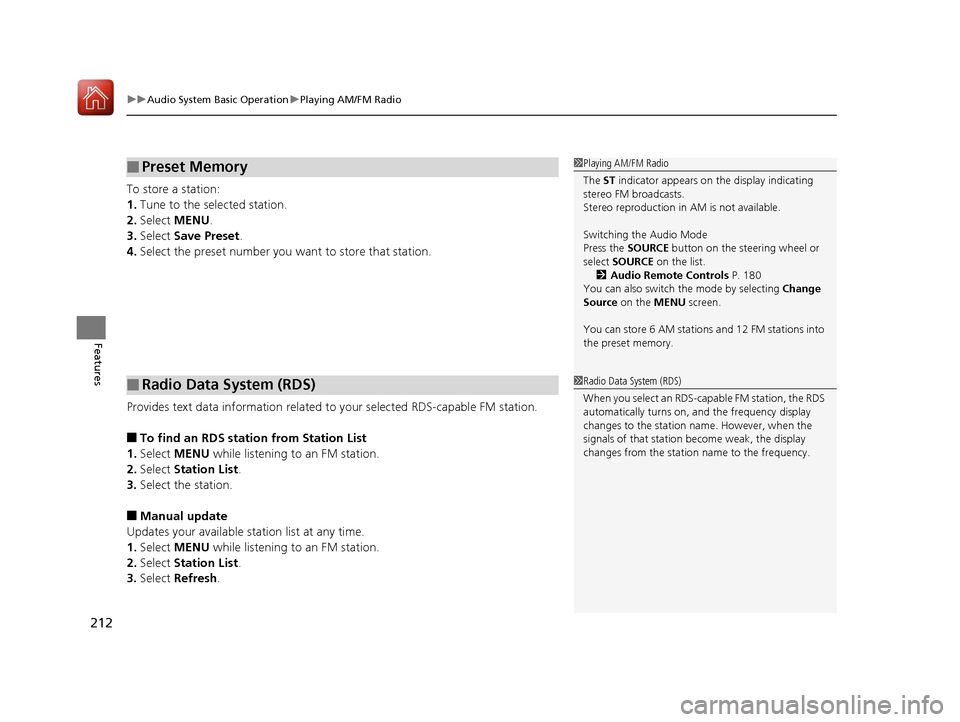
To store a station:
1. Tune to the selected station.
2. Select MENU .
3. Select Save Preset .
4. Select the preset number you want to store that station.
Provides text data information related to your selected RDS-capable FM station.
■To find an RDS station from Station List
1. Select MENU while listening to an FM station.
2. Select Station List .
3. Select the station.
■Manual update
Updates your available station list at any time.
1. Select MENU while listening to an FM station.
2. Select Station List .
3. Select Refresh .
■Preset Memory
■Radio Data System (RDS)
1Playing AM/FM Radio
The ST indicator appears on the display indicating
stereo FM broadcasts.
Stereo reproduction in AM is not available.
Switching the Audio Mode
Press the SOURCE button on the steering wheel or
select SOURCE on the list.
2 Audio Remote Controls P. 180
You can also switch the mode by selecting Change
Source on the MENU screen.
You can store 6 AM stations and 12 FM stations into
the preset memory.
1 Radio Data System (RDS)
When you select an RDS-capable FM station, the RDS
automatically turns on, and the frequency display
changes to the station name. However, when the
signals of that station become weak, the display
changes from the statio n name to the frequency.
17 HR-V HDMC-31T7A6100.book 212 ページ 2016年7月20日 水曜日 午前9時50分
Page 231 of 489
230
uuAudio System Basic Operation uSiri ® Eyes Free
Features
Siri ® Eyes Free
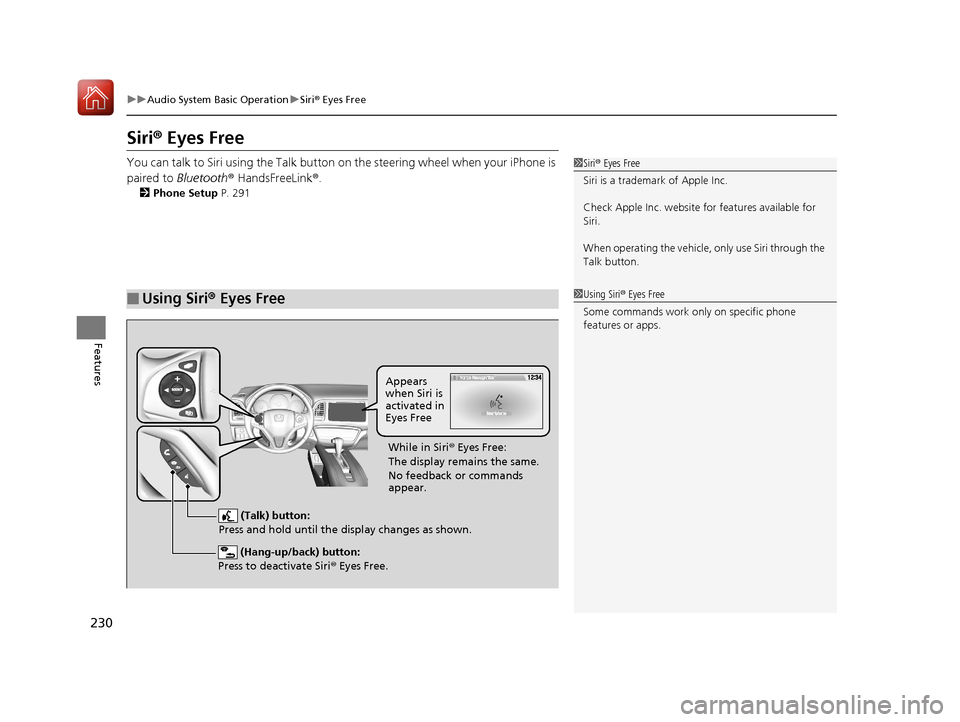
You can talk to Siri using the Talk button on the steering wheel when your iPhone is
paired to Bluetooth ® HandsFreeLink ®.
2 Phone Setup P. 291
■Using Siri® Eyes Free
1Siri ® Eyes Free
Siri is a trademark of Apple Inc.
Check Apple Inc. website for features available for
Siri.
When operating the vehicle, only us e Siri through the
Talk button.
1 Using Siri ® Eyes Free
Some commands work only on specific phone
features or apps.
(Hang-up/back) button:
Press to deactivate Siri ® Eyes Free.
(Talk) button:
Press and hold until the display changes as shown.
Appears
when Siri is
activated in
Eyes Free
While in Siri ® Eyes Free:
The display remains the same.
No feedback or commands
appear.
17 HR-V HDMC-31T7A6100.book 230 ページ 2016年7月20日 水曜日 午前9時50分
Page 261 of 489
260
Features
Bluetooth® HandsFreeLink ®
Bluetooth® HandsFreeLink ® (HFL) allows you to place and receive phone calls using
your vehicle’s audio system, without handling your cell phone.
Using HFL
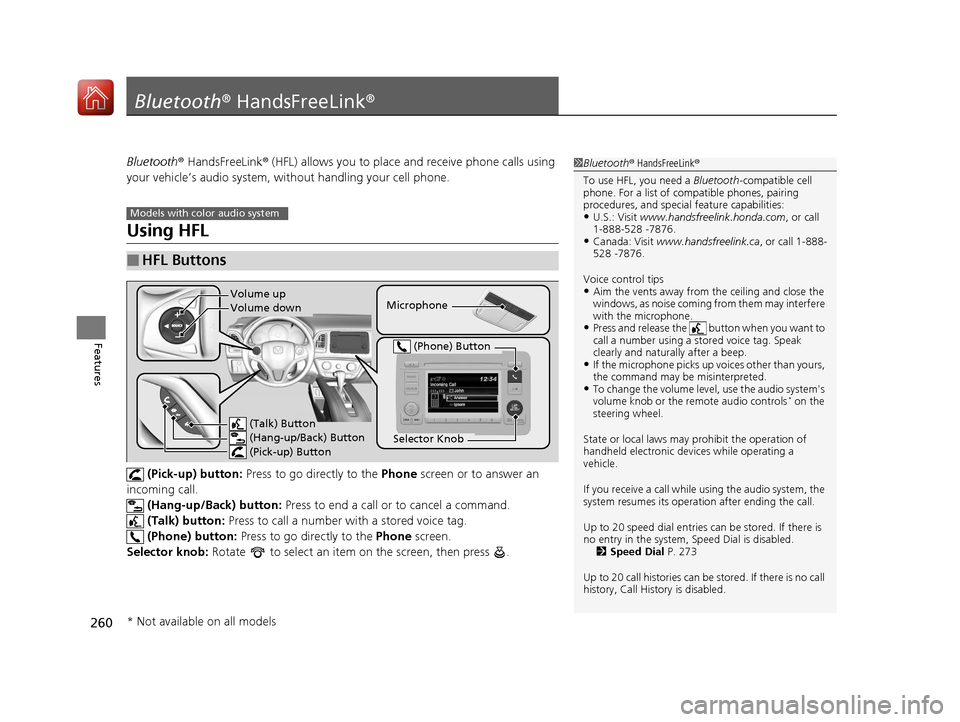
(Pick-up) button: Press to go directly to the Phone screen or to answer an
incoming call. (Hang-up/Back) button: Press to end a call or to cancel a command.
(Talk) button: Press to call a number wi th a stored voice tag.
(Phone) button: Press to go directly to the Phone screen.
Selector knob: Rotate to select an item on the screen, then press .
■HFL Buttons
1 Bluetooth ® HandsFreeLink ®
To use HFL, you need a Bluetooth-compatible cell
phone. For a list of compatible phones, pairing
procedures, and special feature capabilities:
•U.S.: Visit www.handsfreelink.honda.com , or call
1-888-528 -7876.
•Canada: Visit www.handsfreelink.ca , or call 1-888-
528 -7876.
Voice control tips
•Aim the vents away from the ceiling and close the
windows, as noise coming fr om them may interfere
with the microphone.
•Press and release the button when you want to
call a number using a st ored voice tag. Speak
clearly and naturally after a beep.
•If the microphone picks up vo ices other than yours,
the command may be misinterpreted.
•To change the volume level, use the audio system's
volume knob or the remote audio controls* on the
steering wheel.
State or local laws may prohibit the operation of
handheld electronic devices while operating a
vehicle.
If you receive a call while using the audio system, the
system resumes its operati on after ending the call.
Up to 20 speed dial entries can be stored. If there is
no entry in the system, Speed Dial is disabled. 2 Speed Dial P. 273
Up to 20 call histories can be stored. If there is no call
history, Call History is disabled.
Models with color audio system
Microphone
(Talk) Button
(Hang-up/Back) Button
(Pick-up) Button
Selector Knob
(Phone) Button
Volume up
Volume down
* Not available on all models
17 HR-V HDMC-31T7A6100.book 260 ページ 2016年7月20日 水曜日 午前9時50分