audio HONDA HR-V 2017 2.G Workshop Manual
[x] Cancel search | Manufacturer: HONDA, Model Year: 2017, Model line: HR-V, Model: HONDA HR-V 2017 2.GPages: 489, PDF Size: 29.22 MB
Page 212 of 489
211
uuAudio System Basic Operation uPlaying AM/FM Radio
Continued
Features
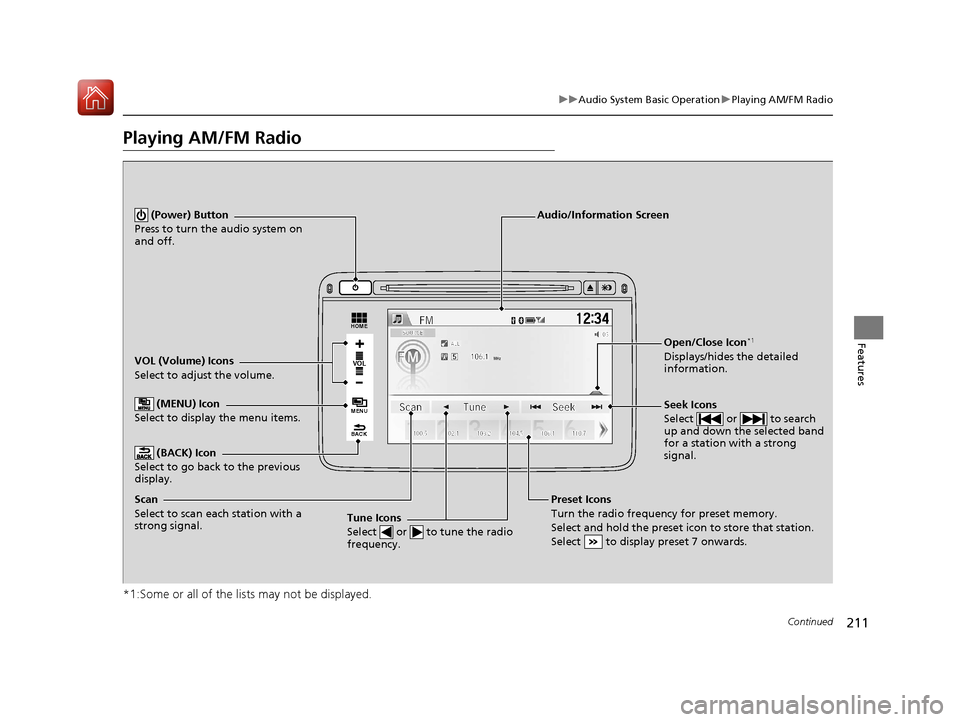
Playing AM/FM Radio
*1:Some or all of the lists may not be displayed.
VOL
HOME
MENU
BACK
VOL (Volume) Icons
Select to adjust the volume. (BACK) Icon
Select to go back to the previous
display.
Seek Icons
Select or to search
up and down the selected band
for a station with a strong
signal.
(Power) Button
Press to turn the audio system on
and off.
Open/Close Icon*1
Displays/hides the detailed
information.
(MENU) Icon
Select to display the menu items.
Audio/Information Screen
Tune Icons
Select or to tune the radio
frequency.
Preset Icons
Turn the radio frequency for preset memory.
Select and hold the preset icon to store that station.
Select to display preset 7 onwards.Scan
Select to scan each station with a
strong signal.
17 HR-V HDMC-31T7A6100.book 211 ページ 2016年7月20日 水曜日 午前9時50分
Page 213 of 489
uuAudio System Basic Operation uPlaying AM/FM Radio
212
Features
To store a station:
1. Tune to the selected station.
2. Select MENU .
3. Select Save Preset .
4. Select the preset number you want to store that station.
Provides text data information related to your selected RDS-capable FM station.
■To find an RDS station from Station List
1. Select MENU while listening to an FM station.
2. Select Station List .
3. Select the station.
■Manual update
Updates your available station list at any time.
1. Select MENU while listening to an FM station.
2. Select Station List .
3. Select Refresh .
■Preset Memory
■Radio Data System (RDS)
1Playing AM/FM Radio
The ST indicator appears on the display indicating
stereo FM broadcasts.
Stereo reproduction in AM is not available.
Switching the Audio Mode
Press the SOURCE button on the steering wheel or
select SOURCE on the list.
2 Audio Remote Controls P. 180
You can also switch the mode by selecting Change
Source on the MENU screen.
You can store 6 AM stations and 12 FM stations into
the preset memory.
1 Radio Data System (RDS)
When you select an RDS-capable FM station, the RDS
automatically turns on, and the frequency display
changes to the station name. However, when the
signals of that station become weak, the display
changes from the statio n name to the frequency.
17 HR-V HDMC-31T7A6100.book 212 ページ 2016年7月20日 水曜日 午前9時50分
Page 214 of 489
213
uuAudio System Basic Operation uPlaying AM/FM Radio
Features
■Radio text
Displays the radio text information of the selected RDS station.
1. Select MENU .
2. Select View Radio Text .
■Scan
Samples each of the strongest stations on the selected band for 10 seconds.
1. Select MENU .
2. Select Scan.
To turn off scan, select Cancel.
17 HR-V HDMC-31T7A6100.book 213 ページ 2016年7月20日 水曜日 午前9時50分
Page 215 of 489
214
uuAudio System Basic Operation uPlaying a CD
Features
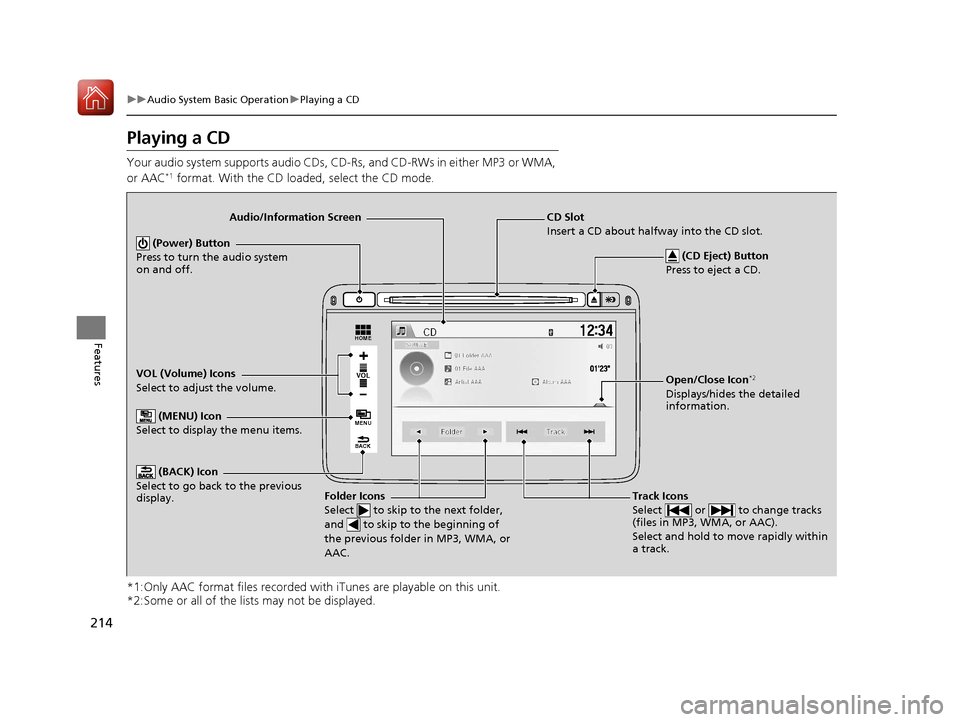
Playing a CD
Your audio system supports audio CDs, CD-Rs, and CD-RWs in either MP3 or WMA,
or AAC*1 format. With the CD loaded, select the CD mode.
*1:Only AAC format files recorded with iTunes are playable on this unit.
*2:Some or all of the lists may not be displayed.
VOL
HOME
MENU
BACK
VOL (Volume) Icons
Select to adjust the volume. (BACK) Icon
Select to go back to the previous
display.
Track Icons
Select or to change tracks
(files in MP3, WMA, or AAC).
Select and hold to move rapidly within
a track.
(Power) Button
Press to turn the audio system
on and off.
Open/Close Icon*2
Displays/hides the detailed
information.
(MENU) Icon
Select to display the menu items.
Audio/Information Screen
Folder Icons
Select to skip to the next folder,
and to skip to the beginning of
the previous folder in MP3, WMA, or
AAC.
(CD Eject) Button
Press to eject a CD.
CD Slot
Insert a CD about halfway into the CD slot.
17 HR-V HDMC-31T7A6100.book 214 ページ 2016年7月20日 水曜日 午前9時50分
Page 216 of 489
Continued215
uuAudio System Basic Operation uPlaying a CD
Features
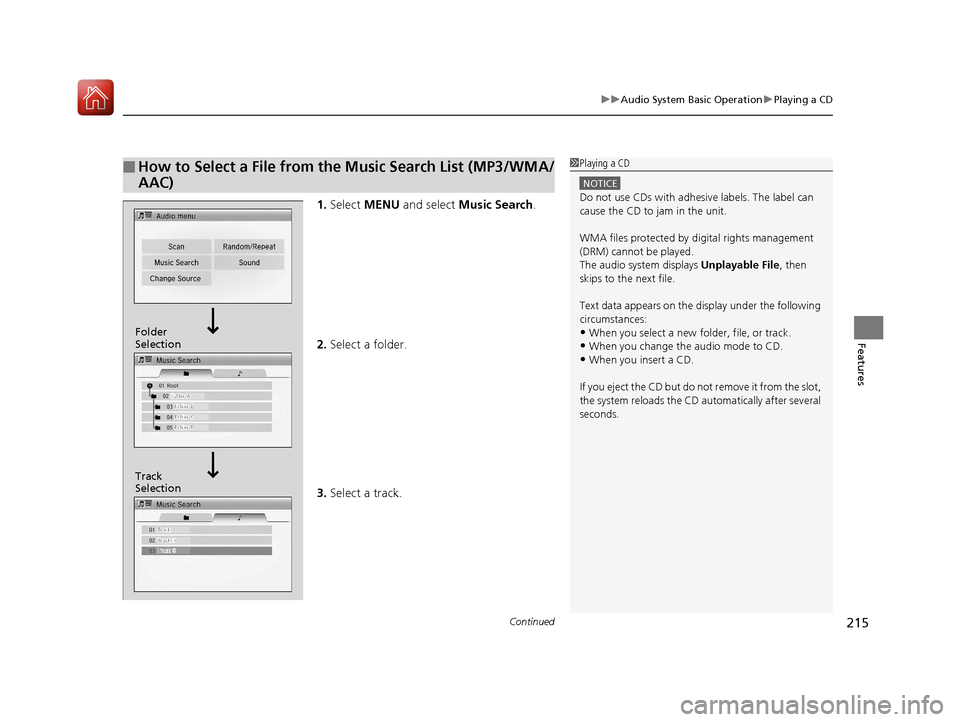
1. Select MENU and select Music Search .
2. Select a folder.
3. Select a track.
■How to Select a File from the Music Search List (MP3/WMA/
AAC)1Playing a CD
NOTICE
Do not use CDs with adhesive labels. The label can
cause the CD to jam in the unit.
WMA files protected by di gital rights management
(DRM) cannot be played.
The audio system displays Unplayable File, then
skips to the next file.
Text data appears on the di splay under the following
circumstances:
•When you select a new folder, file, or track.
•When you change the audio mode to CD.
•When you insert a CD.
If you eject the CD but do not remove it from the slot,
the system reloads the CD automatically after several
seconds.
Track
Selection Folder
Selection
17 HR-V HDMC-31T7A6100.book 215 ページ 2016年7月20日 水曜日 午前9時50分
Page 217 of 489
uuAudio System Basic Operation uPlaying a CD
216
Features
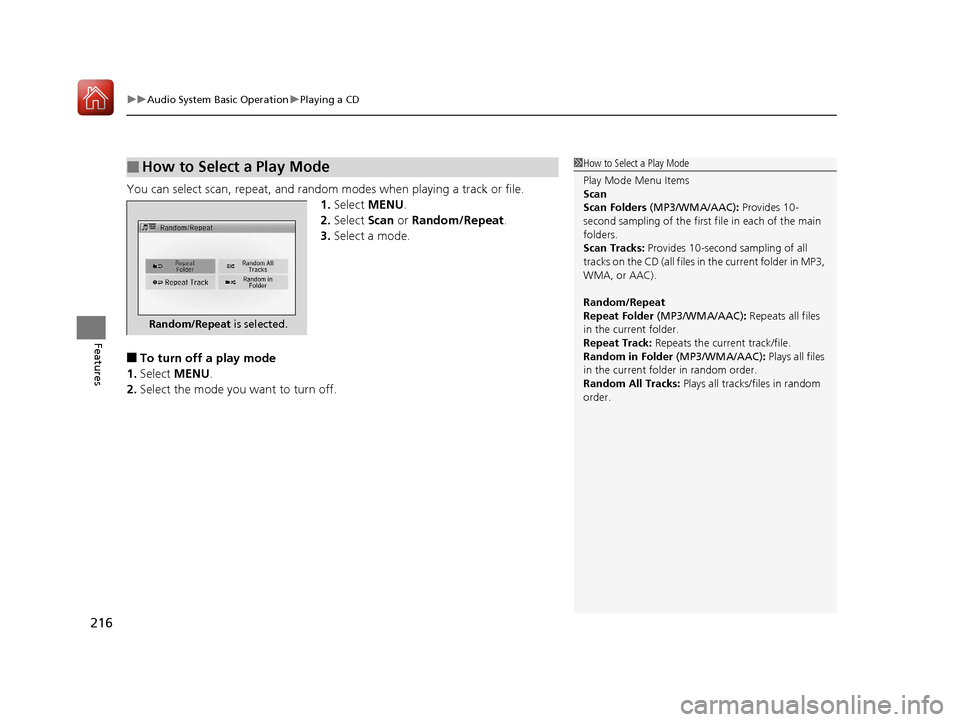
You can select scan, repeat, and random modes when playing a track or file.
1.Select MENU .
2. Select Scan or Random/Repeat .
3. Select a mode.
■To turn off a play mode
1. Select MENU .
2. Select the mode you want to turn off.
■How to Select a Play Mode1How to Select a Play Mode
Play Mode Menu Items
Scan
Scan Folders (MP3/WMA/AAC): Provides 10-
second sampling of the first f ile in each of the main
folders.
Scan Tracks: Provides 10-second sampling of all
tracks on the CD (all files in the current folder in MP3,
WMA, or AAC).
Random/Repeat
Repeat Folder (MP3/WMA/AAC): Repeats all files
in the current folder.
Repeat Track: Repeats the current track/file.
Random in Folder (MP3/WMA/AAC): Plays all files
in the current folder in random order.
Random All Tracks: Plays all tracks/files in random
order.
Random/Repeat is selected.
17 HR-V HDMC-31T7A6100.book 216 ページ 2016年7月20日 水曜日 午前9時50分
Page 218 of 489
217
uuAudio System Basic Operation uPlaying an iPod
Continued
Features
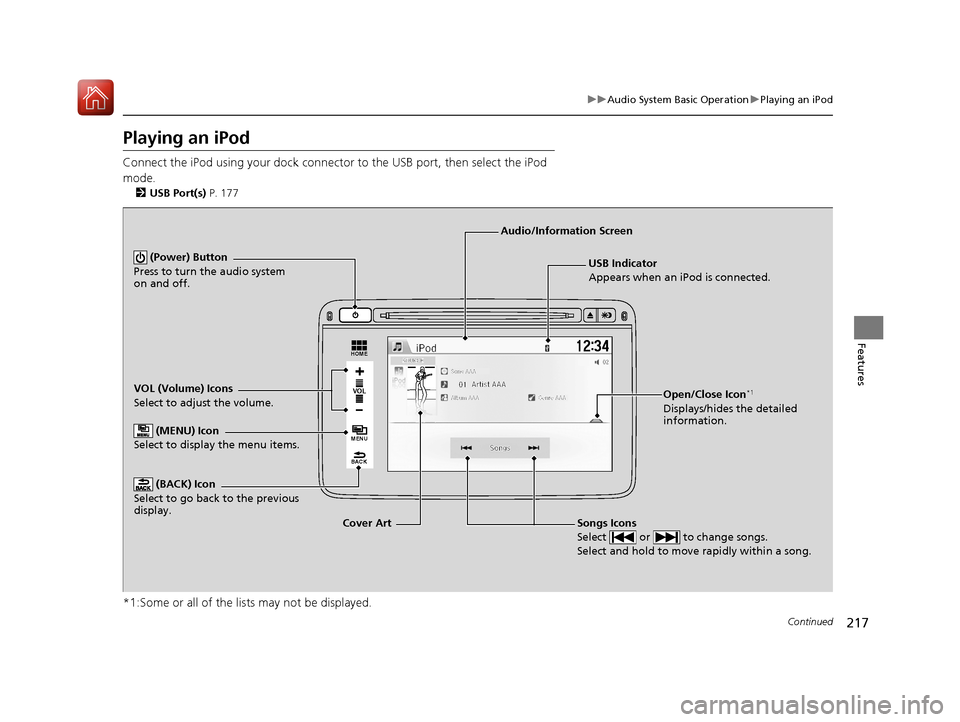
Playing an iPod
Connect the iPod using your dock connector to the USB port, then select the iPod
mode.
2 USB Port(s) P. 177
*1:Some or all of the lists may not be displayed.
VOL
HOME
MENU
BACK
USB Indicator
Appears when an iPod is connected.
Songs Icons
Select or to change songs.
Select and hold to move rapidly within a song.
Audio/Information Screen
Cover Art
VOL (Volume) Icons
Select to adjust the volume.
(BACK) Icon
Select to go back to the previous
display.
(Power) Button
Press to turn the audio system
on and off.
(MENU) Icon
Select to display the menu items.
Open/Close Icon*1
Displays/hides the detailed
information.
17 HR-V HDMC-31T7A6100.book 217 ページ 2016年7月20日 水曜日 午前9時50分
Page 219 of 489
uuAudio System Basic Operation uPlaying an iPod
218
Features
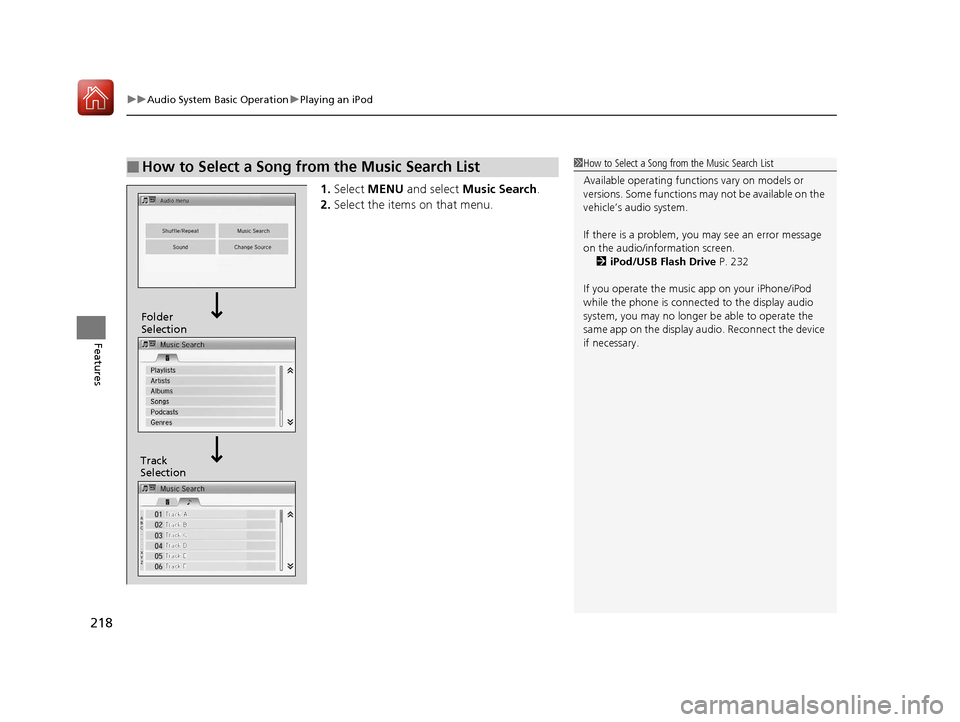
1. Select MENU and select Music Search .
2. Select the items on that menu.
■How to Select a Song from the Music Search List1How to Select a Song from the Music Search List
Available operating functi ons vary on models or
versions. Some functions ma y not be available on the
vehicle’s audio system.
If there is a problem, you may see an error message
on the audio/information screen. 2 iPod/USB Flash Drive P. 232
If you operate the musi c app on your iPhone/iPod
while the phone is connecte d to the display audio
system, you may no longer be able to operate the
same app on the display audi o. Reconnect the device
if necessary.
Track
Selection Folder
Selection
17 HR-V HDMC-31T7A6100.book 218 ページ 2016年7月20日 水曜日 午前9時50分
Page 220 of 489
219
uuAudio System Basic Operation uPlaying an iPod
Features
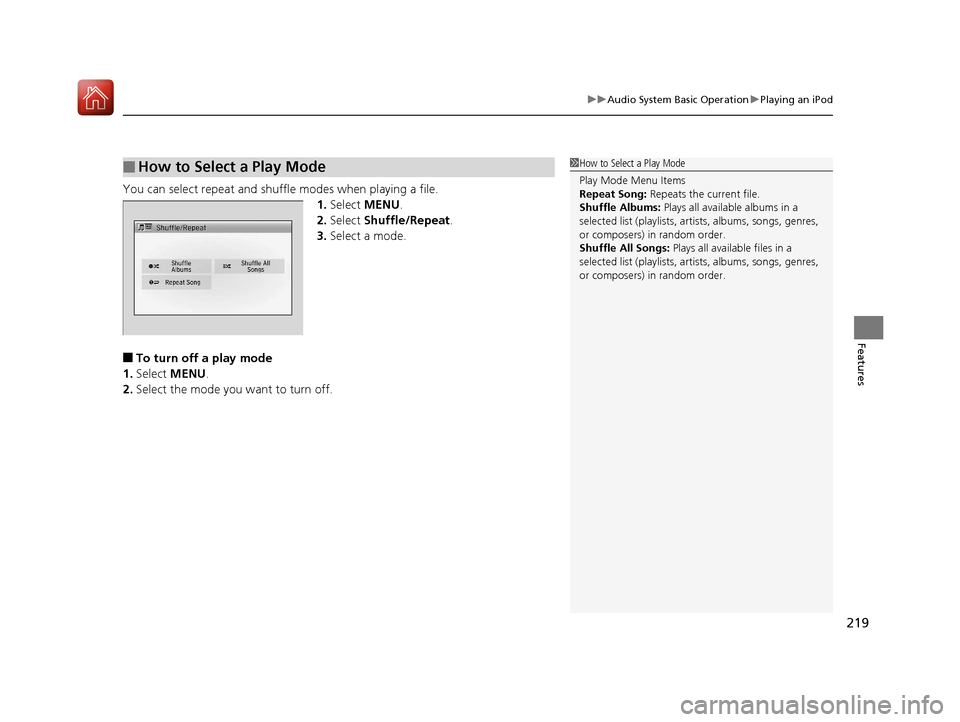
You can select repeat and shuffle modes when playing a file.
1.Select MENU .
2. Select Shuffle/Repeat .
3. Select a mode.
■To turn off a play mode
1. Select MENU .
2. Select the mode you want to turn off.
■How to Select a Play Mode1How to Select a Play Mode
Play Mode Menu Items
Repeat Song: Repeats the current file.
Shuffle Albums: Plays all available albums in a
selected list (playlists, ar tists, albums, songs, genres,
or composers) in random order.
Shuffle All Songs: Plays all available files in a
selected list (playlists, ar tists, albums, songs, genres,
or composers) in random order.
17 HR-V HDMC-31T7A6100.book 219 ページ 2016年7月20日 水曜日 午前9時50分
Page 221 of 489
220
uuAudio System Basic Operation uPlaying Internet Radio
Features
Playing Internet Radio
Connect a compatible phone through Bluetooth®.
2Phone Setup P. 291
You can also connect the phone using your dock connector to the USB port. Select
Source to select Pandora mode.
*1:Some or all of the lists may not be displayed.
U.S. models
Compatible phones only
1 Playing Internet Radio
Pandora ®, the Pandora logo, and the Pandora trade
dress are trademarks or registered trademarks of
Pandora Media, Inc., used with permission. Pandora
is currently available exclusively in the United States.
To find out if your phone is compatible with this
feature, visit www.handsfreelink.honda.com , or call
1-888-528-7876
To use this service in your vehicle, the Pandora ® app
must first be installed on your phone. Visit
www.pandora.com . for more information.
iPhone only
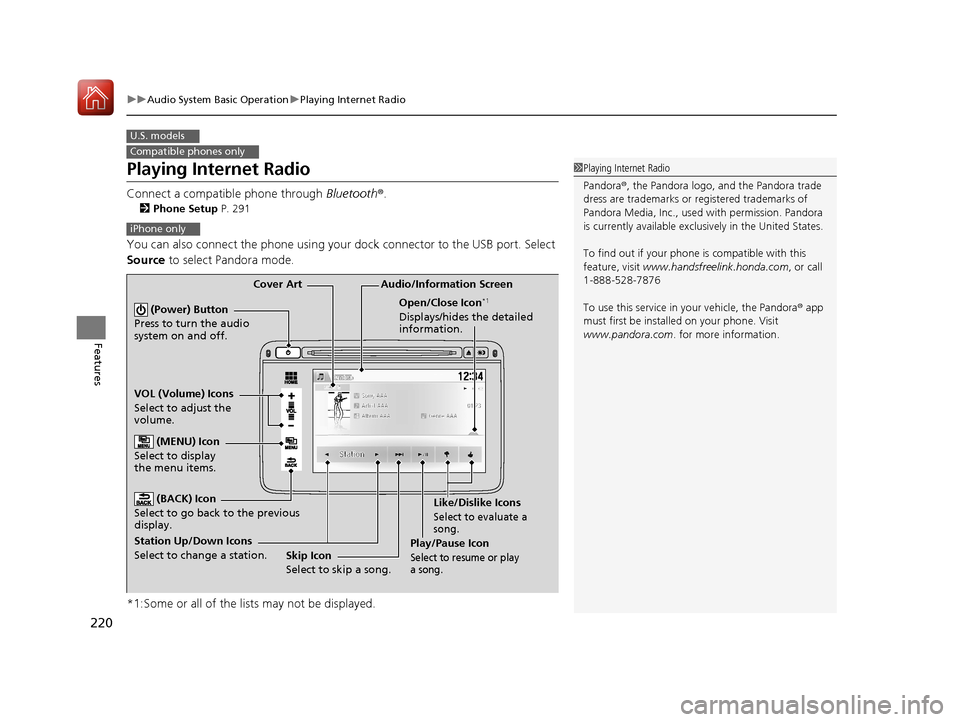
Audio/Information Screen
Cover Art
VOL (Volume) Icons
Select to adjust the
volume. (BACK) Icon
Select to go back to the previous
display.
(Power) Button
Press to turn the audio
system on and off.
(MENU) Icon
Select to display
the menu items.
Play/Pause Icon
Select to resu me or play
a song.
Open/Close Icon*1
Displays/hides the detailed
information.
Station Up/Down Icons
Select to change a station. Skip Icon
Select to skip a song.Like/Dislike Icons
Select to evaluate a
song.
17 HR-V HDMC-31T7A6100.book 220 ページ 2016年7月20日 水曜日 午前9時50分