audio HONDA HR-V 2017 2.G Manual Online
[x] Cancel search | Manufacturer: HONDA, Model Year: 2017, Model line: HR-V, Model: HONDA HR-V 2017 2.GPages: 489, PDF Size: 29.22 MB
Page 242 of 489
241
uuCustomized Features u
Continued
Features
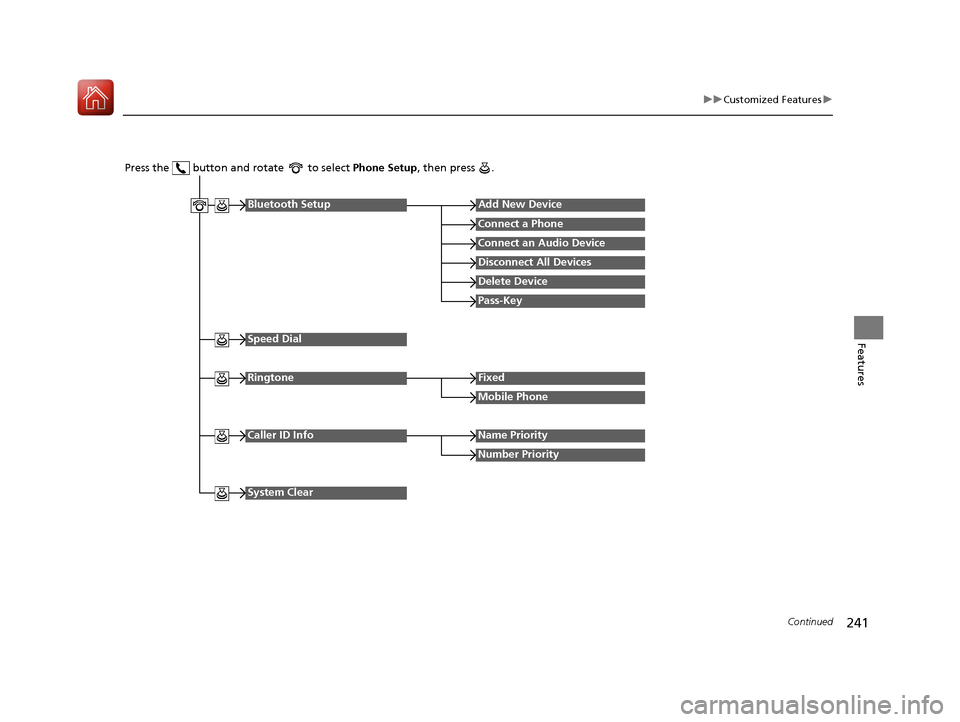
Press the button and rotate to select Phone Setup, then press .
RingtoneFixed
Mobile Phone
Bluetooth SetupAdd New Device
Connect a Phone
Connect an Audio Device
Disconnect All Devices
Delete Device
Pass-Key
Speed Dial
Caller ID InfoName Priority
Number Priority
System Clear
17 HR-V HDMC-31T7A6100.book 241 ページ 2016年7月20日 水曜日 午前9時50分
Page 243 of 489
242
uuCustomized Features u
Features
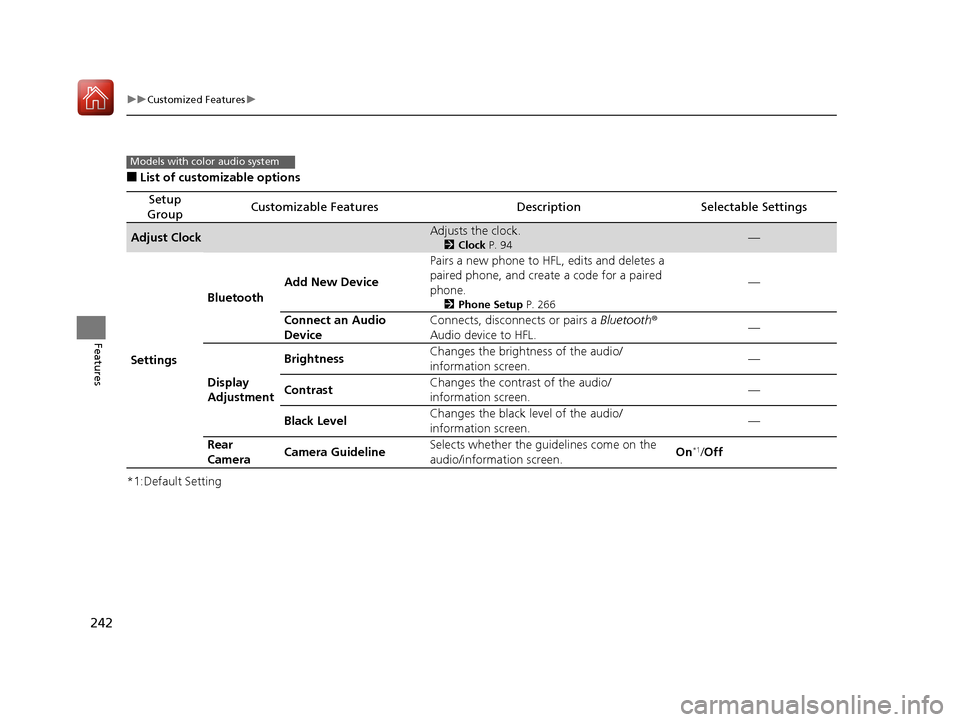
■List of customizable options
*1:Default Setting
Setup
GroupCustomizable FeaturesDescriptionSelectable Settings
Adjust ClockAdjusts the clock.
2 Clock P. 94—
Settings Bluetooth
Add New Device Pairs a new phone to HFL, edits and deletes a
paired phone, and create a code for a paired
phone.
2
Phone Setup P. 266
—
Connect an Audio
Device Connects, disconnects or pairs a Bluetooth
®
Audio device to HFL. —
Display
Adjustment Brightness
Changes the brightness of the audio/
information screen. —
Contrast Changes the contrast of the audio/
information screen.
—
Black Level Changes the black level of the audio/
information screen. —
Rear
Camera Camera Guideline
Selects whether the guidelines come on the
audio/information screen. On
*1/
Off
Models with color audio system
17 HR-V HDMC-31T7A6100.book 242 ページ 2016年7月20日 水曜日 午前9時50分
Page 244 of 489
243
uuCustomized Features u
Continued
Features
*1:Default Setting
Setup
GroupCustomizable FeaturesDescriptionSelectable Settings
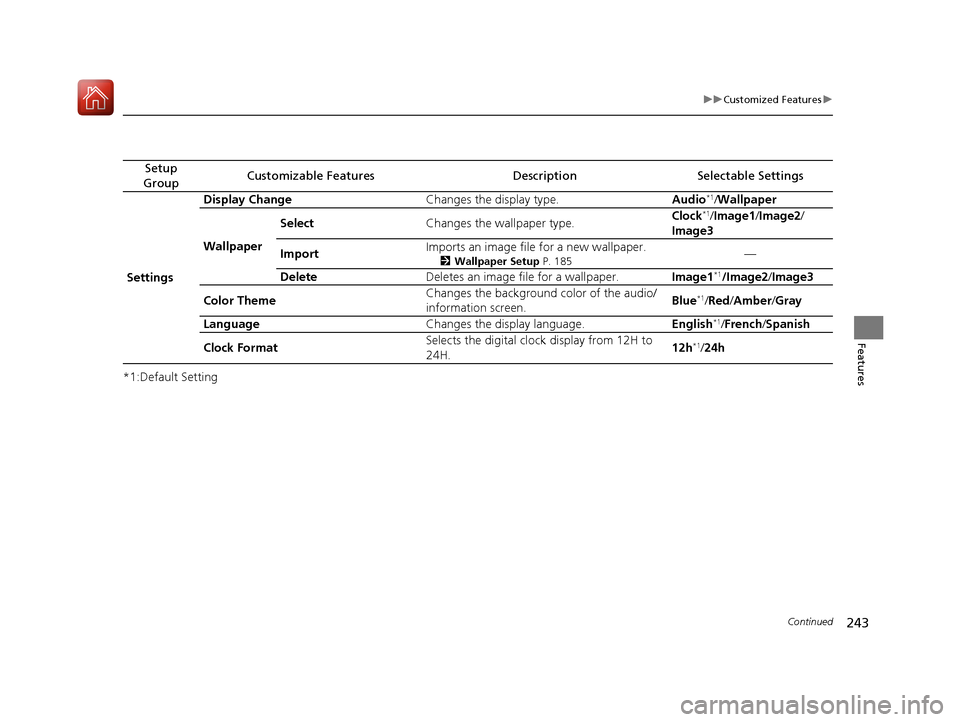
Settings Display Change
Changes the display type. Audio
*1/Wallpaper
Wallpaper Select
Changes the wallpaper type. Clock*1/
Image1/ Image2/
Image3
Import Imports an image file for a new wallpaper.
2
Wallpaper Setup P. 185—
Delete Deletes an image file for a wallpaper. Image1
*1/Image2/Image3
Color Theme Changes the background color of the audio/
information screen.
Blue
*1/
Red /Amber /Gray
Language Changes the display language. English
*1/French /Spanish
Clock Format Selects the digital clock display from 12H to
24H. 12h
*1/
24h
17 HR-V HDMC-31T7A6100.book 243 ページ 2016年7月20日 水曜日 午前9時50分
Page 245 of 489
244
uuCustomized Features u
Features
*1:Default Setting
Setup
GroupCustomizable FeaturesDescriptionSelectable Settings
Phone
Setup
Bluetooth
Setup
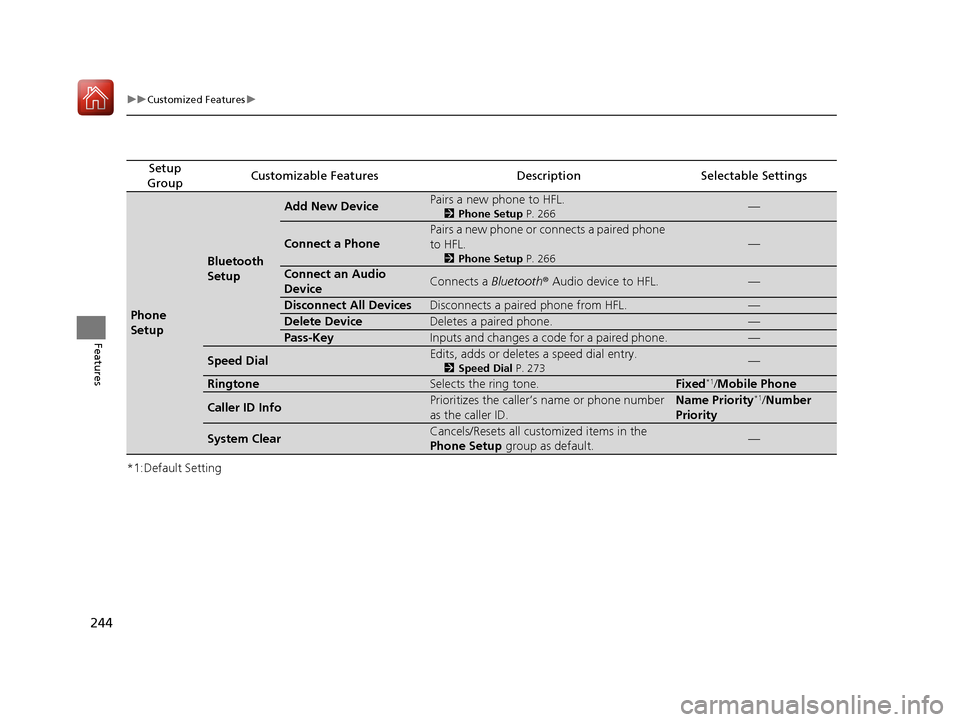
Add New DevicePairs a new phone to HFL.
2 Phone Setup P. 266—
Connect a Phone
Pairs a new phone or connects a paired phone
to HFL.
2Phone Setup P. 266
—
Connect an Audio
DeviceConnects a Bluetooth® Audio device to HFL.—
Disconnect All DevicesDisconnects a paired phone from HFL.—
Delete DeviceDeletes a paired phone.—
Pass-KeyInputs and changes a code for a paired phone.—
Speed DialEdits, adds or deletes a speed dial entry.
2Speed Dial P. 273—
RingtoneSelects the ring tone.Fixed*1/Mobile Phone
Caller ID InfoPrioritizes the caller’s name or phone number
as the caller ID.Name Priority*1/ Number
Priority
System ClearCancels/Resets all customized items in the
Phone Setup group as default.—
17 HR-V HDMC-31T7A6100.book 244 ページ 2016年7月20日 水曜日 午前9時50分
Page 246 of 489
Continued245
uuCustomized Features u
Features
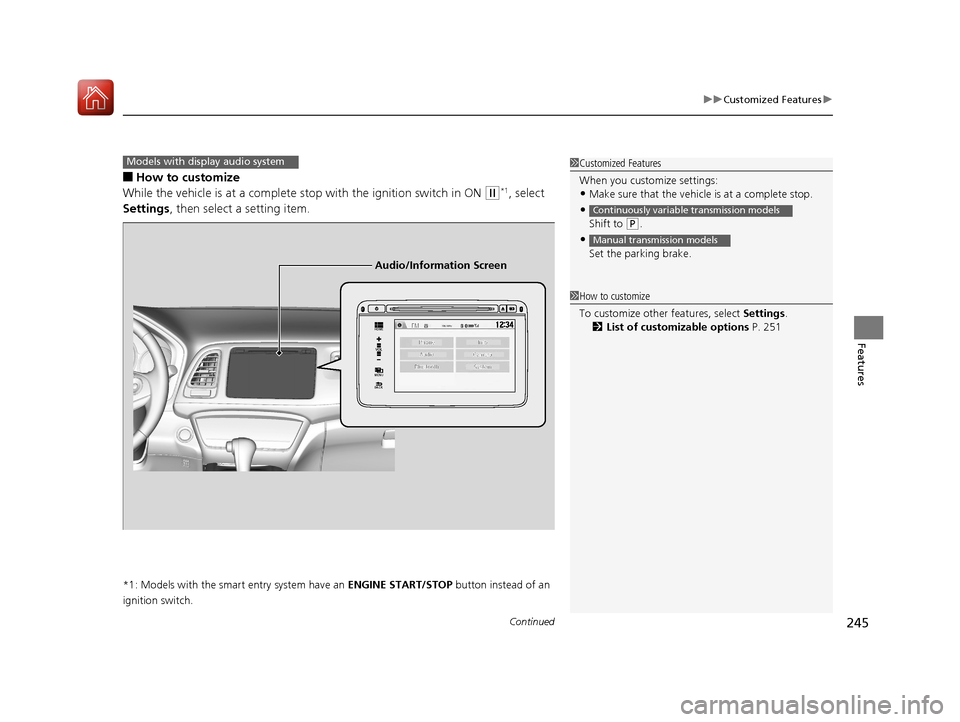
■How to customize
While the vehicle is at a complete st op with the ignition switch in ON
(w*1, select
Settings , then select a setting item.
*1: Models with the smart entry system have an ENGINE START/STOP button instead of an
ignition switch.
Models with display audio system1 Customized Features
When you customize settings:
•Make sure that the vehicle is at a complete stop.
•
Shift to (P.
•
Set the parking brake.
Continuously variable transmission models
Manual transmission models
1 How to customize
To customize other features, select Settings .
2 List of customizable options P. 251
VOL
HOME
MENU
BACK
Audio/Information Screen
17 HR-V HDMC-31T7A6100.book 245 ページ 2016年7月20日 水曜日 午前9時50分
Page 247 of 489
246
uuCustomized Features u
Features
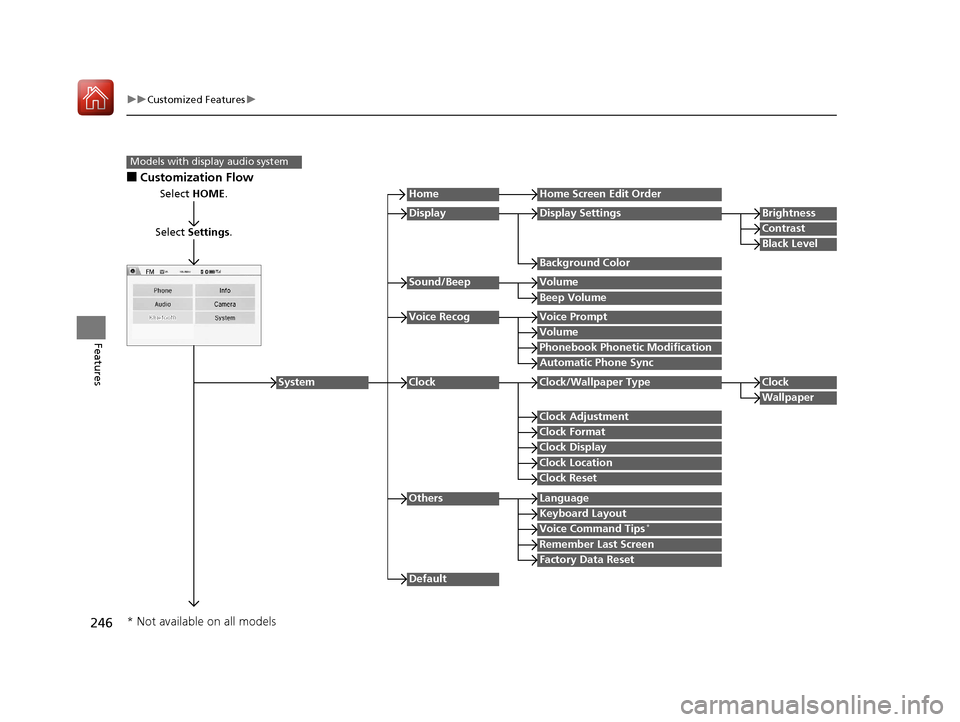
■Customization Flow
Models with display audio system
Select HOME.
Select Settings .
HomeHome Screen Edit Order
Background Color
DisplayDisplay SettingsBrightness
Contrast
Black Level
Beep Volume
Sound/BeepVolume
Volume
Voice RecogVoice Prompt
Automatic Phone Sync
Phonebook Phonetic Modification
Default
Factory Data Reset
Clock Format
ClockClock/Wallpaper TypeClock
Wallpaper
Clock Adjustment
Clock Display
Clock Location
Clock Reset
Keyboard Layout
OthersLanguage
Remember Last Screen
Voice Command Tips*
System
* Not available on all models
17 HR-V HDMC-31T7A6100.book 246 ページ 2016年7月20日 水曜日 午前9時50分
Page 248 of 489
![HONDA HR-V 2017 2.G Manual Online 247
uuCustomized Features u
Continued
Features
*1 : May change depending on your currently selected source.
Sound
Color
Tint
Audio
Audio Source Pop-Up
[Your selected media] Cover Art*1
Color
Display A](/img/13/5941/w960_5941-247.png "HONDA HR-V 2017 2.G Manual Online 247
uuCustomized Features u
Continued
Features
*1 : May change depending on your currently selected source.
Sound
Color
Tint
Audio
Audio Source Pop-Up
[Your selected media] Cover Art*1
Color
Display A")
247
uuCustomized Features u
Continued
Features
*1 : May change depending on your currently selected source.
Sound
Color
Tint
Audio
Audio Source Pop-Up
[Your selected media] Cover Art*1
Color
Display Adjustment*1DisplayBrightness
Contrast
Black Level
Aspect Ratio Adjustment*1
Change Bluetooth Audio Device*1
Bluetooth Device List*1
Default
17 HR-V HDMC-31T7A6100.book 247 ページ 2016年7月20日 水曜日 午前9時50分
Page 252 of 489
251
uuCustomized Features u
Continued
Features
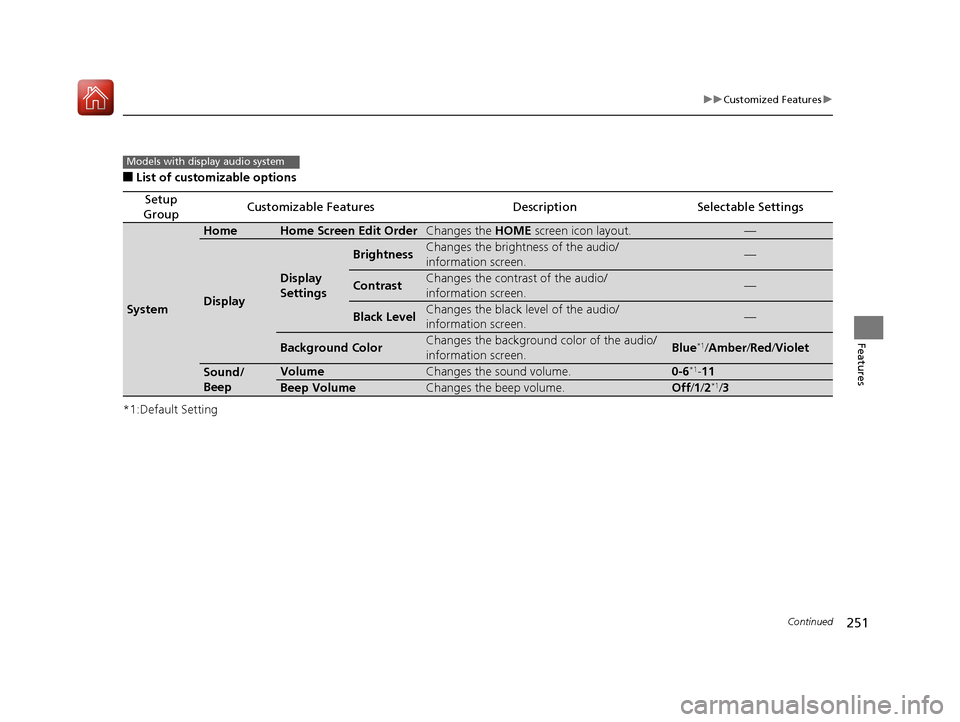
■List of customizable options
*1:Default Setting
Setup
GroupCustomizable FeaturesDescriptionSelectable Settings
System
HomeHome Screen Edit OrderChanges the HOME screen icon layout.—
Display
Display
Settings
BrightnessChanges the brightness of the audio/
information screen.—
ContrastChanges the contrast of the audio/
information screen.—
Black LevelChanges the black level of the audio/
information screen.—
Background ColorChanges the background color of the audio/
information screen.Blue*1/Amber /Red /Violet
Sound/
BeepVolumeChanges the sound volume.0-6*1-11
Beep VolumeChanges the beep volume.Off /1 /2*1/3
Models with display audio system
17 HR-V HDMC-31T7A6100.book 251 ページ 2016年7月20日 水曜日 午前9時50分
Page 254 of 489
253
uuCustomized Features u
Continued
Features
*1:Default Setting
Setup
GroupCustomizable FeaturesDescriptionSelectable Settings
System
Others
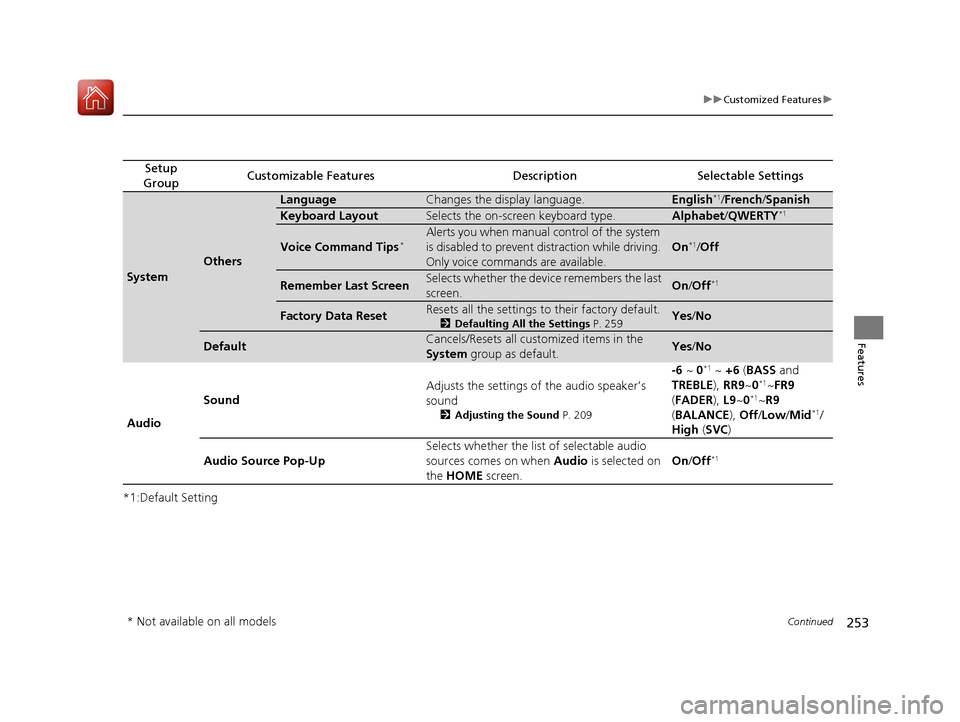
LanguageChanges the display language.English*1/ French /Spanish
Keyboard LayoutSelects the on-screen keyboard type.Alphabet /QWERTY*1
Voice Command Tips*Alerts you when manual control of the system
is disabled to prevent distraction while driving.
Only voice commands are available.
On*1/Off
Remember Last ScreenSelects whether the device remembers the last
screen.On /Off*1
Factory Data ResetResets all the settings to their factory default.
2 Defaulting All the Settings P. 259Yes/No
DefaultCancels/Resets all customized items in the
System group as default.Yes /No
Audio Sound
Adjusts the settings of the audio speaker’s
sound
2
Adjusting the Sound P. 209
-6 ~ 0*1 ~ +6 (BASS and
TREBLE ), RR9~0*1~FR9
( FADER ), L9 ~0*1~R9
( BALANCE ), Off /Low /Mid*1/
High (SVC )
Audio Source Pop-Up Selects whether the list of selectable audio
sources comes on when
Audio is selected on
the HOME screen. On
/Off
*1
* Not available on all models
17 HR-V HDMC-31T7A6100.book 253 ページ 2016年7月20日 水曜日 午前9時50分
Page 255 of 489
![HONDA HR-V 2017 2.G Manual Online 254
uuCustomized Features u
Features
*1:Default Setting
Setup
GroupCustomizable FeaturesDescriptionSelectable Settings
Audio [Your selected media]
Cover ArtTurns on and off the cover art display.
On](/img/13/5941/w960_5941-254.png "HONDA HR-V 2017 2.G Manual Online 254
uuCustomized Features u
Features
*1:Default Setting
Setup
GroupCustomizable FeaturesDescriptionSelectable Settings
Audio [Your selected media]
Cover ArtTurns on and off the cover art display.
On")
254
uuCustomized Features u
Features
*1:Default Setting
Setup
GroupCustomizable FeaturesDescriptionSelectable Settings
Audio [Your selected media]
Cover ArtTurns on and off the cover art display.
On
*1/Off
Display
Adjustment Display
Brightness
2
System P. 251Contrast
Black Level
Color Color
Changes the color of the audio/information
screen. —
Tint Changes the tint of
the audio/information
screen. —
Aspect Ratio Adjustment Changes the aspect ratio and zoom settings of
the audio/information screen.
Normal
/Full
*1/Zoom
Change Bluetooth Audio Device Connects, disconnects or pairs a Bluetooth
®
Audio device to HFL. —
Bluetooth Device List Pairs a new phone to HFL, edits or deletes a
paired phone.
2
Phone Setup P. 291
—
Default Cancels/Resets all customized items in the
Audio group as default. Yes
/No
iPod or USB mode
HDMI ® mode
HDMI ® mode
Bluetooth ® Audio mode
Bluetooth ® Audio mode
17 HR-V HDMC-31T7A6100.book 254 ページ 2016年7月20日 水曜日 午前9時50分