air conditioning HONDA HR-V 2017 2.G Owners Manual
[x] Cancel search | Manufacturer: HONDA, Model Year: 2017, Model line: HR-V, Model: HONDA HR-V 2017 2.GPages: 489, PDF Size: 29.22 MB
Page 17 of 489
16
Quick Reference Guide
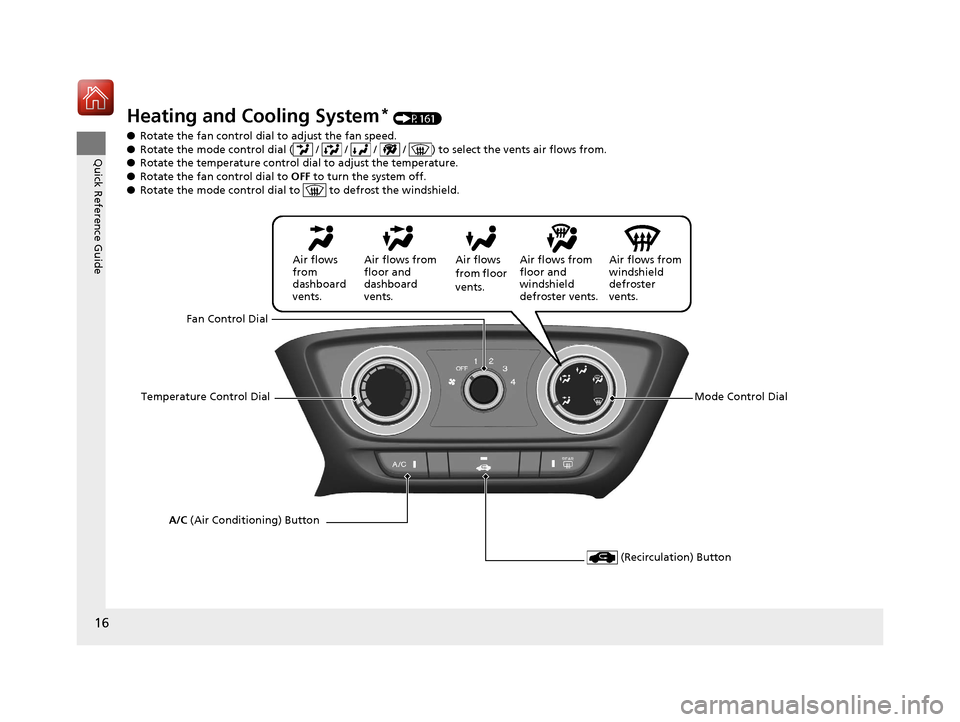
Heating and Cooling System* (P161)
● Rotate the fan control dial to adjust the fan speed.
● Rotate the mode control dial ( / / / / ) to select the vents air flows from.
● Rotate the temperature control dial to adjust the temperature.
● Rotate the fan co ntrol dial to OFF to turn the system off.
● Rotate the mode control dial to to defrost the windshield.
Fan Control Dial
A/C (Air Conditioning) Button Air flows from
windshield
defroster
vents.
Air flows
from floor
vents.
Air flows from
floor and
dashboard
vents.
Air flows
from
dashboard
vents.
Temperature Control Dial Air flows from
floor and
windshield
defroster vents.
Mode Control Dial
(Recirculation) Button
17 HR-V HDMC-31T7A6100.book 16 ページ 2016年7月20日 水曜日 午前9時50分
Page 18 of 489
17
Quick Reference Guide
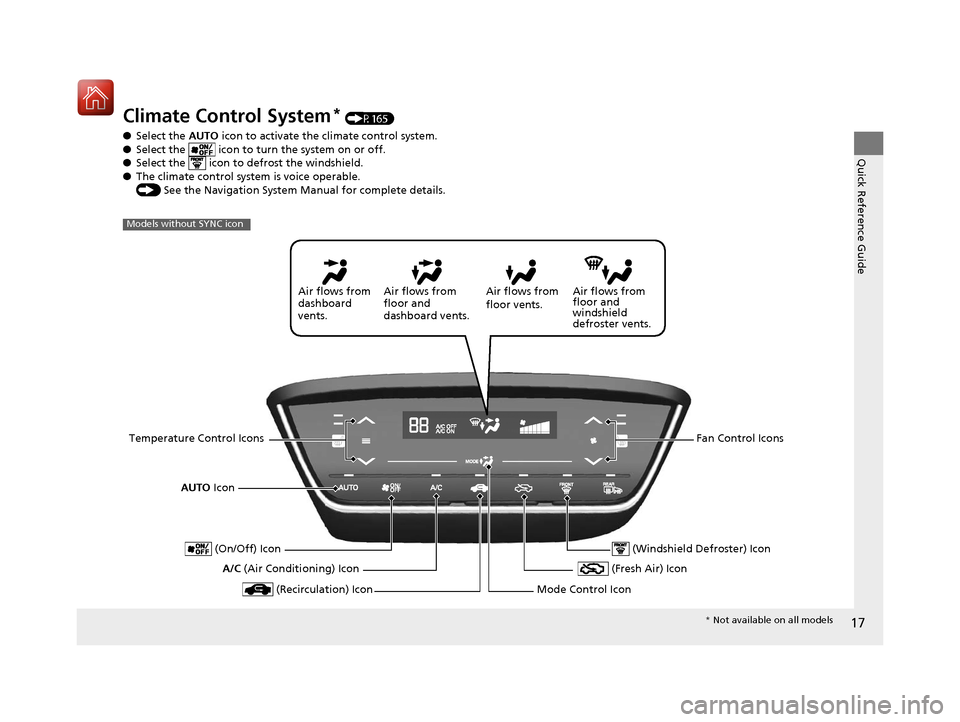
Climate Control System* (P165)
● Select the AUTO icon to activate the climate control system.
● Select the icon to tu rn the system on or off.
● Select the icon to defrost the windshield.
● The climate control system is voice operable.
() See the Navigation System Manual for complete details.
Models without SYNC icon
AUTO Icon
A/C (Air Conditioning) Icon Air flows from
floor and
windshield
defroster vents.
Air flows from
floor vents.
Air flows from
floor and
dashboard vents.
Air flows from
dashboard
vents.
Temperature Control Icons Fan Control Icons
(Recirculation) Icon
(On/Off) Icon
(Fresh Air) Icon
Mode Control Icon
(Windshield Defroster) Icon
* Not available on all models
17 HR-V HDMC-31T7A6100.book 17 ページ 2016年7月20日 水曜日 午前9時50分
Page 19 of 489
18
Quick Reference Guide
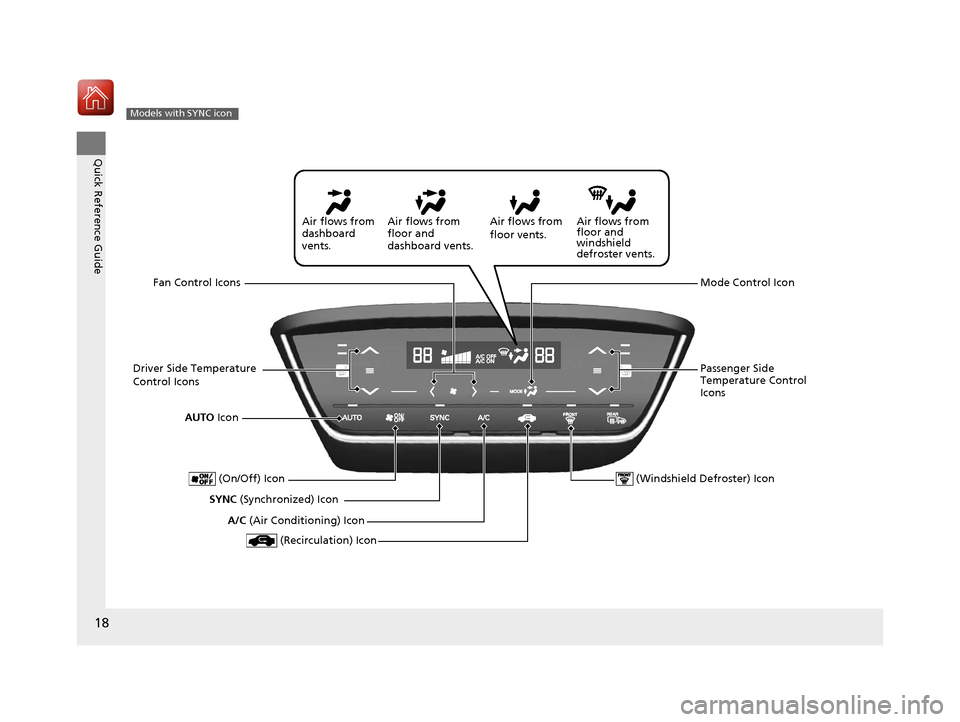
Models with SYNC icon
AUTO Icon
SYNC (Synchronized) Icon Air flows from
floor and
windshield
defroster vents.
Air flows from
floor vents.
Air flows from
floor and
dashboard vents.
Air flows from
dashboard
vents.
Driver Side Temperature
Control Icons Passenger Side
Temperature Control
Icons
(Recirculation) Icon
(On/Off) Icon
Mode Control Icon
(Windshield Defroster) Icon
A/C (Air Conditioning) Icon
Fan Control Icons
17 HR-V HDMC-31T7A6100.book 18 ページ 2016年7月20日 水曜日 午前9時50分
Page 164 of 489
Continued163
uuHeating and Cooling System*uUsing Vents, Heating and A/C
Controls
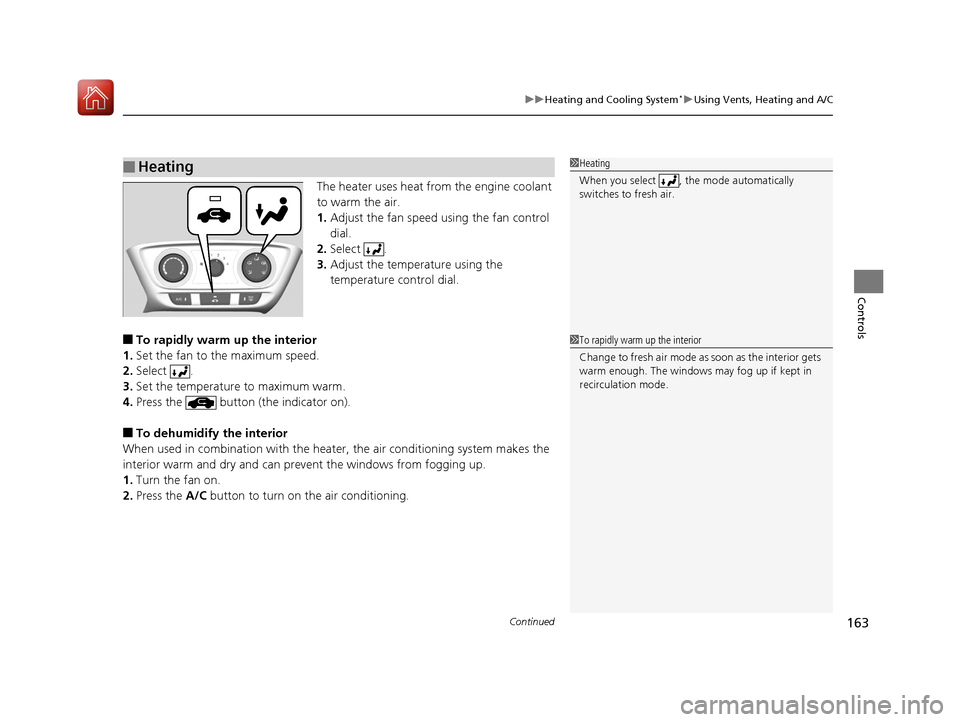
The heater uses heat from the engine coolant
to warm the air.
1. Adjust the fan speed using the fan control
dial.
2. Select .
3. Adjust the temperature using the
temperature control dial.
■To rapidly warm up the interior
1. Set the fan to the maximum speed.
2. Select .
3. Set the temperature to maximum warm.
4. Press the button (the indicator on).
■To dehumidify the interior
When used in combination with the heat er, the air conditioning system makes the
interior warm and dry and can prev ent the windows from fogging up.
1. Turn the fan on.
2. Press the A/C button to turn on the air conditioning.
■Heating1Heating
When you select , the mode automatically
switches to fresh air.
1To rapidly warm up the interior
Change to fresh air mode as soon as the interior gets
warm enough. The windows may fog up if kept in
recirculation mode.
17 HR-V HDMC-31T7A6100.book 163 ページ 2016年7月20日 水曜日 午前9時50分
Page 165 of 489
uuHeating and Cooling System*uUsing Vents, Heating and A/C
164
Controls
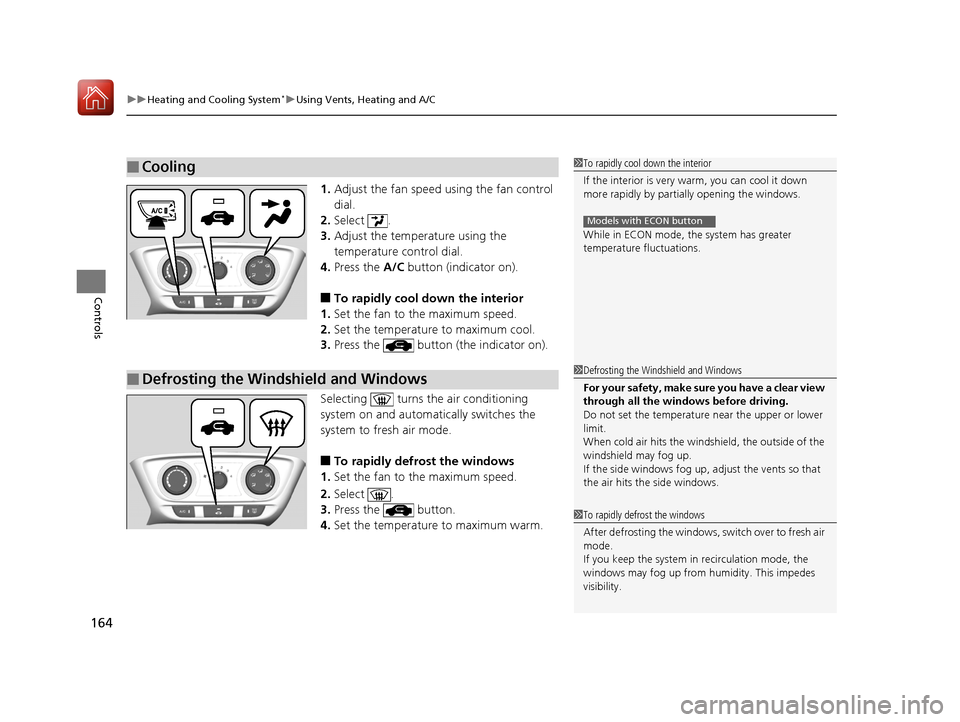
1. Adjust the fan speed using the fan control
dial.
2. Select .
3. Adjust the temperature using the
temperature control dial.
4. Press the A/C button (indicator on).
■To rapidly cool down the interior
1. Set the fan to the maximum speed.
2. Set the temperature to maximum cool.
3. Press the button (the indicator on).
Selecting turns th e air conditioning
system on and automa tically switches the
system to fresh air mode.
■To rapidly defrost the windows
1. Set the fan to the maximum speed.
2. Select .
3. Press the button.
4. Set the temperature to maximum warm.
■Cooling1To rapidly cool down the interior
If the interior is very warm, you can cool it down
more rapidly by parti ally opening the windows.
While in ECON mode, the system has greater
temperature fluctuations.
Models with ECON button
■Defrosting the Windshield and Windows1 Defrosting the Windshield and Windows
For your safety, make sure you have a clear view
through all the windows before driving.
Do not set the temperatur e near the upper or lower
limit.
When cold air hits the windshield, the outside of the
windshield may fog up.
If the side windows fog up, adjust the vents so that
the air hits th e side windows.
1To rapidly defrost the windows
After defrosting the windows, switch over to fresh air
mode.
If you keep the system in recirculation mode, the
windows may fog up from humidity. This impedes
visibility.
17 HR-V HDMC-31T7A6100.book 164 ページ 2016年7月20日 水曜日 午前9時50分
Page 166 of 489
165Continued
Controls
Climate Control System*
Using Automatic Climate Control
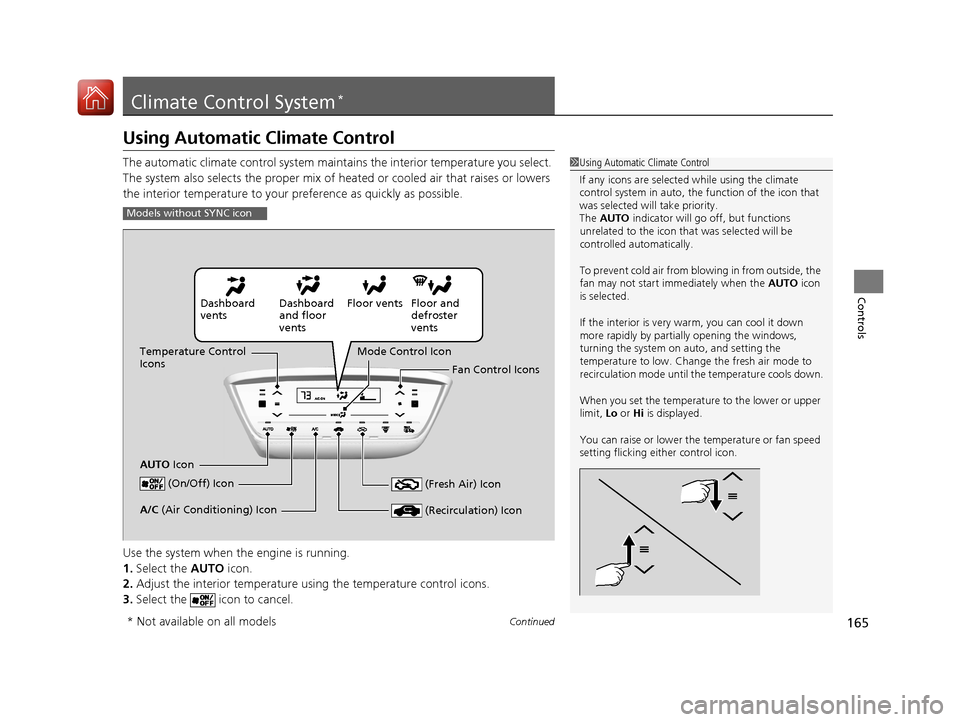
The automatic climate control system maintains the interior temperature you select.
The system also selects the proper mix of heat ed or cooled air that raises or lowers
the interior temperature to your pr eference as quickly as possible.
Use the system when the engine is running.
1. Select the AUTO icon.
2. Adjust the interior temperature us ing the temperature control icons.
3. Select the icon to cancel.1Using Automatic Climate Control
If any icons are selected while using the climate
control system in auto, the function of the icon that
was selected will take priority.
The AUTO indicator will go off, but functions
unrelated to the icon that was selected will be
controlled automatically.
To prevent cold air from bl owing in from outside, the
fan may not start i mmediately when the AUTO icon
is selected.
If the interior is very warm, you can cool it down
more rapidly by partial ly opening the windows,
turning the system on auto, and setting the
temperature to low. Change the fresh air mode to
recirculation mode until the temperature cools down.
When you set the temperat ure to the lower or upper
limit, Lo or Hi is displayed.
You can raise or lower the temperature or fan speed
setting flicking either control icon.
Models without SYNC icon
Dashboard
vents Dashboard
and floor
ventsFloor vents Floor and
defroster
vents
Temperature Control
Icons
AUTO Icon Mode Control Icon
Fan Control Icons
(On/Off) Icon
(Recirculation) IconA/C (Air Conditioning) Icon (Fresh Air) Icon
* Not available on all models
17 HR-V HDMC-31T7A6100.book 165 ページ 2016年7月20日 水曜日 午前9時50分
Page 167 of 489
uuClimate Control System*uUsing Automatic Climate Control
166
Controls
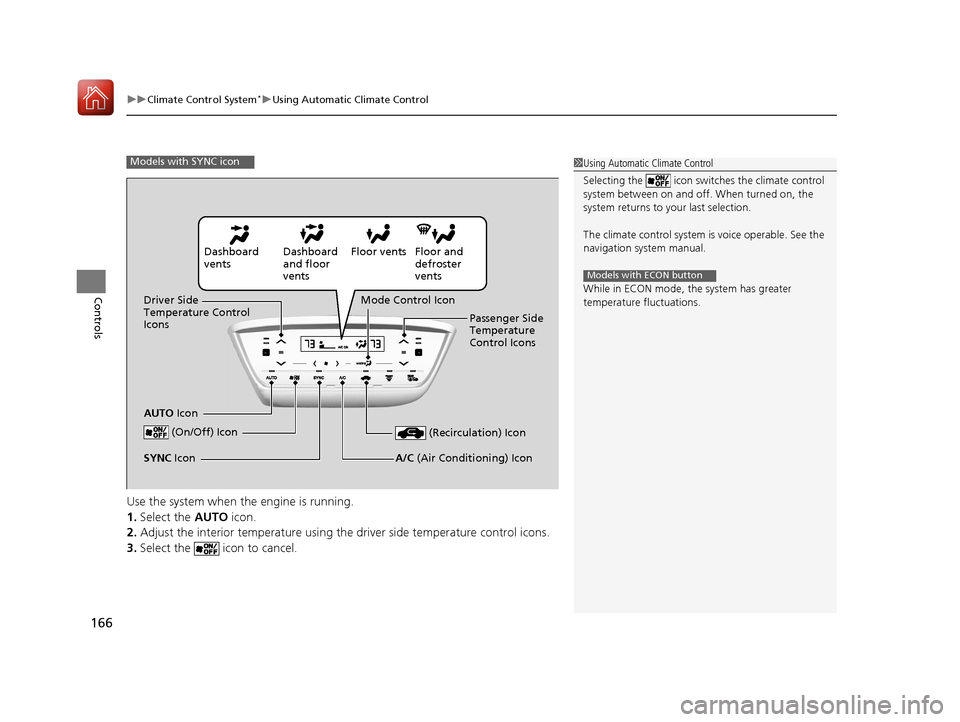
Use the system when the engine is running.
1. Select the AUTO icon.
2. Adjust the interior temperature using th e driver side temperature control icons.
3. Select the icon to cancel.
1Using Automatic Climate Control
Selecting the icon switches the climate control
system between on and off. When turned on, the
system returns to your last selection.
The climate control system is voice operable. See the
navigation sy stem manual.
While in ECON mode, the system has greater
temperature fluctuations.
Models with ECON button
Models with SYNC icon
Dashboard
vents Dashboard
and floor
ventsFloor vents Floor and
defroster
vents
Driver Side
Temperature Control
Icons
AUTO Icon Mode Control Icon
Passenger Side
Temperature
Control Icons
(On/Off) Icon
(Recirculation) Icon
A/C (Air Conditioning) IconSYNC Icon
17 HR-V HDMC-31T7A6100.book 166 ページ 2016年7月20日 水曜日 午前9時50分
Page 169 of 489
uuClimate Control System*uUsing Automatic Climate Control
168
Controls
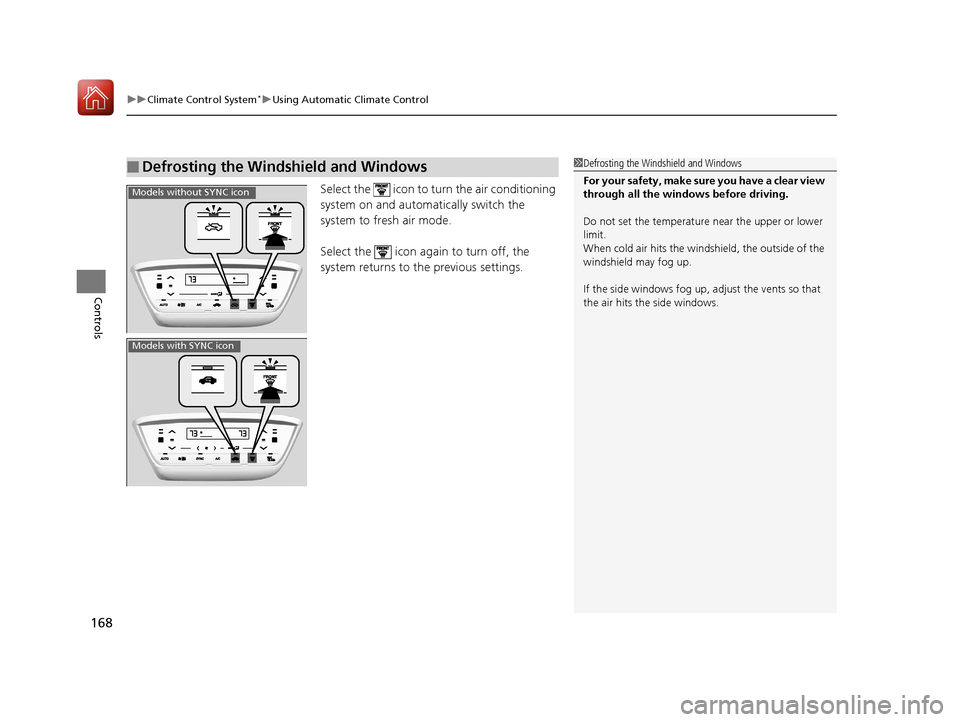
Select the icon to turn the air conditioning
system on and automa tically switch the
system to fresh air mode.
Select the icon again to turn off, the
system returns to the previous settings.
■Defrosting the Windshield and Windows1 Defrosting the Windshield and Windows
For your safety, make sure you have a clear view
through all the windows before driving.
Do not set the temperatur e near the upper or lower
limit.
When cold air hits the windshield, the outside of the
windshield may fog up.
If the side windows fog up, adjust the vents so that
the air hits th e side windows.
Models without SYNC icon
Models with SYNC icon
17 HR-V HDMC-31T7A6100.book 168 ページ 2016年7月20日 水曜日 午前9時50分
Page 467 of 489
466
Information
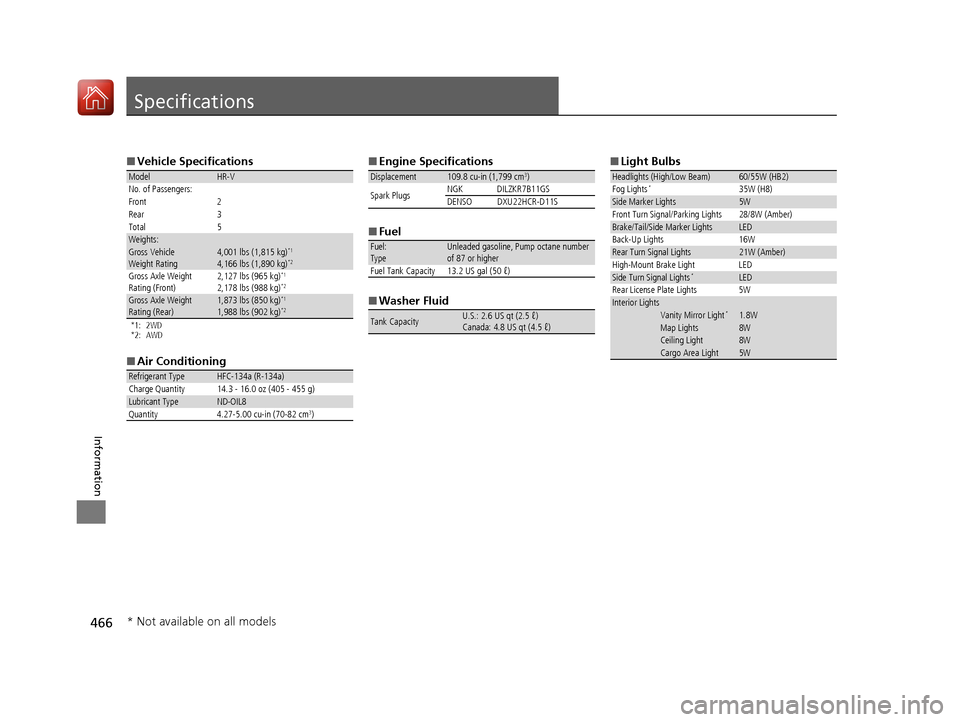
Specifications
■Vehicle Specifications
*1: 2WD
*2: AWD
■Air Conditioning
ModelHR-V
No. of Passengers:
Front 2
Rear 3
Total 5
Weights:Gross Vehicle
Weight Rating 4,001 lbs (1,815 kg)*1
4,166 lbs (1,890 kg)*2
Gross Axle Weight
Rating (Front)2,127 lbs (965 kg)*1
2,178 lbs (988 kg)*2
Gross Axle Weight
Rating (Rear)1,873 lbs (850 kg)*1
1,988 lbs (902 kg)*2
Refrigerant Type HFC-134a (R-134a)
Charge Quantity 14.3 - 16.0 oz (405 - 455 g)
Lubricant TypeND-OIL8
Quantity 4.27-5.00 cu-in (70-82 cm3)
■ Engine Specifications
■ Fuel
■ Washer Fluid
Displacement109.8 cu-in (1,799 cm3)
Spark Plugs NGK DILZKR7B11GS
DENSODXU22HCR-D11S
Fuel:
TypeUnleaded gasoline, Pump octane number
of 87 or higher
Fuel Tank Capacity 13.2 US gal (50 ℓ)
Tank CapacityU.S.: 2.6 US qt (2.5 ℓ)
Canada: 4.8 US qt (4.5 ℓ)
■ Light Bulbs
Headlights (High/Low Beam)60/55W (HB2)
Fog Lights*35W (H8)Side Marker Lights5W
Front Turn Signal/Parking Lights 28/8W (Amber)
Brake/Tail/Side Marker LightsLED
Back-Up Lights 16W
Rear Turn Signal Lights21W (Amber)
High-Mount Brake Light LED
Side Turn Signal Lights*LED
Rear License Plate Lights 5W
Interior LightsVanity Mirror Light*1.8WMap Lights8WCeiling Light8WCargo Area Light5W
* Not available on all models
17 HR-V HDMC-31T7A6100.book 466 ページ 2016年7月20日 水曜日 午前9時50分
Page 479 of 489
Index
478
Index
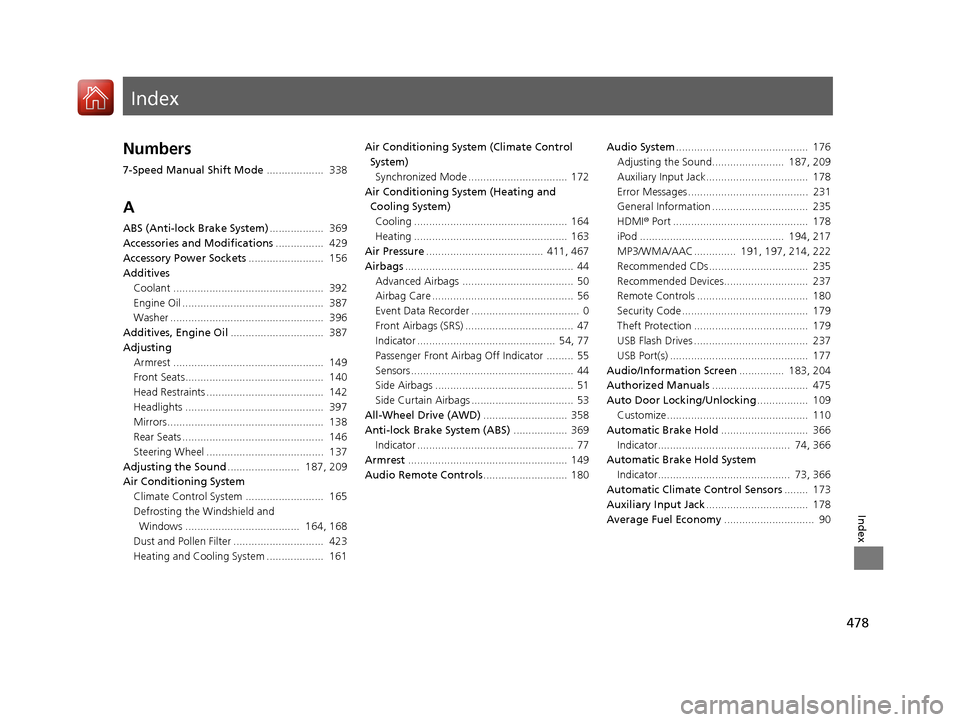
Index
Numbers
7-Speed Manual Shift Mode................... 338
A
ABS (Anti-lock Brake System) .................. 369
Accessories and Modifications ................ 429
Accessory Power Sockets ......................... 156
Additives Coolant .................................................. 392
Engine Oil ............................................... 387
Washer ................................................... 396
Additives, Engine Oil ............................... 387
Adjusting Armrest .................................................. 149
Front Seats.............................................. 140
Head Restraints ....................................... 142
Headlights .............................................. 397
Mirrors.................................................... 138
Rear Seats ............................................... 146
Steering Wheel ....................................... 137
Adjusting the Sound ........................ 187, 209
Air Conditioning System Climate Control System .......................... 165
Defrosting the Windshield and Windows ...................................... 164, 168
Dust and Pollen Filter .............................. 423
Heating and Cooling System ................... 161 Air Conditioning System (Climate Control
System)
Synchronized Mode ................................. 172
Air Conditioning System (Heating and Cooling System)
Cooling ................................................... 164
Heating ................................................... 163
Air Pressure ....................................... 411, 467
Airbags ........................................................ 44
Advanced Airbags ..................................... 50
Airbag Care ............................................... 56
Event Data Recorder .................................... 0
Front Airbags (SRS) .................................... 47
Indicator .............................................. 54, 77
Passenger Front Airbag Off Indicator ......... 55
Sensors ...................................................... 44
Side Airbags .............................................. 51
Side Curtain Airbags .................................. 53
All-Wheel Drive (AWD) ............................ 358
Anti-lock Brake System (ABS) .................. 369
Indicator .................................................... 77
Armrest ..................................................... 149
Audio Remote Controls ............................ 180 Audio System
............................................ 176
Adjusting the Sound........................ 187, 209
Auxiliary Input Jack.................................. 178
Error Messages ........................................ 231
General Information ................................ 235
HDMI ® Port ............................................. 178
iPod ................................................ 194, 217
MP3/WMA/AAC .............. 191, 197, 214, 222
Recommended CDs ................................. 235
Recommended Devices............................ 237
Remote Controls ..................................... 180
Security Code .......................................... 179
Theft Protection ...................................... 179
USB Flash Drives ...................................... 237
USB Port(s) .............................................. 177
Audio/Information Screen ............... 183, 204
Authorized Manuals ................................ 475
Auto Door Locking/Unlocking ................. 109
Customize ............................................... 110
Automatic Brake Hold ............................. 366
Indicator............................................ 74, 366
Automatic Brake Hold System
Indicator............................................ 73, 366
Automatic Climate Control Sensors ........ 173
Auxiliary Input Jack .................................. 178
Average Fuel Economy .............................. 90
17 HR-V HDMC-31T7A6100.book 478 ページ 2016年7月20日 水曜日 午前9時50分