ECU HONDA HR-V 2017 2.G Quick Guide
[x] Cancel search | Manufacturer: HONDA, Model Year: 2017, Model line: HR-V, Model: HONDA HR-V 2017 2.GPages: 78, PDF Size: 5.33 MB
Page 65 of 78
122 || 123
MAINTENANCE
MAINTENANCE
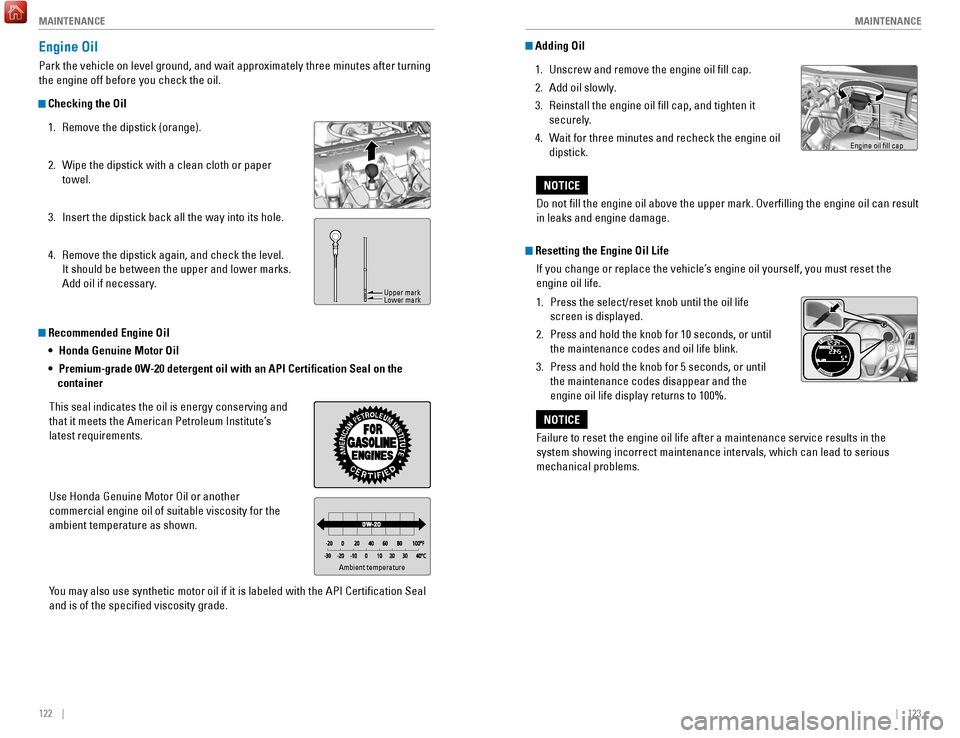
Recommended Engine Oil
• Honda Genuine Motor Oil
•
Premium-grade 0W
-20 detergent oil with an API Certification Seal on the
container
This seal indicates the oil is energy conserving and
that it meets the American Petroleum Institute’s
latest requirements.
Use Honda Genuine Motor Oil or another
commercial engine oil of suitable viscosity for the
ambient temperature as shown.
You may also use synthetic motor oil if it is labeled with the API Certifi\
cation Seal
and is of the specified viscosity grade.
Engine Oil
Park the vehicle on level ground, and wait approximately three minutes after turning
the engine off before you check the oil.
Checking the Oil 1.
Remove the dipstick (orange).
2.
Wipe the dipstick with a clean cloth or paper
towel.
3.
Insert the dipstick back all the way into its hole.
4.
Remove the dipstick again, and check the level.
It should be between the upper and lower marks.
Add oil if necessary
.
Ambient temperature
Upper mark
Lower mark
Adding Oil1.
Unscrew and remove the engine oil fill cap.
2.
Add oil slowly
.
3.
Reinstall the engine oil fill cap, and tighten it
securely
.
4.
W
ait for three minutes and recheck the engine oil
dipstick.
Failure to reset the engine oil life after a maintenance service results\
in the
system showing incorrect maintenance intervals, which can lead to seriou\
s
mechanical problems.
NOTICE
Engine oil fill cap
Do not fill the engine oil above the upper mark. Overfilling the eng\
ine oil can result
in leaks and engine damage.
NOTICE
Resetting the Engine Oil Life If you change or replace the vehicle’s engine oil yourself, you must reset the
engine oil life.
1.
Press the select/reset knob until the oil life
screen is displayed.
2.
Press and hold the knob for 10 seconds, or until
the maintenance codes and oil life blink.
3.
Press and hold the knob for 5 seconds, or until
the maintenance codes disappear and the
engine oil life display returns to 100%.
Page 67 of 78

126 || 127
MAINTENANCE
MAINTENANCE
Changing Wiper Blades
If the wiper blades leave streaks across the windshield, try cleaning th\
em first with a
paper towel or soft cloth and wiper fluid. If the wiper blade rubber h\
as deteriorated,
you should change the wiper blades.
Changing the Front Wiper Blade Rubber
1.
Lift the driver side wiper arm first, then the
passenger side.
2.
Press and hold the tab, then slide the blade
holder off the wiper arm.
3.
Slide the wiper blade out from its holder by
pulling the tabbed end out.
4.
Slide the new wiper blade onto the holder from
the bottom end. The tab on the blade should fit
in the indent of the top of the wiper blade.
5.
Slide the wiper blade onto the wiper arm
securely
.
6.
Lower the passenger side wiper arm first, then
the driver side.
Lock tab Blade
Ta b Blade
Avoid dropping the wiper arm, as it may damage the windshield.
NOTICE
Changing the Rear Wiper Blade Rubber
1.
Lift the wiper arm off the window
.
2.
Pivot up the bottom end of the wiper blade until it
comes off from the wiper arm.
3.
Slide the wiper blade out from the end with the
indent.
4.
Remove the retainers from the rubber blade that
has been removed, and mount to a new rubber
blade.
5.
Slide the new wiper blade onto the holder
. Make
sure it is engaged correctly, then install the wiper
blade assembly onto the wiper arm.
Lock tab
Retainers
Holder
Page 76 of 78
144 || 145
INDEX
VOICE COMMAND INDEX
Phone Commands
The system accepts these commands on most screens.
Info CommandsThe system accepts these commands on most screens.
•
T
rip computer
•
Display traffic list*
•
Display traffic on my route* •
Display clock
•
Display wallpaper
On-screen CommandsThe system accepts these commands on any screen where applicable. All
available commands are highlighted in yellow when you press the Talk button.
•
Next (or previous)
•
Up (or down)
•
Right (or left)
•
Return
•
OK (excluding Startup Confirmation screen)
•
Delete
*if equipped
• Dial/call by number
•
Dial/call by name
•
Call (phone number or name)
INDEX
ABS........................................................................\
...... 25
Accessory Power Socket ........................................49
Airbags........................................................................\
.. 9 About Y
our Airbags
................................................ 11
Advanced Airbags
.................................................... 9
Airbag Care
............................................................. 14
Airbag System Components
.................................13
Airbag System Indicators
.....................................11
Front Airbags (SRS)
.................................................. 9
Passenger Airbag Off Indicator
...........................12
Side Airbags
............................................................ 10
Side Curtain Airbags
.............................................. 10
SRS (Supplemental Restraint System) Indicator
11
Airbag System Components
....................................13
Airbag System Indicators
........................................11
Air Conditioning System........................................... 43
All Wheel Drive (A
WD) ............................................. 25
Ambient Meter........................................................... 95 Anti-Lock Brake System (ABS)
.........................25, 93
Audio Commands
.................................................... 142
Audio Operation
........................................................ 49
Accessory Power Socket
.....................................49
Auxiliary Input Jack
............................................... 50
Bluetooth® Audio
............................................ 57, 65
Color Audio System
................................................ 52
Compact Disc (CD)
........................................... 54
, 62
FM/AM Radio
.................................................... 53, 60
HDMI Port
................................................................ 49
HDMI Video
............................................................. 67
HondaLink™
............................................................ 59
iPod®
................................................................. 55, 63
Pandora®
................................................................ 66
SiriusXM® Radio
................................................... 61
Sound
....................................................................... 51
Steering Wheel Controls
.......................................50
Touchscreen Operation
.........................................58
USB Flash Drive
................................................ 56, 64
USB Port
.................................................................. 49
AUTO
........................................................................\
... 36
Automatic Brake Hold
.............................................. 94
Automatic Dimming Rearview Mirror
....................42
AUX Commands....................................................... 143 Auxiliary Input Jack
.................................................. 50
AWD
........................................................................\
.... 25
BACK button............................................................... 68 Battery
...................................................................... 125Bluetooth® Audio
...............................................57, 65
Bluetooth® Audio Commands ..............................143
Bluetooth® Handsfreelink® (HFL)......................... 68 E-Mail
.......................................................................76
HFL Controls
......................................................68, 71
HondaLink™ Assist
................................................77
Making a Call
....................................................70, 74
Pairing a Phone
................................................69, 73
Siri Eyes Free
..........................................................77
SMS Text Messaging
.............................................76
Speed Dial
.........................................................70, 75
Talk Button Tips
......................................................72
Voice Recognition Tips
..........................................72
Brake Assist System................................................. 93
Brake depress
...........................................................27
Brake hold
..................................................................27
Brake system
.......................................................24, 25
Braking........................................................................\
92 Brightness Control
....................................................35
Built-in key
.................................................................29
Calibration
................................................................107
Carbon Monoxide Gas................................................ 4
Cargo Area Lights
.....................................................35
Changing a Flat Tire
................................................109
Changing Settings
.....................................................47
Changing Wiper Blades
.........................................126
Charging system........................................................ 24 Childproof Door Locks
..............................................31
Child Safety
................................................................15
Childproof Door Locks
...........................................31
Installing a LA
TCH-Compatible Child Seat .........18
Selecting a Child Seat
...........................................17
Child Seat
...................................................................17
Adding Security with a Tether
..............................20
Installing a LATCH-Compatible Child Seat
.........18
Selecting a Child Seat
...........................................17
Climate Control Commands
...................................141
Climate Control System
............................................44
Clock........................................................................\
.... 48 Color Audio System
..................................................52
Compact Disc (CD)
..............................................54, 62
Compact Disc (CD) Commands
.............................142
Contact Us
................................................................137
Continuously Variable Transmission (CVT)
...........90
Coolant
......................................................................124
Cruise Control
............................................................96
CRUISE
MAIN ............................................................27
CUSTOMER Information......................................... 136
Customized Features
................................................47
CVT
........................................................................\
......90
Dashboard and Other Controls
.................................2
Destination
.................................................................81
Detour
........................................................................\
.84