brake HONDA HR-V 2017 2.G Quick Guide
[x] Cancel search | Manufacturer: HONDA, Model Year: 2017, Model line: HR-V, Model: HONDA HR-V 2017 2.GPages: 78, PDF Size: 5.33 MB
Page 55 of 78

102 || 103
HANDLING THE UNEXPECTED
DRIVING
Refueling
Use the proper fuel and refueling procedure to ensure the best performan\
ce and
safety of your vehicle.
Fuel Information
Use of unleaded gasoline of 87 octane or higher is recommended.
•
Honda recommends TOP TIER Detergent Gasoline where available.
•
Do NOT use gasoline containing more than 15% ethanol.
•
Do NOT use gasoline containing methanol.
•
Do NOT use gasoline containing MMT
. Learn about what to do in critical or emergency situations.Smart Entry Remote Battery Strength*
If the battery life in your remote transmitter is weak, follow the below\
steps to start
the engine.
1.
T
ouch the back of the remote transmitter to the
ENGINE START/STOP button while the indicator is
flashing.
2.
With the brake pedal pressed (and the clutch
pedal for manual transmission), press the ENGINE
ST
ART/STOP button within 10 seconds.
HANDLING THE UNEXPECTED
*if equipped
We recommend quality gasoline containing detergent additives that help
prevent fuel system and engine deposits. In addition, in order to mainta\
in good
performance, fuel economy, and emissions control, we strongly recommend the
use of gasoline that does NOT contain harmful manganese-based fuel addit\
ives
such as MMT, if such gasoline is available.
NOTICE
Gasoline is highly flammable and explosive. You can be burned or seriously
injured when handling fuel.
•
Stop the engine, and keep heat, sparks, and flame away
.
•
Handle fuel only outdoors.
•
Wipe up spills immediately
.
WARNING
How to Refuel1.
The fuel fill door is located at the left rear of the
vehicle. Park next to the service pump that is
most accessible.
2.
T
urn off the engine.
3.
Pull the fuel fill door release handle under the
lower left corner of the dashboard. The fuel fill
door opens.
4.
T
urn the fuel fill cap slowly to open. Place the fuel
fill cap in the holder.
5.
Insert the filler nozzle fully
. When the tank is full,
the fuel nozzle clicks off automatically.
6.
Replace the fuel fill cap. T
ighten it until you hear
at least one click. Close the fuel fill door.
Pull
Holder Cap
Shift Lever Does Not Move*
Follow the procedure below if you cannot move the shift lever out of Par\
k (P).
1.
Set the parking brake.
2.
Remove the key from the ignition, or remove the
built-in key from the remote transmitter
.
3.
W
rap a cloth around the tip of a small flat-tip
screwdriver. Put it into the shift lock release slot as
shown in the image, and remove the cover.
4.
Insert the key into the shift lock release slot.
5.
While pushing the key down, press the shift lever
release button and place the shift lever into Neutral
(N). The lock is now released. Have the shift lever
checked by a dealer as soon as possible.
Slot
Release button Shift lock
release slot
Cover
Page 57 of 78
106 || 107
HANDLING THE UNEXPECTED
HANDLING THE UNEXPECTED
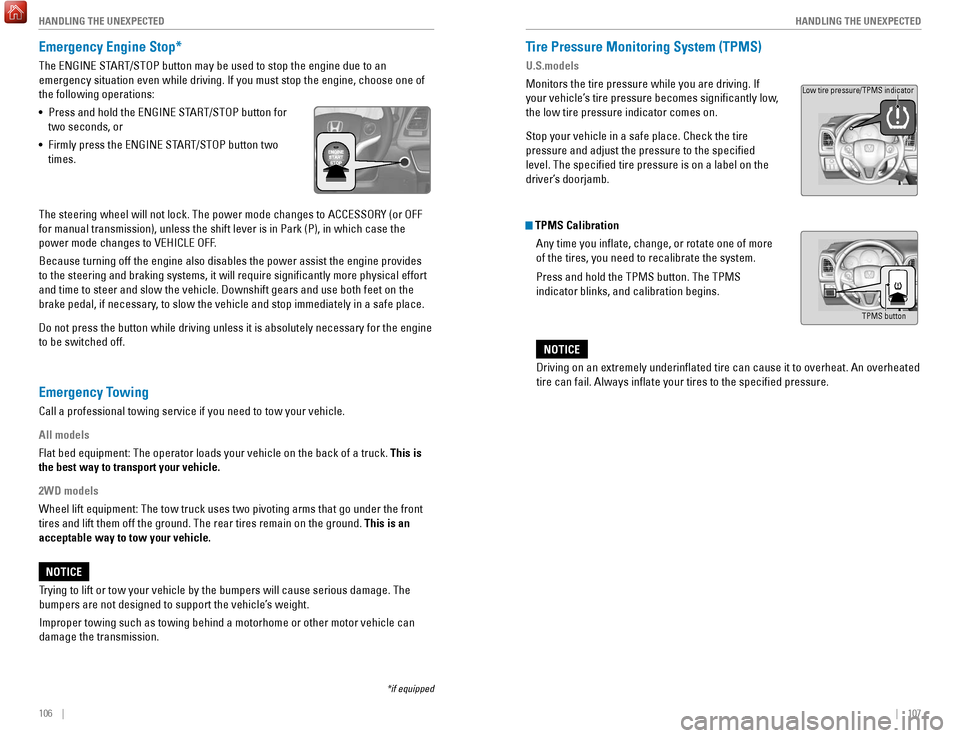
Emergency Engine Stop*
The ENGINE START/STOP button may be used to stop the engine due to an
emergency situation even while driving. If you must stop the engine, cho\
ose one of
the following operations:
•
Press and hold the ENGINE ST
ART/STOP button for
two seconds, or
•
Firmly press the ENGINE ST
ART/STOP button two
times.
The steering wheel will not lock. The power mode changes to ACCESSORY (\
or OFF
for manual transmission), unless the shift lever is in Park (P), in w\
hich case the
power mode changes to VEHICLE OFF.
Because turning off the engine also disables the power assist the engine\
provides
to the steering and braking systems, it will require significantly mor\
e physical effort
and time to steer and slow the vehicle. Downshift gears and use both fee\
t on the
brake pedal, if necessary, to slow the vehicle and stop immediately in a safe place.
Do not press the button while driving unless it is absolutely necessary \
for the engine
to be switched off.
*if equipped
Tire Pressure Monitoring System (TPMS)
U.S.models
Monitors the tire pressure while you are driving. If
your vehicle’s tire pressure becomes significantly low,
the low tire pressure indicator comes on.
Stop your vehicle in a safe place. Check the tire
pressure and adjust the pressure to the specified
level. The specified tire pressure is on a label on the
driver’s doorjamb.
TPMS Calibration Any time you inflate, change, or rotate one of more
of the tires, you need to recalibrate the system.
Press and hold the TPMS button. The TPMS
indicator blinks, and calibration begins.
Driving on an extremely underinflated tire can cause it to overheat. A\
n overheated
tire can fail. Always inflate your tires to the specified pressure.
NOTICE
TPMS button
Low tire pressure/TPMS indicator
Trying to lift or tow your vehicle by the bumpers will cause serious dama\
ge. The
bumpers are not designed to support the vehicle’s weight.
Improper towing such as towing behind a motorhome or other motor vehicle\
can
damage the transmission.
NOTICE
Emergency Towing
Call a professional towing service if you need to tow your vehicle.
All models
Flat bed equipment: The operator loads your vehicle on the back of a tru\
ck. This is
the best way to transport your vehicle.
2WD models
Wheel lift equipment: The tow truck uses two pivoting arms that go under\
the front
tires and lift them off the ground. The rear tires remain on the ground.\
This is an
acceptable way to tow your vehicle.
Page 58 of 78
108 || 109
HANDLING THE UNEXPECTED
HANDLING THE UNEXPECTED
Tire Pressure Monitoring System (TPMS) — Required Federal
Explanation
U.S. models only
Each tire, including the spare (if provided), should be checked monthl\
y
when cold and inflated to the inflation pressure recommended by the \
vehicle manufacturer on the vehicle placard or tire inflation pressure\
label.
(If your vehicle has tires of a different size than the size indicated \
on the
vehicle placard or tire inflation pressure label, you should determine\
the
proper tire inflation pressure for those tires.)
As an added safety feature, your vehicle has been equipped
with a tire pressure monitoring system (TPMS) that illuminates
a low tire pressure telltale when one or more of your tires is
significantly under-inflated.
Accordingly, when the low tire pressure telltale illuminates, you should
stop and check your tires as soon as possible, and inflate them to the\
proper pressure.
Driving on a significantly under-inflated tire causes the tire to overheat
and can lead to tire failure. Under-inflation also reduces fuel efficiency
and tire tread life, and may affect the vehicle’s handling and stopping
ability.
Please note that the TPMS is not a substitute for proper tire maintenanc\
e,
and it is the driver’s responsibility to maintain correct tire pressure, even
if under-inflation has not reached the level to trigger illumination of the
TPMS low tire pressure telltale.
Your vehicle has also been equipped with a TPMS malfunction indicator
to indicate when the system is not operating properly. The TPMS
malfunction indicator is combined with the low tire pressure telltale.
When the system detects a malfunction, the telltale will flash for
approximately one minute and then remain continuously illuminated. This \
sequence will continue upon subsequent vehicle start-ups as long as the \
malfunction exists.
When the malfunction indicator is illuminated, the system may not be abl\
e
to detect or signal low tire pressure as intended.
TPMS malfunctions may occur for a variety of reasons, including the
installation of replacement or alternate tires or wheels on the vehicle \
that
prevent the TPMS from functioning properly.
Always check the TPMS malfunction telltale after replacing one or
more tires or wheels on your vehicle to ensure that the replacement
or alternate tires and wheels allow the TPMS to continue to function
properly.Changing a Flat Tire
If a tire goes flat while driving, grasp the steering wheel firmly, and brake gradually
to reduce speed. Then, stop in a safe place. Replace the flat tire wit\
h the compact
spare tire. Go to a dealer as soon as possible to have the full-size tir\
e repaired or
replaced.
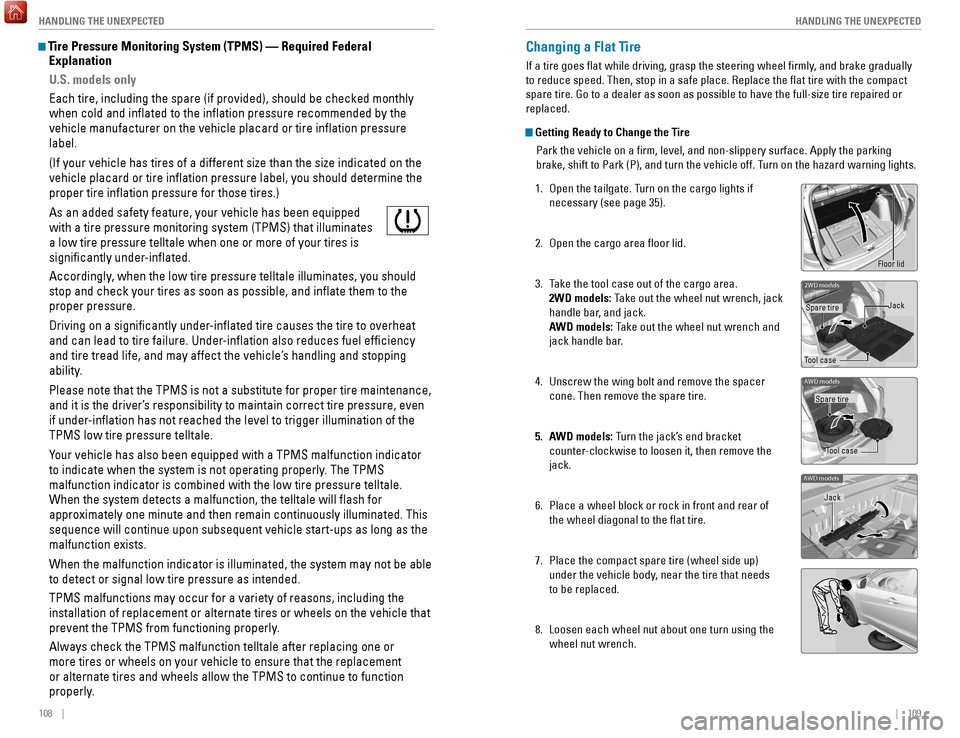
Getting Ready to Change the Tire
Park the vehicle on a firm, level, and non-slippery surface. Apply the\
parking
brake, shift to Park (P), and turn the vehicle off. Turn on the hazard warning lights.
1.
Open the tailgate. T
urn on the cargo lights if
necessary (see page 35).
2.
Open the cargo area floor lid.
3.
T
ake the tool case out of the cargo area.
2WD models: Take out the wheel nut wrench, jack
handle bar, and jack.
AWD models: Take out the wheel nut wrench and
jack handle bar.
4.
Unscrew the wing bolt and remove the spacer
cone. Then remove the spare tire.
5.
A
WD models: Turn the jack’s end bracket
counter-clockwise to loosen it, then remove the
jack.
6.
Place a wheel block or rock in front and rear of
the wheel diagonal to the flat tire.
7.
Place the compact spare tire (wheel side up)
under the vehicle body
, near the tire that needs
to be replaced.
8.
Loosen each wheel nut about one turn using the
wheel nut wrench.
2WD model s
Tool caseSpare tire
Jack
AWD models
Tool case
Spare tire
AWD models
Jack
Floor lid
Page 60 of 78

112 || 113
HANDLING THE UNEXPECTED
HANDLING THE UNEXPECTED
Loose items can fly around the interior in a crash and can seriously i\
njure the
occupants.
Store the wheel, jack, and tools securely before driving.
WARNING
AWD models
1.
Remove the storage bag from the tool case.
2.
Put the flat tire in the storage bag and knot the
top of the bag tightly
.
3.
Poke a hole through the bag and pass the holding
belt through the hole of the bag and the wheel of
the flat tire, as shown.
4.
Place the flat tire in the cargo area, and thread
the belt through the rear anchor
, as shown.
5.
Pass the belt through the ring and tighten the belt
to secure the flat tire in place.
Belt
Rear anchor
Fuse Locations
If any electrical devices are not working, turn the vehicle off and chec\
k to see if any
applicable fuse is blown. Fuse locations are shown on the fuse box cover\
. Locate the
fuse in question by the fuse number and box cover number.
Engine Compartment Fuse BoxesFuse box A
Located under the hood near the brake fluid reservoir. Push the tabs to open the
box.
Circuit ProtectedAmps1Headlight Low Beam Main20 A2CDC*(30A )3Hazard10A4DBW15 A5Wiper*(30A )6Stop10A7IGP15 A8IG Coi l15A9EOP*(10A )10INJ*(20A )11VST2*(30A )12Main Fa n30A13Starter SW*(30A )14MG Clutc h7.5A15Battery Sensor(7.5 A)16Small Light10 A17AFP Main*(10A )18Horn10A19Fog Ligh t*(10A )20SBW*(10A )
Circuit Protecte dAmps
21 Back Up Main 10A
22 Audio (10 A)
23 Sub Fan (30 A)
24 VST1
*(30 A)
25 STRLD*(7.5 A)
26 IGP CAM*(7.5A)
27 – –
28 – –
29 Back Up
*(30 A)
30 IGP LAF (7.5A)
31 IGPS (7.5 A)
32 Right Headlight Low Beam 10A
33 Left Headlight Low Beam 10A
*if equipped
Ta b
Circuit Protected Amps
1 Headlight Low Beam Main 20 A
2 CDC
*(30A )
3 Hazard 10A
4 DBW 15 A
5 Wiper
*(30A )
6 Stop 10A
7 IGP 15 A
8 IG Coil 15A
9 EOP
*(10A )
10 INJ*(20A )
11 VST2*(30A )
12 Main Fan 30A
13 Starter SW
*(30A )
14 MG Clutch 7.5A
15 Battery Sensor (7.5 A)
16 Small Light 10A
17 AFP Main
*(10A )
18 Horn 10A
19 Fog Light
*(10A )
20 SBW*(10A )
Circuit Protecte dAmps21Back Up Main10A22Audio(10 A)23Sub Fan(30 A)24VST1*(30 A)25STRLD*(7.5 A)26IGP CAM*(7.5A )27––28––29Back Up*(30 A)30IGP LAF(7.5A)31IGPS(7.5 A)32Right Headlight Low Beam10A33Left Headlight Low Beam10A
Page 63 of 78

118 || 119
MAINTENANCE
MAINTENANCE
Learn about basic maintenance that you can perform on the vehicle yourse\
lf, as well
as information about how to best maintain the vehicle.
Safety Precautions
Some of the most important safety precautions are listed below; however, we cannot
warn you of every conceivable hazard that can arise in performing mainte\
nance.
Only you can decide whether or not you should perform a given task.
Maintenance Safety
•
T
o reduce the possibility of fire or explosion, keep cigarettes, sparks\
, and flames
away from the battery and all fuel-related parts.
•
Never leave rags, towels, or other flammable objects under the hood. H\
eat
from
the engine and exhaust can ignite them, causing a fire.
•
T
o clean parts, use a commercially available degreaser or parts cleaner, not
gasoline.
•
W
ear eye protection and protective clothing when working with the battery\
or
compressed air.
•
Do not run the engine in confined spaces where carbon monoxide gas can\
accumulate.
Vehicle Safety
•
The vehicle must be stationary
, and parked on level ground with the parking
brake set and the engine off.
•
Be aware that hot parts can burn you.
•
Be aware that moving parts can injure you.
MAINTENANCEMaintenance Minder™
Reminds you when indicated maintenance service is due.
When maintenance is due, the Maintenance Minder indicator comes on and a\
message appears on the display every time you turn the vehicle on. Press\
the select/
reset knob to change displays.
Maintenance
Minder indicator
Main items
Sub items
Maintenance Minder message
• Independent of the Maintenance Minder information, replace the brake fl\
uid
every 3 years.
•
Inspect idle speed every 160,000 miles (256,000 km).
•
Adjust the valves during services A, B, 1, 2, or 3 if they are noisy
.
U.S. models
Maintenance, replacement, or repair of emissions control devices and sys\
tems
may be done by any automotive repair establishment or individuals using \
parts
that are certified to EPA standards.
According to state and federal regulations, failure to perform maintenan\
ce on the
maintenance main items marked with # will not void your emissions warranties.
However, all maintenance services should be performed in accordance with the
intervals indicated by the multi-information display.
Improperly maintaining this vehicle or failing to correct a problem befo\
re
driving can cause a crash in which you can be seriously hurt or killed. \
Always follow the inspection and maintenance recommendations according
to the schedules in this guide.
WARNING
Failure to properly follow maintenance instructions and precautions can \
cause you to be seriously hurt or killed.
Always follow the procedures and precautions in this guide.
WARNING
Page 64 of 78
120 || 121
MAINTENANCE
MAINTENANCE
Maintenance Minder Service Codes
These codes indicate what services are due on your vehicle.
*1: If a message SERVICE does not appear more than 12 months after the display is reset, change the engine oil every year.
#: See information on maintenance and emissions warranty.
CODEMaintenance Main Items
AReplace engine oi l*1
BReplace engine oil*1 and oil lter
Inspect front and rear brakes
Inspect tie rod ends, steering gearbox, and boots
Inspect suspension component s
Inspect driveshaft boots
Inspect brake hoses and lines (Including ABS/VSA)
Inspect all uid levels and condition of uids
Inspect exhaust system#
Inspect fuel lines and connections#
*2: If you drive in dusty conditions, replace the air cleaner element every \
15,000 miles (24,000 km).
*3: If you drive primarily in urban areas that have high concentrations of s\
oot in the air from industryand diesel-powered vehicles, replace the dust and pollen lter every \
15,000 miles (24,000 km).
*4: Driving in mountainous areas at very low vehicle speeds results in higher transmission temperatures. This requires transmission uid changes mo\
re frequently than
recommended by the Maintenance Minder. If you regularly drive your vehic\
le under these
conditions, have the transmission uid changed every 25,000 miles (4\
0,000 km).
CODEMaintenance Sub Items
1
Rotate tires
2Replace air cleaner element*2
Replace dust and pollen lter*3
Inspect drive belt
3
Replace transmission uid*4
4Replace spark plugs
Inspect valve clearance
5
Replace engine coolan t
6Replace rear differential uid*
Continuously variable transmission models only
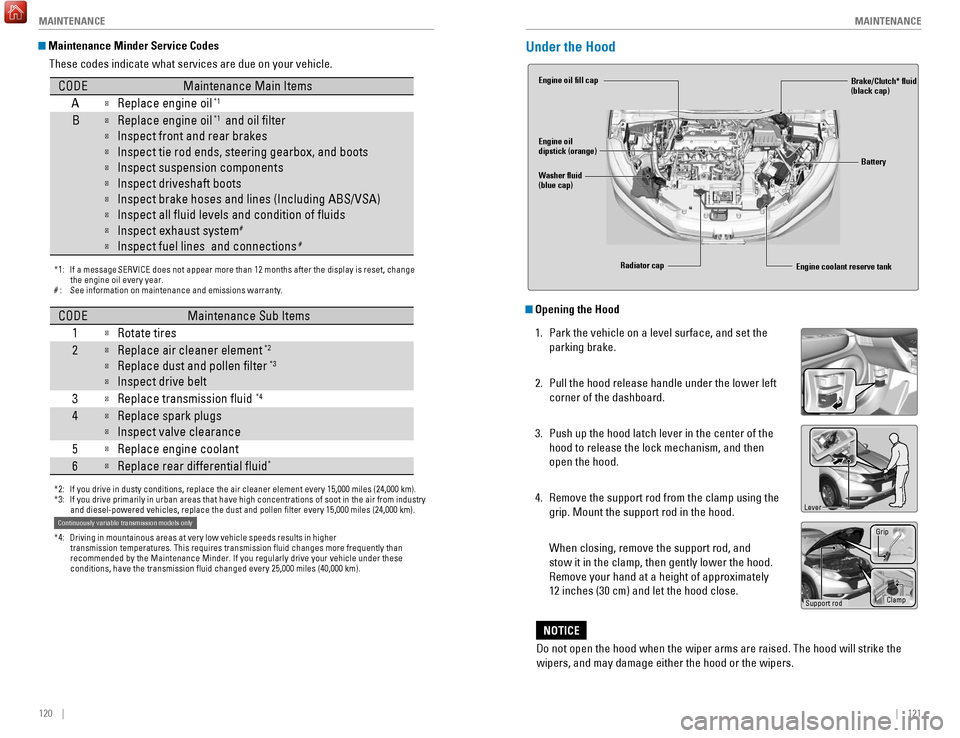
Under the Hood
Opening the Hood
1.
Park the vehicle on a level surface, and set the
parking brake.
2.
Pull the hood release handle under the lower left
corner of the dashboard.
3.
Push up the hood latch lever in the center of the
hood to release the lock mechanism, and then
open the hood.
4.
Remove the support rod from the clamp using the
grip. Mount the support rod in the hood.
When closing, remove the support rod, and
stow it in the clamp, then gently lower the hood.
Remove your hand at a height of approximately
12 inches (30 cm) and let the hood close.
Engine coolant reserve tank
Washer fluid
(blue cap) Engine oil fill cap
Engine oil
dipstick (orange)
Brake/Clutch* fluid
(black cap)
Battery
Radiator cap
Lever
Support rod Grip
Clamp
Do not open the hood when the wiper arms are raised. The hood will strik\
e the
wipers, and may damage either the hood or the wipers.
NOTICE
Page 69 of 78

130 || 131
MAINTENANCE
MAINTENANCE
Tire Service Life
The life of your tires is dependent on many factors, including driving h\
abits, road
conditions, vehicle loading, inflation pressure, maintenance history, speed, and
environmental conditions (even when the tires are not in use).
In addition to regular inspections and inflation pressure maintenance,\
it is
recommended that you have annual inspections performed once the tires re\
ach
five years old. All tires, including the spare, should be removed from\
service after
10 years from the date of manufacture, regardless of their condition or \
state of
wear.
Winter TiresIf driving on snowy or frozen roads, mount all season tires marked “M\
+S”, snow
tires, or tire chains; reduce speed; and maintain sufficient distance \
between
vehicles when driving. For winter tires, select the size and load ranges\
that are the
same as the original tires, and mount them to all four wheels.
Tire ChainsInstall tire chains on the front tires only. Because your vehicle has limited tire
clearance, we strongly recommend using the following chains:
Cable type: SCC Radial Chain SC1034.
Mount chains as tightly as you can, and make sure that they do not touch\
the
brake lines or suspension.
Tire Labeling
The tires that came on your vehicle have a number of markings. Those you\
should be aware of are described below.
Here is an example of what each marking means:
P215/55R17 94V
•
P: vehicle type (passenger)
•
215: tire width in millimeters
•
55: aspect ratio (tire section height as
a percentage of its width)
•
R: tire construction code (radial)
•
17: rim diameter in inches
•
94: load index (code indicating
maximum load tire can carry)
•
V
: speed symbol (code indicating
maximum speed rating)
Tire Identification Number (TIN)
The tire identification number
(TIN) is a group of numbers
and letters that look like the
example below. TIN is located
on the sidewall of the tire.
Glossary of Tire TerminologyCold Tire Pressure – The tire air pressure when the vehicle has been
parked for at least three hours or driven less than 1 mile (1.6 km).
Load Rating – The maximum load that a tire is rated to carry for a gi\
ven
inflation pressure.
Maximum Inflation Pressure – The maximum tire air pressure that the\
tire
can hold.
Maximum Load Rating – The load rating for a tire at the maximum
permissible inflation pressure for that tire.
Recommended Inflation Pressure – The cold tire inflation pressure\
recommended by the manufacturer.
Treadwear Indicators (TWI) – The projections within the principal gr\
ooves
designed to give a visual indication of the degrees of wear of the tread\
.
Tire size
Tire
identication
number (TIN)
Maximum
tire load
Maximum
tire pressure
Tire size
DOT B97R FW6X 2209\n
DOT: This in\ficat\bs t\nhat th\b tir\b m\b\bts all
r\bquir\bm\bnts of th\b U.S\n. D\bpartm\bnt of
Transportation.
B97R: Manufactur\br’s \ni\f\bntifcation mark
FW6X: Tir\b typ\b co\f\b
22 09: Dat\b of Transp\nortation
Year
Week
Traction devices that are the wrong size or improperly installed can dama\
ge your
vehicle’s brake lines, suspension, body, and wheels. Stop driving if they are hitting
any part of the vehicle.
NOTICE Using the wrong chains, or not properly installing chains, can damage th\
e
brake lines and cause a crash in which you can be seriously injured or k\
illed.
Follow all instructions in this guide regarding the selection and use of\
tire
chains.
WARNING
Page 71 of 78

134 || 135
SPECIFICATIONS
MAINTENANCE
Testing of Readiness Codes
Your vehicle has readiness codes as part of the onboard self-diagnostic s\
ystem.
Some states use these codes for testing to verify whether your vehicle’\
s emissions
components are working properly. The codes may not be read if you go through the
emissions testing just after the battery has gone dead or been disconnec\
ted.
To check if they are set, turn the vehicle on without starting the engine\
. The
malfunction indicator lamp will come on for several seconds. If it goes \
off, the
readiness codes are set. If it blinks five times, the readiness codes \
are not set.
If you are required to have your vehicle emissions tested before the rea\
diness codes
are set, prepare the vehicle for retesting by doing the following:
1.
Fill the gas tank to approximately 3/4 full.
2.
Park the vehicle and leave the engine off for 6 hours or more.
3.
Make sure the ambient temperature is between 40°F and 95°F (4°\
C and 3
5°C).
4.
Start the engine without touching the accelerator pedal, and let it idle\
for 20
seconds.
5.
Keep the vehicle in Park (P) or Neutral (manual transmission). Incre\
ase
the
engine speed to 2,000 rpm, and hold it there for about 3 minutes.
6.
Let the engine idle with your foot off the accelerator for 20 seconds.
7.
Select a nearby
, lightly traveled major highway where you can maintain a speed
of 50 to 60 mph (80 to 97 km/h) for at least 20 minutes. Drive on the \
highway with
the vehicle in Drive (D) or 5th gear (manual transmission). Do not u\
se cruise
control. When traffic allows, drive for 90 seconds without using the a\
ccelerator
pedal. (Vehicle speed may vary slightly; this is OK.) If you cannot do this for
a continuous 90 seconds because of traffic conditions, drive for at le\
ast 30
seconds, then repeat two more times (for a total of 90 seconds).
8.
Drive in city or suburban traffic for at least 10 minutes. When traffi\
c con
ditions
allow, let the vehicle coast for several seconds without using the accelerator
pedal or the brake pedal.
9.
Park the vehicle and leave the engine off for 30 minutes.
The readiness codes are erased when the battery is disconnected, and set\
again
only after several days of driving under a variety of conditions.
If an emissions testing facility determines that the readiness codes are\
not
set, you
may be requested to return at a later date to complete the test, or see \
your dealer.
Vehicle
Engine and Fuel
Tires
Light Bulbs
Fluids*1: 2WD
*2: AWD
ModelHR-VNo. of Passengers:
Front 2
Rear 3
Tota l5
Weights:Gross Vehicle
Weight Rating 4,001 lbs (1,815 kg )*14,166 lbs (1,890 kg)*2Gross Axle Weight
Rating (Front )2,127 lbs (965 kg )*12,178 lbs (988 kg)*2Gross Axle Weight
Rating (Rear)1,873 lbs (850 kg )*11,988 lbs (902 kg)*2Air Conditioning:
Refrigerant Type HFC-134a (R-134a)
Charge Quantity 14.3 - 16.0 oz (405 - 455 g)
Lubricant Type ND-OIL8
Quantity4.27 - 5.00 oz (70 - 82 cm³)
Engine Specication
s
FuelDisplacemen t109.8 cu-in (1,799 cm3)
Spark Plugs NG
KD ILZKR7B11GS
DENSODXU22HCR-D11S
Fuel:
TypeUnleaded gasoline, Pump octane number of 87 or higher
Fuel Tank Capacity 13.2 US gal (50 liters)
Re gularSize215/55R17 94 VPressure
psi (kPa[kgf/cm2])Front32 (220 [2.2])Rear30 (210 [2.1])
Compact
Spar e Size
T135/90D16 102M
Pressure
psi (kPa[kgf/cm
2]) 60 (420 [4.2])
Wheel SizeRegular17 x 7 1/2JCo
mpact Spar e16 x 4T
Headlights (High/Low Beam )60/55W (HB2)Fog Lights*35W (H8)Side Marker Lights5W
Front Turn Signal/Parking Light s28/8W (Amber )
Brake/Tail/Side Marker LightsLED
Back-Up Lights 16W
Rear Turn Signal Lights21W (Amber)
High-M ount Brake Light LED
Side Turn Signal Light s*LED
Rear License Plate Light s5W
Interior Light sVanity Mirror Ligh t*1.8WMap Lights8WCeiling Light8WCargo Area Light5W
Brake Fluid
Continuously Variable Transmission Fluid
*
*1: 2WD
*2: AWD
Manual Transmission Fluid*
SpeciedHonda Heavy Duty Brake Fluid DOT 3
SpeciedHonda HCF-2 Transmission Fluid
Capacity Change 3.7 US qt (3.5 L)*14.2 US qt (4.0 L)*2
Specie
dHonda Manual Transmission Flui d
Capacity Change 2.0 US qt (1.9 L)
Engine Oil
Engine Coolan t
*1: Continuously variable transmission models
*2: Manual transmission models
Recommended·Genuine Honda Motor Oil 0W-2 0
·API Premium-grade 0W-20 detergent oi l
Capacity Change
3.7 US qt (3.5 L)
Change
including
lter 3.9 US qt (3.7 L)
Specie
dHonda Long-Life Anti freeze/Coolant Type 2
Ratio 50/50 with distilled wate r
Capacity
1.39 US gal (5.25 L)*1(change including the remaining
0.13 US gal (0.5 L) in the reserve tank )
1.38 US gal (5.24 L)*2
(change including the remaining
0.13 US gal (0.5 L) in the reserve tank )
Washer Fluid
Tank CapacityU.S.: 2.6 US qt (2.5 L)
Canada: 4.8 US qt (4.5 L)
Rear Differential Fluid*SpeciedHonda Dual Pump Fluid II
Capacity Change 1.318 US qt (1.247 )
SPECIFICATIONS
*if equipped
Page 72 of 78

136 || 137
CUSTOMER INFORMATION
CUSTOMER INFORMATION
Learn about information specific to you as a Honda customer and how to\
get help.
Frequently Asked Questions/Troubleshooting
Below are some frequently asked questions and troubleshooting items that\
you may
have about the vehicle.
Q:
How do I set the vehicle clock?
A:
For vehicles without navigation, see page 48. For vehicles with navigati\
on, the
time is automatically set using GPS signals.
Q:
Why doesn’
t the vehicle start when I press the ENGINE START/STOP button?*
A:
The brake pedal must be pressed to start the engine.
Q:
What is the AUTO setting on my headlight lever?
A:
When in the AUTO position, the vehicle’
s exterior lights will automatically turn
on or off depending on the ambient lighting.
Q:
Why won’
t the driver’s door unlock when I grab the door handle, even though
the keyless access remote is within range?*
A:
If you pull the handle too quickly
, the system may not have time to confirm the
door is unlocked. W
ait to hear a beep to confirm the door is unlocked. If you are
wearing gloves, the system may be slow to respond.
Q:
After my battery was disconnected or went dead, the audio system is aski\
ng for
a code. Where do I find this?
A:
In most cases, you do not need to enter a code. T
urn on the vehicle and the
audio system, and press and hold the power button until the system react\
ivates.
Q:
Why can’
t I operate Pandora through the audio system?
A:
Audio may be streaming through
Bluetooth Audio. Make sure Pandora mode
is selected and the phone cable is properly connected to the USB adapter\
.
Some phones may prompt you to “Allow” a connection.
Q:
Is my phone compatible with
Bluetooth features?
A:
Visit handsfreelink.com (U.S.) or handsfreelink.ca (Canada) to check phone
compatibility for
Bluetooth Audio, Bluetooth HandsFreeLink, and SMS text
messaging.
Q:
Every time I press the T
alk button, the system gives me voice prompts. Can I turn
these off?*
A:
From the Home screen, select Settings. Select the V
oice Recog tab, then select
V
oice Prompt. Select Off.
CUSTOMER INFORMATION
*if equipped
Contact Us
Honda dealer personnel are trained professionals. They should be able to\
answer
all your questions. If you encounter a problem that your dealership does\
not solve
to your satisfaction, please discuss it with the dealership’s service manager or
general manager. If you are dissatisfied with the decision made by the dealership’\
s
management, contact Honda Automobile Customer Service.U.S. owners
American Honda Motor Co., Inc.
Honda Automobile Customer Service
1919 Torrance Blvd.
Mail Stop 500-2N-7A
Torrance, CA 90501-2746
Tel: (800) 999-1009
In Puerto Rico and
the U.S. Virgin Islands
Bella International
P.O. Box 190816
San Juan, PR 00919-0816
Tel: (787) 620-7546
When you call or write, please give us the following information:
•
V
ehicle Identification Number
•
Date of purchase
•
Odometer reading of your vehicle
•
Y
our name, address, and telephone number
•
A detailed description of the problem
•
Name of the dealer who sold the vehicle to you Canadian owners
Honda Canada, Inc.
Customer Relations
180 Honda Blvd.
Markham, ON
L6C 0H9
T
el: (888) 946-6329
Fax: (877) 939-0909
e-mail: [email protected]
Q:
Why can’
t I select an item using the selector knob or touchscreen*?
A:
T
o prevent driver distraction, certain items are limited or inoperable wh\
ile the
vehicle is moving. Use voice commands or pull over to select the items.
Q:
Where can I find the vehicle identification number (VIN)?
A:
Check the label on the driver’
s doorjamb.
*if equipped
Honda Roadside Assistance
24-hour emergency road service is available to you in the United States \
and Canada
throughout your 3-year/36,000-mile warranty term. Services include jump starting,
flat tire and lockout assistance, towing, and more (limitations apply\
).
Call (866) 864-5211 (U.S.) or (800) 465-7587 (Canada).
Page 76 of 78
144 || 145
INDEX
VOICE COMMAND INDEX
Phone Commands
The system accepts these commands on most screens.
Info CommandsThe system accepts these commands on most screens.
•
T
rip computer
•
Display traffic list*
•
Display traffic on my route* •
Display clock
•
Display wallpaper
On-screen CommandsThe system accepts these commands on any screen where applicable. All
available commands are highlighted in yellow when you press the Talk button.
•
Next (or previous)
•
Up (or down)
•
Right (or left)
•
Return
•
OK (excluding Startup Confirmation screen)
•
Delete
*if equipped
• Dial/call by number
•
Dial/call by name
•
Call (phone number or name)
INDEX
ABS........................................................................\
...... 25
Accessory Power Socket ........................................49
Airbags........................................................................\
.. 9 About Y
our Airbags
................................................ 11
Advanced Airbags
.................................................... 9
Airbag Care
............................................................. 14
Airbag System Components
.................................13
Airbag System Indicators
.....................................11
Front Airbags (SRS)
.................................................. 9
Passenger Airbag Off Indicator
...........................12
Side Airbags
............................................................ 10
Side Curtain Airbags
.............................................. 10
SRS (Supplemental Restraint System) Indicator
11
Airbag System Components
....................................13
Airbag System Indicators
........................................11
Air Conditioning System........................................... 43
All Wheel Drive (A
WD) ............................................. 25
Ambient Meter........................................................... 95 Anti-Lock Brake System (ABS)
.........................25, 93
Audio Commands
.................................................... 142
Audio Operation
........................................................ 49
Accessory Power Socket
.....................................49
Auxiliary Input Jack
............................................... 50
Bluetooth® Audio
............................................ 57, 65
Color Audio System
................................................ 52
Compact Disc (CD)
........................................... 54
, 62
FM/AM Radio
.................................................... 53, 60
HDMI Port
................................................................ 49
HDMI Video
............................................................. 67
HondaLink™
............................................................ 59
iPod®
................................................................. 55, 63
Pandora®
................................................................ 66
SiriusXM® Radio
................................................... 61
Sound
....................................................................... 51
Steering Wheel Controls
.......................................50
Touchscreen Operation
.........................................58
USB Flash Drive
................................................ 56, 64
USB Port
.................................................................. 49
AUTO
........................................................................\
... 36
Automatic Brake Hold
.............................................. 94
Automatic Dimming Rearview Mirror
....................42
AUX Commands....................................................... 143 Auxiliary Input Jack
.................................................. 50
AWD
........................................................................\
.... 25
BACK button............................................................... 68 Battery
...................................................................... 125Bluetooth® Audio
...............................................57, 65
Bluetooth® Audio Commands ..............................143
Bluetooth® Handsfreelink® (HFL)......................... 68 E-Mail
.......................................................................76
HFL Controls
......................................................68, 71
HondaLink™ Assist
................................................77
Making a Call
....................................................70, 74
Pairing a Phone
................................................69, 73
Siri Eyes Free
..........................................................77
SMS Text Messaging
.............................................76
Speed Dial
.........................................................70, 75
Talk Button Tips
......................................................72
Voice Recognition Tips
..........................................72
Brake Assist System................................................. 93
Brake depress
...........................................................27
Brake hold
..................................................................27
Brake system
.......................................................24, 25
Braking........................................................................\
92 Brightness Control
....................................................35
Built-in key
.................................................................29
Calibration
................................................................107
Carbon Monoxide Gas................................................ 4
Cargo Area Lights
.....................................................35
Changing a Flat Tire
................................................109
Changing Settings
.....................................................47
Changing Wiper Blades
.........................................126
Charging system........................................................ 24 Childproof Door Locks
..............................................31
Child Safety
................................................................15
Childproof Door Locks
...........................................31
Installing a LA
TCH-Compatible Child Seat .........18
Selecting a Child Seat
...........................................17
Child Seat
...................................................................17
Adding Security with a Tether
..............................20
Installing a LATCH-Compatible Child Seat
.........18
Selecting a Child Seat
...........................................17
Climate Control Commands
...................................141
Climate Control System
............................................44
Clock........................................................................\
.... 48 Color Audio System
..................................................52
Compact Disc (CD)
..............................................54, 62
Compact Disc (CD) Commands
.............................142
Contact Us
................................................................137
Continuously Variable Transmission (CVT)
...........90
Coolant
......................................................................124
Cruise Control
............................................................96
CRUISE
MAIN ............................................................27
CUSTOMER Information......................................... 136
Customized Features
................................................47
CVT
........................................................................\
......90
Dashboard and Other Controls
.................................2
Destination
.................................................................81
Detour
........................................................................\
.84