clock reset HONDA HR-V 2018 Owner's Manual (in English)
[x] Cancel search | Manufacturer: HONDA, Model Year: 2018, Model line: HR-V, Model: HONDA HR-V 2018Pages: 503, PDF Size: 32.79 MB
Page 21 of 503
19
Quick Reference Guide
Features (P177)
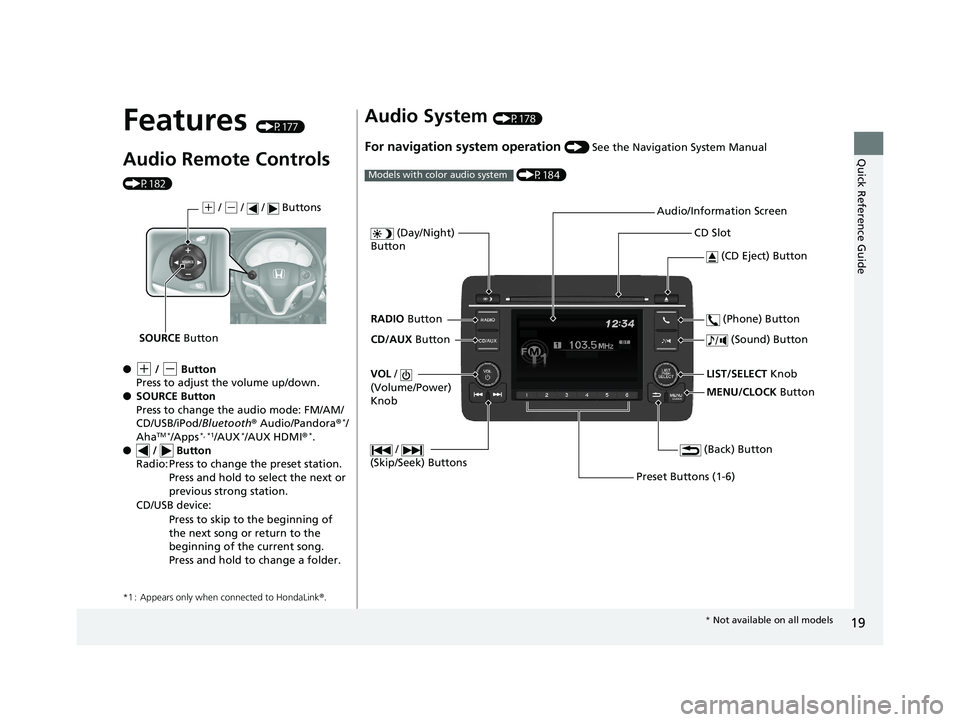
Audio Remote Controls
(P182)
●
(+ / (- Button
Press to adjust the volume up/down.
● SOURCE Button
Press to change the audio mode: FM/AM/
CD/USB/iPod/ Bluetooth® Audio/Pandora ®
*/
AhaTM */Apps*, *1/AUX*/AUX HDMI ®*.
● / Button
*1 : Appears only when connected to HondaLink ®.
Radio: Press to change the preset station.
Press and hold to select the next or
previous strong station.
CD/USB device: Press to skip to the beginning of
the next song or return to the
beginning of the current song.
Press and hold to change a folder.
(+ / (- / / Buttons
SOURCE Button
Audio System (P178)
For navigation system operation () See the Navigation System Manual
(P184)
Models with color audio system
MENU/CLOCK Button
LIST/SELECT Knob
(Day/Night)
Button
(Back) Button
(Sound) Button
VOL /
(Volume/Power)
Knob
CD Slot
(CD Eject) Button
Preset Buttons (1-6) (Phone) Button
RADIO
Button
/
(Skip/Seek) Buttons
CD/AUX Button Audio/Information Screen
*
Not available on all models
18 HR-V-31T7A6200.book 19 ページ 2017年6月30日 金曜日 午後1時23分
Page 93 of 503
91
uuGauges and Displays uInformation Display
Continued
Instrument Panel
Information Display
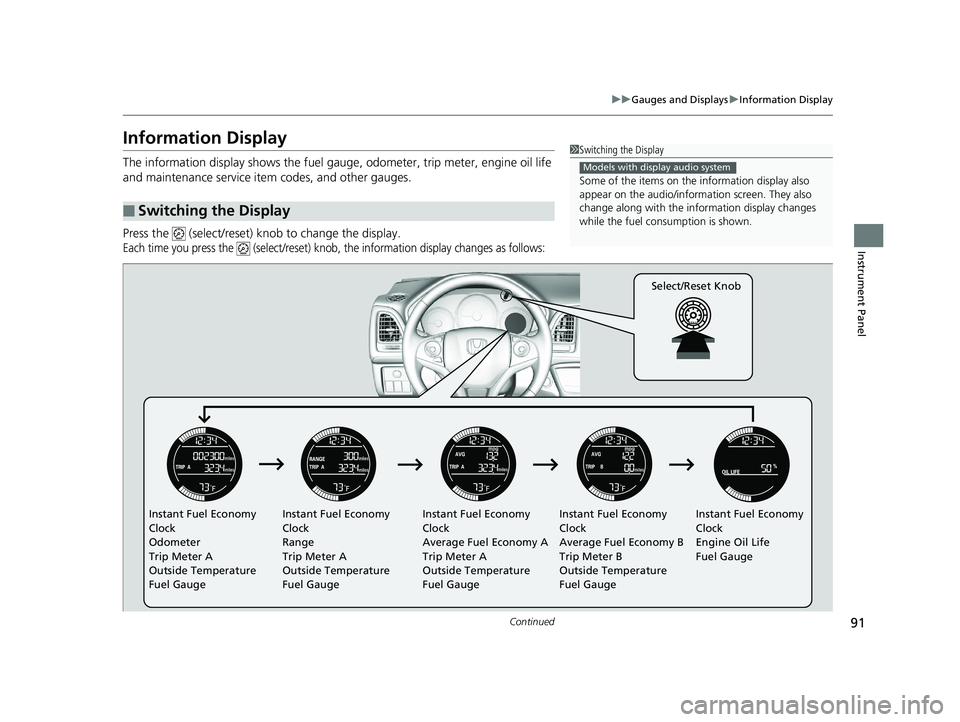
The information display shows the fuel gauge, odometer, trip meter, engine oil life
and maintenance service item codes, and other gauges.
Press the (select/reset) knob to change the display.
Each time you press the (select/reset) knob, the information display changes as follows:
■Switching the Display
1Switching the Display
Some of the items on the information display also
appear on the audio/information screen. They also
change along with the info rmation display changes
while the fuel consumption is shown.
Models with display audio system
Instant Fuel Economy
Clock
Odometer
Trip Meter A
Outside Temperature
Fuel Gauge Instant Fuel Economy
Clock
Range
Trip Meter A
Outside Temperature
Fuel Gauge Instant Fuel Economy
Clock
Average Fuel Economy A
Trip Meter A
Outside Temperature
Fuel GaugeInstant Fuel Economy
Clock
Average Fuel Economy B
Trip Meter B
Outside Temperature
Fuel GaugeInstant Fuel Economy
Clock
Engine Oil Life
Fuel Gauge
Select/Reset Knob
18 HR-V-31T7A6200.book 91 ページ 2017年6月30日 金曜日 午後1時23分
Page 193 of 503
191
uuAudio System Basic Operation uPlaying AM/FM Radio
Continued
Features
Playing AM/FM Radio
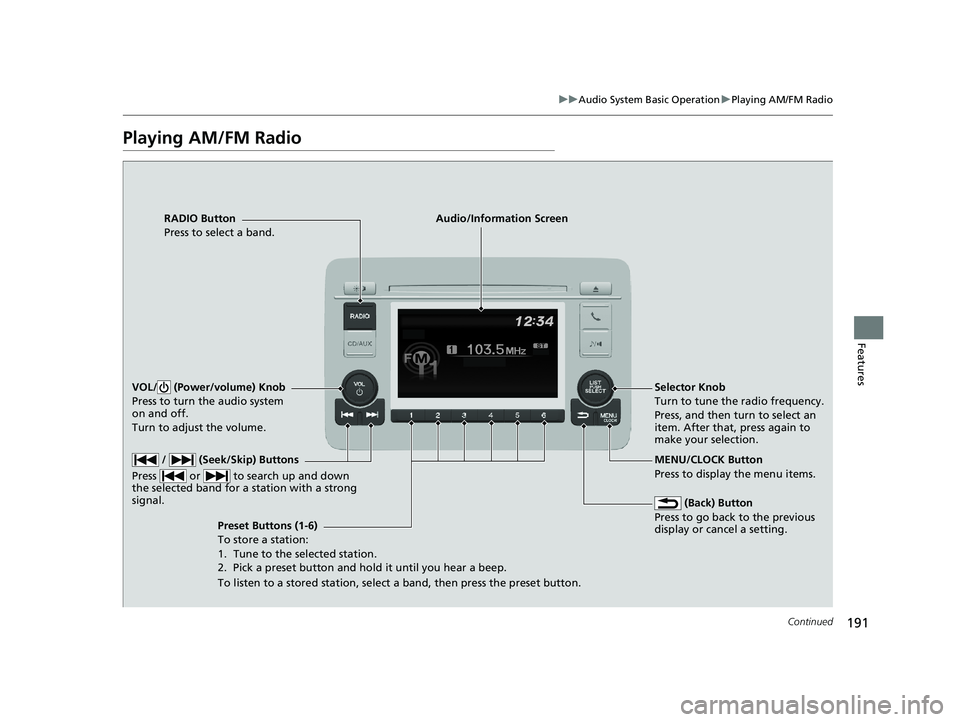
RADIO Button
Press to select a band.
(Back) Button
Press to go back to the previous
display or cancel a setting.
/ (Seek/Skip) Buttons
Press or to search up and down
the selected band for a station with a strong
signal.
VOL/ (Power/volume) Knob
Press to turn the audio system
on and off.
Turn to adjust the volume.
Preset Buttons (1-6)
To store a station:
1. Tune to the selected station.
2. Pick a preset button and hold it until you hear a beep.
To listen to a stored station, select a band, then press the preset button. Selector Knob
Turn to tune the radio frequency.
Press, and then turn to select an
item. After that, press again to
make your selection.
MENU/CLOCK Button
Press to display the menu items.
Audio/Information Screen
18 HR-V-31T7A6200.book 191 ページ 2017年6月30日 金曜日 午後1時23分
Page 194 of 503
uuAudio System Basic Operation uPlaying AM/FM Radio
192
Features
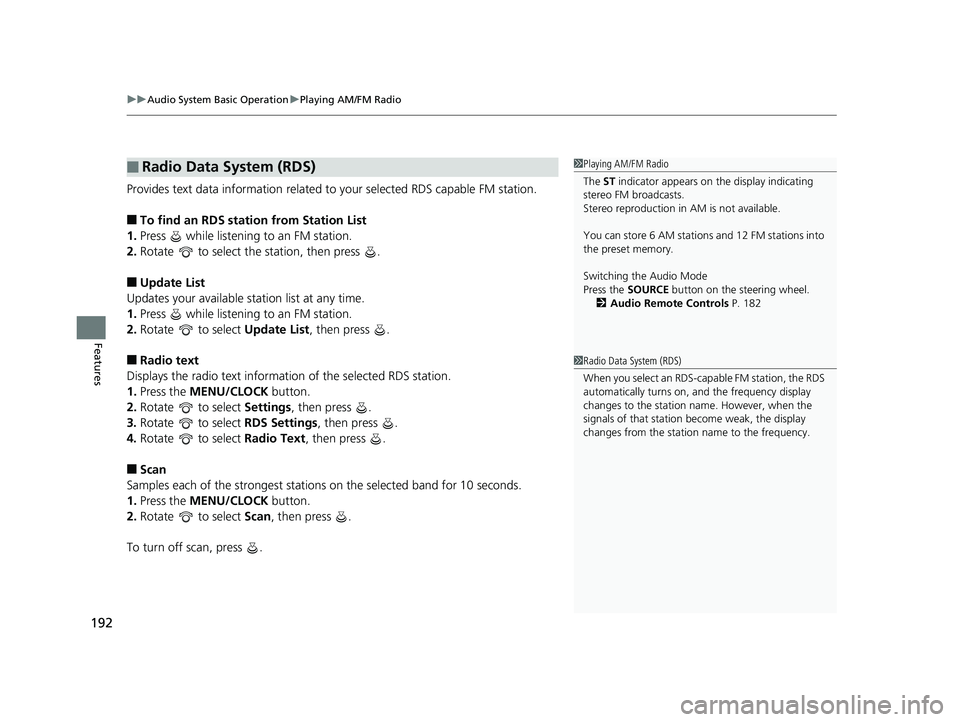
Provides text data information related to your selected RDS capable FM station.
■To find an RDS station from Station List
1. Press while listening to an FM station.
2. Rotate to select the station, then press .
■Update List
Updates your available station list at any time.
1. Press while listening to an FM station.
2. Rotate to select Update List, then press .
■Radio text
Displays the radio text informat ion of the selected RDS station.
1. Press the MENU/CLOCK button.
2. Rotate to select Settings, then press .
3. Rotate to select RDS Settings, then press .
4. Rotate to select Radio Text, then press .
■Scan
Samples each of the strongest stations on the selected band for 10 seconds.
1. Press the MENU/CLOCK button.
2. Rotate to select Scan, then press .
To turn off scan, press .
■Radio Data System (RDS)1 Playing AM/FM Radio
The ST indicator appears on the display indicating
stereo FM broadcasts.
Stereo reproduction in AM is not available.
You can store 6 AM stations and 12 FM stations into
the preset memory.
Switching the Audio Mode
Press the SOURCE button on the steering wheel.
2 Audio Remote Controls P. 182
1Radio Data System (RDS)
When you select an RDS-capable FM station, the RDS
automatically turns on, and the frequency display
changes to the station name. However, when the
signals of that station become weak, the display
changes from the statio n name to the frequency.
18 HR-V-31T7A6200.book 192 ページ 2017年6月30日 金曜日 午後1時23分
Page 204 of 503
202
uuAudio System Basic Operation uPlaying Bluetooth ® Audio
Features
Playing Bluetooth ® Audio
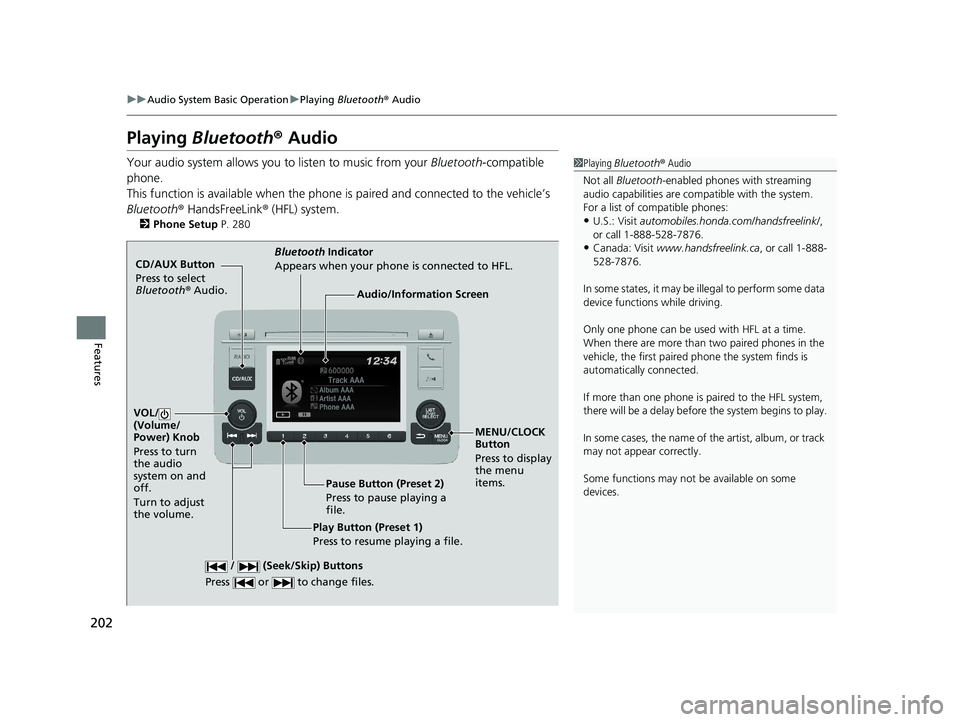
Your audio system allows you to listen to music from your Bluetooth-compatible
phone.
This function is available when the phone is paired and connected to the vehicle’s
Bluetooth ® HandsFreeLink ® (HFL) system.
2 Phone Setup P. 280
1Playing Bluetooth ® Audio
Not all Bluetooth -enabled phones with streaming
audio capabilities are comp atible with the system.
For a list of compatible phones:
•U.S.: Visit automobiles.honda.com /handsfreelink/,
or call 1-888-528-7876.
•Canada: Visit www.handsfreelink.ca , or call 1-888-
528-7876.
In some states, it may be il legal to perform some data
device functions while driving.
Only one phone can be used with HFL at a time.
When there are more than two paired phones in the
vehicle, the first paired phone the system finds is
automatically connected.
If more than one phone is paired to the HFL system,
there will be a delay before the system begins to play.
In some cases, the name of the artist, album, or track
may not appear correctly.
Some functions may not be available on some
devices.
CD/AUX Button
Press to select
Bluetooth ® Audio.
VOL/
(Volume/
Power) Knob
Press to turn
the audio
system on and
off.
Turn to adjust
the volume.
MENU/CLOCK
Button
Press to display
the menu
items.
Audio/Information Screen
Bluetooth Indicator
Appears when your phone is connected to HFL.
/ (Seek/Skip) Buttons
Press or to change files.
Play Button (Preset 1)
Press to resume playing a file. Pause Button (Preset 2)
Press to pause playing a
file.
18 HR-V-31T7A6200.book 202 ページ 2017年6月30日 金曜日 午後1時23分
Page 262 of 503
260
uuCustomized Features u
Features
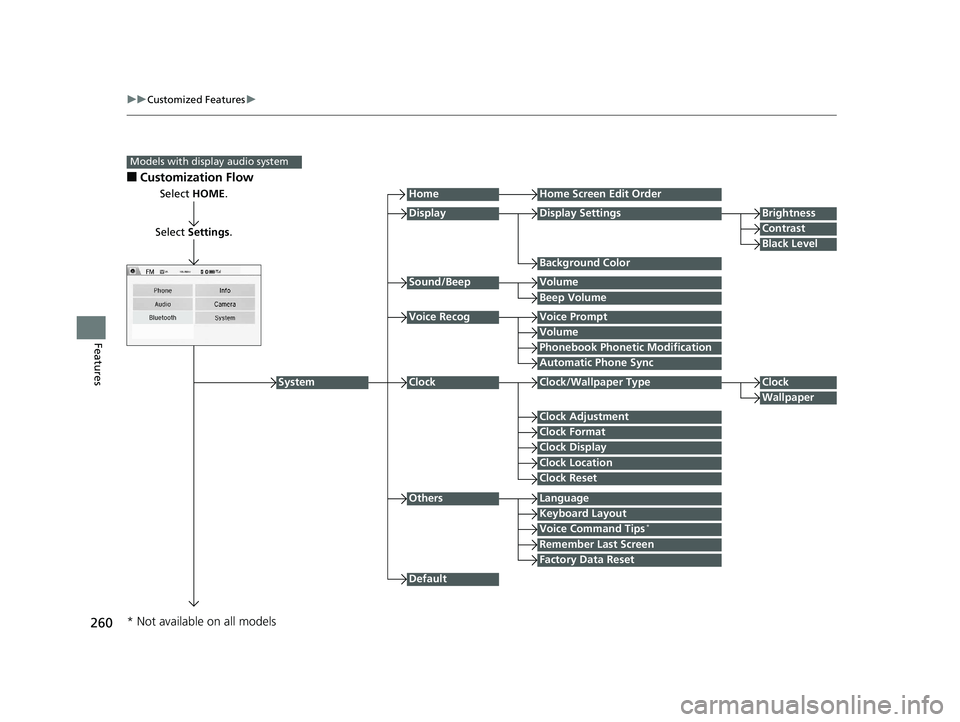
■Customization Flow
Models with display audio system
Select HOME.
Select Settings .
HomeHome Screen Edit Order
Background Color
DisplayDisplay SettingsBrightness
Contrast
Black Level
Beep Volume
Sound/BeepVolume
Volume
Voice RecogVoice Prompt
Automatic Phone Sync
Phonebook Phonetic Modification
Default
Factory Data Reset
Clock Format
ClockClock/Wallpaper TypeClock
Wallpaper
Clock Adjustment
Clock Display
Clock Location
Clock Reset
Keyboard Layout
OthersLanguage
Remember Last Screen
Voice Command Tips*
System
* Not available on all models
18 HR-V-31T7A6200.book 260 ページ 2017年6月30日 金曜日 午後1時23分
Page 264 of 503
262
uuCustomized Features u
Features
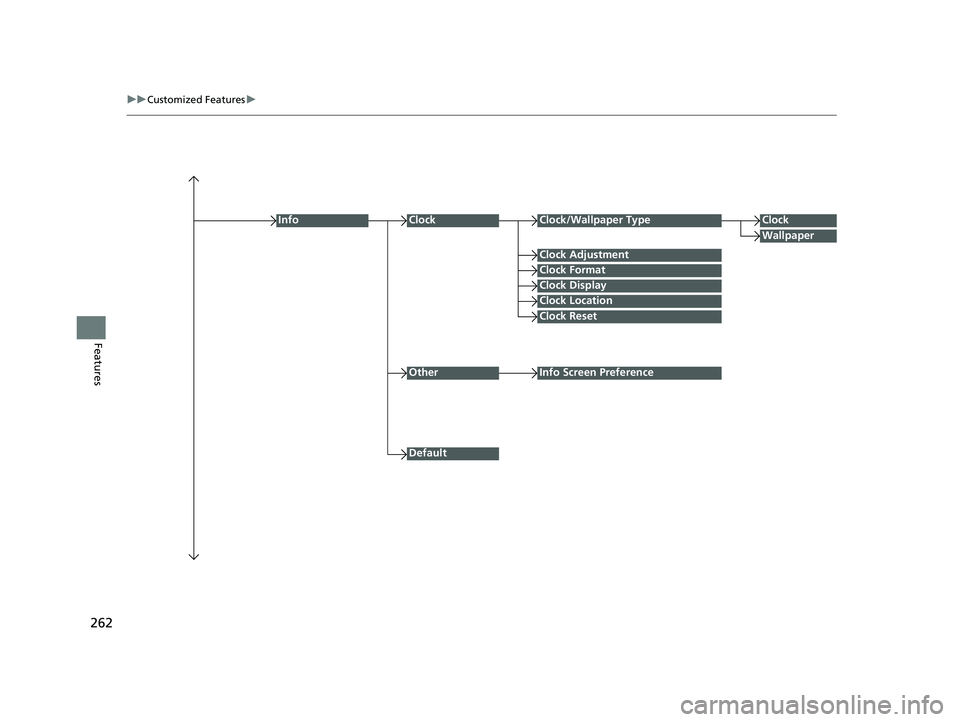
Clock Format
ClockClock/Wallpaper TypeClock
Wallpaper
Clock Adjustment
Clock Display
Clock Location
Clock Reset
Info
Default
OtherInfo Screen Preference
18 HR-V-31T7A6200.book 262 ページ 2017年6月30日 金曜日 午後1時23分
Page 268 of 503
266
uuCustomized Features u
Features
*1:Default Setting
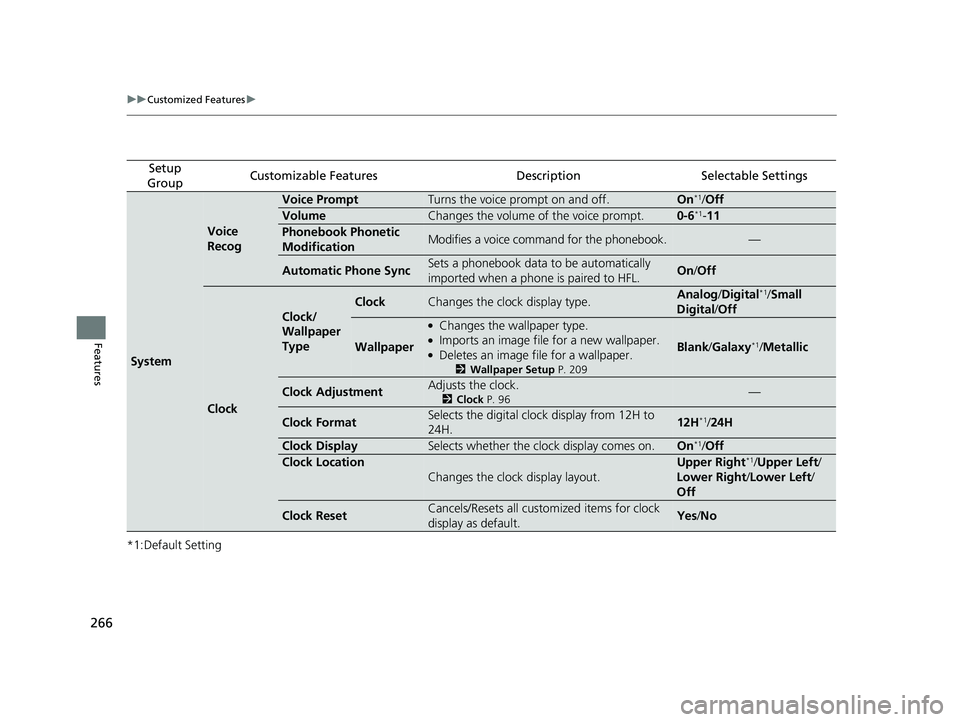
Setup
GroupCustomizable FeaturesDescriptionSelectable Settings
System
Voice
Recog
Voice PromptTurns the voice prompt on and off.On*1/ Off
VolumeChanges the volume of the voice prompt.0-6*1-11
Phonebook Phonetic
ModificationModifies a voice command for the phonebook.—
Automatic Phone SyncSets a phonebook data to be automatically
imported when a phone is paired to HFL.On/Off
Clock
Clock/
Wallpaper
Type
ClockChanges the clock display type.Analog /Digital*1/ Small
Digital /Off
Wallpaper
●Changes the wallpaper type.●Imports an image file for a new wallpaper.●Deletes an image file for a wallpaper.
2 Wallpaper Setup P. 209
Blank/Galaxy*1/Metallic
Clock AdjustmentAdjusts the clock.
2 Clock P. 96—
Clock FormatSelects the digital clock display from 12H to
24H.12H*1/24H
Clock DisplaySelects whether the clock display comes on.On*1/Off
Clock Location
Changes the clock display layout.
Upper Right*1/Upper Left/
Lower Right /Lower Left /
Off
Clock ResetCancels/Resets all customized items for clock
display as default.Yes /No
18 HR-V-31T7A6200.book 266 ページ 2017年6月30日 金曜日 午後1時23分
Page 271 of 503
269
uuCustomized Features u
Continued
Features
*1:Default Setting
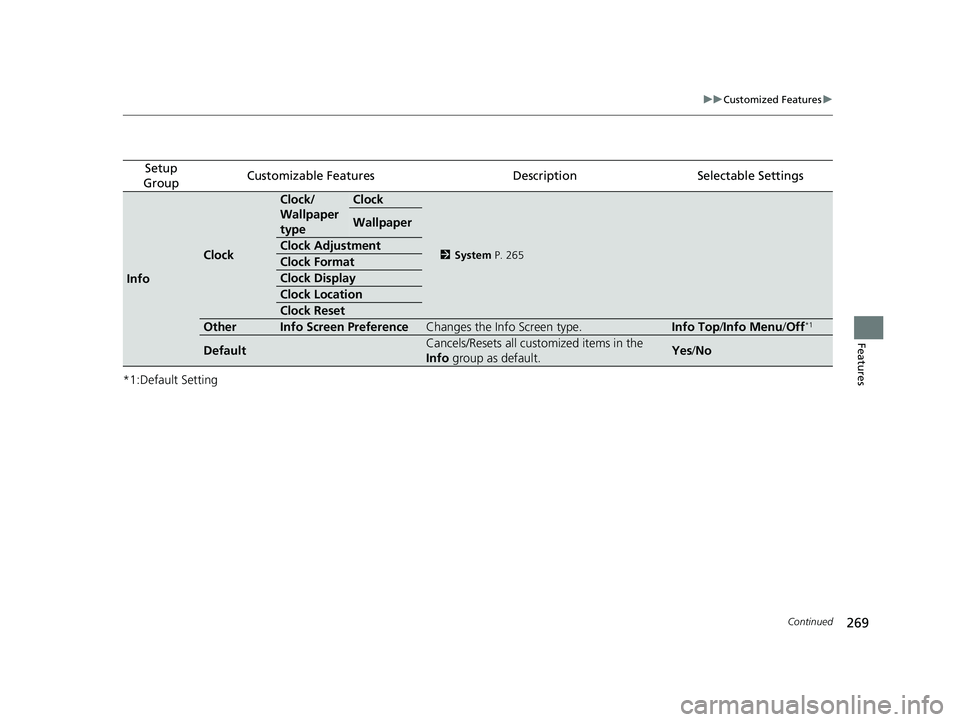
Setup
GroupCustomizable FeaturesDescriptionSelectable Settings
Info
Clock
Clock/
Wallpaper
typeClock
2 System P. 265
Wallpaper
Clock Adjustment
Clock Format
Clock Display
Clock Location
Clock Reset
OtherInfo Screen PreferenceChanges the Info Screen type.Info Top /Info Menu/ Off*1
DefaultCancels/Resets all customized items in the
Info group as default.Yes/No
18 HR-V-31T7A6200.book 269 ページ 2017年6月30日 金曜日 午後1時23分
Page 435 of 503
433
Maintenance
Battery
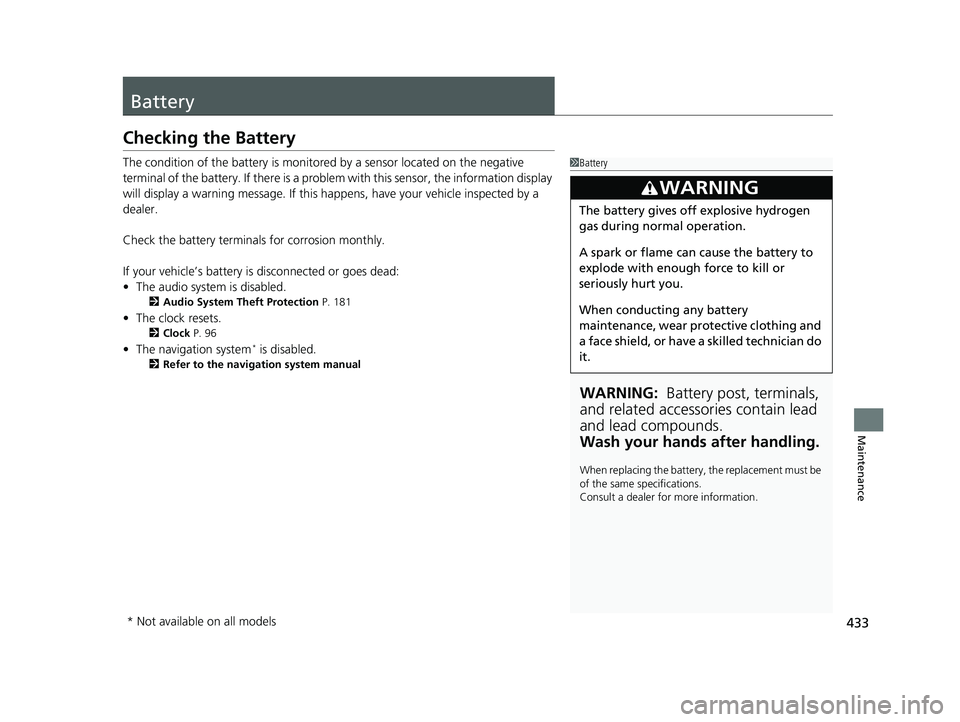
Checking the Battery
The condition of the battery is monitored by a sensor located on the negative
terminal of the battery. If there is a problem with this sensor, the information display
will display a warning message. If this happens, have your vehicle inspected by a
dealer.
Check the battery termina ls for corrosion monthly.
If your vehicle’s battery is disconnected or goes dead:
• The audio system is disabled.
2 Audio System Theft Protection P. 181
•The clock resets.
2 Clock P. 96
•The navigation system* is disabled.
2 Refer to the navigation system manual
1Battery
WARNING: Battery post, terminals,
and related accessories contain lead
and lead compounds.
Wash your hands after handling.
When replacing the battery, the replacement must be
of the same specifications.
Consult a dealer for more information.
3WARNING
The battery gives off explosive hydrogen
gas during normal operation.
A spark or flame can cause the battery to
explode with enough force to kill or
seriously hurt you.
When conducting any battery
maintenance, wear prot ective clothing and
a face shield, or have a skilled technician do
it.
* Not available on all models
18 HR-V-31T7A6200.book 433 ページ 2017年6月30日 金曜日 午後1時23分