ECO mode HONDA HR-V 2020 (in English) Owners Manual
[x] Cancel search | Manufacturer: HONDA, Model Year: 2020, Model line: HR-V, Model: HONDA HR-V 2020Pages: 639, PDF Size: 40.6 MB
Page 365 of 639
363
uuCustomized Features u
Continued
Features
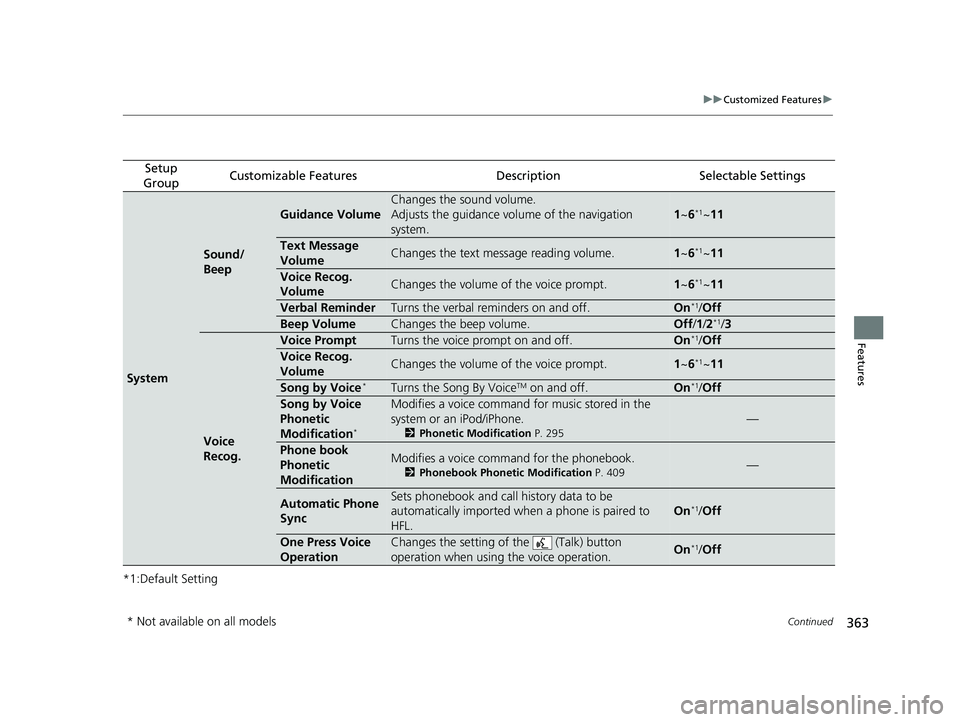
*1:Default Setting
Setup
GroupCustomizable FeaturesDescriptionSelectable Settings
System
Sound/
Beep
Guidance Volume
Changes the sound volume.
Adjusts the guidance volu me of the navigation
system.
1 ~6*1~11
Text Message
VolumeChanges the text message reading volume.1~6*1~11
Voice Recog.
VolumeChanges the volume of the voice prompt.1~6*1~11
Verbal ReminderTurns the verbal reminders on and off.On*1/Off
Beep VolumeChanges the beep volume.Off /1 /2*1/ 3
Voice
Recog.
Voice PromptTurns the voice prompt on and off.On*1/Off
Voice Recog.
VolumeChanges the volume of the voice prompt.1~6*1~11
Song by Voice*Turns the Song By VoiceTM on and off.On*1/Off
Song by Voice
Phonetic
Modification
*
Modifies a voice command fo r music stored in the
system or an iPod/iPhone.
2 Phonetic Modification P. 295
—
Phone book
Phonetic
ModificationModifies a voice command for the phonebook.
2Phonebook Phonetic Modification P. 409—
Automatic Phone
SyncSets phonebook and call history data to be
automatically imported when a phone is paired to
HFL.
On*1/ Off
One Press Voice
OperationChanges the setting of the (Talk) button
operation when using the voice operation.On*1/ Off
* Not available on all models
20 HR-V HDMC HDMG-31T7A6400.book 363 ページ 2019年8月8日 木曜日 午後3時52分
Page 425 of 639
423
Driving
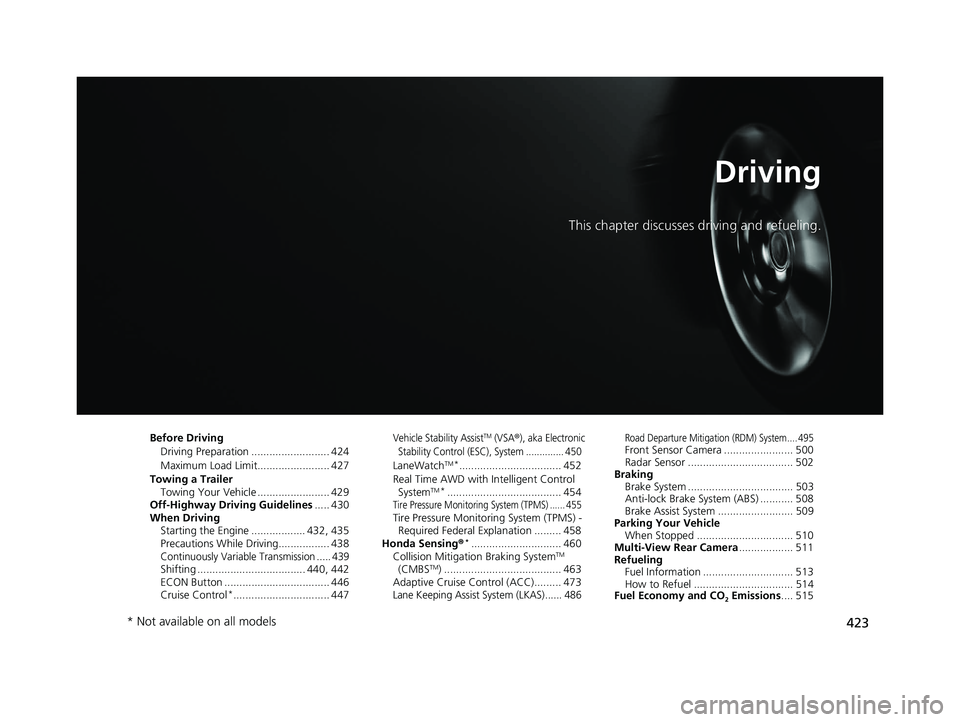
This chapter discusses driving and refueling.
Before DrivingDriving Preparation .......................... 424
Maximum Load Limit........................ 427
Towing a Trailer Towing Your Vehicle ........................ 429
Off-Highway Driving Guidelines ..... 430
When Driving Starting the Engine .................. 432, 435
Precautions While Driving................. 438
Continuously Variable Transmission ..... 439Shifting .................................... 440, 442
ECON Button ................................... 446
Cruise Control
*................................ 447
Vehicle Stability AssistTM (VSA®), aka Electronic
Stability Control (ESC), System .............. 450
LaneWatchTM*.................................. 452
Real Time AWD with Intelligent Control System
TM*...................................... 454Tire Pressure Monitoring System (TPMS) ...... 455Tire Pressure Monitoring System (TPMS) - Required Federal Explanation ......... 458
Honda Sensing ®
*.............................. 460
Collision Mitigati on Braking SystemTM
(CMBSTM) ....................................... 463
Adaptive Cruise Control (ACC)......... 473
Lane Keeping Assist System (LKAS)...... 486
Road Departure Mitigation (RDM) System.... 495Front Sensor Camera ....................... 500
Radar Sensor ................................... 502
Braking Brake System ................................... 503
Anti-lock Brake System (ABS) ........... 508
Brake Assist System ......................... 509
Parking Your Vehicle When Stopped ................................ 510
Multi-View Rear Camera .................. 511
Refueling Fuel Information .............................. 513
How to Refuel ................................. 514
Fuel Economy and CO
2 Emissions .... 515
* Not available on all models
20 HR-V HDMC HDMG-31T7A6400.book 423 ページ 2019年8月8日 木曜日 午後3時52分
Page 434 of 639
432
Driving
When Driving
Starting the Engine
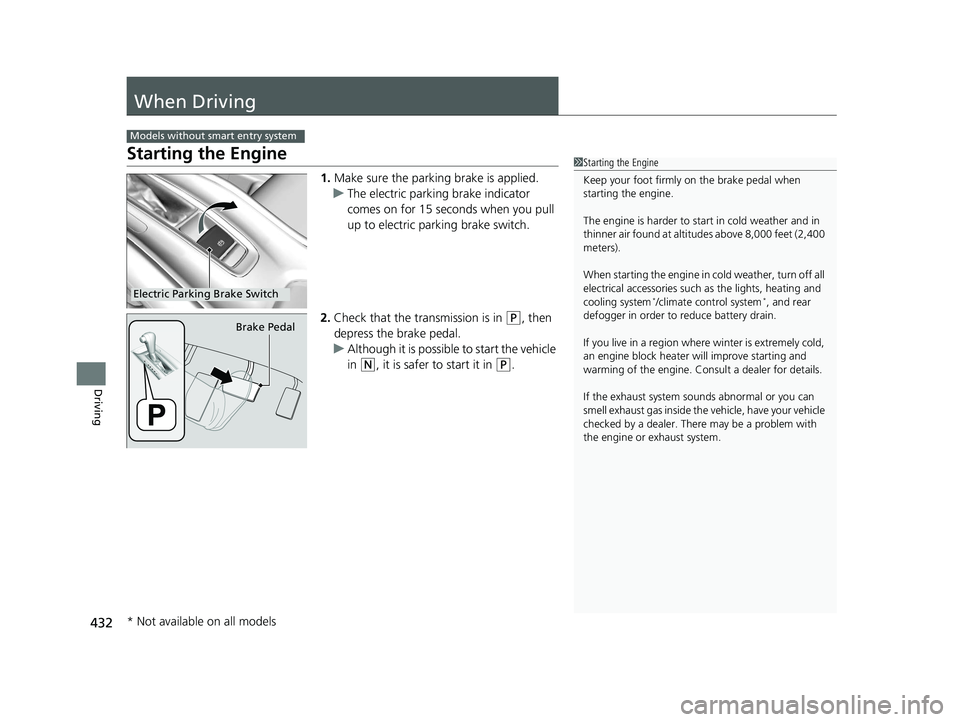
1.Make sure the parking brake is applied.
u The electric parking brake indicator
comes on for 15 seconds when you pull
up to electric parking brake switch.
2. Check that the tr ansmission is in
(P, then
depress the brake pedal.
u Although it is possible to start the vehicle
in
(N, it is safer to start it in (P.
Models without smart entry system
1Starting the Engine
Keep your foot firmly on the brake pedal when
starting the engine.
The engine is harder to st art in cold weather and in
thinner air found at altitudes above 8,000 feet (2,400
meters).
When starting the engine in cold weather, turn off all
electrical accessories such as the lights, heating and
cooling system
*/climate control system*, and rear
defogger in order to reduce battery drain.
If you live in a region where winter is extremely cold,
an engine block heater will improve starting and
warming of the engine. Cons ult a dealer for details.
If the exhaust system sounds abnormal or you can
smell exhaust gas inside the vehicle, have your vehicle
checked by a dealer. There may be a problem with
the engine or exhaust system.Electric Parking Brake Switch
Brake Pedal
* Not available on all models
20 HR-V HDMC HDMG-31T7A6400.book 432 ページ 2019年8月8日 木曜日 午後3時52分
Page 437 of 639
435
uuWhen Driving uStarting the Engine
Continued
Driving
Starting the Engine
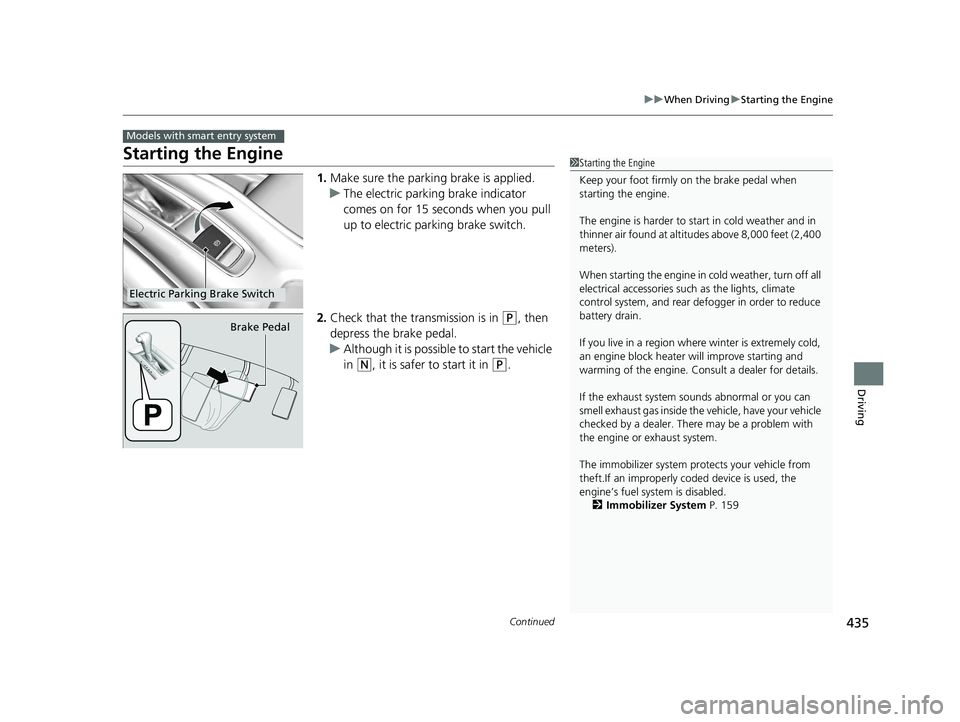
1. Make sure the parkin g brake is applied.
u The electric parking brake indicator
comes on for 15 seconds when you pull
up to electric parking brake switch.
2. Check that the transmission is in
(P, then
depress the brake pedal.
u Although it is possible to start the vehicle
in
(N, it is safer to start it in (P.
Models with smart entry system
1Starting the Engine
Keep your foot firmly on the brake pedal when
starting the engine.
The engine is harder to st art in cold weather and in
thinner air found at altitudes above 8,000 feet (2,400
meters).
When starting the engine in cold weather, turn off all
electrical accessories such as the lights, climate
control system, and rear de fogger in order to reduce
battery drain.
If you live in a region where winter is extremely cold,
an engine block heater will improve starting and
warming of the engine. Cons ult a dealer for details.
If the exhaust system sounds abnormal or you can
smell exhaust gas inside the vehicle, have your vehicle
checked by a dealer. There may be a problem with
the engine or exhaust system.
The immobilizer system pr otects your vehicle from
theft.If an improperly c oded device is used, the
engine’s fuel system is disabled.
2 Immobilizer System P. 159
Electric Parking Brake Switch
Brake Pedal
20 HR-V HDMC HDMG-31T7A6400.book 435 ページ 2019年8月8日 木曜日 午後3時52分
Page 440 of 639
438
uuWhen Driving uPrecautions While Driving
Driving
Precautions While Driving
Utility vehicles have a significantly higher rollover rate than other types of vehicles.
To prevent rollovers or loss of control:
• Take corners at slower speeds than yo u would with a passenger vehicle.
• Avoid sharp turns and abrupt maneuvers whenever possible.
• Do not modify your vehicle in any way that you would raise the center of gravity.
• Do not carry heavy cargo on the roof.
Never carry more than 165 lbs (75 kg) of cargo on the roof rack (Honda accessory).
Avoid driving in deep water and on flooded roads. This can damage the engine or
driveline, or cause electrical component failure.
■Driving Guidelines for Your Utility Vehicle
■In Rain
1 Precautions While Driving
NOTICE
Do not operate th e shift lever while pressing the
accelerator pedal. You could damage the
transmission.
NOTICE
If you repeatedly turn the steering wheel at an
extremely low speed, or hold the steering wheel in
the full left or right position for a while, the electric
power steering (EPS) system heats up. The system
goes into a protective mode, and limits its
performance. The steering wheel becomes harder
and harder to operate. Once the system cools down,
the EPS system is restored. Repeated operation under
these conditions can eventually damage the system.
If the ignition switch is turned to ACCESSORY
( q*1
while driving, the engine will shut down and all
steering and brake power a ssist functions will stop,
making it difficult to control the vehicle.
Do not put the shift lever in
( N, as you will lose
engine braking (and acce leration) performance.
During the first 600 miles (1,000 km) of operation,
avoid sudden acceleration or full throttle operation so
as to not damage the engine or powertrain.
Avoid hard braking for the first 200 miles (300 km).
You should also follow this when the brake pads are
replaced.
*1: Models with the smart entry system have an
ENGINE START/STOP button instead of an ignition
switch.
20 HR-V HDMC HDMG-31T7A6400.book 438 ページ 2019年8月8日 木曜日 午後3時52分
Page 446 of 639
uuWhen Driving uShifting
444
Driving
Use the paddle shifters to change betw een 1st and 7th speeds without removing
your hands from the steering wheel. The transmission switches to the 7-speed
manual shift mode when you pull a paddle shi fter while driving. This mode is useful
when engine braking is needed.
■When the shift lever is in (D:
The shift mode goes into the 7-speed ma nual shift mode temporarily, and the
number is displayed in the shift indicator.
The 7-speed manual shift mode is canceled automatically if you drive at constant
speed or accelerate, and the number in the shift indicator goes off.
You can cancel this mode by pulling th e paddle shifter for a few seconds.
The 7-speed manual shift mode is especially useful when reducing the vehicle speed
temporarily before making a turn.
■When the shift lever is in (S:
The shift mode goes into the 7- speed manual shift mode. The M indicator and the
speed number are displayed in the shift indicator. As the vehicle speed slows down,
the transmission automatically shifts down accordingly. When the vehicle comes to
a stop, it automatically shifts down into 1st.
If the vehicle speed increases and the engi ne speed reaches near the tachometer’s
red zone, the transmission automatically shifts up.
You can only pull away in 1st speed.
When canceling the 7-speed manual sh ift mode, move the shift lever from
(S to
(D. When the 7-speed manual shift mode is canceled, the M indicator and shift
indicator go off.
■7-Speed Manual Shift Mode1 7-Speed Manual Shift Mode
In the 7-speed manual shif t mode, the transmission
shifts up or down by opera ting either paddle shifter
under the following conditions:
Shift Up: The engine sp eed reaches the lowest
threshold of the higher speed position.
Shift Down: The engine sp eed reaches the highest
threshold of the lower speed position.
When the engine speed reaches near the
tachometer’s red zone, the transmission shifts up
automatically.
When the engine speed reaches the lowest threshold
of the selected speed positi on, the transmission shifts
down automatically.
Operating the paddle shifte rs on slippery surfaces
may cause the tires to lock up. In this case, the 7-
speed manual shift mode is canceled and goes back
to the normal
( D driving mode.
20 HR-V HDMC HDMG-31T7A6400.book 444 ページ 2019年8月8日 木曜日 午後3時52分
Page 448 of 639
446
uuWhen Driving uECON Button
Driving
ECON Button
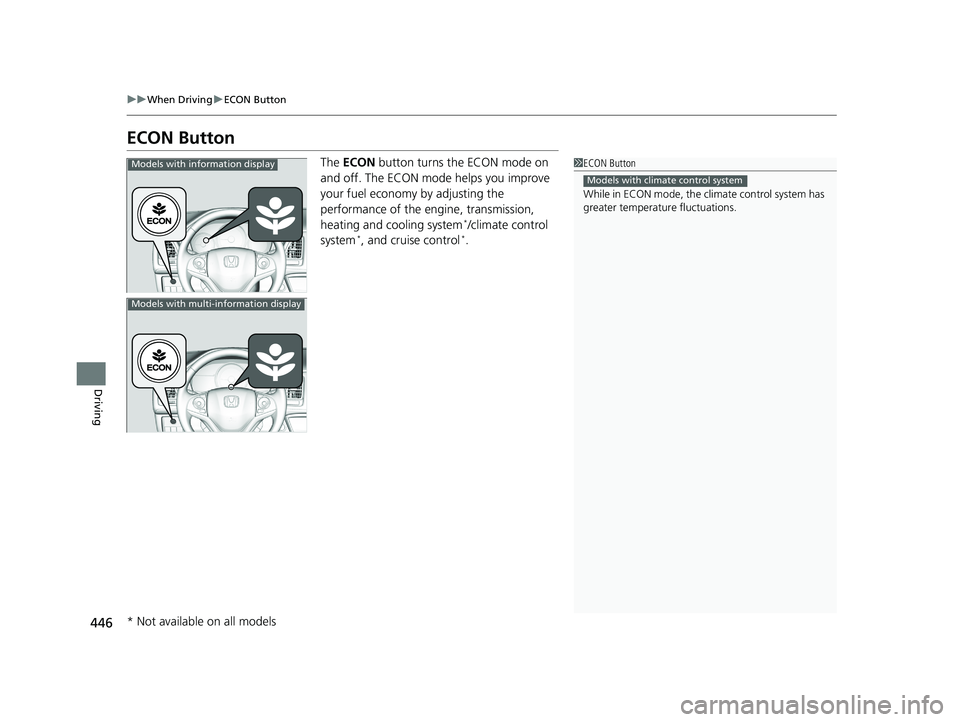
The ECON button turns the ECON mode on
and off. The ECON mode helps you improve
your fuel economy by adjusting the
performance of the engine, transmission,
heating and cooling system
*/climate control
system*, and cruise control*.
1 ECON Button
While in ECON mode, the climate control system has
greater temperature fluctuations.
Models with climate control system
Models with information display
Models with multi-information display
* Not available on all models
20 HR-V HDMC HDMG-31T7A6400.book 446 ページ 2019年8月8日 木曜日 午後3時52分
Page 449 of 639
447
uuWhen Driving uCruise Control*
Continued
Driving
Cruise Control*
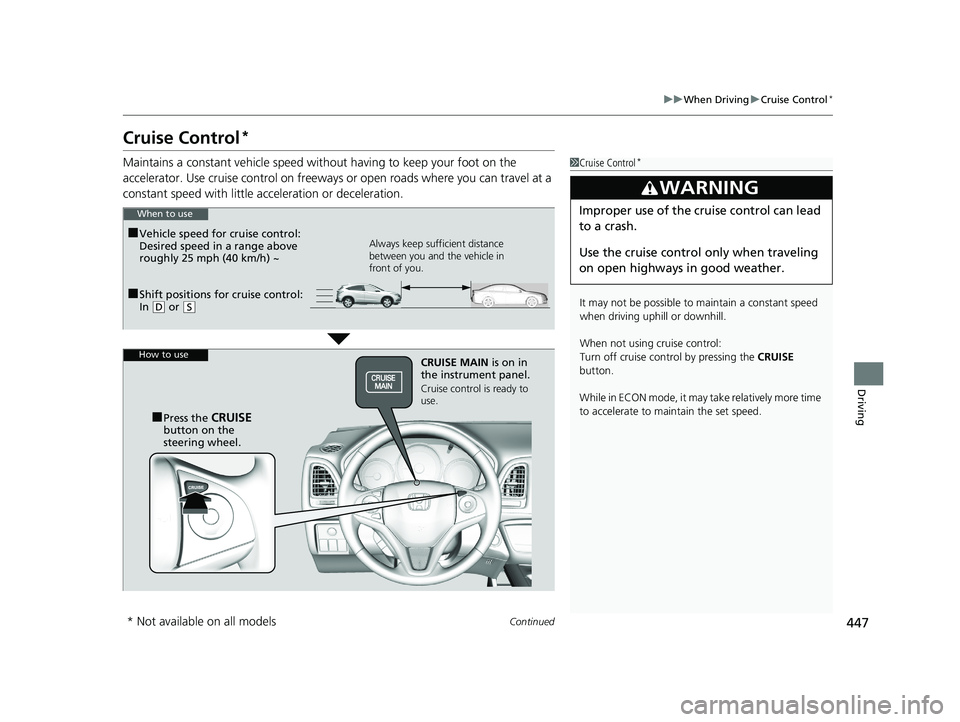
Maintains a constant vehicle speed without having to keep your foot on the
accelerator. Use cruise con trol on freeways or open roads where you can travel at a
constant speed with little ac celeration or deceleration.1Cruise Control*
It may not be possible to maintain a constant speed
when driving uphill or downhill.
When not using cruise control:
Turn off cruise control by pressing the CRUISE
button.
While in ECON mode, it may take relatively more time
to accelerate to maintain the set speed.
3WARNING
Improper use of the cruise control can lead
to a crash.
Use the cruise control only when traveling
on open highways in good weather.
■Shift positions for cruise control:
In ( D or (S Always keep sufficient distance
between you and the vehicle in
front of you.
■Vehicle speed for cruise control:
Desired speed in a range above
roughly 25 mph (40 km/h) ~
When to use
CRUISE MAIN
is on in
the instrument panel.
Cruise control is ready to
use.
■Press the CRUISE
button on the
steering wheel.
How to use
* Not available on all models
20 HR-V HDMC HDMG-31T7A6400.book 447 ページ 2019年8月8日 木曜日 午後3時52分
Page 457 of 639
455
uuWhen Driving uTire Pressure Monitoring System (TPMS)
Continued
Driving
Tire Pressure Monitoring System (TPMS)
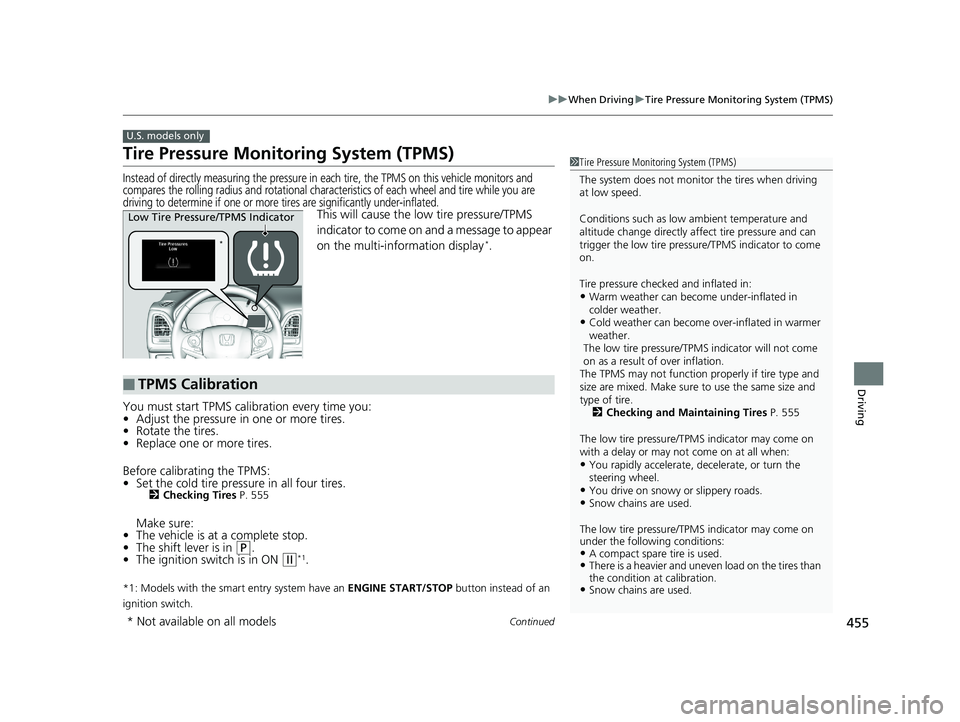
Instead of directly measuring the pressure in ea ch tire, the TPMS on this vehicle monitors and
compares the rolling radius and rotational charac teristics of each wheel and tire while you are
driving to determine if one or more tires are significantly under-inflated.
This will cause the low tire pressure/TPMS
indicator to come on and a message to appear
on the multi-information display
*.
You must start TPMS calibration every time you:
• Adjust the pressure in one or more tires.
• Rotate the tires.
• Replace one or more tires.
Before calibrating the TPMS:
• Set the cold tire pressure in all four tires.
2 Checking Tires P. 555
Make sure:
• The vehicle is at a complete stop.
• The shift lever is in
(P.
• The ignition switch is in ON (w*1.
*1: Models with the smart entry system have an ENGINE START/STOP button instead of an
ignition switch.
U.S. models only
1 Tire Pressure Monitoring System (TPMS)
The system does not monito r the tires when driving
at low speed.
Conditions such as low ambient temperature and
altitude change directly affect tire pressure and can
trigger the low tire pressure/TPMS indicator to come
on.
Tire pressure checked and inflated in:
•Warm weather can beco me under-inflated in
colder weather.
•Cold weather can become over-inflated in warmer
weather.
The low tire pressure/TPMS indicator will not come
on as a result of over inflation.
The TPMS may not function pr operly if tire type and
size are mixed. Make sure to use the same size and
type of tire.
2 Checking and Maintaining Tires P. 555
The low tire pressure/TPMS indicator may come on
with a delay or may not come on at all when:
•You rapidly accelerate, decelerate, or turn the
steering wheel.
•You drive on snowy or slippery roads.•Snow chains are used.
The low tire pressure/TPMS indicator may come on
under the following conditions:
•A compact spare tire is used.•There is a heavier and uneve n load on the tires than
the condition at calibration.
•Snow chains are used.
*
Low Tire Pressure/TPMS Indicator
■TPMS Calibration
* Not available on all models
20 HR-V HDMC HDMG-31T7A6400.book 455 ページ 2019年8月8日 木曜日 午後3時52分
Page 458 of 639
uuWhen Driving uTire Pressure Monitoring System (TPMS)
456
Driving
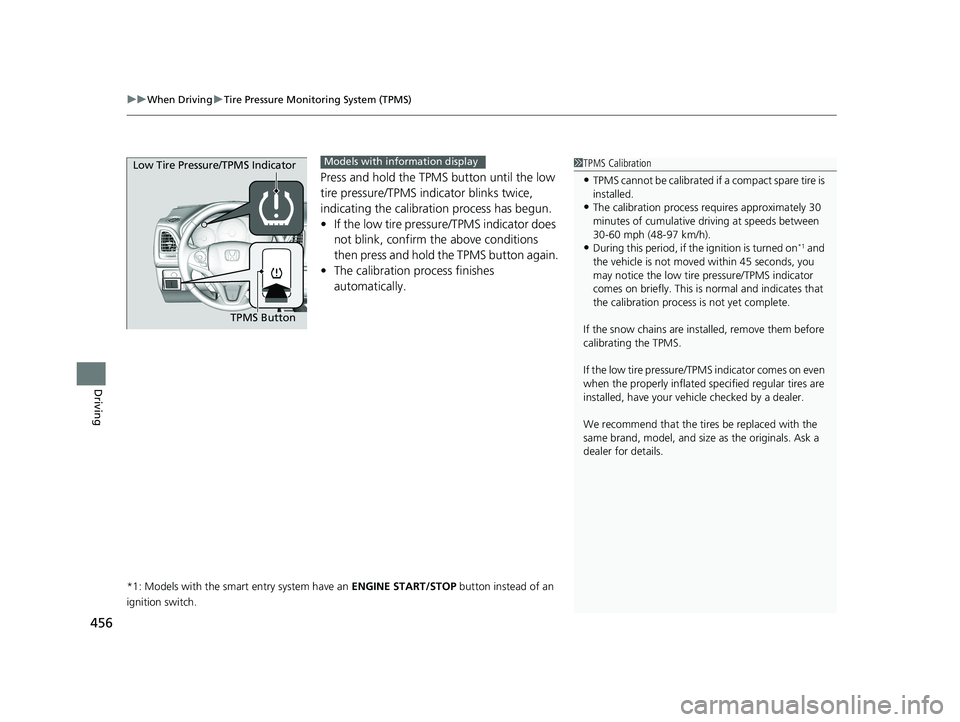
Press and hold the TPMS button until the low
tire pressure/TPMS indi cator blinks twice,
indicating the calibration process has begun.
• If the low tire pressure/TPMS indicator does
not blink, confirm the above conditions
then press and hold the TPMS button again.
• The calibration pr ocess finishes
automatically.
*1: Models with the smart entry system have an ENGINE START/STOP button instead of an
ignition switch.
1 TPMS Calibration
•TPMS cannot be calibrated if a compact spare tire is
installed.
•The calibration process requires approximately 30
minutes of cumulative dr iving at speeds between
30-60 mph (48-97 km/h).
•During this period, if the ignition is turned on*1 and
the vehicle is not move d within 45 seconds, you
may notice the low tire pressure/TPMS indicator
comes on briefly. This is normal and indicates that
the calibration process is not yet complete.
If the snow chains are installed, remove them before
calibrating the TPMS.
If the low tire pressure/TPMS indicator comes on even
when the properly inflated specified regular tires are
installed, have your vehi cle checked by a dealer.
We recommend that the tires be replaced with the
same brand, model, and size as the originals. Ask a
dealer for details.
TPMS Button
Low Tire Pressure/TPMS Indicator
Models with info
rmation display
20 HR-V HDMC HDMG-31T7A6400.book 456 ページ 2019年8月8日 木曜日 午後3時52分