ECO mode HONDA HR-V 2020 (in English) Manual Online
[x] Cancel search | Manufacturer: HONDA, Model Year: 2020, Model line: HR-V, Model: HONDA HR-V 2020Pages: 639, PDF Size: 40.6 MB
Page 295 of 639
293
uuAudio System Basic Operation uSong By VoiceTM (SBV)
Continued
Features
Song By VoiceTM (SBV)
Use SBV to search for and play music from your USB flash drive or iPod using voice
commands.
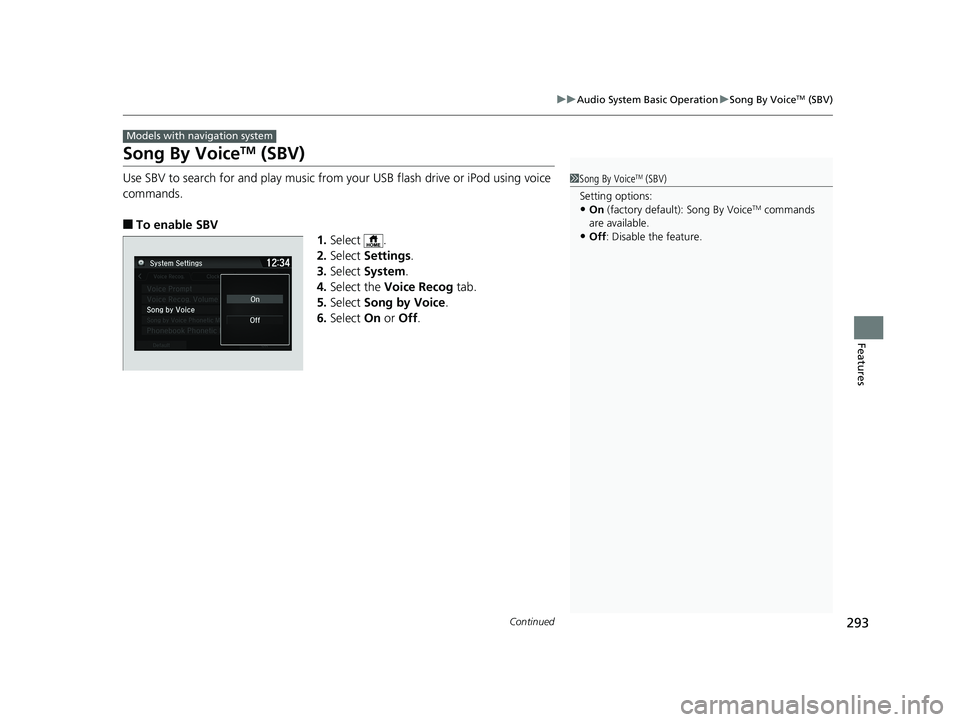
■To enable SBV
1.Select .
2. Select Settings .
3. Select System.
4. Select the Voice Recog tab.
5. Select Song by Voice .
6. Select On or Off .
Models with navigation system
1Song By VoiceTM (SBV)
Setting options:
•On (factory default): Song By VoiceTM commands
are available.
•Off : Disable the feature.
20 HR-V HDMC HDMG-31T7A6400.book 293 ページ 2019年8月8日 木曜日 午後3時52分
Page 296 of 639
uuAudio System Basic Operation uSong By VoiceTM (SBV)
294
Features
■Searching for music using SBV
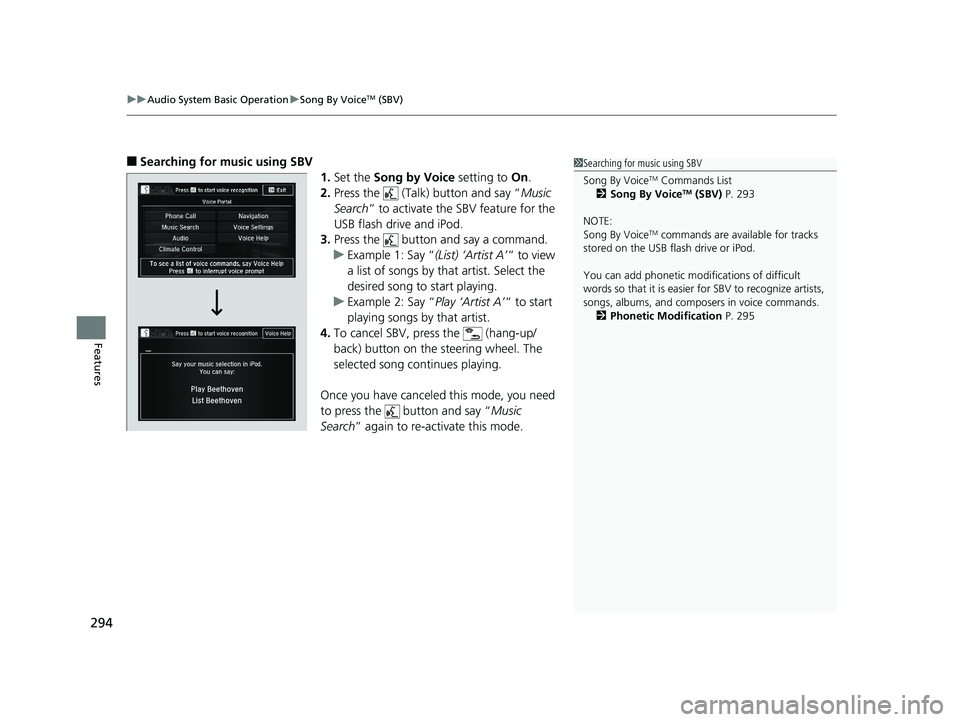
1.Set the Song by Voice setting to On.
2. Press the (Talk) button and say “ Music
Search ” to activate the SBV feature for the
USB flash drive and iPod.
3. Press the button and say a command.
u Example 1: Say “ (List) ‘Artist A’“ to view
a list of songs by that artist. Select the
desired song to start playing.
u Example 2: Say “ Play ‘Artist A’“ to start
playing songs by that artist.
4. To cancel SBV, pr ess the (hang-up/
back) button on the steering wheel. The
selected song continues playing.
Once you have canceled this mode, you need
to press the button and say “ Music
Search ” again to re-activate this mode.1Searching for music using SBV
Song By Voice
TM Commands List
2 Song By VoiceTM (SBV) P. 293
NOTE:
Song By Voice
TM commands are available for tracks
stored on the USB flash drive or iPod.
You can add phonetic modi fications of difficult
words so that it is easier for SBV to recognize artists,
songs, albums, and composers in voice commands. 2 Phonetic Modification P. 295
20 HR-V HDMC HDMG-31T7A6400.book 294 ページ 2019年8月8日 木曜日 午後3時52分
Page 301 of 639
299
uuAudio System Basic Operation uPlaying a USB Flash Drive
Continued
Features
Playing a USB Flash Drive
Your audio system reads an d plays sound and video files on a USB flash drive in
either MP3, WMA, or AAC*1 format.
Connect your USB flash drive to the USB port, then select the USB mode.
2 USB Port(s) P. 229
*1:Only AAC format files recorded with iTunes are playable on this unit.
*2:Some or all of the lists may not be displayed.
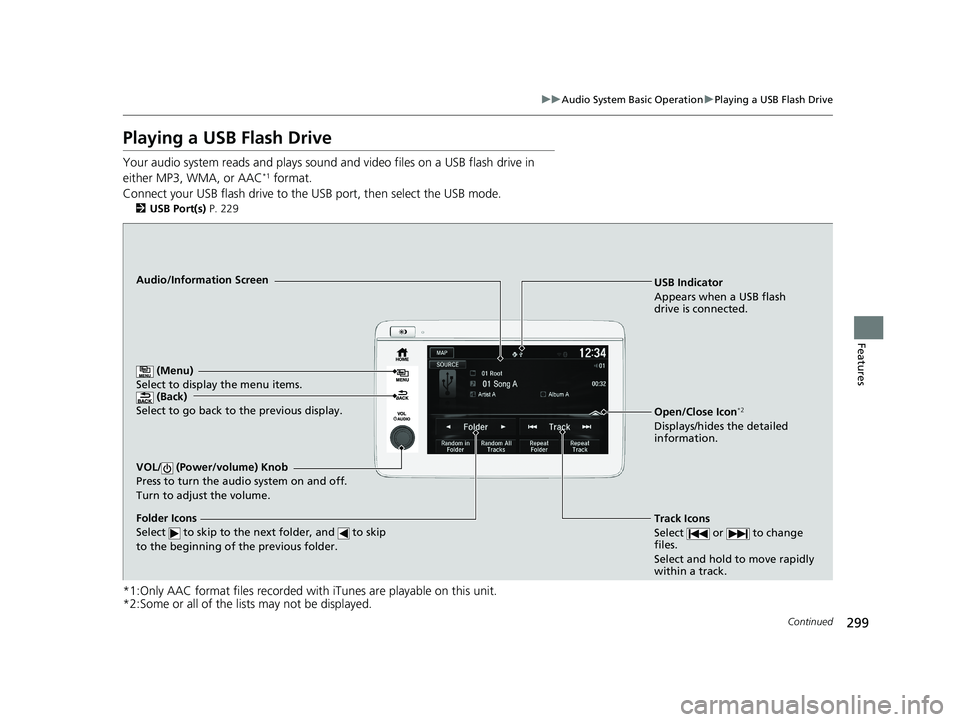
USB Indicator
Appears when a USB flash
drive is connected.
Track Icons
Select or to change
files.
Select and hold to move rapidly
within a track.Audio/Information Screen
(Back)
Select to go back to the previous display.
VOL/ (Power/volume) Knob
Press to turn the audio system on and off.
Turn to adjust the volume.
Open/Close Icon*2
Displays/hides the detailed
information.
(Menu)
Select to display the menu items.
Folder Icons
Select to skip to the next folder, and to skip
to the beginning of the previous folder.
20 HR-V HDMC HDMG-31T7A6400.book 299 ページ 2019年8月8日 木曜日 午後3時52分
Page 303 of 639
301
uuAudio System Basic Operation uPlaying a USB Flash Drive
Features
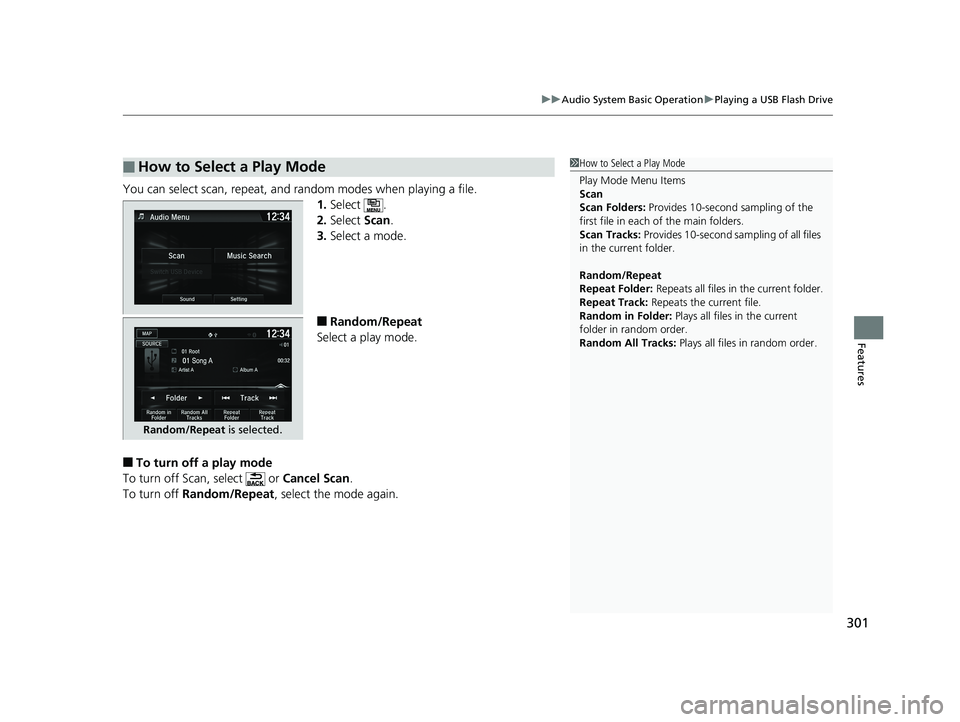
You can select scan, repeat, and random modes when playing a file.
1.Select .
2. Select Scan.
3. Select a mode.
■Random/Repeat
Select a play mode.
■To turn off a play mode
To turn off Scan, select or Cancel Scan.
To turn off Random/Repeat , select the mode again.
■How to Select a Play Mode1How to Select a Play Mode
Play Mode Menu Items
Scan
Scan Folders: Provides 10-second sampling of the
first file in each of the main folders.
Scan Tracks: Provides 10-second sa mpling of all files
in the current folder.
Random/Repeat
Repeat Folder: Repeats all files in the current folder.
Repeat Track: Repeats the current file.
Random in Folder: Plays all files in the current
folder in random order.
Random All Tracks: Plays all files in random order.
Random/Repeat is selected.
20 HR-V HDMC HDMG-31T7A6400.book 301 ページ 2019年8月8日 木曜日 午後3時52分
Page 305 of 639
303
uuAudio System Basic Operation uPlaying Bluetooth ® Audio
Features
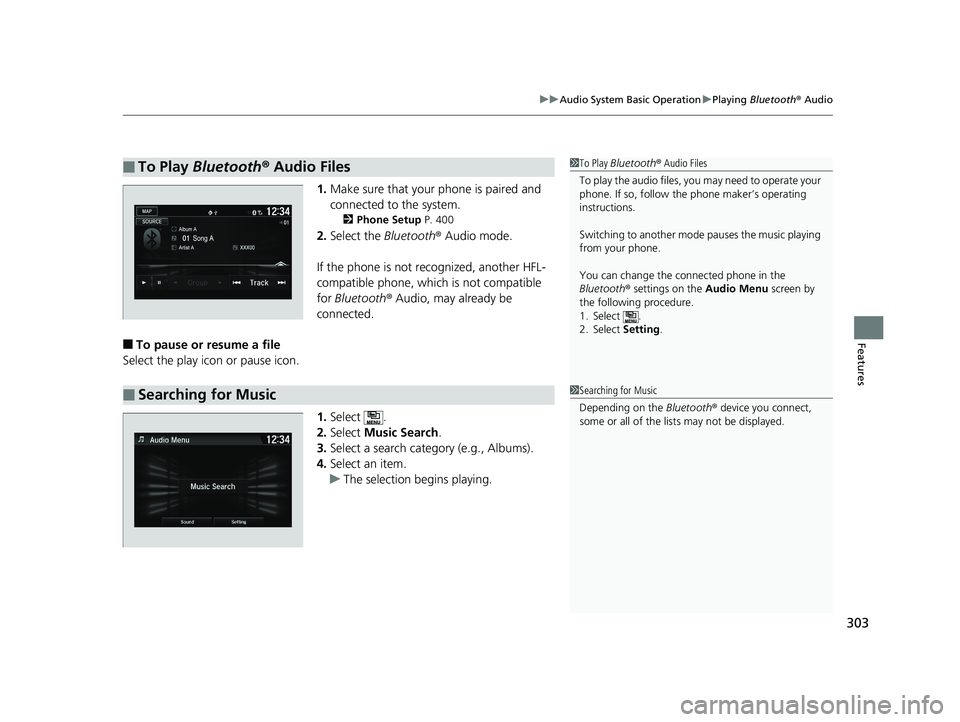
1. Make sure that your phone is paired and
connected to the system.
2 Phone Setup P. 400
2.Select the Bluetooth® Audio mode.
If the phone is not recognized, another HFL-
compatible phone, which is not compatible
for Bluetooth ® Audio, may already be
connected.
■To pause or resume a file
Select the play icon or pause icon.
1.Select .
2. Select Music Search.
3. Select a search catego ry (e.g., Albums).
4. Select an item.
u The selection begins playing.
■To Play Bluetooth ® Audio Files1 To Play Bluetooth ® Audio Files
To play the audio files, y ou may need to operate your
phone. If so, follow the phone maker’s operating
instructions.
Switching to another mode pauses the music playing
from your phone.
You can change the connected phone in the
Bluetooth ® settings on the Audio Menu screen by
the following procedure.
1. Select .
2. Select Setting .
■Searching for Music1Searching for Music
Depending on the Bluetooth® device you connect,
some or all of the list s may not be displayed.
20 HR-V HDMC HDMG-31T7A6400.book 303 ページ 2019年8月8日 木曜日 午後3時52分
Page 331 of 639
329
Features
General Information on the Audio System
SiriusXM® Radio Service*
1.You need your radio ID ready before regist ering for subscription. To see the ID in
the display: Select Channel 000.
2. Have your radio ID and credit card numb er ready, and either call or visit the
SiriusXM ® website to subscribe.
Switch to the SiriusXM ® mode by using the SOURCE button on the steering wheel,
or through the audio/informations screen, and stay in this mode for about 30
minutes until the service is activated. Make sure your vehicle is in an open area with
good reception.
Check antenna:
The SiriusXM ® antenna is disconnected or shorted. Contact a dealer.
No Signal:
The signal is too weak in the current location.
Channel Not Subscribed:
You are not subscribed to the channel selected.
Subscription Updated:
SiriusXM ® radio is receiving informati on update from the network.
Replay Memory Almost Full:
The recording memory is nearly full.
Replay Memory Full:
The recording memory is full.
■Subscribing to SiriusXM ® Radio
■Receiving SiriusXM ® Radio
■SiriusXM ® Radio Display Messages
1 Subscribing to SiriusXM ® Radio
Contact Information for SiriusXM ® Radio:
•U.S.: SiriusXM ® Radio at www.siriusxm.com/
subscribenow or 1-866-635-2349
•Canada: SiriusXM ® Canada at www.siriusxm.ca/
subscribe-now , or 1-877-209-0079
1Receiving SiriusXM ® Radio
The SiriusXM ® satellites are in orbit over the equator;
therefore, objects south of the vehicle may cause
satellite reception interruptions. Sa tellite signals are
more likely to be blocked by tall buildings and
mountains the farther north you travel from the
equator.
You may experience rece ption problems under the
following circumstances:
•In a location with an obstruction to the south of
your vehicle.
•In tunnels
•On the lower level of a multi-tiered road•Large items carried on the roof rack
* Not available on all models
20 HR-V HDMC HDMG-31T7A6400.book 329 ページ 2019年8月8日 木曜日 午後3時52分
Page 332 of 639
330
uuGeneral Information on the Audio System uRecommended CDs*
Features
Recommended CDs*
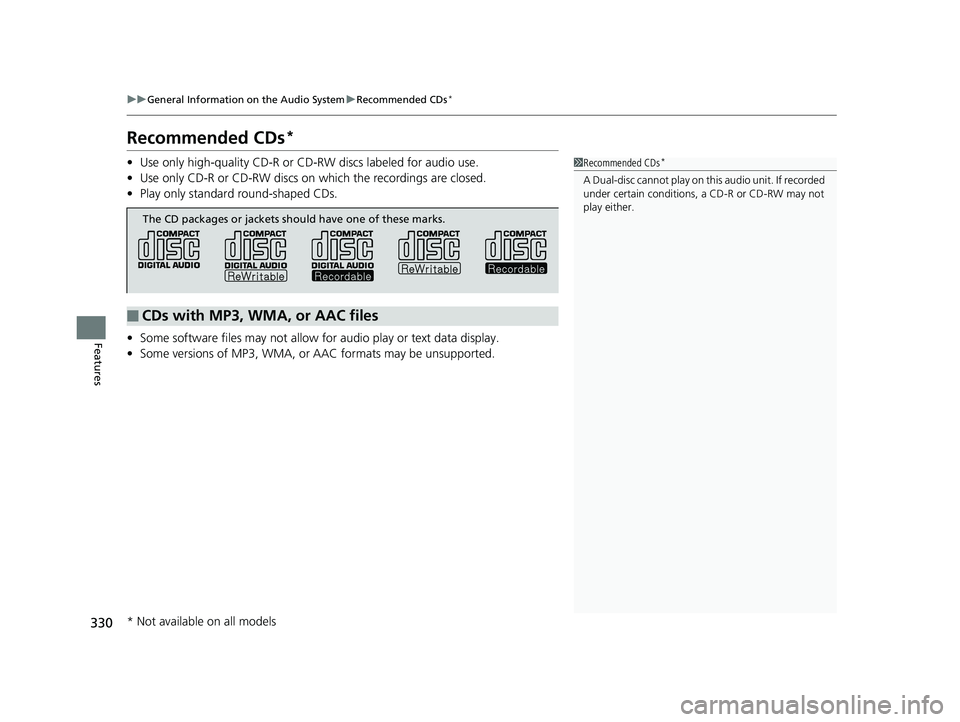
• Use only high-quality CD-R or CD-RW discs labeled for audio use.
• Use only CD-R or CD-RW discs on which the recordings are closed.
• Play only standard round-shaped CDs.
• Some software files may not allow for audio play or text data display.
• Some versions of MP3, WMA, or AAC formats may be unsupported.1Recommended CDs*
A Dual-disc cannot play on th is audio unit. If recorded
under certain conditions, a CD-R or CD-RW may not
play either.
■CDs with MP3, WMA, or AAC files
The CD packages or jackets should have one of these marks.
* Not available on all models
20 HR-V HDMC HDMG-31T7A6400.book 330 ページ 2019年8月8日 木曜日 午後3時52分
Page 334 of 639
332
uuGeneral Information on the Audio System uCompatible iPod, iPhone, and USB Flash Drives
Features
Compatible iPod, iPhone, and USB Flash Drives
*1:Display audio system
• A USB flash drive of 256 MB or higher is recommended.
• Some digital audio players may not be compatible.
• Some USB flash drives (e.g., a device with security lockout) may not work.
• Some software files may not allow for audio play or text data display.
• Some versions of MP3, WMA, or AAC formats may be unsupported.
■iPod and iPhone Model Compatibility
Model
iPod (5th generation)
iPod classic 80GB/160GB (launch in 2007)
iPod classic 120GB (launch in 2008)
iPod classic 160GB (launch in 2009)
iPod nano (1st to 7th generation) released between 2005 and 2012
iPod touch (1st to 5th generation) released between 2007 and 2012
iPhone 3G/iPhone 3GS/iPhone 4/iPhone 4S/iPhone 5/iPhone 5s*1/iPhone 5c*1/
iPhone 6*1/iPhone 6 plus*1/iPhone 6s*1/iPhone 6s plus*1
■USB Flash Drives
1 iPod and iPhone Model Compatibility
This system may not work with all software versions
of these devices.
1USB Flash Drives
Files on the USB flash drive are played in their stored
order. This order may be different from the order
displayed on your PC or device.
20 HR-V HDMC HDMG-31T7A6400.book 332 ページ 2019年8月8日 木曜日 午後3時52分
Page 357 of 639
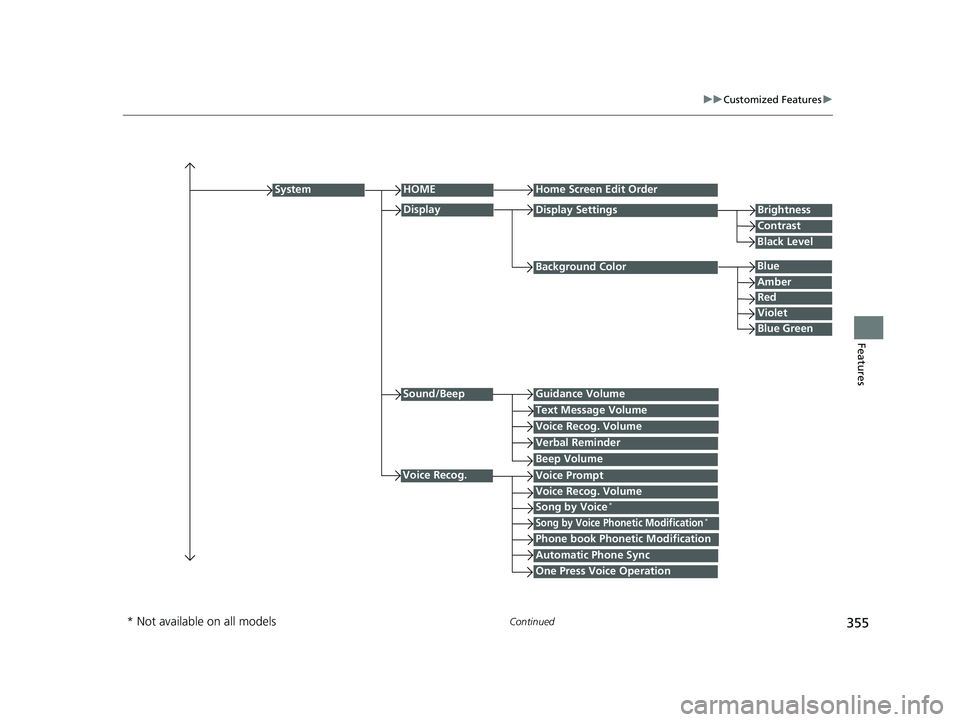
355
uuCustomized Features u
Continued
Features
Background Color
HOMEHome Screen Edit Order
Brightness
Contrast
Display Settings
Voice Prompt
System
Blue
Display
Voice Recog. Volume
Black Level
Amber
Red
Violet
Blue Green
Sound/BeepGuidance Volume
Text Message Volume
Voice Recog. Volume
Verbal Reminder
Beep Volume
Voice Recog.
Song by Voice*
Song by Voice Phonetic Modification*
Phone book Phonetic Modification
Automatic Phone Sync
One Press Voice Operation
* Not available on all models
20 HR-V HDMC HDMG-31T7A6400.book 355 ページ 2019年8月8日 木曜日 午後3時52分
Page 364 of 639
362
uuCustomized Features u
Features
*1:Default Setting
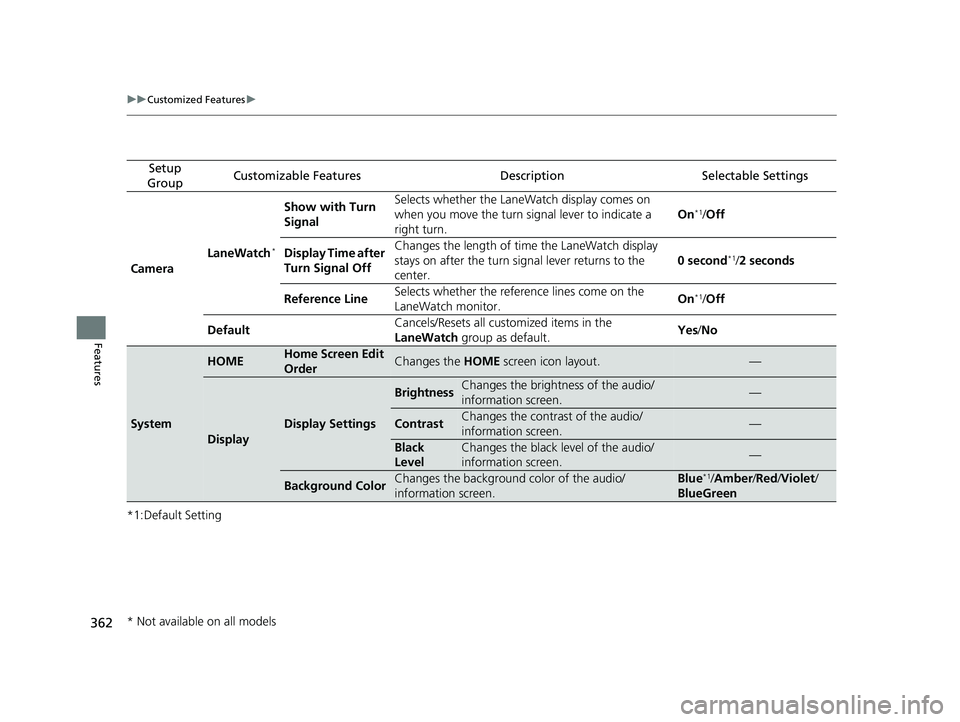
Setup
GroupCustomizable FeaturesDescriptionSelectable Settings
Camera LaneWatch
*
Show with Turn
Signal Selects whether the LaneWatch display comes on
when you move the turn signal lever to indicate a
right turn.
On*1/
Off
Display Time after
Turn Signal Off Changes the length of ti
me the LaneWatch display
stays on after the turn sign al lever returns to the
center. 0 second
*1/
2 seconds
Reference Line Selects whether the reference lines come on the
LaneWatch monitor. On
*1/
Off
Default Cancels/Resets all customized items in the
LaneWatch
group as default. Yes
/No
System
HOMEHome Screen Edit
OrderChanges the HOME screen icon layout.—
Display
Display Settings
BrightnessChanges the brightness of the audio/
information screen.—
ContrastChanges the contrast of the audio/
information screen.—
Black
LevelChanges the black level of the audio/
information screen.—
Background ColorChanges the background color of the audio/
information screen.Blue*1/Amber /Red /Violet /
BlueGreen
* Not available on all models
20 HR-V HDMC HDMG-31T7A6400.book 362 ページ 2019年8月8日 木曜日 午後3時52分