charging HONDA HR-V 2020 Owner's Manual (in English)
[x] Cancel search | Manufacturer: HONDA, Model Year: 2020, Model line: HR-V, Model: HONDA HR-V 2020Pages: 639, PDF Size: 40.6 MB
Page 13 of 639
11
Quick Reference Guide
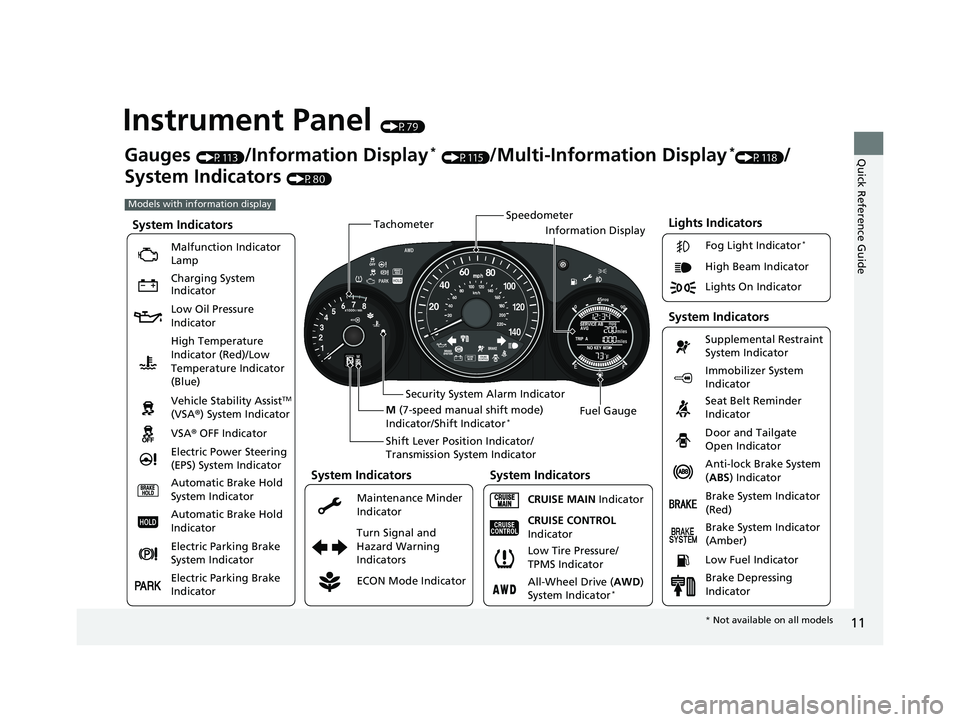
Instrument Panel (P79)
Lights Indicators
Malfunction Indicator
Lamp
Low Oil Pressure
IndicatorAnti-lock Brake System
(ABS ) Indicator
Vehicle Stability Assist
TM
(VSA® ) System Indicator
VSA ® OFF Indicator
Electric Power Steering
(EPS) System Indicator Lights On Indicator High Beam Indicator
Immobilizer System
Indicator
Seat Belt Reminder
Indicator
System Indicators
CRUISE MAIN
Indicator Supplemental Restraint
System Indicator
Door and Tailgate
Open Indicator
Tachometer
Speedometer
Fuel Gauge
Security System Alarm Indicator
Shift Lever Position Indicator/
Transmission System Indicator
Low Fuel Indicator
Gauges (P113)/Information Display* (P115)/Multi-Information Display*(P118)/
System Indicators
(P80)
Turn Signal and
Hazard Warning
Indicators
High Temperature
Indicator (Red)/Low
Temperature Indicator
(Blue)
System Indicators
System Indicators
Brake System Indicator
(Red)
CRUISE CONTROL
Indicator
System Indicators
Charging System
Indicator
ECON Mode Indicator Maintenance Minder
Indicator Fog Light Indicator
*
Brake System Indicator
(Amber)
M
(7-speed manual shift mode)
Indicator/Shift Indicator
*
Information Display
Automatic Brake Hold
System Indicator
Automatic Brake Hold
Indicator
Electric Parking Brake
System Indicator
Electric Parking Brake
Indicator All-Wheel Drive (
AWD)
System Indicator
*
Brake Depressing
Indicator
Models with information display
Low Tire Pressure/
TPMS Indicator
* Not available on all models
20 HR-V HDMC HDMG-31T7A6400.book 11 ページ 2019年8月8日 木曜日 午後3時52分
Page 14 of 639
12
Quick Reference Guide
002300
Lights On Indicator
System Indicators
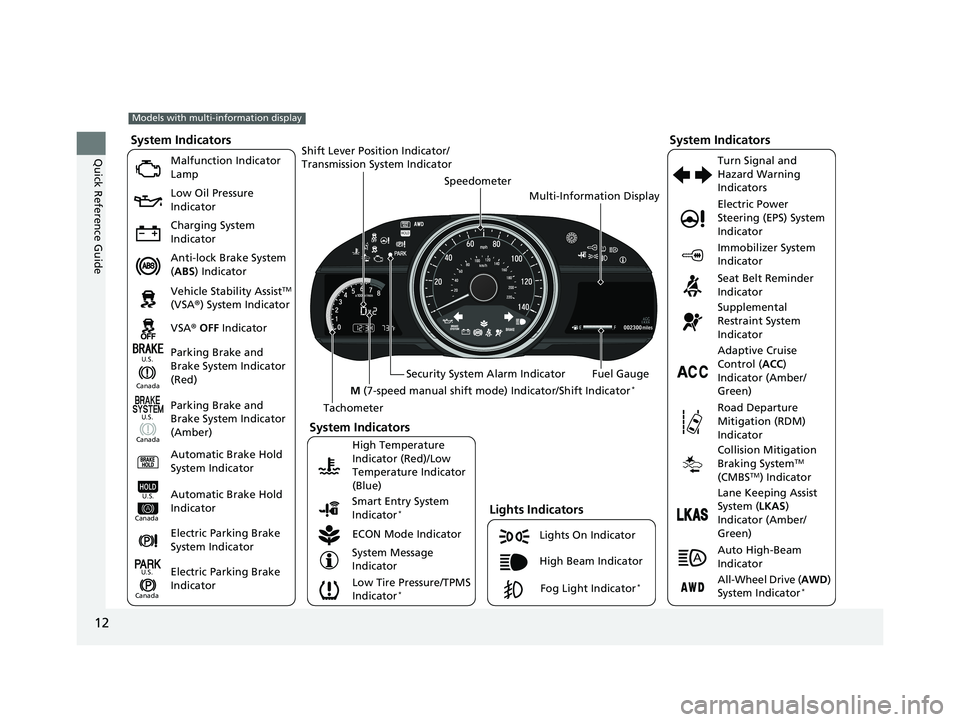
Malfunction Indicator
Lamp
Low Oil Pressure
Indicator
Charging System
Indicator
Anti-lock Brake System
(ABS ) Indicator
Vehicle Stability Assist
TM
(VSA ®) System Indicator
VSA ® OFF Indicator
Low Tire Pressure/TPMS
Indicator
*
Electric Power
Steering (EPS) System
Indicator
Seat Belt Reminder
Indicator
System Indicators
Parking Brake and
Brake System Indicator
(Red) Supplemental
Restraint System
Indicator
Tachometer Speedometer
Fuel Gauge
Security System Alarm Indicator
Shift Lever Position Indicator/
Transmission Sy
stem Indicator
Immobilizer System
Indicator
ECON Mode Indicator Turn Signal and
Hazard Warning
Indicators
Models with multi-information display
Parking Brake and
Brake System Indicator
(Amber)
System Indicators
Lights Indicators
High Beam Indicator
Fog Light Indicator*
Adaptive Cruise
Control (
ACC)
Indicator (Amber/
Green)
System Message
Indicator Collision Mitigation
Braking System
TM
(CMBSTM) Indicator
Road Departure
Mitigation (RDM)
Indicator
Lane Keeping Assist
System (
LKAS)
Indicator (Amber/
Green)
Smart Entry System
Indicator
*
U.S.
Canada
Canada U.S.
High Temperature
Indicator (Red)/Low
Temperature Indicator
(Blue)Automatic Brake Hold
System Indicator
Automatic Brake Hold
IndicatorU.S.
Canada
Electric Parking Brake
System Indicator
Electric Parking Brake
IndicatorU.S.
Canada
Auto High-Beam
Indicator
All-Wheel Drive (
AWD)
System Indicator*
M (7-speed manual shift mode ) Indicator/Shift Indicator*
Multi-Information Display
20 HR-V HDMC HDMG-31T7A6400.book 12 ページ 2019年8月8日 木曜日 午後3時52分
Page 87 of 639
85
uuIndicators u
Continued
Instrument Panel
*1:Models with the smart entry system have an ENGINE START/STOP button instead of an ignition switch.
IndicatorNameOn/BlinkingExplanationMessage*
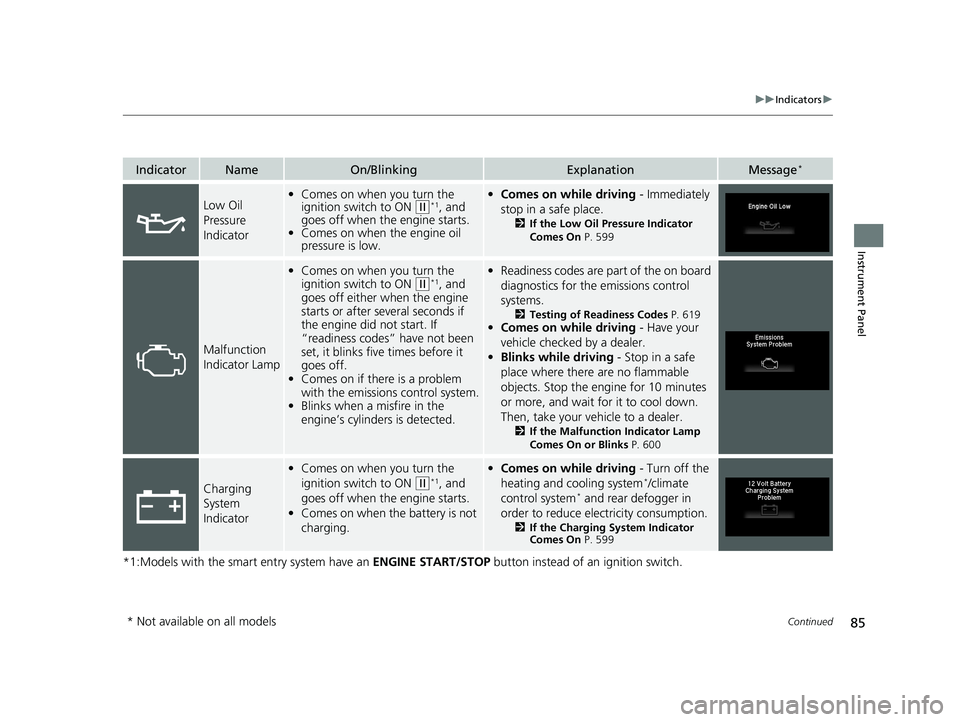
Low Oil
Pressure
Indicator•Comes on when you turn the
ignition switch to ON (w*1, and
goes off when the engine starts.
• Comes on when the engine oil
pressure is low.•Comes on while driving - Immediately
stop in a safe place.
2 If the Low Oil Pressure Indicator
Comes On P. 599
Malfunction
Indicator Lamp
•Comes on when you turn the
ignition switch to ON
(w*1, and
goes off either when the engine
starts or after several seconds if
the engine did not start. If
“readiness codes” have not been
set, it blinks five times before it
goes off.
• Comes on if there is a problem
with the emissions control system.
• Blinks when a misfire in the
engine’s cylinders is detected.
•Readiness codes are part of the on board
diagnostics for the emissions control
systems.
2 Testing of Readiness Codes P. 619•Comes on while driving - Have your
vehicle checked by a dealer.
• Blinks while driving - Stop in a safe
place where there are no flammable
objects. Stop the engine for 10 minutes
or more, and wait for it to cool down.
Then, take your vehicle to a dealer.
2 If the Malfunction Indicator Lamp
Comes On or Blinks P. 600
Charging
System
Indicator
•Comes on when you turn the
ignition switch to ON
(w*1, and
goes off when the engine starts.
• Comes on when the battery is not
charging.
•Comes on while driving - Turn off the
heating and cooling system*/climate
control system* and rear defogger in
order to reduce electricity consumption.
2 If the Charging System Indicator
Comes On P. 599
* Not available on all models
20 HR-V HDMC HDMG-31T7A6400.book 85 ページ 2019年8月8日 木曜日 午後3時52分
Page 231 of 639
229
uuAudio System uUSB Port(s)
Features
USB Port(s)
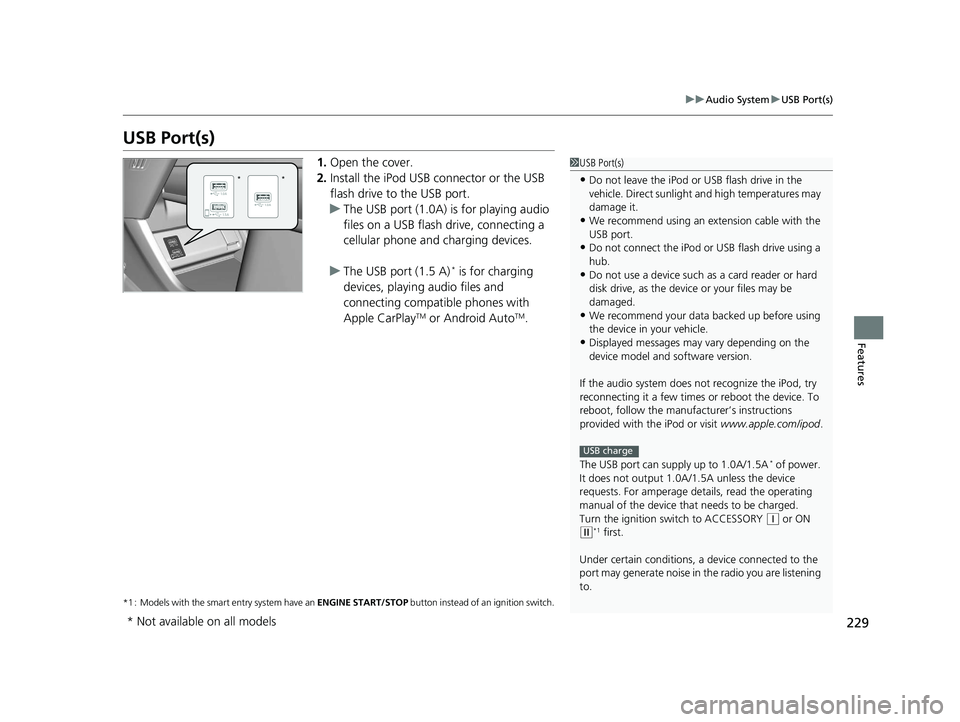
1. Open the cover.
2. Install the iPod USB connector or the USB
flash drive to the USB port.
u The USB port (1.0A) is for playing audio
files on a USB flash drive, connecting a
cellular phone and charging devices.
u The USB port (1.5 A)
* is for charging
devices, playing audio files and
connecting compatib le phones with
Apple CarPlay
TM or Android AutoTM.
*1 : Models with the smart entry system have an ENGINE START/STOP button instead of an ignition switch.
1USB Port(s)
•Do not leave the iPod or USB flash drive in the
vehicle. Direct sunlight and high temperatures may
damage it.
•We recommend using an ex tension cable with the
USB port.
•Do not connect the iPod or USB flash drive using a
hub.
•Do not use a device such as a card reader or hard
disk drive, as the device or your files may be
damaged.
•We recommend your data backed up before using
the device in your vehicle.
•Displayed messages may vary depending on the
device model and software version.
If the audio system does not recognize the iPod, try
reconnecting it a few times or reboot the device. To
reboot, follow the manufac turer’s instructions
provided with the iPod or visit www.apple.com/ipod.
The USB port can supply up to 1.0A/1.5A
* of power.
It does not output 1.0A/1 .5A unless the device
requests. For amperage de tails, read the operating
manual of the device that needs to be charged.
Turn the ignition switch to ACCESSORY
( q or ON (w*1 first.
Under certain condi tions, a device connected to the
port may generate noise in the radio you are listening
to.
USB charge
**
* Not available on all models
20 HR-V HDMC HDMG-31T7A6400.book 229 ページ 2019年8月8日 木曜日 午後3時52分
Page 326 of 639
324
uuAudio Error Messages uiPod/USB Flash Drive
Features
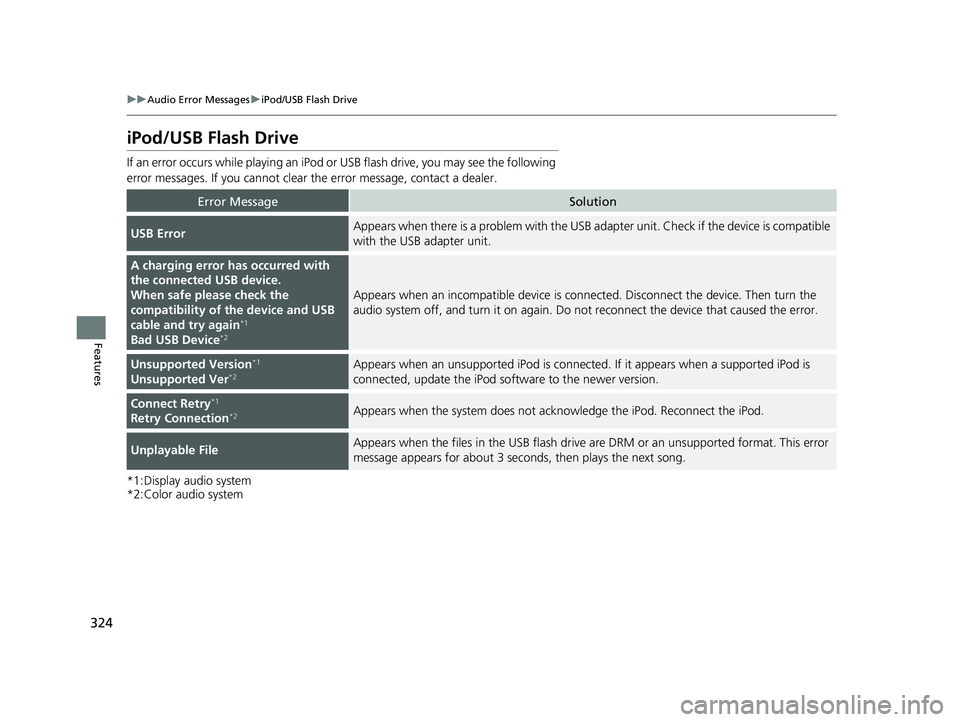
iPod/USB Flash Drive
If an error occurs while playing an iPod or USB flash drive, you may see the following
error messages. If you cannot clear the error message, contact a dealer.
*1:Display audio system
*2:Color audio system
Error MessageSolution
USB ErrorAppears when there is a problem with the USB ad apter unit. Check if the device is compatible
with the USB adapter unit.
A charging error has occurred with
the connected USB device.
When safe please check the
compatibility of th e device and USB
cable and try again
*1
Bad USB Device*2
Appears when an incompatible device is conn ected. Disconnect the device. Then turn the
audio system off, and turn it on again. Do not reconnect the device that caused the error.
Unsupported Version*1
Unsupported Ver*2Appears when an unsupported iPod is connected. If it appears when a supported iPod is
connected, update the iPod software to the newer version.
Connect Retry*1
Retry Connection*2Appears when the system does not acknowledge the iPod. Reconnect the iPod.
Unplayable FileAppears when the files in the USB flash drive are DRM or an unsupported format. This error
message appears for about 3 seconds, then plays the next song.
20 HR-V HDMC HDMG-31T7A6400.book 324 ページ 2019年8月8日 木曜日 午後3時52分
Page 329 of 639
327
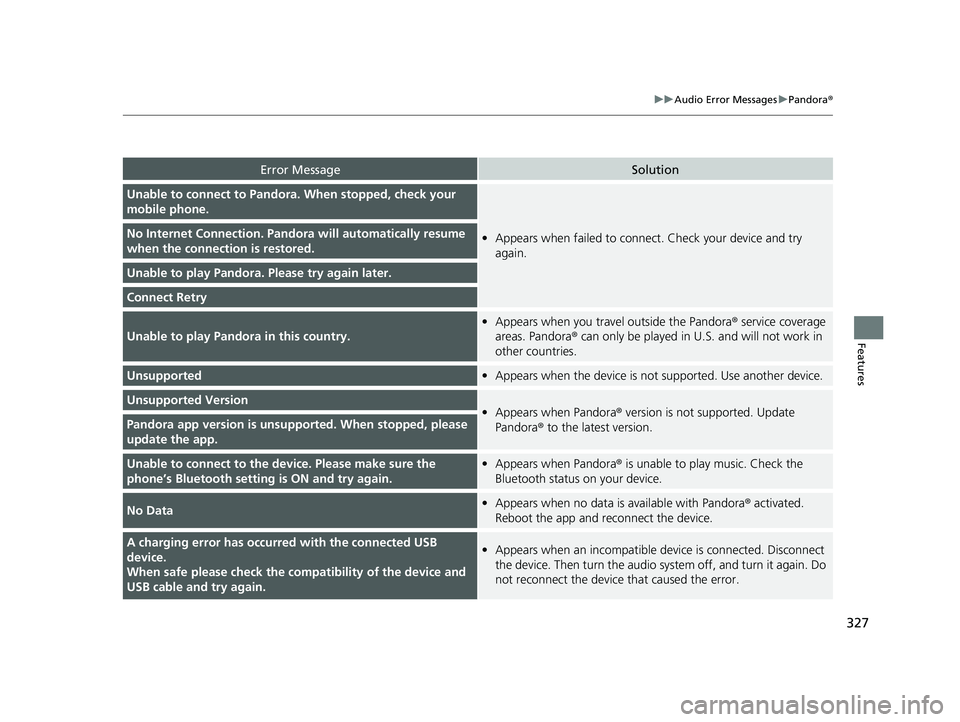
uuAudio Error Messages uPandora ®
Features
Error MessageSolution
Unable to connect to Pandora . When stopped, check your
mobile phone.
• Appears when failed to connec t. Check your device and try
again.No Internet Connection. Pand ora will automatically resume
when the connecti on is restored.
Unable to play Pandora. Please try again later.
Connect Retry
Unable to play Pandora in this country.
•Appears when you travel outside the Pandora ® service coverage
areas. Pandora ® can only be played in U.S. and will not work in
other countries.
Unsupported• Appears when the device is not supported. Use another device.
Unsupported Version•Appears when Pandora® version is not supported. Update
Pandora ® to the latest version.Pandora app version is unsupported. When stopped, please
update the app.
Unable to connect to the device. Please make sure the
phone’s Bluetooth setting is ON and try again.•Appears when Pandora® is unable to play music. Check the
Bluetooth status on your device.
No Data• Appears when no data is available with Pandora ® activated.
Reboot the app and reconnect the device.
A charging error has occurre d with the connected USB
device.
When safe please check the compatibility of the device and
USB cable and try again.• Appears when an incompatible device is connected. Disconnect
the device. Then turn th e audio system off, and turn it again. Do
not reconnect the device that caused the error.
20 HR-V HDMC HDMG-31T7A6400.book 327 ページ 2019年8月8日 木曜日 午後3時52分
Page 341 of 639
339
uuGeneral Information on the Audio System uHonda App License Agreement
Continued
Features
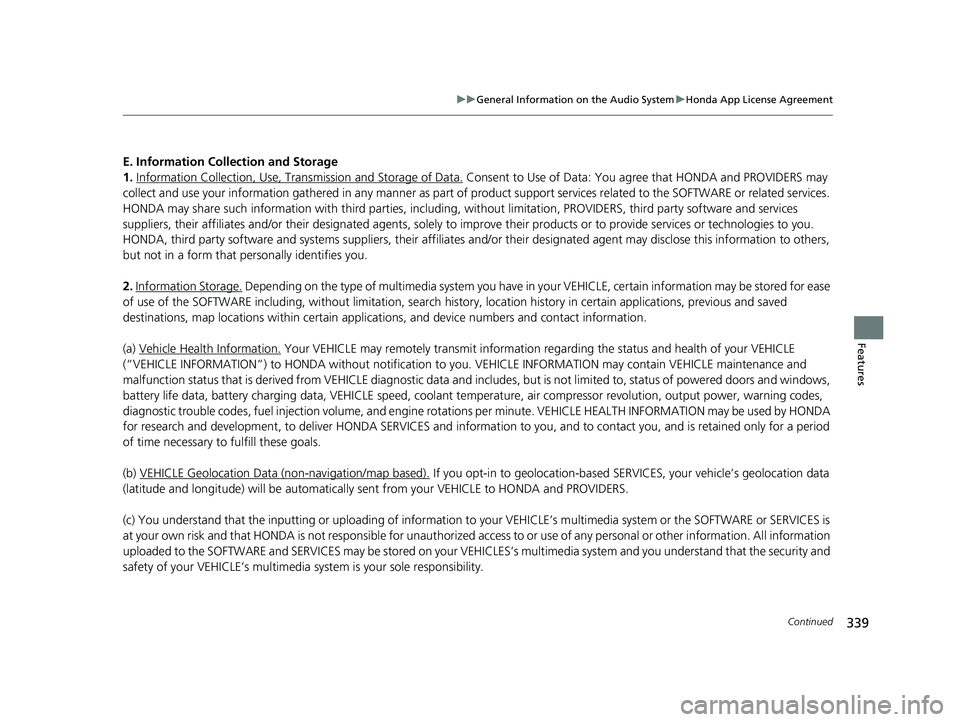
E. Information Collection and Storage
1. Information Collection, Use, Tran smission and Storage of Data.
Consent to Use of Data: You agree that HONDA and PROVIDERS may
collect and use your information gathered in any manner as part of product support services related to the SOFTWARE or related services.
HONDA may share such information with third parties, including, without limitation, PR OVIDERS, third party software and service s
suppliers, their affiliates and/or their designated agents, solely to improve their products or to provide services or technolo gies to you.
HONDA, third party software and systems supplie rs, their affiliates and/or their designated agent may disclose this information to others,
but not in a form that pe rsonally identifies you.
2. Information Storage.
Depending on the type of multimedia system you have in your VEHICLE, certain information may be stored for ease
of use of the SOFTWARE including, without limitation, search history, location history in certain applications, previous and sa ved
destinations, map locations within certain applications, and device numbers and contact information.
(a) Vehicle Health Information.
Your VEHICLE may remotely transmit information re garding the status and health of your VEHICLE
(“VEHICLE INFORMATION”) to HO NDA without notification to you. VEHICLE INFO RMATION may contain VEHICLE maintenance and
malfunction status that is derived from VEHICLE diagnostic data and includes, but is not limited to, status of powered doors and windows,
battery life data, battery charging data, VE HICLE speed, coolant temperature, air comp ressor revolution, output power, warning codes,
diagnostic trouble codes, fuel injection volume, and engine rota tions per minute. VEHICLE HEALTH INFORMATION may be used by HON DA
for research and development, to deliver HONDA SERVICES and informat ion to you, and to contact you, and is retained only for a period
of time necessary to fulfill these goals.
(b) VEHICLE Geolocation Data (non-navigation/map based).
If you opt-in to geolocation-based SERVICES, your vehicle’s geolocation data
(latitude and longitude) will be automatically sent from your VEHICLE to HONDA and PROVIDERS.
(c) You understand that the inputting or uploading of information to your VEHICLE’s multimedia system or the SOFTWARE or SERVIC ES is
at your own risk and that HONDA is not responsible for unauthori zed access to or use of any personal or other information. All information
uploaded to the SOFTWARE and SERVICES may be stored on your VEHICLES’s multimedia system and you understand that the security and
safety of your VEHICLE’s multimedia system is your sole responsibility.
20 HR-V HDMC HDMG-31T7A6400.book 339 ページ 2019年8月8日 木曜日 午後3時52分
Page 569 of 639
567
uuBattery uCharging the Battery
Maintenance
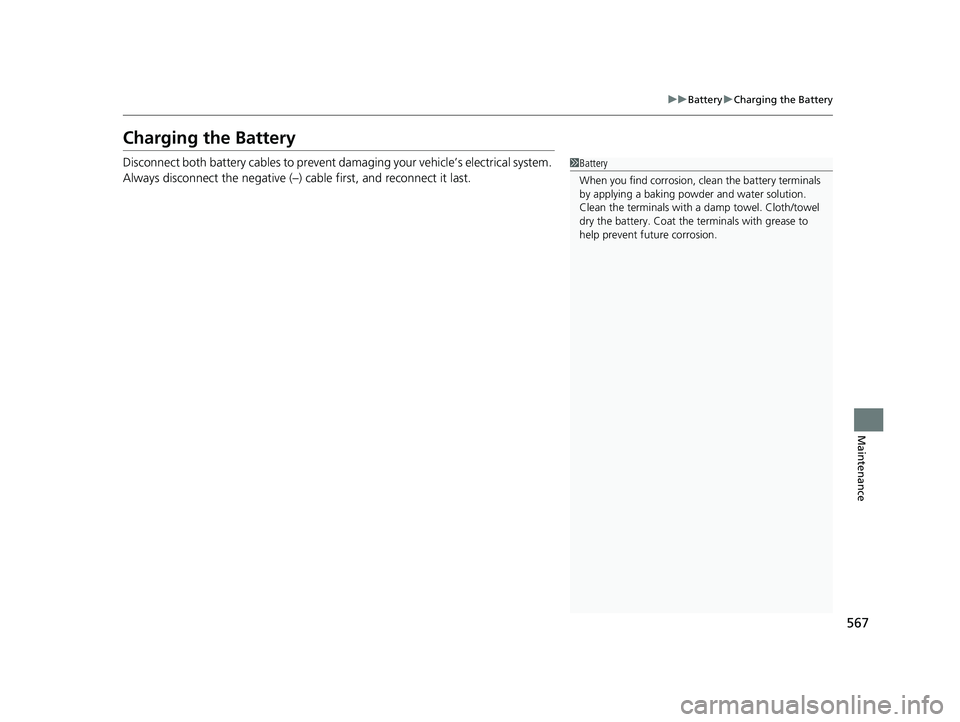
Charging the Battery
Disconnect both battery cables to prevent damaging your vehicle’s electrical system.
Always disconnect the negative (–) cable first, and reconnect it last.1Battery
When you find corrosion, cl ean the battery terminals
by applying a baking powder and water solution.
Clean the terminals with a damp towel. Cloth/towel
dry the battery. Coat the terminals with grease to
help prevent future corrosion.
20 HR-V HDMC HDMG-31T7A6400.book 567 ページ 2019年8月8日 木曜日 午後3時52分
Page 581 of 639
579
Handling the Unexpected
This chapter explains how to handle unexpected troubles.
ToolsTypes of Tools .................................. 580
If a Tire Goes Flat Changing a Flat Tire ......................... 582
Engine Does Not Start Checking the Engine ........................ 591
If the Smart Entry Remote Battery is Weak .. 592
Emergency Engine Stop ................... 593
Jump Starting .................................... 594
Shift Lever Does Not Move .............. 596
Overheating How to Handle Overheating ............. 597 Indicator, Coming On/Blinking
If the Low Oil Pressure Indicator Comes On....599
If the Charging System Indicator Comes
On ................................................. 599
If the Malfunction Indicator Lamp Comes On or Blinks ................................... 600
If the Brake System Indicator (Red) Comes On ................................................. 601
If the Electric Power Steering (EPS) System Indicator Comes On ....................... 601
If the Electric Parking Brake System Indicator Comes On ....................... 602 If the Low Tire Pressure/TPMS Indicator
Comes On or Blinks ....................... 603
Fuses Fuse Locations ................................. 604
Inspecting and Changing Fuses ........ 608
Emergency Towing ........................... 609
When You Cannot Open the Tailgate..... 610
20 HR-V HDMC HDMG-31T7A6400.book 579 ページ 2019年8月8日 木曜日 午後3時52分
Page 596 of 639
594
Handling the Unexpected
Jump Starting
Turn off the power to electric devices, such as audio and lights. Turn off the engine,
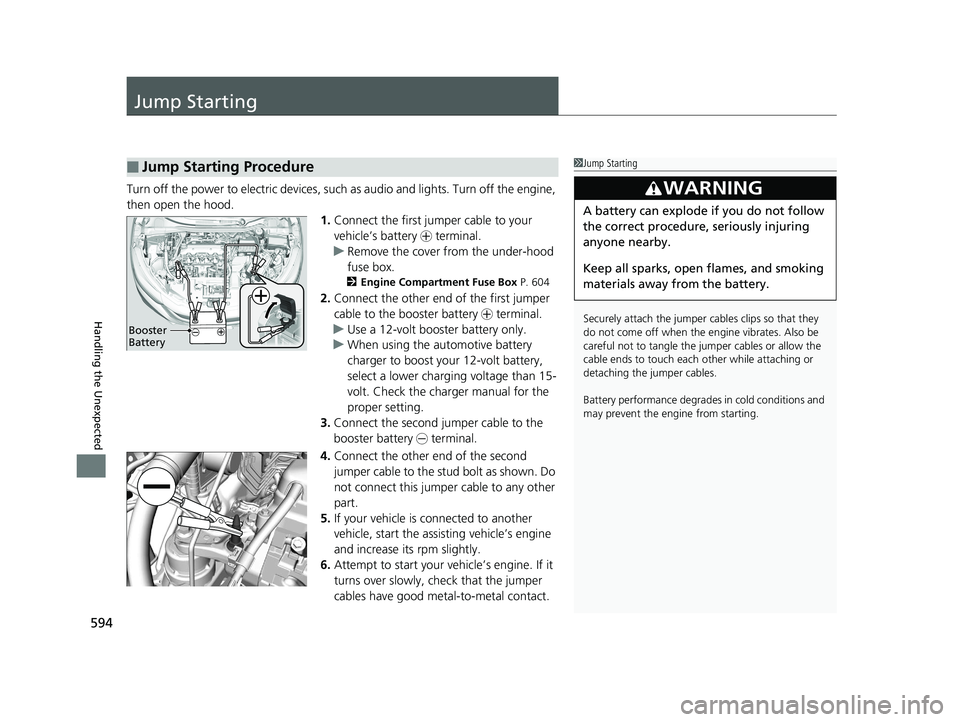
then open the hood. 1.Connect the first jump er cable to your
vehicle’s battery + terminal.
u Remove the cover from the under-hood
fuse box.
2 Engine Compartment Fuse Box P. 604
2.Connect the other end of the first jumper
cable to the booster battery + terminal.
u Use a 12-volt booster battery only.
u When using the automotive battery
charger to boost your 12-volt battery,
select a lower charging voltage than 15-
volt. Check the charger manual for the
proper setting.
3. Connect the second jumper cable to the
booster battery - terminal.
4. Connect the other end of the second
jumper cable to the stud bolt as shown. Do
not connect this jumper cable to any other
part.
5. If your vehicle is connected to another
vehicle, start the assisting vehicle’s engine
and increase its rpm slightly.
6. Attempt to start your vehicle’s engine. If it
turns over slowly, check that the jumper
cables have good metal-to-metal contact.
■Jump Starting Procedure1Jump Starting
Securely attach the jumper cables clips so that they
do not come off when the e ngine vibrates. Also be
careful not to tangle the jumper cables or allow the
cable ends to touch each other while attaching or
detaching the jumper cables.
Battery performance degrades in cold conditions and
may prevent the e ngine from starting.
3WARNING
A battery can explode if you do not follow
the correct procedure, seriously injuring
anyone nearby.
Keep all sparks, open flames, and smoking
materials away from the battery.
Booster
Battery
20 HR-V HDMC HDMG-31T7A6400.book 594 ページ 2019年8月8日 木曜日 午後3時52分