engine HONDA HRV 2022 Owners Manual
[x] Cancel search | Manufacturer: HONDA, Model Year: 2022, Model line: HRV, Model: HONDA HRV 2022Pages: 641, PDF Size: 21.37 MB
Page 314 of 641
uuAudio System Basic Operation uHondaLink ®
312
Features
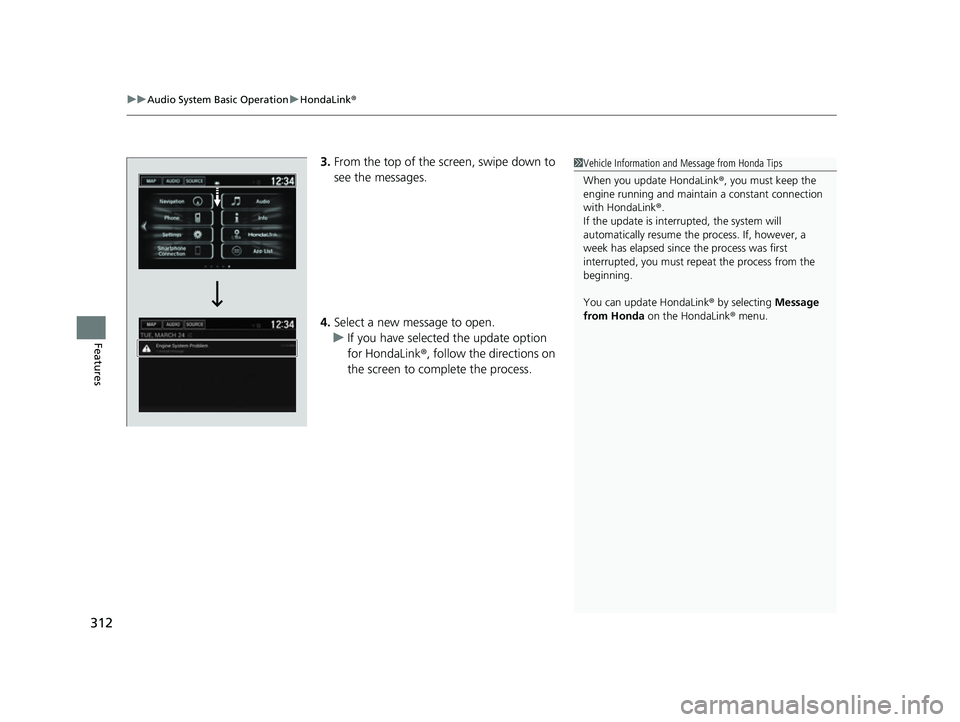
3.From the top of the screen, swipe down to
see the messages.
4. Select a new message to open.
u If you have selected the update option
for HondaLink ®, follow the directions on
the screen to complete the process.1 Vehicle Information and Message from Honda Tips
When you update HondaLink ®, you must keep the
engine running and maintain a constant connection
with HondaLink ®.
If the update is interr upted, the system will
automatically resume the process. If, however, a
week has elapsed since the process was first
interrupted, you must repeat the process from the
beginning.
You can update HondaLink ® by selecting Message
from Honda on the HondaLink ® menu.
22 HR-V HDMC-31T7A6600.book 312 ページ 2021年4月12日 月曜日 午前10時50分
Page 341 of 641
339
uuGeneral Information on the Audio System uHonda App License Agreement
Continued
Features
(b) Restrictions on Use. The licenses granted under this AGREEMENT do not perm it you to use the SOFTWARE or SERVICES on a device
other than your VEHICLE. As a condition of using the SOFT WARE and SERVICES, you agree that you may not and will not:
6. Intellectual Property Rights. All title and intellectual property rights in and to the SOFTWARE and SERVICES, the accompanying
DOCUMENTATION, and all copies of the SOFTWARE or SERVICES are owned by HONDA, PROVIDERS, or their suppliers or licensors. This
AGREEMENT does not grant you any rights in connection with any trademarks or serv ice marks of HONDA, PROVIDERS, or their licensors,
affiliates, or suppliers. (1) copy, download, distribute, mo
dify, publish, sell, rent, lease, lend, license, sublicense, reuse, or create derivative work s of the
SOFTWARE or SERVICES or any of the content or other material within the SOFTWARE or SERVICES, including without limitation,
HONDA or PROVIDER names, logos, or any other trademarks of HONDA or PROVIDERS or used in association with the SOFTWARE or
any SERVICES, except as required to use the SOFTWARE or SERVICES in accordance with this AGREEMENT, any applicable PROVIDER
TERMS, and the DOCUMENTATION;
(2) access or use the SOFTWARE or SERVICES in any manner intended to damage or impair the operation of the SOFTWARE or SERVICES
or interfere with anyone else’s use an d enjoyment of the SOFTWARE or SERVICES;
(3) access or attempt to access any system or server on which the SOFTWARE or SERVICES is hosted or modify or alter the SOFTWARE
or SERVICES in any way;
(4) use the SOFTWARE or SERVICES for any unlawful purpose, or in violation of any third party rights;
(5) use the SOFTWARE or SERVICES in violation of any applicable traffic regulations, rules or laws, including but not limited t o any driver
distraction laws, rules or regulations;
(6) violate the terms of this AGREEMENT, any HONDA TERMS, any PROVIDER TERMS or other applicable third-party terms, conditions,
and privacy policies; or
(7) reverse engineer, decomp ile, disassemble, attempt to derive the source code of, nor permit others to reverse engineer, deco mpile,
or disassemble, or attempt to derive the source code of the SOFT WARE or SERVICES, except and only to the extent that such activity is
expressly permitted (a) by applicable law no twithstanding this limitation or (b) the terms of applicable free or opensource sof tware
licenses.
22 HR-V HDMC-31T7A6600.book 339 ページ 2021年4月12日 月曜日 午前10時50分
Page 345 of 641
343
uuGeneral Information on the Audio System uHonda App License Agreement
Continued
Features
E. Information Collection and Storage
1. Information Collection , Use, Transmission and Storage of Data. Consent to Use of Data:
You agree that HONDA and PROVIDERS may
collect and use your information gathered in any manner as part of product support services related to the SOFTWARE or related services.
HONDA may share such information with third parties, including, without limitation, PR OVIDERS, third party software and services
suppliers, their affiliates and/or their designated agents, solely to improve their products or to provide services or technolo gies to you.
HONDA, third party software and syst ems suppliers, their affiliates and/or their de signated agent may disclose this information to others,
but not in a form that pe rsonally identifies you.
2. Information Storage.
Depending on the type of mult imedia system you have in your VEHICLE, certain information may be stored for ease
of use of the SOFTWARE including, without limitation, search hi story, location history in certain applications, previous and saved
destinations, map locations within certain applications, and device numbers and contact information.
(a) Vehicle Health Information.
Your VEHICLE may remotely transmit information re garding the status and health of your VEHICLE
(“VEHICLE INFORMATION”) to HONDA without notification to you. VEHICLE INFORMATION may contain VEHICLE maintenance and
malfunction status that is derived from VEHICLE diagnostic data and includes, but is not limited to, status of powered doors and windows,
battery life data, battery charging data, VE HICLE speed, coolant temperature, air comp ressor revolution, output power, warning codes,
diagnostic trouble codes, fuel injection volume, and engine rotati ons per minute. VEHICLE HEALTH INFORMATION may be used by HON DA
for research and development, to deliver HONDA SERVICES and informat ion to you, and to contact you, and is retained only for a period
of time necessary to fulfill these goals.
(b) VEHICLE Geolocation Data (non-navigation/map based).
If you opt-in to geolocation-based SERVICES, your vehicle’s geolocation data
(latitude and longitude) will be automatically sent from your VEHICLE to HONDA and PROVIDERS.
(c) You understand that the inputting or uploading of information to your VEHICLE’s multimedia system or the SOFTWARE or SERVIC ES is
at your own risk and that HONDA is not responsible for unauthori zed access to or use of any personal or other information. All information
uploaded to the SOFTWARE and SERVICES may be stored on your VEHICLES’s multimedia system and you understand that the security and
safety of your VEHICLE’s multimedia system is your sole responsibility.
22 HR-V HDMC-31T7A6600.book 343 ページ 2021年4月12日 月曜日 午前10時50分
Page 358 of 641
356
Features
Customized Features
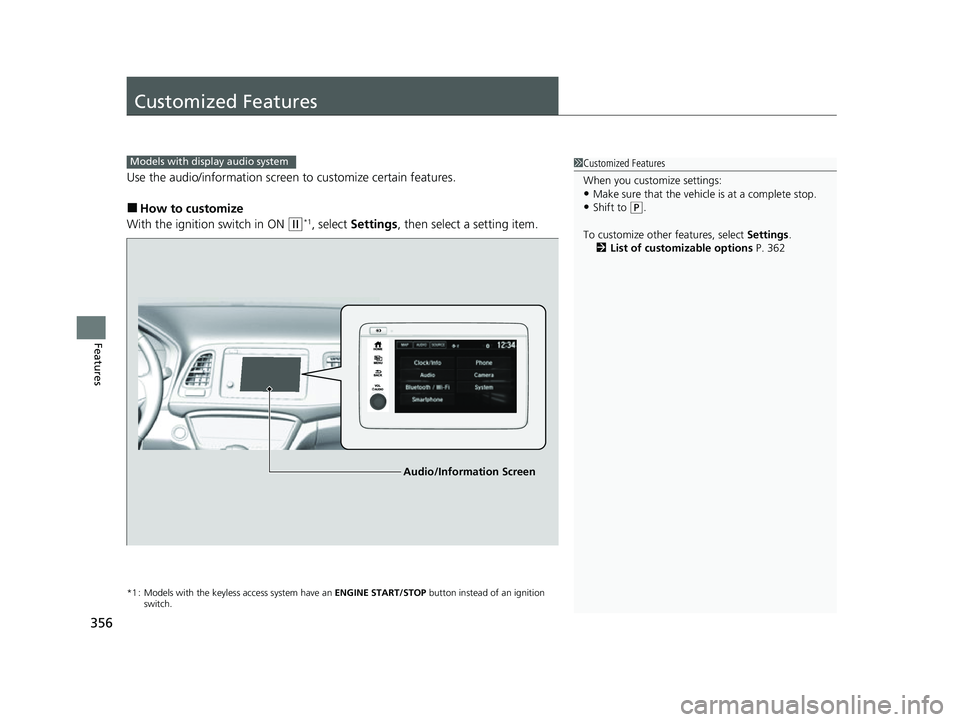
Use the audio/information screen to customize certain features.
■How to customize
With the ignition switch in ON
(w*1, select Settings , then select a setting item.
*1 : Models with the keyless access system have an ENGINE START/STOP button instead of an ignition
switch.
1 Customized Features
When you customize settings:
•Make sure that the vehicle is at a complete stop.
•Shift to (P.
To customize other features, select Settings.
2 List of customizable options P. 362
Models with display audio system
Audio/Information Screen
22 HR-V HDMC-31T7A6600.book 356 ページ 2021年4月12日 月曜日 午前10時50分
Page 370 of 641
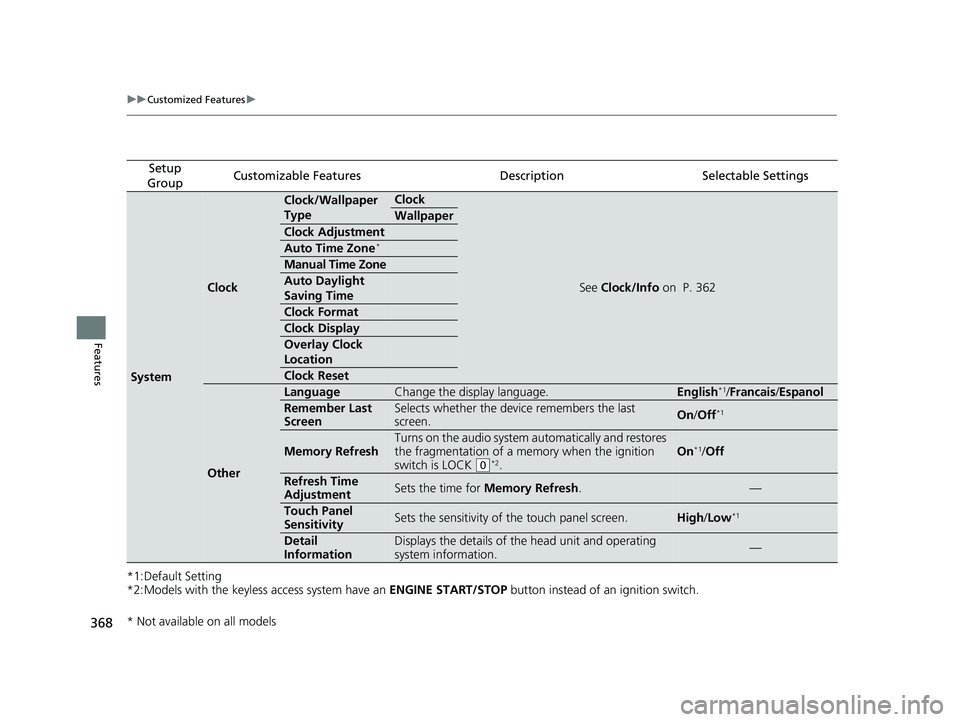
368
uuCustomized Features u
Features
*1:Default Setting
*2:Models with the keyless access system have an ENGINE START/STOP button instead of an ignition switch.
Setup
GroupCustomizable FeaturesDescriptionSelectable Settings
System
Clock
Clock/Wallpaper
TypeClock
See Clock/Info on P. 362
Wallpaper
Clock Adjustment
Auto Time Zone*
Manual Time Zone
Auto Daylight
Saving Time
Clock Format
Clock Display
Overlay Clock
Location
Clock Reset
Other
LanguageChange the display language.English*1/Francais /Espanol
Remember Last
ScreenSelects whether the device remembers the last
screen.On /Off*1
Memory Refresh
Turns on the audio system automatically and restores
the fragmentation of a memory when the ignition
switch is LOCK
(0*2.
On*1/ Off
Refresh Time
AdjustmentSets the time for Memory Refresh .—
Touch Panel
SensitivitySets the sensitivity of the touch panel screen.High/Low*1
Detail
InformationDisplays the details of th e head unit and operating
system information.—
* Not available on all models
22 HR-V HDMC-31T7A6600.book 368 ページ 2021年4月12日 月曜日 午前10時50分
Page 402 of 641
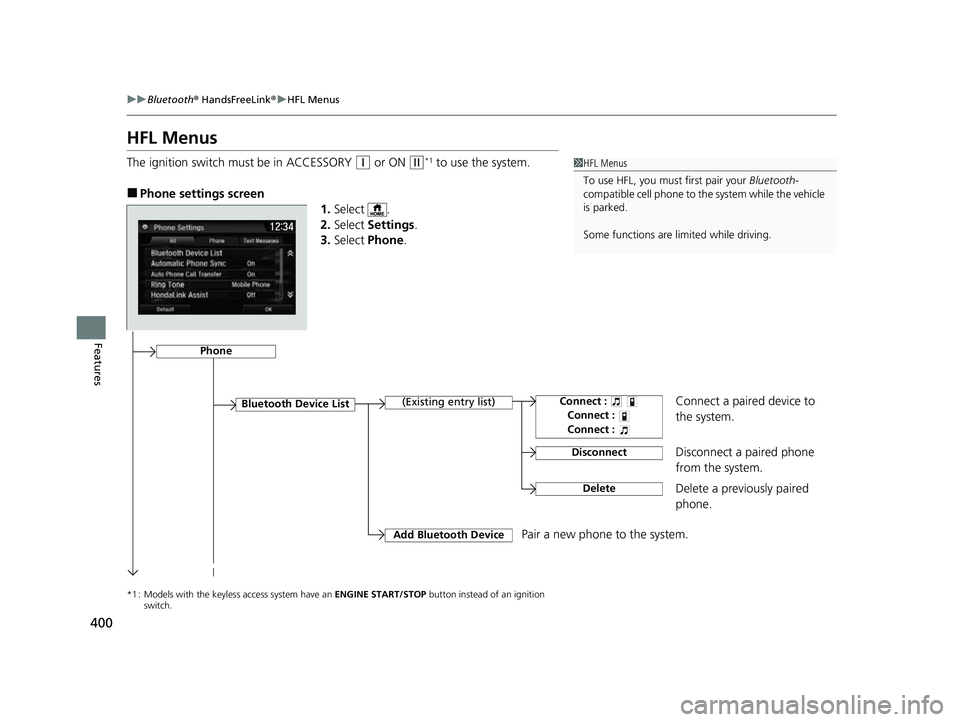
400
uuBluetooth ® HandsFreeLink ®u HFL Menus
Features
HFL Menus
The ignition switch must be in ACCESSORY (q or ON (w*1 to use the system.
■Phone settings screen
1.Select .
2. Select Settings .
3. Select Phone .
*1 : Models with the keyless access system have an ENGINE START/STOP button instead of an ignition
switch.
1 HFL Menus
To use HFL, you must first pair your Bluetooth-
compatible cell phone to th e system while the vehicle
is parked.
Some functions are li mited while driving.
Disconnect a paired phone
from the system.
Bluetooth Device List(Existing entry list)
Disconnect
DeleteDelete a previously paired
phone.
Add Bluetooth DevicePair a new phone to the system.
Phone
Connect a paired device to
the system.Connect :
Connect :
Connect :
22 HR-V HDMC-31T7A6600.book 400 ページ 2021年4月12日 月曜日 午前10時50分
Page 429 of 641
427
Driving
This chapter discusses driving and refueling.
Before DrivingDriving Preparation .......................... 428
Maximum Load Limit........................ 431
Towing a Trailer Towing Behind a Motorhome .......... 433
Off-Highway Driving Guidelines ..... 434
When Driving Starting the Engine .................. 436, 439
Precautions While Driving................. 442
Continuously Variable Transmission ..... 443Shifting .................................... 444, 446
ECON Button ................................... 450
Cruise Control
*................................ 451
Vehicle Stability AssistTM (VSA®), aka Electronic
Stability Control (ESC), System .............. 454
LaneWatchTM*.................................. 456
Real Time AWD with Intelligent Control System
TM*...................................... 458Tire Pressure Monitoring System (TPMS) ...... 459Tire Pressure Monitoring System (TPMS) - Required Federal Explanation ......... 462
Honda Sensing ®
*.............................. 464
Collision Mitigati on Braking SystemTM
(CMBSTM) ....................................... 467
Adaptive Cruise Control (ACC)......... 477
Lane Keeping Assist System (LKAS)...... 490
Road Departure Mitigation (RDM) System.... 499Front Sensor Camera ....................... 504
Radar Sensor ................................... 506
Braking Brake System ................................... 507
Anti-lock Brake System (ABS) ........... 512
Brake Assist System ......................... 513
Parking Your Vehicle When Stopped ................................ 514
Multi-View Rear Camera .................. 515
Refueling Fuel Information .............................. 517
How to Refuel ................................. 518
Fuel Economy and CO
2 Emissions .... 520
* Not available on all models
22 HR-V HDMC-31T7A6600.book 427 ページ 2021年4月12日 月曜日 午前10時50分
Page 430 of 641
428
Driving
Before Driving
Driving Preparation
Check the following items before you start driving.
• Make sure there are no obstructions on th e windows, door mirrors, exterior
lights, or other parts of the vehicle.
u Remove any frost, snow, or ice.
u Remove any snow on the roof, as this can slip down and obstruct your field of
vision while driving. If frozen solid , remove ice once it has softened.
u When removing ice from around the wheel s, be sure not to damage the wheel
or wheel components.
• Make sure the hood is securely closed.
u If the hood opens while driving, your front view will be blocked.
• Make sure the tires are in good condition.
u Check air pressure, and check for damage and excessive wear.
2 Checking and Maintaining Tires P. 559
•Make sure there are no people or ob jects behind or around the vehicle.
u There are blind spots from the inside.
■Exterior Checks1Exterior Checks
NOTICE
When doors are frozen s hut, use warm water around
the door edges to melt any ice. Do not try to force
them open, as this can damage the rubber trim
around the doors. When done, wipe dry to avoid
further freezing.
Do not pour warm water into the key cylinder.
You will be unable to insert the key if the water
freezes in the hole.
Heat from the engine and exhaust can ignite
flammable material s left under the hood, causing a
fire. If you've parked y our vehicle for an extended
period, inspect and remove any debris that may have
collected, such as dried grass and leaves that have
fallen or have been carried in for use as a nest by a
small animal. Also, check under the hood for leftover
flammable materials after you or someone else has
performed maintenance on your vehicle.
22 HR-V HDMC-31T7A6600.book 428 ページ 2021年4月12日 月曜日 午前10時50分
Page 438 of 641
436
Driving
When Driving
Starting the Engine
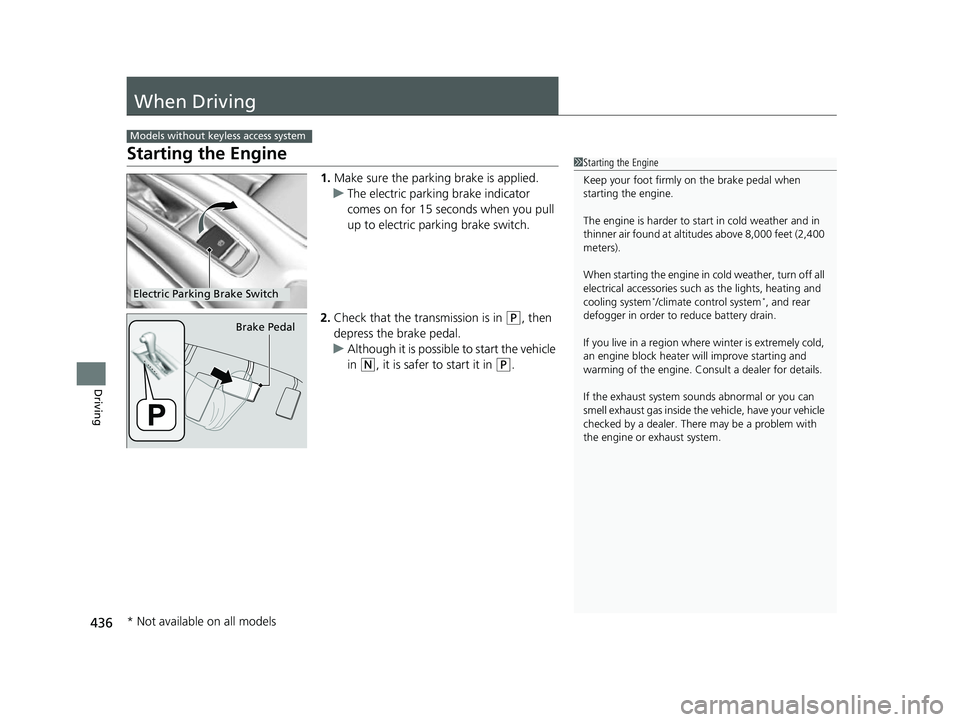
1.Make sure the parking brake is applied.
u The electric parking brake indicator
comes on for 15 seconds when you pull
up to electric parking brake switch.
2. Check that the tr ansmission is in
(P, then
depress the brake pedal.
u Although it is possible to start the vehicle
in
(N, it is safer to start it in (P.
Models without keyless access system
1Starting the Engine
Keep your foot firmly on the brake pedal when
starting the engine.
The engine is harder to st art in cold weather and in
thinner air found at altit udes above 8,000 feet (2,400
meters).
When starting the engine in cold weather, turn off all
electrical accessories such as the lights, heating and
cooling system
*/climate control system*, and rear
defogger in order to reduce battery drain.
If you live in a region where winter is extremely cold,
an engine block heater will improve starting and
warming of the engine. Cons ult a dealer for details.
If the exhaust system sounds abnormal or you can
smell exhaust gas inside the vehicle, have your vehicle
checked by a dealer. There may be a problem with
the engine or exhaust system.Electric Parking Brake Switch
Brake Pedal
* Not available on all models
22 HR-V HDMC-31T7A6600.book 436 ページ 2021年4月12日 月曜日 午前10時50分
Page 439 of 641
Continued437
uuWhen Driving uStarting the Engine
Driving
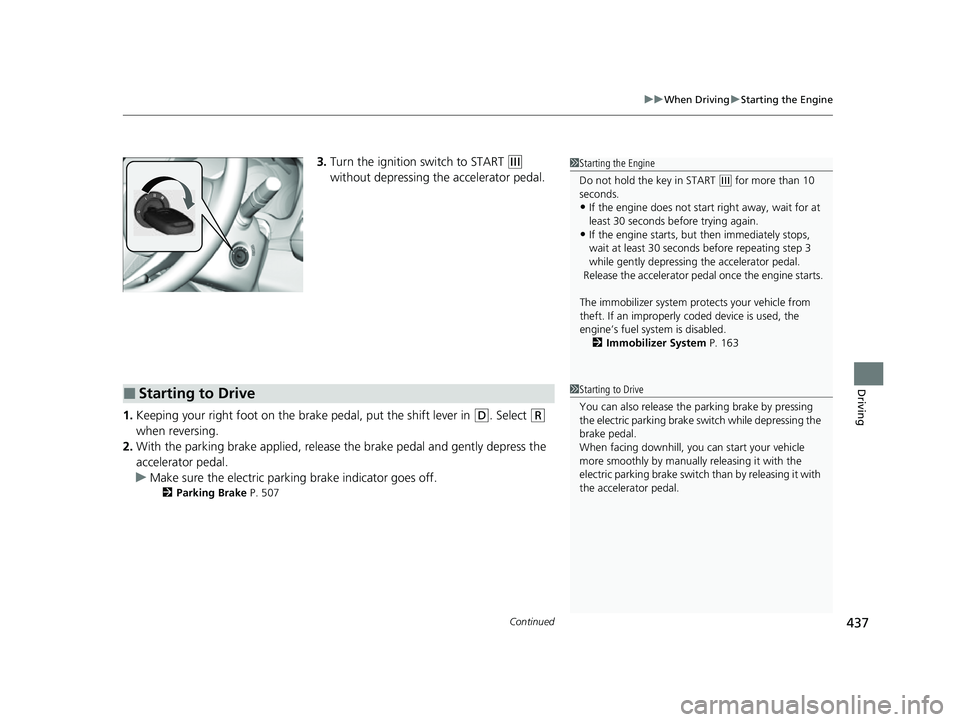
3. Turn the ignition switch to START (e
without depressing the accelerator pedal.
1. Keeping your right foot on the br ake pedal, put the shift lever in
(D. Select (R
when reversing.
2. With the parking brake applied, release the brake pedal and gently depress the
accelerator pedal.
u Make sure the electric parkin g brake indicator goes off.
2Parking Brake P. 507
1Starting the Engine
Do not hold the key in START
(e for more than 10
seconds.
•If the engine does not sta rt right away, wait for at
least 30 seconds before trying again.
•If the engine starts, but then immediately stops,
wait at least 30 seconds before repeating step 3
while gently depressing the accelerator pedal.
Release the accelerator pedal once the engine starts.
The immobilizer system pr otects your vehicle from
theft. If an improperly c oded device is used, the
engine’s fuel system is disabled. 2 Immobilizer System P. 163
■Starting to Drive1Starting to Drive
You can also release the parking brake by pressing
the electric parking brake sw itch while depressing the
brake pedal.
When facing downhill, you can start your vehicle
more smoothly by manually releasing it with the
electric parking brake switch than by releasing it with
the accelerator pedal.
22 HR-V HDMC-31T7A6600.book 437 ページ 2021年4月12日 月曜日 午前10時50分