information HONDA HRV 2022 Owners Manual
[x] Cancel search | Manufacturer: HONDA, Model Year: 2022, Model line: HRV, Model: HONDA HRV 2022Pages: 641, PDF Size: 21.37 MB
Page 274 of 641
uuAudio System Basic Operation uAudio/Information Screen
272
Features
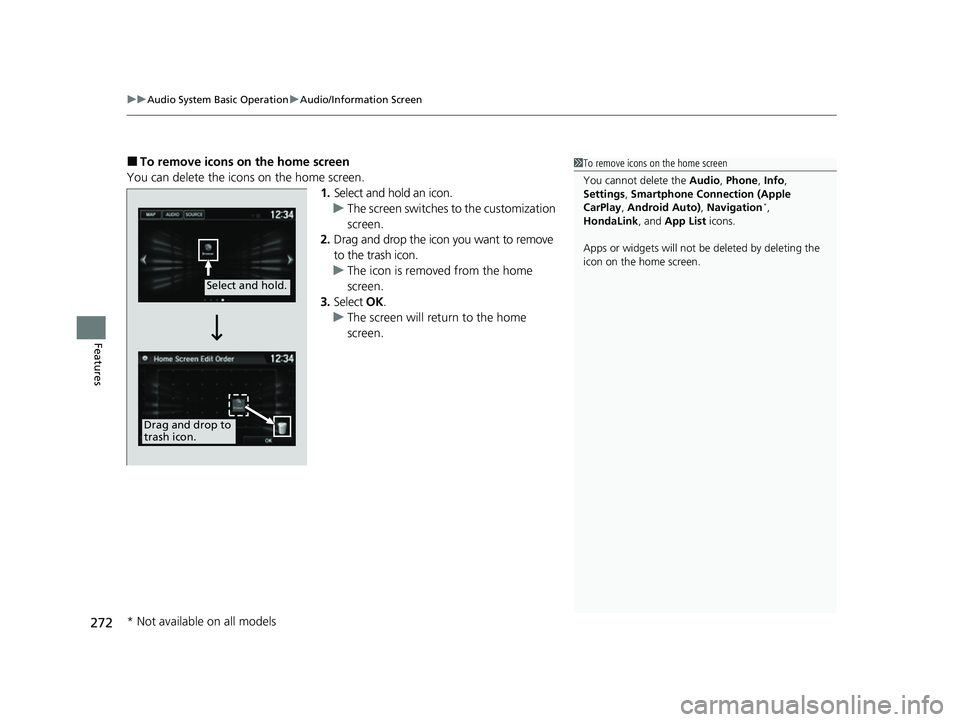
■To remove icons on the home screen
You can delete the icons on the home screen. 1.Select and hold an icon.
u The screen switches to the customization
screen.
2. Drag and drop the icon you want to remove
to the trash icon.
u The icon is removed from the home
screen.
3. Select OK.
u The screen will return to the home
screen.1To remove icons on the home screen
You cannot delete the Audio, Phone , Info,
Settings , Smartphone Connection (Apple
CarPlay , Android Auto) , Navigation
*,
HondaLink, and App List icons.
Apps or widgets will not be deleted by deleting the
icon on the home screen.
Select and hold.
Drag and drop to
trash icon.
* Not available on all models
22 HR-V HDMC-31T7A6600.book 272 ページ 2021年4月12日 月曜日 午前10時50分
Page 275 of 641
273
uuAudio System Basic Operation uAudio/Information Screen
Continued
Features
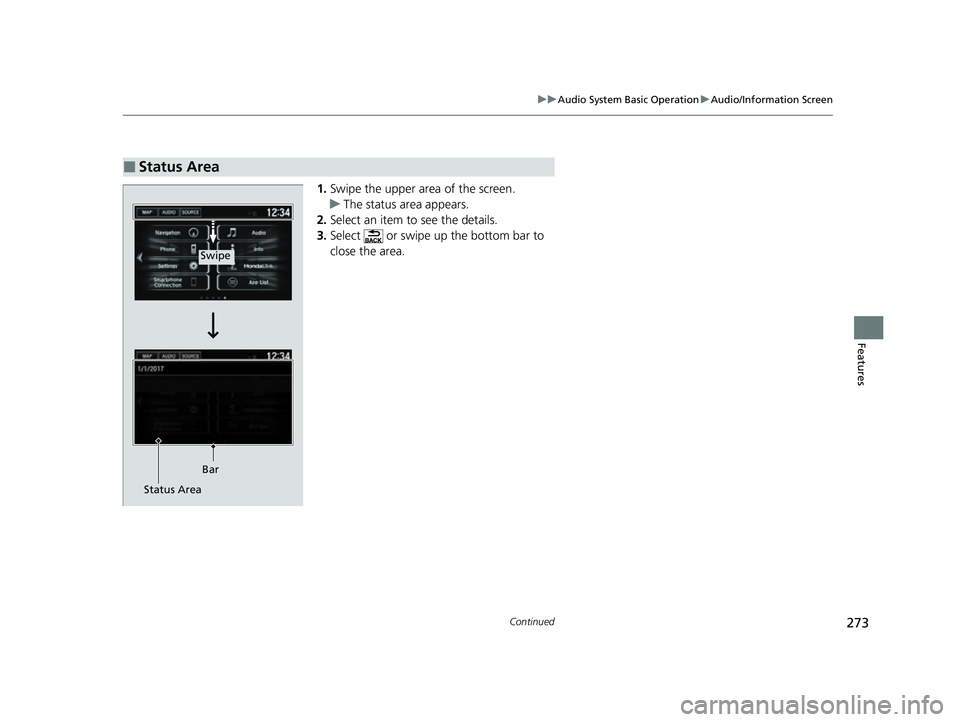
1. Swipe the upper area of the screen.
u The status area appears.
2. Select an item to see the details.
3. Select or swipe up the bottom bar to
close the area.
■Status Area
Swipe
Bar
Status Area
22 HR-V HDMC-31T7A6600.book 273 ページ 2021年4月12日 月曜日 午前10時50分
Page 276 of 641
uuAudio System Basic Operation uAudio/Information Screen
274
Features
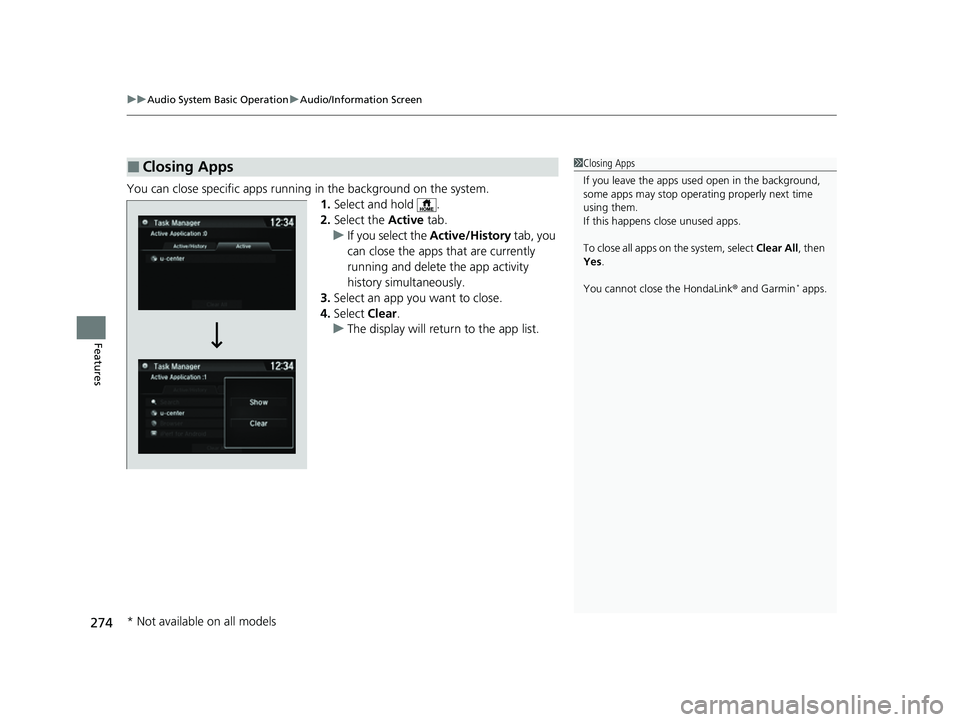
You can close specific apps running in the background on the system.
1.Select and hold .
2. Select the Active tab.
u If you select the Active/History tab, you
can close the apps that are currently
running and delete the app activity
history simultaneously.
3. Select an app you want to close.
4. Select Clear.
u The display will return to the app list.
■Closing Apps1Closing Apps
If you leave the apps used open in the background,
some apps may stop operati ng properly next time
using them.
If this happens close unused apps.
To close all apps on the system, select Clear All, then
Yes .
You cannot close the HondaLink ® and Garmin
* apps.
* Not available on all models
22 HR-V HDMC-31T7A6600.book 274 ページ 2021年4月12日 月曜日 午前10時50分
Page 278 of 641
276
uuAudio System Basic Operation uDisplay Setup
Features
Display Setup
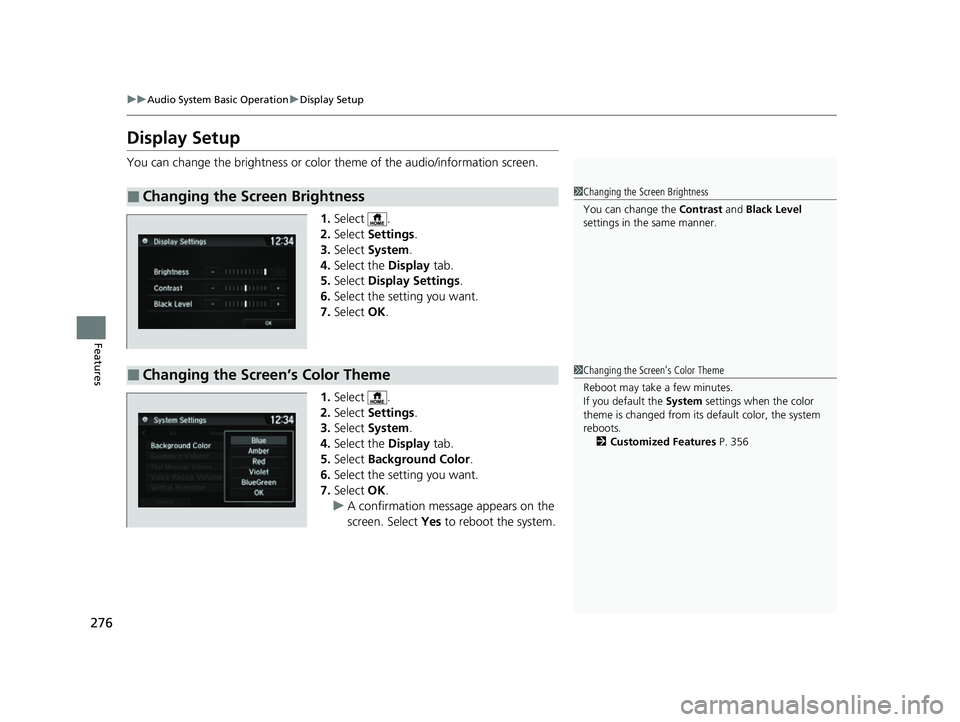
You can change the brightness or color theme of the audio/information screen.
1. Select .
2. Select Settings .
3. Select System .
4. Select the Display tab.
5. Select Display Settings .
6. Select the setting you want.
7. Select OK.
1. Select .
2. Select Settings .
3. Select System .
4. Select the Display tab.
5. Select Background Color .
6. Select the setting you want.
7. Select OK.
u A confirmation message appears on the
screen. Select Yes to reboot the system.
■Changing the Screen Brightness1Changing the Screen Brightness
You can change the Contrast and Black Level
settings in the same manner.
■Changing the Screen’s Color Theme1 Changing the Screen’s Color Theme
Reboot may take a few minutes.
If you default the System settings when the color
theme is changed from its default color, the system
reboots.
2 Customized Features P. 356
22 HR-V HDMC-31T7A6600.book 276 ページ 2021年4月12日 月曜日 午前10時50分
Page 286 of 641
uuAudio System Basic Operation uPlaying AM/FM Radio
284
Features
Samples each of the strongest stations on the selected band for 10 seconds. To turn
off scan, select Cancel or .
Displays the subchannel list when an HD Radio
TM station is selected while listening to
an FM station.
1. Select .
2. Select HD Subchannel .
3. Select the channel number.
Provides text data information related to your selected RDS-capable FM station.
■To find an RDS station from Station List
1. Select the open/close icon to display a list while listening to an FM station.
2. Select the Station List tab.
3. Select the station.
■Manual update
Updates your available station list at any time.
1. Select the open/close icon to display a list while listening to an FM station.
2. Select the Station List tab.
3. Select Refresh .
■Scan
■HD Subchannel
■Radio Data System (RDS)
Models with HD RadioTM
1Radio Data System (RDS)
When you select an RDS-capable FM station, the RDS
automatically turns on, and the frequency display
changes to the station name. However, when the
signals of that station become weak, the display
changes from the statio n name to the frequency.
22 HR-V HDMC-31T7A6600.book 284 ページ 2021年4月12日 月曜日 午前10時50分
Page 288 of 641
286
uuAudio System Basic Operation uPlaying SiriusXM ® Radio*
Features
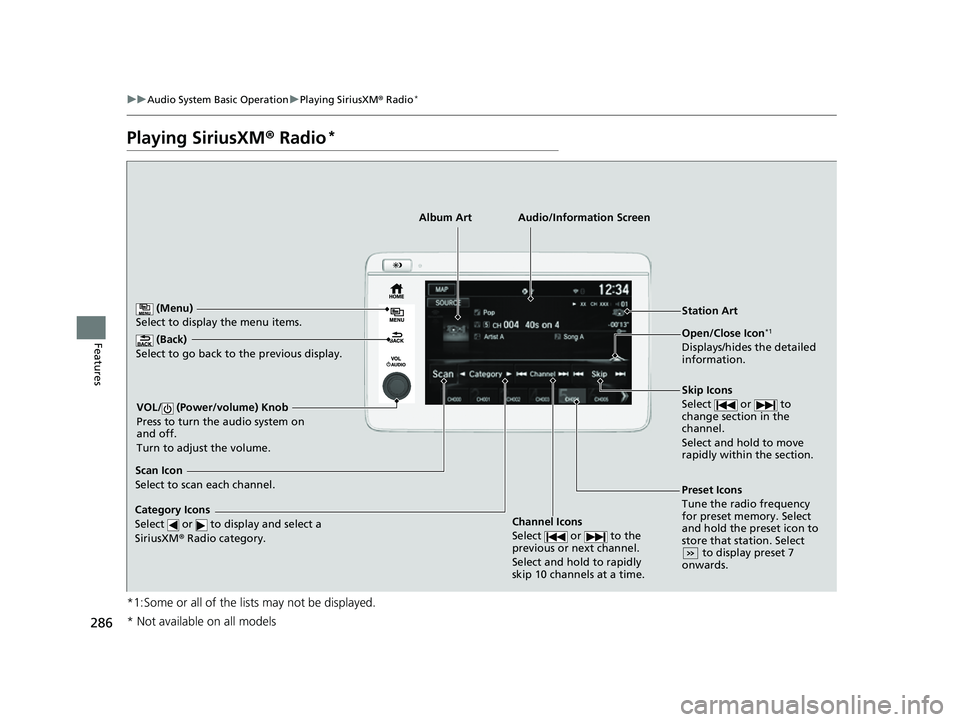
Playing SiriusXM ® Radio*
*1:Some or all of the lists may not be displayed.
(Back)
Select to go back to the previous display.
Skip Icons
Select or to
change section in the
channel.
Select and hold to move
rapidly within the section.
VOL/ (Power/volume) Knob
Press to turn the audio system on
and off.
Turn to adjust the volume.
Open/Close Icon*1
Displays/hides the detailed
information.
(Menu)
Select to display the menu items.
Audio/Information Screen
Category Icons
Select or to d isplay and
select a
SiriusXM ® Radio category.
Scan Icon
Select to scan each channel.
Preset Icons
Tune the radio frequency
for preset memory. Select
and hold the preset icon to
store that station. Select
to display preset 7
onwards.
Station Art
Album Art
Channel Icons
Select or to the
previous or next channel.
Select and hold to rapidly
skip 10 channels at a time.
* Not available on all models
22 HR-V HDMC-31T7A6600.book 286 ページ 2021年4月12日 月曜日 午前10時50分
Page 292 of 641
uuAudio System Basic Operation uPlaying SiriusXM ® Radio*
290
Features
The system can record up to the last 60 minutes of your currently tuned channel’s
broadcast, as well as the last 30 minutes of your preset channel’s broadcast, starting
from the moment you turn the vehicle on. If you tuned to preset channel, the system
records up to 60 minutes of a broadcast instead of up to 30 minutes. You can
rewind and replay the last 30 or 60 minutes of a broadcast.
1. Select .
2. Select Playback .
3. Move the gauge to the posi tion you want to replay.
The following items are available on the pop-up screen: (Skip Down): Skips to the previously stored channel. Select and hold to fast-
rewind the current selection. (Skip Up): Skips to the next channe l. Select and hold to fast-forward the
current selection. (15sec Back): Select to skip back 15 se conds in the current selection. Select and
hold to fast-rewind the current selection.
(15sec Skip): Select to sk ip forward 15 seconds in th e current selection. Select
and hold to fast-forward the current selection. u Select OK or to close the pop-up menu. Replay in playback mode
continues.
To play or pause on playback mode:
1. Select .
2. Select Play/Pause .
■Returning to real-time broadcast
1. Select .
2. Select Go to Live .
■Replay Function1Replay Function
The system starts storing broadcast in memory when
the power mode is turned ON. You can go back to
the program from that point.
You can no longer repl ay any program once the
power mode is turned off as it erases memory.
You can check how long the program has been
stored in memory from th e audio/information screen.
After 30 or 60 minutes of recording the system will
automatically start deleting the oldest data.
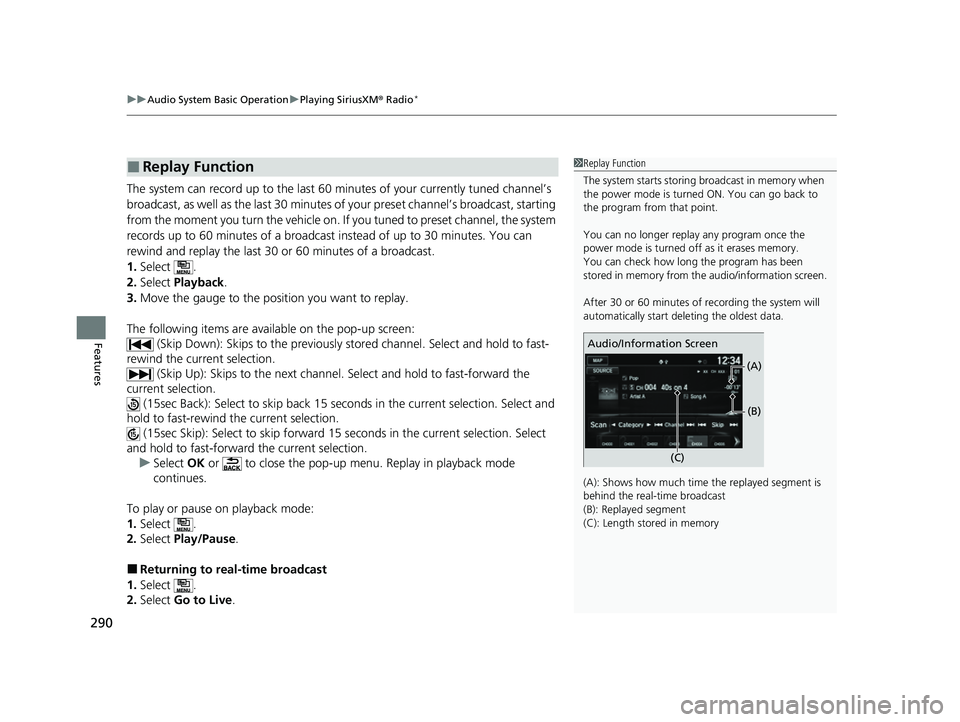
(A): Shows how much time the replayed segment is
behind the real-time broadcast
(B): Replayed segment
(C): Length stored in memory
Audio/Information Screen
(C)(B)
(A)
22 HR-V HDMC-31T7A6600.book 290 ページ 2021年4月12日 月曜日 午前10時50分
Page 295 of 641
293
uuAudio System Basic Operation uPlaying SiriusXM ® Radio*
Features
You can receive traffic and weather information.
■To set up a traffic & weather information
1. Select .
2. Select Settings .
3. Select Audio .
4. Select the SXM tab.
5. Select Traffic & Weather Setup.
6. Select the region.
u When you do not want to receive the information, select Unregistered.
■Listening to traffic and weather information
1. Select .
2. Select Traffic & Weather .
u Play mode can also use the any items same as playback mode.
2 Replay Function P. 290
To go back to the previous screen, select OK.
Sample each channel on the selected mode for 10 seconds.
1. Select Scan.
2. Select Scan Channels.
u You can select the desired channel by songs using Scan Song in Presets.
To turn off scan, select Cancel Scan.
■Traffic and Weather Information
■Scan
1Traffic and Weather Information
The traffic and weather information function at
SiriusXM ® mode only.
You can also set up th e traffic and weather
information by the following procedure.
1. Select Audio .
2. Select .
3. Select Settings .
4. Select the SXM tab.
1Scan
The “Scan Songs in Preset s” function is based on
TuneScan
TM technology of SiriusXM ®.
The “Featured Channels ” function is based on
Featured Favorites
TM technology of SiriusXM ®.
TuneScan
TM and Featured FavoritesTM are registered
trademarks of SiriusXM ® Radio, Inc.
22 HR-V HDMC-31T7A6600.book 293 ページ 2021年4月12日 月曜日 午前10時50分
Page 296 of 641
294
uuAudio System Basic Operation uPlaying an iPod
Features
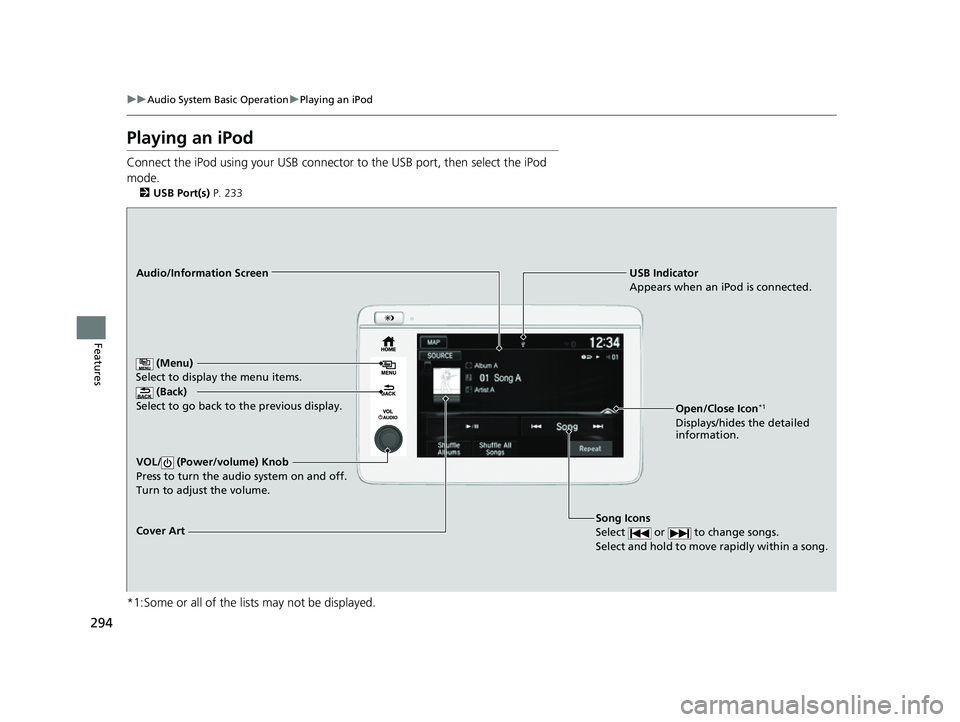
Playing an iPod
Connect the iPod using your USB connector to the USB port, then select the iPod
mode.
2 USB Port(s) P. 233
*1:Some or all of the lists may not be displayed.
USB Indicator
Appears when an iPod is connected.
Song Icons
Select or to change songs.
Select and hold to move rapidly within a song.Audio/Information Screen
Cover Art (Back)
Select to go back to th
e previous display.
VOL/ (Power/volume) Knob
Press to turn the audio system on and off.
Turn to adjust the volume.
(Menu)
Select to display the menu items.
Open/Close Icon*1
Displays/hides the detailed
information.
22 HR-V HDMC-31T7A6600.book 294 ページ 2021年4月12日 月曜日 午前10時50分
Page 297 of 641
Continued295
uuAudio System Basic Operation uPlaying an iPod
Features
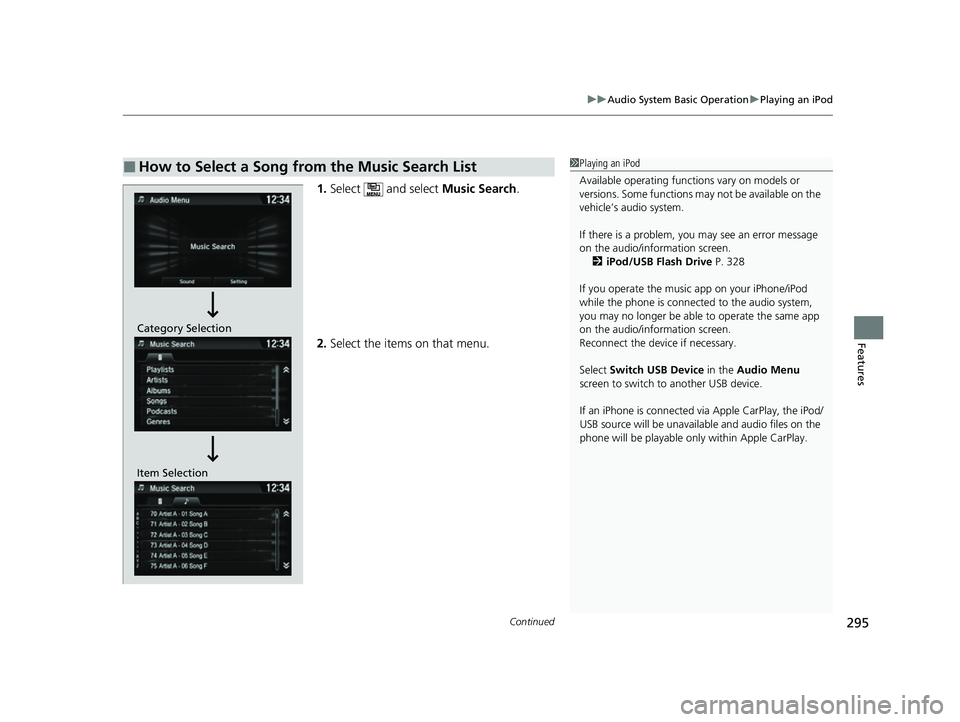
1. Select and select Music Search.
2. Select the items on that menu.
■How to Select a Song from the Music Search List1Playing an iPod
Available operating functi ons vary on models or
versions. Some functions ma y not be available on the
vehicle’s audio system.
If there is a problem, you may see an error message
on the audio/information screen. 2 iPod/USB Flash Drive P. 328
If you operate the musi c app on your iPhone/iPod
while the phone is connected to the audio system,
you may no longer be able to operate the same app
on the audio/information screen.
Reconnect the devi ce if necessary.
Select Switch USB Device in the Audio Menu
screen to switch to another USB device.
If an iPhone is connected via Apple CarPlay, the iPod/
USB source will be unavailable and audio files on the
phone will be playable onl y within Apple CarPlay.
Item SelectionCategory Selection
22 HR-V HDMC-31T7A6600.book 295 ページ 2021年4月12日 月曜日 午前10時50分