information HONDA HRV 2022 Owners Manual
[x] Cancel search | Manufacturer: HONDA, Model Year: 2022, Model line: HRV, Model: HONDA HRV 2022Pages: 641, PDF Size: 21.37 MB
Page 303 of 641
301
uuAudio System Basic Operation uPlaying Pandora ®
Continued
Features
Playing Pandora ®
Your audio system allows you to listen to music from the Pandora ® app on a
compatible smartphone.
This function is available when the phone is paired an d connected to the vehicle’s
Bluetooth ® HandsFreeLink ® (HFL) system, or with an iPhone, you can connect using
your USB cable to the USB port.
2 Phone Setup P. 404
2 USB Port(s) P. 233
*1:Some or all of the lists may not be displayed.
U.S. models
1Playing Pandora ®
Pandora ®, the Pandora logo, and the Pandora trade
dress are trademarks or registered trademarks of
Pandora Media, Inc., used with permission. Pandora
is only available in certai n countries. Visit the Pandora
website for more information.
To find out if your phone is compatible with this
feature, visit automobiles.honda.com /handsfreelink/,
or call 1-888-528-7876.
To use this service in your vehicle, the Pandora ® app
must first be installed on your phone. Visit
www.pandora.com. for more information.
Find the music you love and let the music you love
find you. Pandora ® gives you a personalized music
experience that continually evolves with your tastes.
Create personalized stati ons from songs, artists or
genres. Not sure where to start? Use our voice search
to easily find stations th at match your mood or
activity.
If you cannot operate Pandora ® through the audio
system, it may be streaming through Bluetooth®
Audio. Make sure Pandora ® mode on your audio
system is selected.
If your phone is connecte d to Android Auto, Pandora
is only available through the Android Auto interface.
Visit the Android Auto website to check
compatibility.
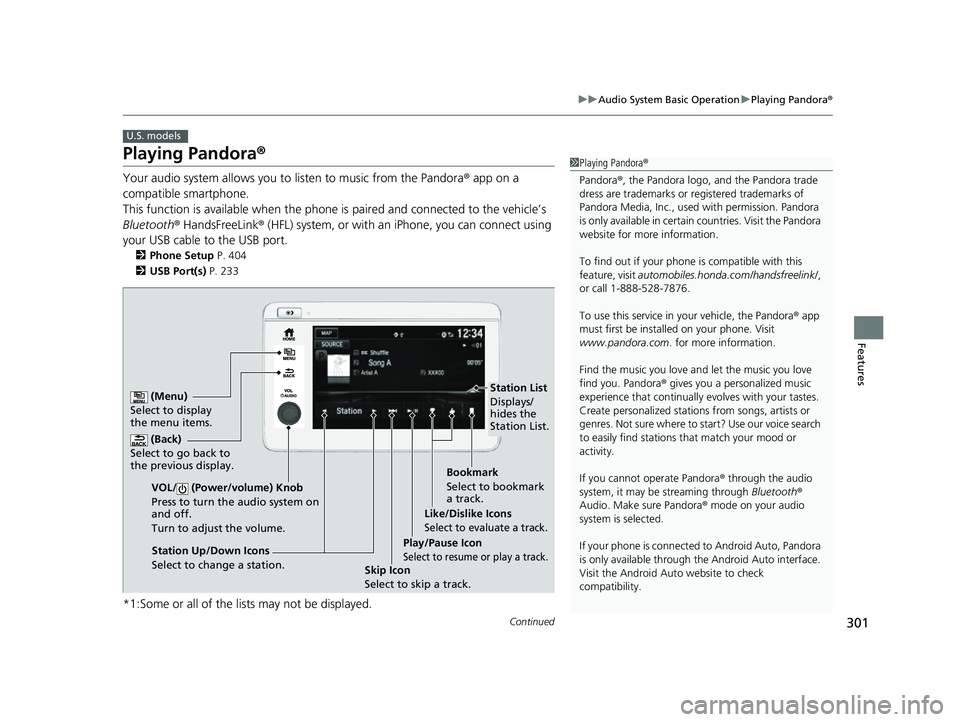
(Back)
Select to go back to
the previous display.
VOL/ (Power/volume) Knob
Press to turn the audio system on
and off.
Turn to adjust the volume.
(Menu)
Select to display
the menu items.
Play/Pause Icon
Select to resume or play a track.Station Up/Down Icons
Select to change a station. Skip Icon
Select to skip a track.Like/Dislike Icons
Select to evaluate a track.
Station List
Displays/
hides the
Station List.
Bookmark
Select to bookmark
a track.
22 HR-V HDMC-31T7A6600.book 301 ページ 2021年4月12日 月曜日 午前10時50分
Page 304 of 641
uuAudio System Basic Operation uPlaying Pandora ®
302
Features
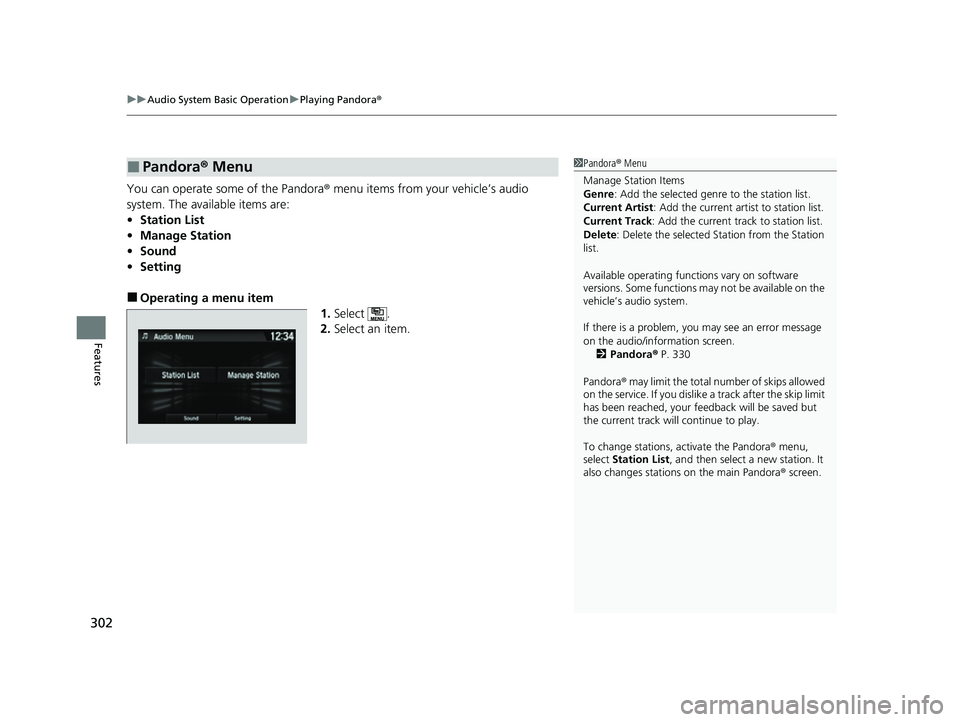
You can operate some of the Pandora® menu items from your vehicle’s audio
system. The available items are:
• Station List
• Manage Station
• Sound
• Setting
■Operating a menu item
1.Select .
2. Select an item.
■Pandora ® Menu1 Pandora ® Menu
Manage Station Items
Genre : Add the selected genre to the station list.
Current Artist : Add the current artist to station list.
Current Track: Add the current track to station list.
Delete : Delete the selected Station from the Station
list.
Available operating functi ons vary on software
versions. Some functions ma y not be available on the
vehicle’s audio system.
If there is a problem, you may see an error message
on the audio/information screen.
2 Pandora ® P. 330
Pandora ® may limit the total number of skips allowed
on the service. If you dislike a track after the skip limit
has been reached, your fe edback will be saved but
the current track will continue to play.
To change stations, activate the Pandora ® menu,
select Station List , and then select a new station. It
also changes stations on the main Pandora ® screen.
22 HR-V HDMC-31T7A6600.book 302 ページ 2021年4月12日 月曜日 午前10時50分
Page 305 of 641
303
uuAudio System Basic Operation uPlaying a USB Flash Drive
Continued
Features
Playing a USB Flash Drive
Your audio system reads an d plays sound and video files on a USB flash drive in
either MP3, WMA, or AAC*1 format.
Connect your USB flash drive to the USB port, then select the USB mode.
2 USB Port(s) P. 233
*1:Only AAC format files recorded with iTunes are playable on this unit.
*2:Some or all of the lists may not be displayed.
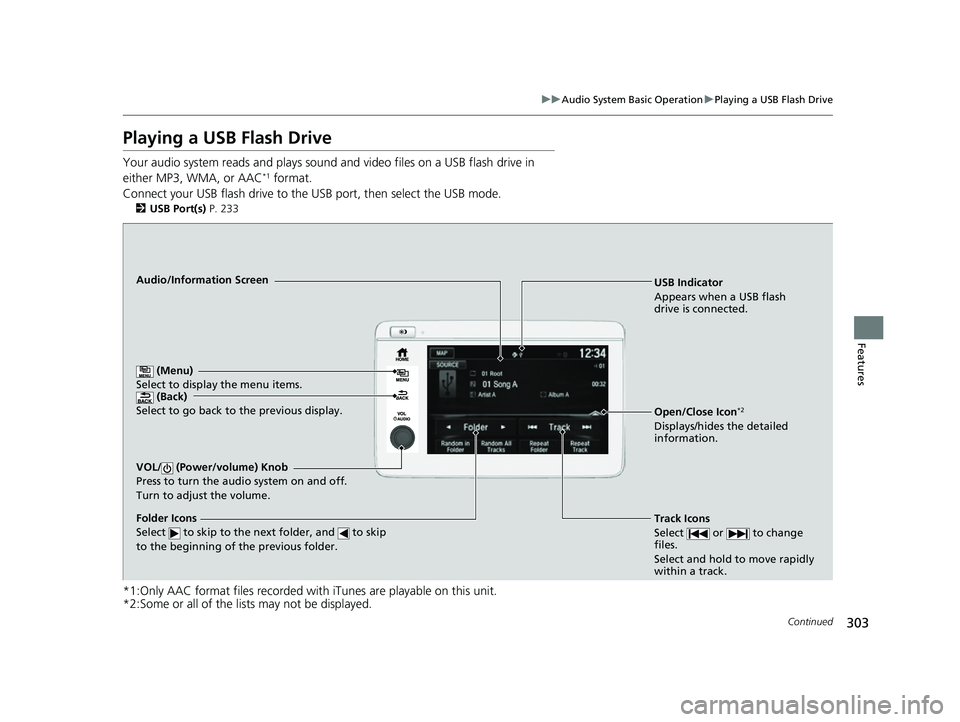
USB Indicator
Appears when a USB flash
drive is connected.
Track Icons
Select or to change
files.
Select and hold to move rapidly
within a track.Audio/Information Screen
(Back)
Select to go b ack to th
e previous display.
VOL/ (Power/volume) Knob
Press to turn the audio system on and off.
Turn to adjust the volume.
Open/Close Icon*2
Displays/hides the detailed
information.
(Menu)
Select to display the menu items.
Folder Icons
Select to skip to the next folder, and to skip
to the beginning of the previous folder.
22 HR-V HDMC-31T7A6600.book 303 ページ 2021年4月12日 月曜日 午前10時50分
Page 306 of 641
uuAudio System Basic Operation uPlaying a USB Flash Drive
304
Features
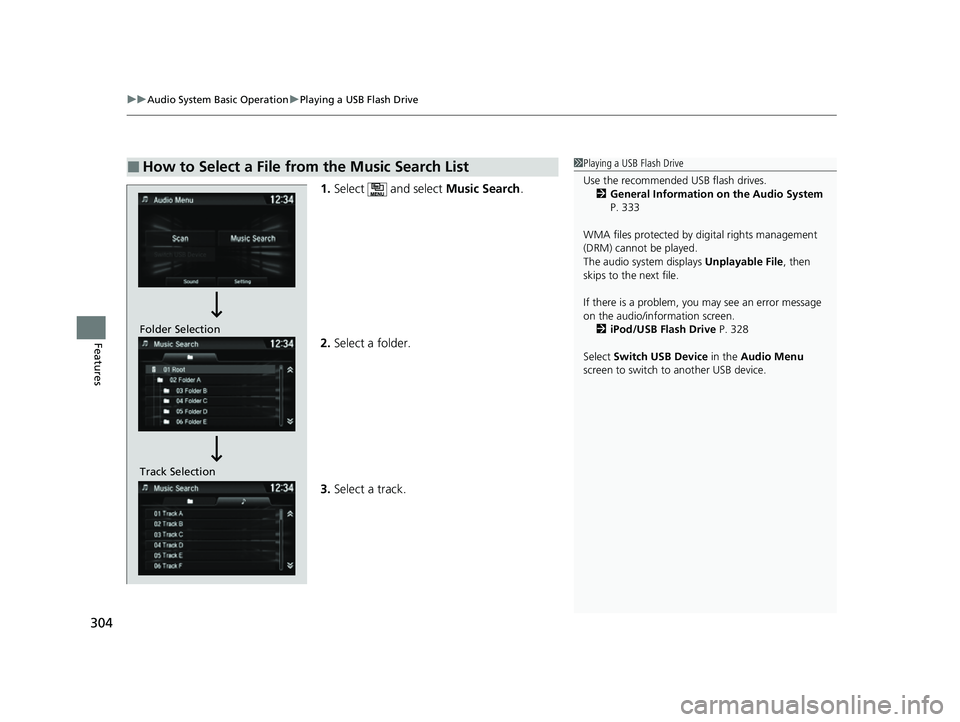
1. Select and select Music Search.
2. Select a folder.
3. Select a track.
■How to Select a File from the Music Search List1Playing a USB Flash Drive
Use the recommended USB flash drives.
2 General Information on the Audio System
P. 333
WMA files protected by di gital rights management
(DRM) cannot be played.
The audio system displays Unplayable File, then
skips to the next file.
If there is a problem, you may see an error message
on the audio/information screen.
2 iPod/USB Flash Drive P. 328
Select Switch USB Device in the Audio Menu
screen to switch to another USB device.
Track Selection Folder Selection
22 HR-V HDMC-31T7A6600.book 304 ページ 2021年4月12日 月曜日 午前10時50分
Page 308 of 641
306
uuAudio System Basic Operation uPlaying Bluetooth ® Audio
Features
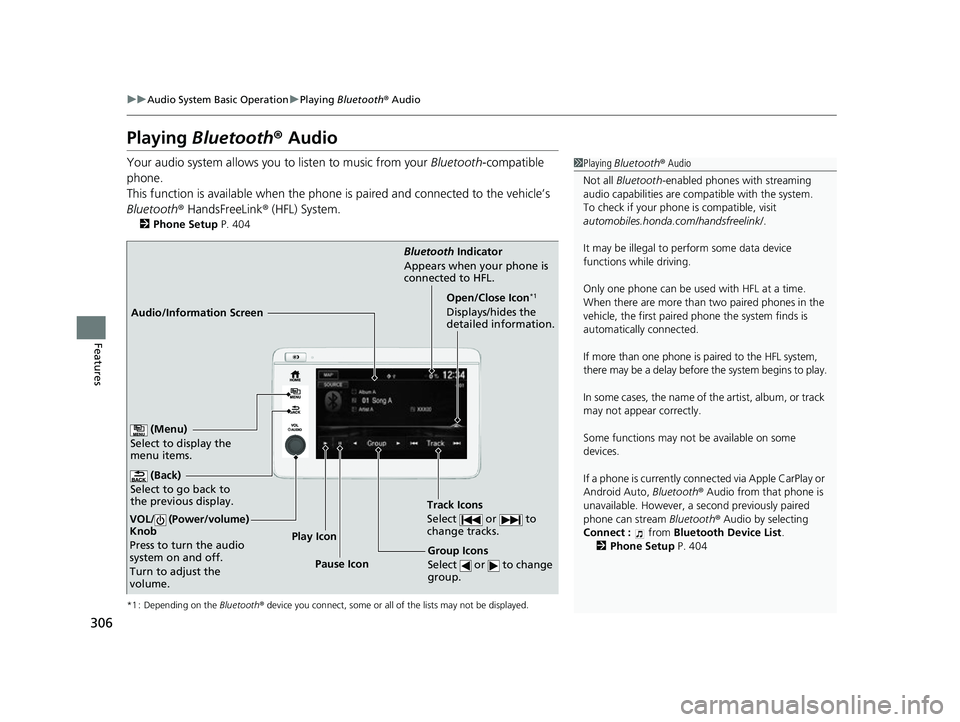
Playing Bluetooth ® Audio
Your audio system allows you to listen to music from your Bluetooth-compatible
phone.
This function is available when the phone is paired and connected to the vehicle’s
Bluetooth ® HandsFreeLink ® (HFL) System.
2 Phone Setup P. 404
*1 : Depending on the Bluetooth® device you connect, some or all of the lists may not be displayed.
1Playing Bluetooth ® Audio
Not all Bluetooth-enabled phones with streaming
audio capabilities are compatible with the system.
To check if your phone is compatible, visit
automobiles.honda.com /handsfreelink/.
It may be illegal to pe rform some data device
functions while driving.
Only one phone can be used with HFL at a time.
When there are more than two paired phones in the
vehicle, the first paired phone the system finds is
automatically connected.
If more than one phone is paired to the HFL system,
there may be a delay before the system begins to play.
In some cases, the name of the artist, album, or track
may not appear correctly.
Some functions may not be available on some
devices.
If a phone is currently conne cted via Apple CarPlay or
Android Auto, Bluetooth® Audio from that phone is
unavailable. However, a se cond previously paired
phone can stream Bluetooth® Audio by selecting
Connect : from Bluetooth Device List .
2 Phone Setup P. 404
Audio/Information Screen Bluetooth
Indicator
App ears
when your phone is
connected to HFL.
Track Icons
Select or to
change tracks.
(Back)
Select to go back to
the previous display.
VOL/ (Power/volume)
Knob
Press to turn the audio
system on and off.
Turn to adjust the
volume.
Open/Close Icon*1
Displays/hides the
detailed information.
(Menu)
Select to display the
menu items.
Group Icons
Select or to change
group.Pause Icon
Play Icon
22 HR-V HDMC-31T7A6600.book 306 ページ 2021年4月12日 月曜日 午前10時50分
Page 310 of 641
308
uuAudio System Basic Operation uHondaLink ®
Features
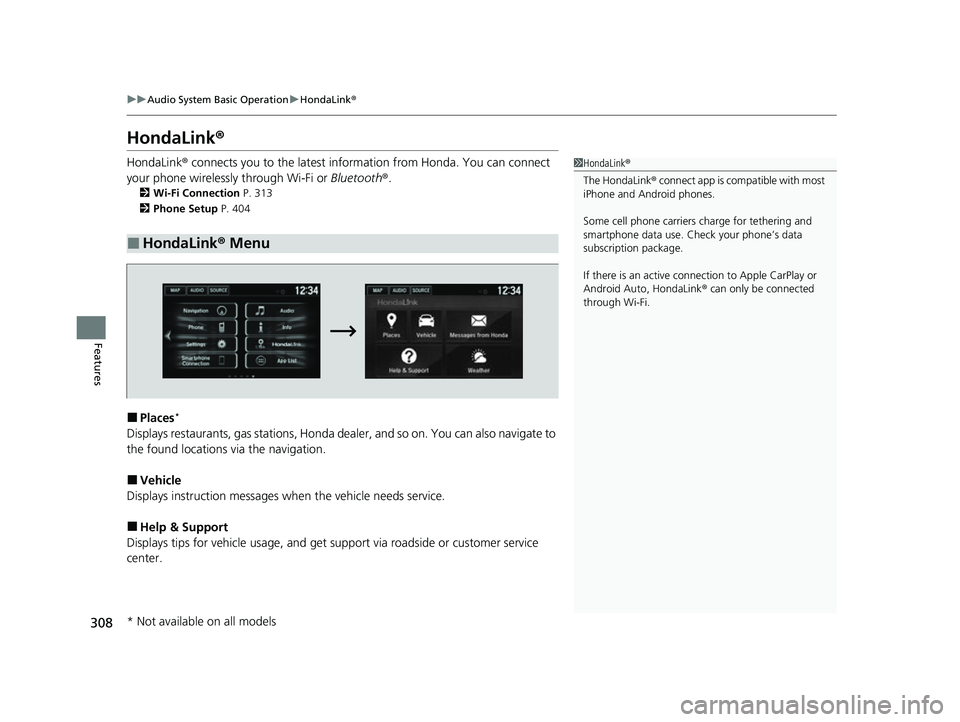
HondaLink ®
HondaLink® connects you to the latest information from Honda. You can connect
your phone wirelessly through Wi-Fi or Bluetooth®.
2Wi-Fi Connection P. 313
2 Phone Setup P. 404
■Places*
Displays restaurants, gas stations, Honda d ealer, and so on. You can also navigate to
the found locations via the navigation.
■Vehicle
Displays instruction messages wh en the vehicle needs service.
■Help & Support
Displays tips for vehicle usage, and get support via roadside or customer service
center.
■HondaLink® Menu
1HondaLink ®
The HondaLink® connect app is compatible with most
iPhone and Android phones.
Some cell phone carriers charge for tethering and
smartphone data use. Check your phone’s data
subscription package.
If there is an active connection to Appl e CarPlay or
Android Auto, HondaLink ® can only be connected
through Wi-Fi.
* Not available on all models
22 HR-V HDMC-31T7A6600.book 308 ページ 2021年4月12日 月曜日 午前10時50分
Page 311 of 641
309
uuAudio System Basic Operation uHondaLink ®
Continued
Features
■Messages from Honda
Displays helpful and important information from Honda.
■Weather*
Displays a weekly five-day weather forecast for any lo cation you want. You can
change the ZIP Code at any time.
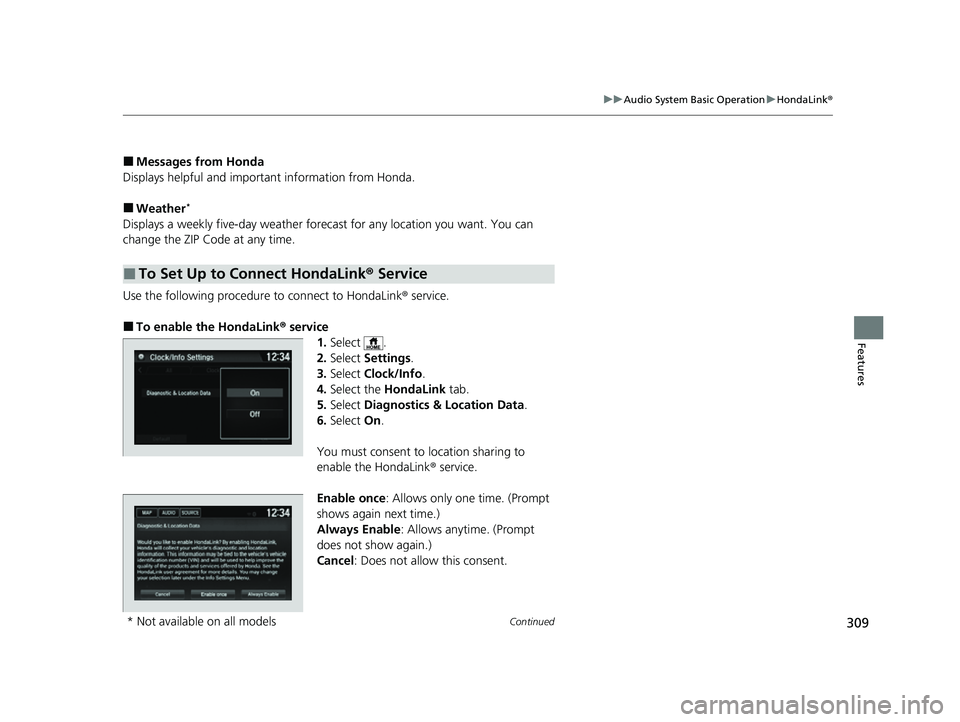
Use the following procedure to connect to HondaLink ® service.
■To enable the HondaLink® service
1.Select .
2. Select Settings .
3. Select Clock/Info .
4. Select the HondaLink tab.
5. Select Diagnostics & Location Data .
6. Select On.
You must consent to location sharing to
enable the HondaLink ® service.
Enable once : Allows only one time. (Prompt
shows again next time.)
Always Enable: Allows anytime. (Prompt
does not show again.)
Cancel : Does not allow this consent.
■To Set Up to Connect HondaLink ® Service
* Not available on all models
22 HR-V HDMC-31T7A6600.book 309 ページ 2021年4月12日 月曜日 午前10時50分
Page 313 of 641
311
uuAudio System Basic Operation uHondaLink ®
Continued
Features
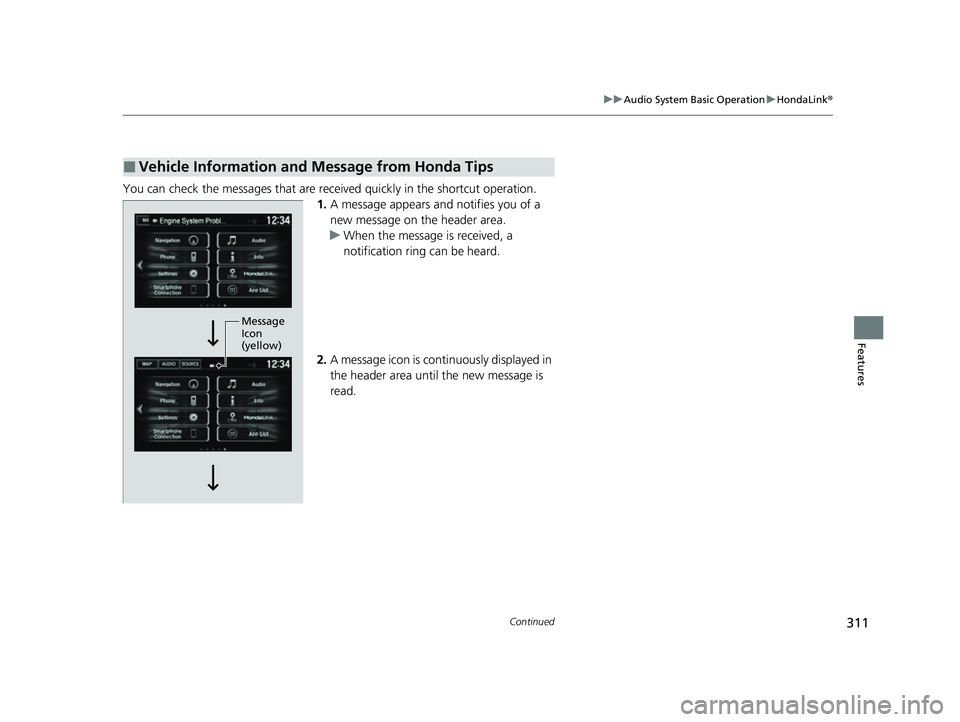
You can check the messages that are receiv ed quickly in the shortcut operation.
1. A message appears and notifies you of a
new message on the header area.
u When the message is received, a
notification ring can be heard.
2. A message icon is continuously displayed in
the header area until the new message is
read.
■Vehicle Information and Message from Honda Tips
Message
Icon
(yellow)
22 HR-V HDMC-31T7A6600.book 311 ページ 2021年4月12日 月曜日 午前10時50分
Page 314 of 641
uuAudio System Basic Operation uHondaLink ®
312
Features
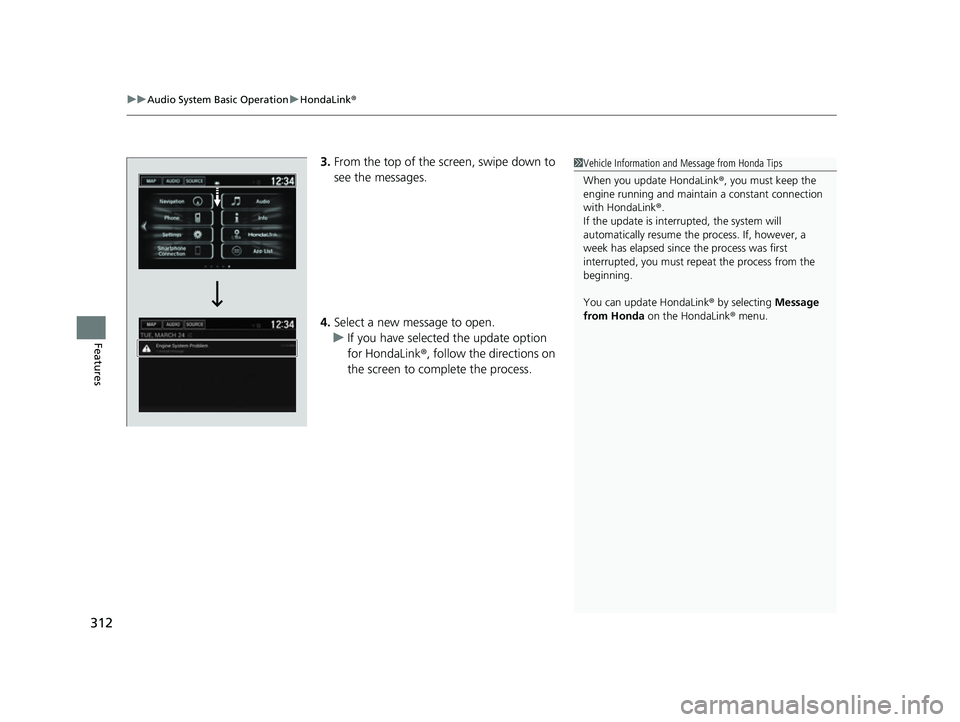
3.From the top of the screen, swipe down to
see the messages.
4. Select a new message to open.
u If you have selected the update option
for HondaLink ®, follow the directions on
the screen to complete the process.1 Vehicle Information and Message from Honda Tips
When you update HondaLink ®, you must keep the
engine running and maintain a constant connection
with HondaLink ®.
If the update is interr upted, the system will
automatically resume the process. If, however, a
week has elapsed since the process was first
interrupted, you must repeat the process from the
beginning.
You can update HondaLink ® by selecting Message
from Honda on the HondaLink ® menu.
22 HR-V HDMC-31T7A6600.book 312 ページ 2021年4月12日 月曜日 午前10時50分
Page 315 of 641
313
uuAudio System Basic Operation uWi-Fi Connection
Continued
Features
Wi-Fi Connection
You can connect the display audio system to the Internet using Wi-Fi and browse
websites or use online services on the audio/information screen. If your phone has
wireless hotspot capabilities, the system can be tethered to your phone. Use the
following steps to set up.
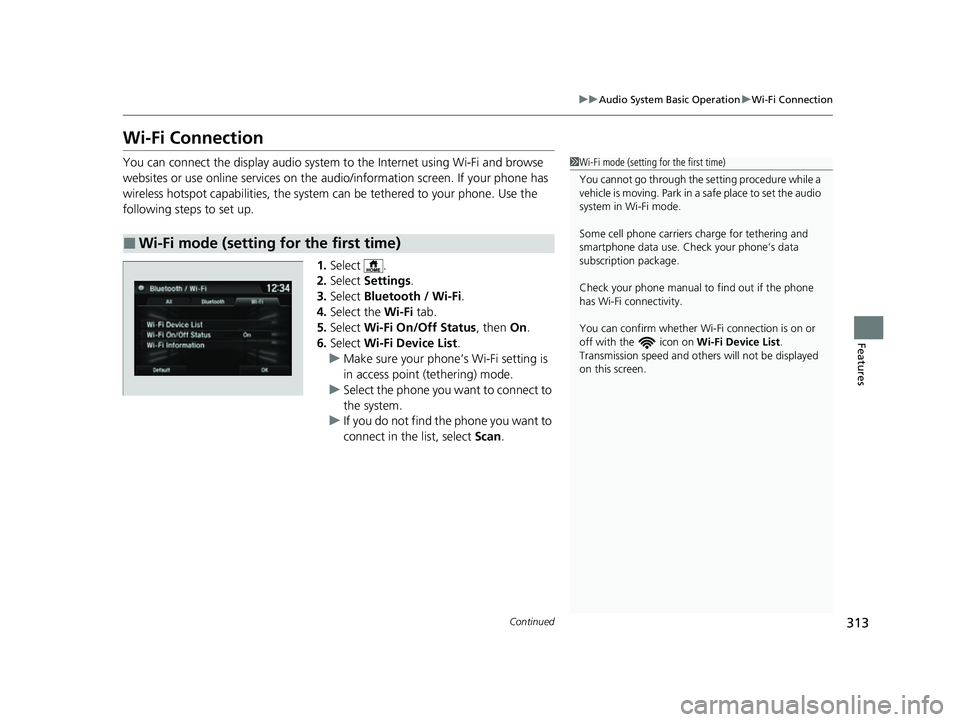
1.Select .
2. Select Settings .
3. Select Bluetooth / Wi-Fi .
4. Select the Wi-Fi tab.
5. Select Wi-Fi On/Off Status , then On.
6. Select Wi-Fi Device List .
u Make sure your phone’s Wi-Fi setting is
in access point (tethering) mode.
u Select the phone you want to connect to
the system.
u If you do not find the phone you want to
connect in the list, select Scan.
■Wi-Fi mode (setting for the first time)
1Wi-Fi mode (setting for the first time)
You cannot go through the se tting procedure while a
vehicle is moving. Park in a safe place to set the audio
system in Wi-Fi mode.
Some cell phone carriers charge for tethering and
smartphone data use. Check your phone’s data
subscription package.
Check your phone manual to find out if the phone
has Wi-Fi connectivity.
You can confirm whether Wi -Fi connection is on or
off with the icon on Wi-Fi Device List.
Transmission speed and others will not be displayed
on this screen.
22 HR-V HDMC-31T7A6600.book 313 ページ 2021年4月12日 月曜日 午前10時50分