warning light HONDA HRV 2022 User Guide
[x] Cancel search | Manufacturer: HONDA, Model Year: 2022, Model line: HRV, Model: HONDA HRV 2022Pages: 641, PDF Size: 21.37 MB
Page 471 of 641
469
uuHonda Sensing ®*uCollision Mitigation Braking SystemTM (CMBSTM)
Continued
Driving
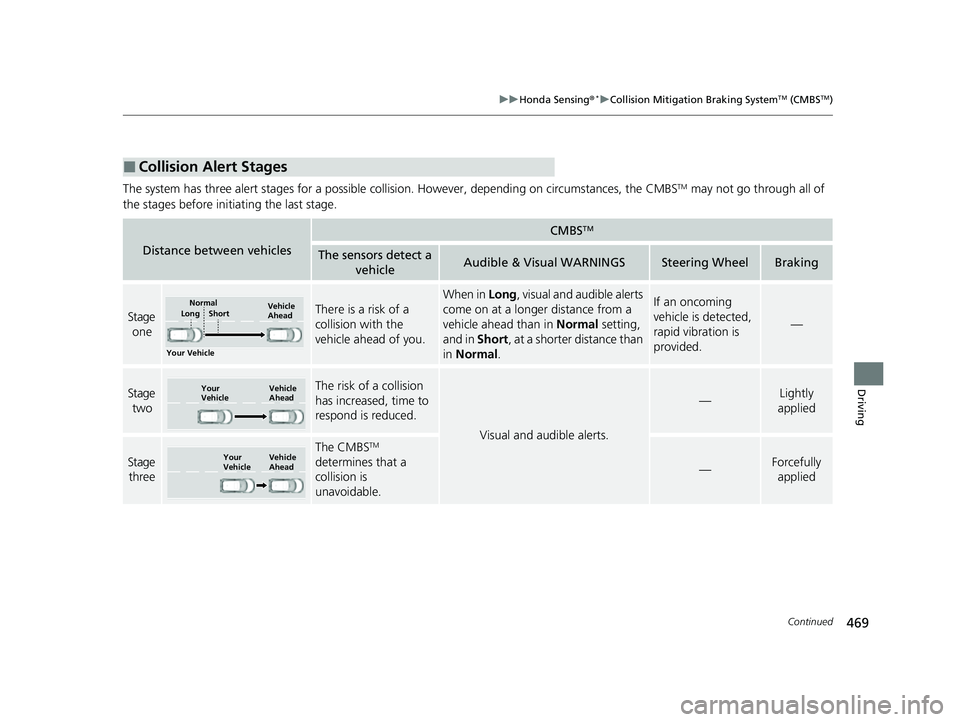
The system has three alert stages for a possible collis ion. However, depending on circumstances, the CMBSTM may not go through all of
the stages before initiating the last stage.
■Collision Alert Stages
Distance between vehicles
CMBSTM
The sensors detect a vehicleAudible & Visual WARNINGSSteering WheelBraking
Stage
oneThere is a risk of a
collision with the
vehicle ahead of you.
When in Long , visual and audible alerts
come on at a longer distance from a
vehicle ahead than in Normal setting,
and in Short, at a shorter distance than
in Normal .If an oncoming
vehicle is detected,
rapid vibration is
provided.
—
Stage
twoThe risk of a collision
has increased, time to
respond is reduced.
Visual and audible alerts.
—Lightly
applied
Stage three
The CMBSTM
determines that a
collision is
unavoidable.
—Forcefully applied
Your Vehicle Vehicle
Ahead
Normal
Short
Long
Your
Vehicle Vehicle
Ahead
Your
VehicleVehicle
Ahead
22 HR-V HDMC-31T7A6600.book 469 ページ 2021年4月12日 月曜日 午前10時50分
Page 473 of 641
Continued471
uuHonda Sensing ®*uCollision Mitigation Braking SystemTM (CMBSTM)
Driving
The system may automatically shut off and the CMBSTM indicator will come on under
certain conditions. Some examples of thes e conditions are listed below. Other
conditions may reduce some of the CMBS
TM functions.
2 Front Sensor Camera P. 504
2 Radar Sensor P. 506
■Environmental conditions
• Driving in bad weather (rain, fog, snow, etc.).
• Sudden changes between light and dark, such as an entrance or exit of a tunnel.
• There is little contrast between objects and the background.
• Driving into low sunlight (e.g., at dawn or dusk).
• Strong light is reflec ted onto the roadway.
• Driving in the shadows of trees, buildings, etc.
• Roadway objects or structures are misint erpreted as vehicles and pedestrians.
• Reflections on the interi or of the windshield.
• Driving at night or in a dark condition such as a tunnel.
■Roadway conditions
• Driving on a snowy or wet roadway (obs cured lane marking, vehicle tracks,
reflected lights, road spray, high contrast).
• The road is hilly or the vehicle is approaching the crest of a hill.
• Driving on curvy, winding, or undulating roads.
■CMBSTM Conditions and Limitations1CMBSTM Conditions and Limitations
Have your vehicle checked by a dealer if you find any
unusual behavior of the system (e.g., the warning
message appears too frequently).
22 HR-V HDMC-31T7A6600.book 471 ページ 2021年4月12日 月曜日 午前10時50分
Page 493 of 641
Continued491
uuHonda Sensing ®*uLane Keeping Assist System (LKAS)
Driving
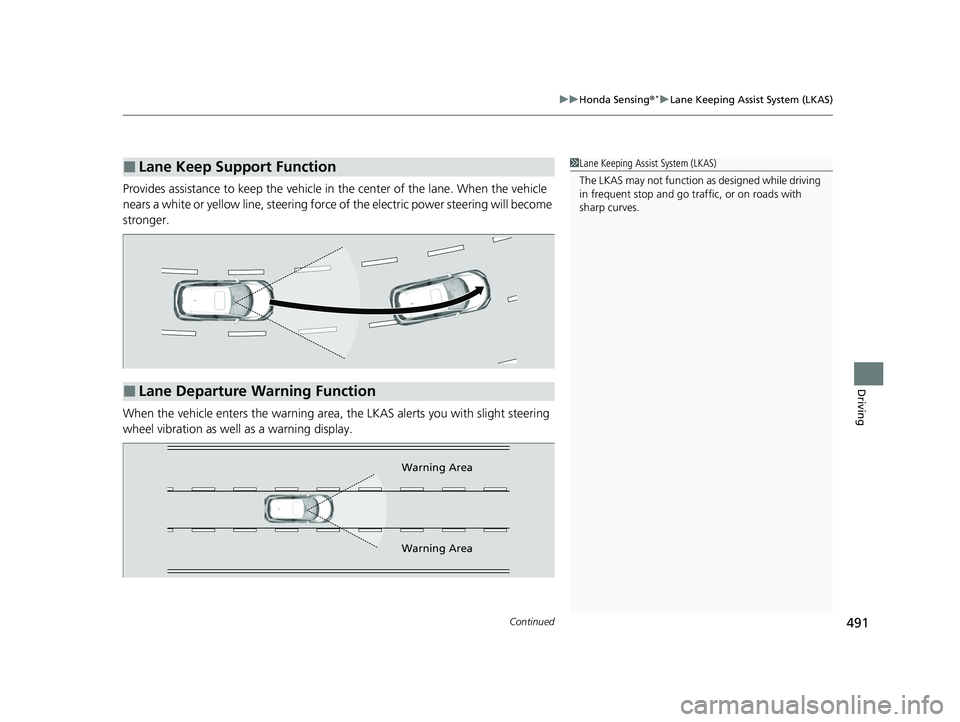
Provides assistance to keep the vehicle in the center of the lane. When the vehicle
nears a white or yellow line, steering force of the electric power steering will become
stronger.
When the vehicle enters the warning area, the LKAS alerts you with slight steering
wheel vibration as well as a warning display.
■Lane Keep Support Function1 Lane Keeping Assist System (LKAS)
The LKAS may not function as designed while driving
in frequent stop and go traf fic, or on roads with
sharp curves.
■Lane Departure Warning Function
Warning Area
Warning Area
22 HR-V HDMC-31T7A6600.book 491 ページ 2021年4月12日 月曜日 午前10時50分
Page 512 of 641
uuBraking uBrake System
510
Driving
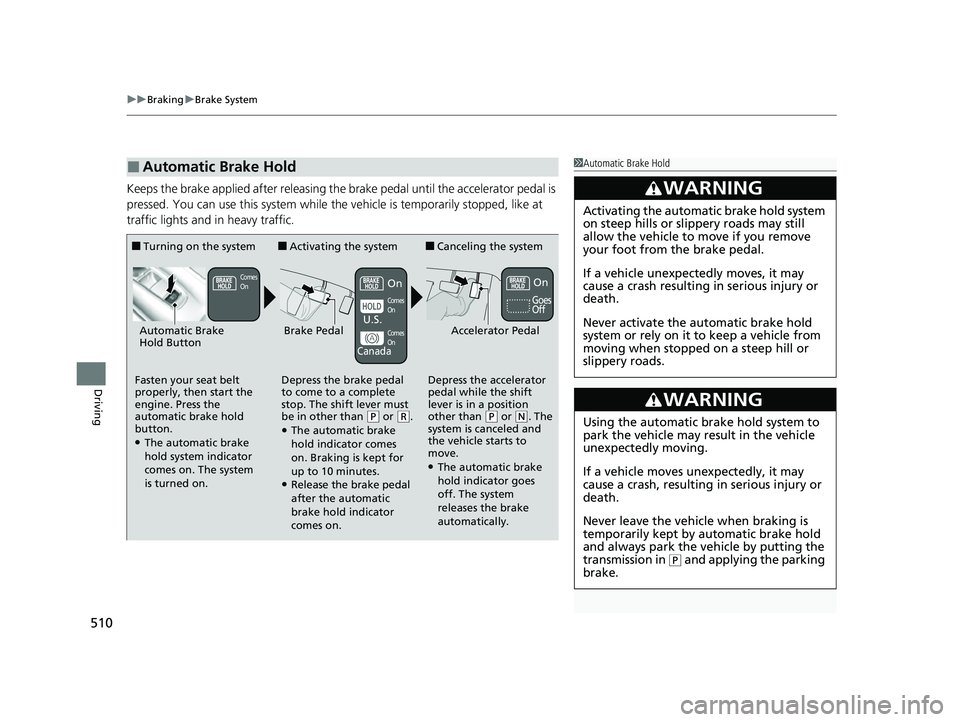
Keeps the brake applied after releasing the br ake pedal until the accelerator pedal is
pressed. You can use this system while th e vehicle is temporarily stopped, like at
traffic lights and in heavy traffic.
■Automatic Brake Hold1 Automatic Brake Hold
3WARNING
Activating the automatic brake hold system
on steep hills or slippery roads may still
allow the vehicle to move if you remove
your foot from the brake pedal.
If a vehicle unexpectedly moves, it may
cause a crash resulting in serious injury or
death.
Never activate the automatic brake hold
system or rely on it to keep a vehicle from
moving when stopped on a steep hill or
slippery roads.
3WARNING
Using the automatic brake hold system to
park the vehicle may result in the vehicle
unexpectedly moving.
If a vehicle moves unexpectedly, it may
cause a crash, resulting in serious injury or
death.
Never leave the vehicle when braking is
temporarily kept by automatic brake hold
and always park the vehicle by putting the
transmission in
( P and applying the parking
brake.
■Turning on the system
Fasten your seat belt
properly, then start the
engine. Press the
automatic brake hold
button.
●The automatic brake
hold system indicator
comes on. The system
is turned on.
■Activating the system
Depress the brake pedal
to come to a complete
stop. The shift lever must
be in other than
( P or (R.●The automatic brake
hold indicator comes
on. Braking is kept for
up to 10 minutes.
●Release the brake pedal
after the automatic
brake hold indicator
comes on.
■Canceling the system
Depress the accelerator
pedal while the shift
lever is in a position
other than
( P or (N. The
system is canceled and
the vehicle starts to
move.
●The automatic brake
hold indicator goes
off. The system
releases the brake
automatically.
Accelerator PedalBrake PedalAutomatic Brake
Hold Button
Goes
Off
Comes
OnOn On
Comes
On
Comes
On
U.S.
Canada
22 HR-V HDMC-31T7A6600.book 510 ページ 2021年4月12日 月曜日 午前10時50分
Page 588 of 641
586
Handling the Unexpected
If a Tire Goes Flat
Changing a Flat Tire
If a tire goes flat while driving, grasp the steering wheel firmly, and brake gradually
to reduce speed. Then, stop in a safe place. Replace the flat tire with a compact
spare tire. Go to a dealer as soon as possible to have th e full-size tire repaired or
replaced.
1. Park the vehicle on firm, level, non-slip pery surface and apply the parking brake.
2. Put the transmission into
(P.
3. Turn on the hazard warning lights an d turn the ignition switch to LOCK
(0*1.
*1: Models with the keyless access system have an ENGINE START/STOP button instead of an
ignition switch.
1 Changing a Flat Tire
Follow compact spare precautions:
Periodically check the tire pressure of the compact
spare. It should be set to the specified pressure.
Specified Pressure: 60 psi (420 kPa, 4.2 kgf/cm
2)
When driving with the compact spare tire, keep the
vehicle speed under 50 mph (80 km/h). Replace with
a full-size tire as soon as possible.
The compact spare tire and wheel in your vehicle are
specifically for this model. Do not use them with
another vehicle. Do not us e another type of compact
spare tire or wheel with your vehicle.
Do not mount tire chains on a compact spare tire.
If a chain-mounted front tire goes flat, remove one of
the full-size rear tires and replace it with the compact
spare tire. Remove the flat front tire and replace it
with the full-size tire that was removed from the rear.
Mount the tire chains on the front tire.
Do not use the jack if it doesn’t work properly. Call
your dealer or a prof essional towing service.
22 HR-V HDMC-31T7A6600.book 586 ページ 2021年4月12日 月曜日 午前10時50分
Page 600 of 641
598
Handling the Unexpected
If the Battery Is Dead
Jump Starting Procedure
Turn off the power to electric devices, such as audio and lights. Turn off the engine,
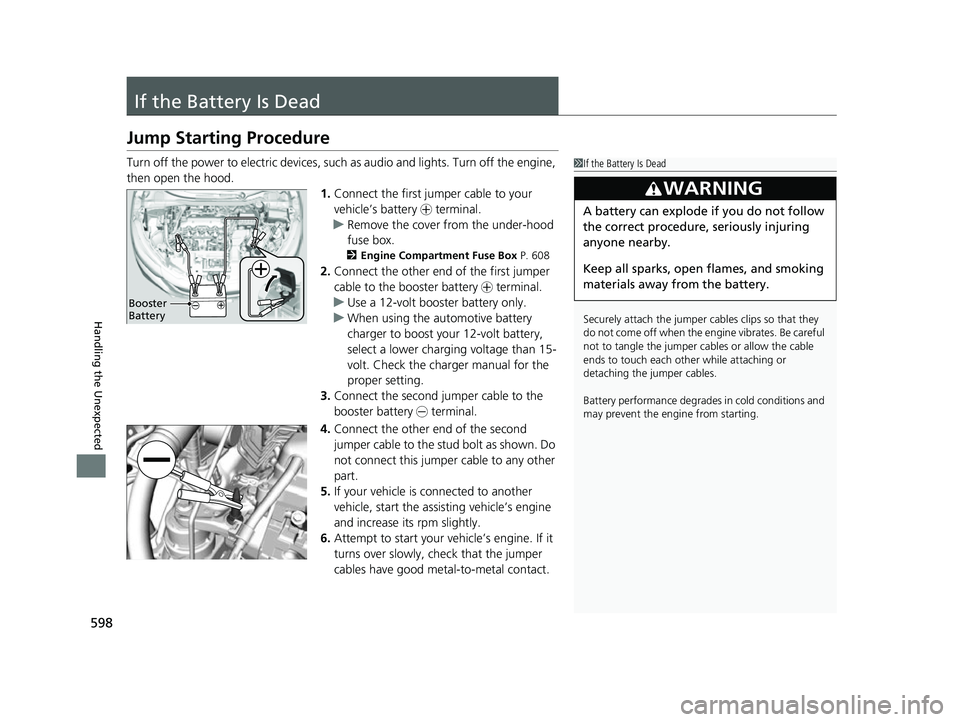
then open the hood. 1.Connect the first jump er cable to your
vehicle’s battery + terminal.
u Remove the cover from the under-hood
fuse box.
2 Engine Compartment Fuse Box P. 608
2.Connect the other end of the first jumper
cable to the booster battery + terminal.
u Use a 12-volt booster battery only.
u When using the automotive battery
charger to boost your 12-volt battery,
select a lower charging voltage than 15-
volt. Check the charger manual for the
proper setting.
3. Connect the second jumper cable to the
booster battery - terminal.
4. Connect the other end of the second
jumper cable to the stud bolt as shown. Do
not connect this jumper cable to any other
part.
5. If your vehicle is connected to another
vehicle, start the assi sting vehicle’s engine
and increase its rpm slightly.
6. Attempt to start your vehicle’s engine. If it
turns over slowly, check that the jumper
cables have good metal-to-metal contact.
1If the Battery Is Dead
Securely attach the jumper cables clips so that they
do not come off when the e ngine vibrates. Be careful
not to tangle the jumper cables or allow the cable
ends to touch each other while attaching or
detaching the jumper cables.
Battery performance degrades in cold conditions and
may prevent the engi ne from starting.
3WARNING
A battery can explode if you do not follow
the correct procedure, seriously injuring
anyone nearby.
Keep all sparks, open flames, and smoking
materials away from the battery.
Booster
Battery
22 HR-V HDMC-31T7A6600.book 598 ページ 2021年4月12日 月曜日 午前10時50分
Page 603 of 641
601Continued
Handling the Unexpected
Overheating
How to Handle Overheating
Overheating symptoms are as follows:
•The high temperature indicator (red) co mes on or the engine suddenly loses
power.
• Steam or spray comes out of the engine compartment.
■First thing to do
1. Immediately park the vehicle in a safe place.
2. Turn off all accessories and turn on the hazard warning lights.
u No steam or spray present: Keep the engine running and open the hood.
u Steam or spray is present: Turn off the engine and wait until it subsides.
Then, open the hood.
1 How to Handle Overheating
NOTICE
Continuing to drive with the high temperature
indicator on may da mage the engine.
3WARNING
Steam and spray from an overheated
engine can seriously scald you.
Do not open the hood if steam is coming
out.
22 HR-V HDMC-31T7A6600.book 601 ページ 2021年4月12日 月曜日 午前10時50分
Page 605 of 641
603
Handling the Unexpected
Indicator, Coming On/Blinking
If the Low Oil Pressure Indicator Comes On
■Reasons for the indicator to come on
Comes on when the engine oil pressure is low.
■What to do as soon as the indicator comes on
1. Immediately park the vehicle on level ground in a safe place.
2. If necessary, turn the hazard warning lights on.
■What to do after parking the vehicle
1. Stop the engine and let it sit for about three minutes.
2. Open the hood and check the oil level.
u Add oil as necessary.
2 Oil Check P. 536
3.Start the engine and check th e low oil pressure indicator.
u The indicator goes off: Start driving again.
u The indicator does not go off within 10 seconds: Immediately stop
the engine and contact a dealer for repairs.
If the Charging System Indicator Comes On
■Reasons for the indicator to come on
Comes on when the battery is not being charged.
■What to do when th e indicator comes on
Turn off the heating and cooling system*/climate control system*, rear
defogger, and other electrical system s, and immediately contact a dealer
for repairs.
1 If the Low Oil Pressure Indicator Comes On
NOTICE
Running the engine with low oil pressure can cause
serious mechanical damage almost immediatelyM
1If the Charging System Indicator Comes On
If you need to stop temporarily, do not turn off the
engine. Restarting the engi ne may rapidly discharge
the battery.
* Not available on all models
22 HR-V HDMC-31T7A6600.book 603 ページ 2021年4月12日 月曜日 午前10時50分
Page 636 of 641
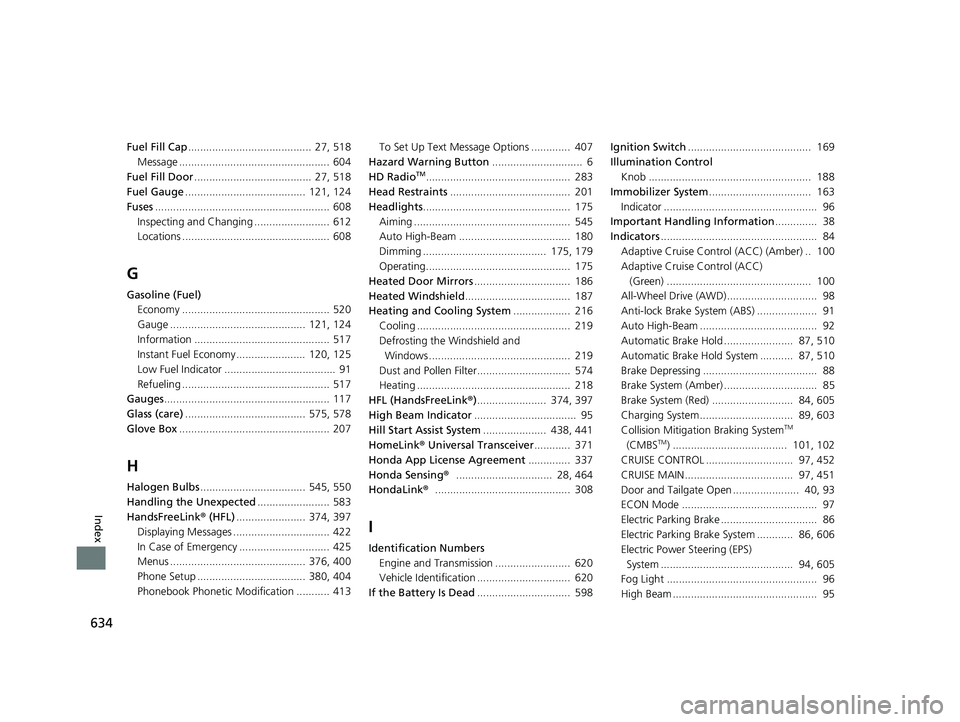
634
Index
Fuel Fill Cap......................................... 27, 518
Message .................................................. 604
Fuel Fill Door ....................................... 27, 518
Fuel Gauge ........................................ 121, 124
Fuses .......................................................... 608
Inspecting and Changing ......................... 612
Locations ................................................. 608
G
Gasoline (Fuel) Economy ................................................. 520
Gauge ............................................. 121, 124
Information ............................................. 517
Instant Fuel Economy ....................... 120, 125
Low Fuel Indicator ..................................... 91
Refueling ................................................. 517
Gauges ....................................................... 117
Glass (care) ........................................ 575, 578
Glove Box .................................................. 207
H
Halogen Bulbs ................................... 545, 550
Handling the Unexpected ........................ 583
HandsFreeLink® (HFL)....................... 374, 397
Displaying Messages ................................ 422
In Case of Emergency .............................. 425
Menus ............................................. 376, 400
Phone Setup .................................... 380, 404
Phonebook Phonetic M odification ........... 413 To Set Up Text Message Options ............. 407
Hazard Warning Button .............................. 6
HD Radio
TM................................................ 283
Head Restraints ........................................ 201
Headlights ................................................. 175
Aiming .................................................... 545
Auto High-Beam ..................................... 180
Dimming ......................................... 175, 179
Operating................................................ 175
Heated Door Mirrors ................................ 186
Heated Windshield ................................... 187
Heating and Cooling System ................... 216
Cooling ................................................... 219
Defrosting the Windshield and
Windows ............................................... 219
Dust and Pollen Filter............................... 574
Heating ................................................... 218
HFL (HandsFreeLink ®)....................... 374, 397
High Beam Indicator .................................. 95
Hill Start Assist System ..................... 438, 441
HomeLink ® Universal Transceiver ............ 371
Honda App License Agreement .............. 337
Honda Sensing ®................................ 28, 464
HondaLink ®............................................. 308
I
Identification Numbers
Engine and Transmission ......................... 620
Vehicle Identification ............................... 620
If the Battery Is Dead ............................... 598 Ignition Switch
......................................... 169
Illumination Control
Knob ...................................................... 188
Immobilizer System .................................. 163
Indicator ................................................... 96
Important Handling Information .............. 38
Indicators .................................................... 84
Adaptive Cruise Control (ACC) (Amber) .. 100
Adaptive Cruise Control (ACC) (Green) ................................................ 100
All-Wheel Drive (AWD).............................. 98
Anti-lock Brake System (ABS) .................... 91
Auto High-Beam ....................................... 92
Automatic Brake Hold ....................... 87, 510
Automatic Brake Hold System ........... 87, 510
Brake Depressing ...................................... 88
Brake System (Amber) ............................... 85
Brake System (Red) ........................... 84, 605
Charging System............................... 89, 603
Collision Mitigati on Braking System
TM
(CMBSTM) ...................................... 101, 102
CRUISE CONTROL ............................. 97, 452
CRUISE MAIN.................................... 97, 451
Door and Tailgate Open ...................... 40, 93
ECON Mode ............................................. 97
Electric Parking Brake ................................ 86
Electric Parking Brake System ............ 86, 606
Electric Power Steering (EPS)
System ............................................ 94, 605
Fog Light .................................................. 96
High Beam ................................................ 95
22 HR-V HDMC-31T7A6600.book 634 ページ 2021年4月12日 月曜日 午前10時50分