information HONDA HRV 2022 Owner's Manual
[x] Cancel search | Manufacturer: HONDA, Model Year: 2022, Model line: HRV, Model: HONDA HRV 2022Pages: 641, PDF Size: 21.37 MB
Page 60 of 641
uuAirbags uFront Airbags (SRS)
58
Safe DrivingThe airbags have advanced features to help reduce the likelihood of airbag related
injuries to smaller occupants.
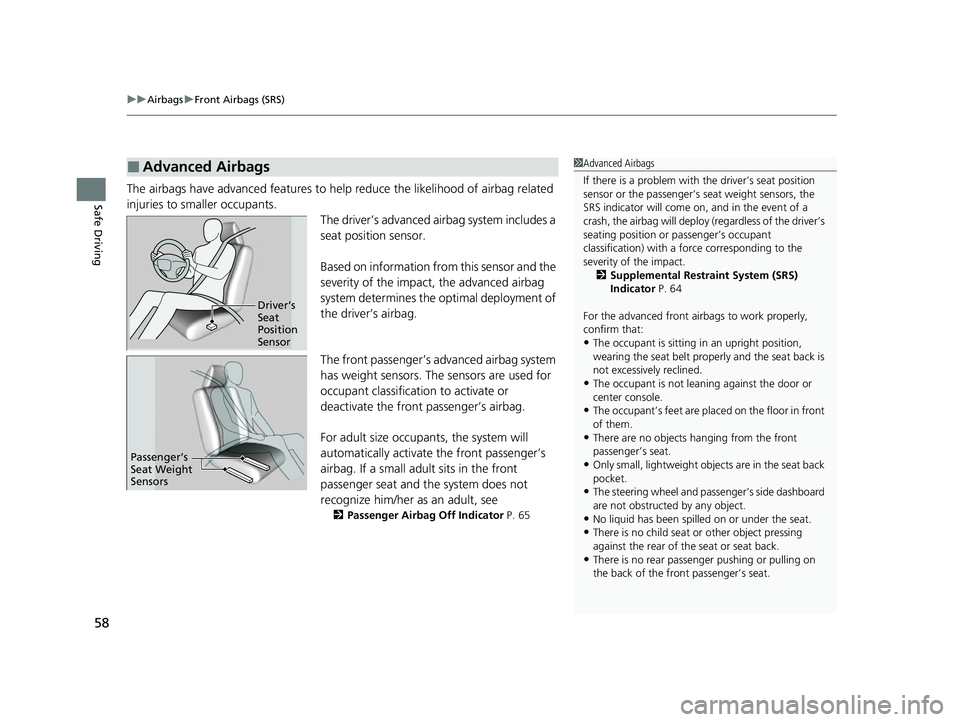
The driver’s advanced airbag system includes a
seat position sensor.
Based on information from this sensor and the
severity of the impact, the advanced airbag
system determines the optimal deployment of
the driver’s airbag.
The front passenger’s advanced airbag system
has weight sensors. The sensors are used for
occupant classification to activate or
deactivate the front passenger’s airbag.
For adult size occupants, the system will
automatically activate the front passenger’s
airbag. If a small adul t sits in the front
passenger seat and the system does not
recognize him/her as an adult, see
2Passenger Airbag Off Indicator P. 65
■Advanced Airbags1Advanced Airbags
If there is a problem with the driver’s seat position
sensor or the passenger’s s eat weight sensors, the
SRS indicator will come on, and in the event of a
crash, the airbag will deploy (regardless of the driver’s
seating position or passenger’s occupant
classification) with a force corresponding to the
severity of the impact. 2 Supplemental Restraint System (SRS)
Indicator P. 64
For the advanced front airbags to work properly,
confirm that:
•The occupant is sitting in an upright position,
wearing the seat belt prope rly and the seat back is
not excessively reclined.
•The occupant is not leaning against the door or
center console.
•The occupant’s feet are plac ed on the floor in front
of them.
•There are no objects ha nging from the front
passenger’s seat.
•Only small, lightweight objec ts are in the seat back
pocket.
•The steering wheel and passenger’s side dashboard
are not obstructed by any object.
•No liquid has been spille d on or under the seat.•There is no child seat or other object pressing
against the rear of the seat or seat back.
•There is no rear passenger pushing or pulling on
the back of the front passenger’s seat.
Driver’s
Seat
Position
Sensor
Passenger’s
Seat Weight
Sensors
22 HR-V HDMC-31T7A6600.book 58 ページ 2021年4月12日 月曜日 午前10時50分
Page 66 of 641
64
uuAirbags uAirbag System Indicators
Safe Driving
Airbag System Indicators
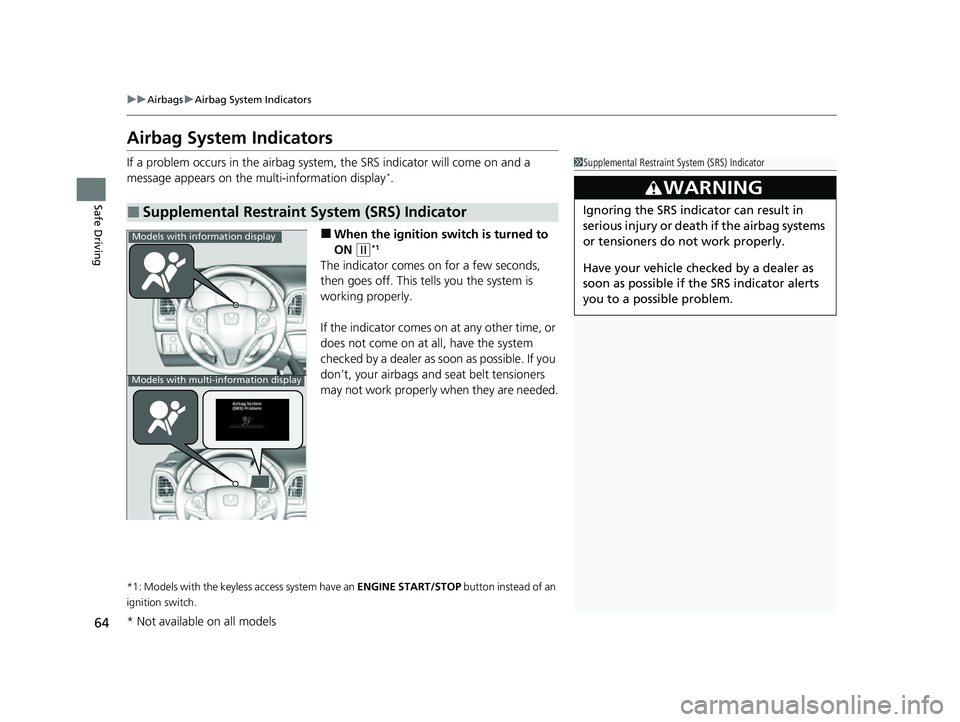
If a problem occurs in the airbag system , the SRS indicator will come on and a
message appears on the multi-information display*.
■When the ignition sw itch is turned to
ON
(w*1
The indicator comes on for a few seconds,
then goes off. This tells you the system is
working properly.
If the indicator comes on at any other time, or
does not come on at all, have the system
checked by a dealer as s oon as possible. If you
don’t, your airbags and seat belt tensioners
may not work properly when they are needed.
*1: Models with the keyless access system have an ENGINE START/STOP button instead of an
ignition switch.
■Supplemental Restraint System (SRS) Indicator
1 Supplemental Restraint Sy stem (SRS) Indicator
3WARNING
Ignoring the SRS indicator can result in
serious injury or death if the airbag systems
or tensioners do not work properly.
Have your vehicle checked by a dealer as
soon as possible if th e SRS indicator alerts
you to a possible problem.
Models with information display
Models with multi-information display
* Not available on all models
22 HR-V HDMC-31T7A6600.book 64 ページ 2021年4月12日 月曜日 午前10時50分
Page 82 of 641
uuChild Safety uSafety of Larger Children
80
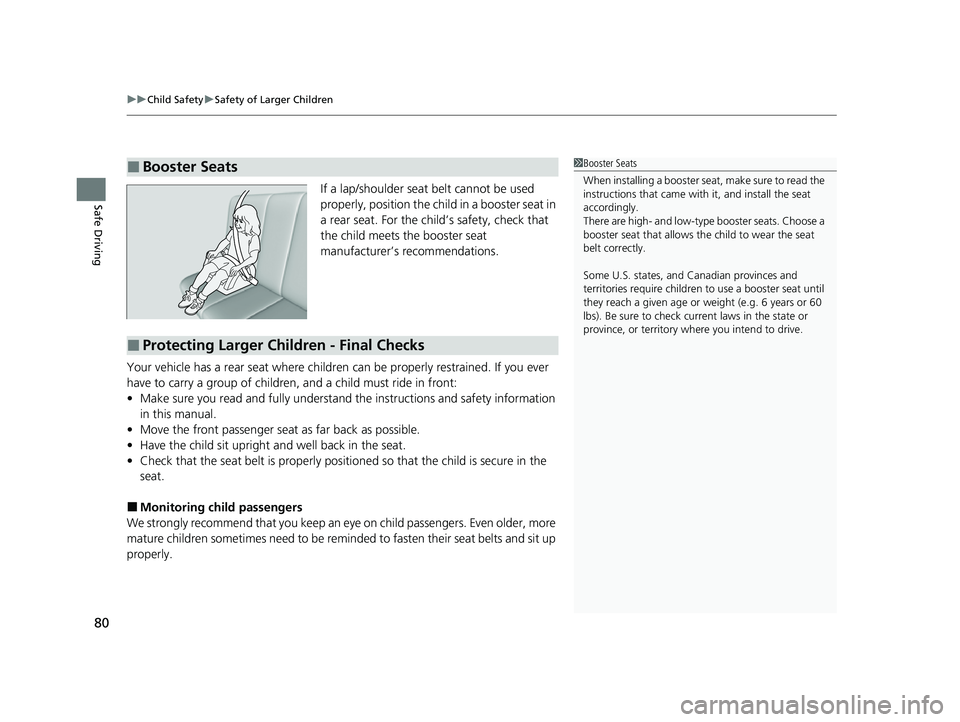
Safe DrivingIf a lap/shoulder seat belt cannot be used
properly, position the child in a booster seat in
a rear seat. For the child’s safety, check that
the child meets the booster seat
manufacturer’s recommendations.
Your vehicle has a rear seat where children can be properly restrained. If you ever
have to carry a group of children, and a child must ride in front:
• Make sure you read and fully understand the instructions and safety information
in this manual.
• Move the front passenger seat as far back as possible.
• Have the child sit upright and well back in the seat.
• Check that the seat belt is properly positi oned so that the child is secure in the
seat.
■Monitoring child passengers
We strongly recommend that you keep an eye on child passengers. Even older, more
mature children sometimes need to be remind ed to fasten their seat belts and sit up
properly.
■Booster Seats1 Booster Seats
When installing a booster seat , make sure to read the
instructions that came with it, and install the seat
accordingly.
There are high- and low-type booster seats. Choose a
booster seat that allows the child to wear the seat
belt correctly.
Some U.S. states, and Canadian provinces and
territories require children to use a booster seat until
they reach a given age or weight (e.g. 6 years or 60
lbs). Be sure to check current laws in the state or
province, or territory where you intend to drive.
■Protecting Larger Children - Final Checks
22 HR-V HDMC-31T7A6600.book 80 ページ 2021年4月12日 月曜日 午前10時50分
Page 85 of 641
83
Instrument Panel
This chapter describes the buttons, indicators, and gauges that are used while driving.
Indicators............................................ 84
Information Display Warning and Information Messages
*.................. 103
Multi-Information Display Warning and Information Messages
*.................. 104
Gauges and Displays Gauges ............................................ 117
Information Display
*........................ 119
Multi-Information Display*............... 122
* Not available on all models
22 HR-V HDMC-31T7A6600.book 83 ページ 2021年4月12日 月曜日 午前10時50分
Page 97 of 641
95
uuIndicators u
Continued
Instrument Panel
*1:Models with the keyless access system have an ENGINE START/STOP button instead of an ignition switch.
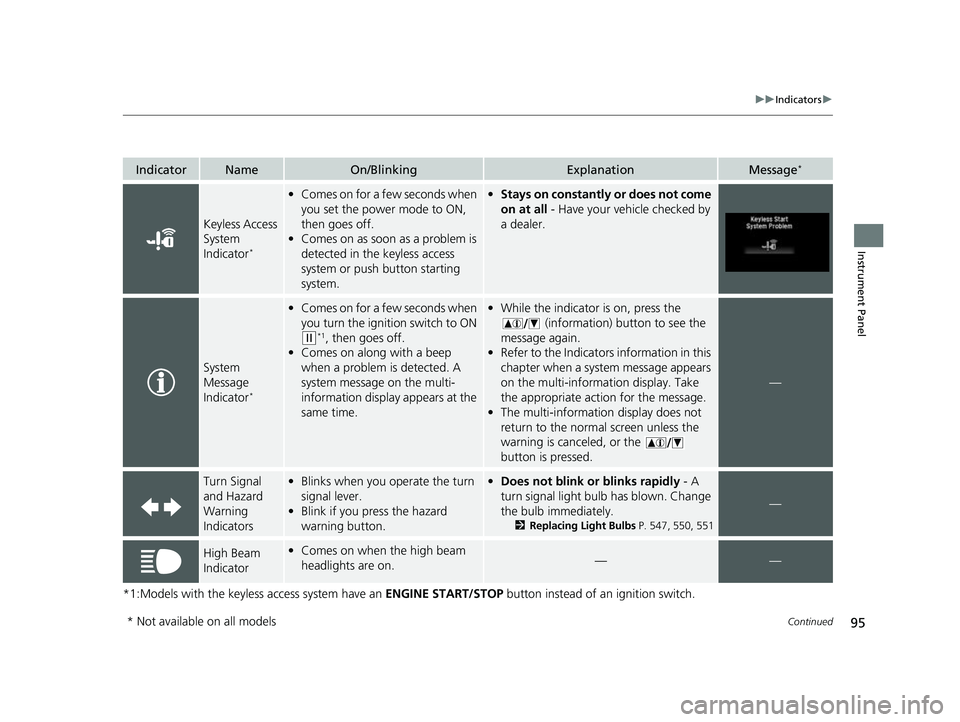
IndicatorNameOn/BlinkingExplanationMessage*
Keyless Access
System
Indicator
*
•Comes on for a few seconds when
you set the power mode to ON,
then goes off.
• Comes on as soon as a problem is
detected in the keyless access
system or push button starting
system.•Stays on constantly or does not come
on at all - Have your vehicle checked by
a dealer.
System
Message
Indicator
*
• Comes on for a few seconds when
you turn the ignition switch to ON
(w*1, then goes off.
• Comes on along with a beep
when a problem is detected. A
system message on the multi-
information display appears at the
same time.
•While the indicator is on, press the
(information) button to see the
message again.
• Refer to the Indicators information in this
chapter when a system message appears
on the multi-information display. Take
the appropriate action for the message.
• The multi-information display does not
return to the normal screen unless the
warning is canceled, or the
button is pressed.
—
Turn Signal
and Hazard
Warning
Indicators•Blinks when you operate the turn
signal lever.
• Blink if you press the hazard
warning button.•Does not blink or blinks rapidly - A
turn signal light bulb has blown. Change
the bulb immediately.
2 Replacing Light Bulbs P. 547, 550, 551
—
High Beam
Indicator•Comes on when the high beam
headlights are on.——
* Not available on all models
22 HR-V HDMC-31T7A6600.book 95 ページ 2021年4月12日 月曜日 午前10時50分
Page 98 of 641
96
uuIndicators u
Instrument Panel
*1:Models with the keyless access system have an ENGINE START/STOP button instead of an ignition switch.
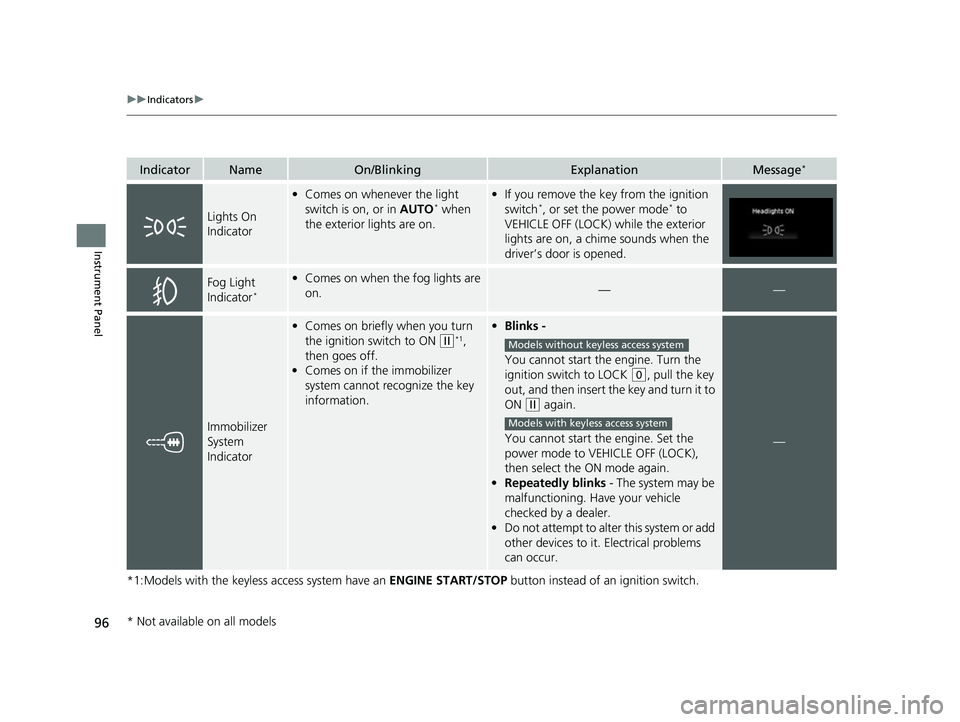
IndicatorNameOn/BlinkingExplanationMessage*
Lights On
Indicator
•Comes on whenever the light
switch is on, or in AUTO* when
the exterior lights are on.
• If you remove the key from the ignition
switch*, or set the power mode* to
VEHICLE OFF (LOCK) while the exterior
lights are on, a chime sounds when the
driver’s door is opened.
Fog Light
Indicator*
• Comes on when the fog lights are
on.——
Immobilizer
System
Indicator
•Comes on briefly when you turn
the ignition switch to ON
(w*1,
then goes off.
• Comes on if the immobilizer
system cannot recognize the key
information.
• Blinks -
You cannot start the engine. Turn the
ignition switch to LOCK
(0, pull the key
out, and then insert the key and turn it to
ON
(w again.
You cannot start the engine. Set the
power mode to VEHICLE OFF (LOCK),
then select the ON mode again.
• Repeatedly blinks - The system may be
malfunctioning. Have your vehicle
checked by a dealer.
• Do not attempt to alter this system or add
other devices to it. Electrical problems
can occur.
—
Models without keyless access system
Models with keyless access system
* Not available on all models
22 HR-V HDMC-31T7A6600.book 96 ページ 2021年4月12日 月曜日 午前10時50分
Page 103 of 641
101
uuIndicators u
Continued
Instrument Panel
*1:Models with the keyless access system have an ENGINE START/STOP button instead of an ignition switch.
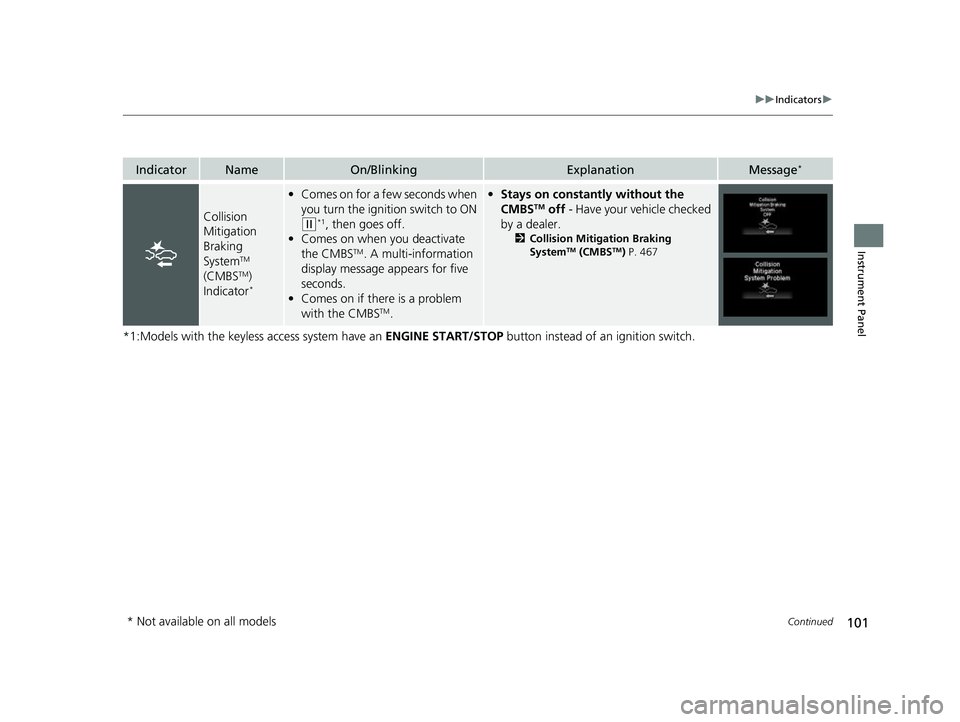
IndicatorNameOn/BlinkingExplanationMessage*
Collision
Mitigation
Braking
System
TM
(CMBSTM)
Indicator*
• Comes on for a few seconds when
you turn the ignition switch to ON
(w*1, then goes off.
• Comes on when you deactivate
the CMBS
TM. A multi-information
display message appears for five
seconds.
• Comes on if there is a problem
with the CMBS
TM.
•Stays on constantly without the
CMBSTM off - Have your vehicle checked
by a dealer.
2 Collision Mitigation Braking
SystemTM (CMBSTM) P. 467
* Not available on all models
22 HR-V HDMC-31T7A6600.book 101 ページ 2021年4月12日 月曜日 午前10時50分
Page 105 of 641
103
uuIndicators uInformation Display Warning and Information Messages*
Instrument Panel
Information Display Warning and Information Messages*
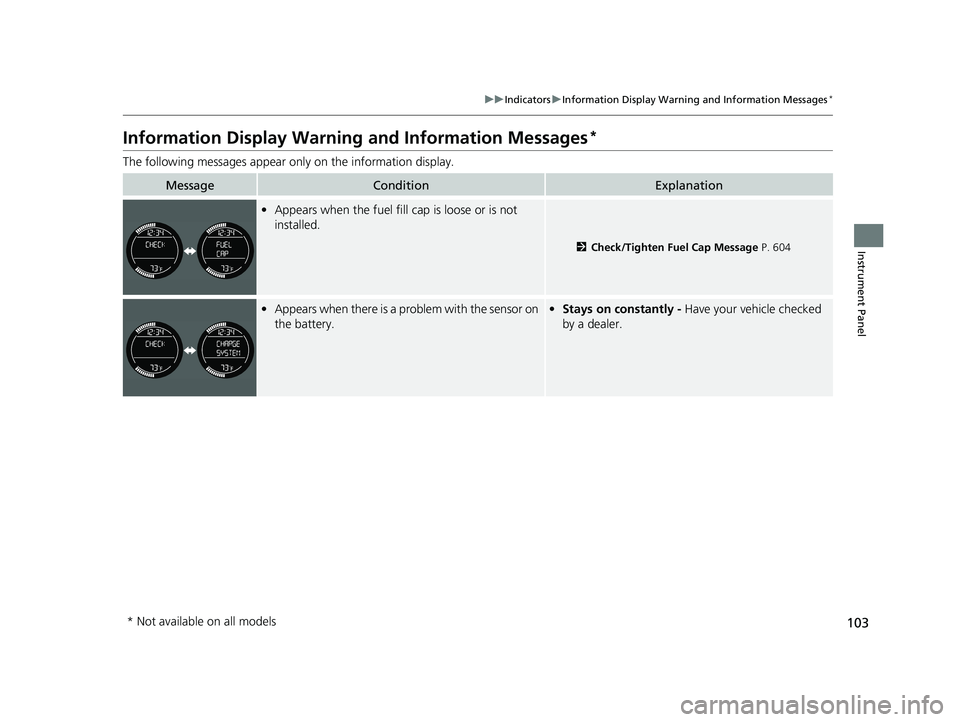
The following messages appear on ly on the information display.
MessageConditionExplanation
•Appears when the fuel fill cap is loose or is not
installed.
2 Check/Tighten Fuel Cap Message P. 604
•Appears when there is a problem with the sensor on
the battery.• Stays on constantly - Have your vehicle checked
by a dealer.
* Not available on all models
22 HR-V HDMC-31T7A6600.book 103 ページ 2021年4月12日 月曜日 午前10時50分
Page 106 of 641
104
uuIndicators uMulti-Information Display Warn ing and Information Messages*
Instrument Panel
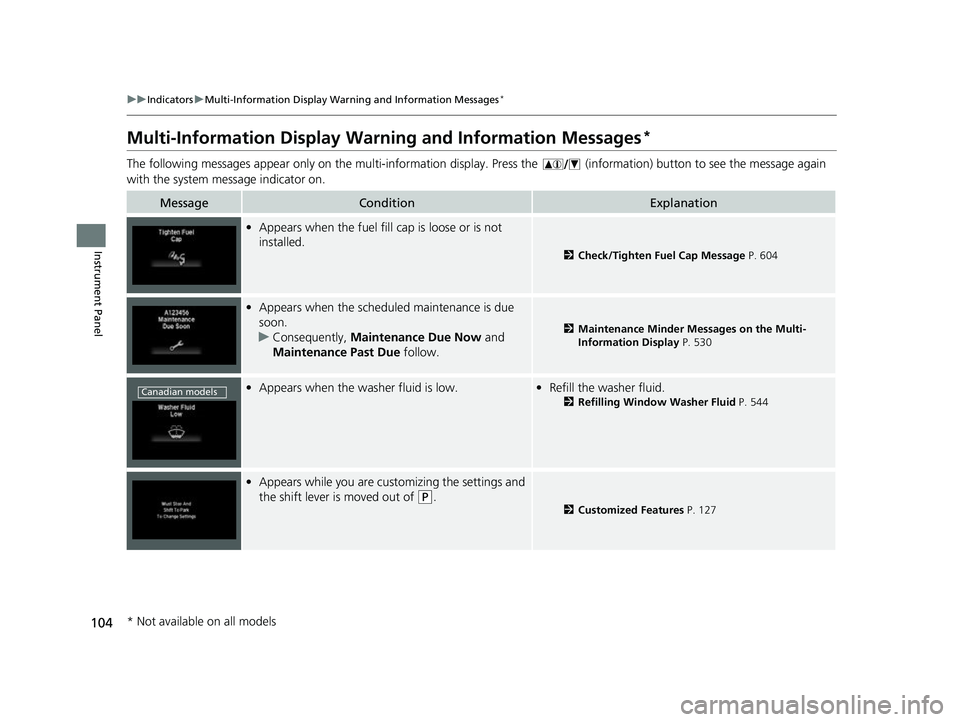
Multi-Information Display Warn ing and Information Messages*
The following messages appear only on the multi-information display. Press the (information) button to see the message again
with the system me ssage indicator on.
MessageConditionExplanation
•Appears when the fuel fill cap is loose or is not
installed.
2 Check/Tighten Fuel Cap Message P. 604
•Appears when the scheduled maintenance is due
soon.
u Consequently, Maintenance Due Now and
Maintenance Past Due follow.
2Maintenance Minder Messages on the Multi-
Information Display P. 530
•Appears when the washer fluid is low.•Refill the washer fluid.
2 Refilling Window Washer Fluid P. 544
•Appears while you are customizing the settings and
the shift lever is moved out of
(P.2 Customized Features P. 127
Canadian models
* Not available on all models
22 HR-V HDMC-31T7A6600.book 104 ページ 2021年4月12日 月曜日 午前10時50分
Page 107 of 641
105
uuIndicators uMulti-Information Display Warn ing and Information Messages*
Continued
Instrument Panel
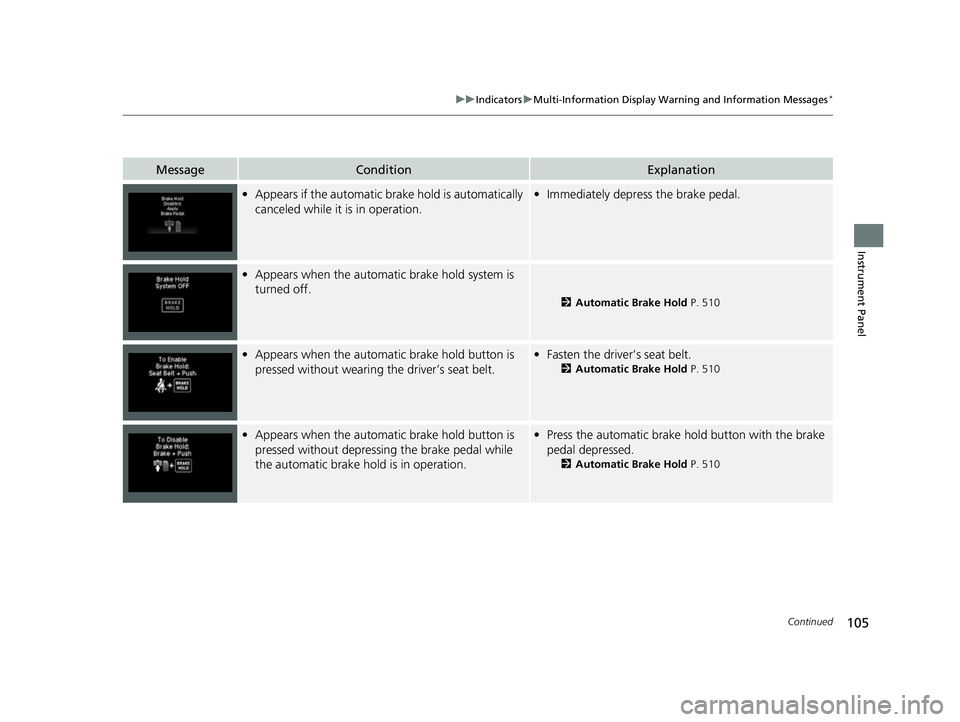
MessageConditionExplanation
•Appears if the automatic brake hold is automatically
canceled while it is in operation.•Immediately depress the brake pedal.
•Appears when the automatic brake hold system is
turned off.
2 Automatic Brake Hold P. 510
•Appears when the automatic brake hold button is
pressed without wearing the driver’s seat belt.•Fasten the driver’s seat belt.
2 Automatic Brake Hold P. 510
•Appears when the automatic brake hold button is
pressed without depressi ng the brake pedal while
the automatic brake hold is in operation.• Press the automatic brake hold button with the brake
pedal depressed.
2 Automatic Brake Hold P. 510
22 HR-V HDMC-31T7A6600.book 105 ページ 2021年4月12日 月曜日 午前10時50分