wheel HONDA HRV 2022 Repair Manual
[x] Cancel search | Manufacturer: HONDA, Model Year: 2022, Model line: HRV, Model: HONDA HRV 2022Pages: 641, PDF Size: 21.37 MB
Page 453 of 641
451
uuWhen Driving uCruise Control*
Continued
Driving
Cruise Control*
Maintains a constant vehicle speed without having to keep your foot on the
accelerator. Use cruise control on freeways or open road s where you can travel at a
constant speed with little ac celeration or deceleration.1Cruise Control*
It may not be possible to maintain a constant speed
when driving uphill or downhill.
When not using cruise control:
Turn off cruise control by pressing the CRUISE
button.
While in ECON mode, it may take relatively more time
to accelerate to maintain the set speed.
3WARNING
Improper use of the cruise control can lead
to a crash.
Use the cruise control only when traveling
on open highways in good weather.
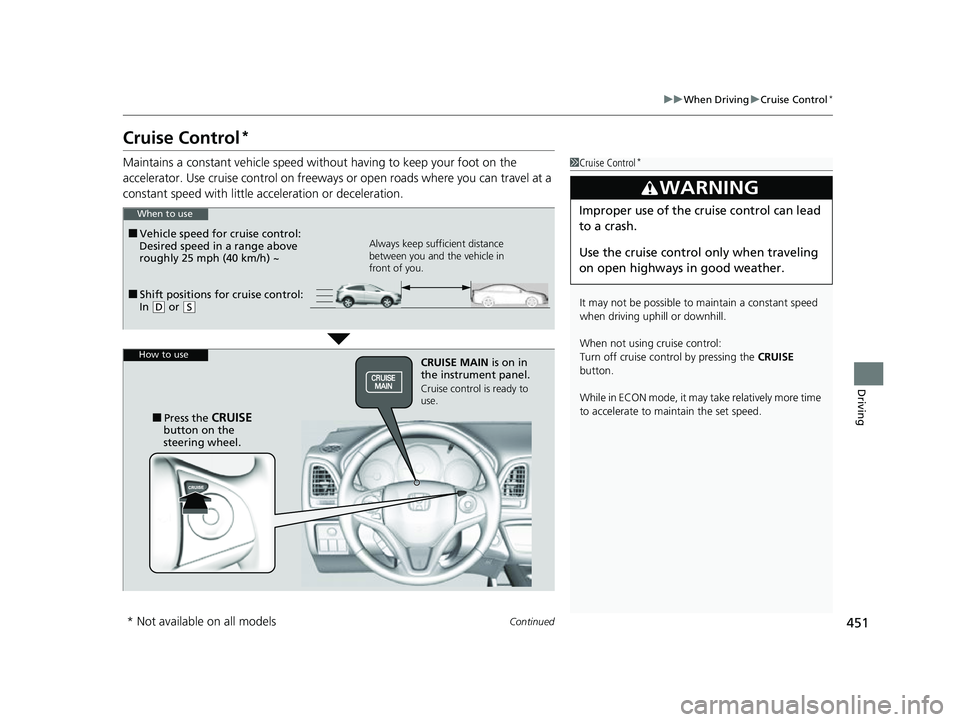
■Shift positions for cruise control:
In ( D or (S Always keep sufficient distance
between you and the vehicle in
front of you.
■Vehicle speed for cruise control:
Desired speed in a range above
roughly 25 mph (40 km/h) ~
When to use
CRUISE MAIN is on in
the instrument panel.
Cruise control is ready to
use.
■Press the CRUISE
button on the
steering wheel.
How to use
* Not available on all models
22 HR-V HDMC-31T7A6600.book 451 ページ 2021年4月12日 月曜日 午前10時50分
Page 455 of 641
453
uuWhen Driving uCruise Control*
Driving
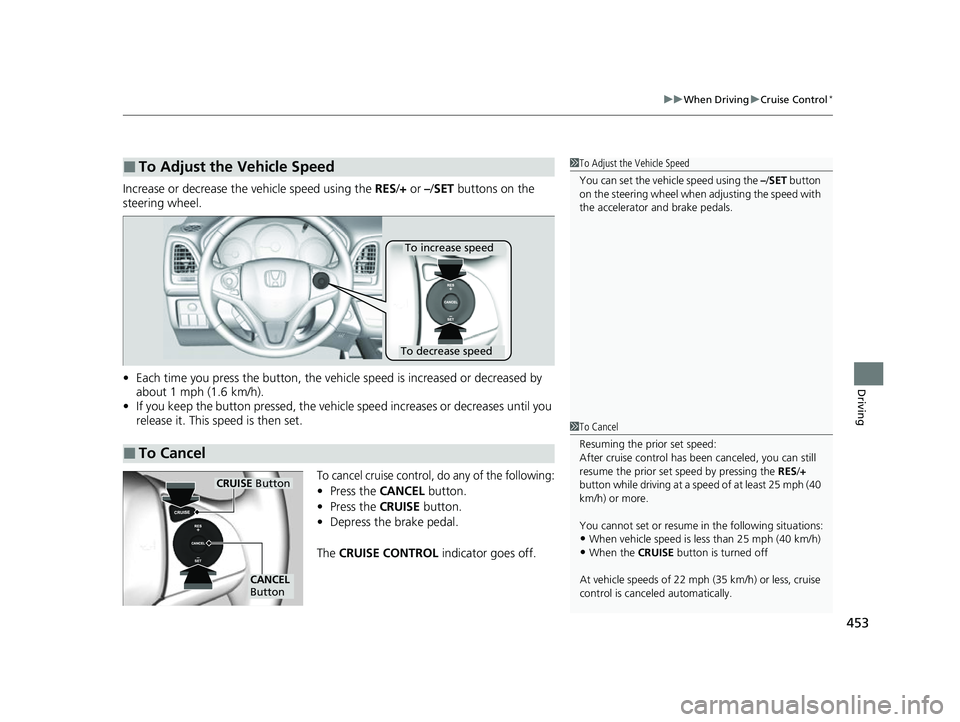
Increase or decrease the vehicle speed using the RES/+ or –/ SET buttons on the
steering wheel.
• Each time you press the button, the vehicl e speed is increased or decreased by
about 1 mph (1.6 km/h).
• If you keep the button pressed, the vehicl e speed increases or decreases until you
release it. This speed is then set.
To cancel cruise control, do any of the following:
• Press the CANCEL button.
• Press the CRUISE button.
• Depress the brake pedal.
The CRUISE CONTROL indicator goes off.
■To Adjust the Vehicle Speed1To Adjust the Vehicle Speed
You can set the vehicle speed using the – /SET button
on the steering wheel when adjusting the speed with
the accelerator and brake pedals.
■To Cancel
To decrease speed
To increase speed
1 To Cancel
Resuming the prior set speed:
After cruise control has be en canceled, you can still
resume the prior set speed by pressing the RES/+
button while driving at a speed of at least 25 mph (40
km/h) or more.
You cannot set or resume in the following situations:
•When vehicle speed is less than 25 mph (40 km/h)
•When the CRUISE button is turned off
At vehicle speeds of 22 m ph (35 km/h) or less, cruise
control is canceled automatically.
CRUISE Button
CANCEL
Button
22 HR-V HDMC-31T7A6600.book 453 ページ 2021年4月12日 月曜日 午前10時50分
Page 457 of 641
455
uuWhen Driving uVehicle Stability AssistTM (VSA ®), aka Electronic Stability Control (ESC), System
Driving
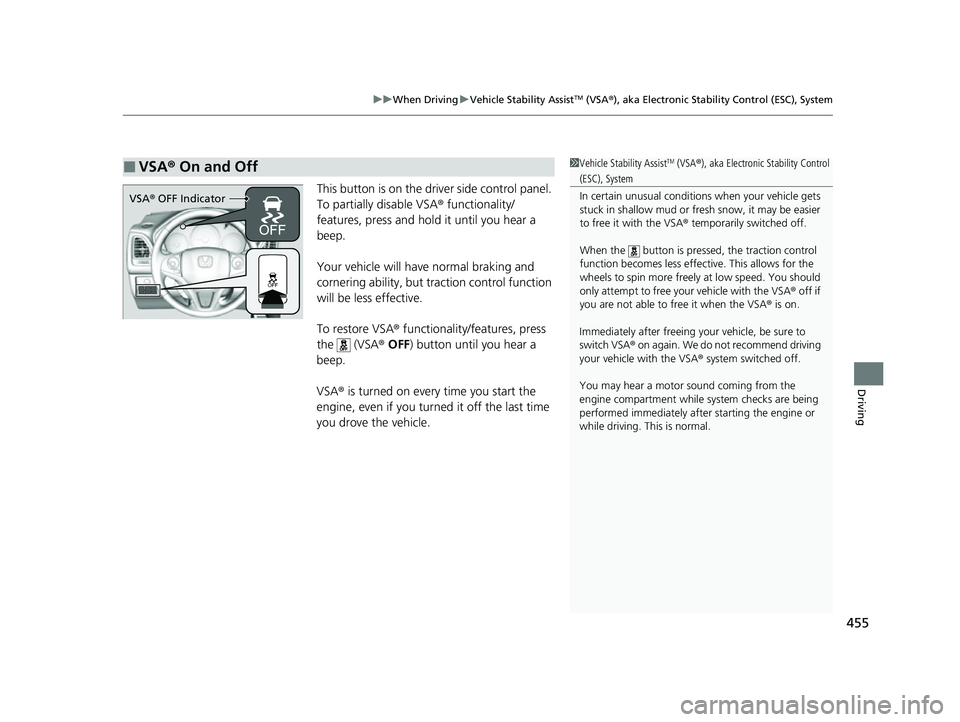
This button is on the driver side control panel.
To partially disable VSA ® functionality/
features, press and hold it until you hear a
beep.
Your vehicle will have normal braking and
cornering ability, but tra ction control function
will be less effective.
To restore VSA ® functionality/features, press
the (VSA ® OFF ) button until you hear a
beep.
VSA ® is turned on every time you start the
engine, even if you turned it off the last time
you drove the vehicle.
■VSA ® On and Off1 Vehicle Stability AssistTM (VSA® ), aka Electronic Stability Control
(ESC), System
In certain unusual conditions when your vehicle gets
stuck in shallow mud or fr esh snow, it may be easier
to free it with the VSA ® temporarily switched off.
When the button is pressed, the traction control
function becomes less effective. This allows for the
wheels to spin more freely at low speed. You should
only attempt to free your vehicle with the VSA ® off if
you are not able to free it when the VSA ® is on.
Immediately after freeing your vehicle, be sure to
switch VSA ® on again. We do not recommend driving
your vehicle with the VSA ® system switched off.
You may hear a motor sound coming from the
engine compartment while system checks are being
performed immediately after starting the engine or
while driving. This is normal.
VSA ® OFF Indicator
22 HR-V HDMC-31T7A6600.book 455 ページ 2021年4月12日 月曜日 午前10時50分
Page 458 of 641
456
uuWhen Driving uLaneWatchTM*
Driving
LaneWatchTM*
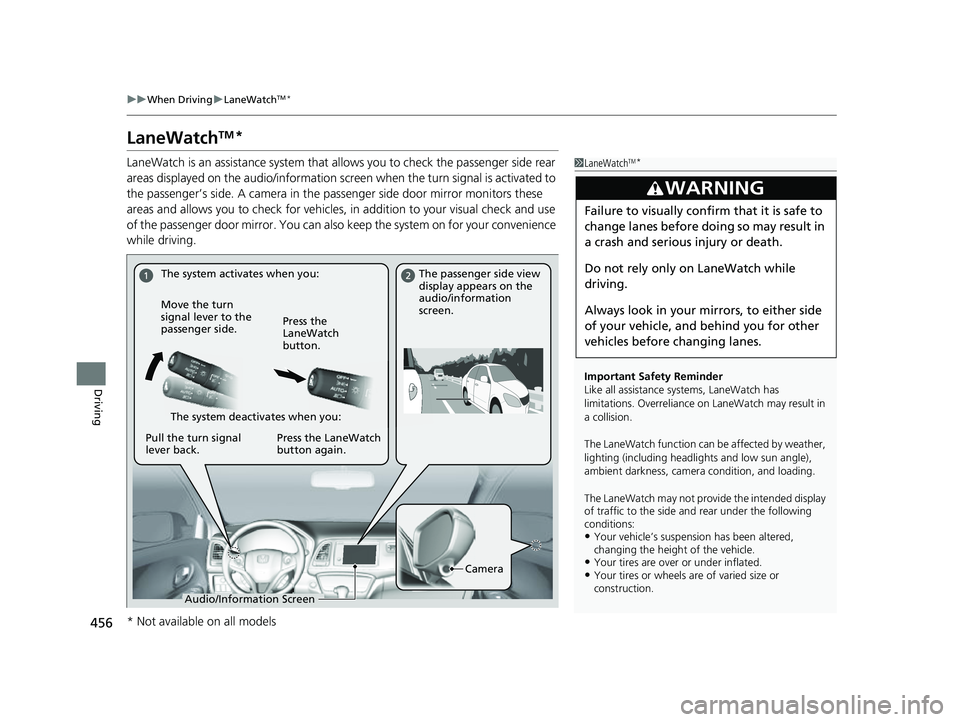
LaneWatch is an assistance system that allows you to check the passenger side rear
areas displayed on the audio/in formation screen when the turn signal is activated to
the passenger’s side. A camera in the passenger side door mirror monitors these
areas and allows you to check for vehicles, in addition to your visual check and use
of the passenger door mirror. You can also keep the system on for your convenience
while driving.1 LaneWatchTM*
Important Safety Reminder
Like all assistance systems, LaneWatch has
limitations. Overreliance on LaneWatch may result in
a collision.
The LaneWatch function can be affected by weather,
lighting (including headli ghts and low sun angle),
ambient darkness, camera condition, and loading.
The LaneWatch may not prov ide the intended display
of traffic to th e side and rear under the following
conditions:
•Your vehicle’s suspension has been altered,
changing the height of the vehicle.
•Your tires are over or under inflated.•Your tires or wheels ar e of varied size or
construction.
3WARNING
Failure to visually confirm that it is safe to
change lanes before doing so may result in
a crash and serious injury or death.
Do not rely only on LaneWatch while
driving.
Always look in your mi rrors, to either side
of your vehicle, and behind you for other
vehicles before changing lanes.
The system activates when you: The passenger side view
display appears on the
audio/information
screen.
Move the turn
signal lever to the
passenger side. Press the
LaneWatch
button.
The system deactivates when you:
Pull the turn signal
lever back. Press the LaneWatch
button again.
Camera
Audio/Information Screen
* Not available on all models
22 HR-V HDMC-31T7A6600.book 456 ページ 2021年4月12日 月曜日 午前10時50分
Page 460 of 641
458
uuWhen Driving uReal Time AWD with Intelligent Control SystemTM*
Driving
Real Time AWD with In telligent Control SystemTM*
Your vehicle is equipped with the AWD syst em. When the system senses a loss of
front wheel traction, it automatically transfe rs some power to the rear wheels. This
allows you to utilize all availabl e traction and may increase mobility.
You still need to exercise the same care when accelerating, steering, and braking
that you would in a two wheel drive vehicle.
If you excessively spin all four wheels an d overheat the AWD system, only the front
wheels receive power. Stop un til the system cools down.1Real Time AWD with In telligent Control SystemTM*
NOTICE
Do not continuously spin the front tires of your
vehicle. Continuously spinning the front tires can
cause transmission or re ar differential damageM
The AWD system may not f unction properly if tire
type and size are mixed. Make sure to use the same
size and type of tire, and the air pressures as
specified.
2 Tire and Wheel Replacement P. 566
* Not available on all models
22 HR-V HDMC-31T7A6600.book 458 ページ 2021年4月12日 月曜日 午前10時50分
Page 461 of 641
459
uuWhen Driving uTire Pressure Monitoring System (TPMS)
Continued
Driving
Tire Pressure Monitoring System (TPMS)
Instead of directly measuring the pressure in each tire, the TPMS on this vehicle
monitors and compares the rolling radius and rotational characteristics of each
wheel and tire while you are driving to determine if one or more tires are
significantly under-inflated.
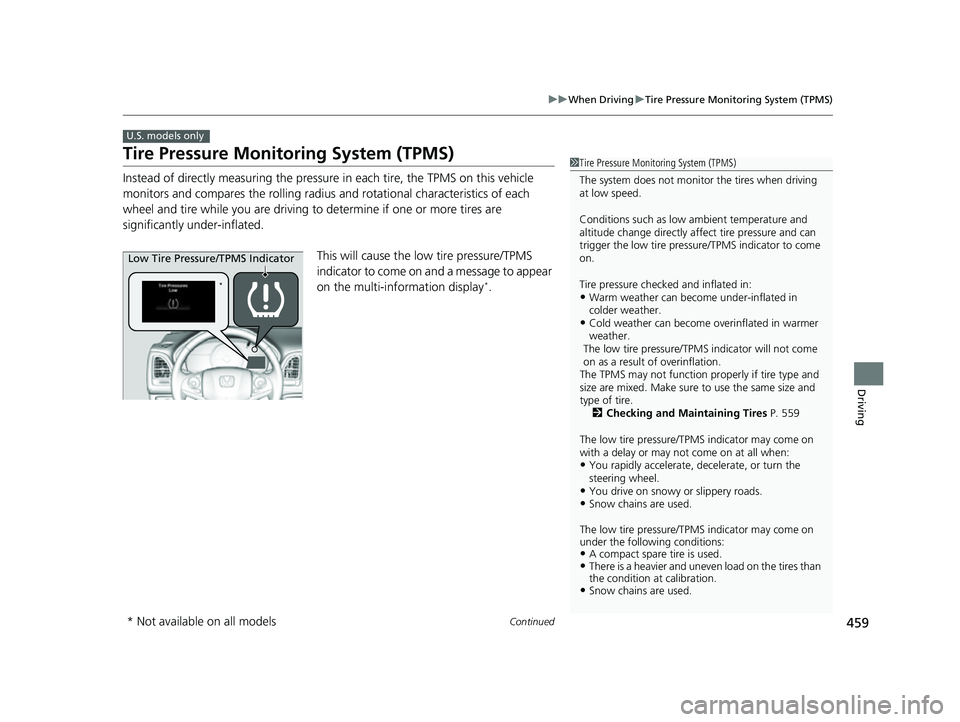
This will cause the low tire pressure/TPMS
indicator to come on and a message to appear
on the multi-information display
*.
U.S. models only
1 Tire Pressure Monitoring System (TPMS)
The system does not monitor the tires when driving
at low speed.
Conditions such as low ambient temperature and
altitude change directly affect tire pressure and can
trigger the low tire pressure/TPMS indicator to come
on.
Tire pressure checked and inflated in:
•Warm weather can beco me under-inflated in
colder weather.
•Cold weather can become overinflated in warmer
weather.
The low tire pressure/TPMS indicator will not come
on as a result of overinflation.
The TPMS may not function pr operly if tire type and
size are mixed. Make sure to use the same size and
type of tire. 2 Checking and Maintaining Tires P. 559
The low tire pressure/TPMS indicator may come on
with a delay or may not come on at all when:
•You rapidly accelerate, decelerate, or turn the
steering wheel.
•You drive on snowy or slippery roads.•Snow chains are used.
The low tire pressure/TPMS indicator may come on
under the following conditions:
•A compact spare tire is used.•There is a heavier and uneve n load on the tires than
the condition at calibration.
•Snow chains are used.
*
Low Tire Pressure/TPMS Indicator
* Not available on all models
22 HR-V HDMC-31T7A6600.book 459 ページ 2021年4月12日 月曜日 午前10時50分
Page 465 of 641
463
uuWhen Driving uTire Pressure Monitoring System (TPMS) - Required Federal Explanation
Driving
Please note that the TPMS is not a substitute for proper tire
maintenance, and it is the driver ’s responsibility to maintain
correct tire pressure, even if un der-inflation has not reached the
level to trigger illumination of th e TPMS low tire pressure telltale.
Your vehicle has also been equi pped with a TPMS malfunction
indicator to indicate when the system is not operating properly.
The TPMS malfunction indicator is combined with the low tire
pressure telltale. When the syst em detects a malfunction, the
telltale will flash fo r approximately one minute and then remain
continuously illumina ted. This sequence will continue upon
subsequent vehicle start-ups as long as the malfunction exists.
When the malfunction indicator is illuminated, the system may
not be able to detect or signal low tire pressure as intended.
TPMS malfunctions may occur for a variety of reasons, including
the installation of replacement or alternate tires or wheels on the
vehicle that prevent the TPMS from functioning properly.
Always check the TPMS malfunction telltale after replacing one or
more tires or wheels on your vehicle to ensure that the
replacement or alternate tires and wheels allow the TPMS to
continue to function properly.
22 HR-V HDMC-31T7A6600.book 463 ページ 2021年4月12日 月曜日 午前10時50分
Page 469 of 641
467
uuHonda Sensing ®*uCollision Mitigation Braking SystemTM (CMBSTM)
Continued
Driving
Collision Mitigation Braking SystemTM (CMBSTM)
The system can assist you when it determines there is a possibility of your vehicle
colliding with a vehicle or a pedestrian dete cted in front of your vehicle. The CMBSTM
is designed to alert you when the potential for a collision is determined, as well \
as to
reduce your vehicle speed to help minimize collision severity when a collision is
deemed unavoidable.
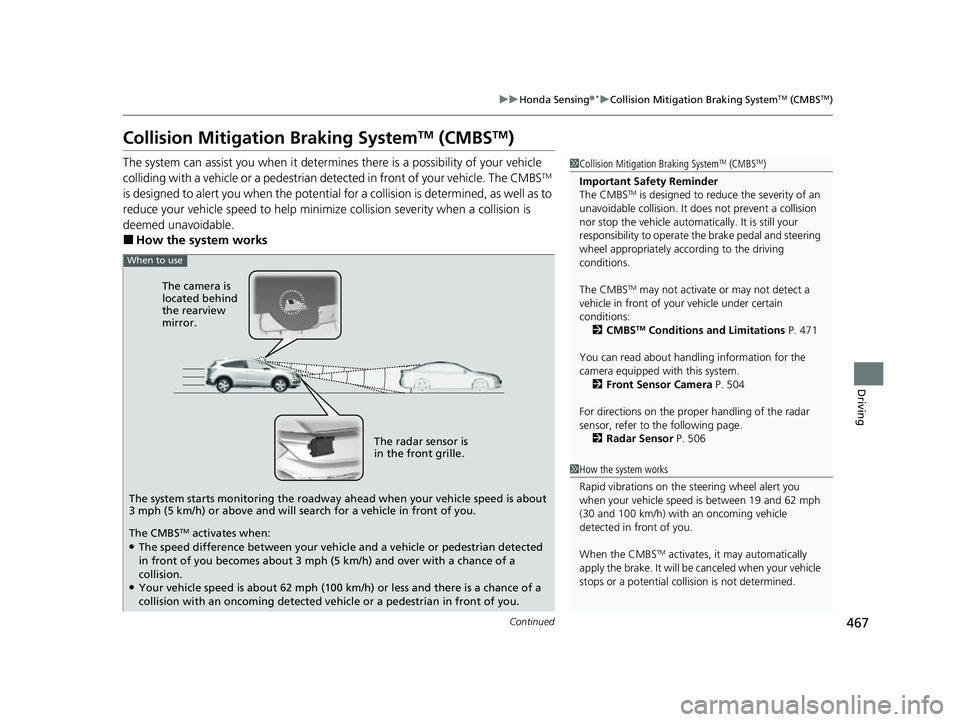
■How the system works
1 Collision Mitigation Braking SystemTM (CMBSTM)
Important Safety Reminder
The CMBS
TM is designed to reduce the severity of an
unavoidable collision. It do es not prevent a collision
nor stop the vehicle automati cally. It is still your
responsibility to operate the brake pedal and steering
wheel appropriately acco rding to the driving
conditions.
The CMBS
TM may not activate or may not detect a
vehicle in front of y our vehicle under certain
conditions:
2 CMBS
TM Conditions and Limitations P. 471
You can read about handling information for the
camera equipped with this system. 2 Front Sensor Camera P. 504
For directions on the prop er handling of the radar
sensor, refer to the following page. 2 Radar Sensor P. 506
1How the system works
Rapid vibrations on the steering wheel alert you
when your vehicle speed is between 19 and 62 mph
(30 and 100 km/h) with an oncoming vehicle
detected in front of you.
When the CMBS
TM activates, it may automatically
apply the brake. It will be canceled when your vehicle
stops or a potential coll ision is not determined.
When to use
The camera is
located behind
the rearview
mirror.
The radar sensor is
in the front grille.
The system starts monitoring the roadway ahead when your vehicle speed is about
3 mph (5 km/h) or above and will search for a vehicle in front of you.
The CMBS
TM activates when:●The speed difference between your vehicl e and a vehicle or pedestrian detected
in front of you becomes about 3 mph (5 km/h) and over with a chance of a
collision.
●Your vehicle speed is about 62 mph (100 km/h) or less and there is a chance of a
collision with an oncoming detected ve hicle or a pedestrian in front of you.
22 HR-V HDMC-31T7A6600.book 467 ページ 2021年4月12日 月曜日 午前10時50分
Page 470 of 641
uuHonda Sensing ®*uCollision Mitigation Braking SystemTM (CMBSTM)
468
Driving
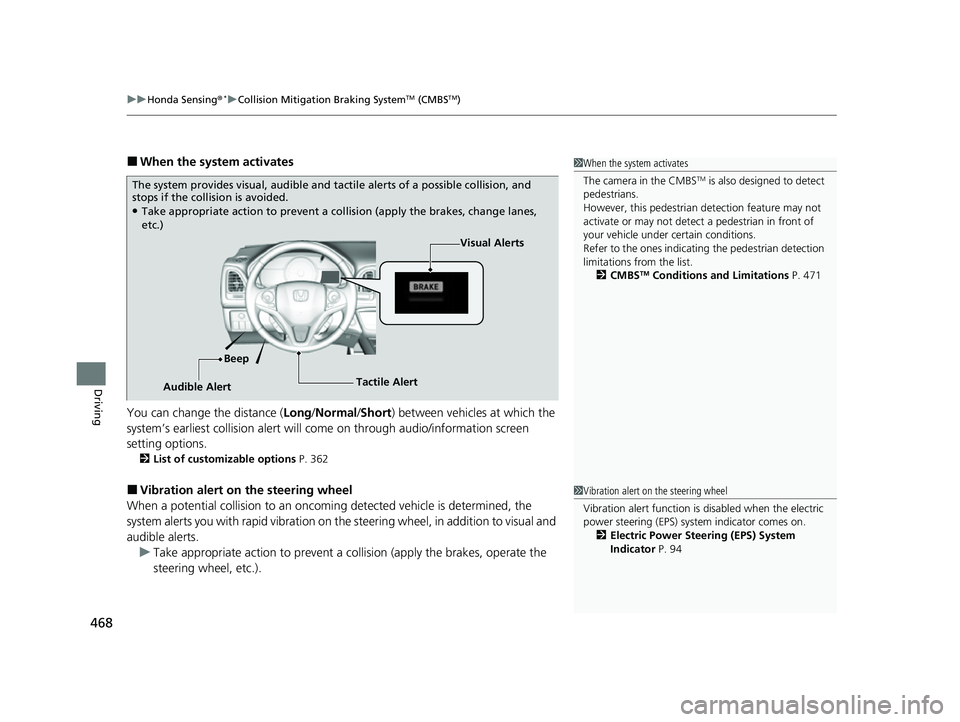
■When the system activates
You can change the distance ( Long/Normal /Short ) between vehicles at which the
system’s earliest collision alert will co me on through audio/information screen
setting options.
2 List of customizable options P. 362
■Vibration alert on the steering wheel
When a potential collision to an oncoming detected vehicle is determined, the
system alerts you with rapid vibration on the steering wheel, in addition to visual and
audible alerts. u Take appropriate action to prevent a co llision (apply the brakes, operate the
steering wheel, etc.).
1 When the system activates
The camera in the CMBS
TM is also designed to detect
pedestrians.
However, this pedestrian detection feature may not
activate or may not detect a pedestrian in front of
your vehicle under certain conditions.
Refer to the ones indicating the pedestrian detection
limitations from the list. 2 CMBS
TM Conditions and Limitations P. 471
The system provides visual, audible and ta ctile alerts of a possible collision, and
stops if the collision is avoided.
●Take appropriate action to prevent a collision (apply the brakes, change lanes,
etc.)
Visual Alerts
Beep
Audible Alert Tactile Alert
1
Vibration alert on the steering wheel
Vibration alert function is disabled when the electric
power steering (EPS) system indicator comes on.
2 Electric Power Steering (EPS) System
Indicator P. 94
22 HR-V HDMC-31T7A6600.book 468 ページ 2021年4月12日 月曜日 午前10時50分
Page 471 of 641
469
uuHonda Sensing ®*uCollision Mitigation Braking SystemTM (CMBSTM)
Continued
Driving
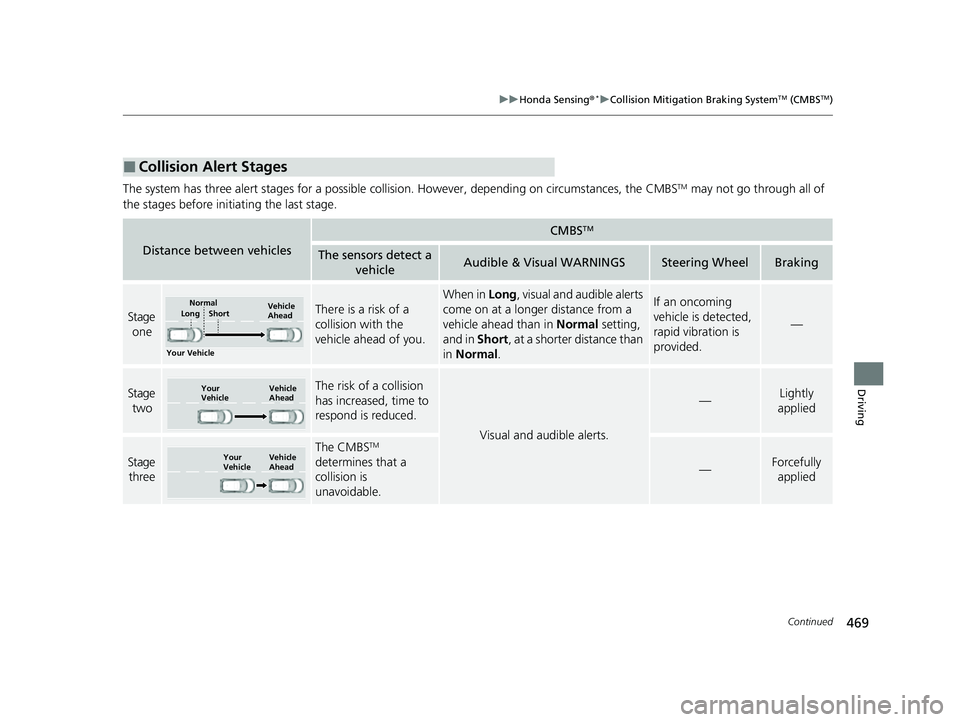
The system has three alert stages for a possible collis ion. However, depending on circumstances, the CMBSTM may not go through all of
the stages before initiating the last stage.
■Collision Alert Stages
Distance between vehicles
CMBSTM
The sensors detect a vehicleAudible & Visual WARNINGSSteering WheelBraking
Stage
oneThere is a risk of a
collision with the
vehicle ahead of you.
When in Long , visual and audible alerts
come on at a longer distance from a
vehicle ahead than in Normal setting,
and in Short, at a shorter distance than
in Normal .If an oncoming
vehicle is detected,
rapid vibration is
provided.
—
Stage
twoThe risk of a collision
has increased, time to
respond is reduced.
Visual and audible alerts.
—Lightly
applied
Stage three
The CMBSTM
determines that a
collision is
unavoidable.
—Forcefully applied
Your Vehicle Vehicle
Ahead
Normal
Short
Long
Your
Vehicle Vehicle
Ahead
Your
VehicleVehicle
Ahead
22 HR-V HDMC-31T7A6600.book 469 ページ 2021年4月12日 月曜日 午前10時50分