display HONDA HRV 2023 Owners Manual
[x] Cancel search | Manufacturer: HONDA, Model Year: 2023, Model line: HRV, Model: HONDA HRV 2023Pages: 664, PDF Size: 20.2 MB
Page 364 of 664
362
uuCustomized Features u
Features
*1:Default Setting
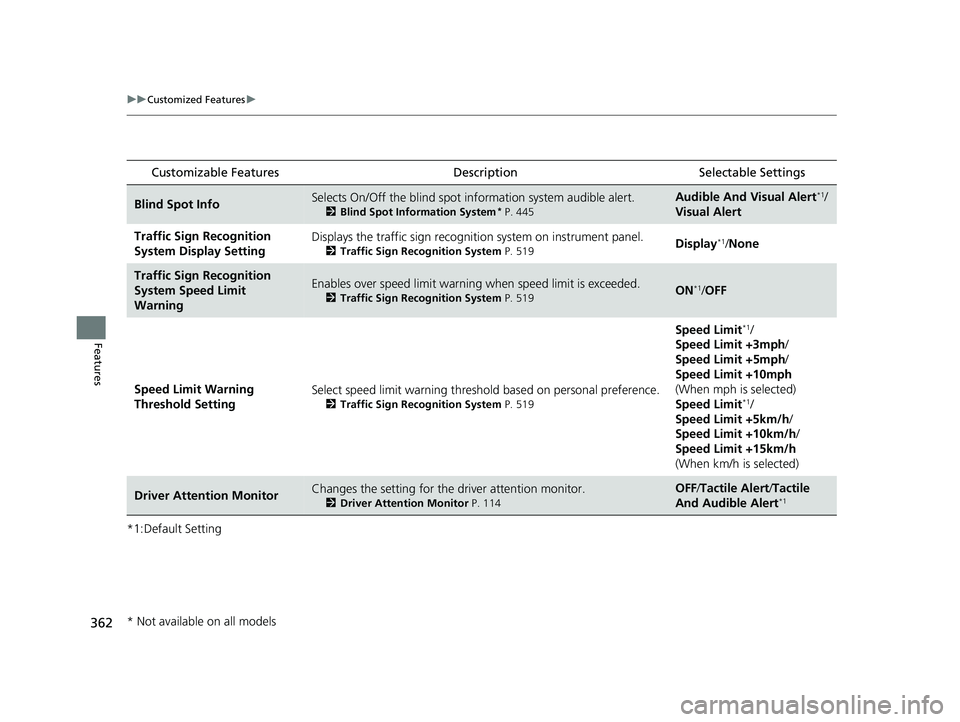
Customizable Features Description Selectable Settings
Blind Spot InfoSelects On/Off the blind spot information system audible alert.
2Blind Spot Information System* P. 445
Audible And Visual Alert*1/
Visual Alert
Traffic Sign Recognition
System Display SettingDisplays the traffic sign recognit ion system on instrument panel.
2Traffic Sign Recognition System P. 519Display*1/None
Traffic Sign Recognition
System Speed Limit
WarningEnables over speed limit warning when speed limi t is exceeded.
2Traffic Sign Recognition System P. 519ON*1/OFF
Speed Limit Warning
Threshold Setting Select speed limit warning threshold based on personal preference.
2
Traffic Sign Recognition System P. 519
Speed Limit*1/
Speed Limit +3mph /
Speed Limit +5mph /
Speed Limit +10mph
(When mph is selected)
Speed Limit
*1/
Speed Limit +5km/h /
Speed Limit +10km/h /
Speed Limit +15km/h
(When km/h is selected)
Driver Attention MonitorChanges the setting for the driver attention monitor.
2Driver Attention Monitor P. 114
OFF/Tactile Alert /Tactile
And Audible Alert*1
* Not available on all models
23 HR-V-313V06000_01.book 362 ページ 2022年4月4日 月曜日 午前10時49分
Page 365 of 664

363
uuCustomized Features u
Continued
Features
■Meter Setup
*1:Default Setting
Customizable Features Description Selectable Settings
Adjust Outside Temp.
DisplaySelects to adjust outside temperature reading by a few degrees.2Outside Temperature P. 105
-5°F ~ ±0°F*1 ~ +5°F (U.S.)
-3°C ~ ±0°C*1 ~ +3°C (Canada)
"Trip A" Reset Timing Selects the timing
to reset Trip A.
2Range/Fuel/Trip Meter P. 109
2 Speed/Time/Trip Meter P. 111When Fully Refueled/IGN OFF /
Manually Reset*1
"Trip B" Reset TimingSelects the timing to reset Trip B.
2 Range/Fuel/Trip Meter P. 109
2 Speed/Time/Trip Meter P. 111When Fully Refueled/IGN OFF /
Manually Reset*1
Adjust Alarm Volume Changes volume level of all system warnings, door opening
warning and indicator. High
/Mid*1/Low
Fuel Efficien cy BacklightTurns the ambient meter feature on and off.ON*1/OFF
Turn By Turn Auto Display Turns on/off the pop-up warning in
the turn-by-turn navigation
in the driver information interface.
2 Turn-by-Turn Directions P. 113ON*1/OFF
Speed/Distance UnitsSelects the trip computer units.
2 Speed/Distance Units P. 122
km/h · km/mph · miles*1 (U.S.)
km/h · km*1/ mph · miles (Canada)
Tachometer Selects whether the tachometer
come on the driver information
interface. ON
*1/
OFF
Rear Seat ReminderTurns the Rear Seat Reminder feature on and off.ON*1/OFF
23 HR-V-313V06000_01.book 363 ページ 2022年4月4日 月曜日 午前10時49分
Page 372 of 664

uuBluetooth ® HandsFreeLink ®u Using HFL
370
Features
Left Selector Wheel: While receiving a call, the incoming call screen is displayed on
the driver information interface. You can pi ck up the call using the left selector
wheel.
2 Receiving a Call P. 387
PHONE button: Press to go directly to the Phone screen.
Selector knob: Rotate to select an item on the screen, then press .
1 Bluetooth ® HandsFreeLink ®
Bluetooth ® Wireless Technology
The Bluetooth ® word mark and logos are registered
trademarks owned by Bluetooth SIG, Inc., and any
use of such marks by Honda Motor Co., Ltd., is under
license. Other trademarks and trade names are those
of their respective owners.
HFL Limitations
An incoming call on HFL will interrupt the audio
system when it is playing. It will resume when the call
is ended.
23 HR-V-313V06000_01.book 370 ページ 2022年4月4日 月曜日 午前10時49分
Page 373 of 664

371
uuBluetooth ® HandsFreeLink ®u Using HFL
Features
The audio/information scr een notifies you when there is an incoming call.
Certain manual functions are disabled or inoperable while the vehicle is in motion.
You cannot select a grayed-out option until the vehicle is stopped.
■HFL Status Display1 HFL Status Display
The information that appears on the audio/
information screen vari es between phone models.
■Limitations for Manual Operation
HFL Mode Battery Level Status
Signal Strength
Bluetooth
Indicator
Appears when your phone
is connected to HFL. Roam Status
Call Name
Call Number
23 HR-V-313V06000_01.book 371 ページ 2022年4月4日 月曜日 午前10時49分
Page 374 of 664

372
uuBluetooth ® HandsFreeLink ®u HFL Menus
Features
HFL Menus
The power mode must be in ACCESSORY or ON to use the system.1HFL Menus
To use HFL, you must first pair your Bluetooth-
compatible cell phone to th e system while the vehicle
is parked.
Some functions are limited while driving. A message
appears on the screen when the vehicle is moving
and the operation is canceled.
PHONE button
Recent Calls
*1All
Pair a phone to the system.Connect New Device
Change DeviceConnects a paired phone.
Priority Device
Sets a device as the priority device.
Bluetooth Settings
Keypad*1
Settings
Favorite
Contacts*1(Existing entry list)
Contacts*1
Dialed
Missed
Received
Display the last outgoing, incoming and missed calls.
Display the last outgoing calls.
Display the last missed calls.
Display the last incoming calls.
Dial the selected number in the favorite contacts list.
Display the phonebook of the paired phone.
Enter a phone number to dial.
Disconnect All DeviceDisconnect a paired phone from the system.
Delete Device
Delete a previously paired phone.*1 : Available only when a phone is connected to HFL.
23 HR-V-313V06000_01.book 372 ページ 2022年4月4日 月曜日 午前10時49分
Page 376 of 664
uuBluetooth ® HandsFreeLink ®u HFL Menus
374
Features
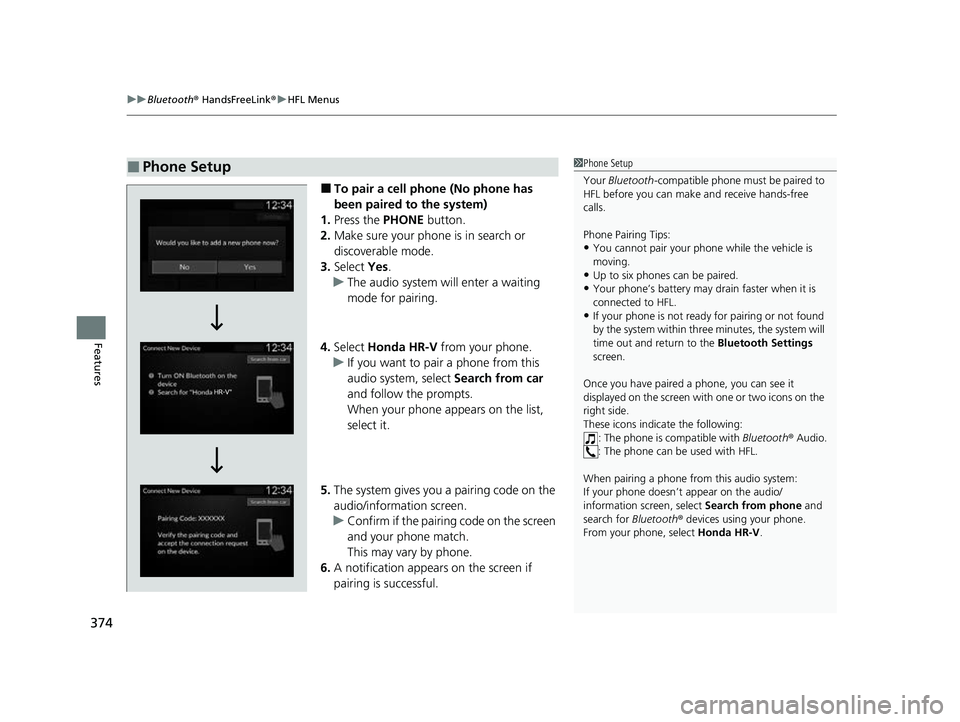
■To pair a cell phone (No phone has
been paired to the system)
1. Press the PHONE button.
2. Make sure your phone is in search or
discoverable mode.
3. Select Yes.
u The audio system will enter a waiting
mode for pairing.
4. Select Honda HR-V from your phone.
u If you want to pair a phone from this
audio system, select Search from car
and follow the prompts.
When your phone appears on the list,
select it.
5. The system gives you a pairing code on the
audio/information screen.
u Confirm if the pairing code on the screen
and your phone match.
This may vary by phone.
6. A notification appears on the screen if
pairing is successful.
■Phone Setup1 Phone Setup
Your Bluetooth -compatible phone must be paired to
HFL before you can make and receive hands-free
calls.
Phone Pairing Tips:
•You cannot pair your phone while the vehicle is
moving.
•Up to six phones can be paired.
•Your phone’s battery may dr ain faster when it is
connected to HFL.
•If your phone is not ready for pairing or not found
by the system within three minutes, the system will
time out and return to the Bluetooth Settings
screen.
Once you have paired a phone, you can see it
displayed on the screen with one or two icons on the
right side.
These icons indicate the following: : The phone is compatible with Bluetooth® Audio.
: The phone can be used with HFL.
When pairing a phone from this audio system:
If your phone doesn’t appear on the audio/
information screen, select Search from phone and
search for Bluetooth® devices using your phone.
From your phone, select Honda HR-V .
23 HR-V-313V06000_01.book 374 ページ 2022年4月4日 月曜日 午前10時49分
Page 392 of 664
uuBluetooth ® HandsFreeLink ®u Using HFL
390
Features
(Talk) button: Press to access Voice Portal.
(Home) button: Press to go back to the home sc reen of the driver information
interface.
Left Selector Wheel: Press the (Home) button. Roll up or down to select
Phone on the driver information interface, and then press the left selector wheel.
While receiving a call, the incoming call scr een is displayed on the driver information
interface. You can pick up the call using the left selector wheel.
2 Receiving a Call P. 404
To go to the phone screen:
1.Press the button.
2. Select Phone to switch the display to the phone screen.
1Bluetooth ® HandsFreeLink ®
Bluetooth ® Wireless Technology
The Bluetooth ® word mark and logos are registered
trademarks owned by Bluetooth SIG, Inc., and any
use of such marks by Honda Motor Co., Ltd., is under
license. Other trademarks and trade names are those
of their respective owners.
HFL Limitations
An incoming call on HFL will interrupt the audio
system when it is playing. It will resume when the call
is ended.
23 HR-V-313V06000_01.book 390 ページ 2022年4月4日 月曜日 午前10時49分
Page 393 of 664
391
uuBluetooth ® HandsFreeLink ®u Using HFL
Features
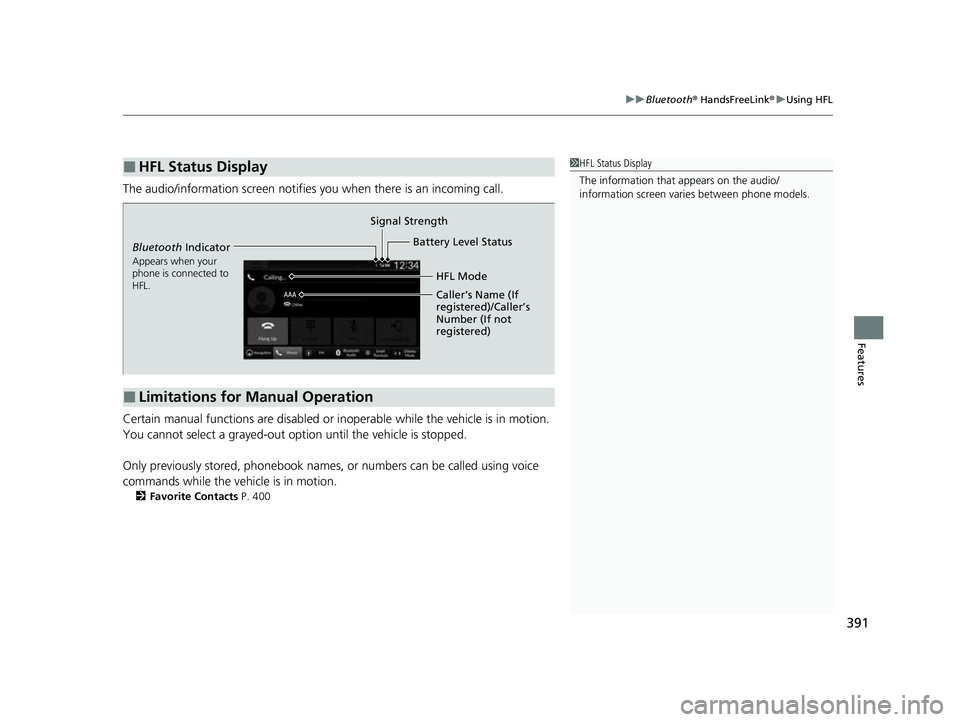
The audio/information scr een notifies you when there is an incoming call.
Certain manual functions are disabled or inoperable while the vehicle is in motion.
You cannot select a grayed-out option until the vehicle is stopped.
Only previously stored, phonebook names, or numbers can be called using voice
commands while the vehicle is in motion.
2 Favorite Contacts P. 400
■HFL Status Display1HFL Status Display
The information that appears on the audio/
information screen vari es between phone models.
■Limitations for Manual Operation
Bluetooth Indicator
Appears when your
phone is connected to
HFL.
Signal Strength
HFL Mode
Battery Level Status
Caller’s Name (If
registered)/Caller’s
Number (If not
registered)
23 HR-V-313V06000_01.book 391 ページ 2022年4月4日 月曜日 午前10時49分
Page 395 of 664
393
uuBluetooth ® HandsFreeLink ®u HFL Menus
Continued
Features
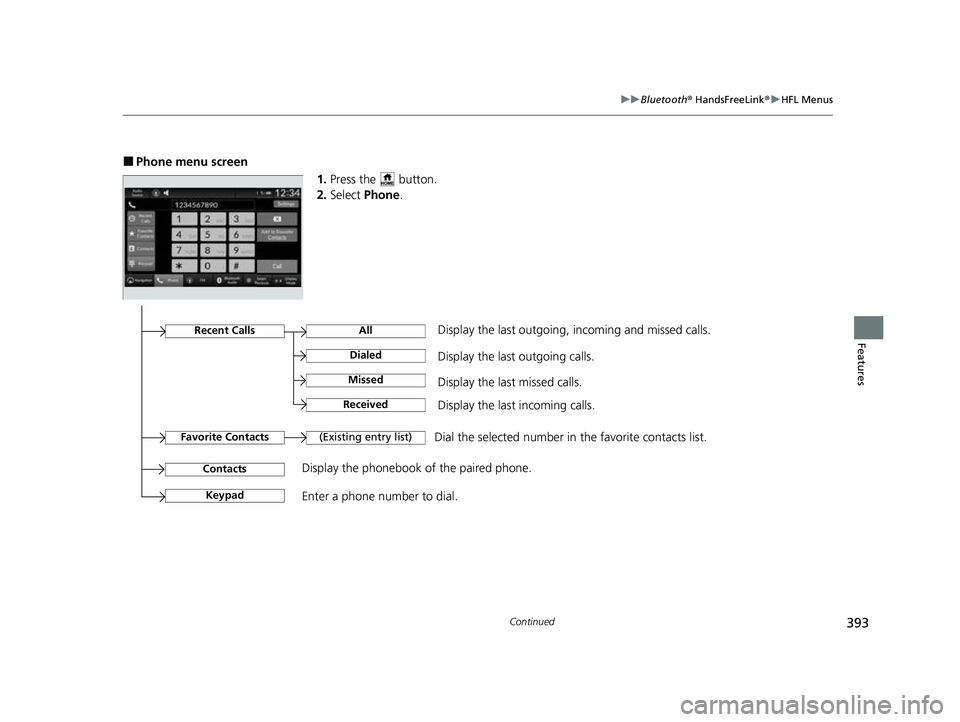
■Phone menu screen
1.Press the button.
2. Select Phone .
Dial the selected number in the favorite contacts list.
All
(Existing entry list)
Display the last outgoing calls.
Recent CallsDisplay the last outgoing, incoming and missed calls.
Favorite Contacts
Contacts
Keypad
Display the phonebook of the paired phone.
Enter a phone number to dial.
Dialed
Display the last missed calls.Missed
Display the last incoming calls.Received
23 HR-V-313V06000_01.book 393 ページ 2022年4月4日 月曜日 午前10時49分
Page 396 of 664
uuBluetooth ® HandsFreeLink ®u HFL Menus
394
Features
■Bluetooth ® setup
You can turn Bluetooth® function on and off.
1. Press the button.
2. Select General Settings .
3. Select Connections .
4. Select Bluetooth .
5. Select Options.
6. Select Bluetooth , then select ON.
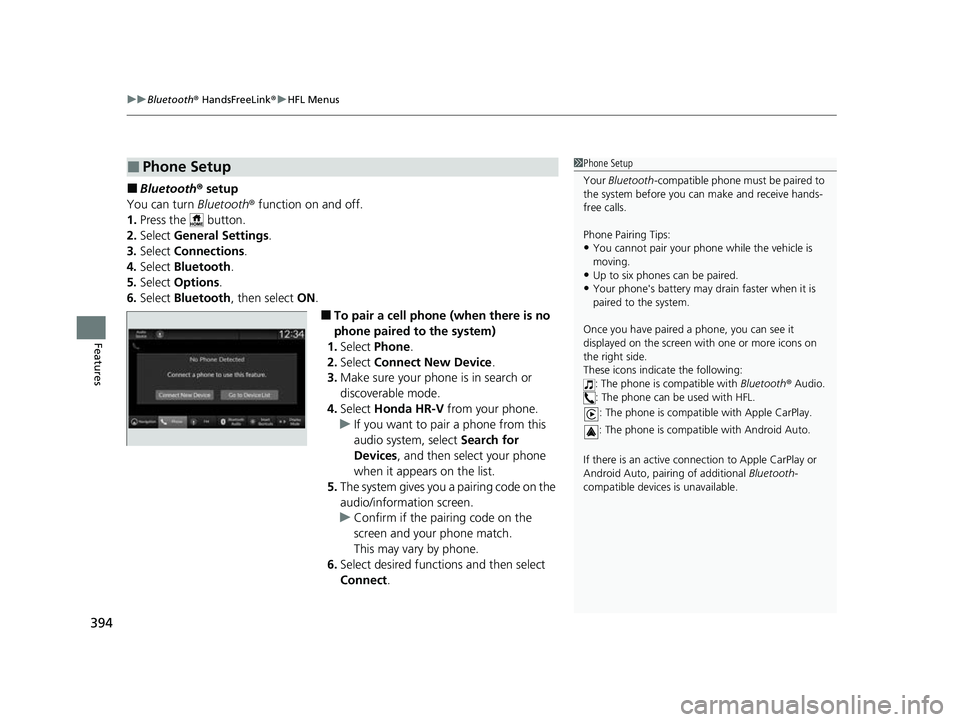
■To pair a cell phone (when there is no
phone paired to the system)
1. Select Phone .
2. Select Connect New Device .
3. Make sure your phone is in search or
discoverable mode.
4. Select Honda HR-V from your phone.
u If you want to pair a phone from this
audio system, select Search for
Devices , and then select your phone
when it appears on the list.
5. The system gives you a pairing code on the
audio/information screen.
u Confirm if the pairing code on the
screen and your phone match.
This may vary by phone.
6. Select desired functions and then select
Connect .
■Phone Setup1Phone Setup
Your Bluetooth -compatible phone must be paired to
the system before you ca n make and receive hands-
free calls.
Phone Pairing Tips:
•You cannot pair your phone while the vehicle is
moving.
•Up to six phones can be paired.
•Your phone's battery may dr ain faster when it is
paired to the system.
Once you have paired a phone, you can see it
displayed on the screen with one or more icons on
the right side.
These icons indicate the following: : The phone is compatible with Bluetooth® Audio.
: The phone can be used with HFL.
: The phone is compatib le with Apple CarPlay.
: The phone is compatible with Android Auto.
If there is an active connection to Appl e CarPlay or
Android Auto, pairing of additional Bluetooth-
compatible devices is unavailable.
23 HR-V-313V06000_01.book 394 ページ 2022年4月4日 月曜日 午前10時49分