audio HONDA HRV 2023 Owners Manual
[x] Cancel search | Manufacturer: HONDA, Model Year: 2023, Model line: HRV, Model: HONDA HRV 2023Pages: 664, PDF Size: 20.2 MB
Page 407 of 664
405
uuBluetooth ® HandsFreeLink ®u HFL Menus
Features
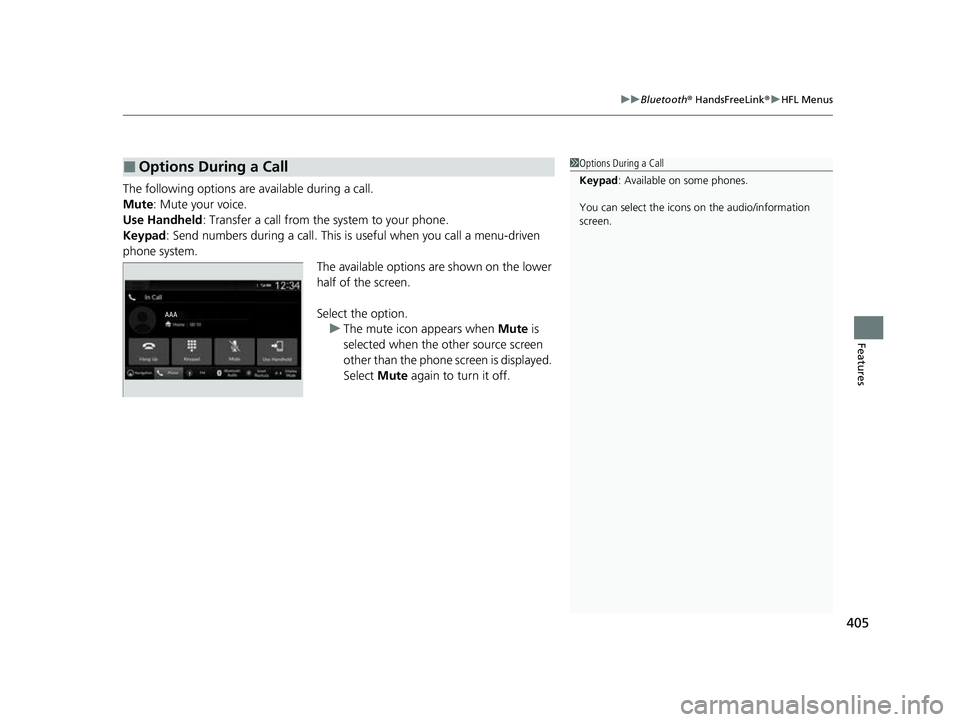
The following options ar e available during a call.
Mute: Mute your voice.
Use Handheld : Transfer a call from the system to your phone.
Keypad : Send numbers during a call. This is useful when you call a menu-driven
phone system. The available options are shown on the lower
half of the screen.
Select the option.u The mute icon appears when Mute is
selected when the other source screen
other than the phone screen is displayed.
Select Mute again to turn it off.
■Options During a Call1Options During a Call
Keypad : Available on some phones.
You can select the icons on the audio/information
screen.
23 HR-V-313V06000_01.book 405 ページ 2022年4月4日 月曜日 午前10時49分
Page 423 of 664
Continued421
uuWhen Driving uStarting the Engine
Driving
When started remotely, the engine automati cally shuts off after 10 minutes of idling
and/or the brake pedal and ENGINE START/STOP button have not been pressed
simultaneously.
To extend the run time for another 10 mi nutes during the first run, press the
button, then press an d hold the button.
u Some exterior lights flash six times if a 10-minute extension request was
transmitted successfully.1 Remote Engine Start*
The engine may not start by the remote engine start
if:
•You have disabled a remo te engine start setting
using the driver information interface* or audio/
information screen*.
2 Settings* P. 123
2 Customized Features P. 345
•The power mode is not in VEHICLE OFF.
•The transmission is in a position other than (P.•The hood is open, or any door or the tailgate is
unlocked.
•You have already used the remote twice to start
the engine.
•Another registered keyless remote is in the vehicle.
•There is any antenna failure.•The door is unlocked with the built-in key.
•The engine oil pressure is low.
•The engine coolant temper ature is extremely high.
•The security system alarm is not set.
* Not available on all models
23 HR-V-313V06000_01.book 421 ページ 2022年4月4日 月曜日 午前10時49分
Page 476 of 664
uuHonda Sensing ®u Adaptive Cruise Control (ACC) with Low Speed Follow
474
Driving
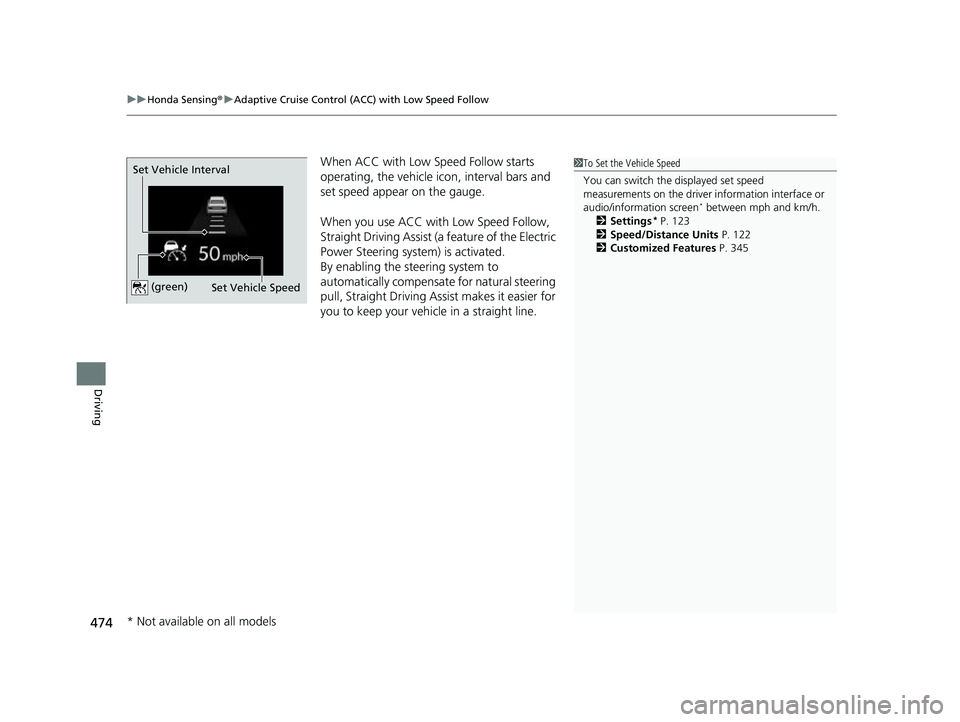
When ACC with Low Speed Follow starts
operating, the vehicle ic on, interval bars and
set speed appear on the gauge.
When you use ACC with Low Speed Follow,
Straight Driving Assist (a feature of the Electric
Power Steering system) is activated.
By enabling the steering system to
automatically compensate for natural steering
pull, Straight Driving Assist makes it easier for
you to keep your vehicl e in a straight line.1To Set the Vehicle Speed
You can switch the displayed set speed
measurements on the driver information interface or
audio/information screen
* between mph and km/h.
2 Settings* P. 123
2 Speed/Distance Units P. 122
2 Customized Features P. 345
Set Vehicle Speed
Set Vehicle Interval (green)
* Not available on all models
23 HR-V-313V06000_01.book 474 ページ 2022年4月4日 月曜日 午前10時49分
Page 490 of 664
uuHonda Sensing ®u Adaptive Cruise Control (ACC) with Low Speed Follow
488
Driving
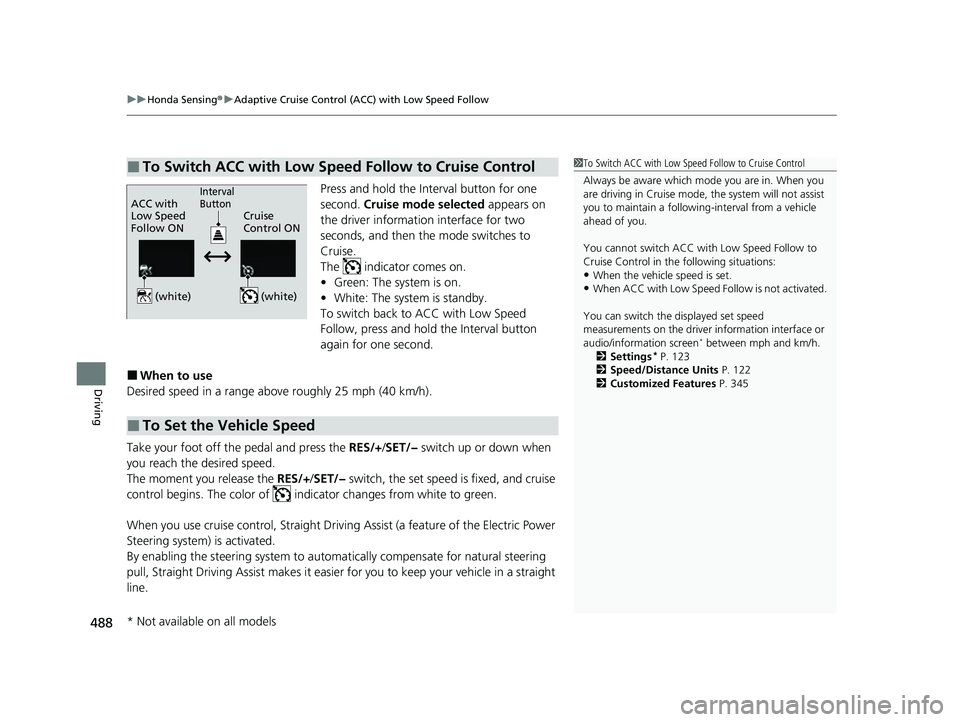
Press and hold the Interval button for one
second. Cruise mode selected appears on
the driver information interface for two
seconds, and then the mode switches to
Cruise.
The indicator comes on.
• Green: The system is on.
• White: The system is standby.
To switch back to ACC with Low Speed
Follow, press and hold the Interval button
again for one second.
■When to use
Desired speed in a range above roughly 25 mph (40 km/h).
Take your foot off the pedal and press the RES/+ /SET/− switch up or down when
you reach the desired speed.
The moment you release the RES/+/SET/− switch, the set speed is fixed, and cruise
control begins. The color of indicator changes from white to green.
When you use cruise control, Straight Driving Assist (a feature of the Electric Power
Steering system) is activated.
By enabling the steering system to automa tically compensate for natural steering
pull, Straight Driving Assist makes it easier for you to keep your vehicle in a straight
line.
■To Switch ACC with Low Speed Follow to Cruise Control1 To Switch ACC with Low Speed Follow to Cruise Control
Always be aware which mode you are in. When you
are driving in Cruise mode, the system will not assist
you to maintain a following-interval from a vehicle
ahead of you.
You cannot switch ACC with Low Speed Follow to
Cruise Control in the following situations:
•When the vehicle speed is set.
•When ACC with Low Speed Follow is not activated.
You can switch the displayed set speed
measurements on the driver information interface or
audio/information screen
* between mph and km/h.
2 Settings* P. 123
2 Speed/Distance Units P. 122
2 Customized Features P. 345
ACC with
Low Speed
Follow ON Cruise
Control ONInterval
Button
(white) (white)
■To Set the Vehicle Speed
* Not available on all models
23 HR-V-313V06000_01.book 488 ページ 2022年4月4日 月曜日 午前10時49分
Page 516 of 664
uuHonda Sensing ®u Road Departure Mitigation System
514
Driving
You can turn the system on and off us ing the driver information interface.
2Switching the Display P. 107
2 Safety Support P. 118
The Road Departure Mitigation system is in the previously selected on (checked) or
off (unchecked) setting each time you start the engine.
■Road Departure Mitigation system On and Off1Road Departure Mitigation system On and Off
When you have selected Warning only from the
customized options using the driver information
interface
* or audio/information screen*, the system
does not operate the steering wheel. 2 Settings
* P. 123
2 Customized Features P. 345
The Vehicle Stability Assist
TM (VSA ®) system, Vehicle
Stability AssistTM (VSA ®) OFF , Adaptive Cruise Control
(ACC) with Low Speed Follow, low tire pressure/
TPMS
*, parking brake and bra ke system and safety
support indicators may come on in amber along with
a message in the gauge when you set the power
mode to ON after re connecting the battery.
Drive a short distance at more than 12 mph (20 km/h).
Each indicator should go off. If any do not, have your
vehicle checked by a dealer.
* Not available on all models
23 HR-V-313V06000_01.book 514 ページ 2022年4月4日 月曜日 午前10時49分
Page 540 of 664
538
uuParking Your Vehicle uParking Sensor System*
Driving
Parking Sensor System*
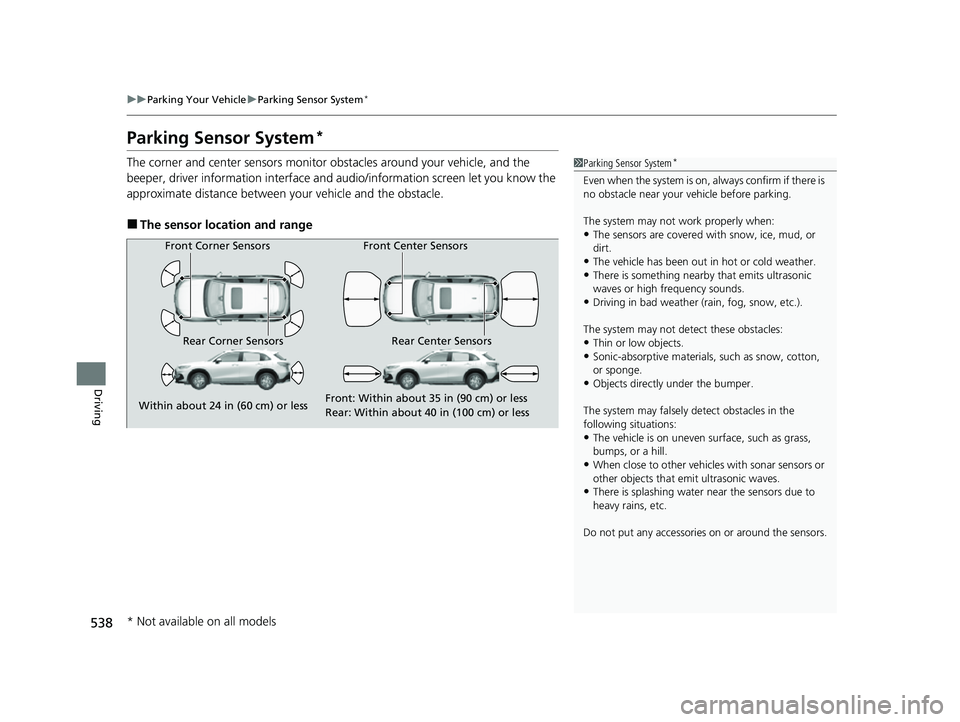
The corner and center sensors monitor obstacles around your vehicle, and the
beeper, driver information interface and audio/informatio n screen let you know the
approximate distance between your vehicle and the obstacle.
■The sensor location and range
1 Parking Sensor System*
Even when the system is on, always confirm if there is
no obstacle near your ve hicle before parking.
The system may not work properly when:
•The sensors are covered with snow, ice, mud, or
dirt.
•The vehicle has been out in hot or cold weather.•There is something nearby that emits ultrasonic
waves or high frequency sounds.
•Driving in bad weather (rain, fog, snow, etc.).
The system may not de tect these obstacles:
•Thin or low objects.•Sonic-absorptive materials, such as snow, cotton,
or sponge.
•Objects directly under the bumper.
The system may falsely de tect obstacles in the
following situations:
•The vehicle is on uneven su rface, such as grass,
bumps, or a hill.
•When close to other vehicl es with sonar sensors or
other objects that em it ultrasonic waves.
•There is splashing water near the sensors due to
heavy rains, etc.
Do not put any accessories on or around the sensors.
Front Corner Sensors
Rear Corner Sensors Rear Center Sensors Front Center Sensors
Within about 24 in (60 cm) or less Front: Within about 35 in (90 cm) or less
Rear: Within abo
u
t 40 in (100 cm) or less
* Not available on all models
23 HR-V-313V06000_01.book 538 ページ 2022年4月4日 月曜日 午前10時49分
Page 543 of 664
541
uuParking Your Vehicle uParking Sensor System*
Driving
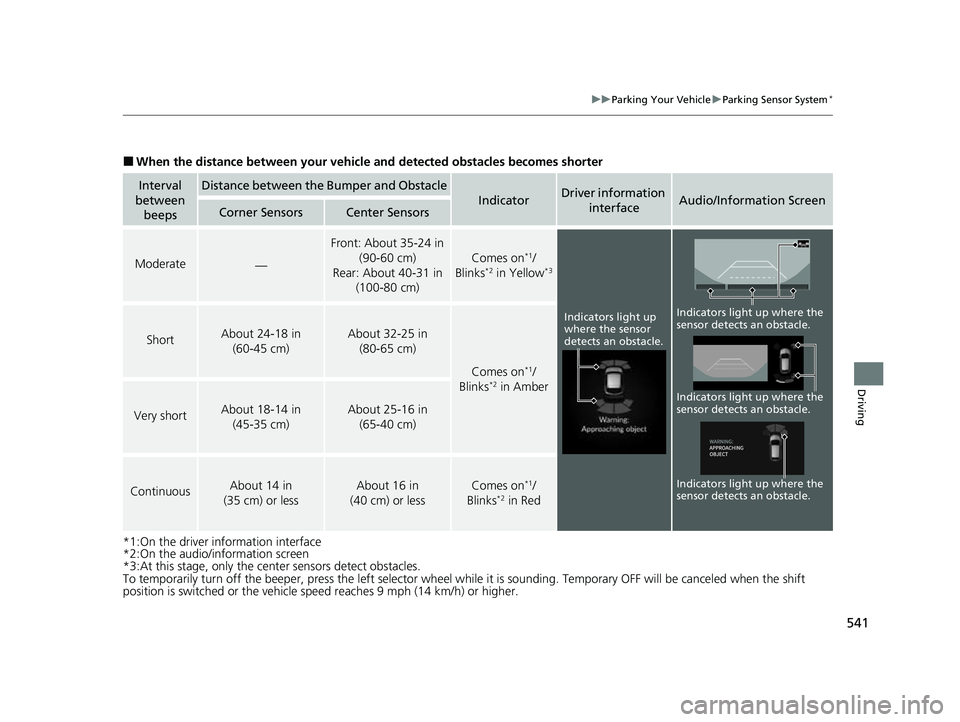
■When the distance between your vehicle and detected obstacles becomes shorter
*1:On the driver information interface
*2:On the audio/information screen
*3:At this stage, only the center sensors detect obstacles.
To temporarily turn off the beeper, press the left selector wheel while it is sounding. Temporary OFF will be canceled when the shift
position is switched or the vehicle sp eed reaches 9 mph (14 km/h) or higher.
Interval
between beepsDistance between the Bumper and Obstacle
IndicatorDriver information
interfaceAudio/Information ScreenCorner SensorsCenter Sensors
Moderate—
Front: About 35-24 in (90-60 cm)
Rear: About 40-31 in (100-80 cm)
Comes on*1/
Blinks*2 in Yellow*3
ShortAbout 24-18 in (60-45 cm) About 32-25 in (80-65 cm)
Comes on*1/
Blinks*2 in Amber
Very shortAbout 18-14 in (45-35 cm) About 25-16 in (65-40 cm)
ContinuousAbout 14 in
(35 cm) or lessAbout 16 in
(40 cm) or lessComes on*1/
Blinks*2 in Red
Indicators light up
where the sensor
detects an obstacle.
Indicators light up where the
sensor detects an obstacle.
Indicators light up where the
sensor detects an obstacle. Indicators light up where the
sensor detects an obstacle.
23 HR-V-313V06000_01.book 541 ページ 2022年4月4日 月曜日 午前10時49分
Page 546 of 664
uuParking Your Vehicle uCross Traffic Monitor*
544
Driving
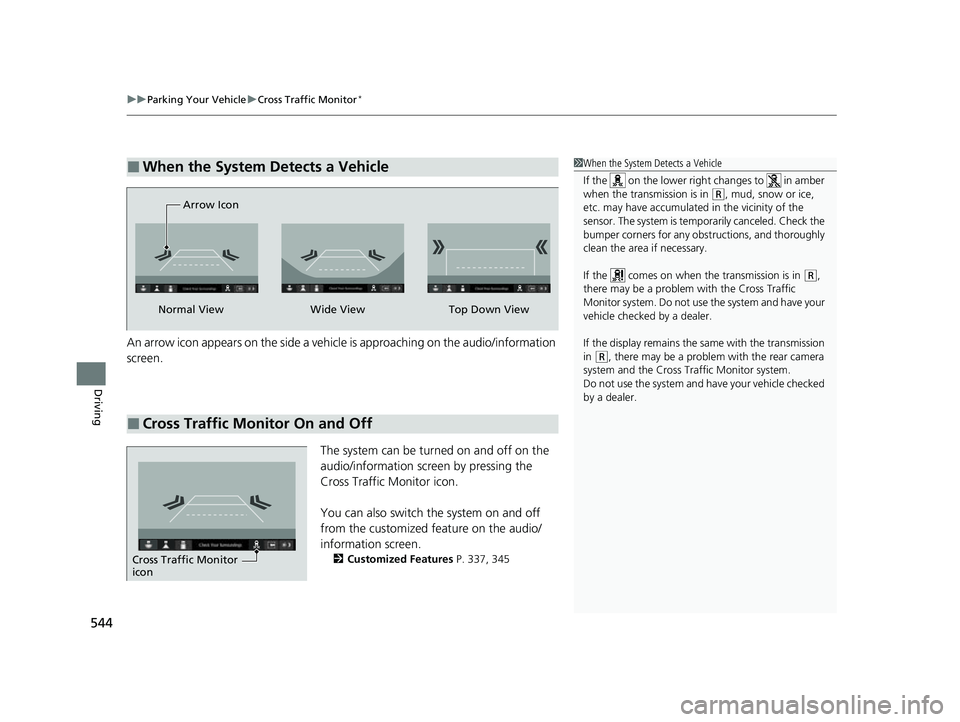
An arrow icon appears on the side a vehicl e is approaching on the audio/information
screen.
The system can be turned on and off on the
audio/information screen by pressing the
Cross Traffic Monitor icon.
You can also switch the system on and off
from the customized feature on the audio/
information screen.
2Customized Features P. 337, 345
■When the System Detects a Vehicle1When the System Detects a Vehicle
If the on the lower right changes to in amber
when the transmission is in
(R, mud, snow or ice,
etc. may have accumulated in the vicinity of the
sensor. The system is temporarily canceled. Check the
bumper corners for any obs tructions, and thoroughly
clean the area if necessary.
If the comes on when the transmission is in
( R,
there may be a problem with the Cross Traffic
Monitor system. Do not use the system and have your
vehicle checked by a dealer.
If the display remains the same with the transmission
in
( R, there may be a problem with the rear camera
system and the Cross Traffic Monitor system.
Do not use the system and have your vehicle checked
by a dealer.
■Cross Traffic Monitor On and Off
Wide View
Normal View Arrow IconTop Down View
Cross Traffic Monitor
icon
23 HR-V-313V06000_01.book 544 ページ 2022年4月4日 月曜日 午前10時49分
Page 547 of 664
545Continued
Driving
Multi-View Rear Camera
About Your Multi-View Rear Camera
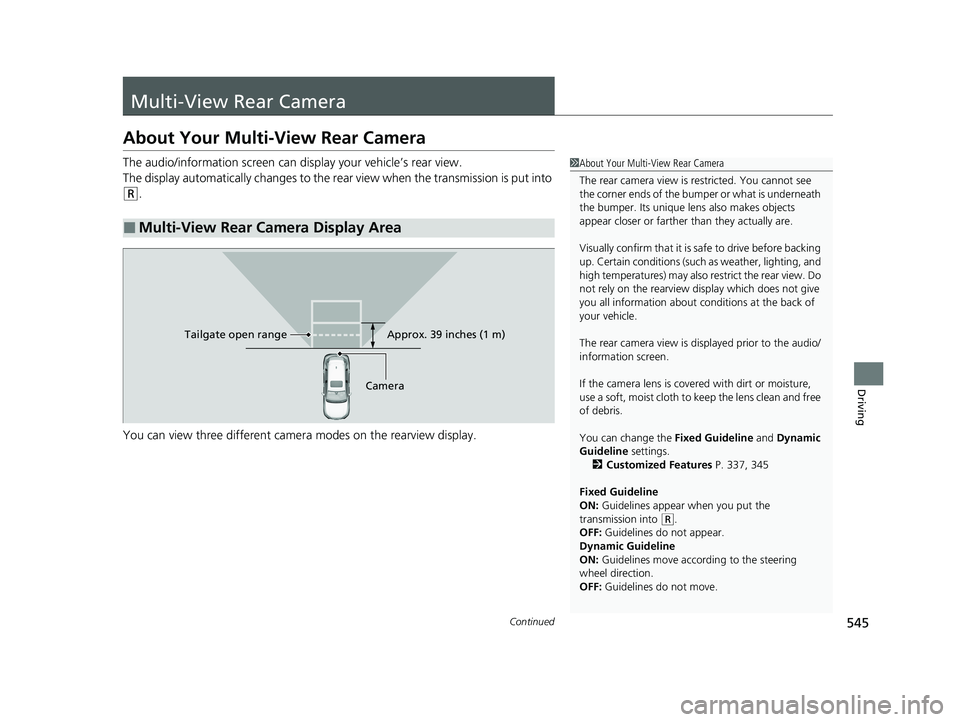
The audio/information screen can display your vehicle’s rear view.
The display automatically changes to the rear view when the transmission is put into
(R.
You can view three different camera modes on the rearview display.
■Multi-View Rear Camera Display Area
1 About Your Multi-View Rear Camera
The rear camera view is restricted. You cannot see
the corner ends of the bumper or what is underneath
the bumper. Its unique le ns also makes objects
appear closer or farther than they actually are.
Visually confirm that it is safe to drive before backing
up. Certain conditions (such as weather, lighting, and
high temperatures) may also restrict the rear view. Do
not rely on the rearview display which does not give
you all information about conditions at the back of
your vehicle.
The rear camera view is di splayed prior to the audio/
information screen.
If the camera lens is cove red with dirt or moisture,
use a soft, moist cloth to keep the lens clean and free
of debris.
You can change the Fixed Guideline and Dynamic
Guideline settings.
2 Customized Features P. 337, 345
Fixed Guideline
ON: Guidelines appear when you put the
transmission into
( R.
OFF: Guidelines do not appear.
Dynamic Guideline
ON: Guidelines move according to the steering
wheel direction.
OFF: Guidelines do not move.
Approx. 39 inches (1 m)
Camera
Tailgate open range
23 HR-V-313V06000_01.book 545 ページ 2022年4月4日 月曜日 午前10時49分
Page 564 of 664
uuMaintenance MinderTMuTo Use Maintenance MinderTM
562
Maintenance
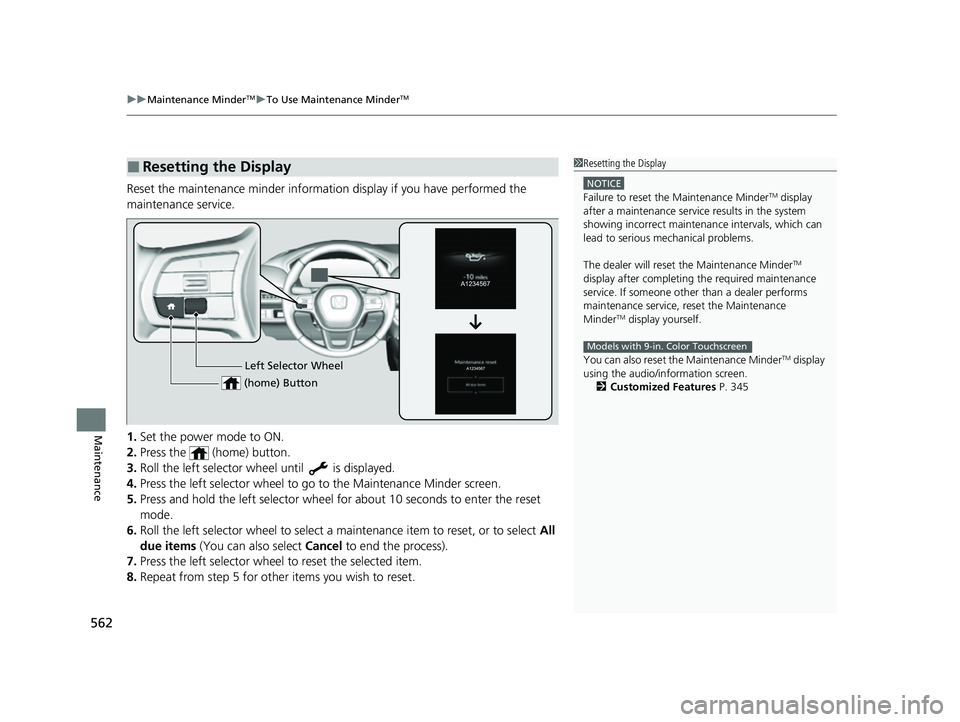
Reset the maintenance minder informat ion display if you have performed the
maintenance service.
1. Set the power mode to ON.
2. Press the (home) button.
3. Roll the left selector wheel until is displayed.
4. Press the left selector wheel to go to the Maintenance Minder screen.
5. Press and hold the left selector wheel fo r about 10 seconds to enter the reset
mode.
6. Roll the left selector wheel to select a ma intenance item to reset, or to select All
due items (You can also select Cancel to end the process).
7. Press the left selector wheel to reset the selected item.
8. Repeat from step 5 for other items you wish to reset.
■Resetting the Display1Resetting the Display
NOTICE
Failure to reset the Maintenance MinderTM display
after a maintenance servic e results in the system
showing incorrect maintenance intervals, which can
lead to serious mechanical problems.
The dealer will reset the Maintenance Minder
TM
display after completing th e required maintenance
service. If someone other than a dealer performs
maintenance service, reset the Maintenance
Minder
TM display yourself.
You can also reset the Maintenance Minder
TM display
using the audio/information screen.
2 Customized Features P. 345
Models with 9-in. Color Touchscreen
Left Selector Wheel
(home) Button
23 HR-V-313V06000_01.book 562 ページ 2022年4月4日 月曜日 午前10時49分