USB port HONDA HRV 2023 User Guide
[x] Cancel search | Manufacturer: HONDA, Model Year: 2023, Model line: HRV, Model: HONDA HRV 2023Pages: 664, PDF Size: 20.2 MB
Page 244 of 664
uuAudio System Basic Operation uAndroid AutoTM
242
Features
•
You can check Android notifications.
• (Android Auto Home)
Display useful information organized by Android Auto into simple cards that
appear just when they’re needed.
When you connect an Android phone to the unit via the USB port, Android Auto is
automatically initiated.
To enable Android Auto after connecting an Android phone to the system, select
Yes on the screen.
You may change the consent settings under the Smartphone Settings menu.
■Auto Pairing Connection
■Connecting Android Auto Using the USB Cable to the USB Port1Connecting Android Auto Using the USB Cable to the USB Port
Only initialize Android Auto when you are safely
parked. When Android Auto first detects your phone,
you will need to set up your phone so that auto
pairing is possibl e. Refer to the instruction manual
that came with your phone.
You can use the following procedure to disconnect or
delete the devices connecting Android Auto after you
have completed the initial setup:
Press the MENU button
Select Smartphone Settings Android Auto
Select device
Use of user and vehicle information
The use and handling of user and vehicle information
transmitted to/from your phone by Android Auto is
governed by the Google’s Privacy Policy.
23 HR-V-313V06000_01.book 242 ページ 2022年4月4日 月曜日 午前10時49分
Page 251 of 664
Continued249
uuAudio System Basic Operation uAudio/Information Screen
Features
You can change, store, and delete the wallpaper on the audio/ information screen.
■Import wallpaper
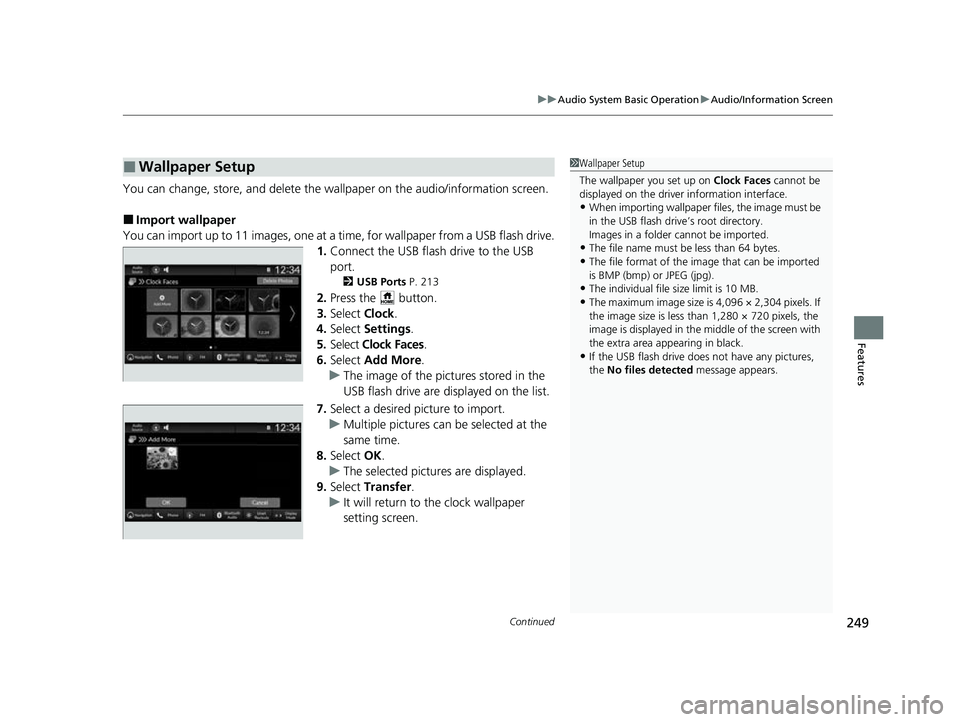
You can import up to 11 images, one at a ti me, for wallpaper from a USB flash drive.
1. Connect the USB flash drive to the USB
port.
2 USB Ports P. 213
2.Press the button.
3. Select Clock.
4. Select Settings .
5. Select Clock Faces .
6. Select Add More .
u The image of the pictures stored in the
USB flash drive are displayed on the list.
7. Select a desired picture to import.
u Multiple pictures can be selected at the
same time.
8. Select OK.
u The selected pictures are displayed.
9. Select Transfer .
u It will return to the clock wallpaper
setting screen.
■Wallpaper Setup1Wallpaper Setup
The wallpaper you set up on Clock Faces cannot be
displayed on the driver information interface.
•When importing wallpaper f iles, the image must be
in the USB flash drive’s root directory.
Images in a folder cannot be imported.
•The file name must be less than 64 bytes.
•The file format of the im age that can be imported
is BMP (bmp) or JPEG (jpg).
•The individual file size limit is 10 MB.
•The maximum image size is 4,096 × 2,304 pixels. If
the image size is less than 1,280 × 720 pixels, the
image is displayed in the middle of the screen with
the extra area appearing in black.
•If the USB flash drive doe s not have any pictures,
the No files detected message appears.
23 HR-V-313V06000_01.book 249 ページ 2022年4月4日 月曜日 午前10時49分
Page 259 of 664
257
uuAudio System Basic Operation uSystem Updates
Continued
Features
System Updates
The audio system’s firmware can be updated with a Wi-Fi connection or with a USB
device.
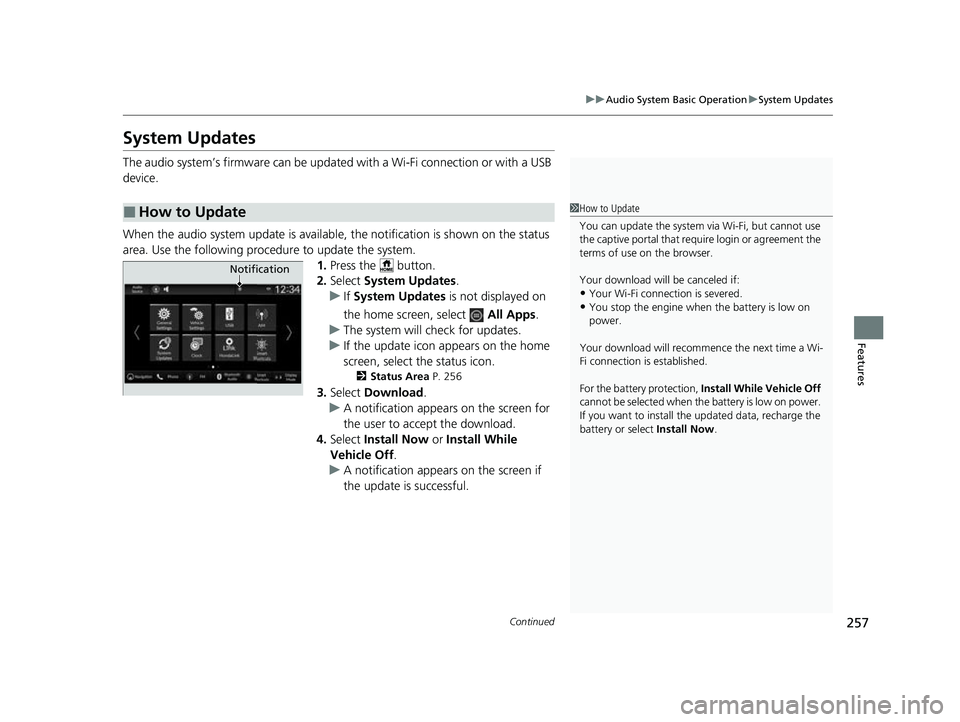
When the audio system update is available, the notification is shown on the status
area. Use the following procedure to update the system. 1.Press the button.
2. Select System Updates .
u If System Updates is not displayed on
the home screen, select All Apps.
u The system will check for updates.
u If the update icon appears on the home
screen, select the status icon.
2 Status Area P. 256
3.Select Download .
u A notification appears on the screen for
the user to acce pt the download.
4. Select Install Now or Install While
Vehicle Off.
u A notification appears on the screen if
the update is successful.
■How to Update1How to Update
You can update the system vi a Wi-Fi, but cannot use
the captive portal that require login or agreement the
terms of use on the browser.
Your download will be canceled if:
•Your Wi-Fi connection is severed.
•You stop the engine when the battery is low on
power.
Your download will recommence the next time a Wi-
Fi connection is established.
For the battery protection, Install While Vehicle Off
cannot be selected when the battery is low on power.
If you want to install the updated data, recharge the
battery or select Install Now.
Notification
23 HR-V-313V06000_01.book 257 ページ 2022年4月4日 月曜日 午前10時49分
Page 264 of 664
uuAudio System Basic Operation uSystem Updates
262
Features
■Download the update files from the server
1. Press the button.
2. Select System Updates .
u If System Updates is not displayed on th e home screen, select All Apps.
3. Select Other Methods .
4. Select Via USB .
u A notification appears on the screen.
5. Connect a USB device into the USB port.
u The inventory data is copied into the USB device.
2 USB Ports P. 213
6.Remove the USB device from the USB port.
7. Connect the USB device into your comp uter, and then download the update files.
u Follow the link to downlo ad the required software update files. Refer to
https://usb.honda.com for instructions.
■Update the audio system
1. Press the button.
2. Select System Updates .
3. Select Other Methods .
4. Select Via USB .
u A notification appears on the screen.
5. Connect the USB device with the update files into the USB port.
u A notification appears on the screen.
2 USB Ports P. 213
6.Select Install Now .
u A notification appears on the screen if the update is successful.
■How to Update with a USB Device1How to Update with a USB Device
A USB device with a minimum of 8 GB of free space
or more is recommended.
Be sure to delete any pr evious inventory or update
files from the USB before starting the USB update
process.
23 HR-V-313V06000_01.book 262 ページ 2022年4月4日 月曜日 午前10時49分
Page 286 of 664
284
uuAudio System Basic Operation uPlaying an iPod
Features
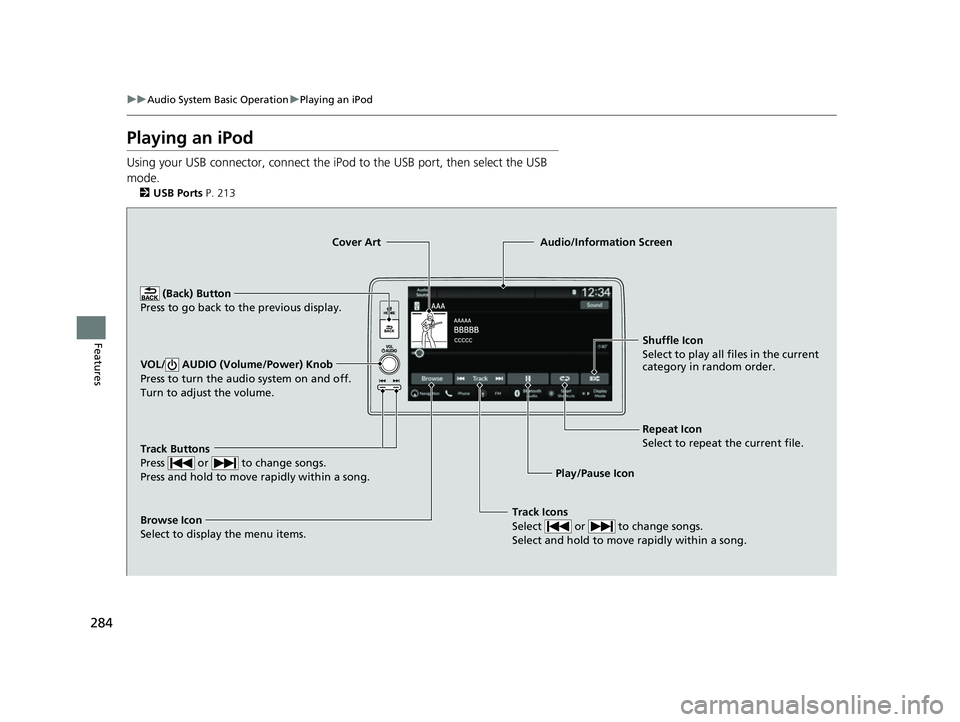
Playing an iPod
Using your USB connector, connect the iPod to the USB port, then select the USB
mode.
2 USB Ports P. 213
Track Icons
Select or to change songs.
Select and hold to move rapidly within a song.
Shuffle Icon
Select to play all files in the current
category in random order.
Cover Art
Audio/Information Screen
Play/Pause Icon
(B
ack) Button
Pre s
s to go back to the previous display.
VOL/ AUDIO (Volume/Power) Knob
Press to turn the audio system on and off.
Turn to adjust the volume.
Repeat Icon
Select to repeat the current file.
Track Buttons
Press or to change songs.
Press and hold to move rapidly within a song.
Browse Icon
Select to display the menu items.
23 HR-V-313V06000_01.book 284 ページ 2022年4月4日 月曜日 午前10時49分
Page 289 of 664
287
uuAudio System Basic Operation uPlaying a USB Flash Drive
Continued
Features
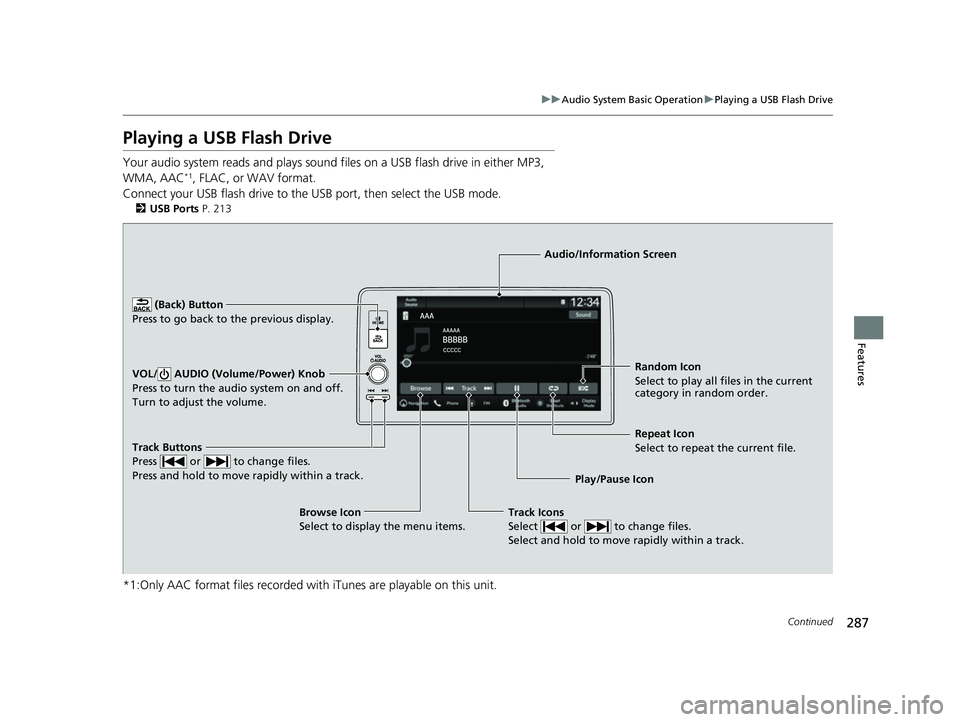
Playing a USB Flash Drive
Your audio system reads and plays sound files on a USB flash drive in either MP3,
WMA, AAC*1, FLAC, or WAV format.
Connect your USB flash drive to the USB port, then select the USB mode.
2 USB Ports P. 213
*1:Only AAC format files recorded with iTunes are playable on this unit.
Track Buttons
Press or to change files.
Press and hold to move rapidly within a track.
Random Icon
Select to play all files in the current
category in random order.
Audio/Information Screen
Play/Pause Icon
(Back) Bu
tt
on
Press to go bac
k to the previous display.
VOL/ AUDIO (Volume/Power) Knob
Press to turn the audio system on and off.
Turn to adjust the volume.
Track Icons
Select or to change files.
Select and hold to move rapidly within a track.
Repeat Icon
Select to repeat the current file.
Browse Icon
Select to display the menu items.
23 HR-V-313V06000_01.book 287 ページ 2022年4月4日 月曜日 午前10時49分
Page 303 of 664
301
uuAudio System Basic Operation uApple CarPlay
Continued
Features
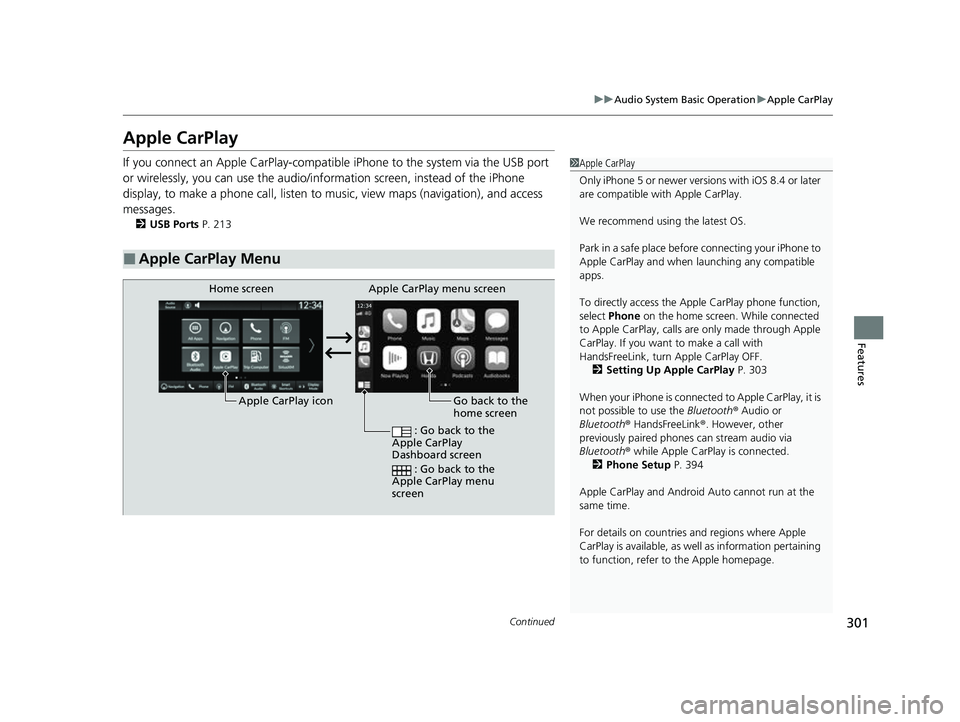
Apple CarPlay
If you connect an Apple CarPlay-compatib le iPhone to the system via the USB port
or wirelessly, you can use the audio/information screen, instead of the iPhone
display, to make a phone call, listen to music, view maps (navigation), and access
messages.
2 USB Ports P. 213
■Apple CarPlay Menu
1Apple CarPlay
Only iPhone 5 or newer versi ons with iOS 8.4 or later
are compatible with Apple CarPlay.
We recommend using the latest OS.
Park in a safe place before connecting your iPhone to
Apple CarPlay and when launching any compatible
apps.
To directly access the Appl e CarPlay phone function,
select Phone on the home screen. While connected
to Apple CarPlay, calls are only made through Apple
CarPlay. If you want to make a call with
HandsFreeLink, turn Apple CarPlay OFF.
2 Setting Up Apple CarPlay P. 303
When your iPhone is connected to Apple CarPlay, it is
not possible to use the Bluetooth® Audio or
Bluetooth ® HandsFreeLink ®. However, other
previously paired phones can stream audio via
Bluetooth ® while Apple CarPlay is connected.
2 Phone Setup P. 394
Apple CarPlay and Android Auto cannot run at the
same time.
For details on c ountries and regions where Apple
CarPlay is available, as well as information pertaining
to function, refer to the Apple homepage.
Go back to the
home screen
Home screen
Apple CarPlay icon Apple CarPlay menu screen
: Go back to the
Apple CarPlay
Dashboard screen
: Go back to the
Apple CarPlay menu
screen
23 HR-V-313V06000_01.book 301 ページ 2022年4月4日 月曜日 午前10時49分
Page 305 of 664
Continued303
uuAudio System Basic Operation uApple CarPlay
Features
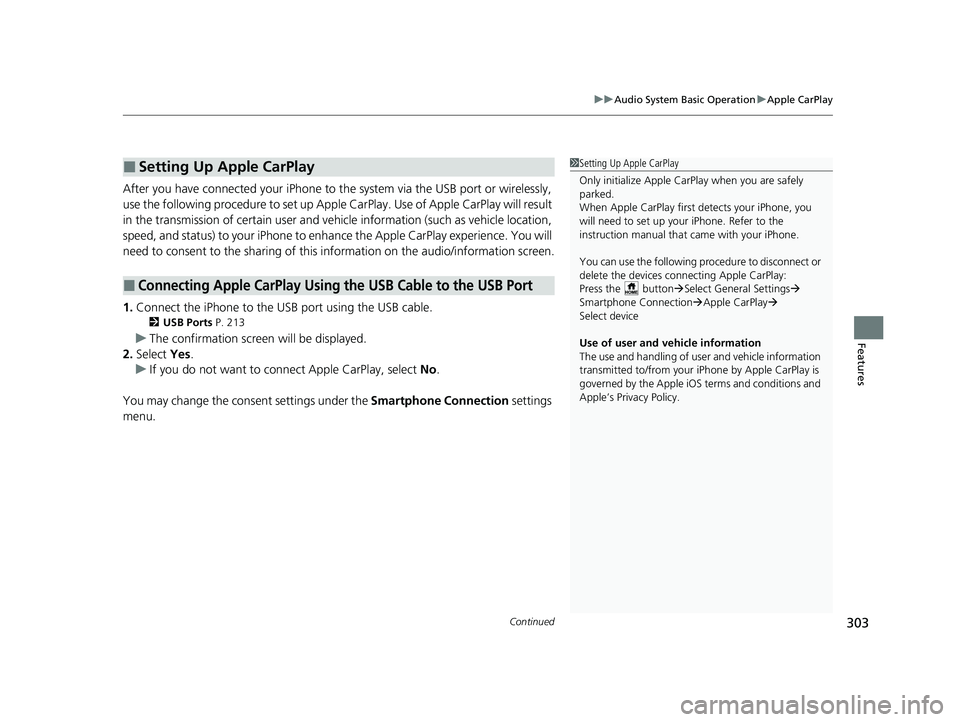
After you have connected your iPhone to the system via the USB port or wirelessly,
use the following procedure to set up Apple CarPlay. Use of Apple CarPlay will result
in the transmission of certain user and vehi cle information (such as vehicle location,
speed, and status) to your iPhone to enha nce the Apple CarPlay experience. You will
need to consent to the sharing of this information on the audio/information screen.
1. Connect the iPhone to the USB port using the USB cable.
2 USB Ports P. 213
uThe confirmation screen will be displayed.
2. Select Yes.
u If you do not want to connect Apple CarPlay, select No.
You may change the cons ent settings under the Smartphone Connection settings
menu.
■Setting Up Apple CarPlay
■Connecting Apple CarPlay Using the USB Cable to the USB Port
1 Setting Up Apple CarPlay
Only initialize Apple CarPlay when you are safely
parked.
When Apple CarPlay first detects your iPhone, you
will need to set up your iPhone. Refer to the
instruction manual that came with your iPhone.
You can use the following procedure to disconnect or
delete the devices conn ecting Apple CarPlay:
Press the button Select General Settings
Smartphone Connection Apple CarPlay
Select device
Use of user and vehicle information
The use and handling of user and vehicle information
transmitted to/from your iP hone by Apple CarPlay is
governed by the Apple iOS terms and conditions and
Apple’s Privacy Policy.
23 HR-V-313V06000_01.book 303 ページ 2022年4月4日 月曜日 午前10時49分
Page 310 of 664
308
uuAudio System Basic Operation uAndroid AutoTM
Features
Android AutoTM
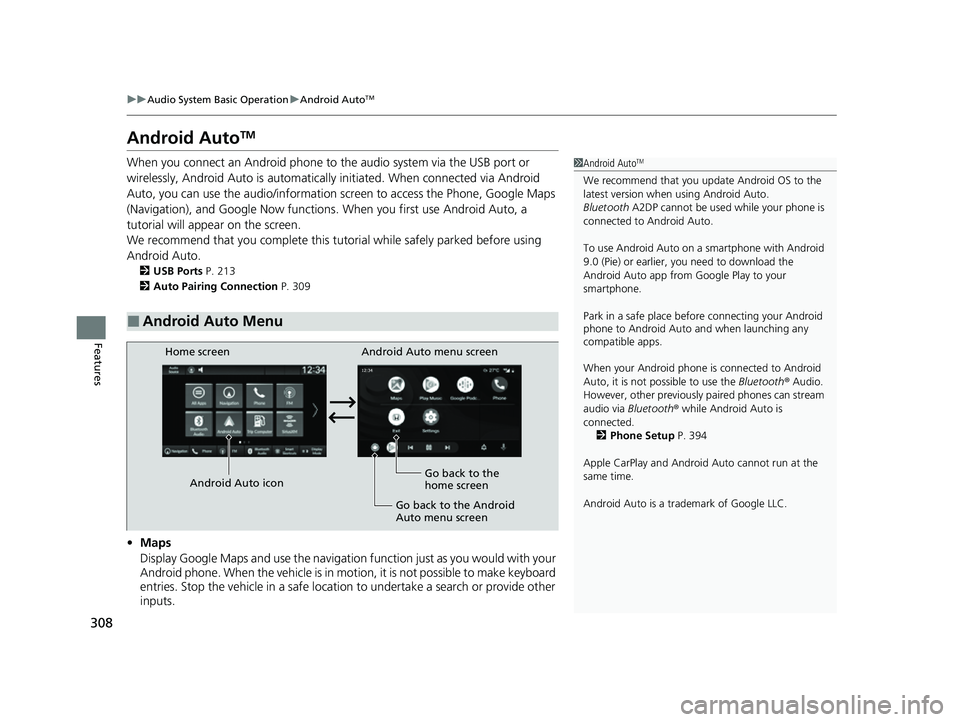
When you connect an Android phone to the audio system via the USB port or
wirelessly, Android Auto is automatically initiated. When connected via Android
Auto, you can use the audio/information screen to access the Phone, Google Maps
(Navigation), and Google Now functions. When you first use Android Auto, a
tutorial will appe ar on the screen.
We recommend that you complete this tuto rial while safely parked before using
Android Auto.
2 USB Ports P. 213
2 Auto Pairing Connection P. 309
•Maps
Display Google Maps and use the navigation function just as you would with your
Android phone. When the vehicle is in motion, it is not possible to make keyboard
entries. Stop the vehicle in a safe location to undertake a search or provide other
inputs.
■Android Auto Menu
1 Android AutoTM
We recommend that you upda te Android OS to the
latest version when using Android Auto.
Bluetooth A2DP cannot be used while your phone is
connected to Android Auto.
To use Android Auto on a smartphone with Android
9.0 (Pie) or earl ier, you need to download the
Android Auto app from Google Play to your
smartphone.
Park in a safe place befo re connecting your Android
phone to Android Auto and when launching any
compatible apps.
When your Android phone is connected to Android
Auto, it is not possible to use the Bluetooth® Audio.
However, other previously paired phones can stream
audio via Bluetooth ® while Android Auto is
connected. 2 Phone Setup P. 394
Apple CarPlay and Android Auto cannot run at the
same time.
Android Auto is a trademark of Google LLC.
Android Auto menu screen
Home screen
Android Auto icon Go back to the
home screen
Go back to the Android
Auto menu screen
23 HR-V-313V06000_01.book 308 ページ 2022年4月4日 月曜日 午前10時49分
Page 311 of 664
Continued309
uuAudio System Basic Operation uAndroid AutoTM
Features
• Phone
Make and receive phone calls as well as listen to voicemail.
• Exit
• Operate Android Auto with your voice.
•
You can check Android notifications.
• (Android Auto Home)
Display useful information organized by Android Auto into simple cards that
appear just when they’re needed.
When you connect an Android phone to the unit via the USB port or wirelessly,
Android Auto is automatically initiated.
■Auto Pairing Connection
1 Android AutoTM
For details on c ountries and regions where Android
Auto is available, as well as information pertaining to
function, refer to the Android Auto homepage.
Screens may differ depending on the version of the
Android Auto app you are using.
Android Auto Operating Requirements &
Limitations
Android Auto requires a compatible Android phone
with an active mobile connection and data plan. Your
carrier’s rate plans will apply.
Changes in operating systems, hardware, software,
and other technology integral to providing Android
Auto functionality, as well as new or revised
governmental regulations, may result in a decrease or
cessation of Android Auto functionality and services.
Honda cannot and does not pr ovide any warranty or
guarantee of future Android Auto performance or
functionality.
It is possible to use 3r d party apps if they are
compatible with Android Auto. Refer to the Android
Auto homepage for informat ion on compatible apps.
23 HR-V-313V06000_01.book 309 ページ 2022年4月4日 月曜日 午前10時49分