lane assist HONDA HRV 2023 User Guide
[x] Cancel search | Manufacturer: HONDA, Model Year: 2023, Model line: HRV, Model: HONDA HRV 2023Pages: 664, PDF Size: 20.2 MB
Page 411 of 664
409
Driving
This chapter discusses driving and refueling.
Before Driving
Driving Preparation .............................. 410
Maximum Load Limit............................ 413
Towing a TrailerTowing Behind a Motorhome............... 415Off-Highway Driving Guidelines..... 416
When Driving
Starting the Engine .............................. 418
Precautions While Driving..................... 425
Continuously Variable Transmission ......... 426Shifting ................................................ 427
Drive Mode Switch ............................... 429
Hill Descent Control System ................. 432
Vehicle Stability AssistTM (VSA®), aka Electronic
Stability Control (ESC), System ................... 434
Real Time AWD with Intelligent Control SystemTM*.. 437Tire Pressure Monitoring System (TPMS) ........... 438Tire Pressure Monitoring System (TPMS) - Required Federal Explanation ............. 443
Blind Spot Information System
*........... 445Honda Sensing ®................................ 449Collision Mitigation Braking SystemTM
(CMBSTM) ........................................... 453
Low Speed Braking Control*................ 465
Adaptive Cruise Control (ACC) with Low Speed Follow ..................................... 471 Lane Keeping Assist System (LKAS) ....... 491
Traffic Jam Assist
*................................ 502
Road Departure Mitigation System ....... 511
Traffic Sign Recognition System ............ 519
Front Wide View Camera...................... 525
Sonar Sensors
*..................................... 527BrakingBrake System ........................................ 528
Anti-lock Brake System (ABS) ................ 535
Brake Assist System .............................. 536
Parking Your Vehicle
Multi-View Rear Camera .................. 545
Refueling
Fuel Economy and CO
2 Emissions .... 550
* Not available on all models
23 HR-V-313V06000_01.book 409 ページ 2022年4月4日 月曜日 午前10時49分
Page 447 of 664
445
uuWhen Driving uBlind Spot Information System*
Continued
Driving
Blind Spot Information System*
When the system detects vehicles approaching from behind in adjacent lanes, the
appropriate indicator comes on, providin g assistance when you change lanes.
The system activates when your vehicle is moving forward at about 20 mph (32 km/h)
or above.
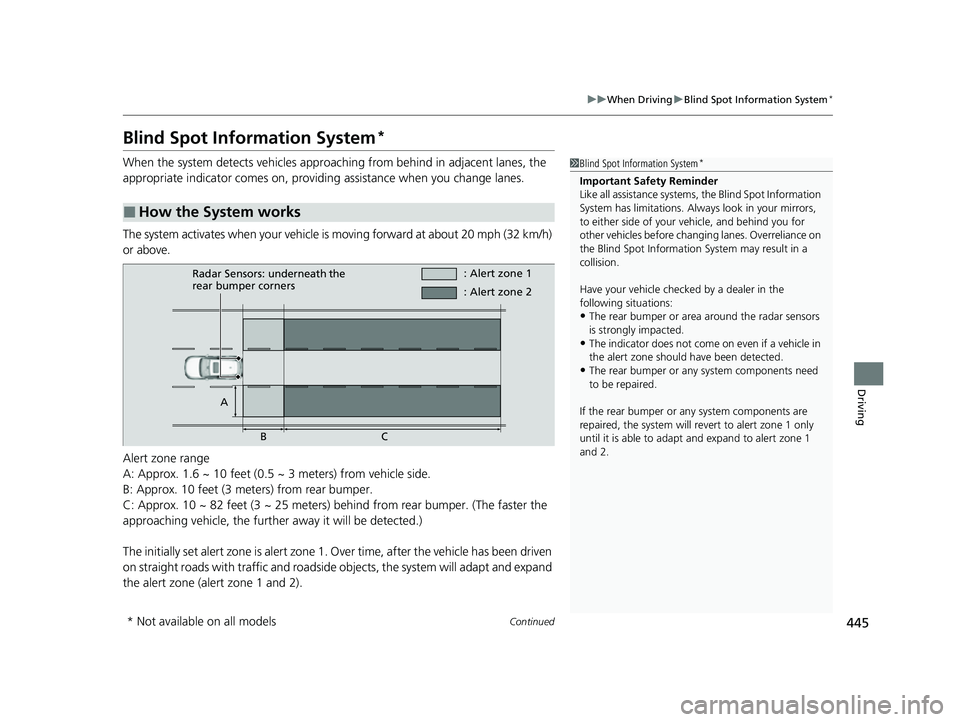
Alert zone range
A: Approx. 1.6 ~ 10 feet (0.5 ~ 3 meters) from vehicle side.
B: Approx. 10 feet (3 meters) from rear bumper.
C: Approx. 10 ~ 82 feet (3 ~ 25 meters) behind from rear bumper. (The faster the
approaching vehicle, the further away it will be detected.)
The initially set alert zone is alert zone 1. Over time, after the vehicle has been driven
on straight roads with traffic and roadside objects, the system will adapt and expand
the alert zone (alert zone 1 and 2).
■How the System works
1 Blind Spot Information System*
Important Safety Reminder
Like all assistance systems, the Blind Spot Information
System has limitations. Always look in your mirrors,
to either side of your vehicle, and behind you for
other vehicles before changing lanes. Overreliance on
the Blind Spot Information System may result in a
collision.
Have your vehicle checked by a dealer in the
following situations:
•The rear bumper or area around the radar sensors
is strongly impacted.
•The indicator does not come on even if a vehicle in
the alert zone should have been detected.
•The rear bumper or any system components need
to be repaired.
If the rear bumper or any system components are
repaired, the system will re vert to alert zone 1 only
until it is able to adapt and expand to alert zone 1
and 2.
Radar Sensors: underneath the
rear bumper corners : Alert zone 1
A BC : Alert zone 2
* Not available on all models
23 HR-V-313V06000_01.book 445 ページ 2022年4月4日 月曜日 午前10時49分
Page 452 of 664
450
uuHonda Sensing ®u
Driving
Honda Sensing® has the following functions.
■The functions whic h do not require switch operations to activate
• Collision Mitigation Braking SystemTM (CMBSTM) 2 P. 453
• Low Speed Braking Control* 2 P. 465
• Road Departure Mitigation System 2 P. 511
• Traffic Sign Recognition System 2 P. 519
■The functions wh ich require switch op erations to activate
• Adaptive Cruise Control ( ACC) with Low Speed Follow
2 P. 471
• Lane Keeping Assist System (LKAS) 2 P. 491
• Traffic Jam Assist* 2 P. 502
* Not available on all models
23 HR-V-313V06000_01.book 450 ページ 2022年4月4日 月曜日 午前10時49分
Page 453 of 664
451
uuHonda Sensing ®u
Continued
Driving
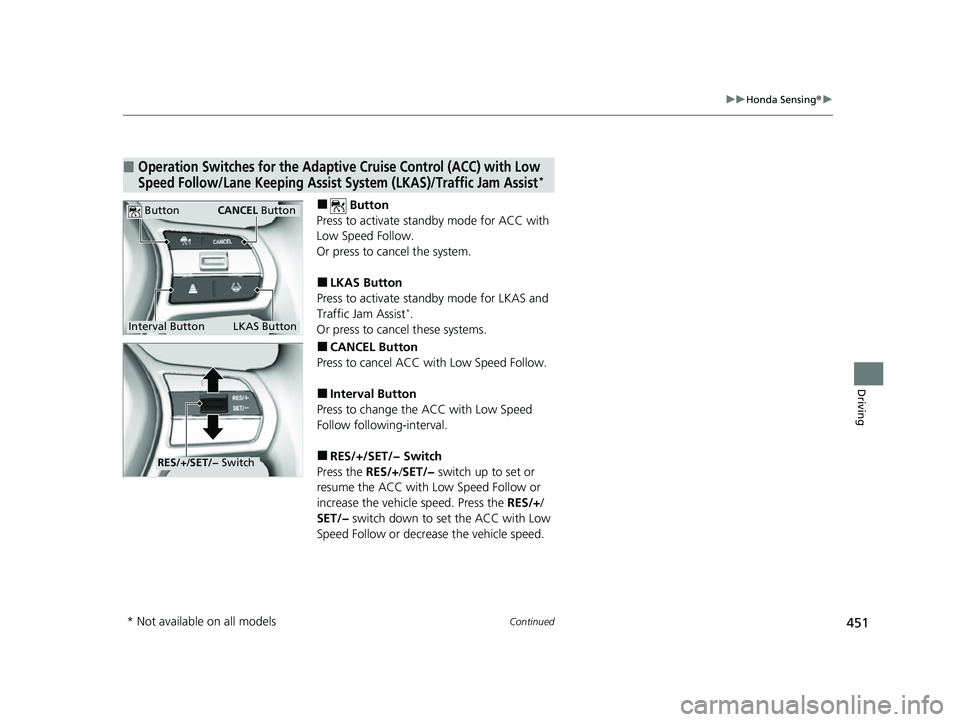
■ Button
Press to activate sta ndby mode for ACC with
Low Speed Follow.
Or press to cancel the system.
■LKAS Button
Press to activate sta ndby mode for LKAS and
Traffic Jam Assist
*.
Or press to cancel these systems.
■CANCEL Button
Press to cancel ACC wi th Low Speed Follow.
■Interval Button
Press to change the ACC with Low Speed
Follow following-interval.
■RES/+/SET/− Switch
Press the RES/+/SET/− switch up to set or
resume the ACC with Low Speed Follow or
increase the vehicle speed. Press the RES/+/
SET/− switch down to set the ACC with Low
Speed Follow or decrea se the vehicle speed.
■Operation Switches for the Adaptive Cruise Control (ACC) with Low
Speed Follow/Lane Keeping Assist System (LKAS)/Traffic Jam Assist*
Interval Button
Button
LKAS Button
CANCEL Button
RES/J/SET/− Switch
* Not available on all models
23 HR-V-313V06000_01.book 451 ページ 2022年4月4日 月曜日 午前10時49分
Page 454 of 664
452
uuHonda Sensing ®u
Driving
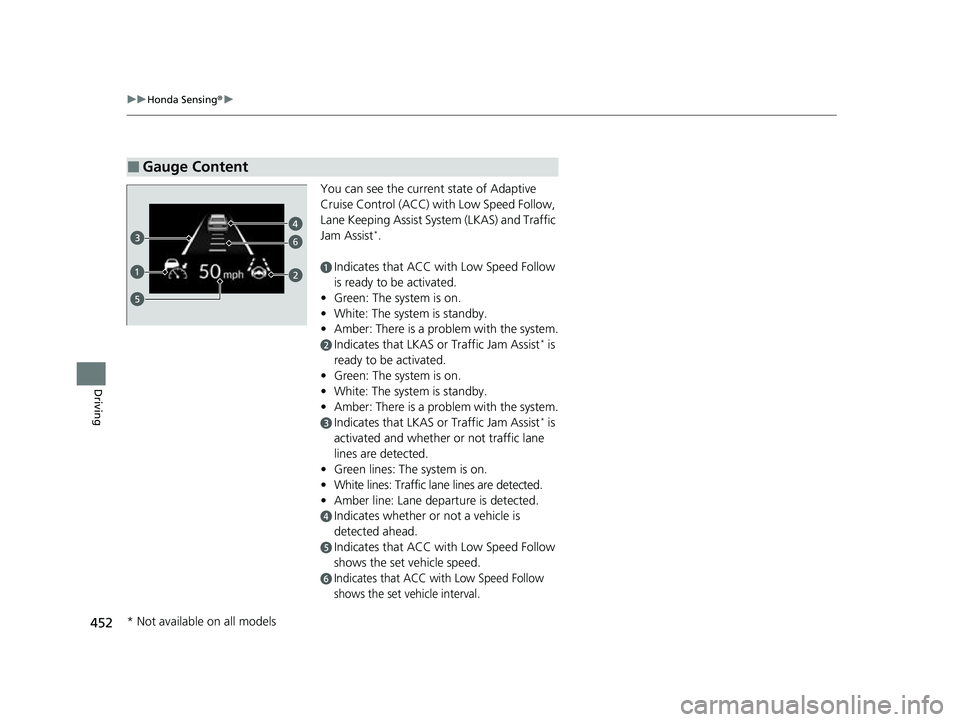
You can see the current state of Adaptive
Cruise Control (ACC) wi th Low Speed Follow,
Lane Keeping Assist System (LKAS) and Traffic
Jam Assist
*.
aIndicates that ACC with Low Speed Follow
is ready to be activated.
• Green: The system is on.
• White: The system is standby.
• Amber: There is a problem with the system.
bIndicates that LKAS or Traffic Jam Assist* is
ready to be activated.
• Green: The system is on.
• White: The system is standby.
• Amber: There is a problem with the system.
cIndicates that LKAS or Traffic Jam Assist* is
activated and whether or not traffic lane
lines are detected.
• Green lines: The system is on.
• White lines: Traffic lane lines are detected.
• Amber line: Lane departure is detected.
dIndicates whether or not a vehicle is
detected ahead.
eIndicates that ACC with Low Speed Follow
shows the set vehicle speed.
fIndicates that ACC with Low Speed Follow
shows the set vehicle interval.
■Gauge Content
6
* Not available on all models
23 HR-V-313V06000_01.book 452 ページ 2022年4月4日 月曜日 午前10時49分
Page 475 of 664
Continued473
uuHonda Sensing ®u Adaptive Cruise Control (ACC) with Low Speed Follow
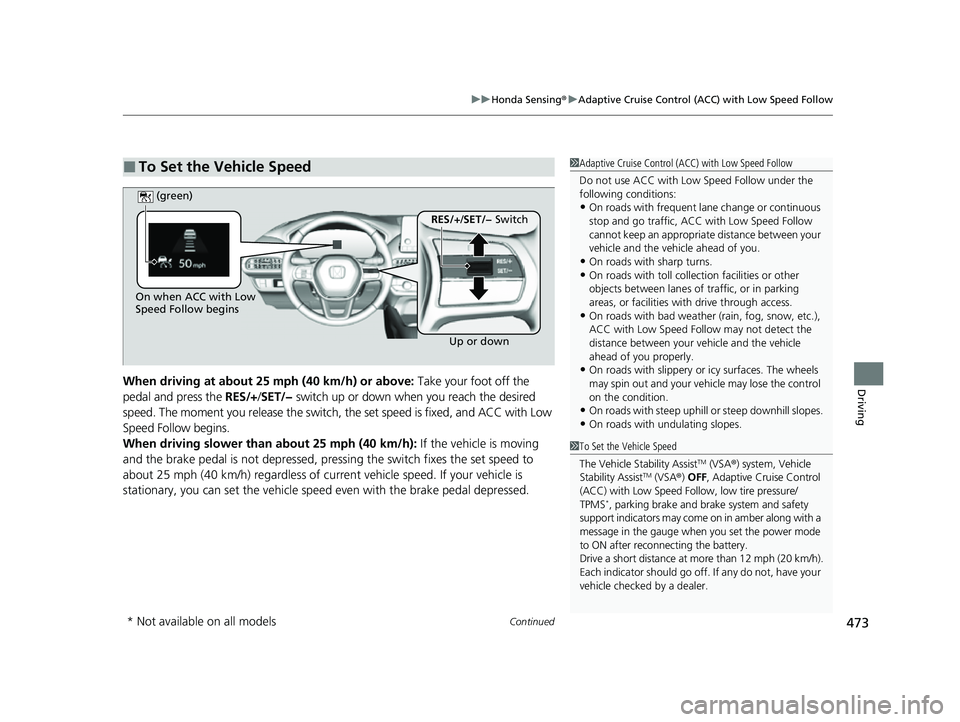
DrivingWhen driving at about 25 mph (40 km/h) or above: Take your foot off the
pedal and press the RES/+/SET/− switch up or down when you reach the desired
speed. The moment you release the switch, the set speed is fixed, and ACC with Low
Speed Follow begins.
When driving slower than about 25 mph (40 km/h): If the vehicle is moving
and the brake pedal is not depressed, pressing the switch fixes the set speed to
about 25 mph (40 km/h) regardless of current vehicle speed. If your vehicle is
stationary, you can set the vehicle speed even with the brake pedal depressed.
■To Set the Vehicle Speed1 Adaptive Cruise Control (ACC) with Low Speed Follow
Do not use ACC with Low Speed Follow under the
following conditions:
•On roads with frequent la ne change or continuous
stop and go traffic, ACC with Low Speed Follow
cannot keep an appropriate distance between your
vehicle and the vehicle ahead of you.
•On roads with sharp turns.•On roads with toll collection facilities or other
objects between lanes of traffic, or in parking
areas, or faci lities with driv e through access.
•On roads with bad weather (rain, fog, snow, etc.),
ACC with Low Speed Follow may not detect the
distance between your vehicle and the vehicle
ahead of you properly.
•On roads with slippery or icy surfaces. The wheels
may spin out and your vehi cle may lose the control
on the condition.
•On roads with steep uphill or steep downhill slopes.
•On roads with undulating slopes.
On when ACC with Low
Speed Follow begins
Up or down
RES/+/SET/− Switch
(green)
1
To Set the Vehicle Speed
The Vehicle Stability Assist
TM (VSA ®) system, Vehicle
Stability AssistTM (VSA ®) OFF , Adaptive Cruise Control
(ACC) with Low Speed Follow, low tire pressure/
TPMS
*, parking brake and brake system and safety
support indicators may come on in amber along with a
message in the gauge when you set the power mode
to ON after reconn ecting the battery.
Drive a short distance at more than 12 mph (20 km/h).
Each indicator should go off. If any do not, have your
vehicle checked by a dealer.
* Not available on all models
23 HR-V-313V06000_01.book 473 ページ 2022年4月4日 月曜日 午前10時49分
Page 493 of 664
491
uuHonda Sensing ®u Lane Keeping Assist System (LKAS)
Continued
Driving
Lane Keeping Assist System (LKAS)
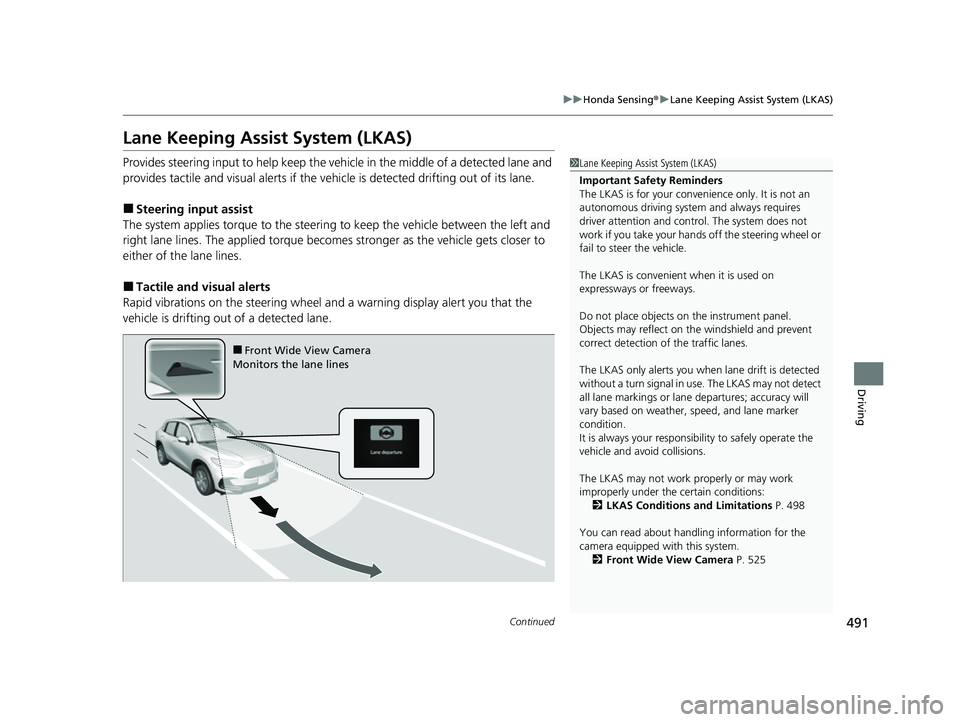
Provides steering input to help keep the vehicle in the middle of a detected lane and
provides tactile and visual al erts if the vehicle is detected drifting out of its lane.
■Steering input assist
The system applies torque to the steerin g to keep the vehicle between the left and
right lane lines. The applied torque becomes stronger as the vehicle gets closer to
either of the lane lines.
■Tactile and vi sual alerts
Rapid vibrations on the steering wheel and a warning display alert you that the
vehicle is drifting out of a detected lane.
1 Lane Keeping Assist System (LKAS)
Important Safety Reminders
The LKAS is for your convenience only. It is not an
autonomous driving system and always requires
driver attention and control. The system does not
work if you take your hands off the steering wheel or
fail to steer the vehicle.
The LKAS is convenient when it is used on
expressways or freeways.
Do not place objects on the instrument panel.
Objects may reflect on th e windshield and prevent
correct detection of the traffic lanes.
The LKAS only alerts you when lane drift is detected
without a turn signal in use. The LKAS may not detect
all lane markings or lane departures; accuracy will
vary based on weather, speed, and lane marker
condition.
It is always your responsibility to safely operate the
vehicle and avoid collisions.
The LKAS may not work properly or may work
improperly under the certain conditions:
2 LKAS Conditions and Limitations P. 498
You can read about handling information for the
camera equipped with this system. 2 Front Wide View Camera P. 525
■Front Wide View Camera
Monitors the lane lines
23 HR-V-313V06000_01.book 491 ページ 2022年4月4日 月曜日 午前10時49分
Page 494 of 664
uuHonda Sensing ®u Lane Keeping Assist System (LKAS)
492
Driving
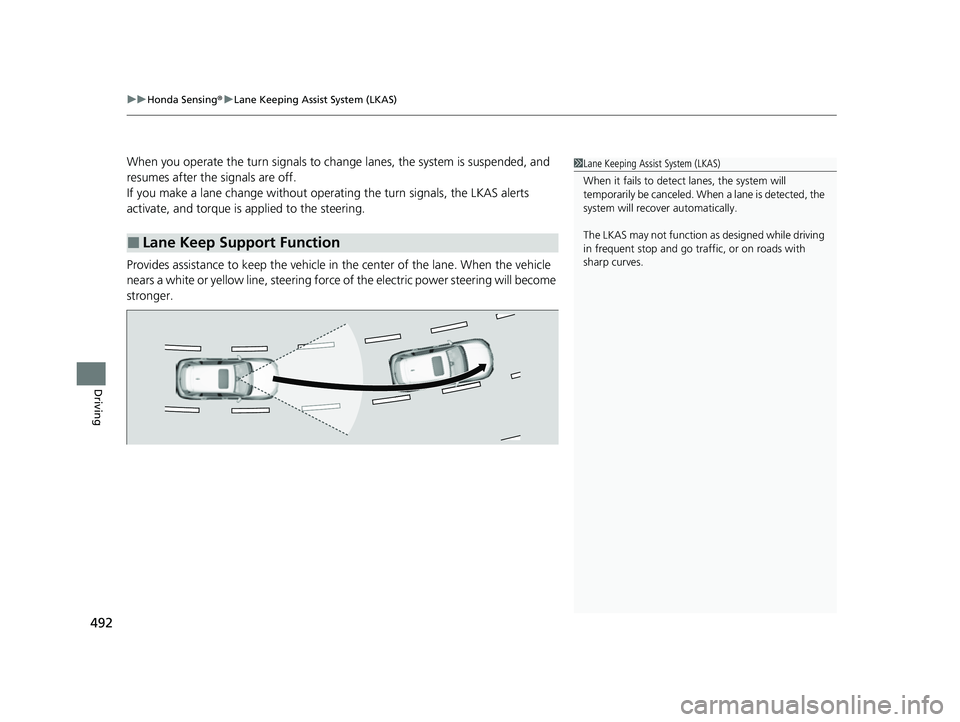
When you operate the turn signals to chan ge lanes, the system is suspended, and
resumes after the signals are off.
If you make a lane change without operat ing the turn signals, the LKAS alerts
activate, and torque is applied to the steering.
Provides assistance to keep the vehicle in the center of the lane. When the vehicle
nears a white or yellow line, steering force of the electric power steering will become
stronger.
■Lane Keep Support Function
1 Lane Keeping Assist System (LKAS)
When it fails to detect lanes, the system will
temporarily be canceled. When a lane is detected, the
system will recover automatically.
The LKAS may not function as designed while driving
in frequent stop and go traf fic, or on roads with
sharp curves.
23 HR-V-313V06000_01.book 492 ページ 2022年4月4日 月曜日 午前10時49分
Page 495 of 664
493
uuHonda Sensing ®u Lane Keeping Assist System (LKAS)
Continued
Driving
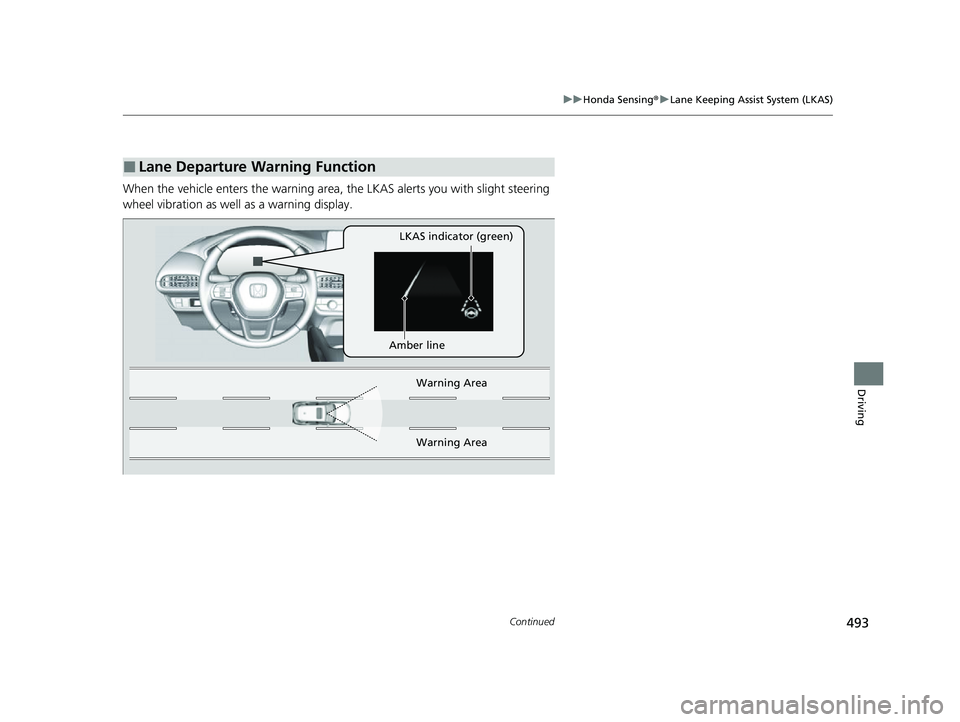
When the vehicle enters the warning area, the LKAS alerts you with slight steering
wheel vibration as well as a warning display.
■Lane Departure Warning Function
LKAS indicator (green)
Amber line Warning Area
Warn ing Ar
ea
23 HR-V-313V06000_01.book 493 ページ 2022年4月4日 月曜日 午前10時49分
Page 496 of 664
uuHonda Sensing ®u Lane Keeping Assist System (LKAS)
494
Driving
The system can be used when the following conditions are met.
• The lane in which you are driving has dete ctable lane markers on both sides, and
your vehicle is in the center of the lane.
• The vehicle is traveling between about 45 and 90 mph (72 and 145 km/h).
• You are driving on a straight or slightly curved road.
• The turn signals are off.
• The brake pedal is not depressed.
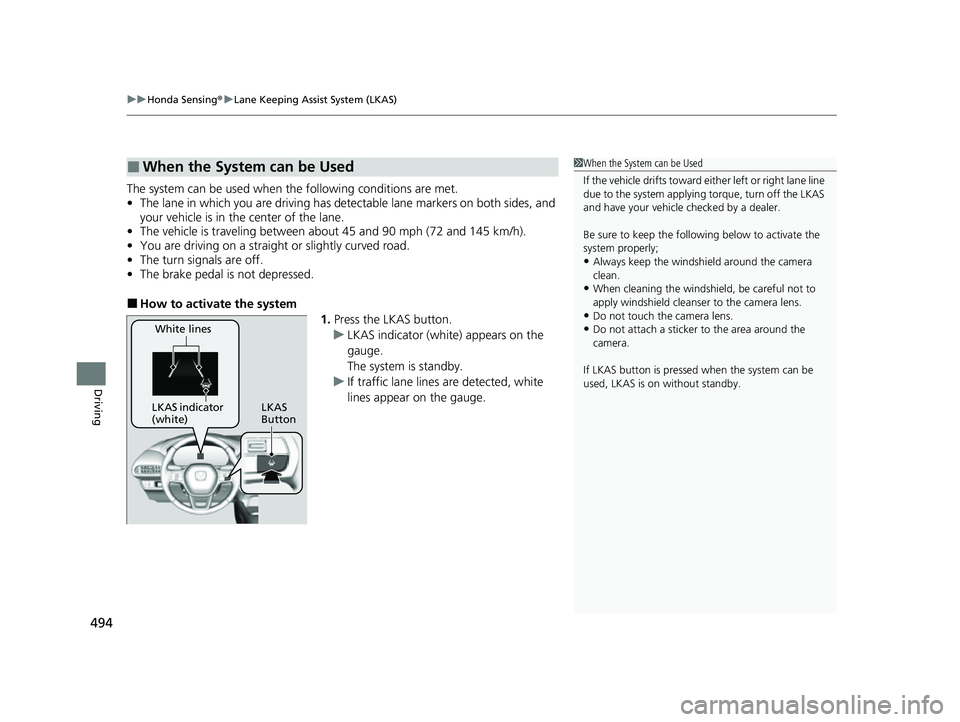
■How to activate the system
1.Press the LKAS button.
u LKAS indicator (white) appears on the
gauge.
The system is standby.
u If traffic lane lines are detected, white
lines appear on the gauge.
■When the System can be Used1When the System can be Used
If the vehicle drifts toward ei ther left or right lane line
due to the system applying torque, turn off the LKAS
and have your vehicle checked by a dealer.
Be sure to keep the following below to activate the
system properly;
•Always keep the windshi eld around the camera
clean.
•When cleaning the windshield, be careful not to
apply windshield cleanser to the camera lens.
•Do not touch the camera lens.
•Do not attach a sticker to the area around the
camera.
If LKAS button is pressed when the system can be
used, LKAS is on without standby.White lines
LKAS indicator
(white) LKAS
Button
23 HR-V-313V06000_01.book 494 ページ 2022年4月4日 月曜日 午前10時49分