tow HONDA HRV 2023 User Guide
[x] Cancel search | Manufacturer: HONDA, Model Year: 2023, Model line: HRV, Model: HONDA HRV 2023Pages: 664, PDF Size: 20.2 MB
Page 176 of 664
174
uuOperating the Switches Around the Steering Wheel uWipers and Washers
Controls
Wipers and Washers
The windshield wipers and washers can be
used when the power mode is in ON.
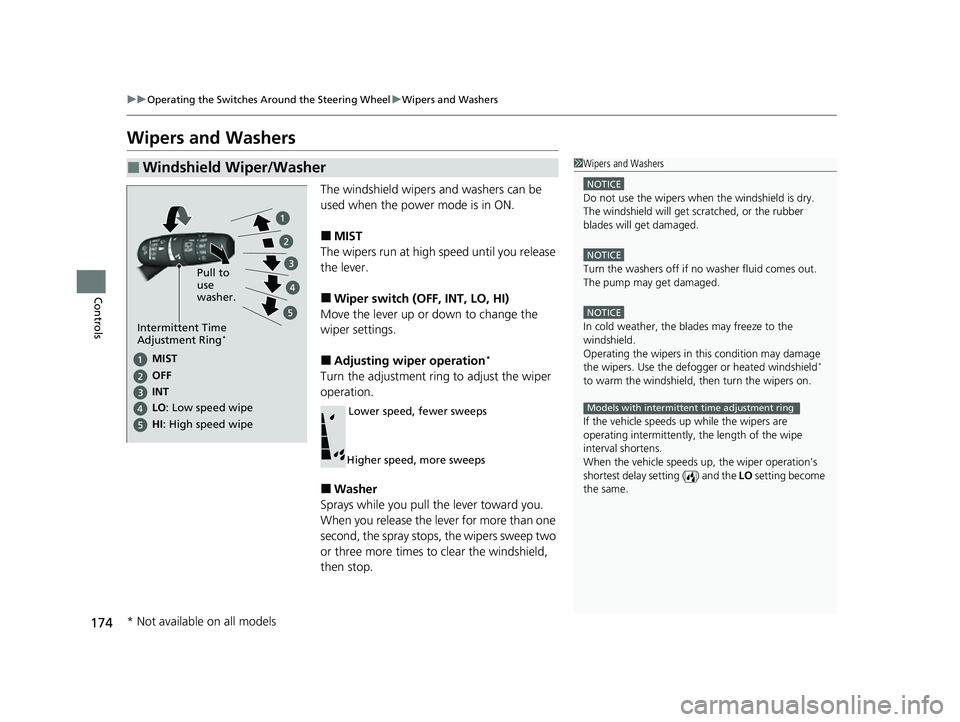
■MIST
The wipers run at high speed until you release
the lever.
■Wiper switch (OFF, INT, LO, HI)
Move the lever up or down to change the
wiper settings.
■Adjusting wiper operation*
Turn the adjustment ring to adjust the wiper
operation.
■Washer
Sprays while you pull the lever toward you.
When you release the lever for more than one
second, the spray stops, the wipers sweep two
or three more times to clear the windshield,
then stop.
■Windshield Wiper/Washer1 Wipers and Washers
NOTICE
Do not use the wipers when the windshield is dry.
The windshield will get sc ratched, or the rubber
blades will get damaged.
NOTICE
Turn the washers off if no washer fluid comes out.
The pump may get damaged.
NOTICE
In cold weather, the blades may freeze to the
windshield.
Operating the wipers in th is condition may damage
the wipers. Use the defogge r or heated windshield
*
to warm the windshield, then turn the wipers on.
If the vehicle speeds up while the wipers are
operating intermittently, the length of the wipe
interval shortens.
When the vehicle speeds up, the wiper operation’s
shortest delay setting ( ) and the LO setting become
the same.
Models with intermittent time adjustment ring
Pull to
use
washer.
MIST
INs OFe
LO : Low speed wipe
HI: High speed wipe
Intermittent Time
Adjustment Ring*
Lower speed, fewer sweeps
Higher speed, more sweeps
* Not available on all models
23 HR-V-313V06000_01.book 174 ページ 2022年4月4日 月曜日 午前10時49分
Page 200 of 664
uuInterior Convenience Items uOther Interior Convenience Items
198
Controls
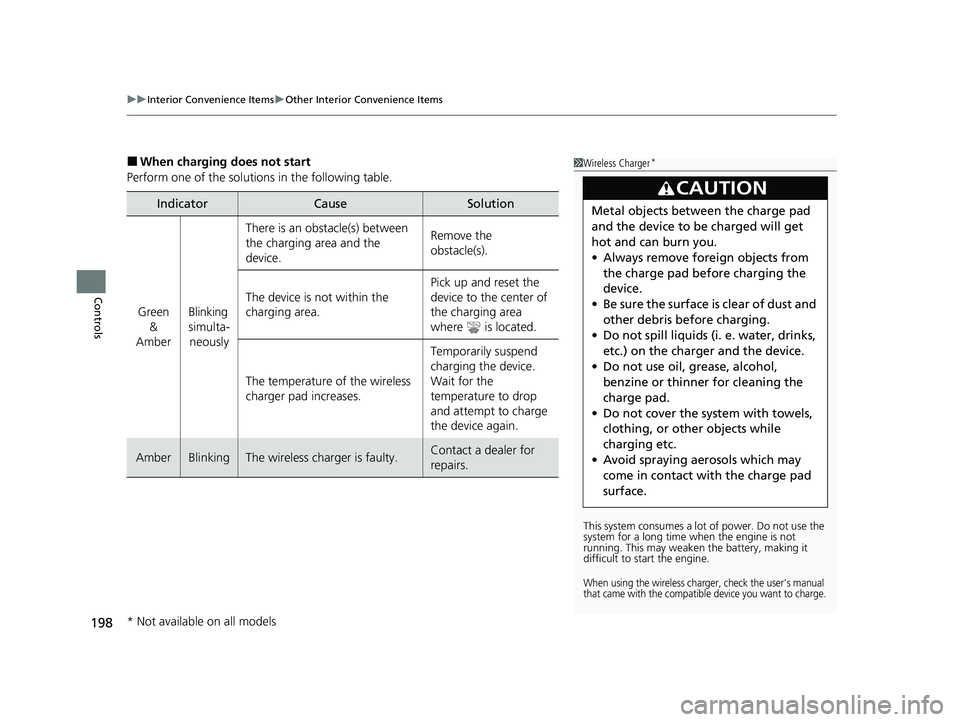
■When charging does not start
Perform one of the solution s in the following table.
IndicatorCauseSolution
Green
&
AmberBlinking
simulta- neously
There is an obstacle(s) between
the charging area and the
device.Remove the
obstacle(s).
The device is not within the
charging area. Pick up and reset the
device to the center of
the charging area
where is located.
The temperature of the wireless
charger pad increases. Temporarily suspend
charging the device.
Wait for the
temperature to drop
and attempt to charge
the device again.
AmberBlinkingThe wireless charger is faulty.Contact a dealer for
repairs.
1
Wireless Charger*
This system consumes a lot of power. Do not use the
system for a long time when the engine is not
running. This may weaken the battery, making it
difficult to start the engine.
When using the wireless charger, check the user’s manual
that came with the compatible device you want to charge.
3CAUTION
Metal objects between the charge pad
and the device to be charged will get
hot and can burn you.
• Always remove foreign objects from
the charge pad before charging the
device.
• Be sure the surface is clear of dust and
other debris before charging.
• Do not spill liquids (i. e. water, drinks,
etc.) on the charger and the device.
• Do not use oil, grease, alcohol,
benzine or thinner for cleaning the
charge pad.
• Do not cover the system with towels,
clothing, or other objects while
charging etc.
• Avoid spraying aerosols which may
come in contact with the charge pad
surface.
* Not available on all models
23 HR-V-313V06000_01.book 198 ページ 2022年4月4日 月曜日 午前10時49分
Page 411 of 664
409
Driving
This chapter discusses driving and refueling.
Before Driving
Driving Preparation .............................. 410
Maximum Load Limit............................ 413
Towing a TrailerTowing Behind a Motorhome............... 415Off-Highway Driving Guidelines..... 416
When Driving
Starting the Engine .............................. 418
Precautions While Driving..................... 425
Continuously Variable Transmission ......... 426Shifting ................................................ 427
Drive Mode Switch ............................... 429
Hill Descent Control System ................. 432
Vehicle Stability AssistTM (VSA®), aka Electronic
Stability Control (ESC), System ................... 434
Real Time AWD with Intelligent Control SystemTM*.. 437Tire Pressure Monitoring System (TPMS) ........... 438Tire Pressure Monitoring System (TPMS) - Required Federal Explanation ............. 443
Blind Spot Information System
*........... 445Honda Sensing ®................................ 449Collision Mitigation Braking SystemTM
(CMBSTM) ........................................... 453
Low Speed Braking Control*................ 465
Adaptive Cruise Control (ACC) with Low Speed Follow ..................................... 471 Lane Keeping Assist System (LKAS) ....... 491
Traffic Jam Assist
*................................ 502
Road Departure Mitigation System ....... 511
Traffic Sign Recognition System ............ 519
Front Wide View Camera...................... 525
Sonar Sensors
*..................................... 527BrakingBrake System ........................................ 528
Anti-lock Brake System (ABS) ................ 535
Brake Assist System .............................. 536
Parking Your Vehicle
Multi-View Rear Camera .................. 545
Refueling
Fuel Economy and CO
2 Emissions .... 550
* Not available on all models
23 HR-V-313V06000_01.book 409 ページ 2022年4月4日 月曜日 午前10時49分
Page 415 of 664
413
uuBefore Driving uMaximum Load Limit
Continued
Driving
Maximum Load Limit
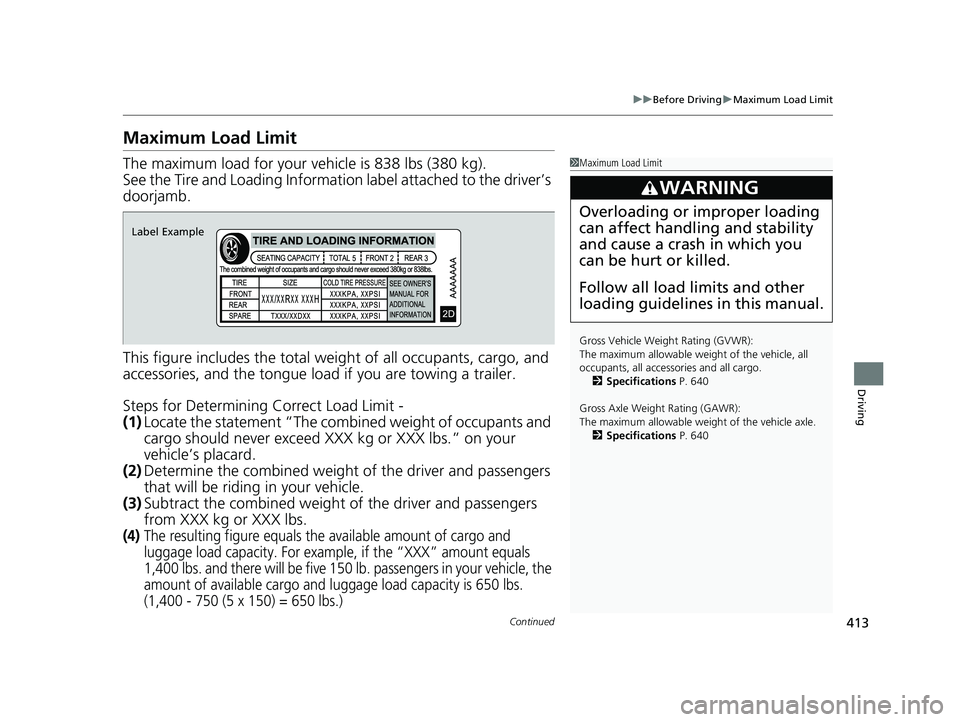
The maximum load for your ve hicle is 838 lbs (380 kg).
See the Tire and Loading Information label attached to the driver’s
doorjamb.
This figure includes the total weig ht of all occupants, cargo, and
accessories, and the tongue load if you are towing a trailer.
Steps for Determining Correct Load Limit -
(1) Locate the statement “The combined weight of occupants and
cargo should never exceed XXX kg or XXX lbs.” on your
vehicle’s placard.
(2) Determine the combined weight of the driver and passengers
that will be riding in your vehicle.
(3) Subtract the combined weight of the driver and passengers
from XXX kg or XXX lbs.
(4)The resulting figure equals the available amount of cargo and
luggage load capacity. For exampl e, if the “XXX” amount equals
1,400 lbs. and there will be five 150 lb. passengers in your vehicle, the
amount of available cargo and luggage load capacity is 650 lbs.
(1,400 - 750 (5 x 150) = 650 lbs.)
1 Maximum Load Limit
Gross Vehicle Weight Rating (GVWR):
The maximum allowable weight of the vehicle, all
occupants, all accesso ries and all cargo.
2 Specifications P. 640
Gross Axle Weight Rating (GAWR):
The maximum allowable weight of the vehicle axle. 2 Specifications P. 640
3WARNING
Overloading or improper loading
can affect handling and stability
and cause a crash in which you
can be hurt or killed.
Follow all load limits and other
loading guidelines in this manual.
Label Example
23 HR-V-313V06000_01.book 413 ページ 2022年4月4日 月曜日 午前10時49分
Page 416 of 664
uuBefore Driving uMaximum Load Limit
414
Driving
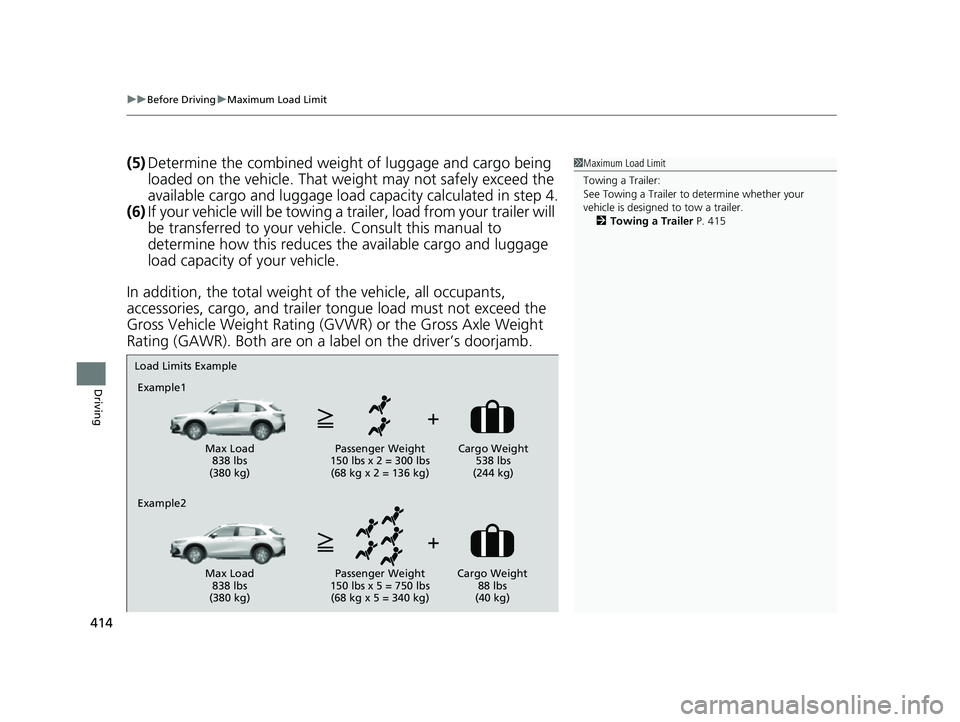
(5) Determine the combined weight of luggage and cargo being
loaded on the vehicle. That we ight may not safely exceed the
available cargo and luggage load capacity calculated in step 4.
(6) If your vehicle will be towing a trailer, load from your trailer will
be transferred to your vehicl e. Consult this manual to
determine how this reduces the available cargo and luggage
load capacity of your vehicle.
In addition, the total weight of the vehicle, all occupants,
accessories, cargo, and trailer tongue load must not exceed the
Gross Vehicle Weight Rating (GVW R) or the Gross Axle Weight
Rating (GAWR). Both are on a label on the driver’s doorjamb.1 Maximum Load Limit
Towing a Trailer:
See Towing a Trailer to determine whether your
vehicle is designed to tow a trailer.
2 Towing a Trailer P. 415
Load Limits Example
Example1
Max Load 838 lbs
(380 kg) Passenger Weight
150 lbs x 2 = 300 lbs (68 kg x 2 = 136 kg) Cargo Weight
538 lbs
(244 kg)
Example2
Max Load 838 lbs
(380 kg) Passenger Weight
150 lbs x 5 = 750 lbs (68 kg x 5 = 340 kg) Cargo Weight
88 lbs
(40 kg)
23 HR-V-313V06000_01.book 414 ページ 2022年4月4日 月曜日 午前10時49分
Page 417 of 664
415
Driving
Towing a Trailer
Your vehicle is not designed to tow a trailer. Attempting to do so can void your
warranties.
Towing Behind a Motorhome
Your vehicle is not designed to be towed behind a motorhome. If your vehicle needs
to be towed in an emergency, refer to the emergency towing information.
2Emergency Towing P. 634
23 HR-V-313V06000_01.book 415 ページ 2022年4月4日 月曜日 午前10時49分
Page 419 of 664
417
uuOff-Highway Driving Guidelines uAvoiding Trouble
Driving
Avoiding Trouble
• Check Out Your Vehicle before you leave the pavement and make sure that all
scheduled maintenance has been completed. Pay special attention to the
condition of the tires, and check the tire pressures.
• Remember the route you choose presents limi ts (too steep or bumpy), you have
limits (driving skill and comfort), and your ve hicle has limits (traction, stability, and
power). Failing to recognize these limits will likely put you and your passengers in
a hazardous situation.
• Accelerating and Braking should be done slowly and gradually. Trying to start
or stop too fast can cause a loss of traction and you could lose control.
• Avoiding Obstacles and Debris in the road reduces the likelihood of a rollover
or damage to your suspension or other components.
• Driving on Slopes increases your risk of a rollover , particularly if you attempt to
drive across a slope that is too steep. Goin g straight up or down a slope is usually
the safest. If you can’t clearly see all cond itions or obstacles on a slope, walk it
before you drive it. If there is any doubt whether you can safely pass, don’t try it.
Find another route. If you get stuck when climbing, do not try to turn around.
Back down slowly following the same route you took up the hill.
• Crossing a Stream - Avoid driving through deep wa ter. If you encounter water
in your route (a small stream or large pu ddle, for example), evaluate it carefully
before going ahead. Make sure it is shallow, flowing slowly, and has firm ground
underneath. If you are not sure of the depth or the ground, turn around and find
another route. Driving through deep water can also damage your vehicle. The
water can get into the transmission and di fferential, diluting the lubricant and
causing an eventual failure. It can also wash the grease out of the wheel bearings.
• If You Get Stuck , carefully go in the direction that you think will get you
unstuck. Do not spin the tires as this will only make things worse and could
damage the transmission. If you are unable to free yourself, your vehicle will need
to be towed. Front and rear tow hooks are provided for this purpose.
23 HR-V-313V06000_01.book 417 ページ 2022年4月4日 月曜日 午前10時49分
Page 472 of 664
470
uuHonda Sensing ®u Low Speed Braking Control*
Driving
■Examples of situations where the sonar sensor cannot detect obstacles
• The sonar sensor is dirty (covered by snow, water, mud, etc.).
• The vehicle is too hot or cold.
• The steering wheel is turned sharply when approaching the obstacle at an angle.
■Examples of other cases where the system may not work correctly
• The vehicle is tilted due to heavy load or suspension modifications.
• An abnormal tire or wheel condition (incorre ct sizes, varied sizes or construction,
improperly inflated, comp act spare tire, etc.).
• Bad weather conditions such as heavy rain, fog, snow, sandstorms, etc.
• The ambient temperature/humidity is too high or low.
• When going down a very steep slope.
• When close to other vehicles with sonar sensors or other objects that emit
ultrasonic waves.
■Situations where the system may activate even without risk of a collision
• When passing through short or narrow gates.
• When driving on uneven surfaces, gr assy areas, or places with steps.
• When a sloped pillar or wall is protruding from a high position.
• When there are obstacles next to the road.
• When driving toward flags, curtains, tree branches, railroad crossing bars, etc.
• When driving on flooded roads.
23 HR-V-313V06000_01.book 470 ページ 2022年4月4日 月曜日 午前10時49分
Page 496 of 664
uuHonda Sensing ®u Lane Keeping Assist System (LKAS)
494
Driving
The system can be used when the following conditions are met.
• The lane in which you are driving has dete ctable lane markers on both sides, and
your vehicle is in the center of the lane.
• The vehicle is traveling between about 45 and 90 mph (72 and 145 km/h).
• You are driving on a straight or slightly curved road.
• The turn signals are off.
• The brake pedal is not depressed.
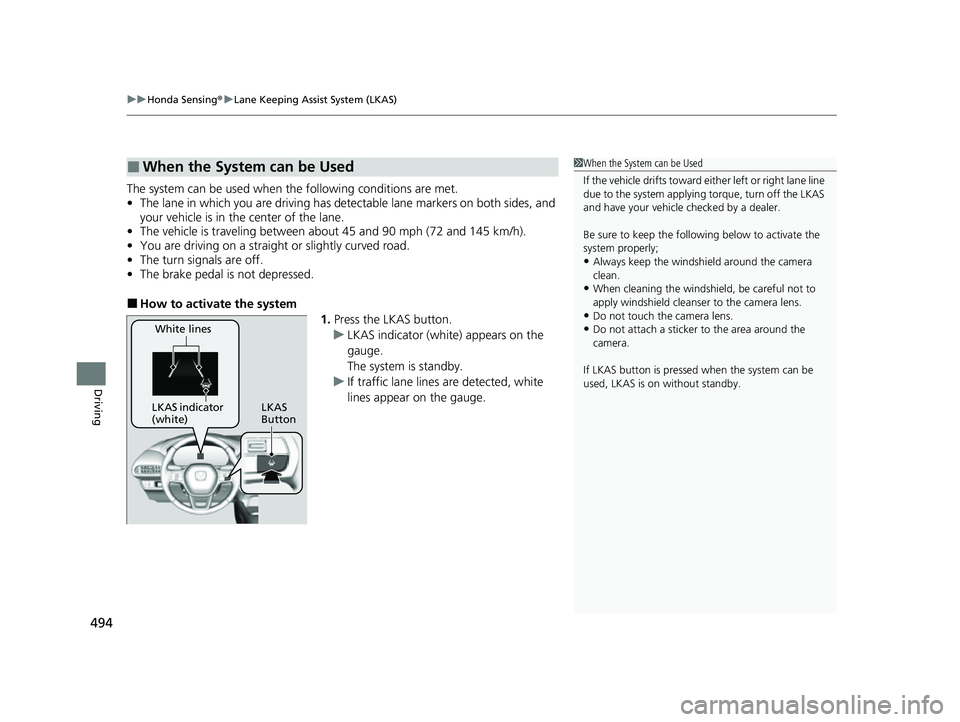
■How to activate the system
1.Press the LKAS button.
u LKAS indicator (white) appears on the
gauge.
The system is standby.
u If traffic lane lines are detected, white
lines appear on the gauge.
■When the System can be Used1When the System can be Used
If the vehicle drifts toward ei ther left or right lane line
due to the system applying torque, turn off the LKAS
and have your vehicle checked by a dealer.
Be sure to keep the following below to activate the
system properly;
•Always keep the windshi eld around the camera
clean.
•When cleaning the windshield, be careful not to
apply windshield cleanser to the camera lens.
•Do not touch the camera lens.
•Do not attach a sticker to the area around the
camera.
If LKAS button is pressed when the system can be
used, LKAS is on without standby.White lines
LKAS indicator
(white) LKAS
Button
23 HR-V-313V06000_01.book 494 ページ 2022年4月4日 月曜日 午前10時49分
Page 528 of 664
uuHonda Sensing ®u Front Wide View Camera
526
Driving
1Front Wide View Camera
If the Some driver assist systems cannot
operate: Camera temperature too high message
appears:
•Use the climate control system to cool down the
interior and, if necessary, also use defroster mode
with the airflow directed towards the camera.
•Start driving the vehicle to lower the windshield
temperature, which cool s down the area around
the camera.
If the Some driver assist systems cannot
operate: Clean front windshield or poor viewing
condition. message appears:
•Park your vehicle in a safe place, and make sure the
windshield is clean.
Clean the windshield if it is dirty. If the message
does not disappear after dr iven for a while, have
your vehicle checked by a dealer.
23 HR-V-313V06000_01.book 526 ページ 2022年4月4日 月曜日 午前10時49分