USB HONDA HRV 2023 Owner's Manual
[x] Cancel search | Manufacturer: HONDA, Model Year: 2023, Model line: HRV, Model: HONDA HRV 2023Pages: 664, PDF Size: 20.2 MB
Page 251 of 664
Continued249
uuAudio System Basic Operation uAudio/Information Screen
Features
You can change, store, and delete the wallpaper on the audio/ information screen.
■Import wallpaper
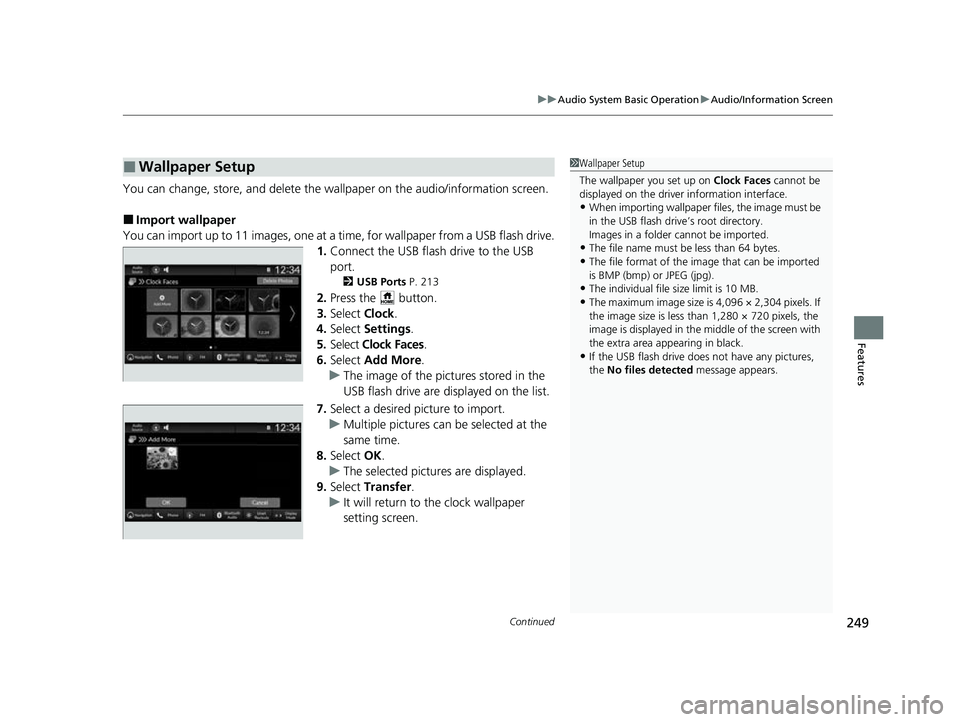
You can import up to 11 images, one at a ti me, for wallpaper from a USB flash drive.
1. Connect the USB flash drive to the USB
port.
2 USB Ports P. 213
2.Press the button.
3. Select Clock.
4. Select Settings .
5. Select Clock Faces .
6. Select Add More .
u The image of the pictures stored in the
USB flash drive are displayed on the list.
7. Select a desired picture to import.
u Multiple pictures can be selected at the
same time.
8. Select OK.
u The selected pictures are displayed.
9. Select Transfer .
u It will return to the clock wallpaper
setting screen.
■Wallpaper Setup1Wallpaper Setup
The wallpaper you set up on Clock Faces cannot be
displayed on the driver information interface.
•When importing wallpaper f iles, the image must be
in the USB flash drive’s root directory.
Images in a folder cannot be imported.
•The file name must be less than 64 bytes.
•The file format of the im age that can be imported
is BMP (bmp) or JPEG (jpg).
•The individual file size limit is 10 MB.
•The maximum image size is 4,096 × 2,304 pixels. If
the image size is less than 1,280 × 720 pixels, the
image is displayed in the middle of the screen with
the extra area appearing in black.
•If the USB flash drive doe s not have any pictures,
the No files detected message appears.
23 HR-V-313V06000_01.book 249 ページ 2022年4月4日 月曜日 午前10時49分
Page 259 of 664
257
uuAudio System Basic Operation uSystem Updates
Continued
Features
System Updates
The audio system’s firmware can be updated with a Wi-Fi connection or with a USB
device.
When the audio system update is available, the notification is shown on the status
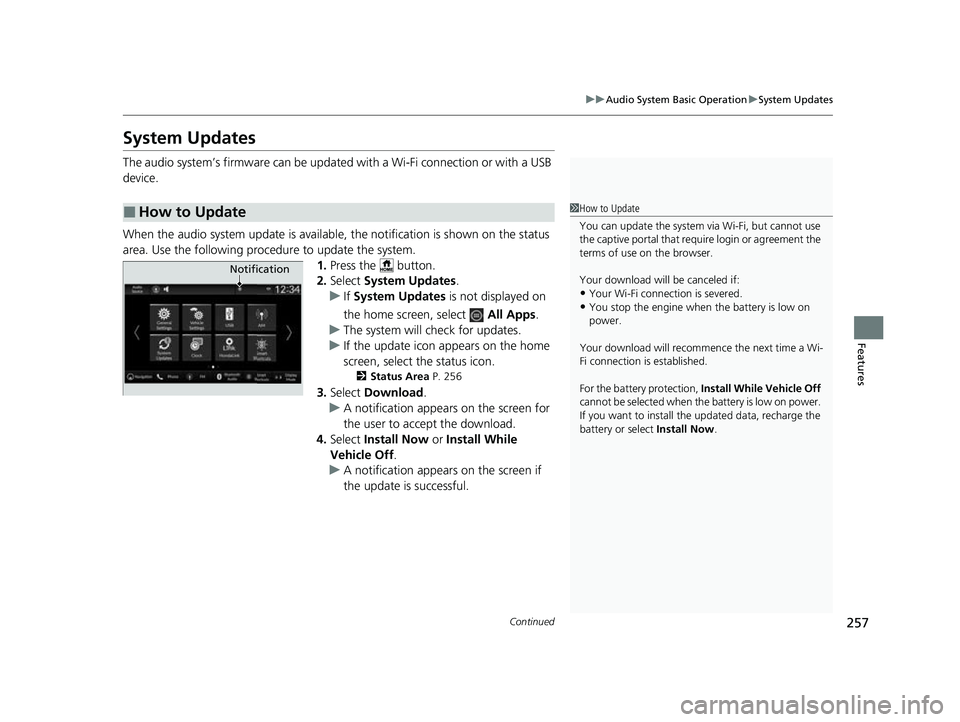
area. Use the following procedure to update the system. 1.Press the button.
2. Select System Updates .
u If System Updates is not displayed on
the home screen, select All Apps.
u The system will check for updates.
u If the update icon appears on the home
screen, select the status icon.
2 Status Area P. 256
3.Select Download .
u A notification appears on the screen for
the user to acce pt the download.
4. Select Install Now or Install While
Vehicle Off.
u A notification appears on the screen if
the update is successful.
■How to Update1How to Update
You can update the system vi a Wi-Fi, but cannot use
the captive portal that require login or agreement the
terms of use on the browser.
Your download will be canceled if:
•Your Wi-Fi connection is severed.
•You stop the engine when the battery is low on
power.
Your download will recommence the next time a Wi-
Fi connection is established.
For the battery protection, Install While Vehicle Off
cannot be selected when the battery is low on power.
If you want to install the updated data, recharge the
battery or select Install Now.
Notification
23 HR-V-313V06000_01.book 257 ページ 2022年4月4日 月曜日 午前10時49分
Page 264 of 664
uuAudio System Basic Operation uSystem Updates
262
Features
■Download the update files from the server
1. Press the button.
2. Select System Updates .
u If System Updates is not displayed on th e home screen, select All Apps.
3. Select Other Methods .
4. Select Via USB .
u A notification appears on the screen.
5. Connect a USB device into the USB port.
u The inventory data is copied into the USB device.
2 USB Ports P. 213
6.Remove the USB device from the USB port.
7. Connect the USB device into your comp uter, and then download the update files.
u Follow the link to downlo ad the required software update files. Refer to
https://usb.honda.com for instructions.
■Update the audio system
1. Press the button.
2. Select System Updates .
3. Select Other Methods .
4. Select Via USB .
u A notification appears on the screen.
5. Connect the USB device with the update files into the USB port.
u A notification appears on the screen.
2 USB Ports P. 213
6.Select Install Now .
u A notification appears on the screen if the update is successful.
■How to Update with a USB Device1How to Update with a USB Device
A USB device with a minimum of 8 GB of free space
or more is recommended.
Be sure to delete any pr evious inventory or update
files from the USB before starting the USB update
process.
23 HR-V-313V06000_01.book 262 ページ 2022年4月4日 月曜日 午前10時49分
Page 270 of 664
268
uuAudio System Basic Operation uVoice Control Operation
Features
■iPod Commands
• List Album
• List Artist
• List Genre
• List Playlist
• Play
• Play
• Play Album
• Play Artist
• Play Genre
• Play Music
• Play Playlist
• Play Song
■USB Commands
• List Album
• List Artist
• List Playlist
• Play
• Play
• Play Album
• Play Artist
• Play Music
• Play Playlist
• Play Song
screen when a navigation voice command is
received.
2
Refer to the Navigation System Manual
•Voice Help
• Cancel
• Back
Voice Help provides guidance for the
current screen.
• Previous
• Next
• Yes
• No
■Navigation Commands*
■Standard Commands
■List Commands
* Not available on all models
23 HR-V-313V06000_01.book 268 ページ 2022年4月4日 月曜日 午前10時49分
Page 286 of 664
284
uuAudio System Basic Operation uPlaying an iPod
Features
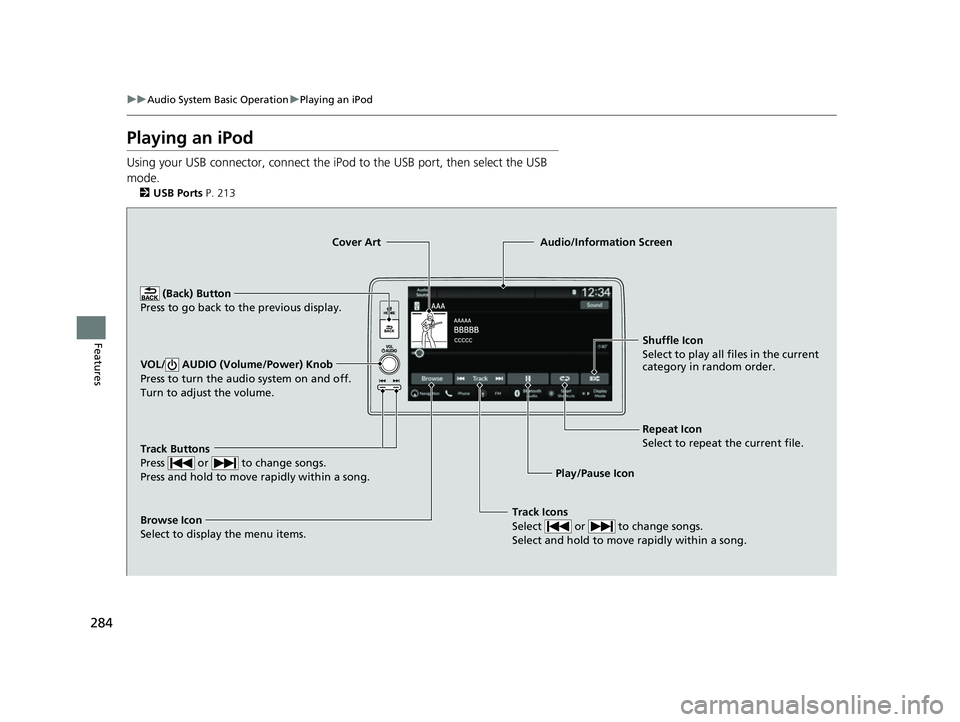
Playing an iPod
Using your USB connector, connect the iPod to the USB port, then select the USB
mode.
2 USB Ports P. 213
Track Icons
Select or to change songs.
Select and hold to move rapidly within a song.
Shuffle Icon
Select to play all files in the current
category in random order.
Cover Art
Audio/Information Screen
Play/Pause Icon
(B
ack) Button
Pre s
s to go back to the previous display.
VOL/ AUDIO (Volume/Power) Knob
Press to turn the audio system on and off.
Turn to adjust the volume.
Repeat Icon
Select to repeat the current file.
Track Buttons
Press or to change songs.
Press and hold to move rapidly within a song.
Browse Icon
Select to display the menu items.
23 HR-V-313V06000_01.book 284 ページ 2022年4月4日 月曜日 午前10時49分
Page 287 of 664
Continued285
uuAudio System Basic Operation uPlaying an iPod
Features
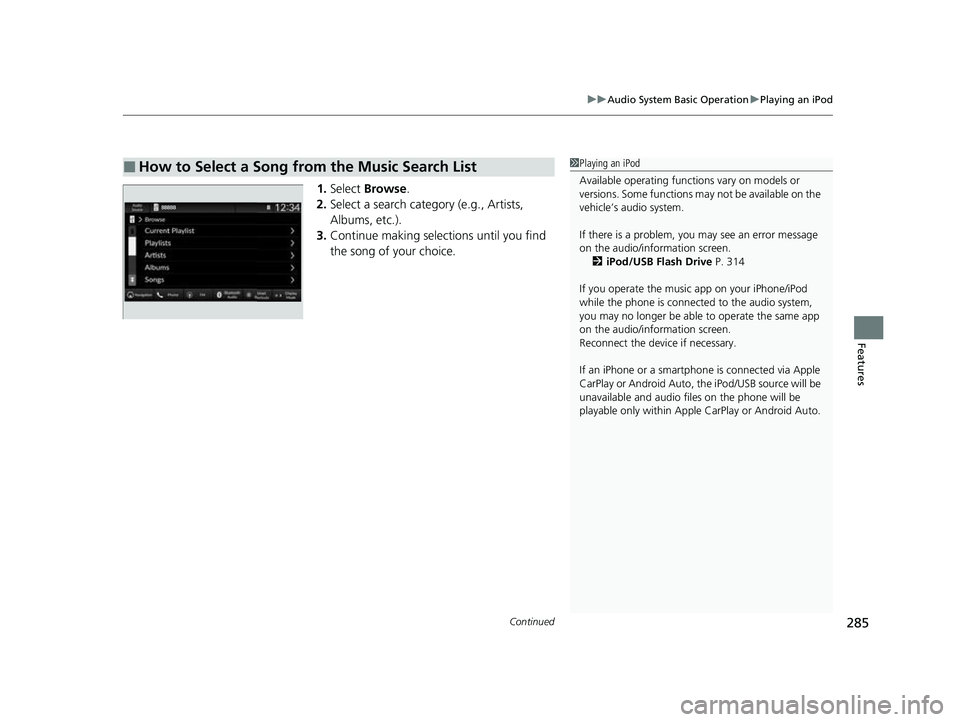
1. Select Browse .
2. Select a search catego ry (e.g., Artists,
Albums, etc.).
3. Continue making selections until you find
the song of your choice.
■How to Select a Song from the Music Search List1Playing an iPod
Available operating functi ons vary on models or
versions. Some functions ma y not be available on the
vehicle’s audio system.
If there is a problem, you may see an error message
on the audio/information screen. 2 iPod/USB Flash Drive P. 314
If you operate the musi c app on your iPhone/iPod
while the phone is connected to the audio system,
you may no longer be able to operate the same app
on the audio/information screen.
Reconnect the devi ce if necessary.
If an iPhone or a smartpho ne is connected via Apple
CarPlay or Android Auto, th e iPod/USB source will be
unavailable and a udio files on the phone will be
playable only within Appl e CarPlay or Android Auto.
23 HR-V-313V06000_01.book 285 ページ 2022年4月4日 月曜日 午前10時49分
Page 289 of 664
287
uuAudio System Basic Operation uPlaying a USB Flash Drive
Continued
Features
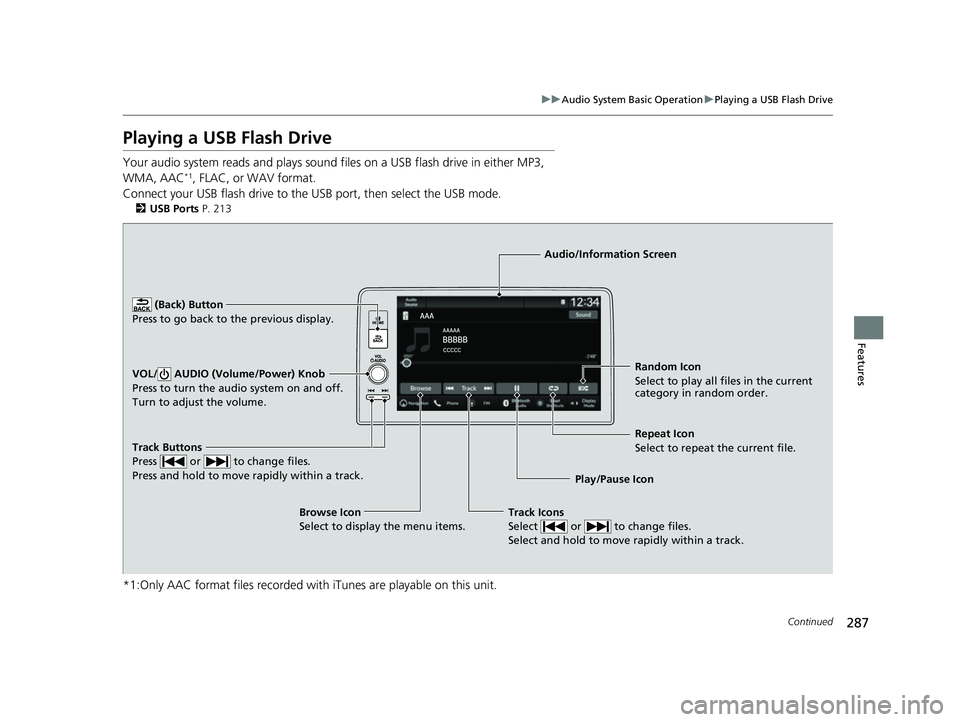
Playing a USB Flash Drive
Your audio system reads and plays sound files on a USB flash drive in either MP3,
WMA, AAC*1, FLAC, or WAV format.
Connect your USB flash drive to the USB port, then select the USB mode.
2 USB Ports P. 213
*1:Only AAC format files recorded with iTunes are playable on this unit.
Track Buttons
Press or to change files.
Press and hold to move rapidly within a track.
Random Icon
Select to play all files in the current
category in random order.
Audio/Information Screen
Play/Pause Icon
(Back) Bu
tt
on
Press to go bac
k to the previous display.
VOL/ AUDIO (Volume/Power) Knob
Press to turn the audio system on and off.
Turn to adjust the volume.
Track Icons
Select or to change files.
Select and hold to move rapidly within a track.
Repeat Icon
Select to repeat the current file.
Browse Icon
Select to display the menu items.
23 HR-V-313V06000_01.book 287 ページ 2022年4月4日 月曜日 午前10時49分
Page 290 of 664
uuAudio System Basic Operation uPlaying a USB Flash Drive
288
Features
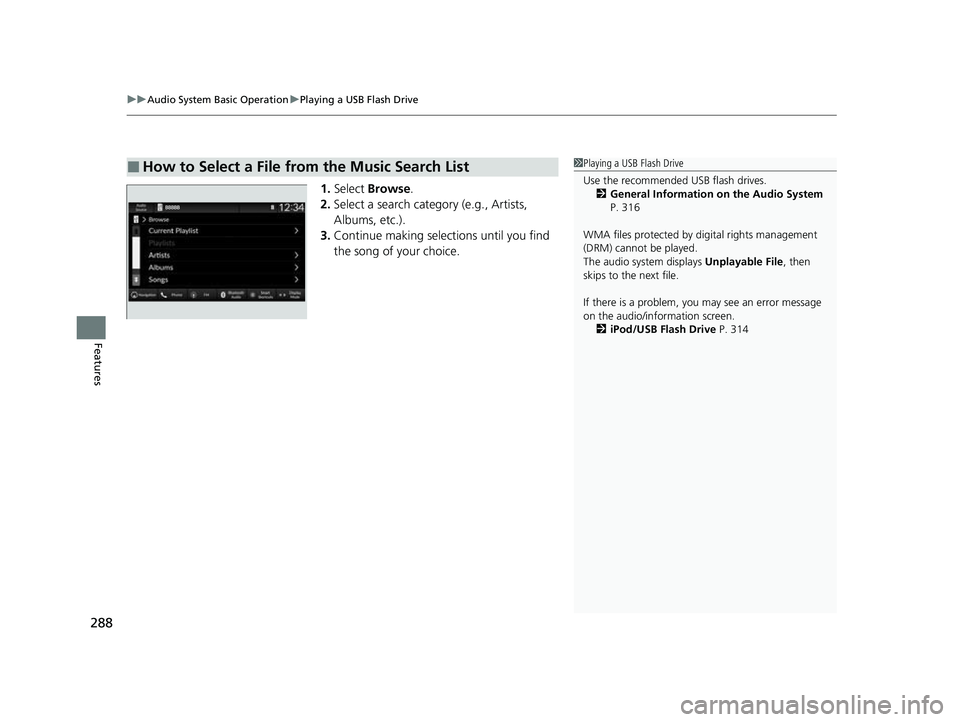
1. Select Browse .
2. Select a search catego ry (e.g., Artists,
Albums, etc.).
3. Continue making selections until you find
the song of your choice.
■How to Select a File from the Music Search List1Playing a USB Flash Drive
Use the recommended USB flash drives.
2 General Information on the Audio System
P. 316
WMA files protected by di gital rights management
(DRM) cannot be played.
The audio system displays Unplayable File, then
skips to the next file.
If there is a problem, you may see an error message
on the audio/information screen.
2 iPod/USB Flash Drive P. 314
23 HR-V-313V06000_01.book 288 ページ 2022年4月4日 月曜日 午前10時49分
Page 291 of 664
289
uuAudio System Basic Operation uPlaying a USB Flash Drive
Features
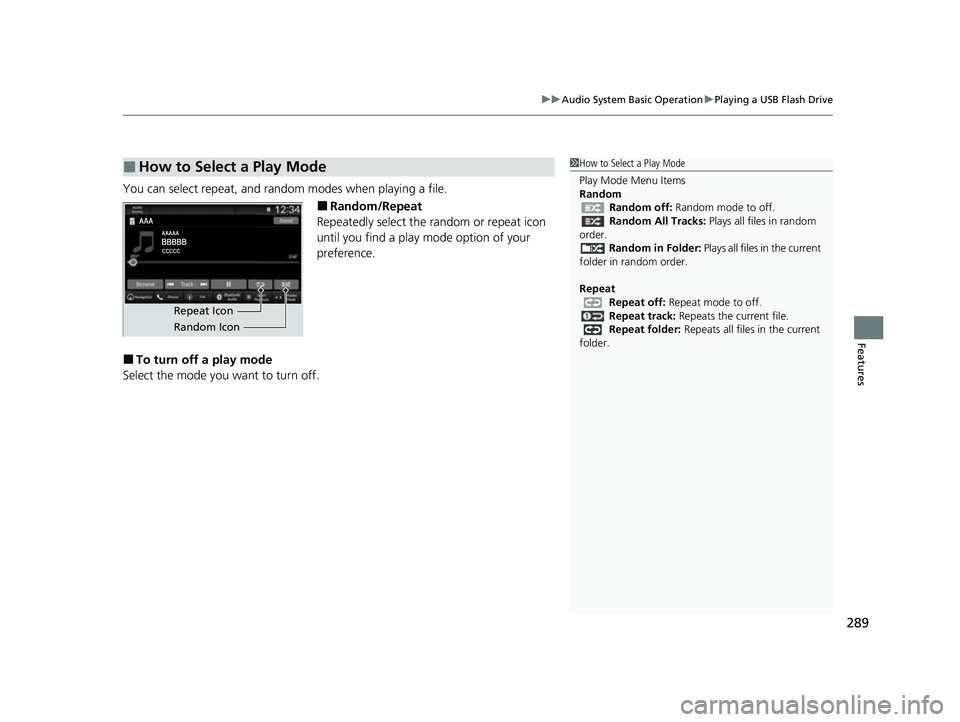
You can select repeat, and random modes when playing a file.
■Random/Repeat
Repeatedly select the random or repeat icon
until you find a play mode option of your
preference.
■To turn off a play mode
Select the mode you want to turn off.
■How to Select a Play Mode1 How to Select a Play Mode
Play Mode Menu Items
Random
Random off: Random mode to off.
Random All Tracks: Plays all files in random
order.
Random in Folder: Plays all files in the current
folder in random order.
Repeat Repeat off: Repeat mode to off.
Repeat track: Repeats the current file.
Repeat folder: Repeats all files in the current
folder.
Repeat Icon
Random Icon
23 HR-V-313V06000_01.book 289 ページ 2022年4月4日 月曜日 午前10時49分
Page 303 of 664
301
uuAudio System Basic Operation uApple CarPlay
Continued
Features
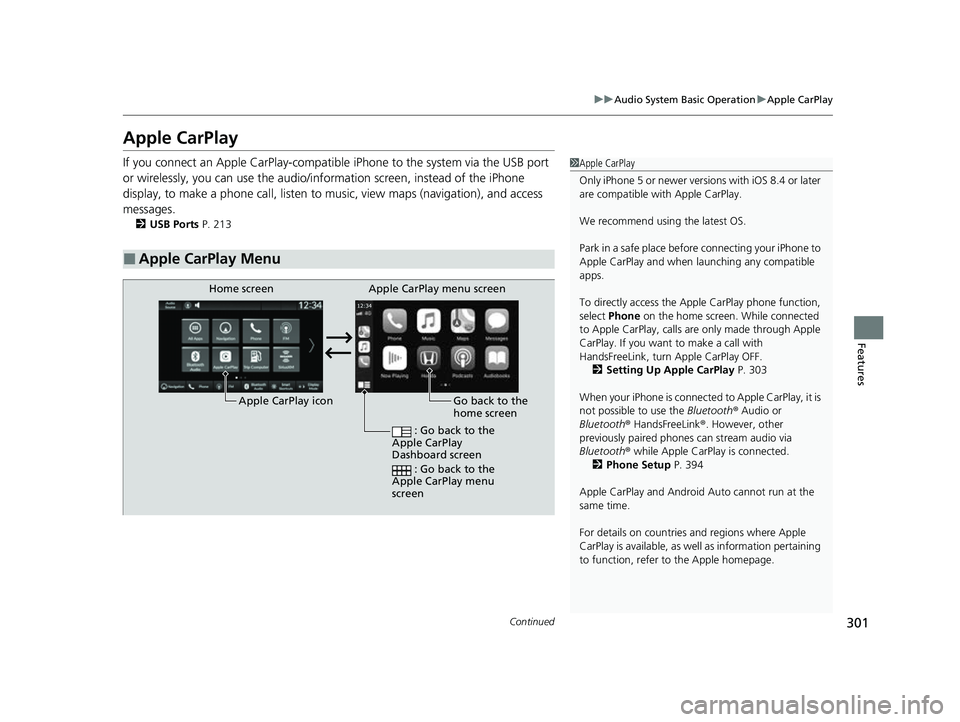
Apple CarPlay
If you connect an Apple CarPlay-compatib le iPhone to the system via the USB port
or wirelessly, you can use the audio/information screen, instead of the iPhone
display, to make a phone call, listen to music, view maps (navigation), and access
messages.
2 USB Ports P. 213
■Apple CarPlay Menu
1Apple CarPlay
Only iPhone 5 or newer versi ons with iOS 8.4 or later
are compatible with Apple CarPlay.
We recommend using the latest OS.
Park in a safe place before connecting your iPhone to
Apple CarPlay and when launching any compatible
apps.
To directly access the Appl e CarPlay phone function,
select Phone on the home screen. While connected
to Apple CarPlay, calls are only made through Apple
CarPlay. If you want to make a call with
HandsFreeLink, turn Apple CarPlay OFF.
2 Setting Up Apple CarPlay P. 303
When your iPhone is connected to Apple CarPlay, it is
not possible to use the Bluetooth® Audio or
Bluetooth ® HandsFreeLink ®. However, other
previously paired phones can stream audio via
Bluetooth ® while Apple CarPlay is connected.
2 Phone Setup P. 394
Apple CarPlay and Android Auto cannot run at the
same time.
For details on c ountries and regions where Apple
CarPlay is available, as well as information pertaining
to function, refer to the Apple homepage.
Go back to the
home screen
Home screen
Apple CarPlay icon Apple CarPlay menu screen
: Go back to the
Apple CarPlay
Dashboard screen
: Go back to the
Apple CarPlay menu
screen
23 HR-V-313V06000_01.book 301 ページ 2022年4月4日 月曜日 午前10時49分