fuel HONDA HRV 2023 Owner's Manual
[x] Cancel search | Manufacturer: HONDA, Model Year: 2023, Model line: HRV, Model: HONDA HRV 2023Pages: 664, PDF Size: 20.2 MB
Page 143 of 664
141
uuLocking and Unlocking the Doors uLocking/Unlocking the Doors from the Outside
Continued
Controls
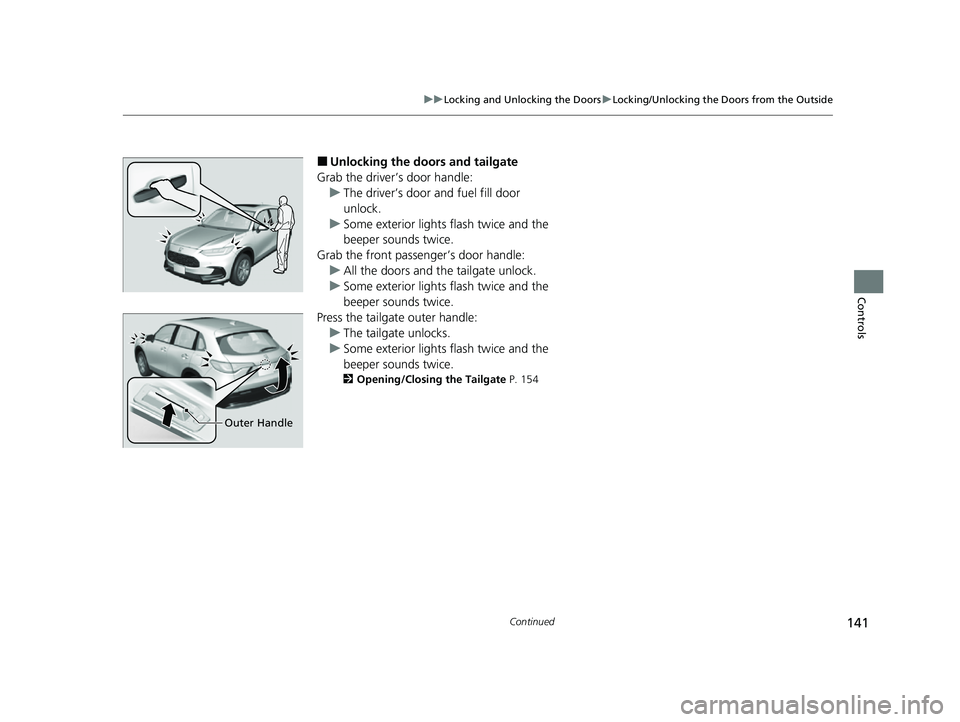
■Unlocking the doors and tailgate
Grab the driver’s door handle: u The driver’s door and fuel fill door
unlock.
u Some exterior lights flash twice and the
beeper sounds twice.
Grab the front passenger’s door handle: u All the doors and the tailgate unlock.
u Some exterior lights flash twice and the
beeper sounds twice.
Press the tailgate outer handle: u The tailgate unlocks.
u Some exterior lights flash twice and the
beeper sounds twice.
2 Opening/Closing the Tailgate P. 154
Outer Handle
23 HR-V-313V06000_01.book 141 ページ 2022年4月4日 月曜日 午前10時49分
Page 147 of 664
Continued145
uuLocking and Unlocking the Doors uLocking/Unlocking the Doors from the Outside
Controls
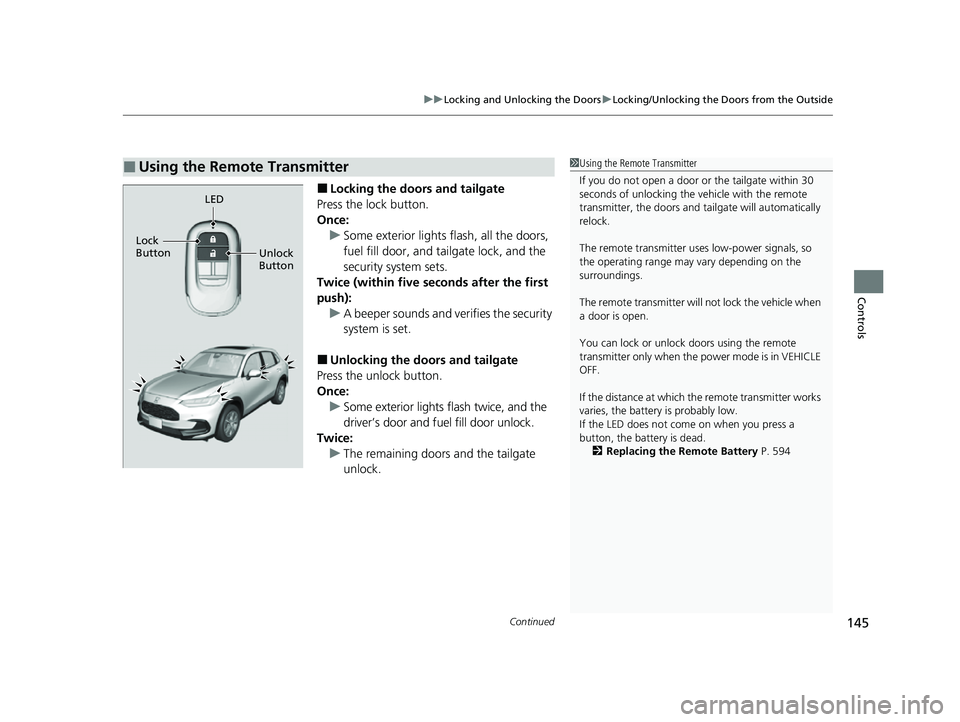
■Locking the doors and tailgate
Press the lock button.
Once: u Some exterior lights flash, all the doors,
fuel fill door, and tailgate lock, and the
security system sets.
Twice (within five se conds after the first
push): u A beeper sounds and verifies the security
system is set.
■Unlocking the doors and tailgate
Press the unlock button.
Once:
u Some exterior lights flash twice, and the
driver’s door and fuel fill door unlock.
Twice: u The remaining doors and the tailgate
unlock.
■Using the Remote Transmitter1Using the Remote Transmitter
If you do not open a door or the tailgate within 30
seconds of unlocking the vehicle with the remote
transmitter, the doors and ta ilgate will automatically
relock.
The remote transmitter us es low-power signals, so
the operating range may vary depending on the
surroundings.
The remote transmitter will not lock the vehicle when
a door is open.
You can lock or unlock doors using the remote
transmitter only when the power mode is in VEHICLE
OFF.
If the distance at which the remote transmitter works
varies, the batter y is probably low.
If the LED does not come on when you press a
button, the battery is dead. 2 Replacing the Remote Battery P. 594
LED
Unlock
Button
Lock
Button
23 HR-V-313V06000_01.book 145 ページ 2022年4月4日 月曜日 午前10時49分
Page 153 of 664
151
uuLocking and Unlocking the Doors uChildproof Door Locks
Controls
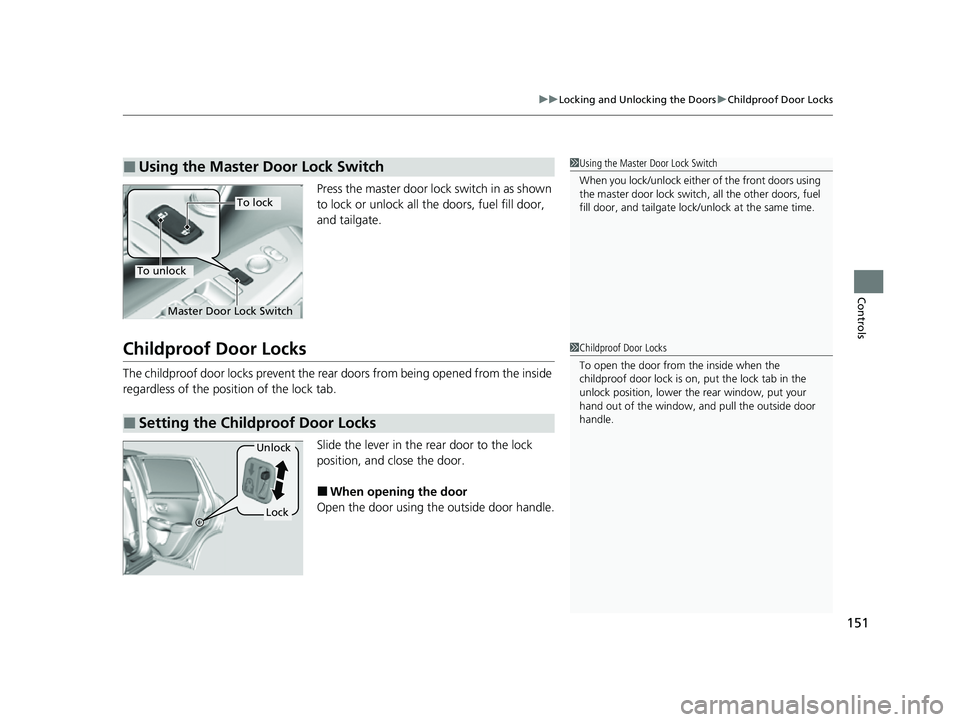
Press the master door lo ck switch in as shown
to lock or unlock all the doors, fuel fill door,
and tailgate.
Childproof Door Locks
The childproof door locks prevent the rear doors from being opened from the inside
regardless of the position of the lock tab.
Slide the lever in the rear door to the lock
position, and close the door.
■When opening the door
Open the door using the outside door handle.
■Using the Master Door Lock Switch1 Using the Master Door Lock Switch
When you lock/unlock either of the front doors using
the master door lock switch , all the other doors, fuel
fill door, and tailga te lock/unlock at the same time.
To lock
To unlock
Master Door Lock Switch
■Setting the Childproof Door Locks
1Childproof Door Locks
To open the door from the inside when the
childproof door lock is on, put the lock tab in the
unlock position, lower the rear window, put your
hand out of the window, and pull the outside door
handle.
Lock
Unlock
23 HR-V-313V06000_01.book 151 ページ 2022年4月4日 月曜日 午前10時49分
Page 213 of 664
211
Features
This chapter describes how to operate technology features.
Audio System
About Your Audio System ................ 212
USB Ports ......................................... 213
Audio System Theft Protection ......... 214
Audio Remote Controls .................... 215
Audio System Basic Operation ........ 219
Adjusting the Sound ........................ 220
Display Setup ................................... 221
Playing AM/FM Radio ....................... 222
Playing an iPod ................................ 224
Playing a USB Flash Drive ................. 227
Playing Bluetooth ® Audio ................. 230
Siri Eyes Free .................................... 234
Models with 7-in. Color Touchscreen
Smartphone Voice Recognition ........ 23T
Apple CarPlay .................................. 23U
Android Auto
TM................................ 24O
Audio System Basic Operation ........ 244
Start Up ........................................... 245
Audio/Information Screen ................ 246
System Updates ............................... 257
Adjusting the Sound ........................ 263
Display Setup ................................... 264
Voice Control Operation .................. 266
Playing AM/FM Radio ....................... 269
Playing SiriusXM ® Radio ................... 273
Playing an iPod ................................ 284Models with 9-in. Color Touchscreen
Playing a USB Flash Drive ................M 28V
Playing Bluetooth ® Audio ................ 290
HondaLink ®..................................... 293
Smart Shortcuts ............................... 297
Wi-Fi Connection ............................. 300
Apple CarPlay .................................. 301
Android Auto
TM............................... 308
Audio Error Messages ...................... 314
General Information on the Audio System ............................................. 316
Customized Features ................ 337, 345
Bluetooth® HandsFreeLink® ..... 369, 389
Refuel Recommend .......................... 408
23 HR-V-313V06000_01.book 211 ページ 2022年4月4日 月曜日 午前10時49分
Page 326 of 664

324
uuGeneral Information on the Audio System uHonda App License Agreement
Features
E. Information Coll ection and Storage
1. Information Collection, Use, Transmission and Storage of Data. Consent to Use of Data:
You agree that HONDA and PROVIDERS may
collect and use your information gathered in any manner as part of product support services related to the SOFTWARE or related services.
HONDA may share such information with third parties, including, without limitation, PROVIDERS, th ird party software and services
suppliers, their affiliates and/or their desi gnated agents, solely to improve their products or to provide services or technolo gies to you.
HONDA, third party software and systems s uppliers, their affiliates and/or their designated agent may disclose this information to others,
but not in a form that pe rsonally identifies you.
2. Information Storage.
Depending on the type of multimedia system you have in your VEHICLE, certain information may be stored for ease
of use of the SOFTWARE including, without limitation, search hi story, location history in certain applications, previous and saved
destinations, map locations within certain applications, and device numbers and contact information.
(a) Vehicle Health Information.
Your VEHICLE may remotely trans mit information regarding the status and health of your VEHICLE
(“VEHICLE INFORMATION”) to HONDA without notification to you. VEHICLE INFORMATION may contain VEHICLE maintenance and
malfunction status that is derived from VEHICLE diagnostic data and includes, but is not limited to, status of powered doors and windows,
battery life data, battery charging data, VEHICLE speed, coolant temperat ure, air compressor revolution, output power, warning codes,
diagnostic trouble codes, fuel injection volu me, and engine rotations per minute. VEHICL E HEALTH INFORMATION may be used by HON DA
for research and development, to deliver HONDA SERVICES and information to you, and to contact you, and is retained only for a period
of time necessary to fulfill these goals.
(b) VEHICLE Geolocation Data (non-navigation/map based).
If you opt-in to geolocation-based SERVICES, your vehicle’s geolocation data
(latitude and longitude) will be automatically se nt from your VEHICLE to HONDA and PROVIDERS.
(c) You understand that the inputting or uploading of information to your VEHICLE’s multimedia system or the SOFTWARE or SERVIC ES is
at your own risk and that HONDA is not responsible for unauthorized access to or use of any personal or other information. All information
uploaded to the SOFTWARE and SERVICES may be stored on your VEHICLES’s multimedia system and you understand that the security and
safety of your VEHICLE’s multimedia system is your sole responsibility.
23 HR-V-313V06000_01.book 324 ページ 2022年4月4日 月曜日 午前10時49分
Page 349 of 664
347
uuCustomized Features u
Continued
Features
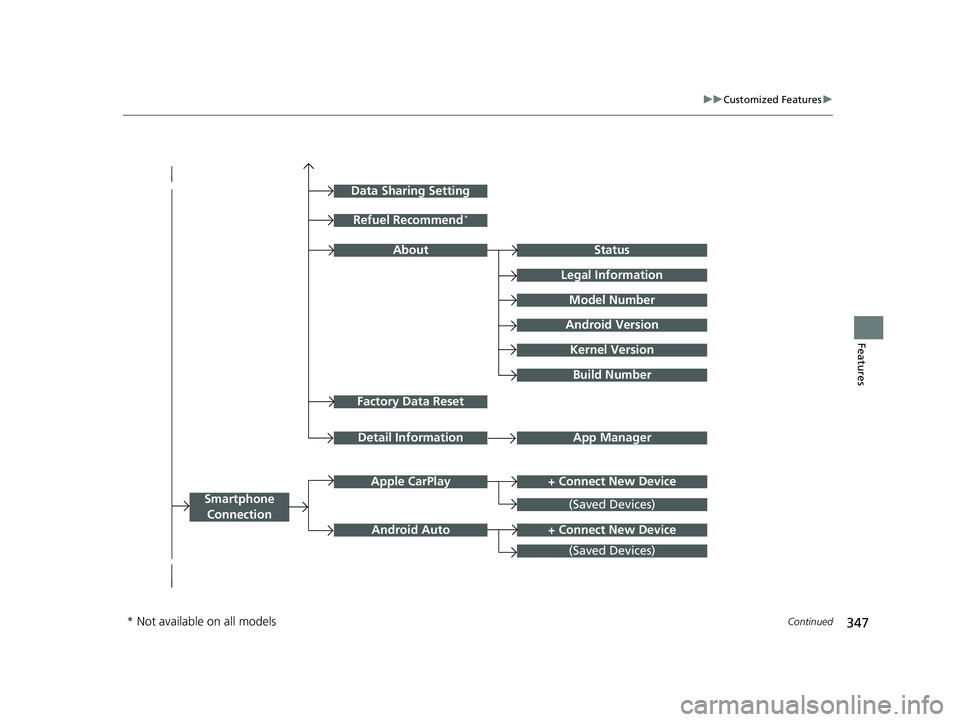
Factory Data Reset
Status
Legal Information
Build Number
Data Sharing Setting
Model Number
Android Version
Kernel Version
App ManagerDetail Information
Refuel Recommend*
About
+ Connect New DeviceApple CarPlay
Smartphone
Connection
Android Auto
(Saved Devices)
+ Connect New Device
(Saved Devices)
* Not available on all models
23 HR-V-313V06000_01.book 347 ページ 2022年4月4日 月曜日 午前10時49分
Page 353 of 664
351
uuCustomized Features u
Continued
Features
*1:Default SettingCustomizable Features
DescriptionSelectable Settings
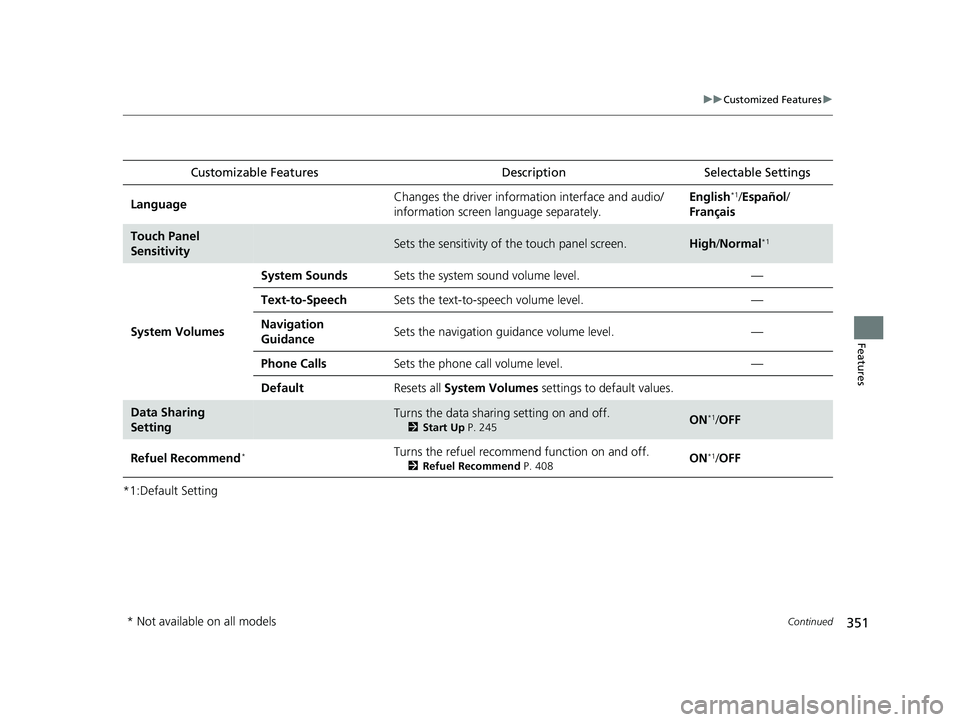
LanguageChanges the driver information interface and audio/
information screen language separately.English*1/Español /
Français
Touch Panel
SensitivitySets the sensitivity of the touch panel screen.High /Normal*1
System Volumes
System SoundsSets the system sound volume level.—
Text-to-SpeechSets the text-to-speech volume level.—
Navigation
GuidanceSets the navigation guidance volume level.—
Phone CallsSets the phone call volume level.—
DefaultResets all System Volumes settings to default values.
Data Sharing
SettingTurns the data sharing setting on and off.
2Start Up P. 245ON*1/OFF
Refuel Recommend*Turns the refuel recommend function on and off.
2 Refuel Recommend P. 408ON*1/OFF
* Not available on all models
23 HR-V-313V06000_01.book 351 ページ 2022年4月4日 月曜日 午前10時49分
Page 361 of 664
359
uuCustomized Features u
Continued
Features
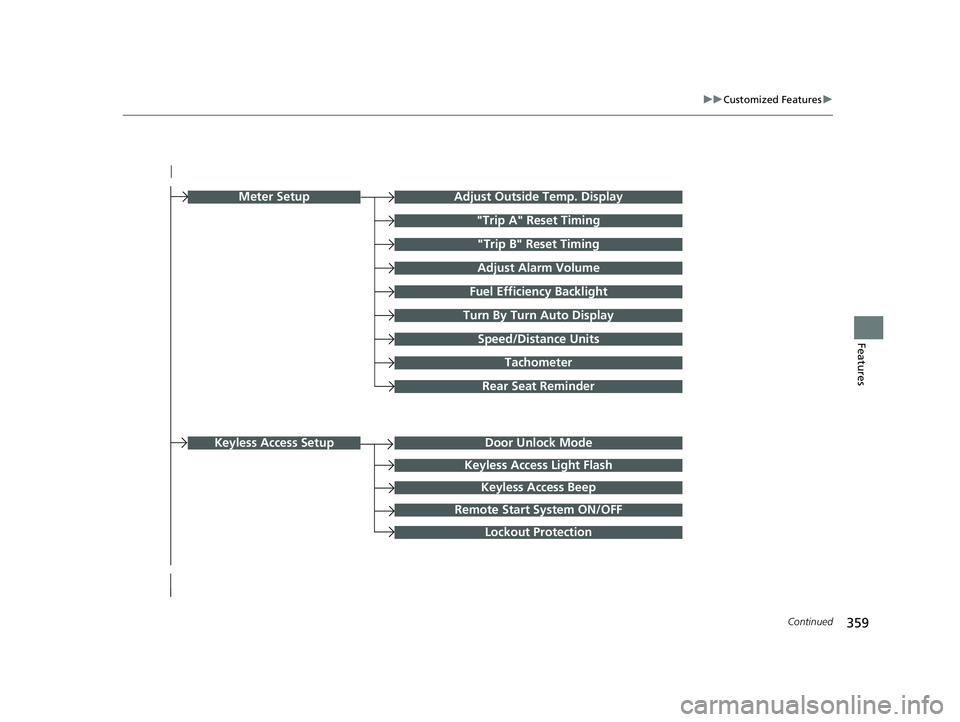
Turn By Turn Auto Display
Speed/Distance Units
Keyless Access Light Flash
Rear Seat Reminder
Door Unlock Mode
Keyless Access Beep
Remote Start System ON/OFF
Lockout Protection
Keyless Access Setup
Meter SetupAdjust Outside Temp. Display
"Trip A" Reset Timing
"Trip B" Reset Timing
Adjust Alarm Volume
Fuel Efficiency Backlight
Tachometer
23 HR-V-313V06000_01.book 359 ページ 2022年4月4日 月曜日 午前10時49分
Page 365 of 664

363
uuCustomized Features u
Continued
Features
■Meter Setup
*1:Default Setting
Customizable Features Description Selectable Settings
Adjust Outside Temp.
DisplaySelects to adjust outside temperature reading by a few degrees.2Outside Temperature P. 105
-5°F ~ ±0°F*1 ~ +5°F (U.S.)
-3°C ~ ±0°C*1 ~ +3°C (Canada)
"Trip A" Reset Timing Selects the timing
to reset Trip A.
2Range/Fuel/Trip Meter P. 109
2 Speed/Time/Trip Meter P. 111When Fully Refueled/IGN OFF /
Manually Reset*1
"Trip B" Reset TimingSelects the timing to reset Trip B.
2 Range/Fuel/Trip Meter P. 109
2 Speed/Time/Trip Meter P. 111When Fully Refueled/IGN OFF /
Manually Reset*1
Adjust Alarm Volume Changes volume level of all system warnings, door opening
warning and indicator. High
/Mid*1/Low
Fuel Efficien cy BacklightTurns the ambient meter feature on and off.ON*1/OFF
Turn By Turn Auto Display Turns on/off the pop-up warning in
the turn-by-turn navigation
in the driver information interface.
2 Turn-by-Turn Directions P. 113ON*1/OFF
Speed/Distance UnitsSelects the trip computer units.
2 Speed/Distance Units P. 122
km/h · km/mph · miles*1 (U.S.)
km/h · km*1/ mph · miles (Canada)
Tachometer Selects whether the tachometer
come on the driver information
interface. ON
*1/
OFF
Rear Seat ReminderTurns the Rear Seat Reminder feature on and off.ON*1/OFF
23 HR-V-313V06000_01.book 363 ページ 2022年4月4日 月曜日 午前10時49分
Page 410 of 664
408
Features
Refuel Recommend
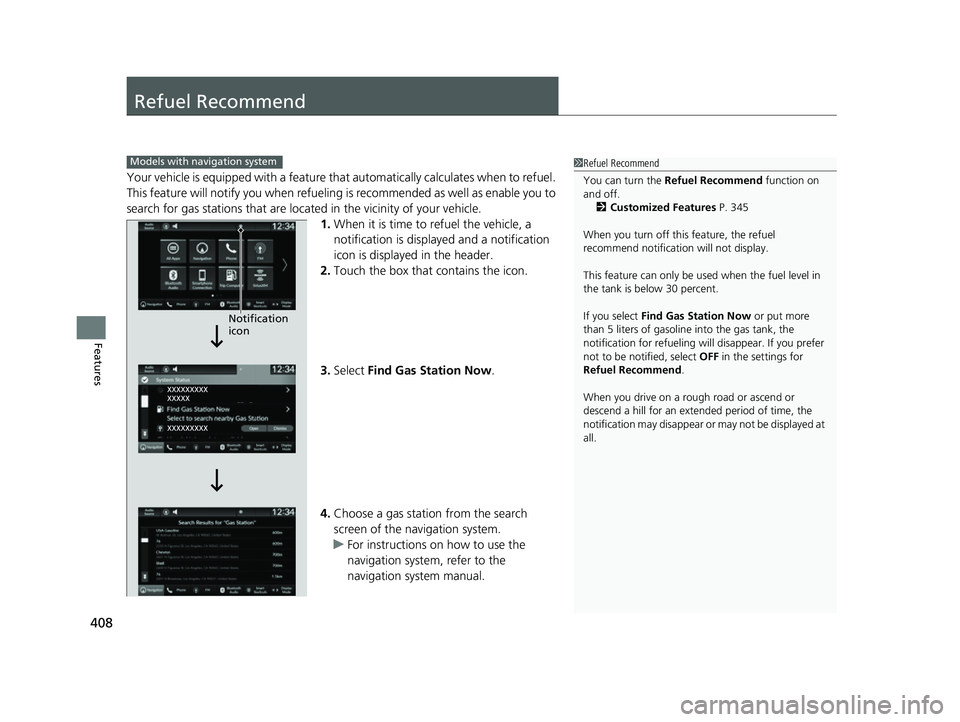
Your vehicle is equipped with a feature that automatically calculates when to refuel.
This feature will notify you when refueling is recommended as well as enable you to
search for gas stations that are loca ted in the vicinity of your vehicle.
1. When it is time to refuel the vehicle, a
notification is displayed and a notification
icon is displayed in the header.
2. Touch the box that contains the icon.
3. Select Find Gas Station Now .
4. Choose a gas station from the search
screen of the navigation system.
u For instructions on how to use the
navigation system, refer to the
navigation system manual.
1Refuel Recommend
You can turn the Refuel Recommend function on
and off.
2 Customized Features P. 345
When you turn off this feature, the refuel
recommend notification will not display.
This feature can only be used when the fuel level in
the tank is below 30 percent.
If you select Find Gas Station Now or put more
than 5 liters of gasoline into the gas tank, the
notification for refueling will disappear. If you prefer
not to be notified, select OFF in the settings for
Refuel Recommend .
When you drive on a rough road or ascend or
descend a hill for an ex tended period of time, the
notification may disappear or may not be displayed at
all.Models with navigation system
Notification
icon
23 HR-V-313V06000_01.book 408 ページ 2022年4月4日 月曜日 午前10時49分