key HONDA HRV 2023 Owner's Guide
[x] Cancel search | Manufacturer: HONDA, Model Year: 2023, Model line: HRV, Model: HONDA HRV 2023Pages: 664, PDF Size: 20.2 MB
Page 299 of 664
297
uuAudio System Basic Operation uSmart Shortcuts
Continued
Features
Smart Shortcuts
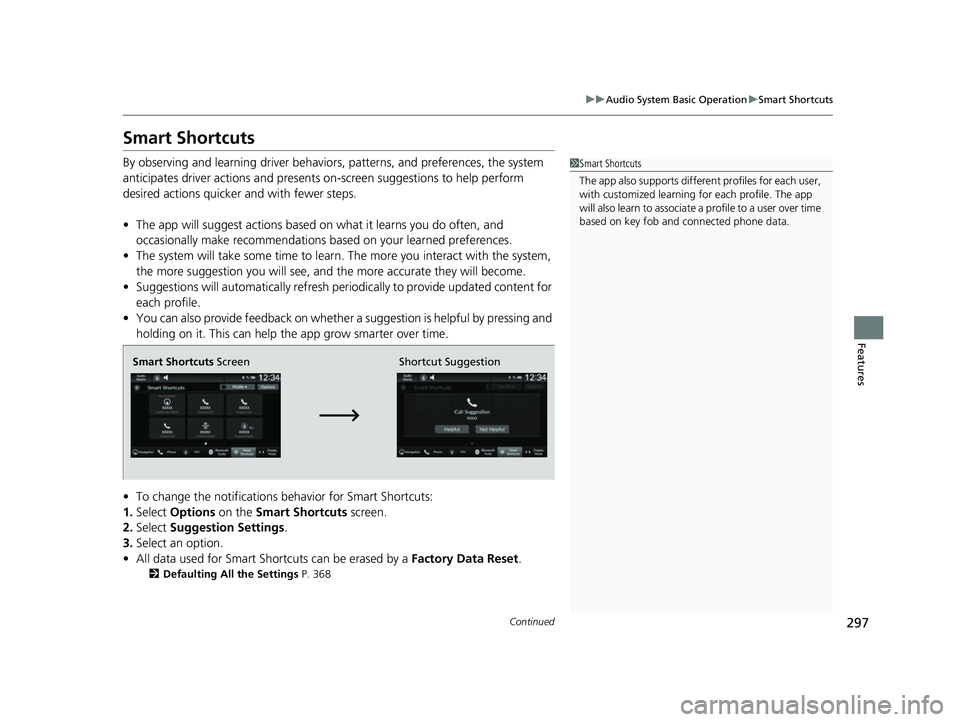
By observing and learning driver behavior s, patterns, and preferences, the system
anticipates driver actions and presents on-screen suggestions to help perform
desired actions quicker and with fewer steps.
• The app will suggest actions based on what it learns you do often, and
occasionally make recommendations ba sed on your learned preferences.
• The system will take some time to learn. The more you interact with the system,
the more suggestion you will see, and the more accurate they will become.
• Suggestions will automatically refresh periodically to provide updated content for
each profile.
• You can also provide feedback on whether a suggestion is helpful by pressing and
holding on it. This can help the app grow smarter over time.
• To change the notifications behavior for Smart Shortcuts:
1. Select Options on the Smart Shortcuts screen.
2. Select Suggestion Settings .
3. Select an option.
• All data used for Smart Shortcuts can be erased by a Factory Data Reset.
2Defaulting All the Settings P. 368
1Smart Shortcuts
The app also supports different profiles for each user,
with customized learning for each profile. The app
will also learn to associate a profile to a user over time
based on key fob and connected phone data.
Smart Shortcuts Screen Shortcut Suggestion
23 HR-V-313V06000_01.book 297 ページ 2022年4月4日 月曜日 午前10時49分
Page 310 of 664
308
uuAudio System Basic Operation uAndroid AutoTM
Features
Android AutoTM
When you connect an Android phone to the audio system via the USB port or
wirelessly, Android Auto is automatically initiated. When connected via Android
Auto, you can use the audio/information screen to access the Phone, Google Maps
(Navigation), and Google Now functions. When you first use Android Auto, a
tutorial will appe ar on the screen.
We recommend that you complete this tuto rial while safely parked before using
Android Auto.
2 USB Ports P. 213
2 Auto Pairing Connection P. 309
•Maps
Display Google Maps and use the navigation function just as you would with your
Android phone. When the vehicle is in motion, it is not possible to make keyboard
entries. Stop the vehicle in a safe location to undertake a search or provide other
inputs.
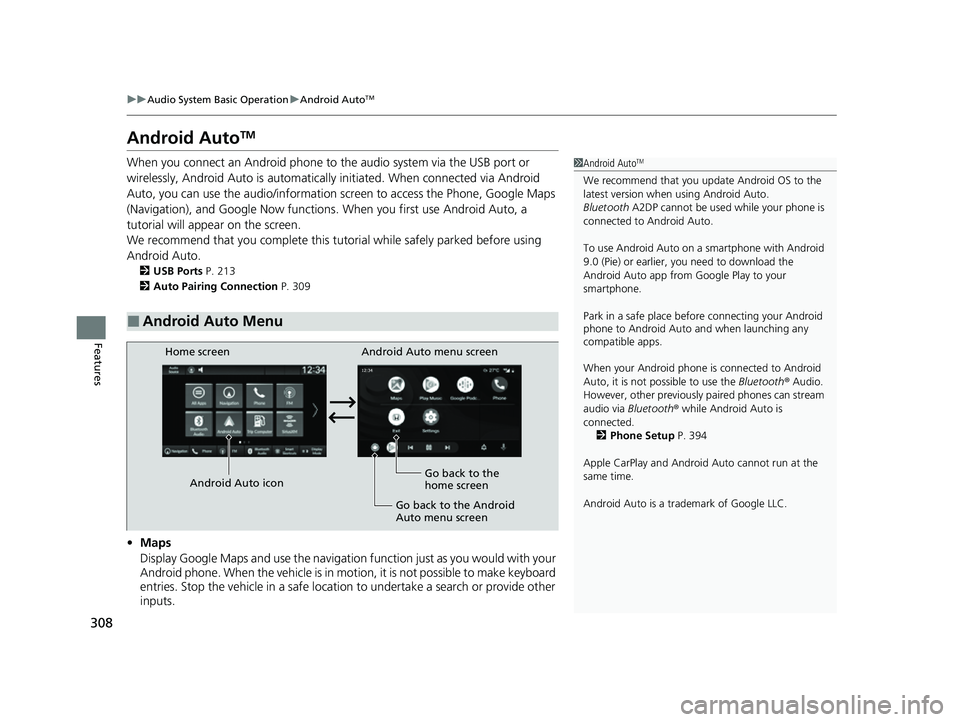
■Android Auto Menu
1 Android AutoTM
We recommend that you upda te Android OS to the
latest version when using Android Auto.
Bluetooth A2DP cannot be used while your phone is
connected to Android Auto.
To use Android Auto on a smartphone with Android
9.0 (Pie) or earl ier, you need to download the
Android Auto app from Google Play to your
smartphone.
Park in a safe place befo re connecting your Android
phone to Android Auto and when launching any
compatible apps.
When your Android phone is connected to Android
Auto, it is not possible to use the Bluetooth® Audio.
However, other previously paired phones can stream
audio via Bluetooth ® while Android Auto is
connected. 2 Phone Setup P. 394
Apple CarPlay and Android Auto cannot run at the
same time.
Android Auto is a trademark of Google LLC.
Android Auto menu screen
Home screen
Android Auto icon Go back to the
home screen
Go back to the Android
Auto menu screen
23 HR-V-313V06000_01.book 308 ページ 2022年4月4日 月曜日 午前10時49分
Page 361 of 664
359
uuCustomized Features u
Continued
Features
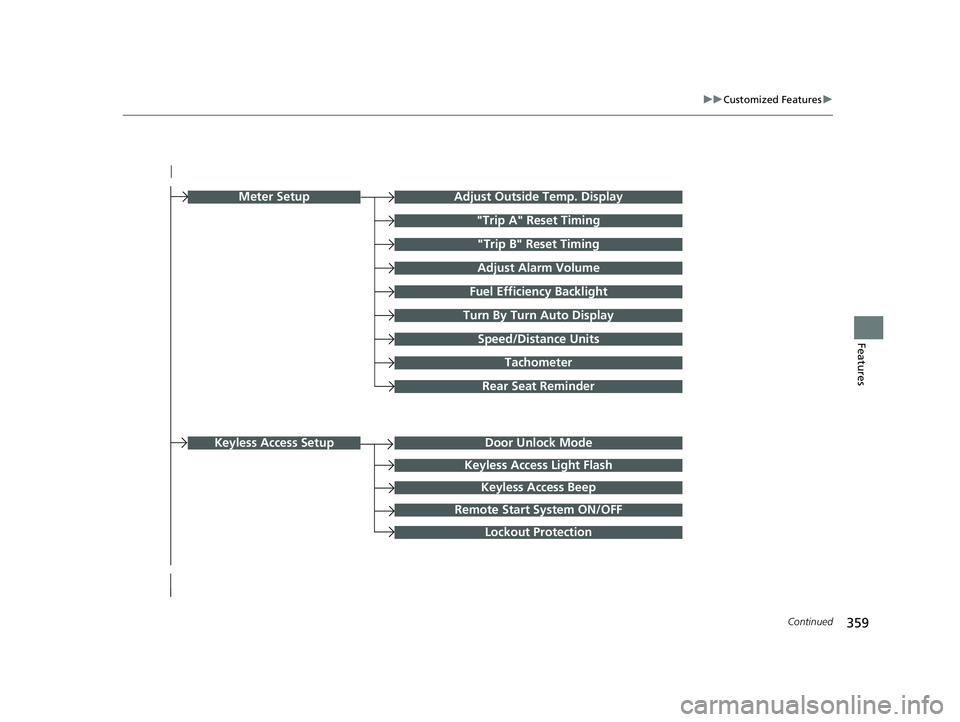
Turn By Turn Auto Display
Speed/Distance Units
Keyless Access Light Flash
Rear Seat Reminder
Door Unlock Mode
Keyless Access Beep
Remote Start System ON/OFF
Lockout Protection
Keyless Access Setup
Meter SetupAdjust Outside Temp. Display
"Trip A" Reset Timing
"Trip B" Reset Timing
Adjust Alarm Volume
Fuel Efficiency Backlight
Tachometer
23 HR-V-313V06000_01.book 359 ページ 2022年4月4日 月曜日 午前10時49分
Page 362 of 664
360
uuCustomized Features u
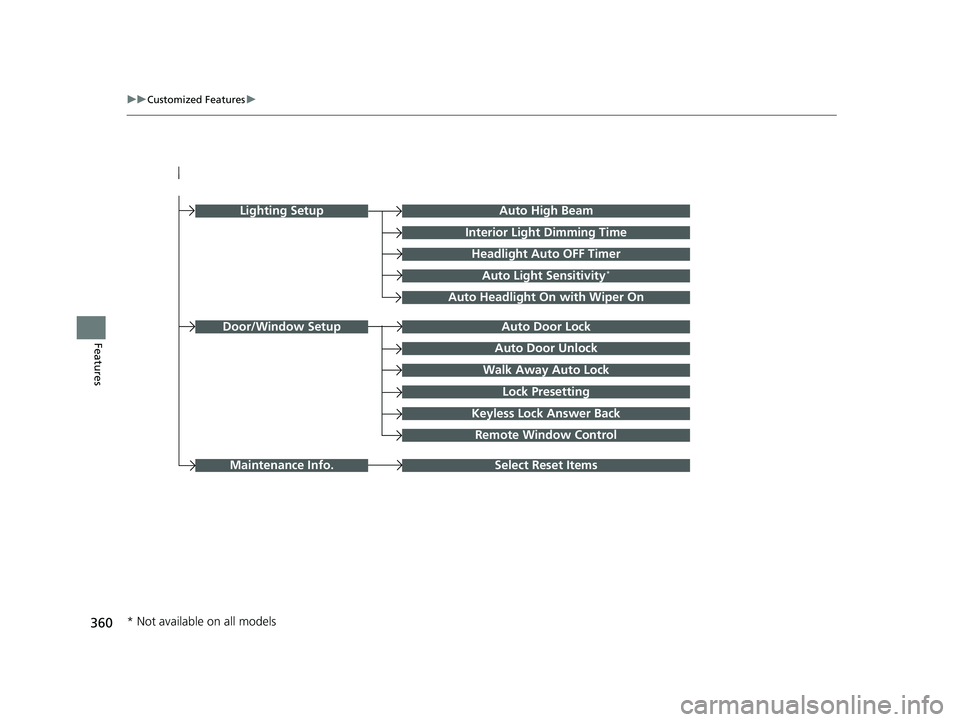
FeaturesAuto Door Unlock
Auto Door Lock
Walk Away Auto Lock
Lock Presetting
Keyless Lock Answer Back
Door/Window Setup
Lighting SetupAuto High Beam
Interior Light Dimming Time
Headlight Auto OFF Timer
Auto Light Sensitivity*
Auto Headlight On with Wiper On
Remote Window Control
Select Reset ItemsMaintenance Info.
* Not available on all models
23 HR-V-313V06000_01.book 360 ページ 2022年4月4日 月曜日 午前10時49分
Page 366 of 664

364
uuCustomized Features u
Features
■Keyless Access Setup
*1:Default Setting
Customizable Features Description Selectable Settings
Door Unlock ModeChanges which doors unlock when you grab the driver’s door
handle.Driver Door Only*1/All
Doors
Keyless Access Light Flash Causes some exterior lights to flash when you unlock/lock the
doors. ON
*1/
OFF
Keyless Access BeepCauses the beeper to sound when you unlock/lock the doors.ON*1/OFF
Remote Start System ON/
OFF Turns the remote engine start feature on and off.
ON
*1/OFF
Lockout ProtectionChanges the settings for the lockout protection function.ON*1/OFF
23 HR-V-313V06000_01.book 364 ページ 2022年4月4日 月曜日 午前10時49分
Page 368 of 664

366
uuCustomized Features u
Features
■Door/Window Setup
*1:Default Setting
Customizable Features Description Selectable Settings
Auto Door LockChanges the setting for the automatic locking feature.OFF/With Vehicle Speed*1/
Shift From P
Auto Door Unlock Changes the setting for when the doors unlock automatically. OFF
/All Doors When
Driver’s Door Opens
*1/ All
Doors When Shifted to
Park/ All Doors With IGN
OFF
Walk Away Auto LockChanges the settings for the auto lock function when you walk
away from the vehicle.ON /OFF*1
Lock Presetting Changes the settings for the Lock Presetting function. ON*1/OFF
Keyless Lock Answer Back
Turns on/off flash of exterior light s when doors are locked/unlocked
by the keyless remote.
2 Using the Remote Transmitter P. 155
ON*1/OFF
Remote Window Control Turns the remote window control on and off. ON
*1/OFF
23 HR-V-313V06000_01.book 366 ページ 2022年4月4日 月曜日 午前10時49分
Page 374 of 664

372
uuBluetooth ® HandsFreeLink ®u HFL Menus
Features
HFL Menus
The power mode must be in ACCESSORY or ON to use the system.1HFL Menus
To use HFL, you must first pair your Bluetooth-
compatible cell phone to th e system while the vehicle
is parked.
Some functions are limited while driving. A message
appears on the screen when the vehicle is moving
and the operation is canceled.
PHONE button
Recent Calls
*1All
Pair a phone to the system.Connect New Device
Change DeviceConnects a paired phone.
Priority Device
Sets a device as the priority device.
Bluetooth Settings
Keypad*1
Settings
Favorite
Contacts*1(Existing entry list)
Contacts*1
Dialed
Missed
Received
Display the last outgoing, incoming and missed calls.
Display the last outgoing calls.
Display the last missed calls.
Display the last incoming calls.
Dial the selected number in the favorite contacts list.
Display the phonebook of the paired phone.
Enter a phone number to dial.
Disconnect All DeviceDisconnect a paired phone from the system.
Delete Device
Delete a previously paired phone.*1 : Available only when a phone is connected to HFL.
23 HR-V-313V06000_01.book 372 ページ 2022年4月4日 月曜日 午前10時49分
Page 384 of 664
382
uuBluetooth ® HandsFreeLink ®u HFL Menus
Features
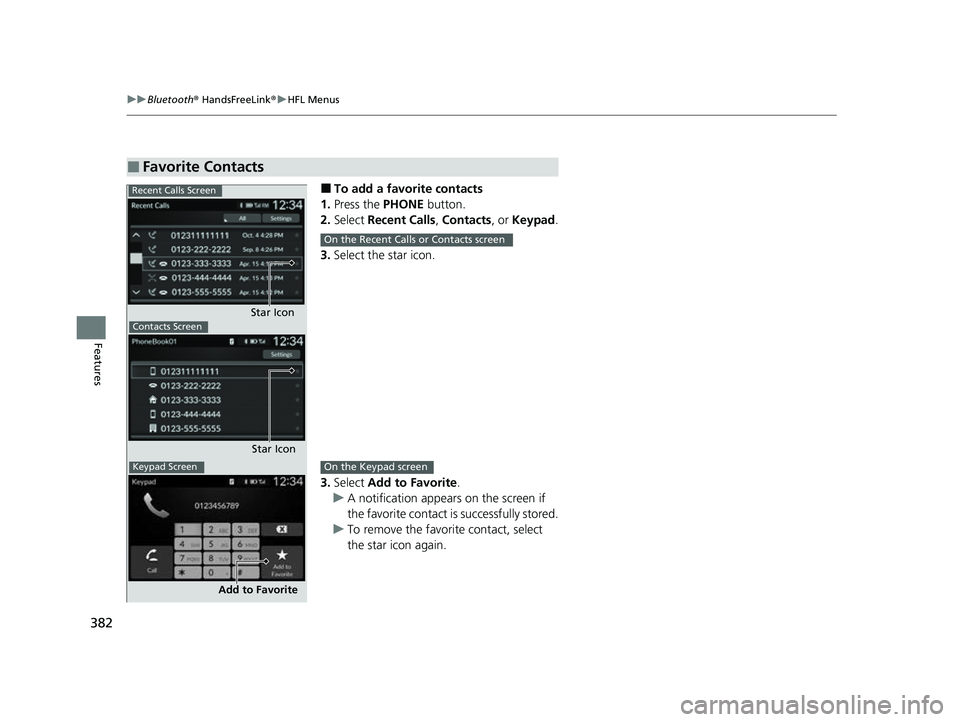
■To add a favorite contacts
1. Press the PHONE button.
2. Select Recent Calls , Contacts , or Keypad .
3. Select the star icon.
3. Select Add to Favorite .
u A notification appears on the screen if
the favorite contact is successfully stored.
u To remove the favorite contact, select
the star icon again.
■Favorite Contacts
Recent Calls Screen
Star IconContacts Screen
Star Icon
Keypad Screen
Add to Favorite
On the Recent Calls or Contacts screen
On the Keypad screen
23 HR-V-313V06000_01.book 382 ページ 2022年4月4日 月曜日 午前10時49分
Page 387 of 664
Continued385
uuBluetooth ® HandsFreeLink ®u HFL Menus
Features
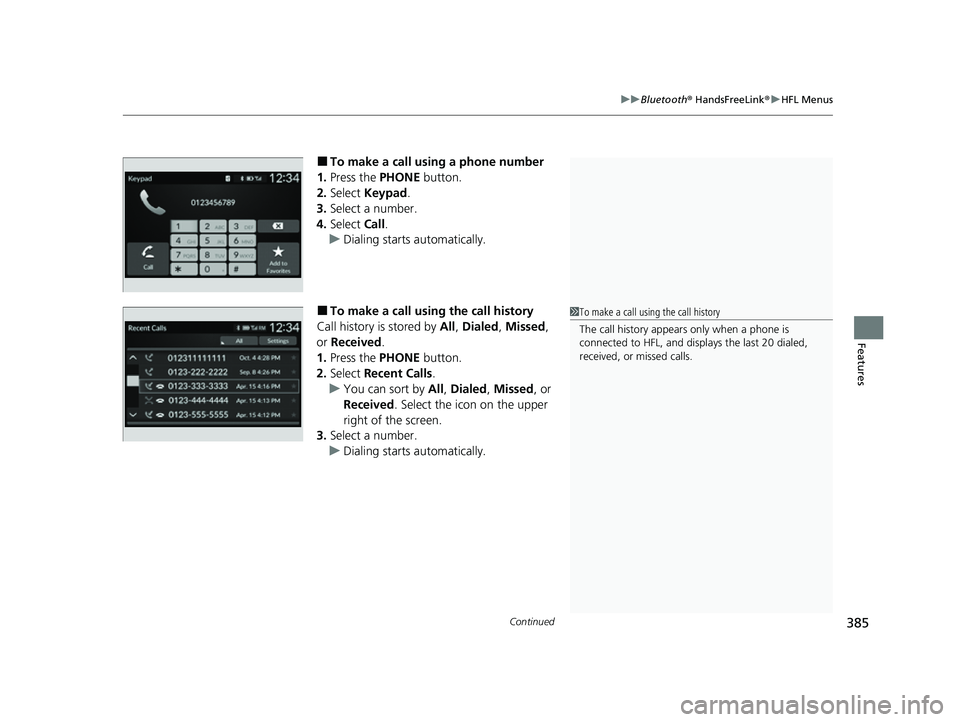
■To make a call using a phone number
1. Press the PHONE button.
2. Select Keypad .
3. Select a number.
4. Select Call.
u Dialing starts automatically.
■To make a call using the call history
Call history is stored by All, Dialed , Missed ,
or Received .
1. Press the PHONE button.
2. Select Recent Calls .
u You can sort by All, Dialed , Missed , or
Received . Select the icon on the upper
right of the screen.
3. Select a number.
u Dialing starts automatically.1To make a call using the call history
The call history appears only when a phone is
connected to HFL, and disp lays the last 20 dialed,
received, or missed calls.
23 HR-V-313V06000_01.book 385 ページ 2022年4月4日 月曜日 午前10時49分
Page 390 of 664
uuBluetooth ® HandsFreeLink ®u HFL Menus
388
Features
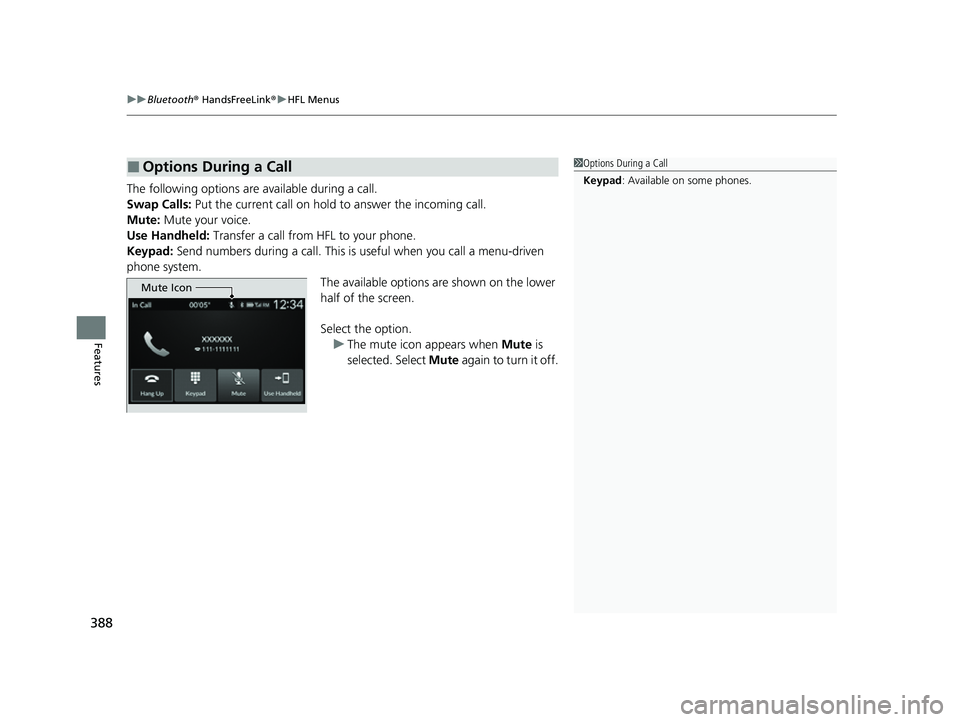
The following options are available during a call.
Swap Calls: Put the current call on hold to answer the incoming call.
Mute: Mute your voice.
Use Handheld: Transfer a call from HFL to your phone.
Keypad: Send numbers during a call. This is useful when you call a menu-driven
phone system. The available options are shown on the lower
half of the screen.
Select the option. u The mute icon appears when Mute is
selected. Select Mute again to turn it off.
■Options During a Call1Options During a Call
Keypad : Available on some phones.
Mute Icon
23 HR-V-313V06000_01.book 388 ページ 2022年4月4日 月曜日 午前10時49分