charging HONDA HRV 2023 Owners Manual
[x] Cancel search | Manufacturer: HONDA, Model Year: 2023, Model line: HRV, Model: HONDA HRV 2023Pages: 664, PDF Size: 20.2 MB
Page 89 of 664
87
uuIndicators u
Continued
Instrument Panel
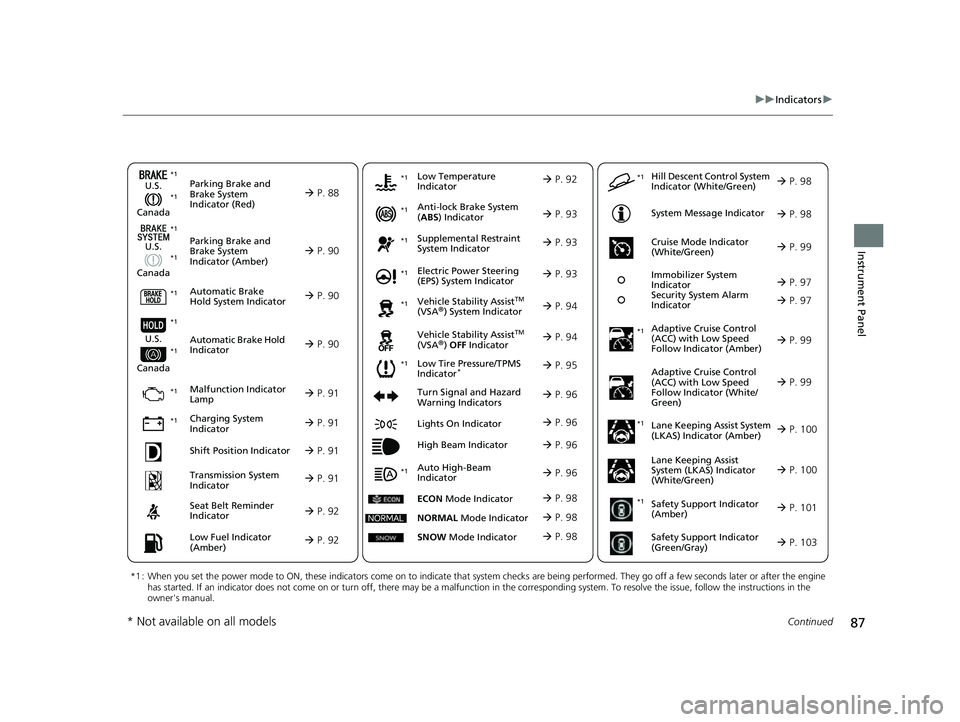
Parking Brake and
Brake System
Indicator (Red)
Parking Brake and
Brake System
Indicator (Amber)
U.S.
Canada
U.S.
Canada Automatic Brake
Hold System Indicator
Automatic Brake Hold
Indicator
U.S.
Canada
*1 : When you set the power mode to ON, these indicators come on to indicate that system checks are being performed. They go off a few seconds later or after the engine
has started. If an indicator does not come on or turn off, ther e may be a malfunction in the corresponding system. To resolve the issue, follow the instructions in the
owner's manual.
P. 88*1
Malfunction Indicator
Lamp
Charging System
Indicator
Anti-lock Brake System
(ABS ) Indicator
Seat Belt Reminder
Indicator
Low Fuel Indicator
(Amber)
Vehicle Stability AssistTM
(VSA®) System Indicator
Vehicle Stability Assist
TM
(VSA®) OFF Indicator
Supplemental Restraint
System Indicator
Auto High-Beam
Indicator
Low Tire Pressure/TPMS
Indicator*
Electric Power Steering
(EPS) System Indicator
Turn Signal and Hazard
Warning Indicators
Lights On Indicator
High Beam Indicator
System Message Indicator
Adaptive Cruise Control
(ACC) with Low Speed
Follow Indicator (Amber)
Lane Keeping Assist System
(LKAS) Indicator (Amber)
Safety Support Indicator
(Green/Gray)
P. 90
P. 90
P. 90
P. 91
P. 91*1 *1
P. 95
*1
Shift Position Indicator P. 91
Transmission System
Indicator P. 91
P. 92
P. 92
P. 93
P. 93
P. 96
P. 94
*1
*1
P. 94
*1 P. 93
P. 99
*1
P. 96
P. 96
P. 96
Immobilizer System
Indicator
Security System Alarm
Indicator P. 97
P. 98
P. 100
P. 103
*1
Adaptive Cruise Control
(ACC) with Low Speed
Follow Indicator (White/
Green) P. 99
*1
Lane Keeping Assist
System (LKAS) Indicator
(White/Green) P. 100
*1Safety Support Indicator
(Amber) P. 101
*1
Cruise Mode Indicator
(White/Green) P. 99
*1
Low Temperature
Indicator P. 92
P. 97*1 *1
ECON
Mode Indicator P. 98
NORMAL Mode Indicator P. 98
SNOW Mode Indicator P. 98
Hill Descent Control System
Indicator (White/Green) P. 98*1
*1 *1
*1
*1
* Not available on all models
23 HR-V-313V06000_01.book 87 ページ 2022年4月4日 月曜日 午前10時49分
Page 93 of 664
91
uuIndicators u
Continued
Instrument Panel
IndicatorNameOn/BlinkingExplanation
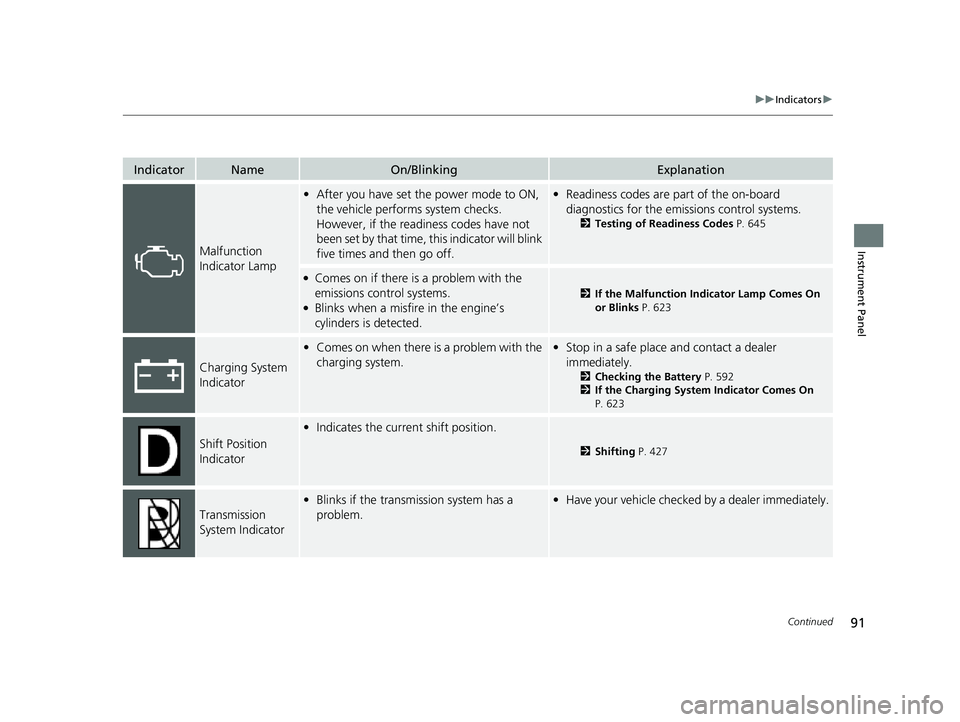
Malfunction
Indicator Lamp
•After you have set the power mode to ON,
the vehicle performs system checks.
However, if the readiness codes have not
been set by that time, this indicator will blink
five times and then go off.•Readiness codes are part of the on-board
diagnostics for the emissions control systems.
2 Testing of Readiness Codes P. 645
●Comes on if there is a problem with the
emissions control systems.
●Blinks when a misfire in the engine’s
cylinders is detected.
2If the Malfunction Indicator Lamp Comes On
or Blinks P. 623
Charging System
Indicator
•Comes on when there is a problem with the
charging system.•Stop in a safe place and contact a dealer
immediately.
2 Checking the Battery P. 592
2 If the Charging System Indicator Comes On
P. 623
Shift Position
Indicator
• Indicates the current shift position.
2 Shifting P. 427
Transmission
System Indicator
•Blinks if the transmission system has a
problem.•Have your vehicle checked by a dealer immediately.
23 HR-V-313V06000_01.book 91 ページ 2022年4月4日 月曜日 午前10時49分
Page 199 of 664
Continued197
uuInterior Convenience Items uOther Interior Convenience Items
Controls
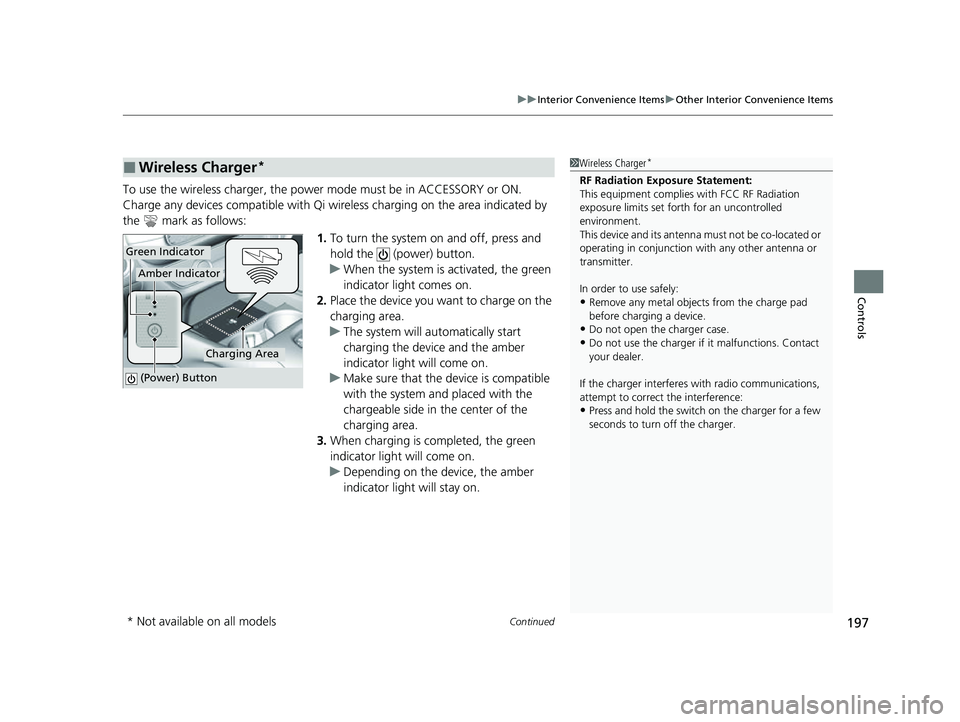
To use the wireless charger, the power mode must be in ACCESSORY or ON.
Charge any devices compatible with Qi wi reless charging on the area indicated by
the mark as follows:
1.To turn the system on and off, press and
hold the (power) button.
u When the system is activated, the green
indicator light comes on.
2. Place the device you want to charge on the
charging area.
u The system will au tomatically start
charging the device and the amber
indicator light will come on.
u Make sure that the device is compatible
with the system and placed with the
chargeable side in the center of the
charging area.
3. When charging is completed, the green
indicator light will come on.
u Depending on the device, the amber
indicator light will stay on.
■Wireless Charger*1Wireless Charger*
RF Radiation Exposure Statement:
This equipment complies with FCC RF Radiation
exposure limits set forth for an uncontrolled
environment.
This device and its antenna must not be co-located or
operating in conjunction with any other antenna or
transmitter.
In order to use safely:
•Remove any metal objects from the charge pad
before charging a device.
•Do not open the charger case.
•Do not use the charger if it malfunctions. Contact
your dealer.
If the charger interferes with radio communications,
attempt to correct the interference:
•Press and hold the switch on the charger for a few
seconds to turn off the charger.
Green Indicator
Charging Area
(Power) Button
Amber Indicator
* Not available on all models
23 HR-V-313V06000_01.book 197 ページ 2022年4月4日 月曜日 午前10時49分
Page 200 of 664
uuInterior Convenience Items uOther Interior Convenience Items
198
Controls
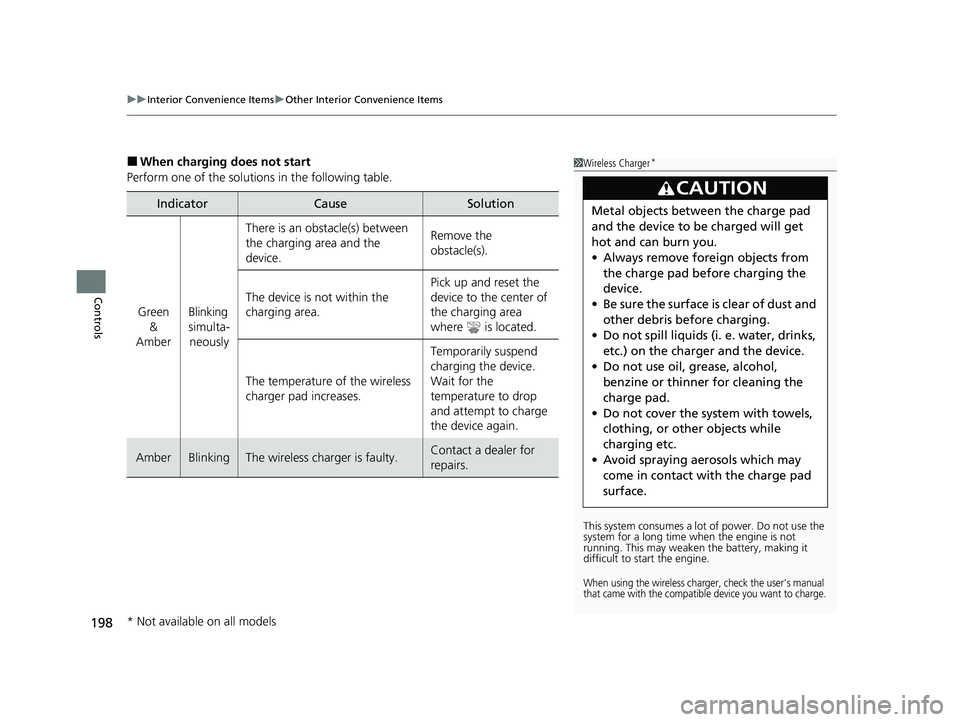
■When charging does not start
Perform one of the solution s in the following table.
IndicatorCauseSolution
Green
&
AmberBlinking
simulta- neously
There is an obstacle(s) between
the charging area and the
device.Remove the
obstacle(s).
The device is not within the
charging area. Pick up and reset the
device to the center of
the charging area
where is located.
The temperature of the wireless
charger pad increases. Temporarily suspend
charging the device.
Wait for the
temperature to drop
and attempt to charge
the device again.
AmberBlinkingThe wireless charger is faulty.Contact a dealer for
repairs.
1
Wireless Charger*
This system consumes a lot of power. Do not use the
system for a long time when the engine is not
running. This may weaken the battery, making it
difficult to start the engine.
When using the wireless charger, check the user’s manual
that came with the compatible device you want to charge.
3CAUTION
Metal objects between the charge pad
and the device to be charged will get
hot and can burn you.
• Always remove foreign objects from
the charge pad before charging the
device.
• Be sure the surface is clear of dust and
other debris before charging.
• Do not spill liquids (i. e. water, drinks,
etc.) on the charger and the device.
• Do not use oil, grease, alcohol,
benzine or thinner for cleaning the
charge pad.
• Do not cover the system with towels,
clothing, or other objects while
charging etc.
• Avoid spraying aerosols which may
come in contact with the charge pad
surface.
* Not available on all models
23 HR-V-313V06000_01.book 198 ページ 2022年4月4日 月曜日 午前10時49分
Page 201 of 664
Continued199
uuInterior Convenience Items uOther Interior Convenience Items
Controls
1Wireless Charger*
The wireless charger can su pport up to 15 W, but the
charging rate varies base d on the device and other
conditions.
/05*$&
Do not place any magneti c recording media or
precision machines within the charging area while
charging.
The data on your cards such as credit cards can be
lost because of the magneti c effect. Also, precision
machines such as watc hes can be affected.
“Qi” and marks are the registered trademarks
owned by Wire less Power Consortium (WPC).
In the following cases, ch arging may stop or not start:
•The device is already fully charged.•The temperature of the device is extremely high
while charging.
•You are at a place that emits strong
electromagnetic waves or noises, such as a TV
station, electric power plant, or gas station.
•The device has a cover, case or accessories which
are not compatible wi th wireless charging.
A device may not charge if the size or shape of its
chargeable side is not a ppropriate for use with the
charging area.
Not all devices are compatible with the system.
* Not available on all models
23 HR-V-313V06000_01.book 199 ページ 2022年4月4日 月曜日 午前10時49分
Page 202 of 664
uuInterior Convenience Items uOther Interior Convenience Items
200
Controls
1Wireless Charger*
During the charging phase, it is normal for the
charging area and de vice to heat up.
Charging may be briefl y interrupted when:
•All the doors and the tailgate are closed
- to avoid interference with the proper functioning
of the keyless access system.
•The position of the device is altered.
Do not charge more than one device at a time on a
charging area.
If the device becomes too hot and its battery
protection function activa tes, it may charge
extremely slowly or no longer charge.
The temperature at which the battery protection
function activates de pends on the device.
* Not available on all models
23 HR-V-313V06000_01.book 200 ページ 2022年4月4日 月曜日 午前10時49分
Page 215 of 664
213
uuAudio System uUSB Ports
Features
USB Ports
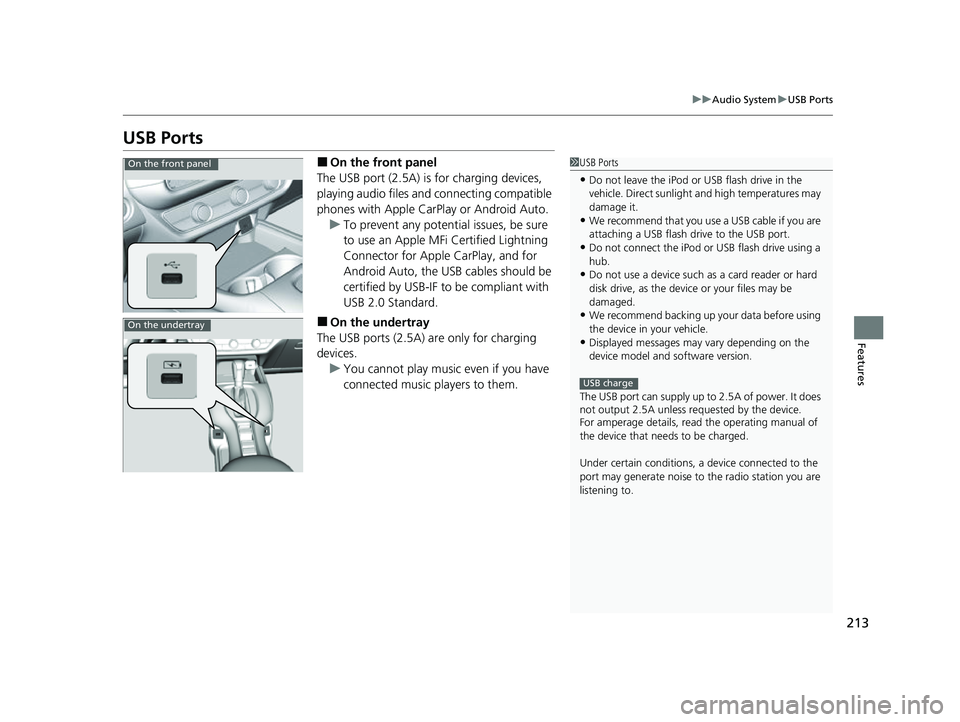
■On the front panel
The USB port (2.5A) is for charging devices,
playing audio files and connecting compatible
phones with Apple CarPlay or Android Auto. u To prevent any potenti al issues, be sure
to use an Apple MFi Certified Lightning
Connector for Apple CarPlay, and for
Android Auto, the USB cables should be
certified by USB-IF to be compliant with
USB 2.0 Standard.
■On the undertray
The USB ports (2.5A) are only for charging
devices. u You cannot play music even if you have
connected music players to them.
1USB Ports
•Do not leave the iPod or USB flash drive in the
vehicle. Direct sunlight and high temperatures may
damage it.
•We recommend that you us e a USB cable if you are
attaching a USB flash drive to the USB port.
•Do not connect the iPod or USB flash drive using a
hub.
•Do not use a device such as a card reader or hard
disk drive, as the device or your files may be
damaged.
•We recommend backing up yo ur data before using
the device in your vehicle.
•Displayed messages may vary depending on the
device model and software version.
The USB port can supply up to 2.5A of power. It does
not output 2.5A unless requested by the device.
For amperage details, read the operating manual of
the device that ne eds to be charged.
Under certain condi tions, a device connected to the
port may generate noise to the radio station you are
listening to.
USB charge
On the front panel
On the undertray
23 HR-V-313V06000_01.book 213 ページ 2022年4月4日 月曜日 午前10時49分
Page 317 of 664
315
uuAudio Error Messages uiPod/USB Flash Drive
Features*1:Models with 7-in. Color Touchscreen
*2:Models with 9-in. Color Touchscreen
Error MessageSolution
Device No Response*1, *2Appears when the system does not communicat e with a connected device. If it appears
when a device is connected, contact your place of device purchase.
USB hub not supported*1, *2Appears when only a HUB is conn ected. If it appears, connect a USB flash drive to the
HUB.
A charging error has occurred with the
connected USB device. When safe please
check the compatibility of the device and
USB cable and try again.
*1, *2
Appears when an incompatible device is co nnected. Disconnect the device. Then, turn
the audio system off and turn it on again. Do not reconnect the device that caused the
error.
23 HR-V-313V06000_01.book 315 ページ 2022年4月4日 月曜日 午前10時49分
Page 326 of 664

324
uuGeneral Information on the Audio System uHonda App License Agreement
Features
E. Information Coll ection and Storage
1. Information Collection, Use, Transmission and Storage of Data. Consent to Use of Data:
You agree that HONDA and PROVIDERS may
collect and use your information gathered in any manner as part of product support services related to the SOFTWARE or related services.
HONDA may share such information with third parties, including, without limitation, PROVIDERS, th ird party software and services
suppliers, their affiliates and/or their desi gnated agents, solely to improve their products or to provide services or technolo gies to you.
HONDA, third party software and systems s uppliers, their affiliates and/or their designated agent may disclose this information to others,
but not in a form that pe rsonally identifies you.
2. Information Storage.
Depending on the type of multimedia system you have in your VEHICLE, certain information may be stored for ease
of use of the SOFTWARE including, without limitation, search hi story, location history in certain applications, previous and saved
destinations, map locations within certain applications, and device numbers and contact information.
(a) Vehicle Health Information.
Your VEHICLE may remotely trans mit information regarding the status and health of your VEHICLE
(“VEHICLE INFORMATION”) to HONDA without notification to you. VEHICLE INFORMATION may contain VEHICLE maintenance and
malfunction status that is derived from VEHICLE diagnostic data and includes, but is not limited to, status of powered doors and windows,
battery life data, battery charging data, VEHICLE speed, coolant temperat ure, air compressor revolution, output power, warning codes,
diagnostic trouble codes, fuel injection volu me, and engine rotations per minute. VEHICL E HEALTH INFORMATION may be used by HON DA
for research and development, to deliver HONDA SERVICES and information to you, and to contact you, and is retained only for a period
of time necessary to fulfill these goals.
(b) VEHICLE Geolocation Data (non-navigation/map based).
If you opt-in to geolocation-based SERVICES, your vehicle’s geolocation data
(latitude and longitude) will be automatically se nt from your VEHICLE to HONDA and PROVIDERS.
(c) You understand that the inputting or uploading of information to your VEHICLE’s multimedia system or the SOFTWARE or SERVIC ES is
at your own risk and that HONDA is not responsible for unauthorized access to or use of any personal or other information. All information
uploaded to the SOFTWARE and SERVICES may be stored on your VEHICLES’s multimedia system and you understand that the security and
safety of your VEHICLE’s multimedia system is your sole responsibility.
23 HR-V-313V06000_01.book 324 ページ 2022年4月4日 月曜日 午前10時49分
Page 595 of 664
593
uuBattery uCharging the Battery
Maintenance
Charging the Battery
Disconnect both battery cables to prevent damaging your vehicle’s electrical system.
Always disconnect the negative (–) cable first, and reconnect it last.1Battery
When you find corrosion, cl ean the battery terminals
by applying a baking powder and water solution.
Clean the terminals with a damp towel. Cloth/towel
dry the battery. Coat the terminals with grease to
help prevent future corrosion.
The Vehicle Stability Assist
TM (VSA ®) system, Adaptive
Cruise Control (ACC) with Low Speed Follow, brake
system (amber), safety suppor t and low tire pressure/
TPMS
* indicators may come on in amber along with
a message in the driver information interface when
you set the power mode to ON after reconnecting
the battery.
Drive a short distance at more than 12 mph (20 km/
h). Each indicator should go of f. If any does not, have
your vehicle checked by a dealer.
* Not available on all models
23 HR-V-313V06000_01.book 593 ページ 2022年4月4日 月曜日 午前10時49分