clock HONDA INSIGHT 2000 1.G Owners Manual
[x] Cancel search | Manufacturer: HONDA, Model Year: 2000, Model line: INSIGHT, Model: HONDA INSIGHT 2000 1.GPages: 262, PDF Size: 3.73 MB
Page 66 of 262
Controls Nea r th e Steerin g Whee l
Rear Windo w Wipe r an d Washe r
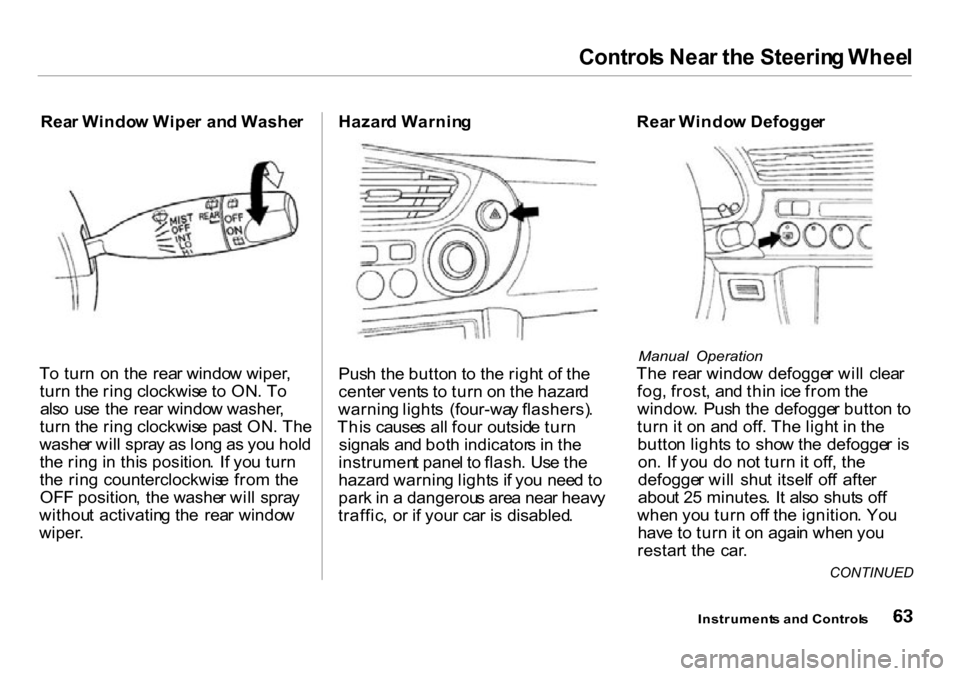
T o tur n o n th e rea r windo w wiper ,
tur n th e rin g clockwis e t o ON . T o
als o us e th e rea r windo w washer ,
tur n th e rin g clockwis e pas t ON . Th e
washe r wil l spra y a s lon g a s yo u hol d
th e rin g in thi s position . I f yo u tur n
th e rin g counterclockwis e fro m th e
OF F position , th e washe r wil l spra y
withou t activatin g th e rea r windo w
wiper . Hazar
d Warnin g
Pus h th e butto n t o th e righ t o f th e
cente r vent s t o tur n o n th e hazar d
warnin g light s (four-wa y flashers) .
Thi s cause s al l fou r outsid e tur n
signal s an d bot h indicator s i n th e
instrumen t pane l t o flash . Us e th e
hazar d warnin g light s i f yo u nee d t o
par k in a dangerou s are a nea r heav y
traffic , o r i f you r ca r i s disabled . Rea
r Windo w Defogge r
Manual Operation
The rea r windo w defogge r wil l clea r
fog , frost , an d thi n ic e fro m th e
window . Pus h th e defogge r butto n t o
tur n it o n an d off . Th e ligh t i n th e
butto n light s t o sho w th e defogge r i s
on . I f yo u d o no t tur n it off , th e
defogge r wil l shu t itsel f of f afte r
abou t 2 5 minutes . I t als o shut s of f
whe n yo u tur n of f th e ignition . Yo u
hav e t o tur n it o n agai n whe n yo u
restar t th e car .
Instrument s an d Control s
CONTINUED
Page 72 of 262
Keys an d Lock s
Door Lock s
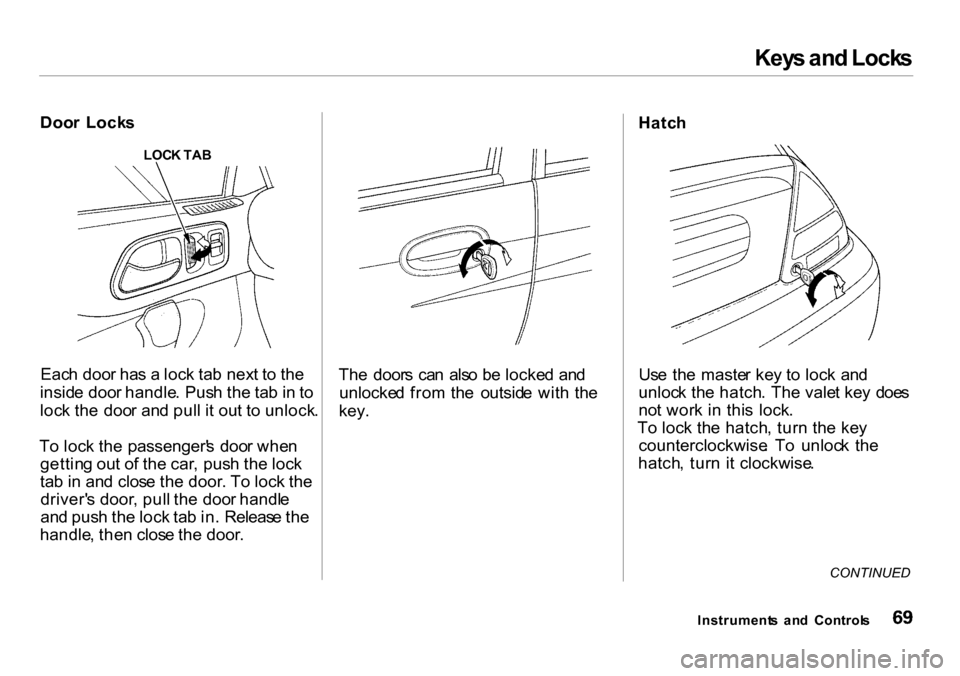
LOCK TA B
Eac h doo r ha s a loc k ta b nex t t o th e
insid e doo r handle . Pus h th e ta b in to
loc k th e doo r an d pul l i t ou t t o unlock .
T o loc k th e passenger' s doo r whe n
gettin g ou t o f th e car , pus h th e loc k
ta b in an d clos e th e door . T o loc k th e
driver' s door , pul l th e doo r handl e
an d pus h th e loc k ta b in . Releas e th e
handle , the n clos e th e door . Th
e door s ca n als o b e locke d an d
unlocke d fro m th e outsid e wit h th e
key. Hatc
h
Us e th e maste r ke y t o loc k an d
unloc k th e hatch . Th e vale t ke y doe s
no t wor k i n thi s lock .
T o loc k th e hatch , tur n th e ke y
counterclockwise . T o unloc k th e
hatch , tur n i t clockwise .
CONTINUED
Instrument s an d Control s
Page 73 of 262
Keys an d Lock s
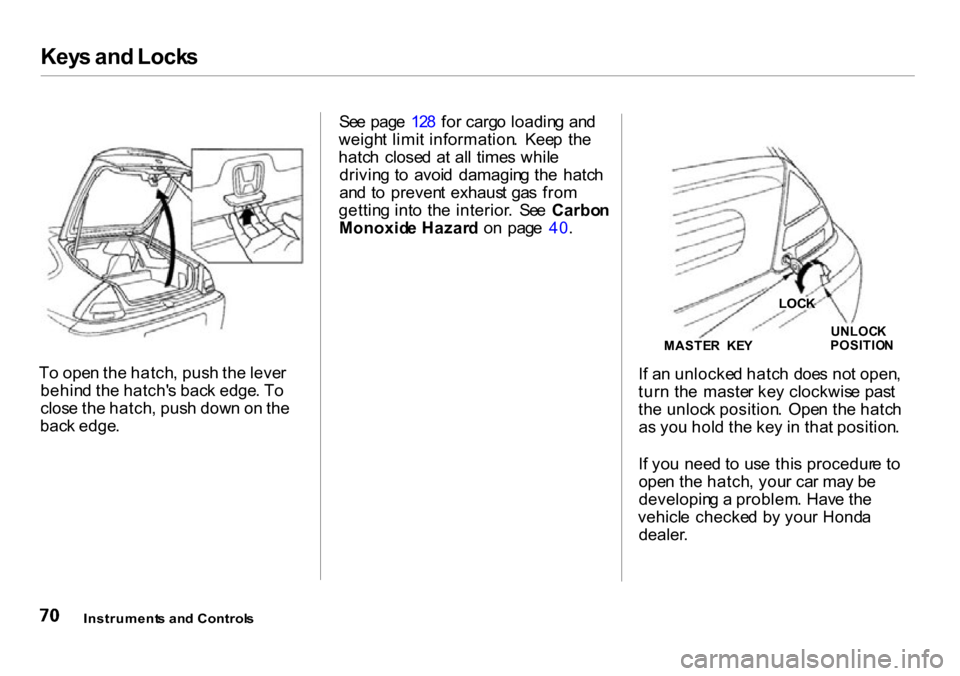
To ope n th e hatch , pus h th e leve r
behin d th e hatch' s bac k edge . T o
clos e th e hatch , pus h dow n o n th e
bac k edge . Se
e pag e 12 8 fo r carg o loadin g an d
weigh t limi t information . Kee p th e
hatc h close d a t al l time s whil e
drivin g t o avoi d damagin g th e hatc h
an d t o preven t exhaus t ga s fro m
gettin g int o th e interior . Se e Carbo n
Monoxid e Hazar d o n pag e 40 .
If a n unlocke d hatc h doe s no t open ,
tur n th e maste r ke y clockwis e pas t
th e unloc k position . Ope n th e hatc h
a s yo u hol d th e ke y i n tha t position .
I f yo u nee d t o us e thi s procedur e t o
ope n th e hatch , you r ca r ma y b e
developin g a problem . Hav e th e
vehicl e checke d b y you r Hond a
dealer .
Instrument s an d Control s
MASTER KE Y UNLOC
K
POSITIO N
LOCK
Page 75 of 262
Keys an d Lock s
Panic Mode
Panic mod e allow s yo u t o remotel y
activat e you r car' s securit y syste m to
attrac t attention . Whe n activated , th e
hor n wil l sound , an d th e exterio r
light s wil l flas h fo r abou t 3 0 seconds .
T o activat e pani c mode , pres s an d
hol d th e PANI C butto n fo r abou t on e
second .
To cance l Pani c mod e befor e 3 0
seconds , pres s an y butto n o n th e
remot e transmitter . Yo u ca n als o
tur n th e ignitio n switc h t o O N (II) .
Replacing the Battery
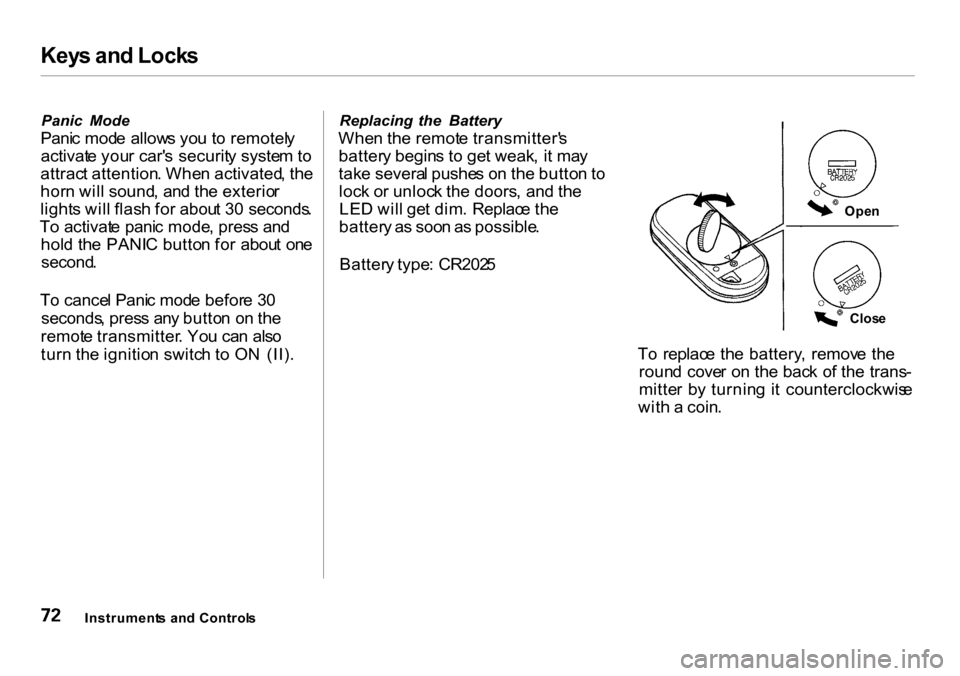
Whe n th e remot e transmitter' s
batter y begin s t o ge t weak , i t ma y
tak e severa l pushe s o n th e butto n to
loc k o r unloc k th e doors , an d th e
LE D wil l ge t dim . Replac e th e
batter y a s soo n a s possible .
Batter y type : CR202 5
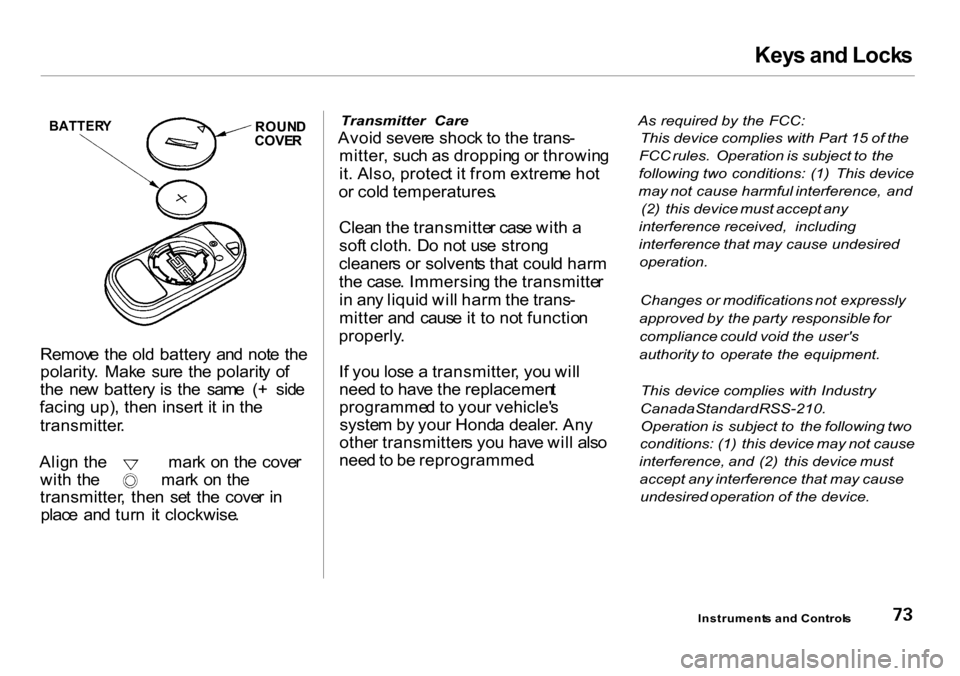
To replac e th e battery , remov e th e
roun d cove r o n th e bac k o f th e trans -
mitte r b y turnin g i t counterclockwis e
wit h a coin .
Instrument s an d Control s
Open
Clos e
Page 76 of 262
Keys an d Lock s
BATTER Y ROUN D
COVE R
Remov e th e ol d batter y an d not e th e
polarity . Mak e sur e th e polarit y o f
th e ne w batter y i s th e sam e ( + sid e
facin g up) , the n inser t i t i n th e
transmitter .
Align th e mar k o n th e cove r
with th e mar k o n th e
transmitter , the n se t th e cove r i n
plac e an d tur n i t clockwise .
Transmitter Care
Avoid sever e shoc k t o th e trans -
mitter , suc h a s droppin g o r throwin g
it . Also , protec t i t fro m extrem e ho t
o r col d temperatures .
Clea n th e transmitte r cas e wit h a
sof t cloth . D o no t us e stron g
cleaner s o r solvent s tha t coul d har m
th e case . Immersin g th e transmitte r
i n an y liqui d wil l har m th e trans -
mitte r an d caus e it t o no t functio n
properly .
I f yo u los e a transmitter , yo u wil l
nee d to hav e th e replacemen t
programme d t o you r vehicle' s
syste m b y you r Hond a dealer . An y
othe r transmitter s yo u hav e wil l als o
nee d to b e reprogrammed .
As required by the FCC:
This device complies with Part 15 of the
FCC rules. Operation is subject to the
following two conditions: (1) This device
may not cause harmful interference, and
(2) this device must accept any
interference received, including
interference that may cause undesired
operation.
Changes or modifications not expressly
approved by the party responsible for
compliance could void the user's
authority to operate the equipment.
This device complies with Industry
Canada Standard RSS-210.
Operation is subject to the following two
conditions: (1) this device may not cause
interference, and (2) this device must
accept any interference that may cause
undesired operation of the device.
Instrument s an d Control s
Page 85 of 262
Heating
Proper us e o f th e Heatin g syste m
can mak e th e interio r comfortable ,
and kee p th e window s clea r fo r bes t
visibility .
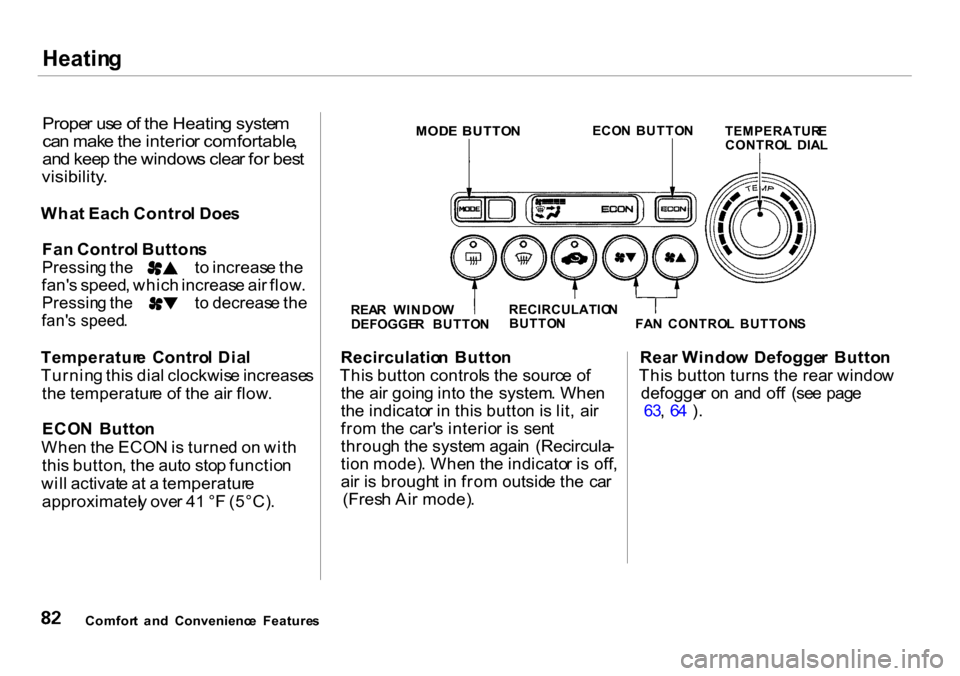
What Eac h Contro l Doe s
Fa n Contro l Button s
Pressing th e t o increas e th e
fan' s speed , whic h increas e ai r flow .
Pressin g th e t o decreas e th e
fan' s speed .
Temperatur e Contro l Dia l
Turnin g thi s dia l clockwis e increase s
th e temperatur e o f th e ai r flow .
ECO N Butto n
Whe n th e ECO N is turne d o n wit h
thi s button , th e aut o sto p functio n
wil l activat e a t a temperatur e
approximatel y ove r 4 1 ° F (5°C) . Recirculatio
n Butto n
Thi s butto n control s th e sourc e o f
th e ai r goin g int o th e system . Whe n
th e indicato r i n thi s butto n is lit , ai r
fro m th e car' s interio r i s sen t
throug h th e syste m agai n (Recircula -
tio n mode) . Whe n th e indicato r i s off ,
ai r i s brough t i n fro m outsid e th e ca r
(Fres h Ai r mode) . Rea
r Windo w Defogge r Butto n
Thi s butto n turn s th e rea r windo w
defogge r o n an d of f (se e pag e
63 , 6 4 ) .
Comfor t an d Convenienc e Feature sREA
R WINDO W
DEFOGGE R BUTTO NRECIRCULATIO
N
BUTTO N
FAN CONTRO L BUTTON S
TEMPERATUR
E
CONTRO L DIA L
ECO
N BUTTO N
MODE BUTTO N
Page 167 of 262
Coolin
g Syste m
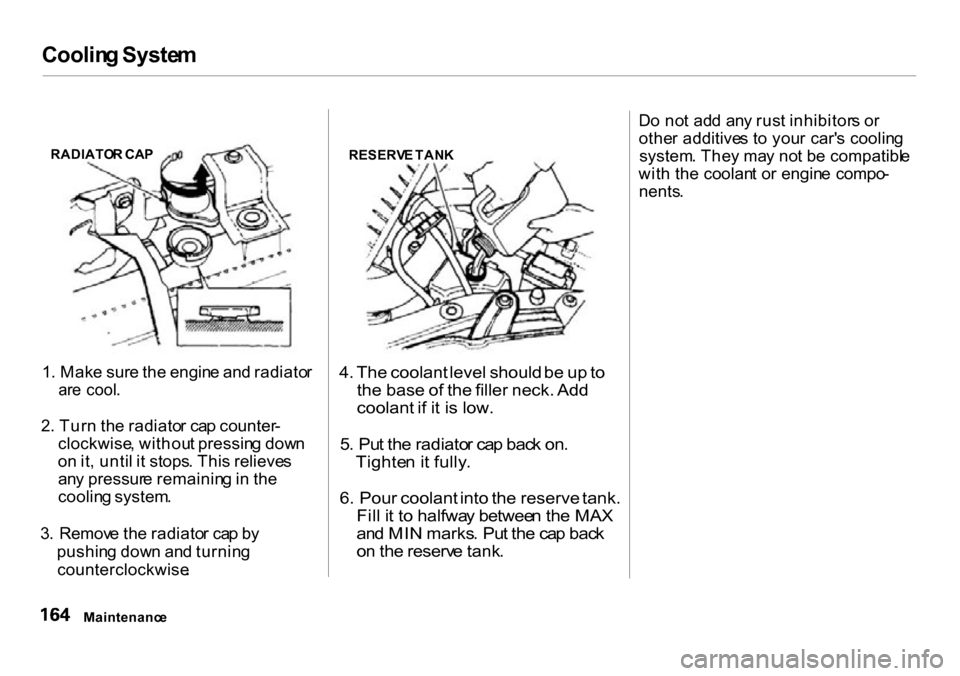
1 . Mak e sur e th e engin e an d radiato r
ar e cool .
2 . Tur n th e radiato r ca p counter -
clockwise , withou t pressin g dow n
o n it , unti l i t stops . Thi s relieve s
an y pressur e remainin g in th e
coolin g system .
3 . Remov e th e radiato r ca p b y
pushin g dow n an d turnin g
counterclockwise .
4.
The coolant level should be up to
the base of the filler neck. Add
coolant if it is low.
5 . Pu t th e radiato r ca p bac k on .
Tighte n it fully .
6. Pour coolant into the reserve tank.
Fil l i t t o halfwa y betwee n th e MA X
an d MI N marks . Pu t th e ca p bac k
o n th e reserv e tank .
D
o no t ad d an y rus t inhibitor s o r
othe r additive s t o you r car' s coolin g
system . The y ma y no t b e compatibl e
wit h th e coolan t o r engin e compo -
nents .
Maintenanc e
RADIATO
R CA P
RESERVE TAN K
Page 194 of 262
Light
s
4 . Uncli p th e en d o f th e hold-dow n
wir e fro m its slot . Pivo t i t ou t o f
th e wa y an d remov e th e bulb .
5 . Inser t th e ne w bul b int o th e hole ,
makin g sur e th e tab s ar e in thei r
slots . Pivo t th e hold-dow n wir e
bac k in plac e an d cli p th e en d int o
th e slot .
6 . Instal l th e rubbe r sea l ove r th e
bac k o f th e headligh t assembly .
Mak e sur e it i s righ t sid e up ; i t i s
marke d "TOP. "
7 . Pus h th e electrica l connecto r ont o
th e tab s o f th e ne w bulb . Mak e
sur e i t lock s i n place .
Tur n o n th e headlight s t o tes t th e
ne w bulb .
8 . Reinstal l th e radiato r reserv e tank .Replacin
g th e Fron t Parkin g
Light s
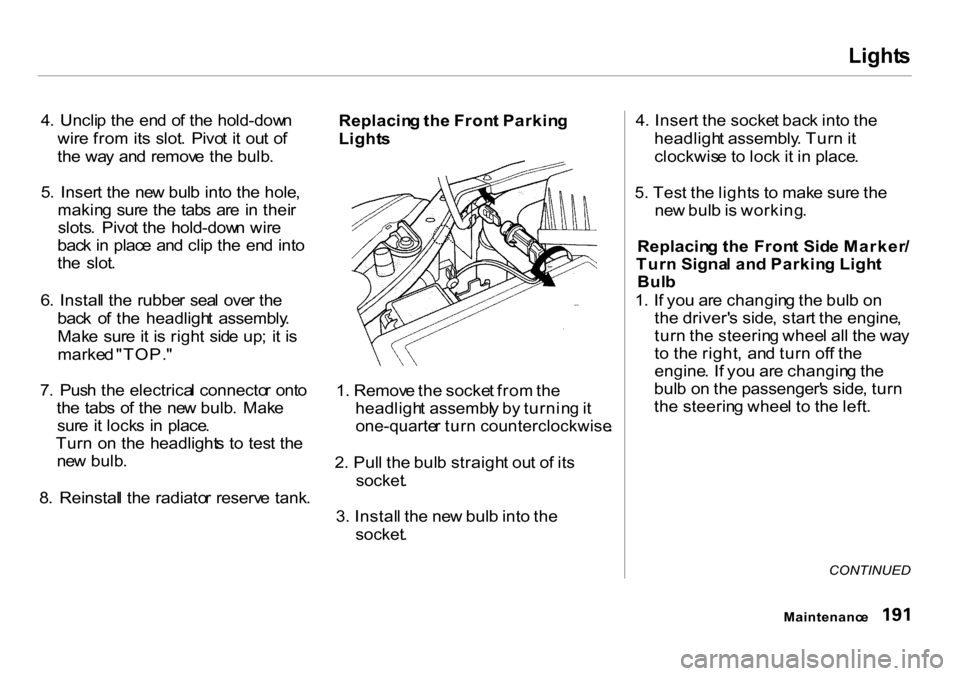
1 . Remov e th e socke t fro m th e
headligh t assembl y b y turnin g it
one-quarte r tur n counterclockwise .
2 . Pul l th e bul b straigh t ou t o f it s
socket .
3 . Instal l th e ne w bul b int o th e
socket .
4
. Inser t th e socke t bac k int o th e
headligh t assembly . Tur n it
clockwis e t o loc k i t i n place .
5 . Tes t th e light s t o mak e sur e th e
ne w bul b is working .
Replacin g th e Fron t Sid e Marker /
Tur n Signa l an d Parkin g Ligh t
Bul b
1 . I f yo u ar e changin g th e bul b o n
th e driver' s side , star t th e engine ,
tur n th e steerin g whee l al l th e wa y
t o th e right , an d tur n of f th e
engine . I f yo u ar e changin g th e
bul b o n th e passenger' s side , tur n
th e steerin g whee l t o th e left .
CONTINUED
Maintenanc e
Page 195 of 262
Light
s
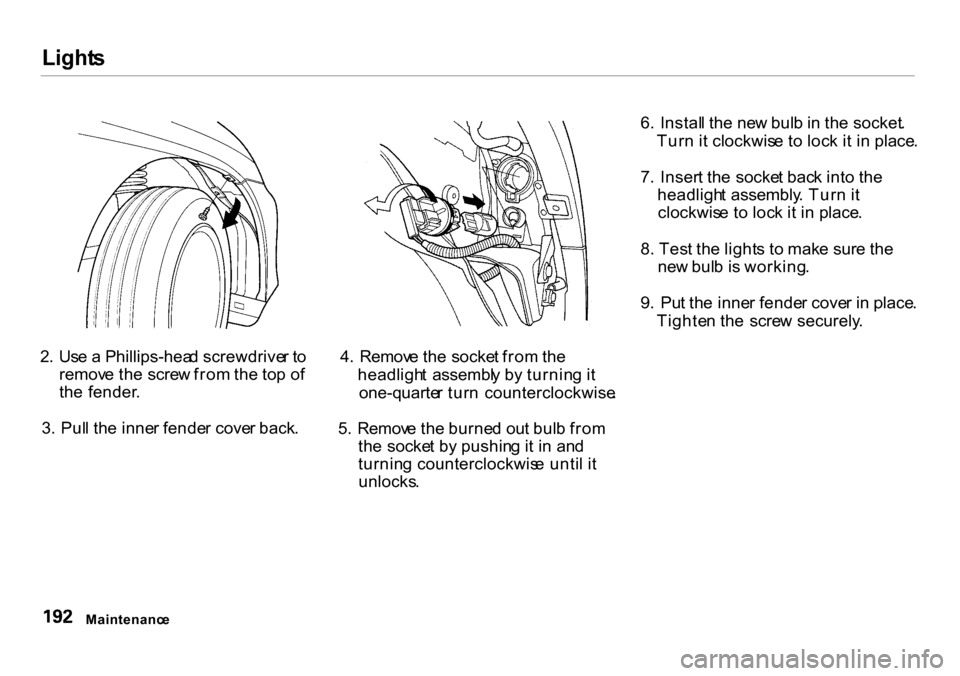
2 . Us e a Phillips-hea d screwdrive r t o
remov e th e scre w fro m th e to p o f
th e fender .
3 . Pul l th e inne r fende r cove r back . 4
. Remov e th e socke t fro m th e
headligh t assembl y b y turnin g i t
one-quarte r tur n counterclockwise .
5 . Remov e th e burne d ou t bul b fro m
th e socke t b y pushin g it i n an d
turnin g counterclockwis e unti l i t
unlocks . 6
. Instal l th e ne w bul b in th e socket .
Tur n i t clockwis e t o loc k i t i n place .
7 . Inser t th e socke t bac k int o th e
headligh t assembly . Tur n i t
clockwis e t o loc k i t i n place .
8 . Tes t th e light s t o mak e sur e th e
ne w bul b is working .
9 . Pu t th e inne r fende r cove r i n place .
Tighte n th e scre w securely .
Maintenanc e
Page 196 of 262
Light
s
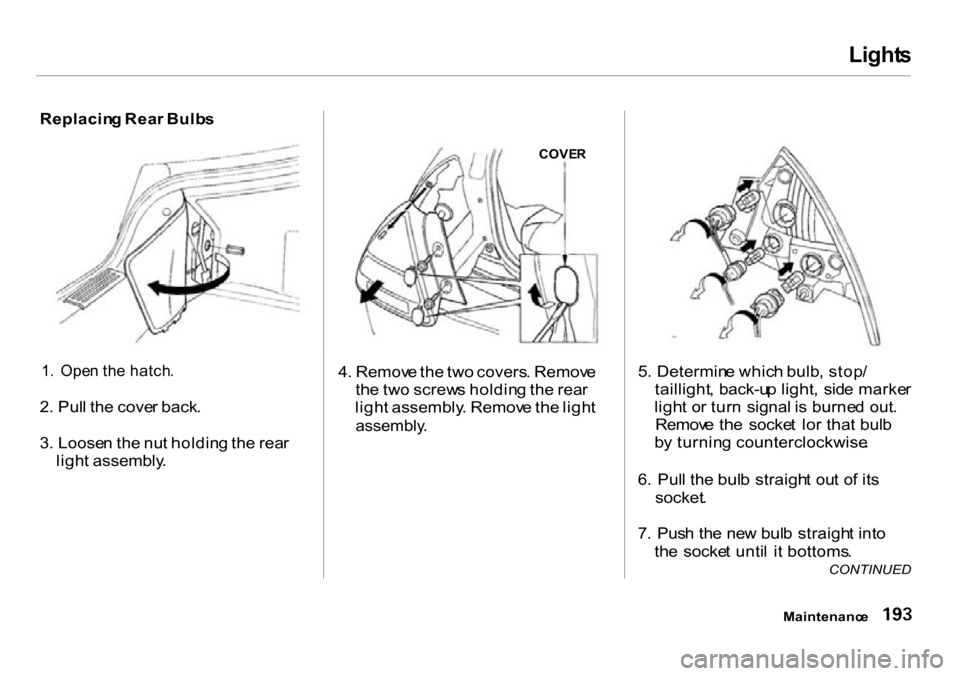
Replacin g Rea r Bulb s
1 . Ope n th e hatch .
2 . Pul l th e cove r back .
3 . Loose n th e nu t holdin g th e rea r
ligh t assembly . 4
. Remov e th e tw o covers . Remov e
th e tw o screw s holdin g th e rea r
ligh t assembly . Remov e th e ligh t
assembly .
5
. Determin e whic h bulb , stop /
taillight , back-u p light , sid e marke r
ligh t o r tur n signal is burne d out .
Remov e th e socke t lo r tha t bul b
b y turnin g counterclockwise .
6 . Pul l th e bul b straigh t ou t o f it s
socket .
7 . Pus h th e ne w bul b straigh t int o
th e socke t unti l i t bottoms .
Maintenanc e
CONTINUED
COVE
R