reset HONDA INSIGHT 2005 1.G User Guide
[x] Cancel search | Manufacturer: HONDA, Model Year: 2005, Model line: INSIGHT, Model: HONDA INSIGHT 2005 1.GPages: 218, PDF Size: 2.7 MB
Page 91 of 218

Your vehicle’s audio system will
disable itself if it is disconnected
f rom electrical power f or any reason.
To make it work again, you must
enter a specif ic f ive-digit code in the
preset buttons. Because there are
hundreds of number combinations
possible f rom f ive-digits, making the
system work without knowing the
exact code is nearly impossible.If your vehicle’s battery is
disconnected or goes dead, or the
radio f use is removed, the audio
system will disable itself . If this
happens, you will see ‘‘COdE’’ in the
frequencydisplaythenexttimeyou
turn on the system. Use the preset
buttons to enter the five-digit code.
The code is located on the radio code
card included in your Owner’s
Manual kit. When it is entered
correctly, the radio will start playing.
If you make a mistake entering the
code, do not start over; complete the
f ive-digit sequence, then enter the
correct code. You have ten tries to
enter the correct code. If you are
unsuccessful in ten attempts, you
must then leave the system on for 1
hour bef ore trying again.You will have to store your favorite
stations in the preset buttons after
the system begins working. Your
original settings were lost when the
power was disconnected.
If you lose the card, you must obtain
the code number f rom a dealer. To
do this, you will need the system’s
serial number. Youshouldhavereceivedacardthat
lists your audio system’s code and
serial numbers. It is best to store this
card in a saf e place at home. In
addition, you should write the audio
system’s serial number in this
Owner’s Manual.
Radio T hef t Prot ect ion
90
Page 92 of 218
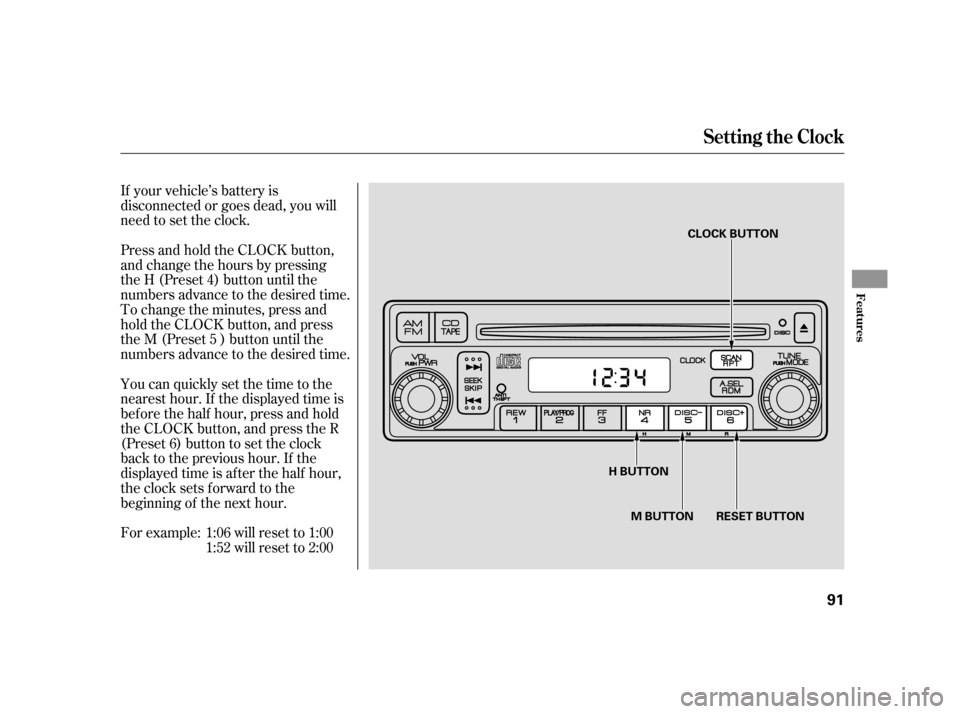
If your vehicle’s battery is
disconnected or goes dead, you will
need to set the clock.
Press and hold the CLOCK button,
and change the hours by pressing
the H (Preset 4) button until the
numbers advance to the desired time.
To change the minutes, press and
hold the CLOCK button, and press
the M (Preset 5 ) button until the
numbers advance to the desired time.
You can quickly set the time to the
nearest hour. If the displayed time is
bef ore the half hour, press and hold
the CLOCK button, and press the R
(Preset 6) button to set the clock
back to the previous hour. If the
displayed time is af ter the half hour,
the clock sets forward to the
beginning of the next hour.1:06 will reset to 1:00
1:52 will reset to 2:00
For example:
Setting the Clock
Features
91
M BUTTON RESET BUTTON CLOCK BUTTON
H BUTTON
Page 188 of 218
If the radio f use is removed, the
audio system will disable itself . The
nexttimeyouturnontheradioyou
will see ‘‘COdE’’ in the f requency
display. Use the preset buttons to
enter the f ive-digit code (see page).
If the replacement fuse of the
same rating blows in a short time,
there is probably a serious
electrical problem with your
vehicle. Leave the blown fuse in
that circuit, and have your vehicle
checked by a qualif ied mechanic.
If you cannot drive the vehicle
without f ixing the problem, and you
do not have a spare fuse, take a fuse
of the same rating or a lower rating
f rom one of the other circuits. Make
sureyoucandowithoutthatcircuit
temporarily (such as the accessory
power socket or radio).
If you replace the blown f use with a
spare f use that has a lower rating, it
might blow out again. This does not
indicate anything wrong. Replace the
f use with one of the correct rating as
soon as you can.
6. 90
Fuses
T aking Care of t he Unexpect ed
187
Replacing a f use with one that has a
higher rating greatly increases the
chances of damaging the electrical
system. If you do not have a
replacement f use with the proper rating
f or the circuit, install one with a lower
rating.