brake light HONDA INSIGHT 2019 (in English) Owner's Guide
[x] Cancel search | Manufacturer: HONDA, Model Year: 2019, Model line: INSIGHT, Model: HONDA INSIGHT 2019Pages: 675, PDF Size: 36.97 MB
Page 553 of 675
551
Maintenance
This chapter discusses basic maintenance.
Before Performing MaintenanceInspection and Maintenance ............ 552
Safety When Performing Maintenance ...553Parts and Fluids Used in Maintenance Service ........................................... 554
Maintenance Minder
TM..................... 555
Maintenance Under the Hood Maintenance Items Under the Hood .. 562
Opening the Hood ........................... 563
Recommended Engine Oil ................ 564
Oil Check ......................................... 565
Adding Engine Oil ............................ 566
Changing the Engine Oil and Oil Filter ..... 567
Cooling System ................................ 569
Inverter Coolant ............................... 571
Transmission Fluid ............................ 572
Brake Fluid ....................................... 573
Refilling Window Wa sher Fluid......... 574
Replacing Light Bulbs ....................... 575
Checking and Maintaining Wiper
Blades .......................................... 579
Checking and Maintaining Tires
Checking Tires ................................. 582
Tire and Loading Information Label .. 583
Tire Labeling .................................... 583
DOT Tire Quality Grading (U.S. Vehicles) .. 585
Wear Indicators ............................... 587
Tire Service Life ................................ 587
Tire and Wheel Replacement ........... 588
Tire Rotation .................................... 589
Winter Tires ..................................... 590
12-Volt Battery ................................. 591
Remote Transmitter Care Replacing the Button Battery ........... 593
Climate Control System Maintenance.. 594Cleaning
Interior Care .................................... 595
Exterior Care.................................... 597
Accessories and Modifications ........ 601
19 INSIGHT HMIN-31TXM6000.book 551 ページ 2018年4月20日 金曜日 午後4時22分
Page 554 of 675
552
Maintenance
Before Performing Maintenance
Inspection and Maintenance
For your safety, perform all listed inspections and maintenance to keep your vehicle
in good condition. If you become aware of any abnormality (noise, smell, insufficient
brake fluid, oil residue on the ground, etc.), have your vehicle inspected by a dealer.
(Note, however, that service at a dealer is not mandatory to keep your warranties in
effect.)
■Daily inspections
Perform inspections before long distance tri ps, when washing the vehicle, or when
refueling.
■Periodic inspections
• Check the brake fluid level monthly.
2 Brake Fluid P. 573
•Check the tire pressure monthly. Examin e the tread for wear and foreign objects.
2Checking and Maintaining Tires P. 582
•Check the operation of the exterior lights monthly.
2 Replacing Light Bulbs P. 575
•Check the condition of the wiper bl ades at least every six months.
2Checking and Maintaining Wiper Blades P. 579
■Types of Inspection and Maintenance
1Inspection and Maintenance
Maintenance, replacement, or repair of
emissions control devices and systems may be
done by any automotive repair establishment or
individuals using parts that are “certified” to
EPA standards.
According to state and fede ral regulations, failure to
perform maintenance on the maintenance main
items marked with # will not void your emissions
warranties. However, all ma intenance services should
be performed in accordan ce with the intervals
indicated by the driver information interface.
2 Maintenance Service Items P. 559
If you want to perform complex maintenance tasks
that require more skills a nd tools, you can purchase a
subscription to the Service Express website at
www.techinfo.honda.com .
2 Authorized Manuals P. 661
If you want to perform ma intenance yourself, make
sure that you have the necessary tools and skills first.
After performing ma intenance, update the records in
the separate maintenance booklet.
U.S. models
19 INSIGHT HMIN-31TXM6000.book 552 ページ 2018年4月20日 金曜日 午後4時22分
Page 565 of 675
563
uuMaintenance Under the Hood uOpening the Hood
Maintenance
Opening the Hood
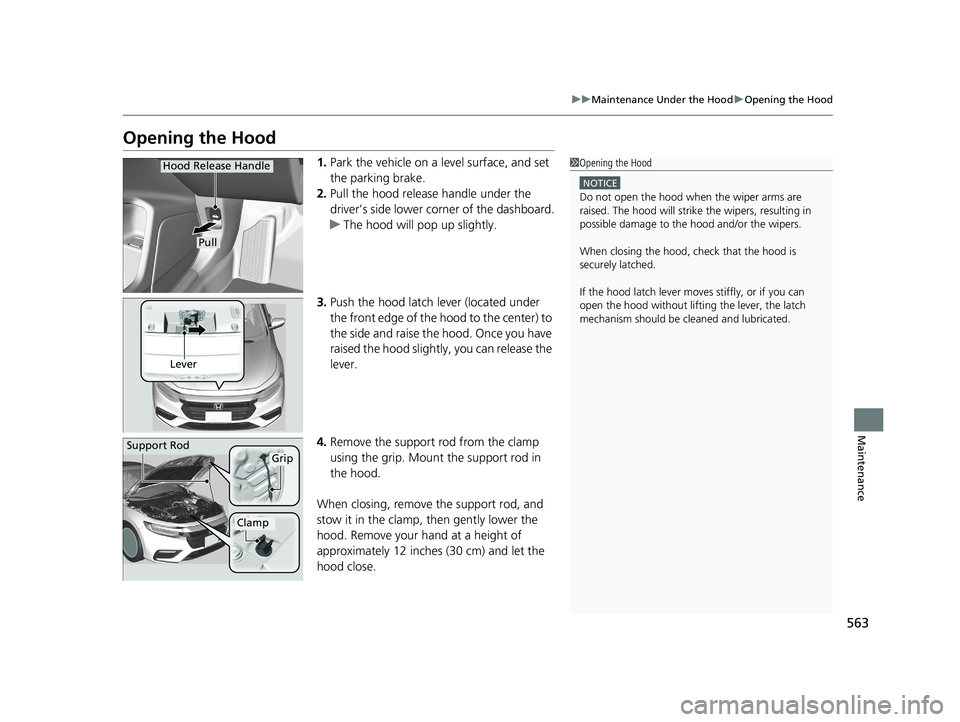
1. Park the vehicle on a level surface, and set
the parking brake.
2. Pull the hood release handle under the
driver’s side lower corner of the dashboard.
u The hood will pop up slightly.
3. Push the hood latch lever (located under
the front edge of the hood to the center) to
the side and raise the hood. Once you have
raised the hood slightly , you can release the
lever.
4. Remove the support rod from the clamp
using the grip. Mount the support rod in
the hood.
When closing, remove the support rod, and
stow it in the clamp, then gently lower the
hood. Remove your hand at a height of
approximately 12 inches (30 cm) and let the
hood close.1 Opening the Hood
NOTICE
Do not open the hood when the wiper arms are
raised. The hood will strike the wipers, resulting in
possible damage to the hood and/or the wipers.
When closing the hood, check that the hood is
securely latched.
If the hood latch lever moves stiffly, or if you can
open the hood without lifti ng the lever, the latch
mechanism should be cl eaned and lubricated.
Hood Release Handle
Pull
Lever
Support RodGrip
Clamp
19 INSIGHT HMIN-31TXM6000.book 563 ページ 2018年4月20日 金曜日 午後4時22分
Page 578 of 675
576
uuReplacing Light Bulbs uRear Turn Signal Light Bulbs
Maintenance
Rear Turn Signal Light Bulbs
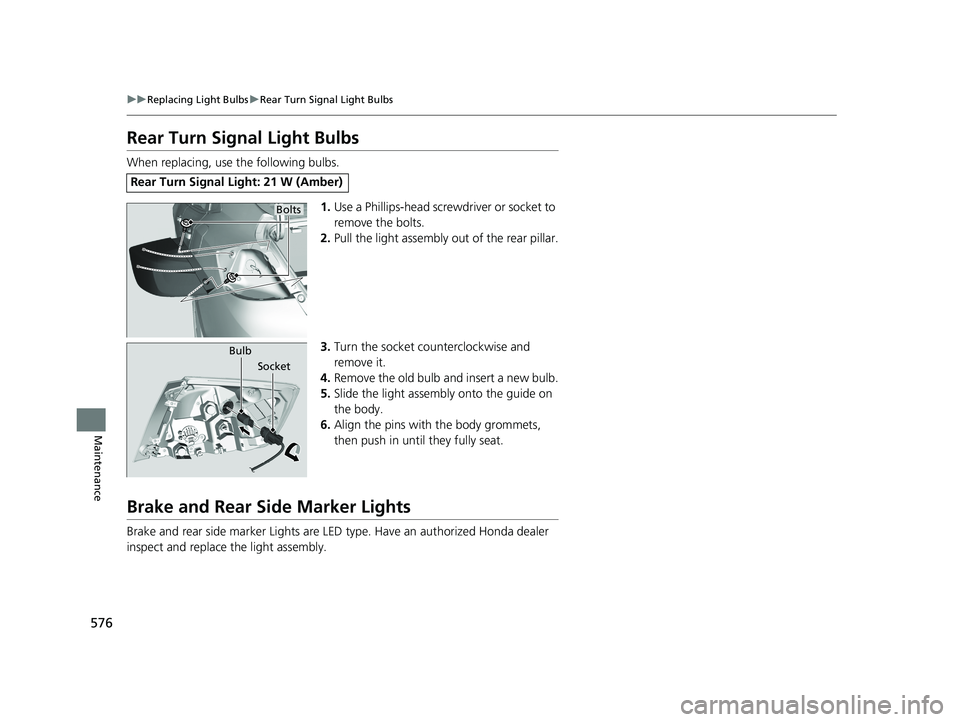
When replacing, use the following bulbs.
1.Use a Phillips-head screwdriver or socket to
remove the bolts.
2. Pull the light assembly out of the rear pillar.
3. Turn the socket c ounterclockwise and
remove it.
4. Remove the old bulb and insert a new bulb.
5. Slide the light assembly onto the guide on
the body.
6. Align the pins with the body grommets,
then push in unt il they fully seat.
Brake and Rear Side Marker Lights
Brake and rear side marker Lights are LED type. Have an authorized Honda dealer
inspect and replace the light assembly.
Rear Turn Signal Light: 21 W (Amber)
Bolts
Bulb
Socket
19 INSIGHT HMIN-31TXM6000.book 576 ページ 2018年4月20日 金曜日 午後4時22分
Page 580 of 675
578
uuReplacing Light Bulbs uRear License Plate Light
Maintenance
Rear License Plate Light
Rear license plate light is LED type. Have an authorized Honda dealer inspect and
replace the light assembly.
High-Mount Brake Light
High-mount brake light is LED type. Have an authorized Honda dealer inspect and
replace the light assembly.
19 INSIGHT HMIN-31TXM6000.book 578 ページ 2018年4月20日 金曜日 午後4時22分
Page 601 of 675
599
uuCleaning uExterior Care
Continued
Maintenance
The inside lenses of exterior lights (headlights, brake light s, etc.) may fog temporarily
if you have driven in the rain, or after the vehicle has been run through a car wash.
Dew condensation also may build up inside the lenses when there is a significant
enough difference between the ambient and inside lens temperatures (similar to
vehicle windows fogging up in rainy conditions). These conditions are natural
processes, not structural design problems in the exterior lights.
Lens design characteristics ma y result in moisture developing on the light lens frame
surfaces. This also is not a malfunction.
However, if you see large amounts of wa ter accumulation, or large water drops
building up inside the lenses, have your vehicle inspected by a dealer.
■Fogged Exterior Light Lenses
19 INSIGHT HMIN-31TXM6000.book 599 ページ 2018年4月20日 金曜日 午後4時22分
Page 607 of 675
605Continued
Handling the Unexpected
If a Tire Goes Flat
Changing a Flat Tire
If a tire goes flat while driving, grasp the steering wheel firmly, and brake gradually
to reduce speed. Then, stop in a safe plac e. Replace the flat tire with a compact
spare tire. Go to a dealer as soon as possib le to have the full-size tire repaired or
replaced.
1. Park the vehicle on firm, level, non-slip pery surface and apply the parking brake.
2. Change the shift position to
(P.
3. Turn on the hazard warning lights an d set the power mode to VEHICLE OFF.
Vehicles with optional spare tire
1Changing a Flat Tire
Follow compact spare precautions:
Periodically check the tire pressure of the compact
spare. It should be set to the specified pressure.
Specified Pressure: 60 psi (420 kPa, 4.2 kgf/cm
2)
When driving with the compact spare tire, keep the
vehicle speed under 50 mph (80 km/h). Replace with
a full-size tire as soon as possible.
The compact spare tire and wheel in your vehicle are
specifically for this model. Do not use them with
another vehicle. Do not us e another type of compact
spare tire or wheel with your vehicle.
Do not mount tire chains on a compact spare tire.
If a chain-mounted front tire goes flat, remove one of
the full-size rear tires and replace it with the compact
spare tire. Remove the flat front tire and replace it
with the full-size tire that was removed from the rear.
Mount the tire chains on the front tire.
NOTICE
Do not use the jack if it doesn’t work properly.
Call your dealer or a pr ofessional towing service.
19 INSIGHT HMIN-31TXM6000.book 605 ページ 2018年4月20日 金曜日 午後4時22分
Page 613 of 675
611
uuIf a Tire Goes Flat uTemporarily Repairing a Flat Tire
Continued
Handling the Unexpected
Temporarily Repairing a Flat Tire
If the tire has a large cut or is otherwise severely damaged, you will need to have the
vehicle towed. If the tire only has a small puncture, from a nail for instance, you can
use the temporary tire repair kit so that you can drive to the nearest service station
for a more permanent repair.
If a tire goes flat while driving, grasp the steering wheel firmly, and brake gradually
to reduce speed. Then stop in a safe place.
1. Park the vehicle on a firm, level, and n on-slippery surface, and apply the parking
brake.
2. Change the shift position to
(P.
3. Turn on the hazard warning lights an d set the power mode to VEHICLE OFF
(LOCK).
1 Temporarily Repairing a Flat Tire
The kit should not be used in the following situations.
Instead, contact a dealer or roadside assistance to
have the vehicle towed.
•The tire sealant has expired.
•More than one tire is punctured.
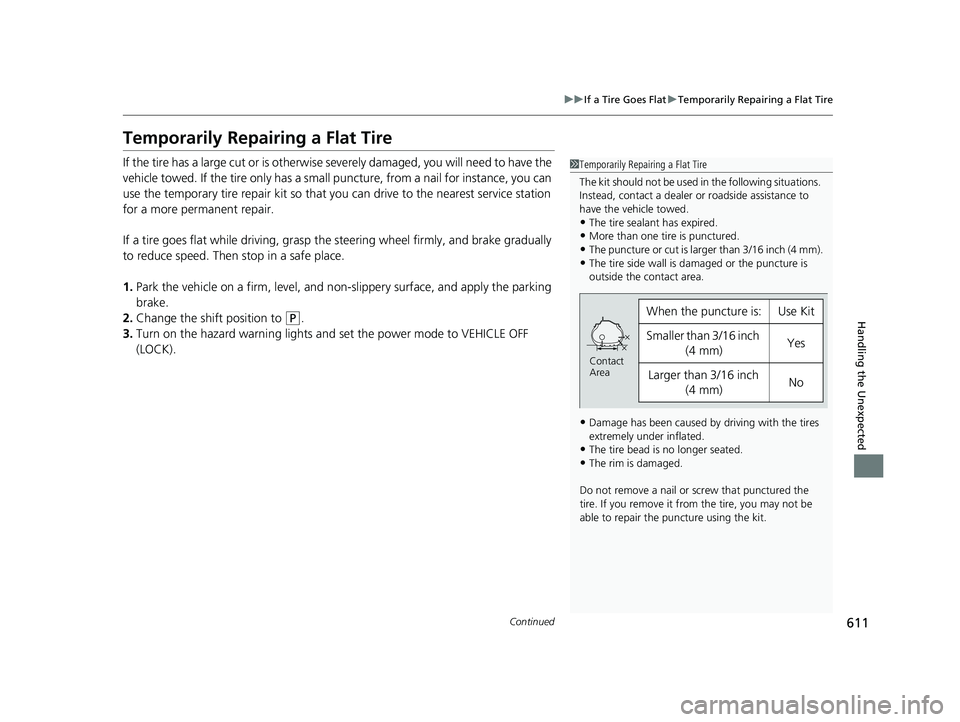
•The puncture or cut is larger than 3/16 inch (4 mm).•The tire side wall is da maged or the puncture is
outside the contact area.
•Damage has been caused by driving with the tires
extremely under inflated.
•The tire bead is no longer seated.
•The rim is damaged.
Do not remove a nail or screw that punctured the
tire. If you remove it from the tire, you may not be
able to repair the puncture using the kit.
When the puncture is:Use Kit
Smaller than 3/16 inch (4 mm)Yes
Larger than 3/16 inch (4 mm)No
Contact
Area
19 INSIGHT HMIN-31TXM6000.book 611 ページ 2018年4月20日 金曜日 午後4時22分
Page 627 of 675
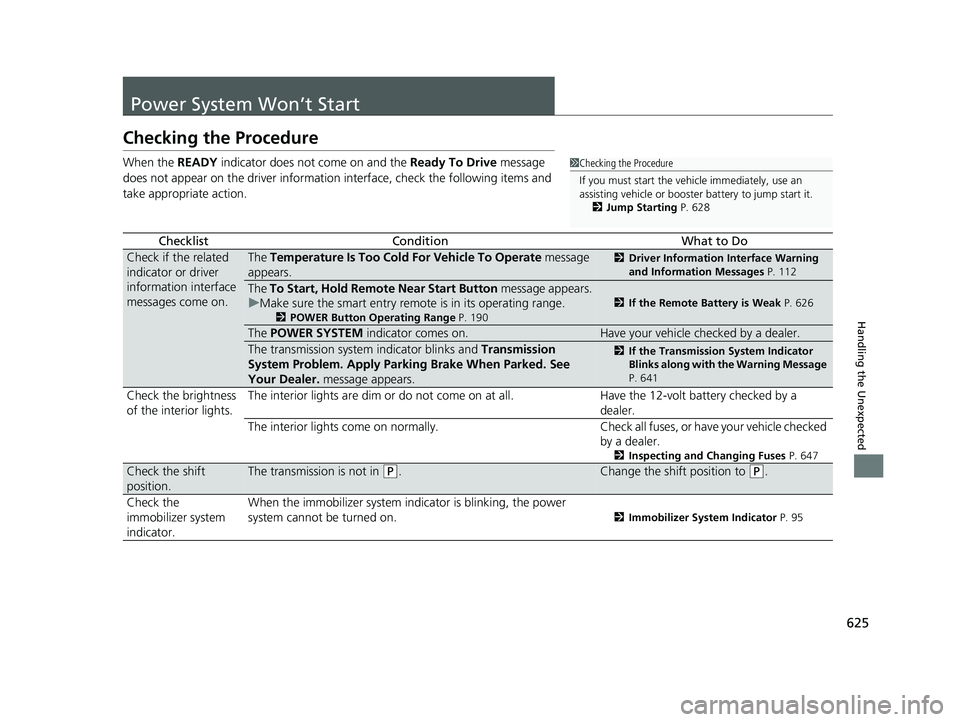
625
Handling the Unexpected
Power System Won’t Start
Checking the Procedure
When the READY indicator does not come on and the Ready To Drive message
does not appear on the driver informatio n interface, check the following items and
take appropriate action.
ChecklistConditionWhat to Do
Check if the related
indicator or driver
information interface
messages come on.The Temperature Is Too Cold For Vehicle To Operate message
appears.2 Driver Information Interface Warning
and Information Messages P. 112
The To Start, Hold Remote Near Start Button message appears.
u Make sure the smart entry remote is in its operating range.
2 POWER Button Operating Range P. 190
2If the Remote Battery is Weak P. 626
The POWER SYSTEM indicator comes on.Have your vehicle checked by a dealer.
The transmission system indicator blinks and Transmission
System Problem. Apply Parkin g Brake When Parked. See
Your Dealer. message appears.2If the Transmission System Indicator
Blinks along with the Warning Message
P. 641
Check the brightness
of the interior lights. The interior lights are dim or do not come on at all. Have the 12-volt battery checked by a
dealer.
The interior lights come on normally. Check all fuses, or have your vehicle checked
by a dealer.
2 Inspecting and Changing Fuses P. 647
Check the shift
position.The transmission is not in (P.Change the shift position to (P.
Check the
immobilizer system
indicator. When the immobilizer system i
ndicator is blinking, the power
system cannot be turned on.
2 Immobilizer System Indicator P. 95
1Checking the Procedure
If you must start the vehi cle immediately, use an
assisting vehicle or booster battery to jump start it.
2 Jump Starting P. 628
19 INSIGHT HMIN-31TXM6000.book 625 ページ 2018年4月20日 金曜日 午後4時22分
Page 638 of 675

636
uuIndicator, Coming On/Blinking uIf the Brake System Indicator (Red) Comes On or Blinks
Handling the Unexpected
If the Brake System Indicator (Red) Comes On or
Blinks
■Reasons for the indicator to come on
• The brake fluid is low.
• There is a malfunction in the brake system.
■What to do when the indicator comes on while driving
Depress the brake pedal lightly to check pedal pressure.
• If normal, check the brake fluid level the next time you stop.
• If abnormal, take immediate action. If necessary, downshift the
transmission to slow the vehicle using regenerative braking.
■Reason for the indicator to blink
• There is a problem with the electric parking brake system.
■What to do when the indicator blinks
Avoid using the parking brake and have your vehicle checked by a dealer
immediately.
1 If the Brake System Indicator (Red) Comes On or Blinks
Have your vehicle re paired immediately.
It is dangerous to drive with low brake fluid. If there
is no resistance from the brake pedal, stop
immediately in a safe plac e. If necessary, downshift
the gears.
If the brake system indicator and ABS indicator come
on simultaneously, the elec tronic brake distribution
system is not working. Th is can result in vehicle
instability under sudden braking.
Have your vehicle inspecte d by a dealer immediately.
If the brake system indicator (red) blinks at the same
time when the brake system indicator (amber) comes
on, the parking br ake may not work.
Avoid using the parking brak e and have your vehicle
checked by a dealer immediately.
2 If the Brake System Indicator (Red) Comes
On or Blinks at the Same Time When the
Brake System Indicator (Amber) Comes On
P. 637
If you repeatedly operate th e electric parking brake in
a short period of time, the brake stops operating to
prevent heating of the system and the indicator
blinks.
It returns to its original state in approximately 1
minute.
U.S.
Canada (Red)
19 INSIGHT HMIN-31TXM6000.book 636 ページ 2018年4月20日 金曜日 午後4時22分