phone HONDA INSIGHT 2019 (in English) Service Manual
[x] Cancel search | Manufacturer: HONDA, Model Year: 2019, Model line: INSIGHT, Model: HONDA INSIGHT 2019Pages: 675, PDF Size: 36.97 MB
Page 364 of 675
362
uuCustomized Features u
Features
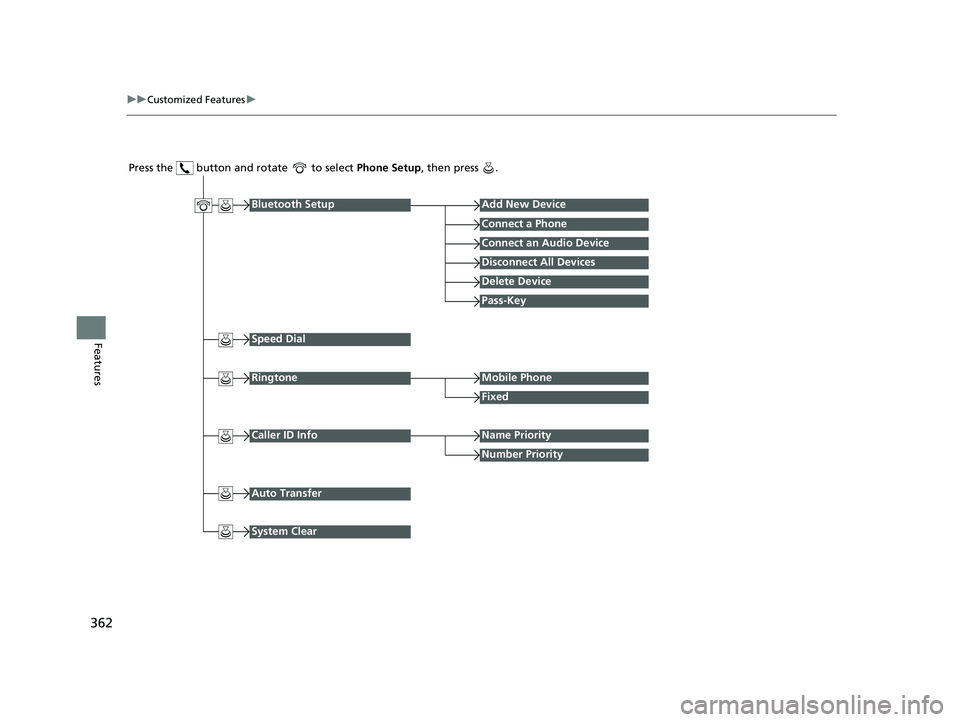
Press the button and rotate to select Phone Setup, then press .
RingtoneMobile Phone
Fixed
Bluetooth SetupAdd New Device
Connect a Phone
Connect an Audio Device
Disconnect All Devices
Delete Device
Pass-Key
Speed Dial
Caller ID InfoName Priority
Number Priority
System Clear
Auto Transfer
19 INSIGHT HMIN-31TXM6000.book 362 ページ 2018年4月20日 金曜日 午後4時22分
Page 365 of 675
363
uuCustomized Features u
Continued
Features
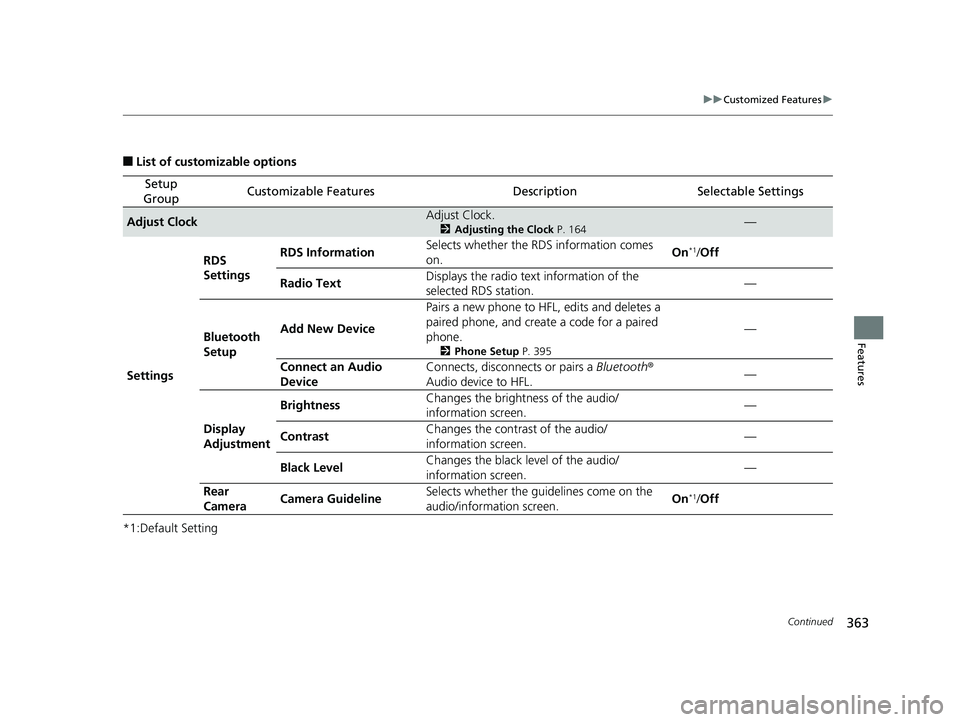
■List of customizable options
*1:Default Setting
Setup
GroupCustomizable FeaturesDescriptionSelectable Settings
Adjust ClockAdjust Clock.
2 Adjusting the Clock P. 164—
Settings RDS
Settings
RDS Information
Selects whether the RDS information comes
on. On
*1/
Off
Radio Text Displays the radio text information of the
selected RDS station. —
Bluetooth
Setup Add New Device
Pairs a new phone to HFL, edits and deletes a
paired phone, and create
a code for a paired
phone.
2 Phone Setup P. 395
—
Connect an Audio
Device Connects, disconnects or pairs a
Bluetooth®
Audio device to HFL. —
Display
Adjustment Brightness
Changes the brightness of the audio/
information screen. —
Contrast Changes the contrast of the audio/
information screen.
—
Black Level Changes the black level of the audio/
information screen. —
Rear
Camera Camera Guideline
Selects whether the guidelines come on the
audio/information screen. On
*1/
Off
19 INSIGHT HMIN-31TXM6000.book 363 ページ 2018年4月20日 金曜日 午後4時22分
Page 367 of 675
365
uuCustomized Features u
Features
*1:Default Setting
Setup
GroupCustomizable FeaturesDescriptionSelectable Settings
Phone
Setup
Bluetooth
Setup
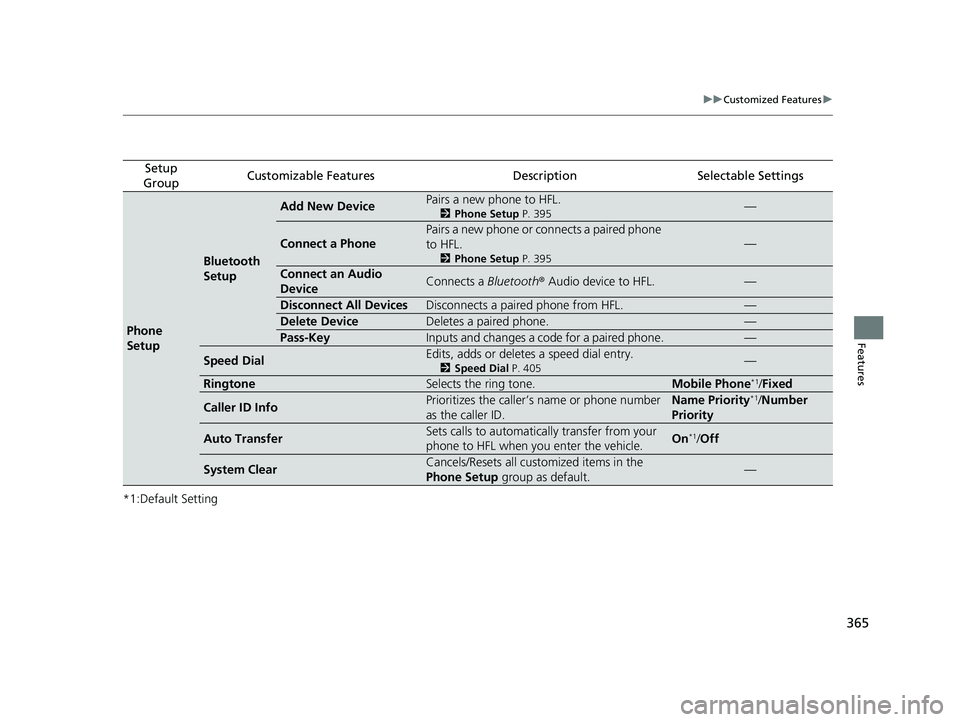
Add New DevicePairs a new phone to HFL.
2 Phone Setup P. 395—
Connect a Phone
Pairs a new phone or connects a paired phone
to HFL.
2Phone Setup P. 395
—
Connect an Audio
DeviceConnects a Bluetooth® Audio device to HFL.—
Disconnect All DevicesDisconnects a paired phone from HFL.—
Delete DeviceDeletes a paired phone.—
Pass-KeyInputs and changes a code for a paired phone.—
Speed DialEdits, adds or deletes a speed dial entry.
2Speed Dial P. 405—
RingtoneSelects the ring tone.Mobile Phone*1/Fixed
Caller ID InfoPrioritizes the caller’s name or phone number
as the caller ID.Name Priority*1/Number
Priority
Auto TransferSets calls to automatically transfer from your
phone to HFL when you enter the vehicle.On*1/ Off
System ClearCancels/Resets all customized items in the
Phone Setup group as default.—
19 INSIGHT HMIN-31TXM6000.book 365 ページ 2018年4月20日 金曜日 午後4時22分
Page 371 of 675
369
uuCustomized Features u
Continued
Features
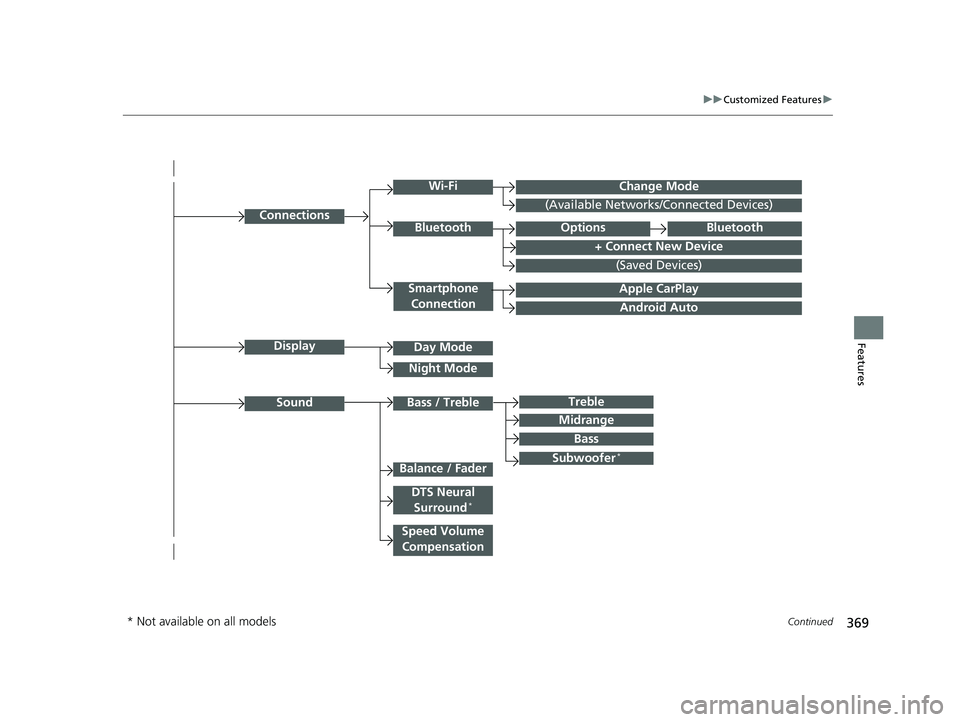
Android Auto
Connections
+ Connect New Device
(Saved Devices)
Change Mode
Smartphone
Connection
Bluetooth
Wi-Fi
(Available Networks/Connected Devices)
Apple CarPlay
Display
Sound
Day Mode
Night Mode
Treble
Subwoofer*
Bass / Treble
Speed Volume Compensation
Balance / Fader
DTS Neural Surround*
Midrange
Bass
OptionsBluetooth
* Not available on all models
19 INSIGHT HMIN-31TXM6000.book 369 ページ 2018年4月20日 金曜日 午後4時22分
Page 379 of 675
377
uuCustomized Features u
Continued
Features
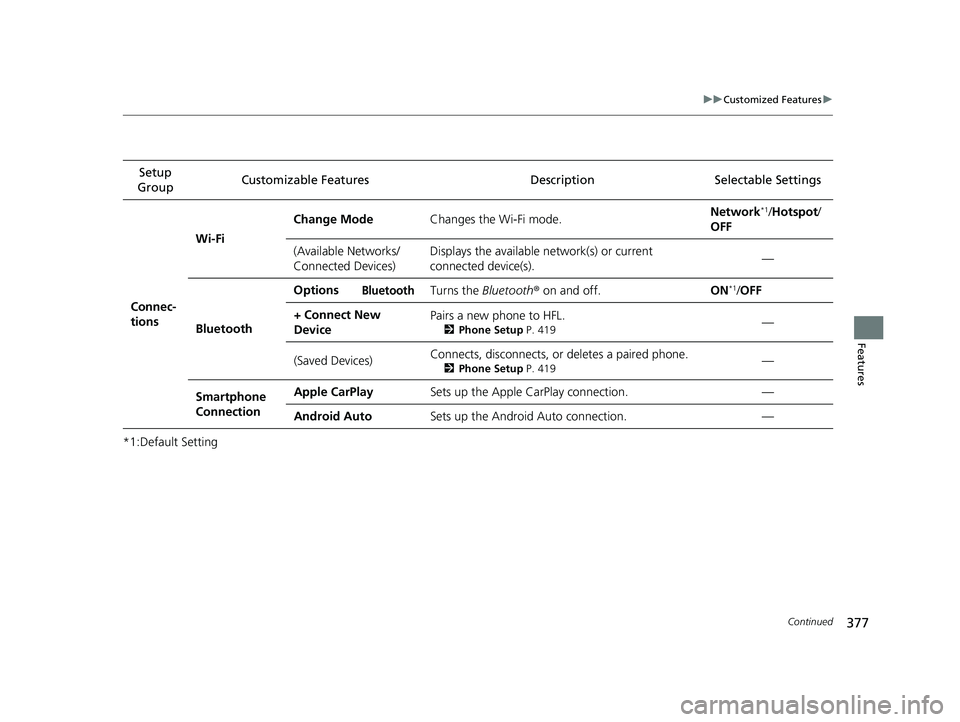
*1:Default SettingSetup
Group Customizable Features Desc
ription Selectable Settings
Connec-
tions Wi-Fi
Change Mode
Changes the Wi-Fi mode. Network
*1/
Hotspot /
OFF
(Available Networks/
Connected Devices) Displays the available network(s) or current
connected device(s).
—
Bluetooth Options
Bluetooth Turns the
Bluetooth® on and off. ON*1/OFF
+ Connect New
Device Pairs a new phone to HFL.
2
Phone Setup P. 419—
(Saved Devices) Connects, disconnects, or deletes a paired phone.
2
Phone Setup P. 419—
Smartphone
Connection Apple CarPlay
Sets up the Apple CarPlay connection. —
Android Auto Sets up the Android Auto connection. —
19 INSIGHT HMIN-31TXM6000.book 377 ページ 2018年4月20日 金曜日 午後4時22分
Page 391 of 675
389Continued
Features
Bluetooth® HandsFreeLink ®
Bluetooth® HandsFreeLink ® (HFL) allows you to place and receive phone calls using
your vehicle's audio system, without handling your cell phone.
Using HFL
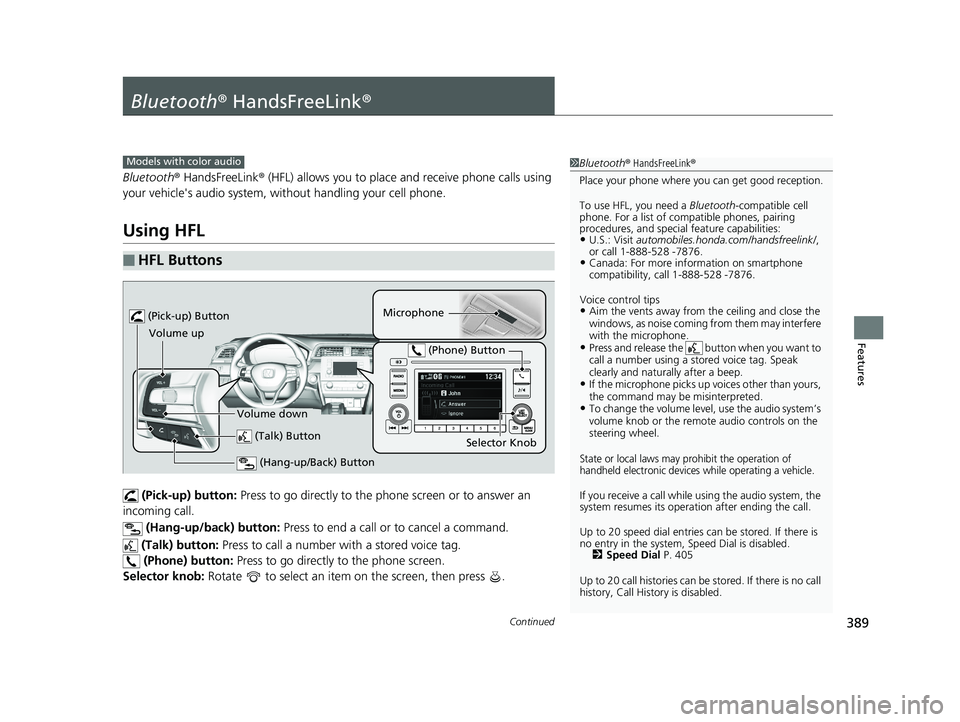
(Pick-up) button: Press to go directly to the pho ne screen or to answer an
incoming call.
(Hang-up/back) button: Press to end a call or to cancel a command.
(Talk) button: Press to call a number with a stored voice tag.
(Phone) button: Press to go directly to the phone screen.
Selector knob: Rotate to select an item on the screen, then press .
■HFL Buttons
1Bluetooth ® HandsFreeLink ®
Place your phone where y ou can get good reception.
To use HFL, you need a Bluetooth-compatible cell
phone. For a list of compatible phones, pairing
procedures, and special feature capabilities:
•U.S.: Visit automobiles.honda.com /handsfreelink/,
or call 1-888-528 -7876.
•Canada: For more info rmation on smartphone
compatibility, call 1-888-528 -7876.
Voice control tips
•Aim the vents away from the ceiling and close the
windows, as noise coming fr om them may interfere
with the microphone.
•Press and release the button when you want to
call a number using a st ored voice tag. Speak
clearly and naturally after a beep.
•If the microphone picks up vo ices other than yours,
the command may be misinterpreted.
•To change the volume level, use the audio system’s
volume knob or the remote audio controls on the
steering wheel.
State or local laws may pr ohibit the operation of
handheld electronic devices while operating a vehicle.
If you receive a call while using the audio system, the
system resumes its operati on after ending the call.
Up to 20 speed dial entries can be stored. If there is
no entry in the system, Speed Dial is disabled. 2 Speed Dial P. 405
Up to 20 call histories can be stored. If there is no call
history, Call History is disabled.
Models with color audio
(Talk) Button
Volume up Microphone
(Hang-up/Back) Button
(Pick-up) Button
Volume down Selector Knob
(Phone) Button
19 INSIGHT HMIN-31TXM6000.book 389 ページ 2018年4月20日 金曜日 午後4時22分
Page 392 of 675
uuBluetooth ® HandsFreeLink ®u Using HFL
390
Features
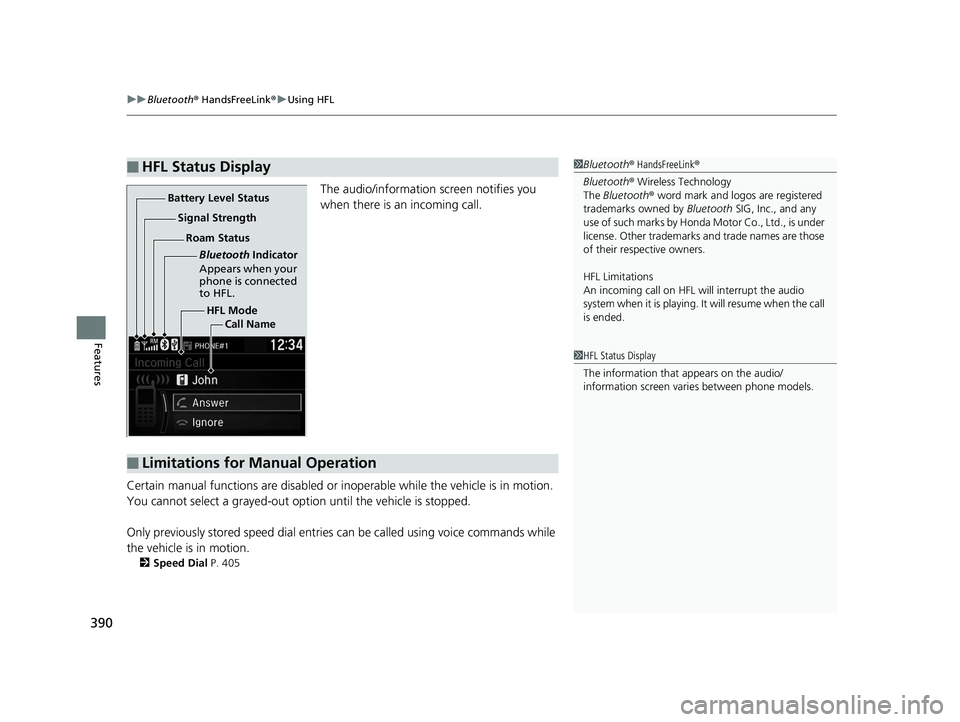
The audio/information screen notifies you
when there is an incoming call.
Certain manual functions are disabled or i noperable while the vehicle is in motion.
You cannot select a grayed-out option until the vehicle is stopped.
Only previously stored speed dial entries can be called using voice commands while
the vehicle is in motion.
2 Speed Dial P. 405
■HFL Status Display1Bluetooth ® HandsFreeLink ®
Bluetooth ® Wireless Technology
The Bluetooth ® word mark and logos are registered
trademarks owned by Bluetooth SIG, Inc., and any
use of such marks by Honda Motor Co., Ltd., is under
license. Other trademarks and trade names are those
of their respective owners.
HFL Limitations
An incoming call on HFL will interrupt the audio
system when it is playing. It will resume when the call
is ended.
HFL Mode
Battery Level Status
Signal Strength
Bluetooth Indicator
Appears when your
phone is connected
to HFL.
Roam Status
Call Name
■Limitations for Manual Operation
1HFL Status Display
The information that appears on the audio/
information screen vari es between phone models.
19 INSIGHT HMIN-31TXM6000.book 390 ページ 2018年4月20日 金曜日 午後4時22分
Page 393 of 675
391
uuBluetooth ® HandsFreeLink ®u HFL Menus
Continued
Features
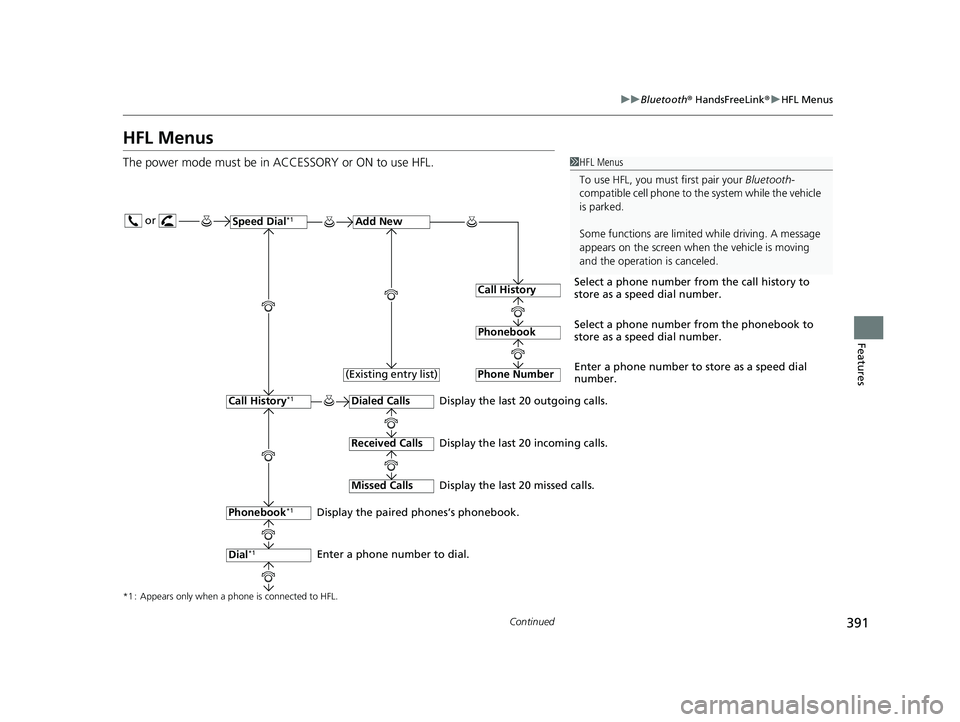
HFL Menus
The power mode must be in ACCESSORY or ON to use HFL.1HFL Menus
To use HFL, you must first pair your Bluetooth-
compatible cell phone to th e system while the vehicle
is parked.
Some functions are limited while driving. A message
appears on the screen when the vehicle is moving
and the operation is canceled.
or
Display the last 20 outgoing calls.
Display the last 20 incoming calls.
Display the last 20 missed calls.
*1 : Appears only when a phone is connected to HFL.
Speed Dial*1Add New
Select a phone number from the call history to
store as a speed dial number.
Call History
PhonebookSelect a phone number from the phonebook to
store as a speed dial number.
Phone Number
Enter a phone number to store as a speed dial
number.
Dialed Calls
Received Calls
Missed Calls
Phonebook*1
Dial*1
Call History*1
Display the paired phones’s phonebook.
Enter a phone number to dial. (Existing entry list)
19 INSIGHT HMIN-31TXM6000.book 391 ページ 2018年4月20日 金曜日 午後4時22分
Page 394 of 675
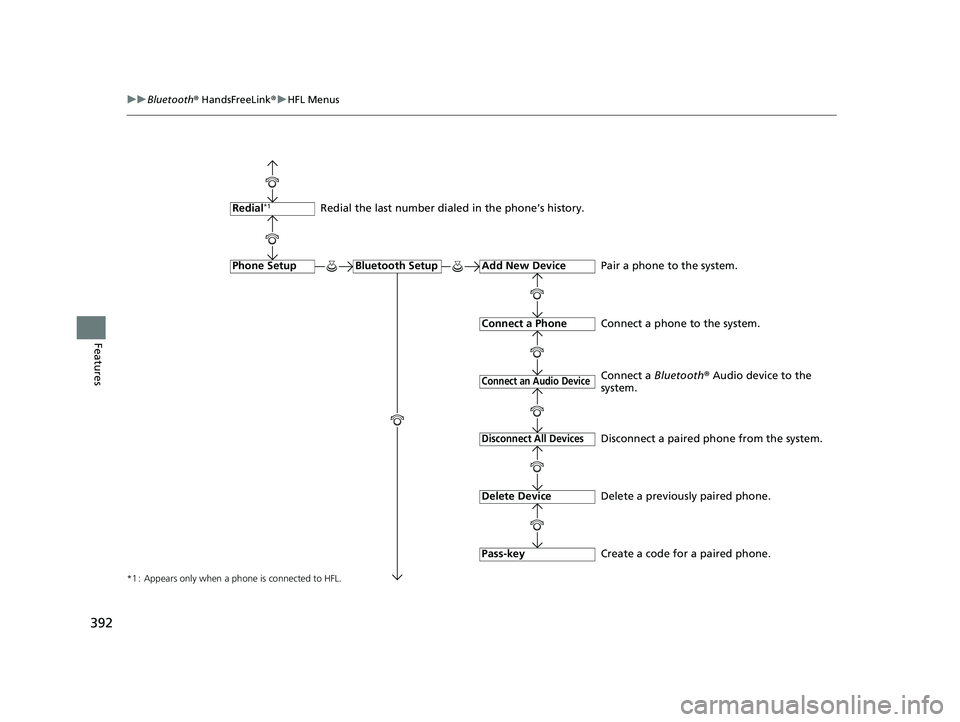
392
uuBluetooth ® HandsFreeLink ®u HFL Menus
Features
*1 : Appears only when a phone is connected to HFL.
Redial the last number dialed in the phone’s history.
Add New Device
Connect a Phone
Connect an Audio Device
Bluetooth SetupPhone Setup
Redial*1
Pair a phone to the system.
Connect a phone to the system.
Create a code for a paired phone.
Disconnect All Devices
Delete Device
Pass-key
Disconnect a paired phone from the system.
Delete a previously paired phone. Connect a Bluetooth® Audio device to the
system.
19 INSIGHT HMIN-31TXM6000.book 392 ページ 2018年4月20日 金曜日 午後4時22分
Page 395 of 675
393
uuBluetooth ® HandsFreeLink ®u HFL Menus
Continued
Features
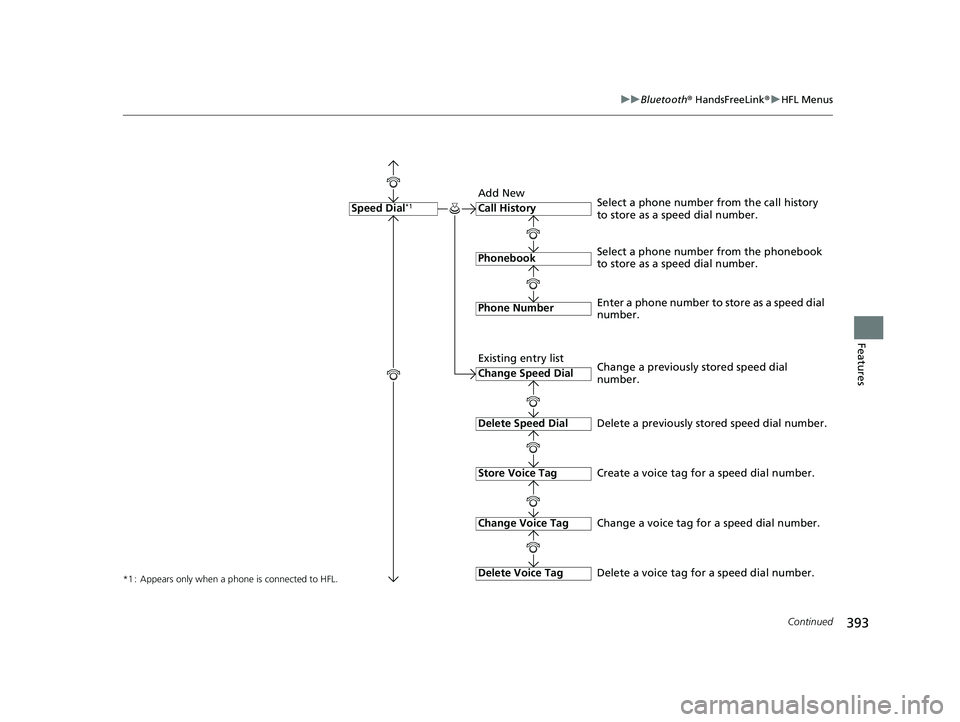
*1 : Appears only when a phone is connected to HFL.
Call History
Phonebook
Phone Number
Speed Dial*1
Select a phone number from the phonebook
to store as a speed dial number. Select a phone number from the call history
to store as a speed dial number.
Create a voice tag for a speed dial number.
Change Speed Dial
Delete Speed Dial
Store Voice Tag
Enter a phone number to store as a speed dial
number.
Delete a previously stored speed dial number.
Change Voice Tag
Delete Voice Tag
Change a previously stored speed dial
number.
Change a voice tag for a speed dial number.
Delete a voice tag for a speed dial number.
Add New
Existing entry list
19 INSIGHT HMIN-31TXM6000.book 393 ページ 2018年4月20日 金曜日 午後4時22分