spare wheel HONDA INSIGHT 2019 Owner's Manual (in English)
[x] Cancel search | Manufacturer: HONDA, Model Year: 2019, Model line: INSIGHT, Model: HONDA INSIGHT 2019Pages: 675, PDF Size: 36.97 MB
Page 475 of 675
Continued473
uuWhen Driving uTire Pressure Monitoring System (TPMS)
Driving
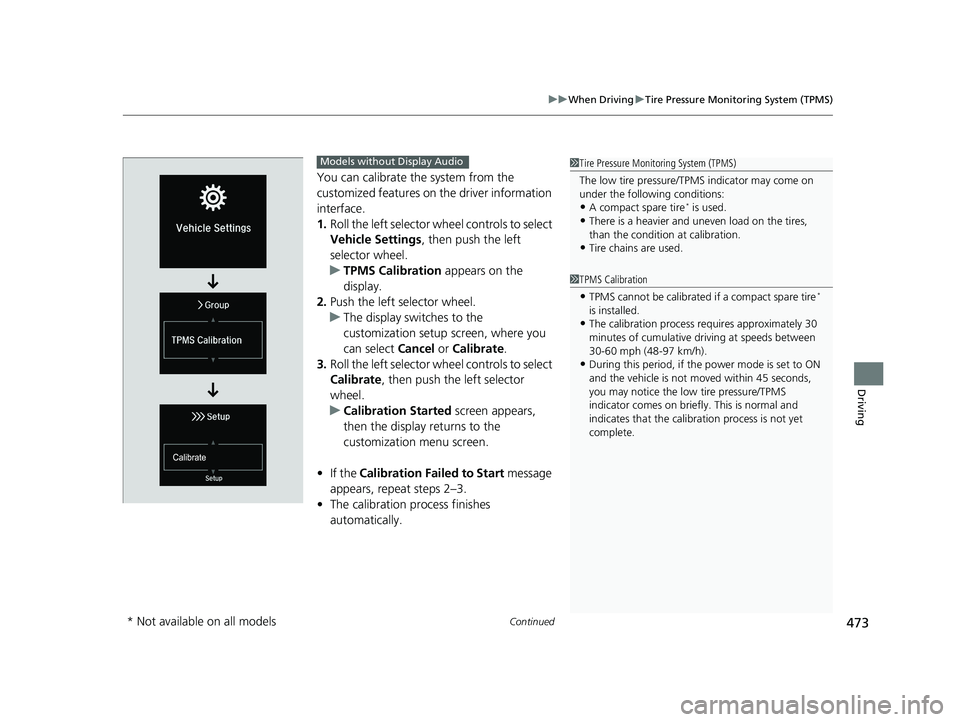
You can calibrate the system from the
customized features on the driver information
interface.
1. Roll the left selector wheel controls to select
Vehicle Settings , then push the left
selector wheel.
u TPMS Calibration appears on the
display.
2. Push the left selector wheel.
u The display swit ches to the
customization setup screen, where you
can select Cancel or Calibrate .
3. Roll the left selector wheel controls to select
Calibrate , then push the left selector
wheel.
u Calibration Started screen appears,
then the display returns to the
customization menu screen.
• If the Calibration Failed to Start message
appears, repeat steps 2–3.
• The calibration process finishes
automatically.
1Tire Pressure Monitoring System (TPMS)
The low tire pressure/TPMS indicator may come on
under the following conditions:
•A compact spare tire* is used.
•There is a heavier and une ven load on the tires,
than the condition at calibration.
•Tire chains are used.
1 TPMS Calibration
•TPMS cannot be calibrated if a compact spare tire*
is installed.
•The calibration process requires approximately 30
minutes of cumulative dr iving at speeds between
30-60 mph (48-97 km/h).
•During this period, if the power mode is set to ON
and the vehicle is not moved within 45 seconds,
you may notice the low tire pressure/TPMS
indicator comes on briefl y. This is normal and
indicates that the calibr ation process is not yet
complete.
Models without Display Audio
* Not available on all models
19 INSIGHT HMIN-31TXM6000.book 473 ページ 2018年4月20日 金曜日 午後4時22分
Page 490 of 675
488
uuHonda Sensing ®u Collision Mitigation Braking SystemTM (CMBSTM)
Driving
■Vehicle conditions
• Headlight lenses are dirty or the headlights are not properly adjusted.
• The outside of the windshie ld is blocked by dirt, mud, leaves, wet snow, etc.
• The inside of the windshield is fogged.
• An abnormal tire or wheel condition (wrong sized, varied size or construction,
improperly inflated, compact spare tire
*, etc.).
• When tire chains are installed.
• The vehicle is tilted due to a heav y load or suspension modifications.
• The camera temperature gets too high.
• Driving with the parking brake applied.
• When the radar sensor at the lower part of the front bumper gets dirty.
• Driving at night or in a dark place (e .g., a tunnel) with the headlights off.
■Detection limitations
• A vehicle or pedestrian suddenly crosses in front of you.
• The distance between your vehicle and the vehicle or pedestrian ahead of you is
too short.
• A vehicle cuts in front of you at a slow speed, and it brakes suddenly.
• When you accelerate rapidly and approach the vehicle or pedestrian ahead of you
at high speed.
• The vehicle ahead of you is a motorcycle, bicycle, mobility scooter or other small
vehicle.
• When there are animals in front of your vehicle.
• When you drive on a curved, wi nding or undulating road that makes it difficult for
the sensor to properly detect a vehicle in front of you.
• The speed difference between your vehicle an d a vehicle or pedestrian in front of
you is significantly large.
• An oncoming vehicle suddenly comes in front of you.
• Another vehicle suddenly comes in front of you at an intersection, etc.
• Your vehicle abruptly crosses over in front of an oncoming vehicle.
• When driving through a narrow iron bridge.
• When the lead vehicle suddenly slows down.
* Not available on all models
19 INSIGHT HMIN-31TXM6000.book 488 ページ 2018年4月20日 金曜日 午後4時22分
Page 500 of 675
uuHonda Sensing ®u Adaptive Cruise Control (ACC) with Low Speed Follow (LSF)
498
Driving
The system may automatically shut off and the ACC with LSF indicator will come on
under certain conditions. Some examples of these conditions are listed below. Other
conditions may reduce some of the ACC with LSF functions.
■Environmental conditions
Driving in bad weather (r ain, fog, snow, etc.).
■Roadway conditions
Driving on a snowy or wet roadway (obscure d lane marking, vehicle tracks, reflected
lights, road spray, high contrast).
■Vehicle conditions
• The outside of the windshie ld is blocked by dirt, mud, leaves, wet snow, etc.
• An abnormal tire or wheel condition (Wrong sized, varied size or construction,
improperly inflated, compact spare tire
*, etc.).
• The camera temperature gets too high.
• The parking brake is applied.
• When the radar sensor cover is dirty.
• The vehicle is tilted due to a heav y load or suspension modifications.
• When tire chains are installed.
■ACC with LSF Conditions and Limitations1ACC with LSF Conditions and Limitations
The radar sensor for ACC with LSF is shared with the
collision mitigation braking system (CMBS).
2 Collision Mitigation Braking System
TM
(CMBSTM) P. 483
For directions on the prop er handling of the radar
sensor, refer to the following page. 2 Radar Sensor P. 530
You can read about handling information for the
camera equipped with this system. 2 Front Sensor Camera P. 528
Have your vehicle checked by a dealer if you find any
unusual behavior of the system (e.g., the warning
message appears too frequently).
* Not available on all models
19 INSIGHT HMIN-31TXM6000.book 498 ページ 2018年4月20日 金曜日 午後4時22分
Page 518 of 675
516
uuHonda Sensing ®u Lane Keeping Assist System (LKAS)
Driving
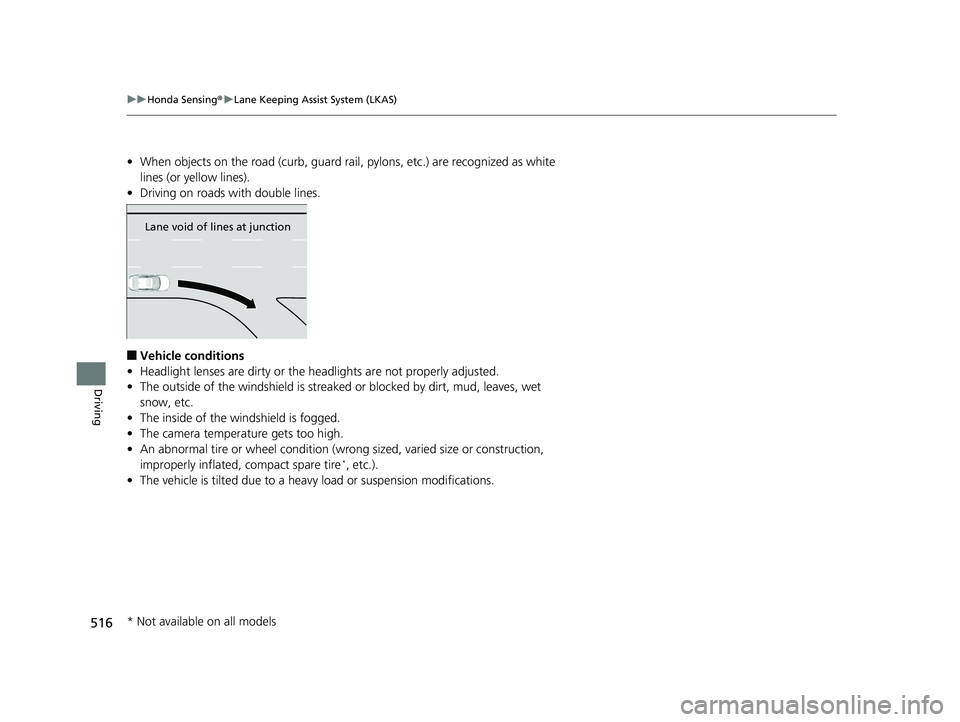
• When objects on the road (curb, guard rail, pylons, etc.) are recognized as white
lines (or yellow lines).
• Driving on roads with double lines.
■Vehicle conditions
• Headlight lenses are dirty or the headlights are not properly adjusted.
• The outside of the windshield is streake d or blocked by dirt, mud, leaves, wet
snow, etc.
• The inside of the windshield is fogged.
• The camera temperature gets too high.
• An abnormal tire or wheel condition (wrong sized, varied size or construction,
improperly inflated, compact spare tire
*, etc.).
• The vehicle is tilted due to a heav y load or suspension modifications.
Lane void of lines at junction
* Not available on all models
19 INSIGHT HMIN-31TXM6000.book 516 ページ 2018年4月20日 金曜日 午後4時22分
Page 523 of 675
521
uuHonda Sensing ®u Road Departure Mitigation (RDM) System
Driving
■Roadway conditions
• Driving on a snowy or wet roadway (obs cured lane marking, vehicle tracks,
reflected lights, road spray, high contrast).
• Driving on a road with temporary lane markings.
• Faint, multiple, or varied lane markings are visible on the roadway due to road
repairs or old lane markings.
• The roadway has merging, split, or crossing lines (e.g., such as at an intersection
or crosswalk).
• The lane markings are extremely narrow, wide, or changing.
• The vehicle in front of you is driving near the lane lines.
• The road is hilly or the vehicle is approaching the crest of a hill.
• Driving on rough or unpaved roads, or over bumpy surfaces.
• When objects on the road (curb, guard rail, pylons, etc.) are recognized as white
lines (or yellow lines).
• Driving on roads with double lines.
■Vehicle conditions
• Headlight lenses are dirty or the h eadlights are not properly adjusted.
• The outside of the windshield is streaked or blocked by dirt, mud, leaves, wet
snow, etc.
• The inside of the windshield is fogged.
• The camera temperature gets too high.
• An abnormal tire or wheel condition (wrong sized, varied size or construction,
improperly inflated, compact spare tire
*, etc.).
• The vehicle is tilted due to a heavy load or suspension modifications.
• When tire chains are installed.
* Not available on all models
19 INSIGHT HMIN-31TXM6000.book 521 ページ 2018年4月20日 金曜日 午後4時22分
Page 526 of 675
uuHonda Sensing ®u Traffic Sign Recognition System
524
Driving
The traffic sign recognition system may not be able to recognize the traffic sign in
the following cases.
■Vehicle conditions
• Headlight lenses are dirty or the headlights are not properly adjusted.
• The outside of the windshie ld is blocked by dirt, mud, leaves, wet snow, etc.
• The inside of the windshield is fogged.
• There are portions remaining to be wiped.
• An abnormal tire or wheel condition (wrong sized, varied size or construction,
improperly inflated, compact spare tire
*, etc.).
• The vehicle is tilted due to a heav y load or suspension modifications.
■Environmental conditions
• Driving into low sunlight (e.g., at dawn or dusk).
• Strong light is reflected onto the roadway.
• Sudden changes between light and dark, such as an entrance or exit of a tunnel.
• When you drive in the shad ows of trees, buildings, etc.
• Driving at night, in dark areas such as long tunnels.
• Driving in bad weather (rain, fog, snow, etc.).
• A vehicle in front of you is traveling flying up spray or snow.
■Traffic Sign Recognition System Conditions and Limitations1Traffic Sign Recognition System Conditions and Limitations
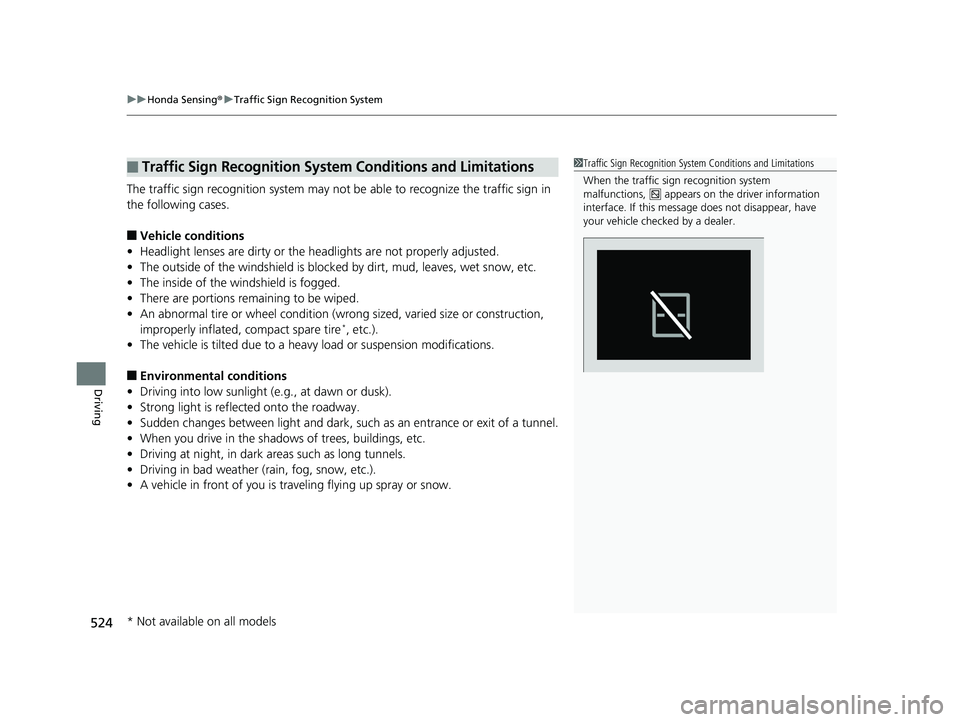
When the traffic sign recognition system
malfunctions, appears on the driver information
interface. If this message does not disappear, have
your vehicle checked by a dealer.
* Not available on all models
19 INSIGHT HMIN-31TXM6000.book 524 ページ 2018年4月20日 金曜日 午後4時22分
Page 584 of 675
582
Maintenance
Checking and Maintaining Tires
Checking Tires
To safely operate your vehicle, your tires must be of the proper type and size, in
good condition with adequate tread, and properly inflated.
■Inflation guidelines
Properly inflated tires provide the best combination of handling, tread life, and comfort.
Refer to the driver’s doorjamb label or spec ifications page for the specified pressure.
Underinflated tires wear unevenly, adversely affect handling and fuel economy, and
are more likely to fail from overheating.
Overinflated tires make your vehicle ride harshly, are more prone to road hazards,
and wear unevenly.
Every day before you drive, look at each of the tires. If one looks lower than the
others, check the pressure with a tire gauge.
At least once a month or before long trips, use a gauge to measure the pressure in all
tires, including the spare
*. Even tires in good condition can lose 1–2 psi (10–20 kPa,
0.1–0.2 kgf/cm2) per month.
■Inspection guidelines
Every time you check inflation, also examine the tires and valve stems.
Look for:
• Bumps or bulges on the side or in the tread. Replace the tire if you find any cuts,
splits, or cracks in the si de of the tire. Replace it if you see fabric or cord.
• Remove any foreign objects and inspect for air leaks.
• Uneven tread wear. Have a deal er check the wheel alignment.
• Excessive tread wear.
2 Wear Indicators P. 587
•Cracks or other damage around valve stem.
1Checking Tires
Measure the air pressure when tires are cold. This
means the vehicle has been parked for at least three
hours, or driven less than 1 mile (1.6 km). If
necessary, add or releas e air until the specified
pressure is reached.
If checked when hot, tire pressure can be as much as
4–6 psi (30–40 kPa, 0.3–0.4 kgf/cm
2) higher than if
checked when cold.
Whenever tire pressure is adjusted, you must
calibrate the TPMS. 2 TPMS Calibration P. 472
Have a dealer check the tires if you feel a consistent
vibration while driving. Ne w tires and any that have
been removed and reinst alled should be properly
balanced.
Check the spare tire pressu re once a month or before
long trips.
3WARNING
Using tires that are excessively worn or
improperly inflated can cause a crash in
which you can be seriously hurt or killed.
Follow all instruction s in this owner’s
manual regarding ti re inflation and
maintenance.
Vehicles with optional spare tire
* Not available on all models
19 INSIGHT HMIN-31TXM6000.book 582 ページ 2018年4月20日 金曜日 午後4時22分
Page 606 of 675

604
Handling the Unexpected
Tools
Types of Tools
1Types of Tools
The tools are stored in the trunk.
Wheel Nut Wrench/
Jack Handle
Box Wrench
Jack Handle Bar
Tool Case Jack
Shaft Wrench
Box Wrench
Shaft Wrench
Tool Case
Vehicles with optional spare tire
19 INSIGHT HMIN-31TXM6000.book 604 ページ 2018年4月20日 金曜日 午後4時22分
Page 607 of 675
605Continued
Handling the Unexpected
If a Tire Goes Flat
Changing a Flat Tire
If a tire goes flat while driving, grasp the steering wheel firmly, and brake gradually
to reduce speed. Then, stop in a safe plac e. Replace the flat tire with a compact
spare tire. Go to a dealer as soon as possib le to have the full-size tire repaired or
replaced.
1. Park the vehicle on firm, level, non-slip pery surface and apply the parking brake.
2. Change the shift position to
(P.
3. Turn on the hazard warning lights an d set the power mode to VEHICLE OFF.
Vehicles with optional spare tire
1Changing a Flat Tire
Follow compact spare precautions:
Periodically check the tire pressure of the compact
spare. It should be set to the specified pressure.
Specified Pressure: 60 psi (420 kPa, 4.2 kgf/cm
2)
When driving with the compact spare tire, keep the
vehicle speed under 50 mph (80 km/h). Replace with
a full-size tire as soon as possible.
The compact spare tire and wheel in your vehicle are
specifically for this model. Do not use them with
another vehicle. Do not us e another type of compact
spare tire or wheel with your vehicle.
Do not mount tire chains on a compact spare tire.
If a chain-mounted front tire goes flat, remove one of
the full-size rear tires and replace it with the compact
spare tire. Remove the flat front tire and replace it
with the full-size tire that was removed from the rear.
Mount the tire chains on the front tire.
NOTICE
Do not use the jack if it doesn’t work properly.
Call your dealer or a pr ofessional towing service.
19 INSIGHT HMIN-31TXM6000.book 605 ページ 2018年4月20日 金曜日 午後4時22分
Page 608 of 675
606
uuIf a Tire Goes Flat uChanging a Flat Tire
Handling the Unexpected
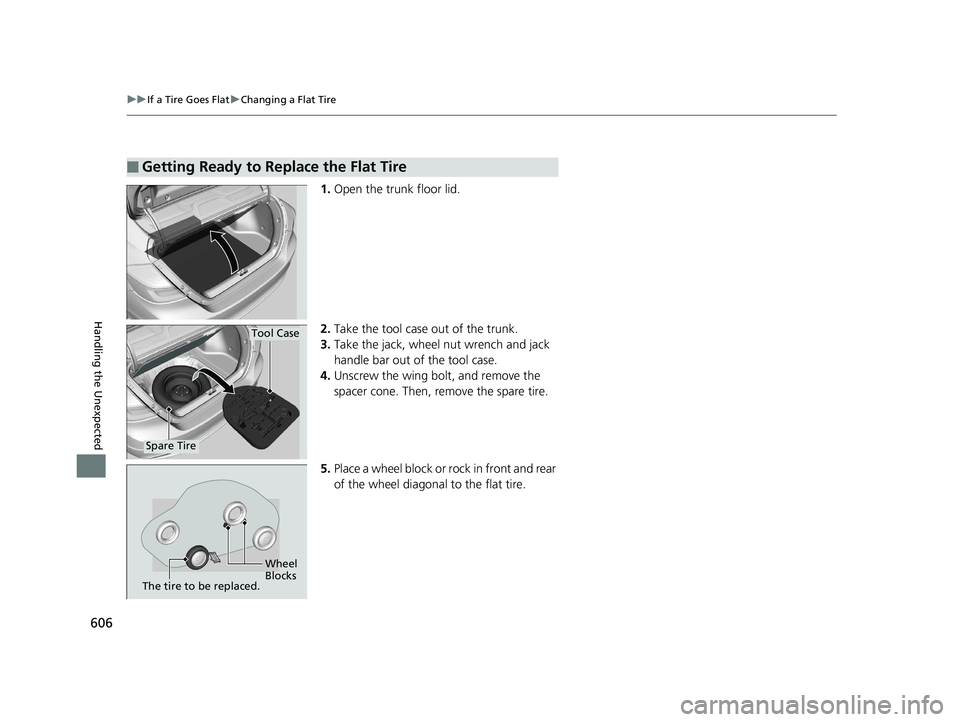
1. Open the trunk floor lid.
2. Take the tool case out of the trunk.
3. Take the jack, wheel nut wrench and jack
handle bar out of the tool case.
4. Unscrew the wing bolt, and remove the
spacer cone. Then, remove the spare tire.
5. Place a wheel block or ro ck in front and rear
of the wheel diagonal to the flat tire.
■Getting Ready to Replace the Flat Tire
Tool Case
Spare Tire
Wheel
Blocks
The tire to be replaced.
19 INSIGHT HMIN-31TXM6000.book 606 ページ 2018年4月20日 金曜日 午後4時22分