tele HONDA INSIGHT 2019 Owner's Manual (in English)
[x] Cancel search | Manufacturer: HONDA, Model Year: 2019, Model line: INSIGHT, Model: HONDA INSIGHT 2019Pages: 675, PDF Size: 36.97 MB
Page 170 of 675
168
uuLocking and Unlocking the Doors uLow Remote Signal Strength
Controls
Low Remote Signal Strength
The vehicle transmits radio waves to locate the remote when locking/unlocking the
doors*, opening the trunk*, or to activate the power system.
In the following cases, locking/unlocking the doors
*, opening the trunk*, or
activating the power system may be inhibited or operation may be unstable:
• Strong radio waves are being tra nsmitted by nearby equipment.
• You are carrying the remote together with telecommunications equipment,
laptop computers, cell phone s, or wireless devices.
• A metallic object is touchi ng or covering the remote.
1Low Remote Signal Strength
Communication between the remote and the vehicle
consumes the remote’s battery.
Battery life is about two years, but this varies
depending on re gularity of use.
The battery is consumed whenever the remote is
receiving strong radio waves. Avoid placing it near
electrical appliances such as televisions and personal
computers.
* Not available on all models
19 INSIGHT HMIN-31TXM6000.book 168 ページ 2018年4月20日 金曜日 午後4時22分
Page 185 of 675
183
Controls
Security System
Immobilizer System
The immobilizer system prevents a key that has not been pre-registered from
starting the power system. Each key cont ains electronic transmitters that use
electronic signals to verify the key.
Pay attention to the follo wing when pressing the POWER button:
• Do not allow objects that emit strong radio waves near the POWER button.
• Make sure the key is not covered by or touching a metal object.
• Do not bring a key from another vehicle’s immobilizer system near the POWER
button.
• Do not put the key near magnetic items. Electronic devices, such as televisions
and audio systems emit strong magnetic fields. Note that even a key chain can
become magnetic.1 Immobilizer System
NOTICE
Leaving the key in the vehicl e can result in theft or
accidental movement of the vehicle.
Always take the key with you whenever you leave the
vehicle unattended.
Do not alter the system or add other devices to it.
Doing so may damage the system and make your
vehicle inoperable.
Apply and hold the brake pedal before turning the
vehicle on the first time af ter the 12-volt battery has
been disconnected.
Canadian models
19 INSIGHT HMIN-31TXM6000.book 183 ページ 2018年4月20日 金曜日 午後4時22分
Page 280 of 675
278
uuAudio System Basic Operation uSystem Updates
Features
System Updates
The audio system’s firmware can be updated with a Wi-Fi connection, or with a USB
device.
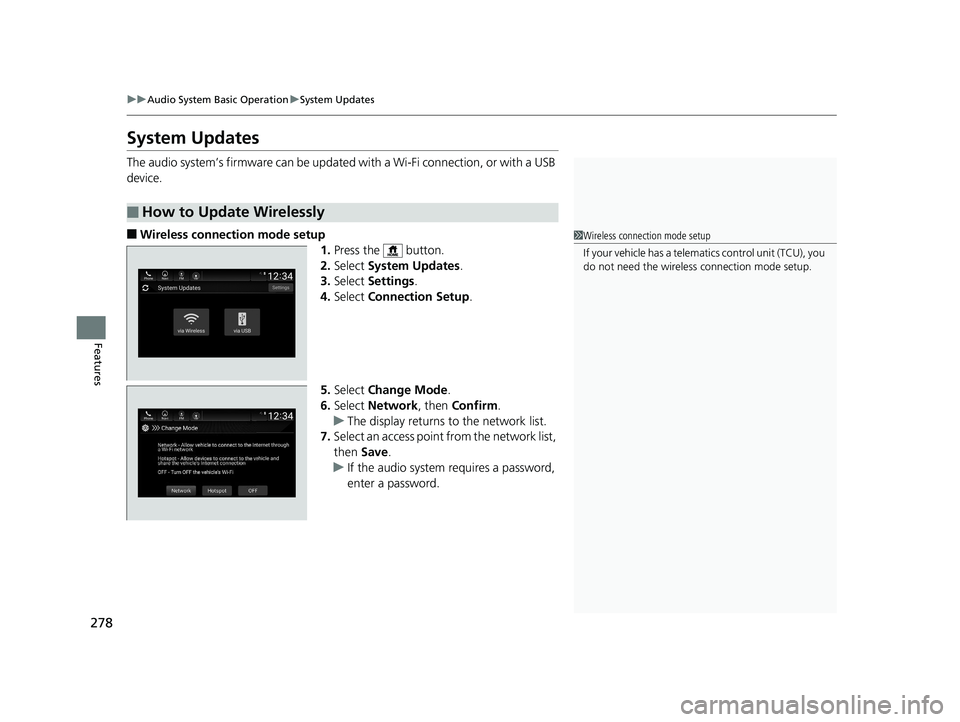
■Wireless connection mode setup
1.Press the button.
2. Select System Updates .
3. Select Settings .
4. Select Connection Setup .
5. Select Change Mode .
6. Select Network, then Confirm.
u The display returns to the network list.
7. Select an access point from the network list,
then Save.
u If the audio system requires a password,
enter a password.
■How to Update Wirelessly
1Wireless connection mode setup
If your vehicle has a telema tics control unit (TCU), you
do not need the wireless connection mode setup.
19 INSIGHT HMIN-31TXM6000.book 278 ページ 2018年4月20日 金曜日 午後4時22分
Page 315 of 675
313
uuAudio System Basic Operation uHondaLink ®
Continued
Features
HondaLink ®
HondaLink® connects you to the latest info rmation from Honda. You can connect
your phone wirelessly through Wi-Fi or Bluetooth®.
2Wi-Fi Connection P. 322
2 Phone Setup P. 419
Use the following procedure to connect to HondaLink ®.
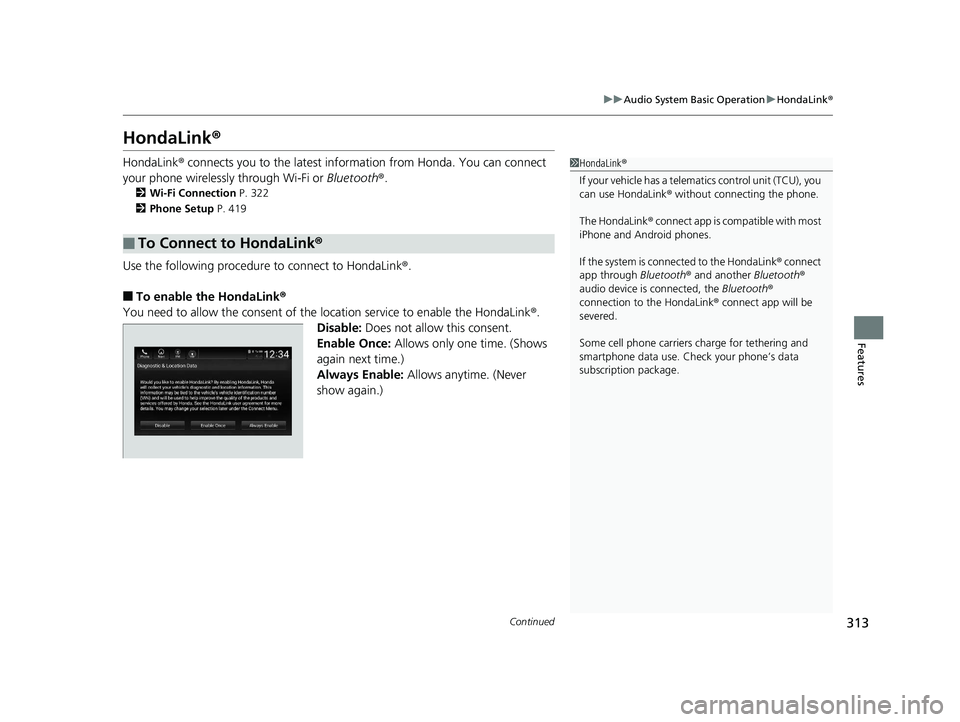
■To enable the HondaLink®
You need to allow the consent of the location service to enable the HondaLink ®.
Disable: Does not allow this consent.
Enable Once: Allows only one time. (Shows
again next time.)
Always Enable: Allows anytime. (Never
show again.)
■To Connect to HondaLink®
1 HondaLink ®
If your vehicle has a telema tics control unit (TCU), you
can use HondaLink ® without connecting the phone.
The HondaLink ® connect app is compatible with most
iPhone and Android phones.
If the system is conn ected to the HondaLink ® connect
app through Bluetooth® and another Bluetooth®
audio device is connected, the Bluetooth®
connection to the HondaLink ® connect app will be
severed.
Some cell phone carriers charge for tethering and
smartphone data use. Check your phone’s data
subscription package.
19 INSIGHT HMIN-31TXM6000.book 313 ページ 2018年4月20日 金曜日 午後4時22分
Page 321 of 675
Continued319
uuAudio System Basic Operation uHondaLink® Service*
Features
Your subscribed telematics service prov ider can track your vehicle’s location,
remotely lock or unlock doors, and help you find your vehicle.
To use these features, you n eed your user ID and personal identification number
(PIN).
■Stolen vehicle tracking
This feature searches and tracks down your ve hicle position even if it is on the move.
If you believe that your vehicle has been stolen, contact the police as well as the
provider.
■Remote door lock/unlock
The provider can remotely lock or unlock doors upon your request.
■Vehicle finder
This feature is convenient to use when trying to locate your vehicle in large areas,
such as a crowded parking lot. If you cannot locate your vehicle after using the
remote transmitter’s answerback function, you can contact the provider which can
then flash your vehicle’s exterior light s and sound the horn, and sends vehicle
location via web/Smartphone.
■Security ala rm notification
If the security system in your vehicl e detects an abnormal condition, such as
someone tampering with the lock on your vehicle, the provider notifies you by email.
■Security Features1Security Features
The contact information of your provider, your user
ID and PIN will be given when you subscribe to
HondaLink ®. If you forget any of the above, contact a
Honda dealer, or go to hondalink.honda.com.
You can also activate the remote door lock/unlock
and vehicle finder features from the Internet or using
your smartphone app. As k a dealer, or visit
hondalink.honda.com .
1Vehicle finder
The lights will stop flas hing and horn will stop
sounding under the following:
•When conditions 30 seconds have elapsed.
•You unlock the doors using the remote transmitter.
•You unlock the doors using the smart entry system.•You unlock the doors us ing the built-in key.
•The power mode is set to ACCESSORY or ON.
19 INSIGHT HMIN-31TXM6000.book 319 ページ 2018年4月20日 金曜日 午後4時22分
Page 323 of 675
321
uuAudio System Basic Operation uHondaLink® Service*
Features
Your subscribed telematics service prov ider can check your vehicle’s condition.
■Virtual Dashboard
You can remotely check the mileage, fuel range, and oil life in your app.
■Remote Start and stop the engine
You can remotely turn on an d off the power system using your app as same as the
smart entry key.
■Geofence Alert
You can receive a notification anytime your ve hicle enters or leaves a region set by
you.
■Speed Alert
You can receive a notification when your ve hicle has exceeded a speed limit set by
you.
■Personal Data Wipe
You can reset your audio and navigation system settings to factory defaults with the
app.
■Wi-Fi hotspot
Vehicle provides 4G LTE ne twork environment as Wi-Fi router to use tablet or
smartphone in your vehicle.
■Convenient Features1 Convenient Features
The contact information of your provider, your user
ID and PIN will be given when you subscribe to
HondaLink ®. If you forget any of the above, contact a
Honda dealer, or go to hondalink.honda.com.
19 INSIGHT HMIN-31TXM6000.book 321 ページ 2018年4月20日 金曜日 午後4時22分
Page 351 of 675
349
uuGeneral Information on the Audio System uHonda App License Agreement
Continued
Features
L. Changes to the SOFTWARE or SERVICES. WE may change, modify, or update the SOFT WARE or SERVICES from time to time. Unless
explicitly stated otherwise, any new featur es or services that augment or enhance the SOFTWARE or SERVICES in the future shall
respectively be considered part of the SOFTWARE or SERVICES and s ubject to this AGREEMENT. WE reserve the right at any time and from
time to time to interrupt, res trict, modify, suspend, discontinue, temporarily or permanently, the SOFTWARE or SERVICES (or any portion
thereof), with or without notice to you, and you agree that HONDA shall not be li able to you or to any third party for any modification,
suspension or discontinuance of the SOFTWARE or SERVICES.
M. ARBITRATION:
PLEASE READ THIS ARBITRATION PROVISION CAREFULLY TO UNDER STAND YOUR RIGHTS. YOU AGREE THAT ANY CLAIM THAT YOU
MAY HAVE IN THE FUTURE MUST BE RESOLVED THROUGH BIND ING ARBITRATION. YOU WAIVE THE RIGHT TO HAVE YOUR DISPUTE
HEARD IN COURT AND WAIVE THE RIGHT TO BRING CLASS CLAIMS. YOU UNDERSTAND THAT DISCOVERY AND APPEAL RIGHTS ARE
MORE LIMITED IN ARBITRATION.
Arbitration is a method of resolving a clai m, dispute or controversy without filing a lawsuit. By agreeing to arbitrate, the right to go to
court is waived and instead claims, disputes or controversies ar e submitted to binding arbitration. This provision sets forth the terms and
conditions of our agreement. YOU and HONDA agree and acknowle dge that this Agreement affects interstate commerce and the
Federal Arbitration Act (“FAA”) applies. By using the Software, Vehicle, or Services, YO U elect to have disputes resolved by arbitration.
YOU, HONDA or any involved third party may pursue a Claim. “Claim” means any dispute between YOU, HONDA, or any involved third
party relating to your use of the Software , the Vehicle, or the Services, this Agreement, or our relationship, including any
representations, omissions or warranties. “Claim” does not include personal injury or wrongful death claims. YOU or HONDA may s eek
remedies in small claims court or provisional judicial remedi es without arbitrating. In addition, notwithstanding anything here in to the
contrary, YOU or HONDA may seek equitable re lief in a court of competent jurisdiction.
YOU or HONDA may select arbitration with American Arbitration Asso ciation, JAMS or National Arbitration and Mediation. Contact
these sponsors for their rules. The hearing will be in the federa l district where YOU reside. If agreed, it may be by telephone or written
submissions. Filing and arbitrator fees to be paid per the sponsor rules. You may contact the sponsor for a fee waiver. If no fee waivers,
HONDA will pay filing and arbitrator fees up to $5,000, unless law requires more. Each party is responsible for other fees. Arbitrator
may award costs or fees to prevailing party, if permitted by law. HONDA will not seek fees, unless the claims are frivolous.
19 INSIGHT HMIN-31TXM6000.book 349 ページ 2018年4月20日 金曜日 午後4時22分
Page 355 of 675
353
uuGeneral Information on the Audio System uAbout Open Source Licenses
Features
About Open Source Licenses
To see the open source licens e information, follow these steps.
1. Press the MENU/CLOCK button.
2. Rotate to select Settings, then press .
3. Rotate to select License, then press .
1. Press the button.
2. Select Settings .
3. Select System.
4. Select About .
5. Select Legal Information .
6. Select License .1About Open Source Licenses
Free/Open Source Software Information
This product contains Free/Open Source
Software(FOSS).
The license information and/ or the source code of
such FOSS can be found at the following URL.
https://www.denso.com/global/en/opensource/tcu/
honda/
Models with Telematics Control UnitModels with color audio
Models with Display Audio
19 INSIGHT HMIN-31TXM6000.book 353 ページ 2018年4月20日 金曜日 午後4時22分
Page 453 of 675
Continued451
uuWhen Driving uTurning on the Power
Driving
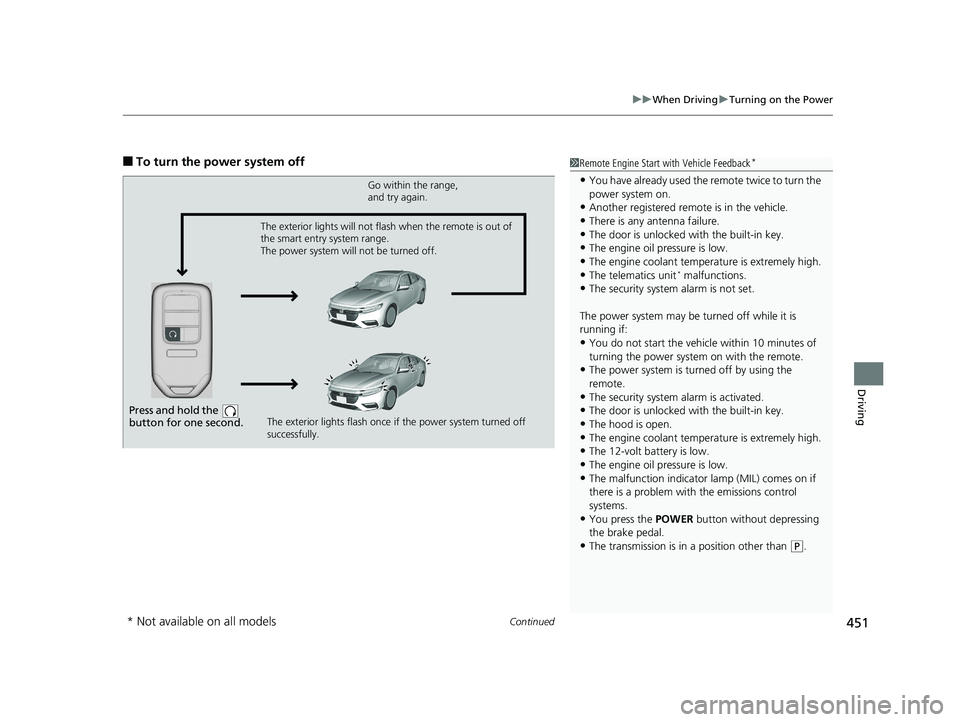
■To turn the power system off1Remote Engine Start with Vehicle Feedback*
•You have already used the remote twice to turn the
power system on.
•Another registered remo te is in the vehicle.
•There is any antenna failure.•The door is unlocked with the built-in key.
•The engine oil pressure is low.
•The engine coolant temper ature is extremely high.•The telematics unit* malfunctions.
•The security system alarm is not set.
The power system may be turned off while it is
running if:
•You do not start the vehicl e within 10 minutes of
turning the power system on with the remote.
•The power system is turned off by using the
remote.
•The security system alarm is activated.
•The door is unlocked with the built-in key.
•The hood is open.
•The engine coolant temper ature is extremely high.•The 12-volt battery is low.
•The engine oil pressure is low.
•The malfunction indicator lamp (MIL) comes on if
there is a problem with the emissions control
systems.
•You press the POWER button without depressing
the brake pedal.
•The transmission is in a position other than ( P.
Press and hold the
button for one second.
Go within the range,
and try again.
The exterior lights flash once if the power system turned off
successfully.
The exterior lights will not flash when the remote is out of
the smart entry system range.
The power system will not be turned off.
* Not available on all models
19 INSIGHT HMIN-31TXM6000.book 451 ページ 2018年4月20日 金曜日 午後4時22分
Page 664 of 675
662
Information
Customer Service Information
Honda dealership personnel are trained professionals who should be able to deal
with any problems you may encounter with your vehicle. If, however, you are faced
with a problem that they cannot resolv e to your satisfaction, contact Honda
Customer Services.
U.S. Owners
American Honda Motor Co., Inc.
Honda Automobile Customer Services
Mail Stop 100-5E-8A
1919 Torrance Blvd.
Torrance, CA 90501-2746
Tel: 1 (800) 999-1009 Canadian Owners
Honda Canada Inc.
Customer Relations
180 Honda Boulevard
Markham, ON
L6C 0H9
Tel: 1-888-9-HONDA-9
Fax: 1-877-939-0909
E-mail: [email protected]
In Puerto Rico an d the U.S. Virgin
Islands
Bella International
P.O. Box 190816
San Juan, PR 00919-0816
Tel: 1 (787) 620-75461 Customer Service Information
When you call or write, please give us the following
information:
•Vehicle Identification Number
2Vehicle Identification Number (VIN),
Engine Number, Motor Number, and
Transmission Number P. 654
•Date of purchase•Odometer reading of your vehicle
•Your name, address, and telephone number
•A detailed description of the problem•Name of the dealer who sold the vehicle to you
19 INSIGHT HMIN-31TXM6000.book 662 ページ 2018年4月20日 金曜日 午後4時22分