fuel HONDA INSIGHT 2022 Owner's Manual
[x] Cancel search | Manufacturer: HONDA, Model Year: 2022, Model line: INSIGHT, Model: HONDA INSIGHT 2022Pages: 609, PDF Size: 18.48 MB
Page 153 of 609
152
uuGauges and Driver Information Interface uDriver Information Interface
Instrument Panel
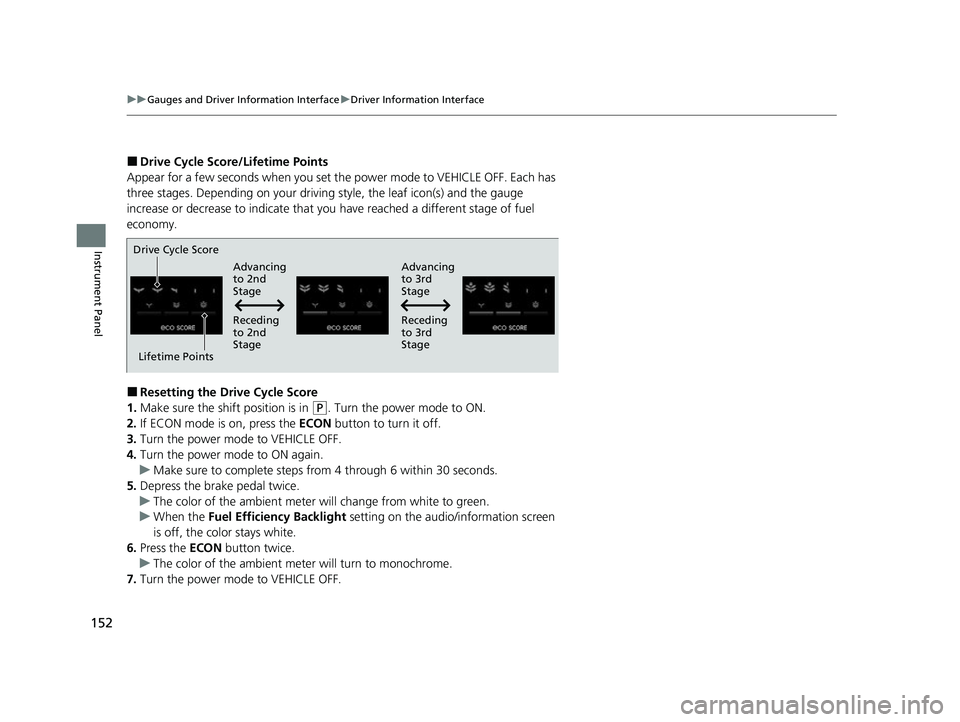
■Drive Cycle Score/Lifetime Points
Appear for a few seconds when you set th e power mode to VEHICLE OFF. Each has
three stages. Depending on your driving style, the leaf icon(s) and the gauge
increase or decrease to indicate that you have reached a different stage of fuel
economy.
■Resetting the Drive Cycle Score
1. Make sure the shift position is in
(P. Turn the power mode to ON.
2. If ECON mode is on, press the ECON button to turn it off.
3. Turn the power mode to VEHICLE OFF.
4. Turn the power mode to ON again.
u Make sure to complete steps from 4 through 6 within 30 seconds.
5. Depress the brake pedal twice.
u The color of the ambient meter wi ll change from white to green.
u When the Fuel Efficiency Backlight setting on the audio/information screen
is off, the color stays white.
6. Press the ECON button twice.
u The color of the ambient mete r will turn to monochrome.
7. Turn the power mode to VEHICLE OFF.
Drive Cycle Score
Lifetime Points Advancing
to 2nd
Stage
Advancing
to 3rd
Stage
Receding
to 3rd
Stage
Receding
to 2nd
Stage
22 INSIGHT HMIN-31TXM6300.book 152 ページ 2021年2月24日 水曜日 午後3時45分
Page 224 of 609
223
Features
This chapter describes how to operate technology features.
Audio SystemAbout Your Audio System ................ 224
USB Ports ......................................... 225
Audio System Theft Protection ......... 226
Audio Remote Controls .................... 227
Audio System Basic Operation ........ 230
Audio/Information Screen ................ 231
System Updates ............................... 246
Adjusting the Sound ........................ 252
Display Setup ................................... 253
Voice Control Operation .................. 255
Playing AM/FM Radio ....................... 258 Playing SiriusXM
® Radio ................... 262
Playing an iPod ................................ 273
Playing a USB Flash Drive ................. 276
Playing Bluetooth ® Audio................. 279
HondaLink ®..................................... 281
HondaLink ® Service
*........................ 285
Wi-Fi Connection ............................. 290
AT&T Hotspot
*................................ 292
Siri ® Eyes Free .................................. 293
Apple CarPlay
TM............................... 294
Android AutoTM................................ 298
Audio Error Messages ...................... 302 General Information on the Audio
System ............................................. 304
Customized Features ........................ 326
HomeLink ® Universal Transceiver
*.. 346
Bluetooth ® HandsFreeLink® ............. 349
Refuel Recommend .......................... 374
* Not available on all models
22 INSIGHT HMIN-31TXM6300.book 223 ページ 2021年2月24日 水曜日 午後3時45分
Page 235 of 609
uuAudio System Basic Operation uAudio/Information Screen
234
Features
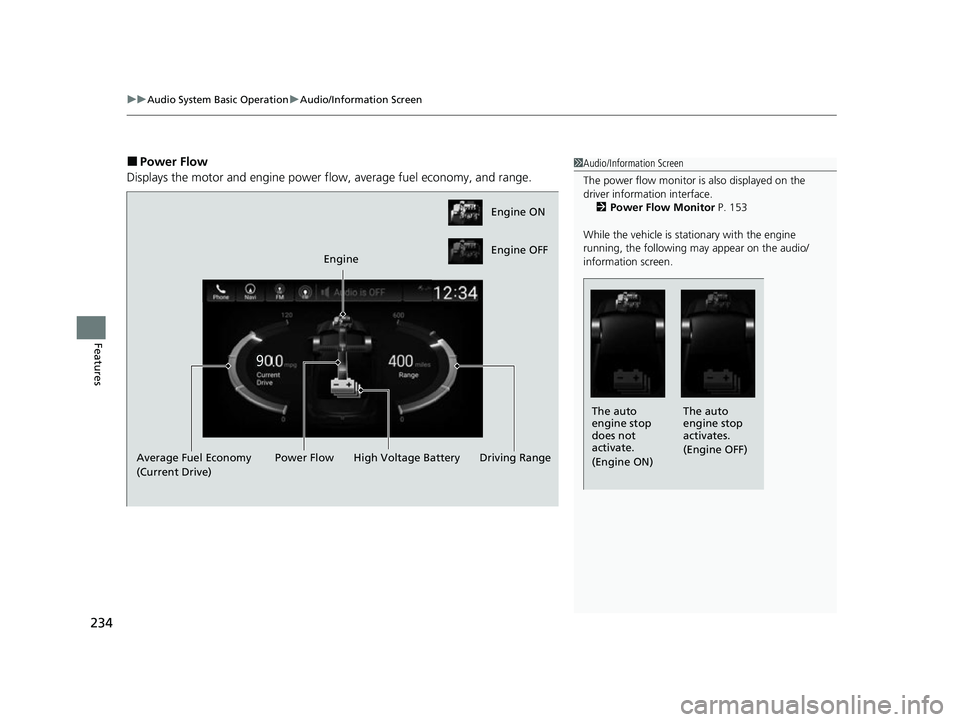
■Power Flow
Displays the motor and engine power fl ow, average fuel economy, and range.1Audio/Information Screen
The power flow monitor is also displayed on the
driver information interface.
2 Power Flow Monitor P. 153
While the vehicle is stat ionary with the engine
running, the following may appear on the audio/
information screen.
The auto
engine stop
activates.
(Engine OFF)
The auto
engine stop
does not
activate.
(Engine ON)
Engine ON
Engine OFF
Engine
Average Fuel Economy
(Current Drive) High Voltage Battery
Power Flow Driving Range
22 INSIGHT HMIN-31TXM6300.book 234 ページ 2021年2月24日 水曜日 午後3時45分
Page 313 of 609
312
uuGeneral Information on the Audio System uHonda App License Agreement
Features
E. Information Collection and Storage
1. Information Collection , Use, Transmission and Storage of Data. Consent to Use of Data:
You agree that HONDA and PROVIDERS may
collect and use your information gathered in any manner as part of product support services related to the SOFTWARE or related services.
HONDA may share such information with third parties, including, without limitation, PROV IDERS, third party software and service s
suppliers, their affiliates and/or their design ated agents, solely to improve their products or to provide services or technologies to you.
HONDA, third party software and systems supp liers, their affiliates and/or their designated agent may disclose this information to others,
but not in a form that pe rsonally identifies you.
2. Information Storage.
Depending on the type of multimedia system you have in your VEHICLE, certain information may be stored for ease
of use of the SOFTWARE including, without limitation, search hi story, location history in certain applications, previous and saved
destinations, map locations within certain applications, and device numbers and contact information.
(a) Vehicle Health Information.
Your VEHICLE may remotely trans mit information regarding the status and health of your VEHICLE
(“VEHICLE INFORMATION”) to HONDA without notification to you. VEHICLE INFORMATION may contain VEHICLE maintenance and
malfunction status that is derived from VEHICLE diagnostic data and includes, but is not limited to, status of powered doors and windows,
battery life data, battery charging data, VEHICLE speed, coolant temperat ure, air compressor revolution, output power, warning codes,
diagnostic trouble codes, fuel injection volu me, and engine rotations per minute. VEHICL E HEALTH INFORMATION may be used by HON DA
for research and development, to deliver HO NDA SERVICES and information to you, and to contact you, and is retained only for a period
of time necessary to fulfill these goals.
(b) VEHICLE Geolocation Data (non-navigation/map based).
If you opt-in to geolocation-based SERVICES, your vehicle’s geolocation data
(latitude and longitude) will be automatically sent from your VEHICLE to HONDA and PROVIDERS.
(c) You understand that the inputting or uploading of information to your VEHICLE’s multimedia system or the SOFTWARE or SERVICES is
at your own risk and that HONDA is not resp onsible for unauthorized access to or use of any personal or other information. All information
uploaded to the SOFTWARE and SERVICES may be stored on your VEHI CLES’s multimedia system and you understand that the security and
safety of your VEHICLE’s multimedia system is your sole responsibility.
22 INSIGHT HMIN-31TXM6300.book 312 ページ 2021年2月24日 水曜日 午後3時45分
Page 329 of 609
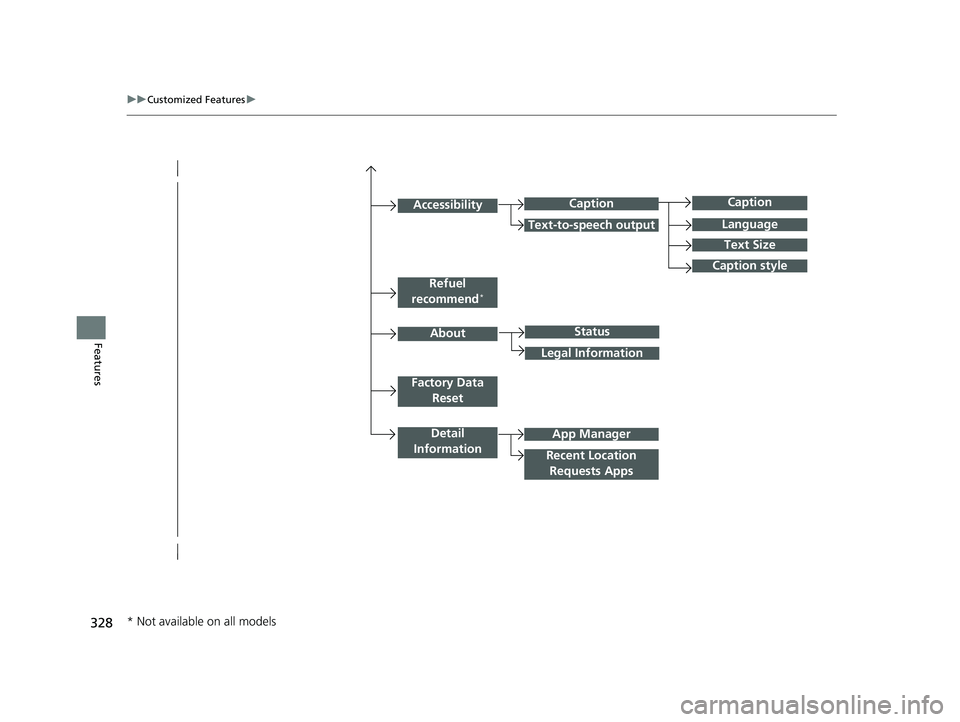
328
uuCustomized Features u
Features
Caption
Language
Caption style
Detail
Information
Factory Data Reset
About
Refuel
recommend*
Accessibility
Status
Legal Information
App Manager
Recent Location Requests Apps
Caption
Text-to-speech output
Text Size
* Not available on all models
22 INSIGHT HMIN-31TXM6300.book 328 ページ 2021年2月24日 水曜日 午後3時45分
Page 331 of 609
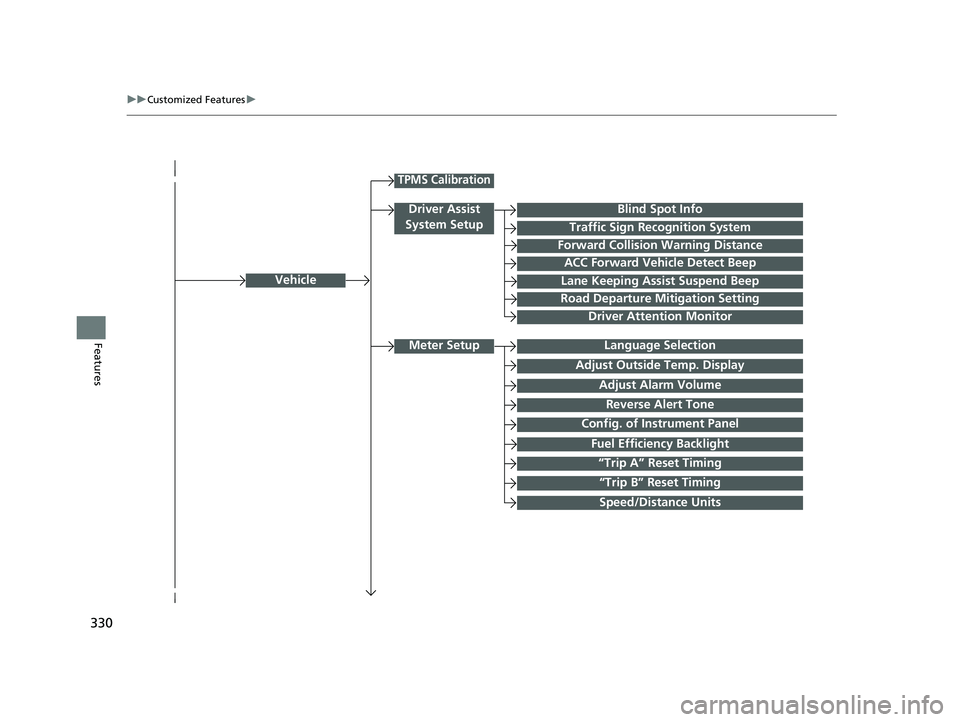
330
uuCustomized Features u
FeaturesLanguage Selection
Vehicle
Meter Setup
Adjust Outside Temp. Display
“Trip A” Reset Timing
“Trip B” Reset Timing
Reverse Alert Tone
Config. of Instrument Panel
Adjust Alarm Volume
Fuel Efficiency Backlight
TPMS Calibration
Driver Assist
System Setup
Traffic Sign Recognition System
Forward Collision Warning Distance
ACC Forward Vehicle Detect Beep
Lane Keeping Assist Suspend Beep
Road Departure Mitigation Setting
Driver Attention Monitor
Speed/Distance Units
Blind Spot Info
22 INSIGHT HMIN-31TXM6300.book 330 ページ 2021年2月24日 水曜日 午後3時45分
Page 337 of 609

336
uuCustomized Features u
Features
*1:Default SettingSetup
Group Customizable Features Description Selectable Settings
System
Refuel
recommend*Turns the refuel recommend function on and off.
2
Refuel Recommend P. 374ON*1/OFF
AboutStatusDisplays the Android setting items.—Legal Information
Factory Data
ResetResets all the settings to their factory default.2 Defaulting All the Settings P. 345Continue /Cancel
Detail
InformationApp ManagerDisplays the Android sy stem memory and apps
information.—
Recent Location
Requests AppsDisplays the recent loca tion requests from apps.—
* Not available on all models
22 INSIGHT HMIN-31TXM6300.book 336 ページ 2021年2月24日 水曜日 午後3時45分
Page 341 of 609
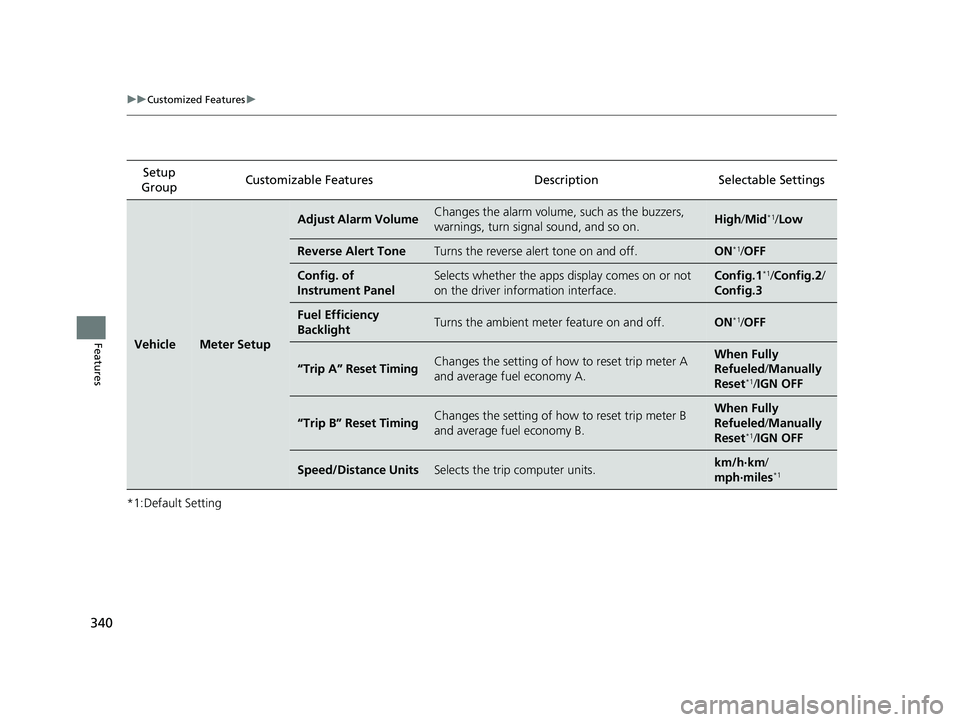
340
uuCustomized Features u
Features
*1:Default SettingSetup
Group Customizable Features
DescriptionSelectable Settings
VehicleMeter Setup
Adjust Alarm VolumeChanges the alarm volume, such as the buzzers,
warnings, turn signal sound, and so on.High /Mid*1/Low
Reverse Alert ToneTurns the reverse alert tone on and off.ON*1/OFF
Config. of
Instrument PanelSelects whether the apps display comes on or not
on the driver info rmation interface.Config.1*1/Config.2 /
Config.3
Fuel Efficiency
BacklightTurns the ambient meter feature on and off.ON*1/ OFF
“Trip A” Reset TimingChanges the setting of how to reset trip meter A
and average fuel economy A.When Fully
Refueled /Manually
Reset
*1/ IGN OFF
“Trip B” Reset TimingChanges the setting of how to reset trip meter B
and average fuel economy B.When Fully
Refueled /Manually
Reset
*1/ IGN OFF
Speed/Distance UnitsSelects the trip computer units.km/h·km /
mph·miles*1
22 INSIGHT HMIN-31TXM6300.book 340 ページ 2021年2月24日 水曜日 午後3時45分
Page 375 of 609
374
Features
Refuel Recommend
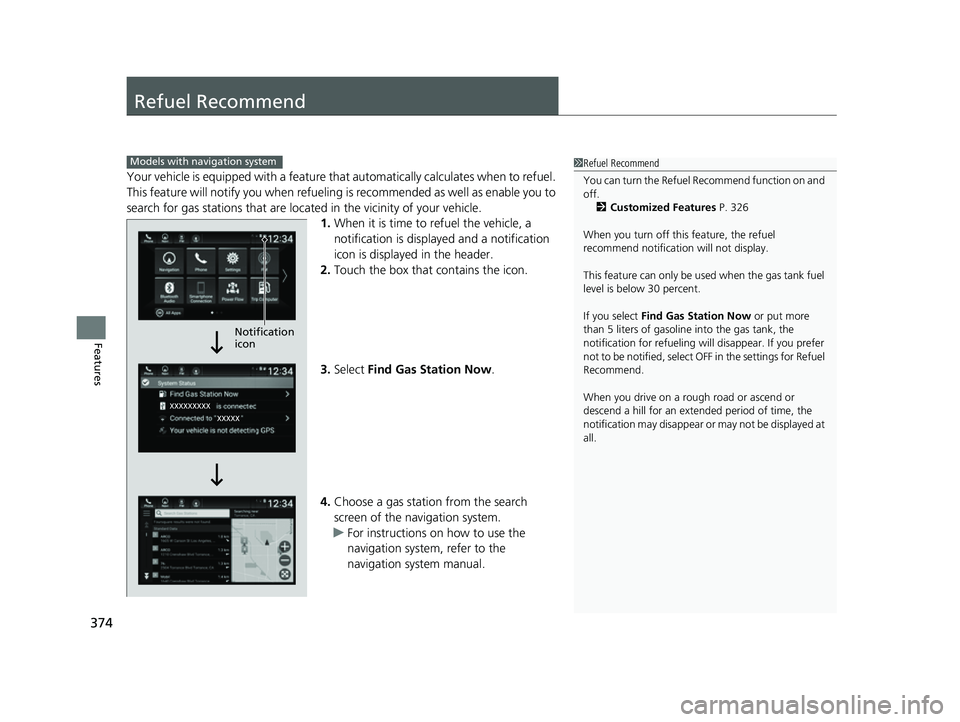
Your vehicle is equipped with a feature that automatically calculates when to refuel.
This feature will notify you when refueling is recommended as well as enable you to
search for gas stations that are loca ted in the vicinity of your vehicle.
1. When it is time to refuel the vehicle, a
notification is displayed and a notification
icon is displayed in the header.
2. Touch the box that contains the icon.
3. Select Find Gas Station Now .
4. Choose a gas station from the search
screen of the navigation system.
u For instructions on how to use the
navigation system, refer to the
navigation system manual.
1Refuel Recommend
You can turn the Refuel Recommend function on and
off.
2 Customized Features P. 326
When you turn off this feature, the refuel
recommend notificati on will not display.
This feature can only be us ed when the gas tank fuel
level is below 30 percent.
If you select Find Gas Station Now or put more
than 5 liters of gasoline into the gas tank, the
notification for refueling will disappear. If you prefer
not to be notified, select O FF in the settings for Refuel
Recommend.
When you drive on a rough road or ascend or
descend a hill for an ex tended period of time, the
notification may disappear or may not be displayed at
all.Models with navigation system
Notification
icon
22 INSIGHT HMIN-31TXM6300.book 374 ページ 2021年2月24日 水曜日 午後3時45分
Page 376 of 609
375
Driving
This chapter discusses driving and refueling.
Before Driving................................... 376
Towing a Trailer ................................ 381
When Driving
Turning on the Power ...................... 382
Precautions While Driving................. 388
Transmission .................................... 390
Shifting ............................................ 391
SPORT Mode.................................... 397
Deceleration Paddle Selector ............ 398
ECON Mode .................................... 401
Acoustic Vehicle Al erting System ...... 402
Vehicle Stability AssistTM (VSA®), aka Electronic
Stability Control (ESC), System ...............403
Agile Handling Assist ............................. 405Tire Pressure Monitoring System (TPMS) .. 406Tire Pressure Monitoring System (TPMS) - Required Federal Explanation ......... 409
Blind spot information System.......... 411
High Voltage Battery ........................ 414
Honda Sensing ®................................ 415
Collision Mitigati on Braking System
TM
(CMBSTM) ....................................... 418
Adaptive Cruise Control (ACC) with Low Speed Follow ................................. 428
Lane Keeping Assist System (LKAS).... 446
Road Departure Mi tigation (RDM)
System ........................................ 454
Traffic Sign Recognition System ....... 459
Front Sensor Camera ....................... 465
Radar Sensor ................................... 467
Braking
Brake System ................................... 468
Anti-lock Brake System (ABS) ........... 476
Brake Assist System ......................... 477
Parking Your Vehicle ........................ 478
Multi-View Rear Camera .................. 483
Refueling ........................................... 485
Fuel Economy and CO
2 Emissions .... 488
22 INSIGHT HMIN-31TXM6300.book 375 ページ 2021年2月24日 水曜日 午後3時45分