fuel HONDA INSIGHT 2022 User Guide
[x] Cancel search | Manufacturer: HONDA, Model Year: 2022, Model line: INSIGHT, Model: HONDA INSIGHT 2022Pages: 609, PDF Size: 18.48 MB
Page 89 of 609
88
uuIndicators u
Instrument Panel
IndicatorNameOn/BlinkingExplanationMessage
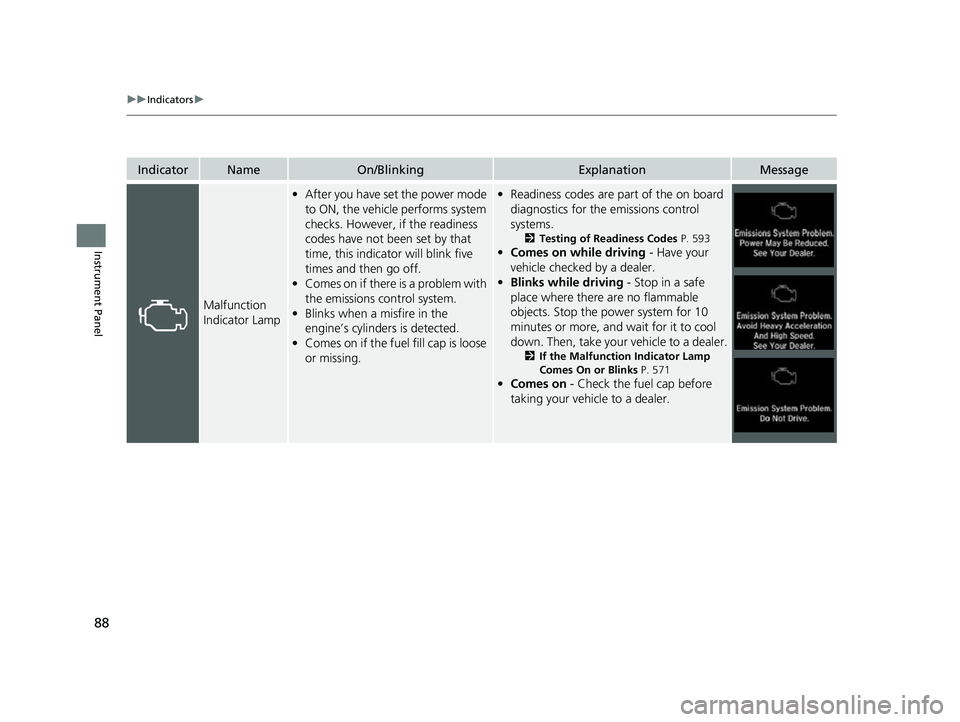
Malfunction
Indicator Lamp
•After you have set the power mode
to ON, the vehicle performs system
checks. However, if the readiness
codes have not been set by that
time, this indicator will blink five
times and then go off.
• Comes on if there is a problem with
the emissions control system.
• Blinks when a misfire in the
engine’s cylinders is detected.
• Comes on if the fuel fill cap is loose
or missing.• Readiness codes are part of the on board
diagnostics for the emissions control
systems.
2 Testing of Readiness Codes P. 593
•Comes on while driving - Have your
vehicle checked by a dealer.
• Blinks while driving - Stop in a safe
place where there are no flammable
objects. Stop the power system for 10
minutes or more, and wait for it to cool
down. Then, take your vehicle to a dealer.
2 If the Malfunction Indicator Lamp
Comes On or Blinks P. 571
•Comes on - Check the fuel cap before
taking your vehicle to a dealer.
22 INSIGHT HMIN-31TXM6300.book 88 ページ 2021年2月24日 水曜日 午後3時45分
Page 92 of 609
91
uuIndicators u
Continued
Instrument Panel
IndicatorNameOn/BlinkingExplanationMessage
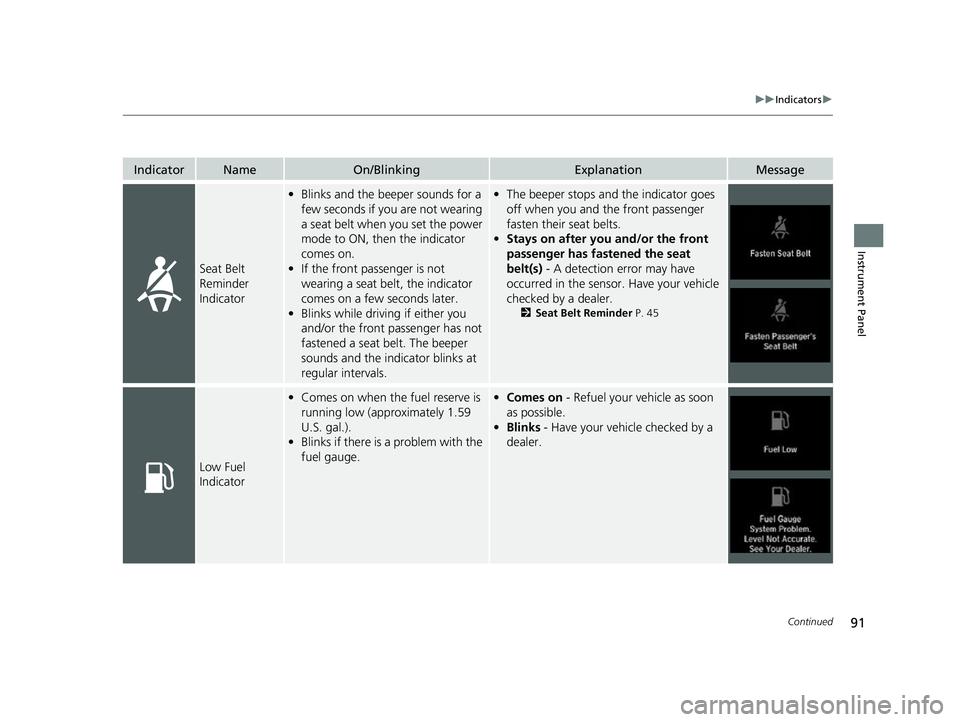
Seat Belt
Reminder
Indicator
•Blinks and the beep er sounds for a
few seconds if you are not wearing
a seat belt when you set the power
mode to ON, then the indicator
comes on.
• If the front passenger is not
wearing a seat belt, the indicator
comes on a few seconds later.
• Blinks while driving if either you
and/or the front passenger has not
fastened a seat belt. The beeper
sounds and the indicator blinks at
regular intervals.•The beeper stops and the indicator goes
off when you and the front passenger
fasten their seat belts.
• Stays on after you and/or the front
passenger has fastened the seat
belt(s) - A detection error may have
occurred in the sensor. Have your vehicle
checked by a dealer.
2 Seat Belt Reminder P. 45
Low Fuel
Indicator
•Comes on when the fuel reserve is
running low (approximately 1.59
U.S. gal.).
• Blinks if there is a problem with the
fuel gauge.•Comes on - Refuel your vehicle as soon
as possible.
• Blinks - Have your vehicle checked by a
dealer.
22 INSIGHT HMIN-31TXM6300.book 91 ページ 2021年2月24日 水曜日 午後3時45分
Page 107 of 609
106
uuIndicators uDriver Information Interface Wa rning and Information Messages
Instrument Panel
MessageConditionExplanation
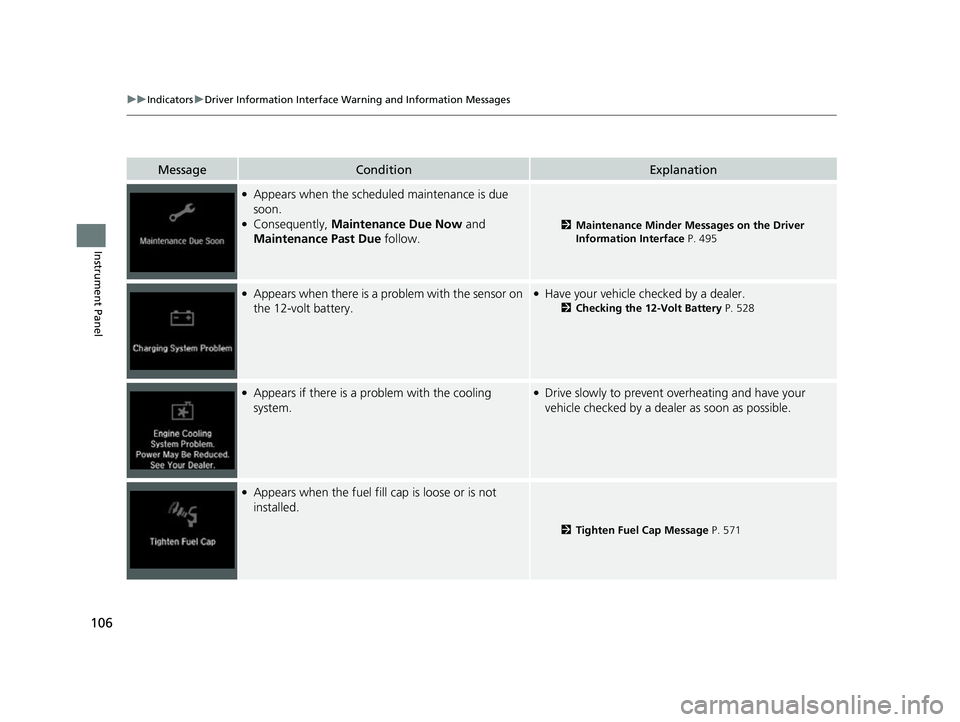
●Appears when the scheduled maintenance is due
soon.
●Consequently, Maintenance Due Now and
Maintenance Past Due follow.2Maintenance Minder Messages on the Driver
Information Interface P. 495
●Appears when there is a pr oblem with the sensor on
the 12-volt battery.●Have your vehicle checked by a dealer.
2 Checking the 12-Volt Battery P. 528
●Appears if there is a problem with the cooling
system.●Drive slowly to prevent ov erheating and have your
vehicle checked by a deal er as soon as possible.
●Appears when the fuel fill cap is loose or is not
installed.
2Tighten Fuel Cap Message P. 571
22 INSIGHT HMIN-31TXM6300.book 106 ページ 2021年2月24日 水曜日 午後3時45分
Page 108 of 609
107
uuIndicators uDriver Information Interface Wa rning and Information Messages
Continued
Instrument Panel
MessageConditionExplanation
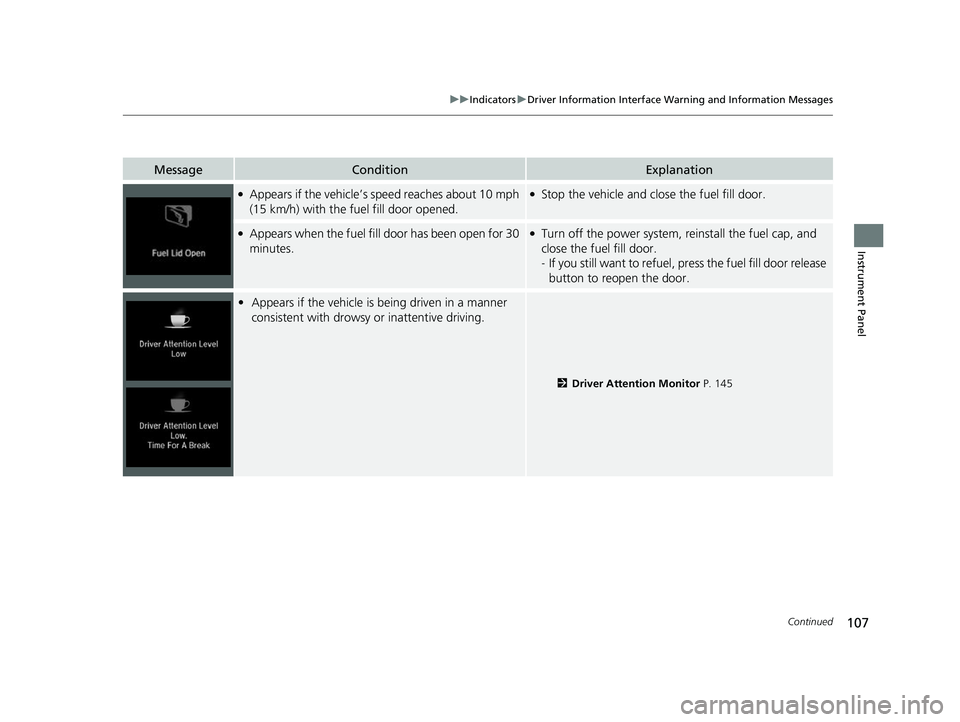
●Appears if the vehicle’s speed reaches about 10 mph
(15 km/h) with the fuel fill door opened.●Stop the vehicle and close the fuel fill door.
●Appears when the fuel fill door has been open for 30
minutes.●Turn off the power system, re install the fuel cap, and
close the fuel fill door.
- If you still want to refuel, press the fuel fill door release
button to reopen the door.
• Appears if the vehicle is being driven in a manner
consistent with drowsy or inattentive driving.
2 Driver Attention Monitor P. 145
22 INSIGHT HMIN-31TXM6300.book 107 ページ 2021年2月24日 水曜日 午後3時45分
Page 114 of 609
113
uuIndicators uDriver Information Interface Wa rning and Information Messages
Continued
Instrument Panel
MessageConditionExplanation
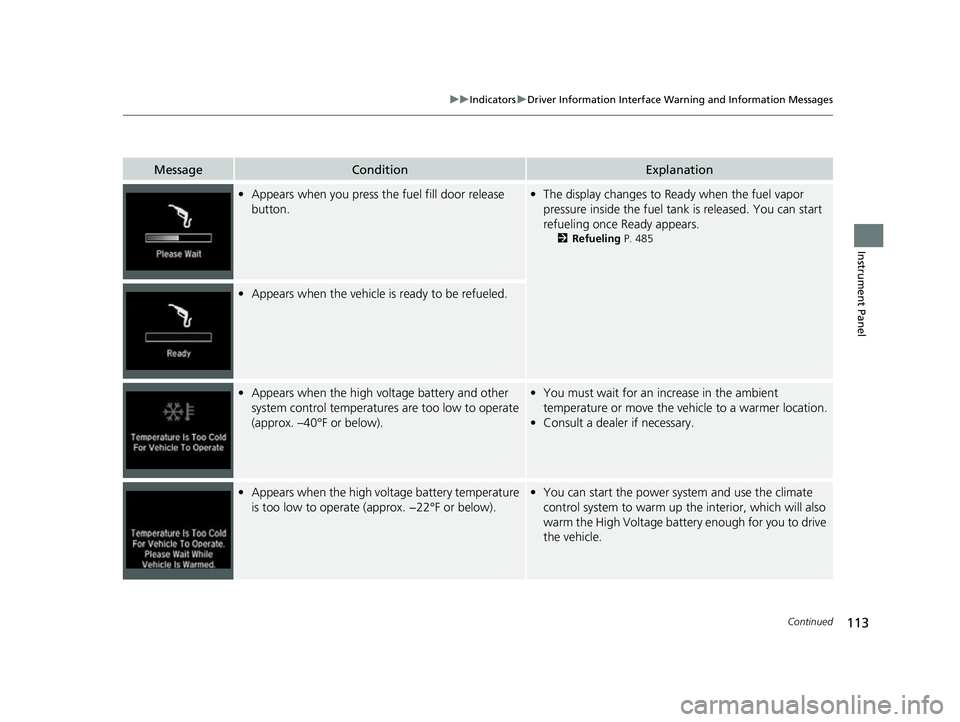
•Appears when you press the fuel fill door release
button.• The display changes to Ready when the fuel vapor
pressure inside the fuel tank is released. You can start
refueling once Ready appears.
2 Refueling P. 485
•Appears when the vehicle is ready to be refueled.
•Appears when the high voltage battery and other
system control temperatures are too low to operate
(approx. –40°F or below).• You must wait for an increase in the ambient
temperature or move the vehicle to a warmer location.
• Consult a dealer if necessary.
•Appears when the high voltage battery temperature
is too low to operate (approx. −22°F or below).•You can start the power system and use the climate
control system to warm up the interior, which will also
warm the High Voltage battery enough for you to drive
the vehicle.
22 INSIGHT HMIN-31TXM6300.book 113 ページ 2021年2月24日 水曜日 午後3時45分
Page 130 of 609
129Continued
Instrument Panel
Gauges and Driver Information Interface
Gauges
Gauges include the speedometer, fuel gauge, POWER/CHARGE gauge, High
Voltage battery charge level gauge, and re lated indicators. They are displayed when
the power mode is in ON.
Displays your driving speed in mph or km/h.
Displays the amount of fuel left in the fuel tank.
■Speedometer
■Fuel Gauge
1 Speedometer
You can show another speed unit on the driver
information interface (s ub display) and set the
displayed measurements to read in either mph and
km/h. 2 POWER/CHARGE Gauge P. 131
1Fuel Gauge
NOTICE
You should refuel when the reading approaches .
Running out of fuel can cause the engine to misfire,
damaging the cata lytic converter.
The actual amount of remain ing fuel may differ from
the fuel gauge reading.E
22 INSIGHT HMIN-31TXM6300.book 129 ページ 2021年2月24日 水曜日 午後3時45分
Page 137 of 609
136
uuGauges and Driver Information Interface uDriver Information Interface
Instrument Panel
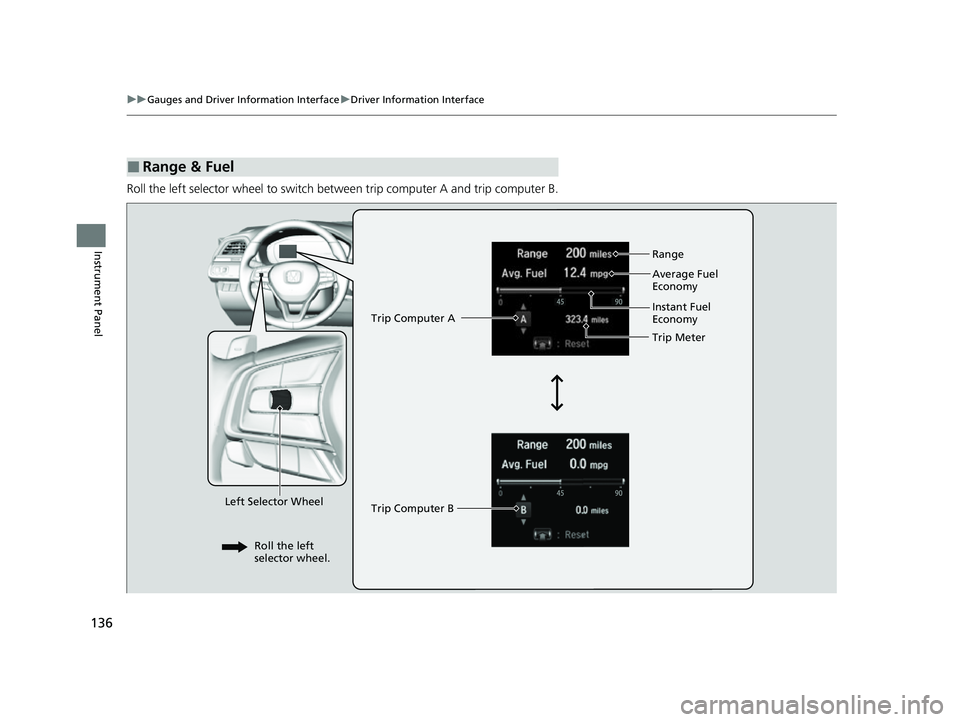
Roll the left selector wheel to switch between trip computer A and trip computer B.
■Range & Fuel
Left Selector Wheel Trip Computer A
Trip Computer B
Trip Meter Range
Average Fuel
Economy
Instant Fuel
Economy
Roll the left
selector wheel.
22 INSIGHT HMIN-31TXM6300.book 136 ページ 2021年2月24日 水曜日 午後3時45分
Page 138 of 609
Continued137
uuGauges and Driver Information Interface uDriver Information Interface
Instrument Panel
■Trip meter
Shows the total number of miles or kilomete rs driven since the last reset. Meters A
and B can be used to measure two separate trips.
Resetting a trip meter
To reset the trip meter, display it, press the left selector wheel and then select Reset.
u The trip meter is reset to 0.0.
■Average fuel economy (Avg. Fuel)
Shows the estimated average fuel economy of each trip meter in mpg or l/100 km.
The display is updated at set intervals. Wh en a trip meter is reset, the average fuel
economy is also reset.
■Instant fuel economy
Shows the instant fuel economy as a bar graph in mpg or l/100 km.
■Range
Shows the estimated distance you can trave l on the remaining fuel. This estimated
distance is based on the vehicle’s current fuel economy.
1 Trip meter
Switch between trip meter A and trip meter B by
rolling the left selector wheel.
Resetting the trip meter in the Range & Fuel, the trip
meter in the sub display resets at the same time.
1 Average fuel economy (Avg. Fuel)
You can change when the average fuel economy is
reset.
2 Customized Features P. 326
22 INSIGHT HMIN-31TXM6300.book 137 ページ 2021年2月24日 水曜日 午後3時45分
Page 151 of 609
150
uuGauges and Driver Information Interface uDriver Information Interface
Instrument Panel
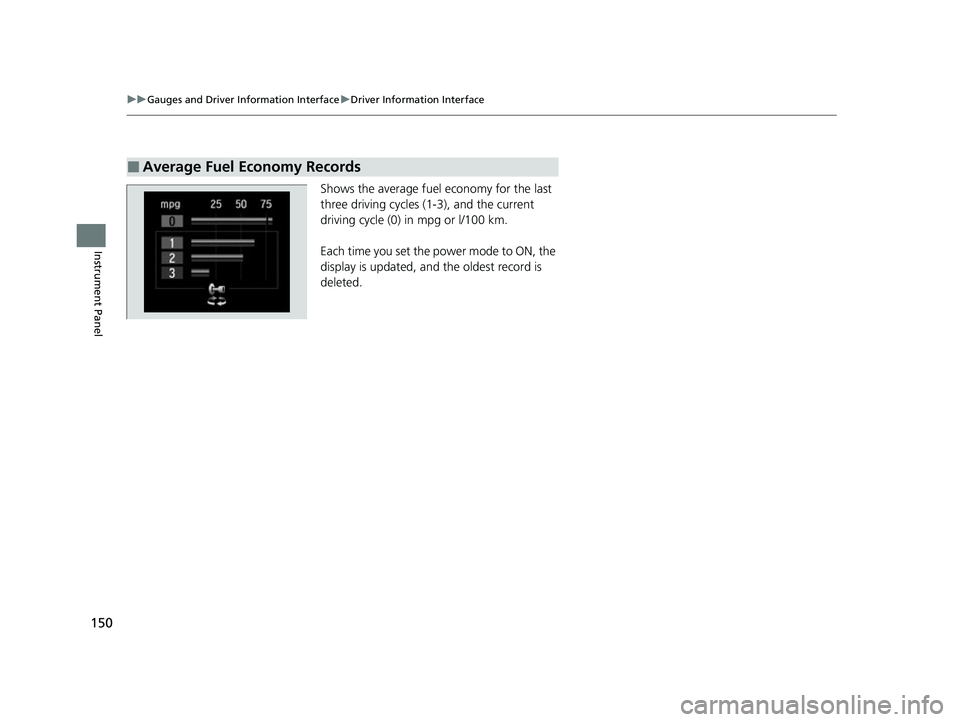
Shows the average fuel economy for the last
three driving cycles (1-3), and the current
driving cycle (0) in mpg or l/100 km.
Each time you set the power mode to ON, the
display is updated, and the oldest record is
deleted.
■Average Fuel Economy Records
22 INSIGHT HMIN-31TXM6300.book 150 ページ 2021年2月24日 水曜日 午後3時45分
Page 152 of 609
Continued151
uuGauges and Driver Information Interface uDriver Information Interface
Instrument Panel
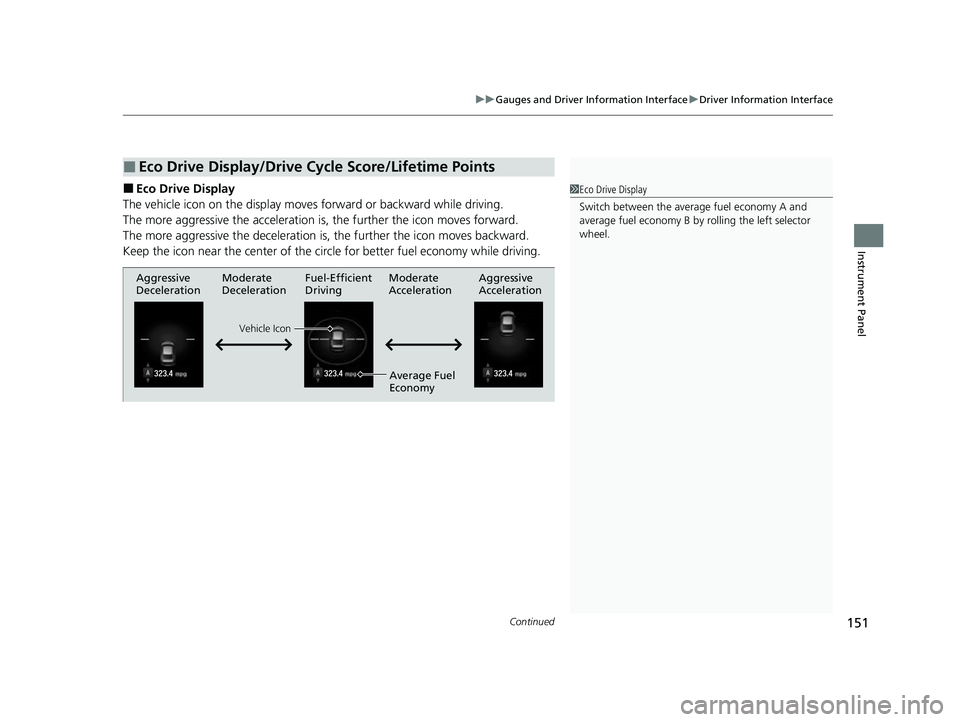
■Eco Drive Display
The vehicle icon on the display moves forward or backward while driving.
The more aggressive the acceleration is , the further the icon moves forward.
The more aggressive the deceleration is , the further the icon moves backward.
Keep the icon near the cent er of the circle for better fuel economy while driving.
■Eco Drive Display/Drive Cycle Score/Lifetime Points
1Eco Drive Display
Switch between the average fuel economy A and
average fuel economy B by ro lling the left selector
wheel.
Aggressive
Deceleration Fuel-Efficient
Driving Aggressive
Acceleration
Moderate
Deceleration Moderate
Acceleration
Average Fuel
Economy
Vehicle Icon
22 INSIGHT HMIN-31TXM6300.book 151 ページ 2021年2月24日 水曜日 午後3時45分