lock HONDA INSIGHT 2022 Owner's Manual
[x] Cancel search | Manufacturer: HONDA, Model Year: 2022, Model line: INSIGHT, Model: HONDA INSIGHT 2022Pages: 609, PDF Size: 18.48 MB
Page 93 of 609
92
uuIndicators u
Instrument Panel
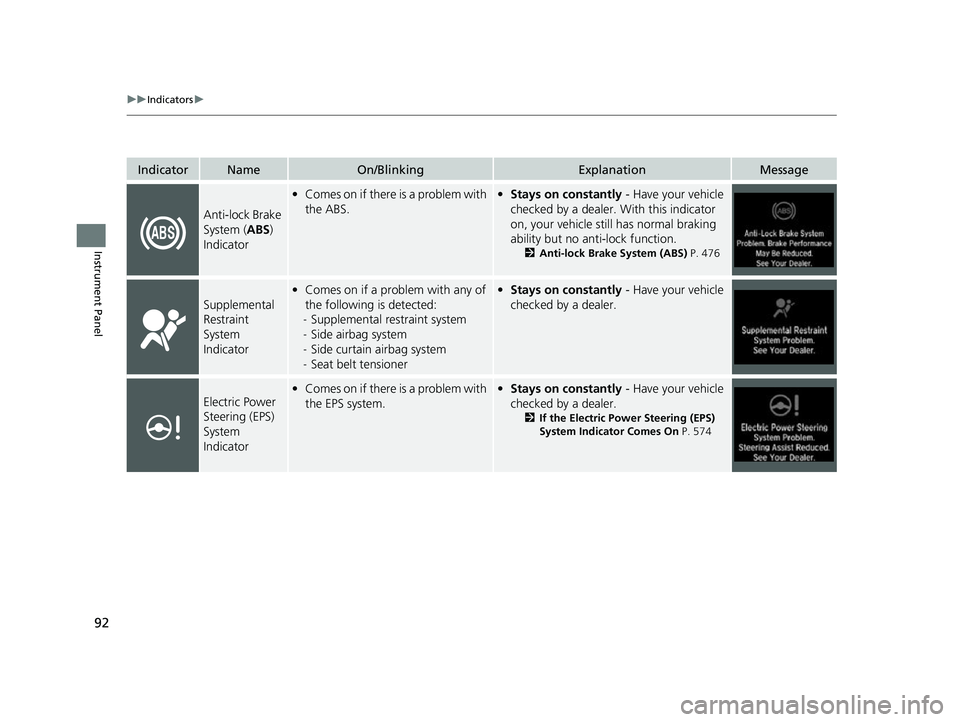
IndicatorNameOn/BlinkingExplanationMessage
Anti-lock Brake
System (ABS)
Indicator
• Comes on if there is a problem with
the ABS.• Stays on constantly - Have your vehicle
checked by a dealer. With this indicator
on, your vehicle still has normal braking
ability but no anti-lock function.
2 Anti-lock Brake System (ABS) P. 476
Supplemental
Restraint
System
Indicator
•Comes on if a problem with any of
the following is detected:
- Supplemental restraint system
- Side airbag system
- Side curtain airbag system
- Seat belt tensioner• Stays on constantly - Have your vehicle
checked by a dealer.
Electric Power
Steering (EPS)
System
Indicator• Comes on if there is a problem with
the EPS system.• Stays on constantly - Have your vehicle
checked by a dealer.
2 If the Electric Power Steering (EPS)
System Indicator Comes On P. 574
22 INSIGHT HMIN-31TXM6300.book 92 ページ 2021年2月24日 水曜日 午後3時45分
Page 102 of 609
101
uuIndicators u
Continued
Instrument Panel
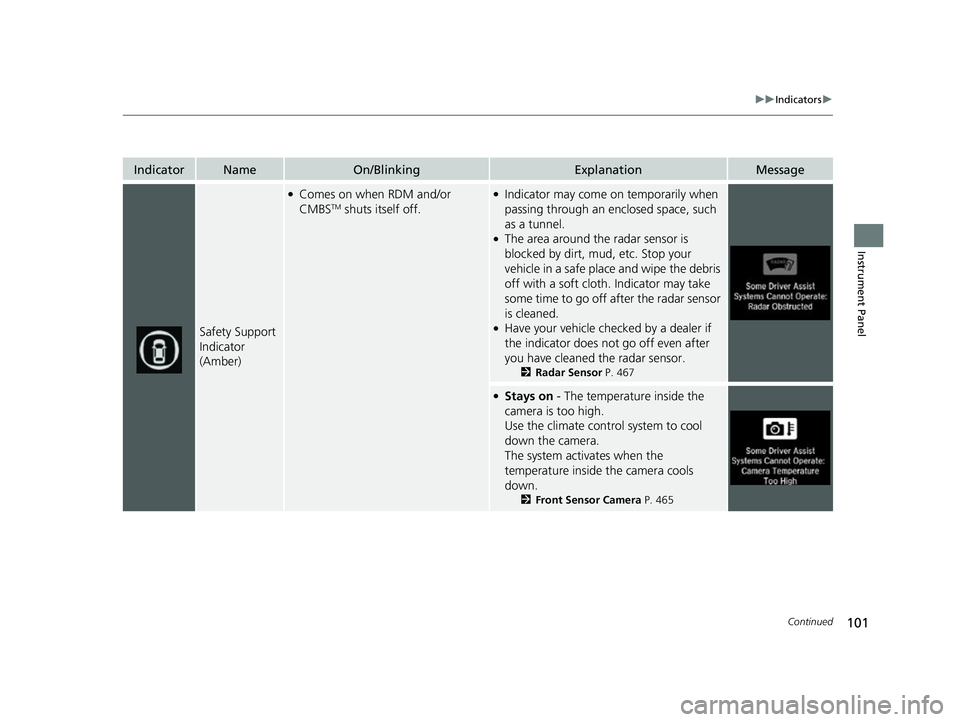
IndicatorNameOn/BlinkingExplanationMessage
Safety Support
Indicator
(Amber)
●Comes on when RDM and/or
CMBSTM shuts itself off.
●Indicator may come on temporarily when
passing through an en closed space, such
as a tunnel.
●The area around the radar sensor is
blocked by dirt, mud, etc. Stop your
vehicle in a safe place and wipe the debris
off with a soft cloth. Indicator may take
some time to go off after the radar sensor
is cleaned.
●Have your vehicle checked by a dealer if
the indicator does not go off even after
you have cleaned the radar sensor.
2 Radar Sensor P. 467
●Stays on - The temperature inside the
camera is too high.
Use the climate control system to cool
down the camera.
The system activates when the
temperature inside the camera cools
down.
2 Front Sensor Camera P. 465
22 INSIGHT HMIN-31TXM6300.book 101 ページ 2021年2月24日 水曜日 午後3時45分
Page 103 of 609
102
uuIndicators u
Instrument Panel
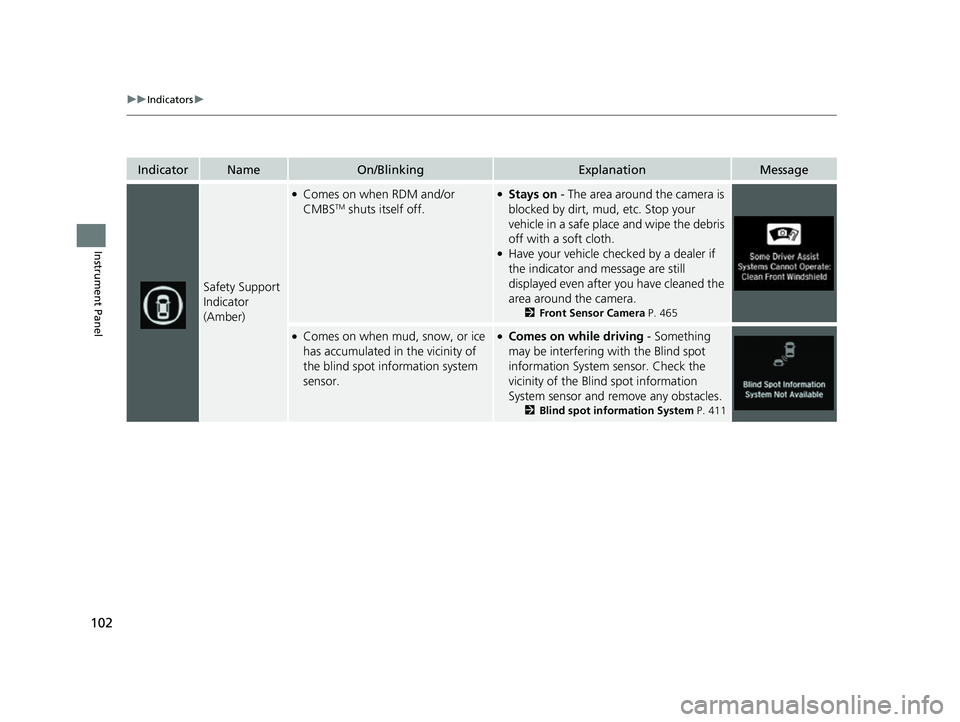
IndicatorNameOn/BlinkingExplanationMessage
Safety Support
Indicator
(Amber)
●Comes on when RDM and/or
CMBSTM shuts itself off.
●Stays on - The area around the camera is
blocked by dirt, mud, etc. Stop your
vehicle in a safe place and wipe the debris
off with a soft cloth.
●Have your vehicle checked by a dealer if
the indicator and message are still
displayed even after you have cleaned the
area around the camera.
2 Front Sensor Camera P. 465
●Comes on when mud, snow, or ice
has accumulated in the vicinity of
the blind spot information system
sensor.●Comes on while driving - Something
may be interfering with the Blind spot
information System sensor. Check the
vicinity of the Blin d spot information
System sensor and remove any obstacles.
2 Blind spot information System P. 411
22 INSIGHT HMIN-31TXM6300.book 102 ページ 2021年2月24日 水曜日 午後3時45分
Page 126 of 609
125
uuIndicators uDriver Information Interface Wa rning and Information Messages
Continued
Instrument Panel
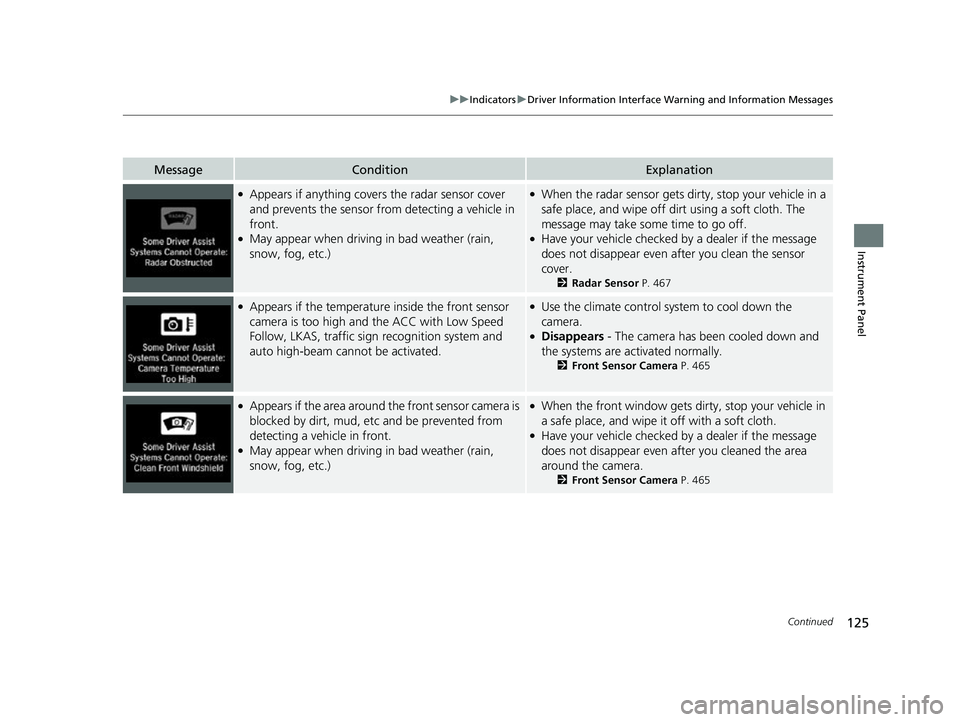
MessageConditionExplanation
●Appears if anything covers the radar sensor cover
and prevents the sensor from detecting a vehicle in
front.
●May appear when driving in bad weather (rain,
snow, fog, etc.)
●When the radar sensor gets dirty, stop your vehicle in a
safe place, and wipe off dirt using a soft cloth. The
message may take some time to go off.
●Have your vehicle checked by a dealer if the message
does not disappear even after you clean the sensor
cover.
2 Radar Sensor P. 467
●Appears if the temperature inside the front sensor
camera is too high and the ACC with Low Speed
Follow, LKAS, traffic sign recognition system and
auto high-beam cannot be activated.●Use the climate control sy stem to cool down the
camera.
●Disappears - The camera has been cooled down and
the systems are activated normally.
2 Front Sensor Camera P. 465
●Appears if the area around the front sensor camera is
blocked by dirt, mud, etc and be prevented from
detecting a vehicle in front.
●May appear when driving in bad weather (rain,
snow, fog, etc.)
●When the front window gets dirty, stop your vehicle in
a safe place, and wipe it off with a soft cloth.
●Have your vehicle checked by a dealer if the message
does not disappear even a fter you cleaned the area
around the camera.
2 Front Sensor Camera P. 465
22 INSIGHT HMIN-31TXM6300.book 125 ページ 2021年2月24日 水曜日 午後3時45分
Page 129 of 609
128
uuIndicators uDriver Information Interface Wa rning and Information Messages
Instrument Panel
MessageConditionExplanation
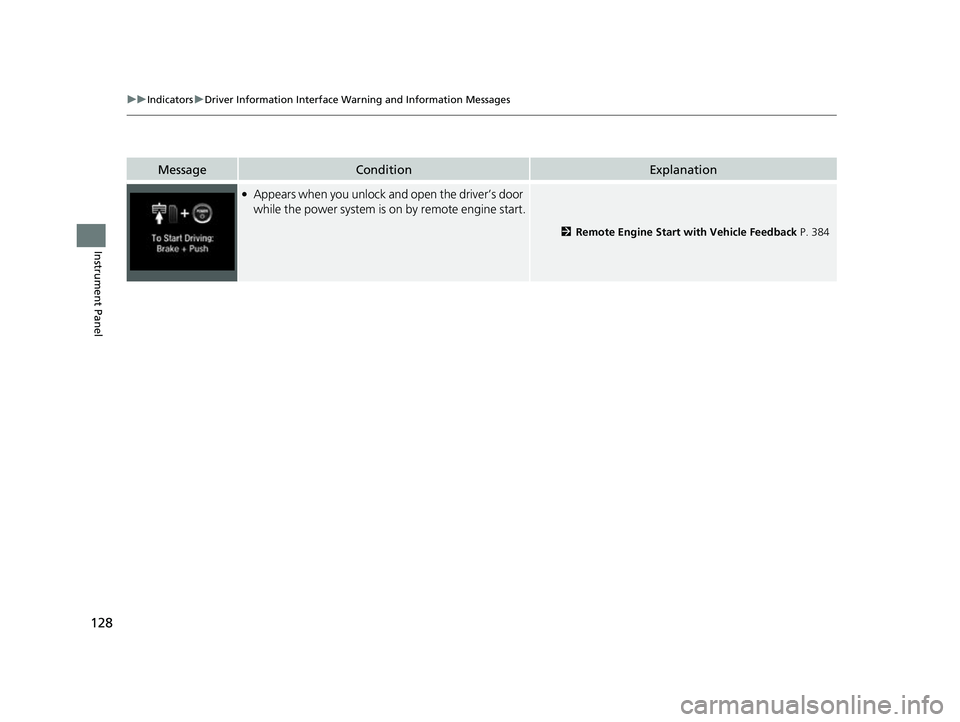
●Appears when you unlock and open the driver’s door
while the power system is on by remote engine start.
2Remote Engine Start with Vehicle Feedback P. 384
22 INSIGHT HMIN-31TXM6300.book 128 ページ 2021年2月24日 水曜日 午後3時45分
Page 156 of 609
155
Controls
This chapter explains how to operate the various controls necessary for driving.
Clock.................................................. 156
Locking and Unlocking the Doors Key .................................................. 157
Low Keyless Remote Signal Strength ... 159
Locking/Unlocking the Doors from the Outside .......................................... 160
Locking/Unlocking the Doors from the Inside ............................................. 167
Childproof Door Locks ..................... 169
Auto Door Locking/Unlocking .......... 170
Opening and Closing the Trunk ....... 171
Security System
Immobilizer System .......................... 174 Security System Alarm...................... 175
Opening and Closing the Windows ... 177
Moonroof*................................................ 180Operating the Switches Around the
Steering Wheel POWER Button................................. 181
Turn Signals ..................................... 184
Light Switches.................................. 185
Fog Lights
*...................................... 188
Daytime Running Lights ................... 188
Auto High-Beam .............................. 189
Wipers and Washers ........................ 192
Rear Defogger/Heated Door Mirror Button ........................................ 194
Brightness Control ........................... 195
Adjusting the Steering Wheel .......... 196
Adjusting the Mirrors Interior Rearview Mirror ................... 197
Power Door Mirrors ......................... 198
Adjusting the Seats .......................... 199
Interior Lights/Interior Convenience
Items ................................................ 207
Climate Control System Using Automatic Climate Control .... 216
Automatic Climate Control Sensors ... 222
* Not available on all models
22 INSIGHT HMIN-31TXM6300.book 155 ページ 2021年2月24日 水曜日 午後3時45分
Page 157 of 609
156
Controls
Clock
Adjusting the Clock
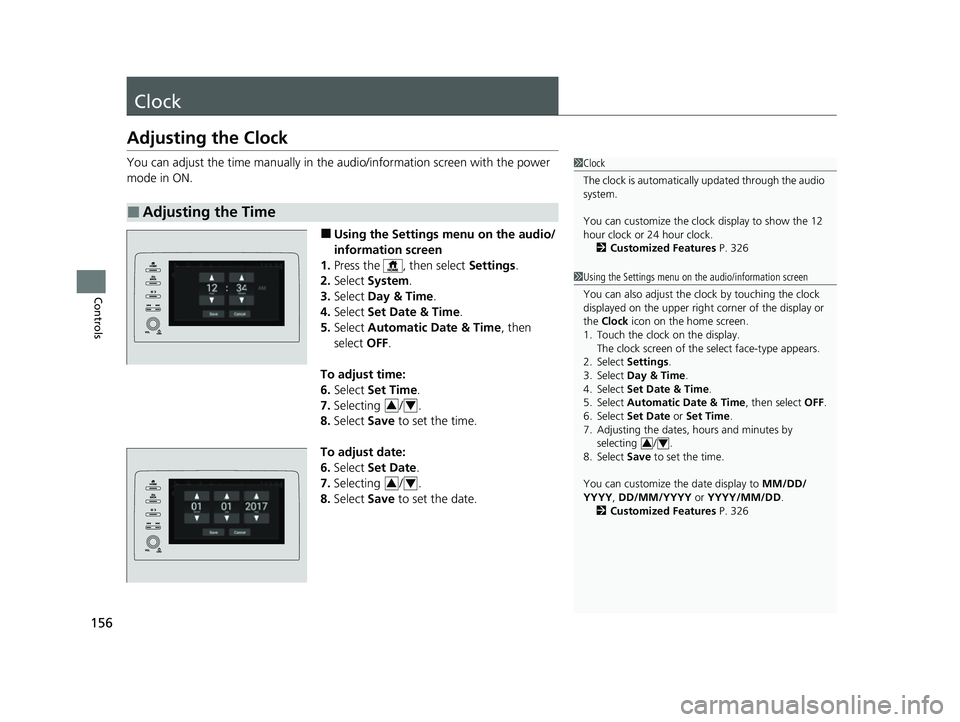
You can adjust the time manually in the audio/information screen with the power
mode in ON.
■Using the Settings menu on the audio/
information screen
1. Press the , then select Settings.
2. Select System .
3. Select Day & Time .
4. Select Set Date & Time .
5. Select Automatic Date & Time , then
select OFF.
To adjust time:
6. Select Set Time.
7. Selecting / .
8. Select Save to set the time.
To adjust date:
6. Select Set Date .
7. Selecting / .
8. Select Save to set the date.
■Adjusting the Time
1Clock
The clock is automatically updated through the audio
system.
You can customize the clock display to show the 12
hour clock or 24 hour clock.
2 Customized Features P. 326
1Using the Settings menu on the audio/information screen
You can also adjust the clock by touching the clock
displayed on the upper right corner of the display or
the Clock icon on the home screen.
1. Touch the clock on the display. The clock screen of the select face-type appears.
2. Select Settings .
3. Select Day & Time .
4. Select Set Date & Time .
5. Select Automatic Date & Time , then select OFF.
6. Select Set Date or Set Time.
7. Adjusting the dates, hours and minutes by
selecting / .
8. Select Save to set the time.
You can customize the date display to MM/DD/
YYYY, DD/MM/YYYY or YYYY/MM/DD .
2 Customized Features P. 326
34
34
34
22 INSIGHT HMIN-31TXM6300.book 156 ページ 2021年2月24日 水曜日 午後3時45分
Page 158 of 609
157Continued
Controls
Locking and Unlocking the Doors
Key
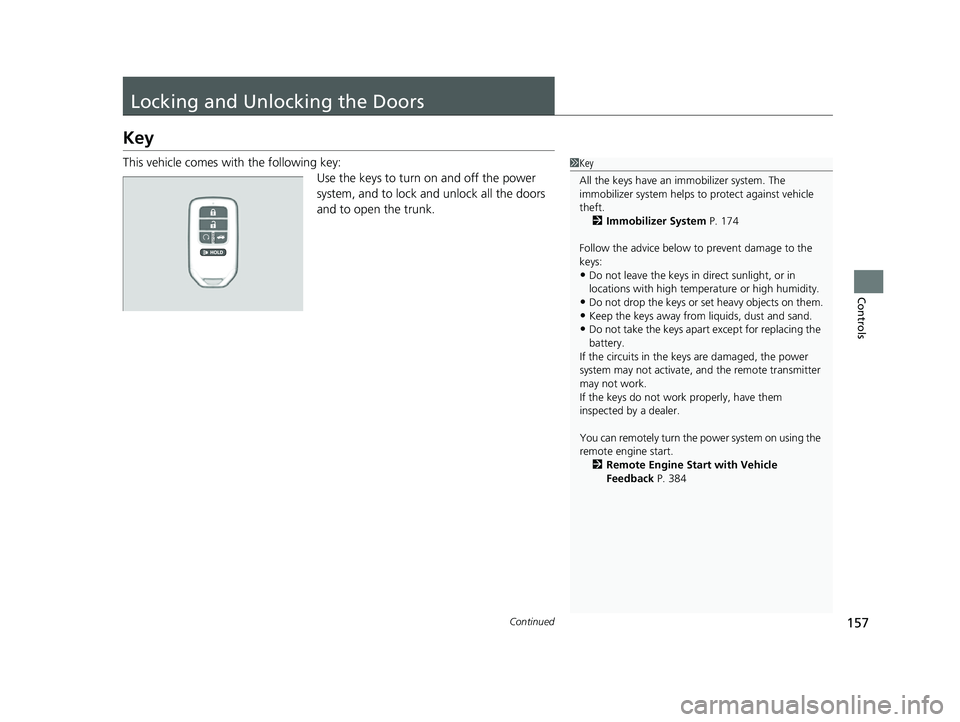
This vehicle comes with the following key:Use the keys to turn on and off the power
system, and to lock and unlock all the doors
and to open the trunk.1 Key
All the keys have an immobilizer system. The
immobilizer system helps to protect against vehicle
theft. 2 Immobilizer System P. 174
Follow the advice below to prevent damage to the
keys:
•Do not leave the keys in direct sunlight, or in
locations with high temperature or high humidity.
•Do not drop the keys or set heavy objects on them.•Keep the keys away from liquids, dust and sand.
•Do not take the keys apart except for replacing the
battery.
If the circuits in the keys are damaged, the power
system may not activate, and the remote transmitter
may not work.
If the keys do not work properly, have them
inspected by a dealer.
You can remotely turn the power system on using the
remote engine start. 2 Remote Engine Start with Vehicle
Feedback P. 384
22 INSIGHT HMIN-31TXM6300.book 157 ページ 2021年2月24日 水曜日 午後3時45分
Page 159 of 609
uuLocking and Unlocking the Doors uKey
158
Controls
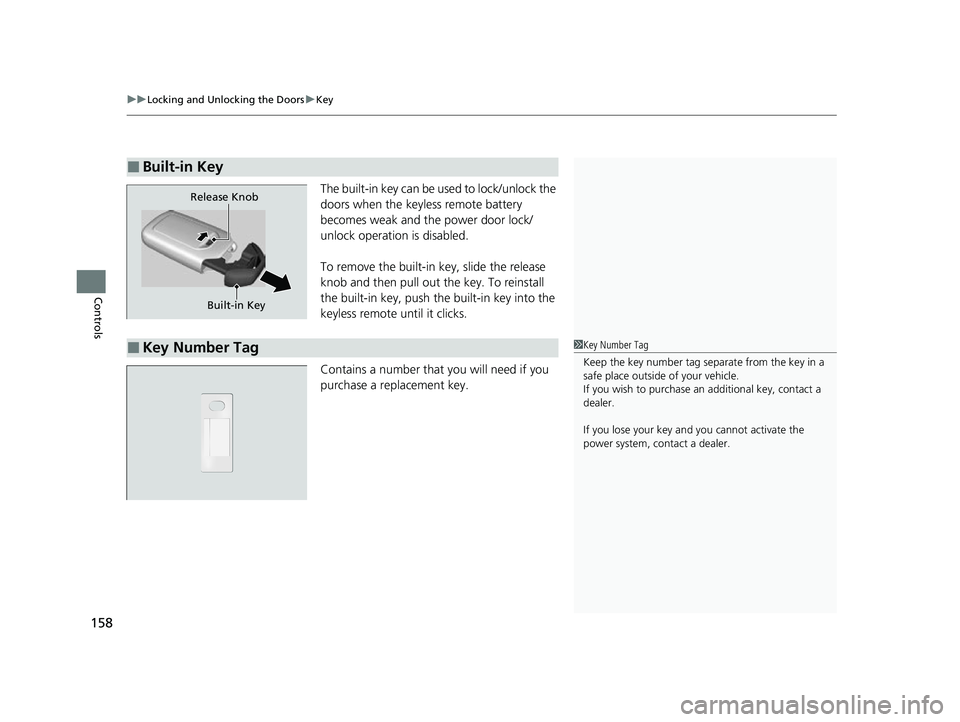
The built-in key can be used to lock/unlock the
doors when the keyless remote battery
becomes weak and th e power door lock/
unlock operation is disabled.
To remove the built-in key, slide the release
knob and then pull out the key. To reinstall
the built-in key, push th e built-in key into the
keyless remote until it clicks.
Contains a number that you will need if you
purchase a replacement key.
■Built-in Key
Built-in Key
Release Knob
■Key Number Tag1
Key Number Tag
Keep the key number tag separate from the key in a
safe place outside of your vehicle.
If you wish to purchase an additional key, contact a
dealer.
If you lose your key an d you cannot activate the
power system, contact a dealer.
22 INSIGHT HMIN-31TXM6300.book 158 ページ 2021年2月24日 水曜日 午後3時45分
Page 160 of 609
159
uuLocking and Unlocking the Doors uLow Keyless Remote Signal Strength
Controls
Low Keyless Remote Signal Strength
The vehicle transmits radio waves to lo cate the keyless remote when locking/
unlocking the doors, opening the trunk, or to activate the power system.
In the following cases, locking/unlocking the doors, opening the trunk, or activating
the power system may be inhibited or operation may be unstable:
• Strong radio waves are being transmitted by nearby equipment.
• You are carrying the keyless remote together with telecommunications
equipment, laptop computers, ce ll phones, or wireless devices.
• A metallic object is touching or covering the keyless remote.1Low Keyless Remote Signal Strength
Communication between the keyless remote and the
vehicle consumes the ke yless remote’s battery.
Battery life is about two years, but this varies
depending on regularity of use.
The battery is consumed whenever the keyless
remote is receivi ng strong radio wave s. Avoid placing
it near electrical appliances such as televisions and
personal computers.
22 INSIGHT HMIN-31TXM6300.book 159 ページ 2021年2月24日 水曜日 午後3時45分