lock HONDA INSIGHT 2022 Repair Manual
[x] Cancel search | Manufacturer: HONDA, Model Year: 2022, Model line: INSIGHT, Model: HONDA INSIGHT 2022Pages: 609, PDF Size: 18.48 MB
Page 233 of 609
232
uuAudio System Basic Operation uAudio/Information Screen
Features
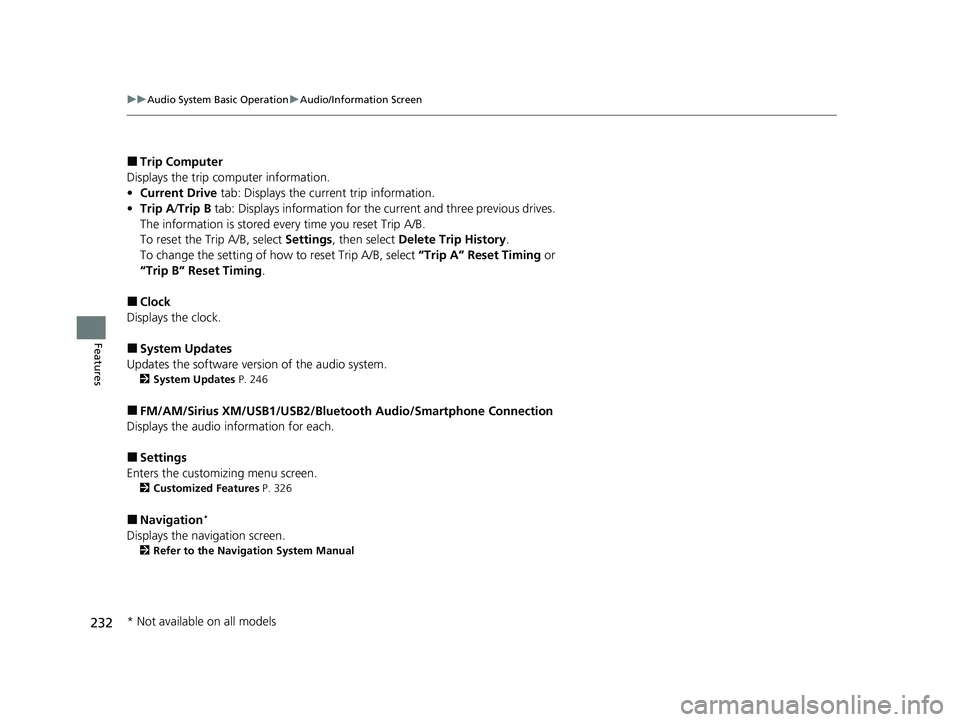
■Trip Computer
Displays the trip co mputer information.
• Current Drive tab: Displays the current trip information.
• Trip A /Trip B tab: Displays information for the current and three previous drives.
The information is stored every time you reset Trip A/B.
To reset the Trip A/B, select Settings, then select Delete Trip History .
To change the setting of how to reset Trip A/B, select “Trip A” Reset Timing or
“Trip B” Reset Timing .
■Clock
Displays the clock.
■System Updates
Updates the software version of the audio system.
2 System Updates P. 246
■FM/AM/Sirius XM/USB1/USB2/Bluetooth Audio/Smartphone Connection
Displays the audio information for each.
■Settings
Enters the customiz ing menu screen.
2Customized Features P. 326
■Navigation*
Displays the navigation screen.
2Refer to the Navigation System Manual
* Not available on all models
22 INSIGHT HMIN-31TXM6300.book 232 ページ 2021年2月24日 水曜日 午後3時45分
Page 238 of 609
Continued237
uuAudio System Basic Operation uAudio/Information Screen
Features
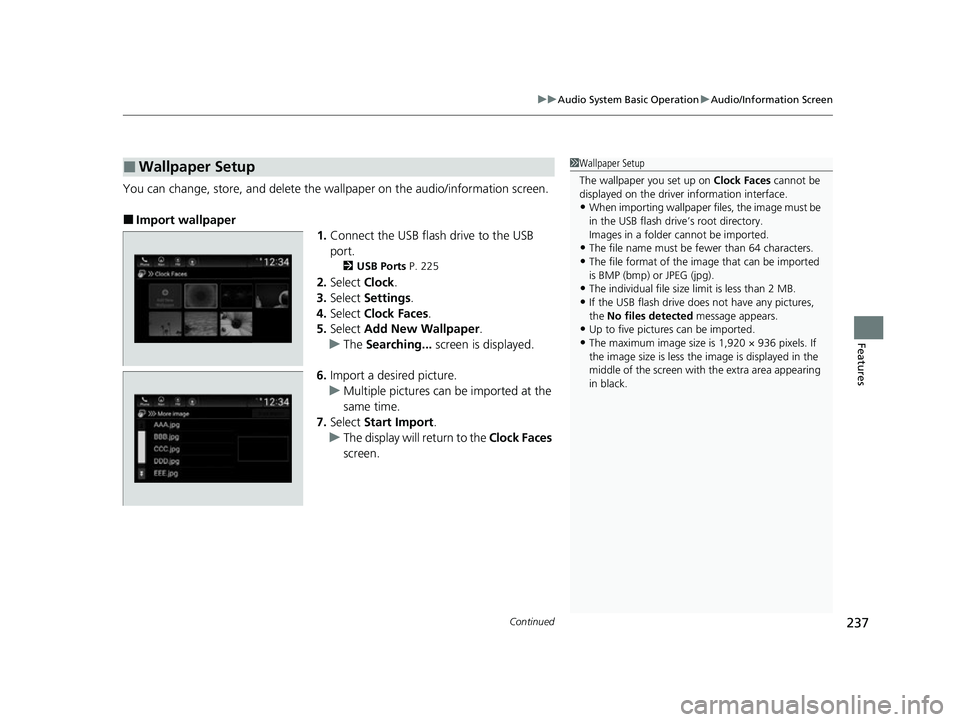
You can change, store, and delete the wa llpaper on the audio/information screen.
■Import wallpaper
1.Connect the USB flash drive to the USB
port.
2 USB Ports P. 225
2.Select Clock.
3. Select Settings .
4. Select Clock Faces .
5. Select Add New Wallpaper .
u The Searching... screen is displayed.
6. Import a desired picture.
u Multiple pictures can be imported at the
same time.
7. Select Start Import .
u The display will return to the Clock Faces
screen.
■Wallpaper Setup1 Wallpaper Setup
The wallpaper you set up on Clock Faces cannot be
displayed on the driver information interface.
•When importing wallpaper files, the image must be
in the USB flash drive’s root directory.
Images in a folder cannot be imported.
•The file name must be fewer than 64 characters.
•The file format of the im age that can be imported
is BMP (bmp) or JPEG (jpg).
•The individual file size limit is less than 2 MB.
•If the USB flash drive doe s not have any pictures,
the No files detected message appears.
•Up to five pictur es can be imported.
•The maximum image size is 1,920 × 936 pixels. If
the image size is less the image is displayed in the
middle of the screen with the extra area appearing
in black.
22 INSIGHT HMIN-31TXM6300.book 237 ページ 2021年2月24日 水曜日 午後3時45分
Page 239 of 609
uuAudio System Basic Operation uAudio/Information Screen
238
Features
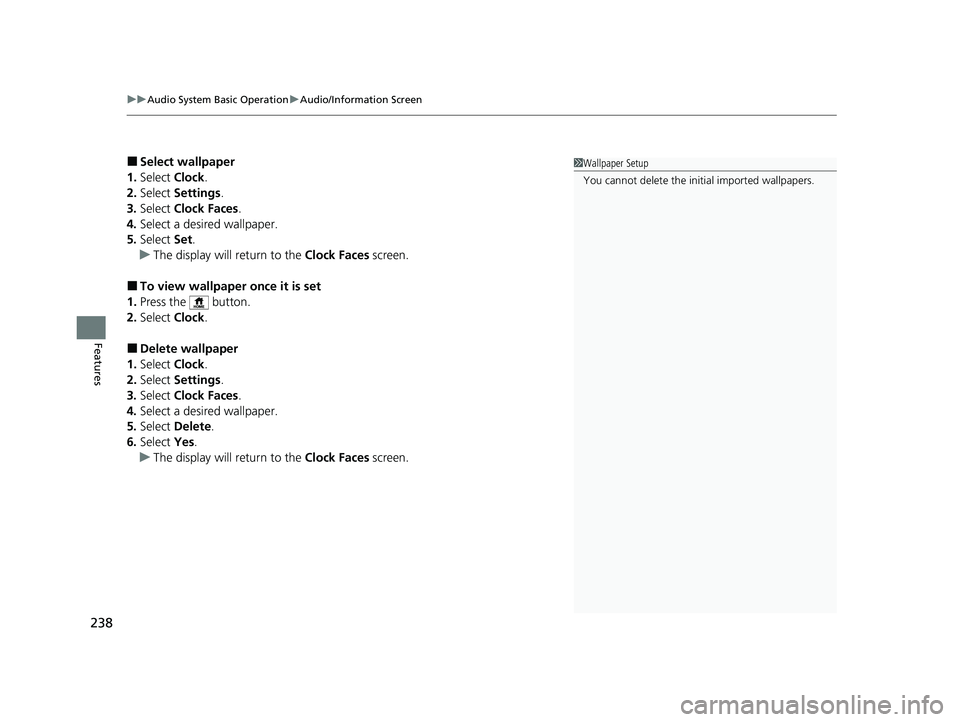
■Select wallpaper
1. Select Clock.
2. Select Settings .
3. Select Clock Faces.
4. Select a desired wallpaper.
5. Select Set.
u The display will return to the Clock Faces screen.
■To view wallpaper once it is set
1. Press the button.
2. Select Clock.
■Delete wallpaper
1. Select Clock.
2. Select Settings .
3. Select Clock Faces.
4. Select a desired wallpaper.
5. Select Delete.
6. Select Yes.
u The display will return to the Clock Faces screen.
1Wallpaper Setup
You cannot delete the initial imported wallpapers.
22 INSIGHT HMIN-31TXM6300.book 238 ページ 2021年2月24日 水曜日 午後3時45分
Page 305 of 609
304
Features
General Information on the Audio System
SiriusXM® Radio Service
1. You need your radio ID ready before regist ering for subscription. To see the ID in
the screen, select Channel to 0.
2. Have your radio ID ready, and either call or visit the SiriusXM® website to
subscribe.
Switch to the SiriusXM ® mode by using the audio remote controls on the steering
wheel, or through the audio/information screen, and stay in this mode for about 30
minutes until the service is activated. Make sure your vehicle is in an open area with
good reception.
Channel **** is not subscribed. Call SiriusXM to subscribe.
*1
You are not subscribed to the channel selected.
Subscription Updated:
SiriusXM ® radio is receiving information update from the network.
Channel Not Available:
No such channel exits, or the artist or title information is unavailable.
No Signal:
The signal is too weak in the current location.
Check Tuner:
There is a problem with the SiriusXM ® tuner. Contact a dealer.
Antenna Disconnected, Antenna Shorted:
There is a problem with the SiriusXM ® antenna. Contact a dealer.
*1 : ****part is variable characters, and w ill change depending upon where an subscribe.
■Subscribing to SiriusXM® Radio
■Receiving SiriusXM ® Radio
■SiriusXM ® Radio Display Messages
1 Subscribing to SiriusXM ® Radio
Contact Information for SiriusXM ® Radio:
SiriusXM ® Radio at
www.siriusxm.com/subscribenow , or 1-866-635-
2349
1 Receiving SiriusXM ® Radio
The SiriusXM ® satellites are in orbit over the equator;
therefore, objects south of the vehicle may cause
satellite rece ption interruptions. Sa tellite signals are
more likely to be blocked by tall buildings and
mountains the farther north you travel from the
equator.
You may experience rece ption problems under the
following circumstances:
•In a location with an obstruction to the south of
your vehicle.
•In tunnels•On the lower level of a multi-tiered road
•Large items carried on the roof rack
22 INSIGHT HMIN-31TXM6300.book 304 ページ 2021年2月24日 水曜日 午後3時45分
Page 306 of 609
305
uuGeneral Information on the Audio System uCompatible iPod, iPhone, and USB Flash Drives
Features
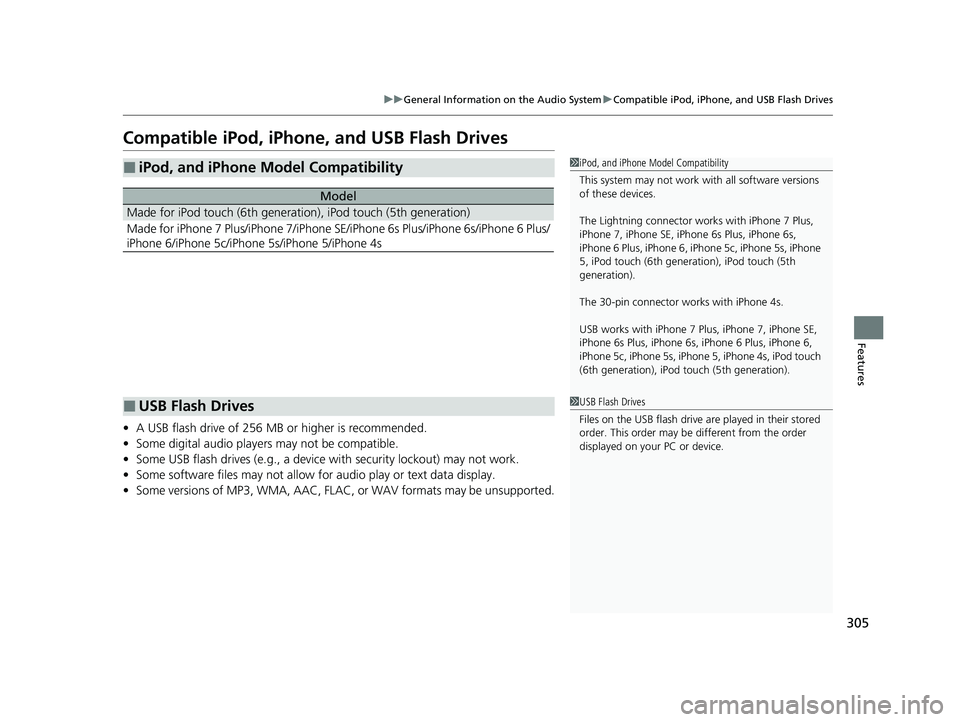
Compatible iPod, iPhone , and USB Flash Drives
•A USB flash drive of 256 MB or higher is recommended.
• Some digital audio players may not be compatible.
• Some USB flash drives (e.g., a device with security lockout) may not work.
• Some software files may not allow for audio play or text data display.
• Some versions of MP3, WMA, AAC, FLAC, or WAV formats may be unsupported.
■iPod, and iPhone Model Compatibility
Model
Made for iPod touch (6th generation), iPod touch (5th generation)
Made for iPhone 7 Plus/iPhone 7/iPhone SE/iPhone 6s Plus/iPhone 6s/iPhone 6 Plus/
iPhone 6/iPhone 5c/iPhone 5s/iPhone 5/iPhone 4s
1iPod, and iPhone Model Compatibility
This system may not work with all software versions
of these devices.
The Lightning connector work s with iPhone 7 Plus,
iPhone 7, iPhone SE, iPhone 6s Plus, iPhone 6s,
iPhone 6 Plus, iPhone 6, iP hone 5c, iPhone 5s, iPhone
5, iPod touch (6th generation), iPod touch (5th
generation).
The 30-pin connector wo rks with iPhone 4s.
USB works with iPhone 7 Pl us, iPhone 7, iPhone SE,
iPhone 6s Plus, iPhone 6s, iPhone 6 Plus, iPhone 6,
iPhone 5c, iPhone 5s, iPhone 5, iPhone 4s, iPod touch
(6th generation), iPod t ouch (5th generation).
■USB Flash Drives1USB Flash Drives
Files on the USB flash drive are played in their stored
order. This order may be different from the order
displayed on your PC or device.
22 INSIGHT HMIN-31TXM6300.book 305 ページ 2021年2月24日 水曜日 午後3時45分
Page 332 of 609
331
uuCustomized Features u
Continued
Features
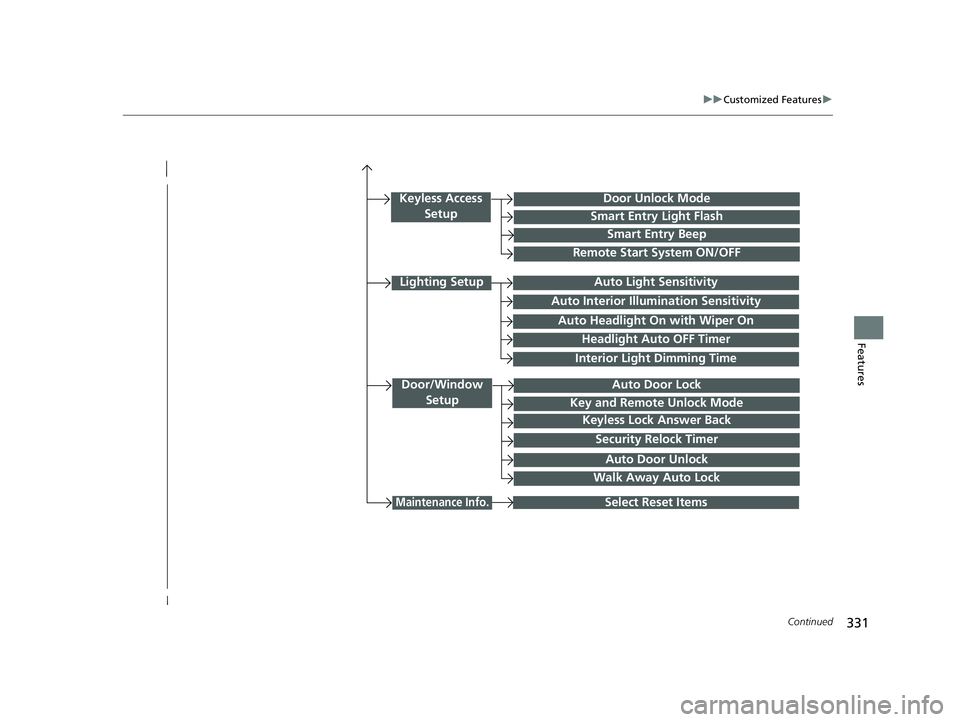
Interior Light Dimming Time
Headlight Auto OFF Timer
Auto Light Sensitivity
Door/Window
SetupAuto Door Lock
Auto Door Unlock
Key and Remote Unlock Mode
Keyless Lock Answer Back
Security Relock Timer
Select Reset Items
Walk Away Auto Lock
Keyless Access SetupDoor Unlock Mode
Smart Entry Light Flash
Smart Entry Beep
Remote Start System ON/OFF
Auto Headlight On with Wiper On
Auto Interior Illumi nation Sensitivity
Maintenance Info.
Lighting Setup
22 INSIGHT HMIN-31TXM6300.book 331 ページ 2021年2月24日 水曜日 午後3時45分
Page 334 of 609
333
uuCustomized Features u
Continued
Features
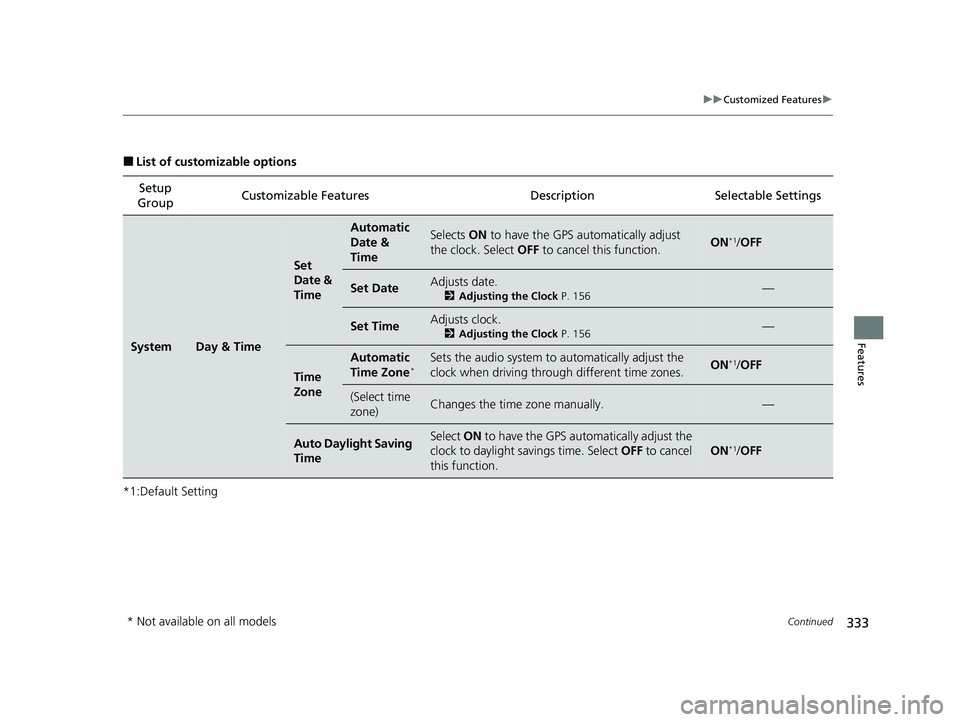
■List of customizable options
*1:Default Setting Setup
Group Customizable Features
DescriptionSelectable Settings
SystemDay & Time
Set
Date &
Time
Automatic
Date &
TimeSelects ON to have the GPS automatically adjust
the clock. Select OFF to cancel this function.ON*1/OFF
Set DateAdjusts date.
2 Adjusting the Clock P. 156—
Set TimeAdjusts clock.
2Adjusting the Clock P. 156—
Time
Zone
Automatic
Time Zone*Sets the audio system to automatically adjust the
clock when driving through different time zones.ON*1/ OFF
(Select time
zone)Changes the time zone manually.—
Auto Daylight Saving
TimeSelect ON to have the GPS automatically adjust the
clock to daylight savings time. Select OFF to cancel
this function.
ON*1/ OFF
* Not available on all models
22 INSIGHT HMIN-31TXM6300.book 333 ページ 2021年2月24日 水曜日 午後3時45分
Page 335 of 609
334
uuCustomized Features u
Features
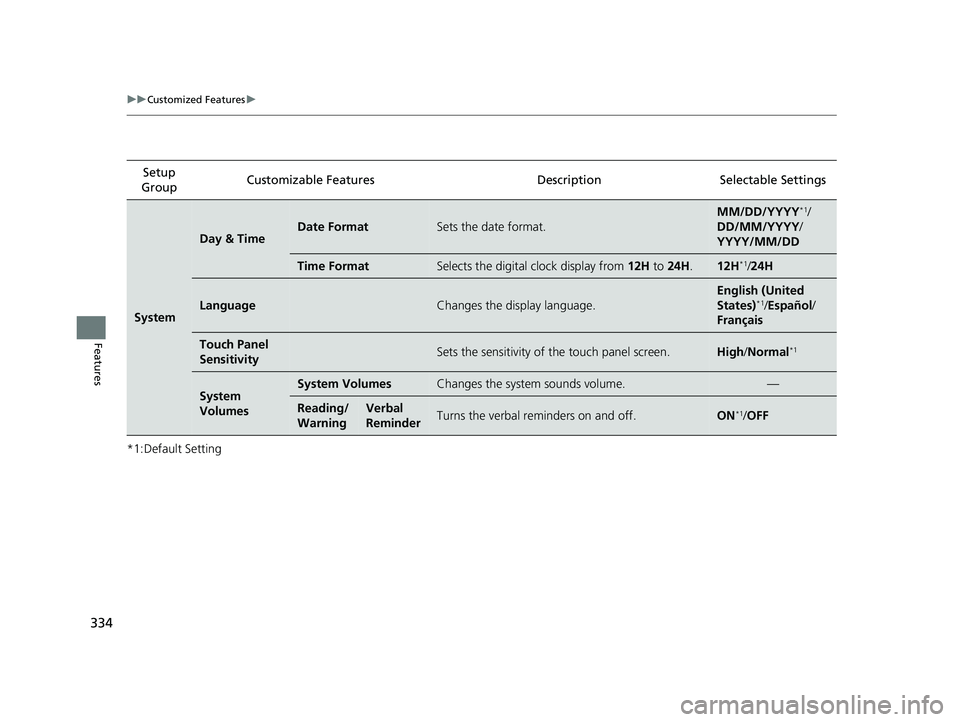
*1:Default SettingSetup
Group Customizable Features Desc
ription Selectable Settings
System
Day & TimeDate FormatSets the date format.
MM/DD/YYYY*1/
DD/MM/YYYY/
YYYY/MM/DD
Time FormatSelects the digital clock display from 12H to 24H .12H*1/24H
LanguageChanges the display language.
English (United
States)*1/Español /
Français
Touch Panel
SensitivitySets the sensitivity of the touch panel screen.High /Normal*1
System
VolumesSystem VolumesChanges the system sounds volume.—
Reading/
WarningVerbal
ReminderTurns the verbal reminders on and off.ON*1/ OFF
22 INSIGHT HMIN-31TXM6300.book 334 ページ 2021年2月24日 水曜日 午後3時45分
Page 342 of 609
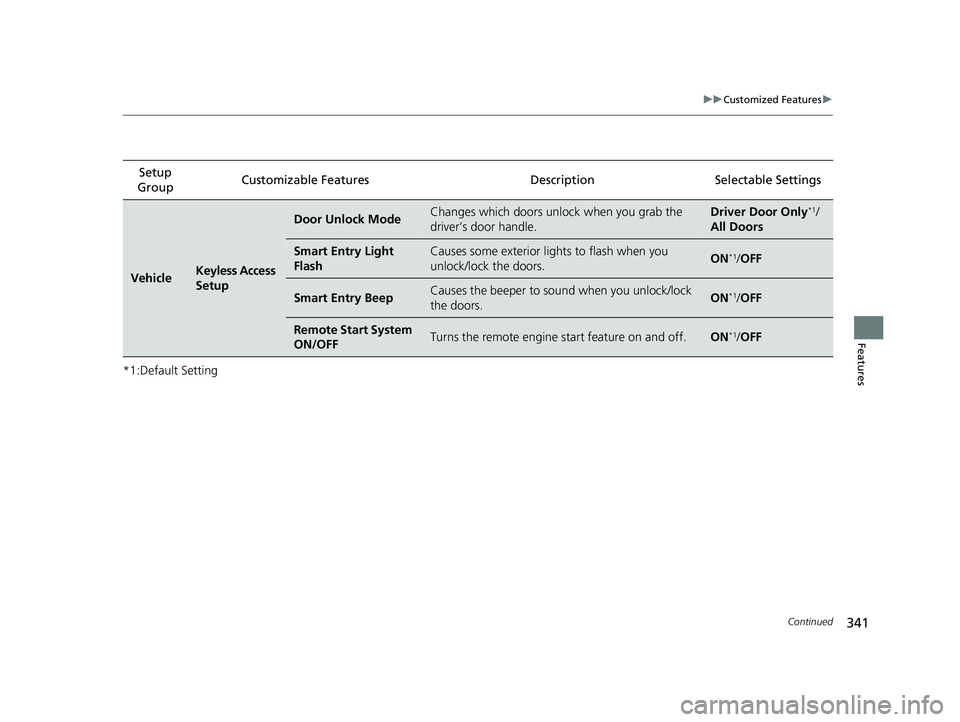
341
uuCustomized Features u
Continued
Features
*1:Default SettingSetup
Group Customizable Features
DescriptionSelectable Settings
VehicleKeyless Access
Setup
Door Unlock ModeChanges which doors unlock when you grab the
driver’s door handle.Driver Door Only*1/
All Doors
Smart Entry Light
FlashCauses some exterior lights to flash when you
unlock/lock the doors.ON*1/ OFF
Smart Entry BeepCauses the beeper to so und when you unlock/lock
the doors.ON*1/ OFF
Remote Start System
ON/OFFTurns the remote engine start feature on and off.ON*1/OFF
22 INSIGHT HMIN-31TXM6300.book 341 ページ 2021年2月24日 水曜日 午後3時45分
Page 344 of 609
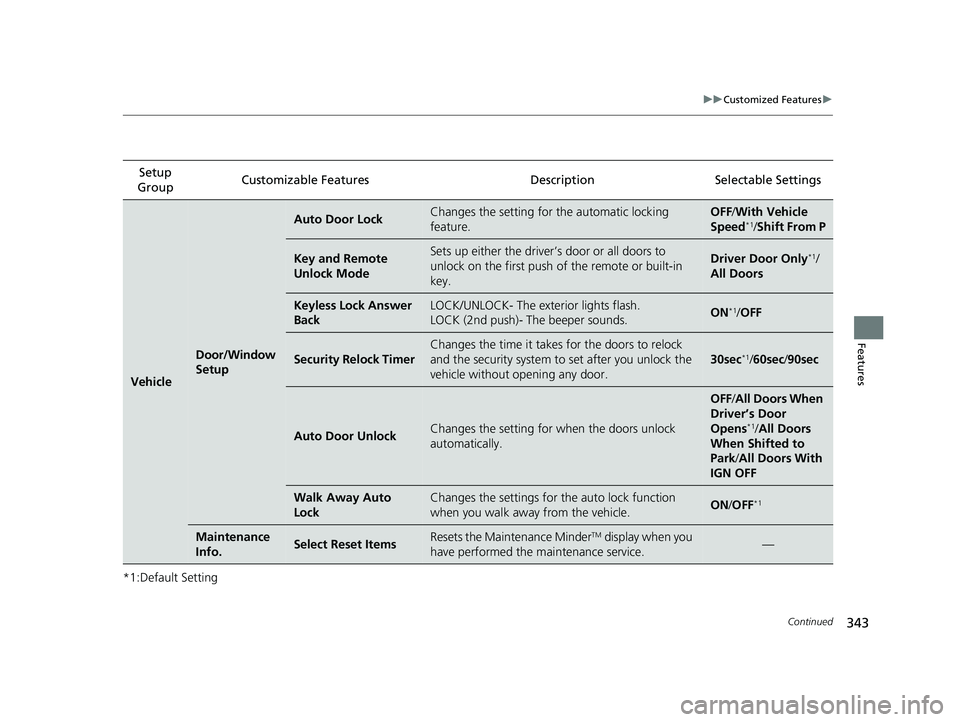
343
uuCustomized Features u
Continued
Features
*1:Default SettingSetup
Group Customizable Features
DescriptionSelectable Settings
Vehicle
Door/Window
Setup
Auto Door LockChanges the setting for the automatic locking
feature.OFF /With Ve hicle
Speed*1/ Shift From P
Key and Remote
Unlock ModeSets up either the driver’s door or all doors to
unlock on the first push of the remote or built-in
key.Driver Door Only*1/
All Doors
Keyless Lock Answer
BackLOCK/UNLOCK- The exterior lights flash.
LOCK (2nd push)- The beeper sounds.ON*1/ OFF
Security Relock Timer
Changes the time it takes for the doors to relock
and the security system to set after you unlock the
vehicle without opening any door.
30sec*1/ 60sec /90sec
Auto Door UnlockChanges the setting for when the doors unlock
automatically.
OFF /All Doors When
Driver’s Door
Opens
*1/ All Doors
When Shifted to
Park/ All Doors With
IGN OFF
Walk Away Auto
LockChanges the settings for th e auto lock function
when you walk away from the vehicle.ON /OFF*1
Maintenance
Info.Select Reset ItemsResets the Maintenance MinderTM display when you
have performed the maintenance service.—
22 INSIGHT HMIN-31TXM6300.book 343 ページ 2021年2月24日 水曜日 午後3時45分