remote control HONDA INSIGHT 2022 Owner's Manual
[x] Cancel search | Manufacturer: HONDA, Model Year: 2022, Model line: INSIGHT, Model: HONDA INSIGHT 2022Pages: 609, PDF Size: 18.48 MB
Page 184 of 609
183
uuOperating the Switches Around the Steering Wheel uPOWER Button
Controls
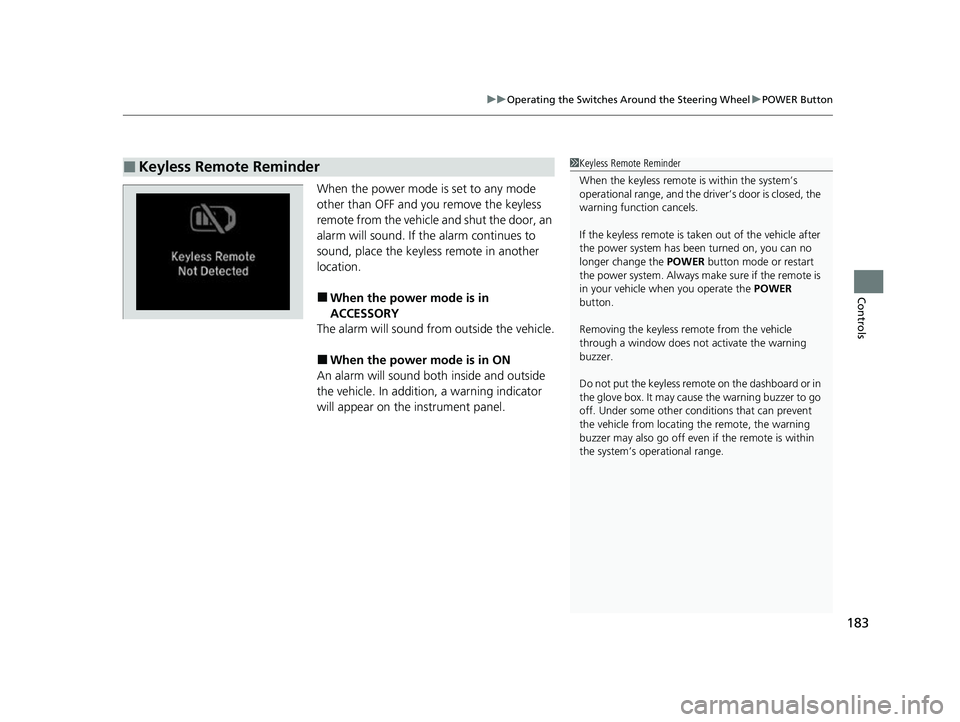
When the power mode is set to any mode
other than OFF and yo u remove the keyless
remote from the vehicle and shut the door, an
alarm will sound. If the alarm continues to
sound, place the keyless remote in another
location.
■When the power mode is in
ACCESSORY
The alarm will sound from outside the vehicle.
■When the power mode is in ON
An alarm will sound both inside and outside
the vehicle. In additi on, a warning indicator
will appear on the instrument panel.
■Keyless Remote Reminder1 Keyless Remote Reminder
When the keyless remote is within the system’s
operational range, and the driv er’s door is closed, the
warning function cancels.
If the keyless remote is taken out of the vehicle after
the power system has been turned on, you can no
longer change the POWER button mode or restart
the power system. Always make sure if the remote is
in your vehicle when you operate the POWER
button.
Removing the keyless remote from the vehicle
through a window does not activate the warning
buzzer.
Do not put the keyless remo te on the dashboard or in
the glove box. It may cause the warning buzzer to go
off. Under some other cond itions that can prevent
the vehicle from locating the remote, the warning
buzzer may also go off even if the remote is within
the system’s operational range.
22 INSIGHT HMIN-31TXM6300.book 183 ページ 2021年2月24日 水曜日 午後3時45分
Page 188 of 609
187
uuOperating the Switches Around the Steering Wheel uLight Switches
Controls
The headlights automatically come on when the wipers are used several times within
a certain number of intervals with the headlight switch in AUTO.
The headlights automatically go off a few minutes later if the wipers are stopped.
The headlights, all other exterior lights, a nd the instrument panel lights turn off 15
seconds after you set the power mode to VEHICLE OFF (LOCK), take the remote with
you, and close the driver’s door.
If you set the power mode to VEHICLE OFF (LOCK) with the headlight switch on, but
do not open the door, the lights turn off a fter 10 minutes (3 minutes, if the switch
is in the AUTO position).
The lights turn on again when you unlock or open the driver’s door. If you unlock
the door, but do not open it within 15 seconds, the lights go off. If you open the
driver’s door, you will hear a reminder chime alerting you that the lights are on.
■Headlight Integration with Wipers
■Automatic Lighting Off Feature
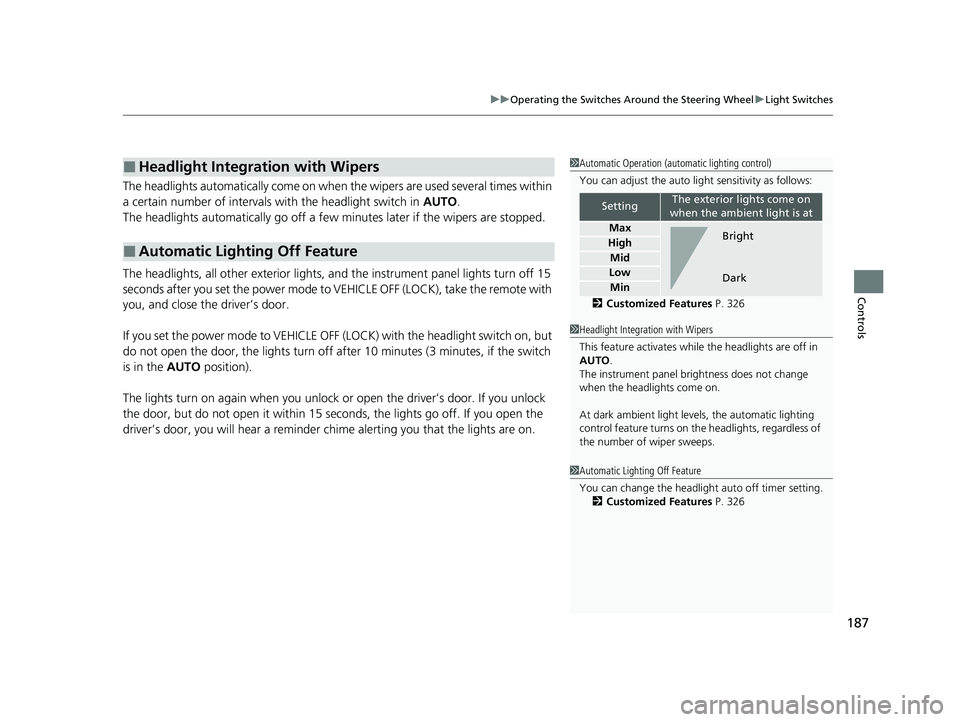
1Automatic Operation (aut omatic lighting control)
You can adjust the auto li ght sensitivity as follows:
2 Customized Features P. 326
SettingThe exterior lights come on
when the ambient light is at
Max
High
Mid
Low
Min
Bright
Dark
1 Headlight Integration with Wipers
This feature activates while the headlights are off in
AUTO .
The instrument panel br ightness does not change
when the headlights come on.
At dark ambient light levels, the automatic lighting
control feature turns on the headlights, regardless of
the number of wiper sweeps.
1 Automatic Lighting Off Feature
You can change the headlight auto off timer setting.
2 Customized Features P. 326
22 INSIGHT HMIN-31TXM6300.book 187 ページ 2021年2月24日 水曜日 午後3時45分
Page 224 of 609
223
Features
This chapter describes how to operate technology features.
Audio SystemAbout Your Audio System ................ 224
USB Ports ......................................... 225
Audio System Theft Protection ......... 226
Audio Remote Controls .................... 227
Audio System Basic Operation ........ 230
Audio/Information Screen ................ 231
System Updates ............................... 246
Adjusting the Sound ........................ 252
Display Setup ................................... 253
Voice Control Operation .................. 255
Playing AM/FM Radio ....................... 258 Playing SiriusXM
® Radio ................... 262
Playing an iPod ................................ 273
Playing a USB Flash Drive ................. 276
Playing Bluetooth ® Audio................. 279
HondaLink ®..................................... 281
HondaLink ® Service
*........................ 285
Wi-Fi Connection ............................. 290
AT&T Hotspot
*................................ 292
Siri ® Eyes Free .................................. 293
Apple CarPlay
TM............................... 294
Android AutoTM................................ 298
Audio Error Messages ...................... 302 General Information on the Audio
System ............................................. 304
Customized Features ........................ 326
HomeLink ® Universal Transceiver
*.. 346
Bluetooth ® HandsFreeLink® ............. 349
Refuel Recommend .......................... 374
* Not available on all models
22 INSIGHT HMIN-31TXM6300.book 223 ページ 2021年2月24日 水曜日 午後3時45分
Page 225 of 609
224
Features
Audio System
About Your Audio System
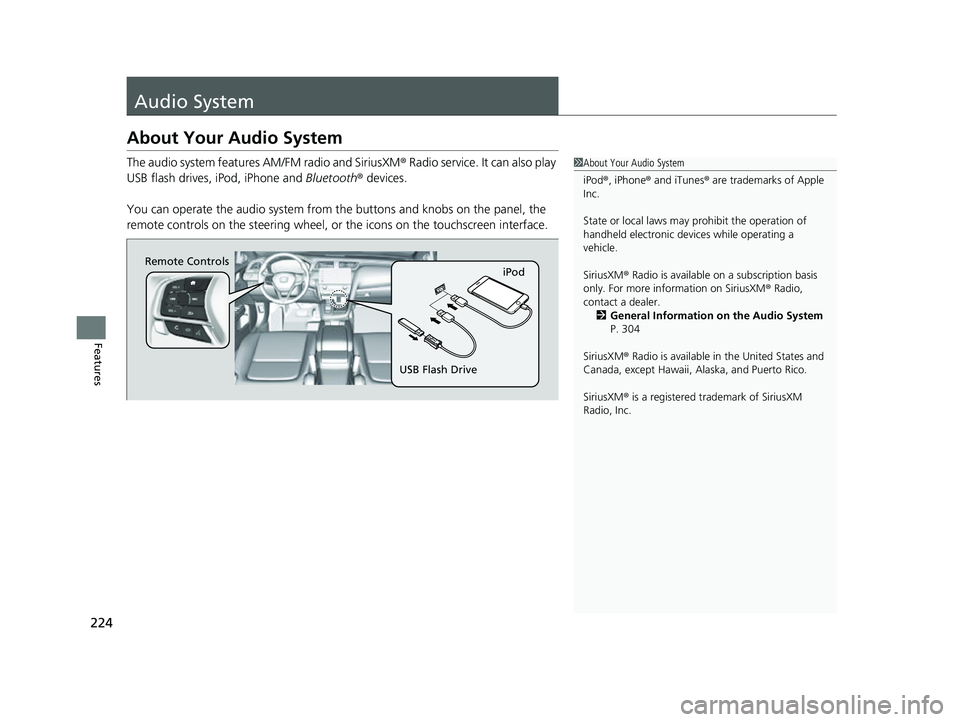
The audio system features AM/FM radio and SiriusXM® Radio service. It can also play
USB flash drives, iPod, iPhone and Bluetooth® devices.
You can operate the audio system from the buttons and knobs on the panel, the
remote controls on the steering wheel, or the icons on the touchscreen interface.1About Your Audio System
iPod ®, iPhone ® and iTunes ® are trademarks of Apple
Inc.
State or local laws may prohibit the operation of
handheld electronic devi ces while operating a
vehicle.
SiriusXM ® Radio is available on a subscription basis
only. For more information on SiriusXM ® Radio,
contact a dealer. 2 General Information on the Audio System
P. 304
SiriusXM ® Radio is available in the United States and
Canada, except Ha waii, Alaska, and Puerto Rico.
SiriusXM ® is a registered trademark of SiriusXM
Radio, Inc.
Remote Controls iPod
USB Flash Drive
22 INSIGHT HMIN-31TXM6300.book 224 ページ 2021年2月24日 水曜日 午後3時45分
Page 228 of 609
227
uuAudio System uAudio Remote Controls
Continued
Features
Audio Remote Controls
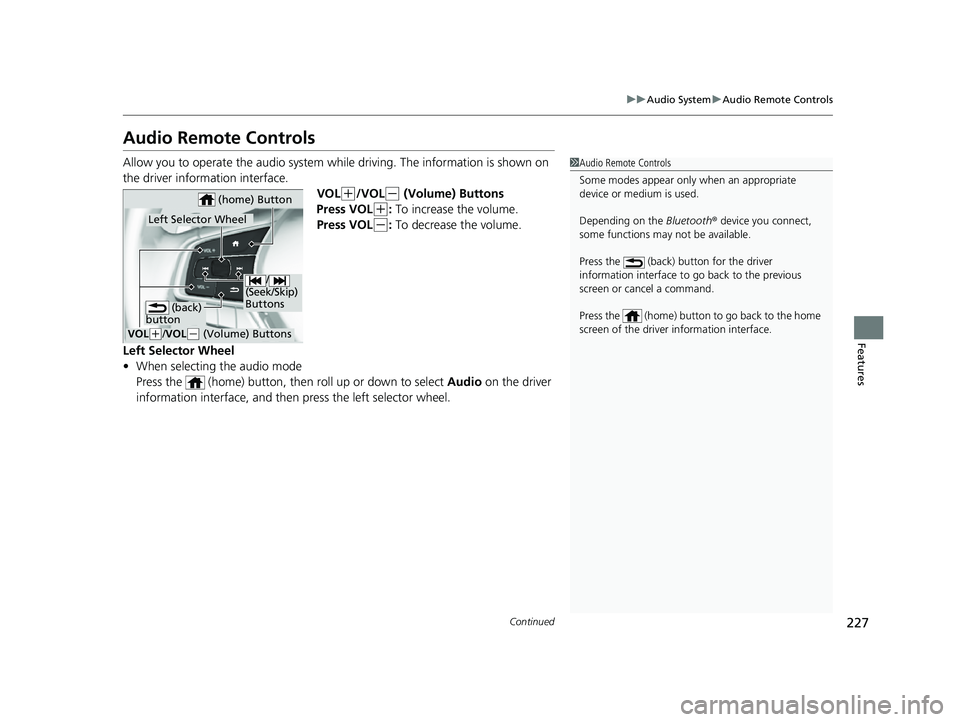
Allow you to operate the audio system whil e driving. The information is shown on
the driver information interface. VOL
(+/VOL(- (Volume) Buttons
Press VOL
(+: To increase the volume.
Press VOL
(-: To decrease the volume.
Left Selector Wheel
• When selecting the audio mode
Press the (home) button, then roll up or down to select Audio on the driver
information interface, and then press the left selector wheel.
1Audio Remote Controls
Some modes appear only when an appropriate
device or medium is used.
Depending on the Bluetooth® device you connect,
some functions may not be available.
Press the (back) button for the driver
information interface to go back to the previous
screen or cancel a command.
Press the (home) button to go back to the home
screen of the driver information interface.
/
(Seek/Skip)
Buttons
VOL( +/ VOL(- (Volume) Buttons
Left Selector Wheel
(home) Button
(back)
button
22 INSIGHT HMIN-31TXM6300.book 227 ページ 2021年2月24日 水曜日 午後3時45分
Page 229 of 609
228
uuAudio System uAudio Remote Controls
Features
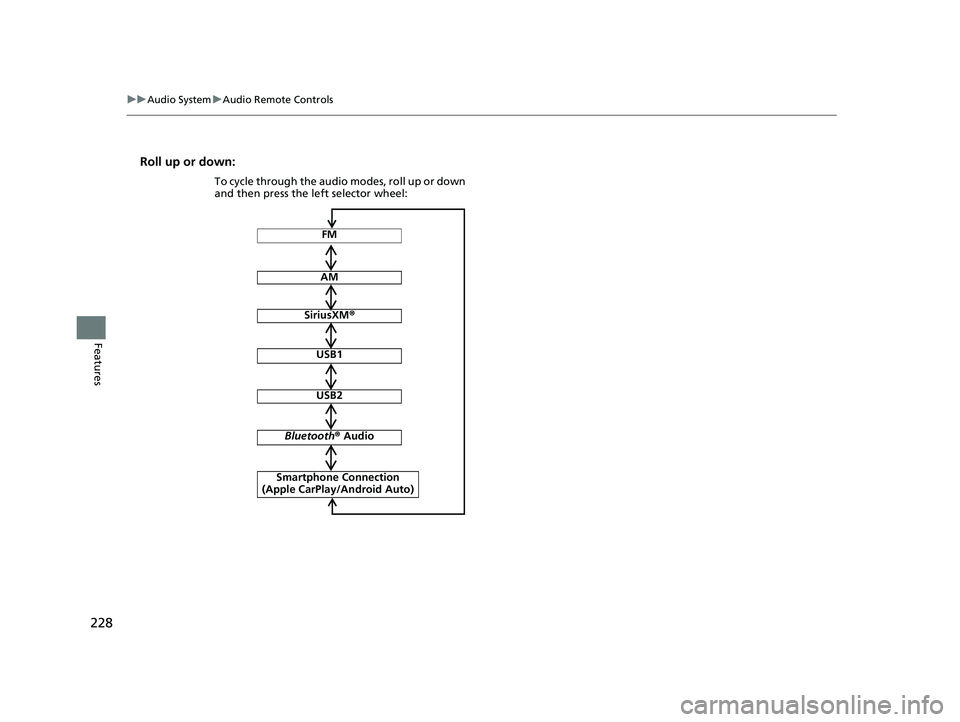
Roll up or down:
FM
AM
SiriusXM ®
USB1
USB2
Bluetooth ® Audio
Smartphone Connection
(Apple CarPlay/Android Auto)
To cycle through the audio modes, roll up or down
and then press the left selector wheel:
22 INSIGHT HMIN-31TXM6300.book 228 ページ 2021年2月24日 水曜日 午後3時45分
Page 230 of 609
229
uuAudio System uAudio Remote Controls
Features
/ (Seek/Skip) Buttons
• When listening to the radio
Press : To select the next preset radio station.
Press : To select the previous preset radio station.
Press and hold : To select the next strong station.
Press and hold : To select the previous strong station.
• When listening to an iPod, USB flash drive, or Bluetooth® Audio, or Smartphone
Connection
Press : To skip to the next song.
Press : To go back to the beginning of the current or previous song.
• When listening to a USB flash drive
Press and hold : To skip to the next folder.
Press and hold : To go back to the previous folder.
22 INSIGHT HMIN-31TXM6300.book 229 ページ 2021年2月24日 水曜日 午後3時45分
Page 260 of 609
Continued259
uuAudio System Basic Operation uPlaying AM/FM Radio
Features
To store a station:
1. Tune to the selected station.
2. Select and hold the preset number for the station you want to store.
Lists the strongest stations on the selected band.
1. Select Station List to display a list.
2. Select the station.
■Manual update
Updates your available st ation list at any time.
1. Select Station List to display a list.
2. Select Refresh .
■Preset Memory
■Station List
1Preset Memory
The ST indicator appears on the display indicating
stereo FM broadcasts.
Stereo reproduction in AM is not available.
Switching the Audio Mode
Roll up or down to select Audio on the left selector
wheel or select the audio source icon on the screen.
2 Audio Remote Controls P. 227
You can store 12 AM/FM stations into preset
memory.
HD Radio Technology manufactured under license
from iBiquity Digital Cor poration. U.S. and Foreign
Patents. HD Radio
TM and the HD, HD Radio, and
“Arc” logos are proprietary trademarks of iBiquity
Digital Corp.
22 INSIGHT HMIN-31TXM6300.book 259 ページ 2021年2月24日 水曜日 午後3時45分
Page 264 of 609
Continued263
uuAudio System Basic Operation uPlaying SiriusXM ® Radio
Features
1. Select Settings .
2. Select Tune Mode .
3. Select Channel or Category .
■To Change the Tune Mode1Playing SiriusXM ® Radio
In the channel mode, all available channels are
selectable. In the category mode, you can select a
channel within a ca tegory (Jazz, Rock, Classical, etc.).
There may be instances when SiriusXM ® Radio does
not broadcast all the data fi elds (artist name, title).
This does not indicate a problem with your audio
system.
SiriusXM ® Radio stations load in ascending order,
which can take about a minute. Once they have
loaded you will be able to scroll up or down to make
your selections.
Switching the Audio Mode
Roll up or down to select Audio on the left selector
wheel or select the audio source icon on the screen.
2 Audio Remote Controls P. 227
Tune Start:
When you change to a preset channel, a song being
played on that channel restarts from the beginning
with this function. This can be turned on or off by the
following procedure.
1. Select Settings.
2. Select Tune Start .
3. Select ON or OFF .
To change a category, select Category icons, or
select More and then select Category List.
22 INSIGHT HMIN-31TXM6300.book 263 ページ 2021年2月24日 水曜日 午後3時45分
Page 305 of 609
304
Features
General Information on the Audio System
SiriusXM® Radio Service
1. You need your radio ID ready before regist ering for subscription. To see the ID in
the screen, select Channel to 0.
2. Have your radio ID ready, and either call or visit the SiriusXM® website to
subscribe.
Switch to the SiriusXM ® mode by using the audio remote controls on the steering
wheel, or through the audio/information screen, and stay in this mode for about 30
minutes until the service is activated. Make sure your vehicle is in an open area with
good reception.
Channel **** is not subscribed. Call SiriusXM to subscribe.
*1
You are not subscribed to the channel selected.
Subscription Updated:
SiriusXM ® radio is receiving information update from the network.
Channel Not Available:
No such channel exits, or the artist or title information is unavailable.
No Signal:
The signal is too weak in the current location.
Check Tuner:
There is a problem with the SiriusXM ® tuner. Contact a dealer.
Antenna Disconnected, Antenna Shorted:
There is a problem with the SiriusXM ® antenna. Contact a dealer.
*1 : ****part is variable characters, and w ill change depending upon where an subscribe.
■Subscribing to SiriusXM® Radio
■Receiving SiriusXM ® Radio
■SiriusXM ® Radio Display Messages
1 Subscribing to SiriusXM ® Radio
Contact Information for SiriusXM ® Radio:
SiriusXM ® Radio at
www.siriusxm.com/subscribenow , or 1-866-635-
2349
1 Receiving SiriusXM ® Radio
The SiriusXM ® satellites are in orbit over the equator;
therefore, objects south of the vehicle may cause
satellite rece ption interruptions. Sa tellite signals are
more likely to be blocked by tall buildings and
mountains the farther north you travel from the
equator.
You may experience rece ption problems under the
following circumstances:
•In a location with an obstruction to the south of
your vehicle.
•In tunnels•On the lower level of a multi-tiered road
•Large items carried on the roof rack
22 INSIGHT HMIN-31TXM6300.book 304 ページ 2021年2月24日 水曜日 午後3時45分