warning HONDA INSIGHT 2022 Owner's Manual
[x] Cancel search | Manufacturer: HONDA, Model Year: 2022, Model line: INSIGHT, Model: HONDA INSIGHT 2022Pages: 609, PDF Size: 18.48 MB
Page 98 of 609
97
uuIndicators u
Continued
Instrument Panel
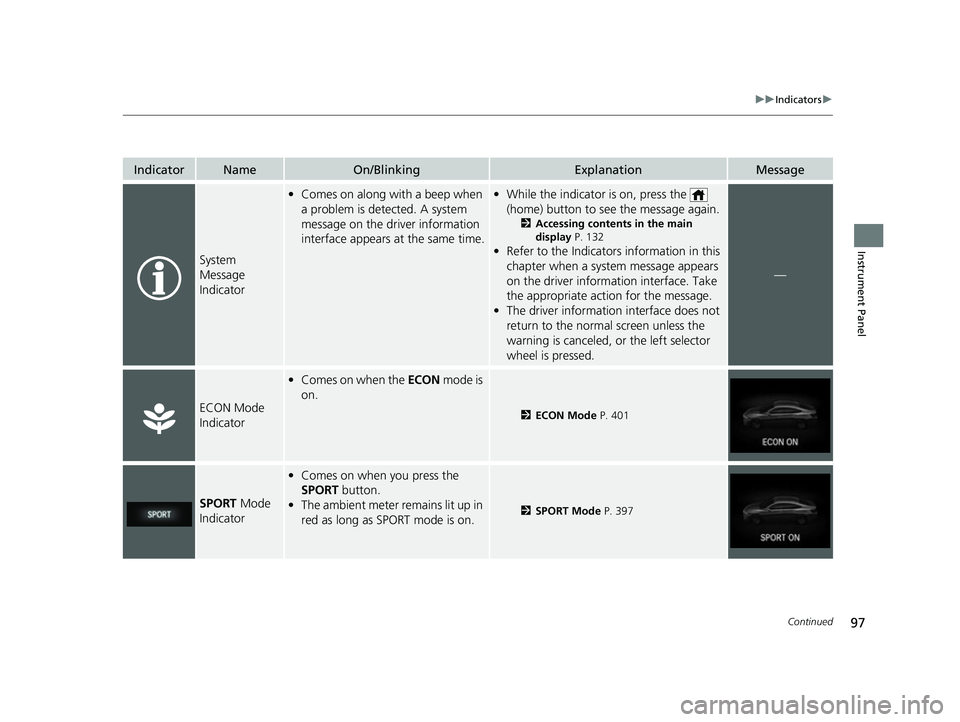
IndicatorNameOn/BlinkingExplanationMessage
System
Message
Indicator
•Comes on along with a beep when
a problem is detected. A system
message on the driver information
interface appears at the same time.•While the indicator is on, press the
(home) button to see the message again.
2 Accessing contents in the main
display P. 132
•Refer to the Indicators information in this
chapter when a system message appears
on the driver inform ation interface. Take
the appropriate action for the message.
• The driver information interface does not
return to the normal screen unless the
warning is canceled, or the left selector
wheel is pressed.
—
ECON Mode
Indicator
•Comes on when the ECON mode is
on.
2 ECON Mode P. 401
SPORT Mode
Indicator
• Comes on when you press the
SPORT button.
• The ambient meter remains lit up in
red as long as SPORT mode is on.
2 SPORT Mode P. 397
22 INSIGHT HMIN-31TXM6300.book 97 ページ 2021年2月24日 水曜日 午後3時45分
Page 105 of 609
104
uuIndicators uDriver Information Interface Wa rning and Information Messages
Instrument Panel
Driver Information Interface Warning and Information Messages
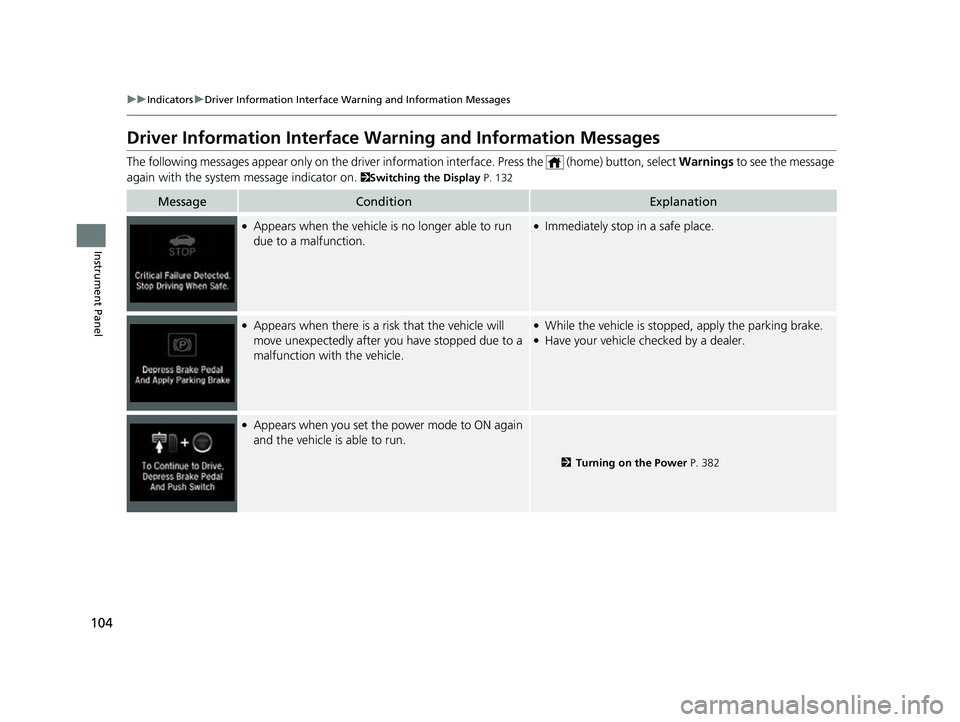
The following messages appear only on the driver information interface. Press the (home) button, select Warnings to see the message
again with the system message indicator on.
2Switching the Display P. 132
MessageConditionExplanation
●Appears when the vehicle is no longer able to run
due to a malfunction.●Immediately stop in a safe place.
●Appears when there is a risk that the vehicle will
move unexpectedly after you have stopped due to a
malfunction with the vehicle.●While the vehicle is stopped, apply the parking brake.●Have your vehicle checked by a dealer.
●Appears when you set the power mode to ON again
and the vehicle is able to run.
2 Turning on the Power P. 382
22 INSIGHT HMIN-31TXM6300.book 104 ページ 2021年2月24日 水曜日 午後3時45分
Page 106 of 609
105
uuIndicators uDriver Information Interface Wa rning and Information Messages
Continued
Instrument Panel
MessageConditionExplanation
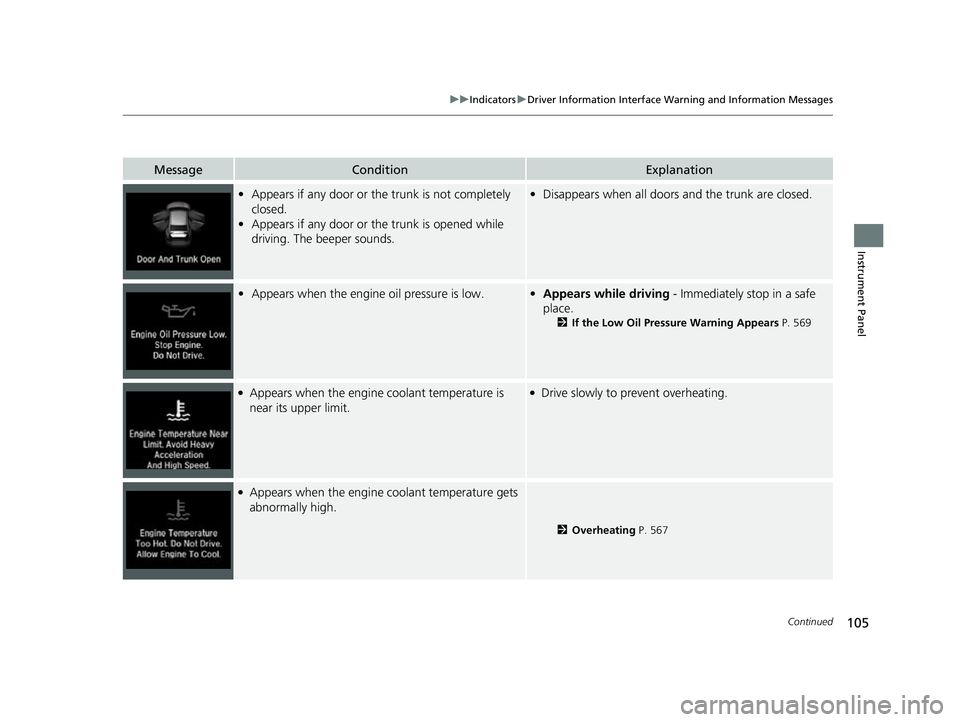
•Appears if any door or the trunk is not completely
closed.
• Appears if any door or the trunk is opened while
driving. The beeper sounds.•Disappears when all doors and the trunk are closed.
• Appears when the engine oil pressure is low.•Appears while driving - Immediately stop in a safe
place.
2 If the Low Oil Pressure Warning Appears P. 569
●Appears when the engine coolant temperature is
near its upper limit.●Drive slowly to prevent overheating.
●Appears when the engine coolant temperature gets
abnormally high.
2 Overheating P. 567
22 INSIGHT HMIN-31TXM6300.book 105 ページ 2021年2月24日 水曜日 午後3時45分
Page 127 of 609
126
uuIndicators uDriver Information Interface Wa rning and Information Messages
Instrument Panel
MessageConditionExplanation
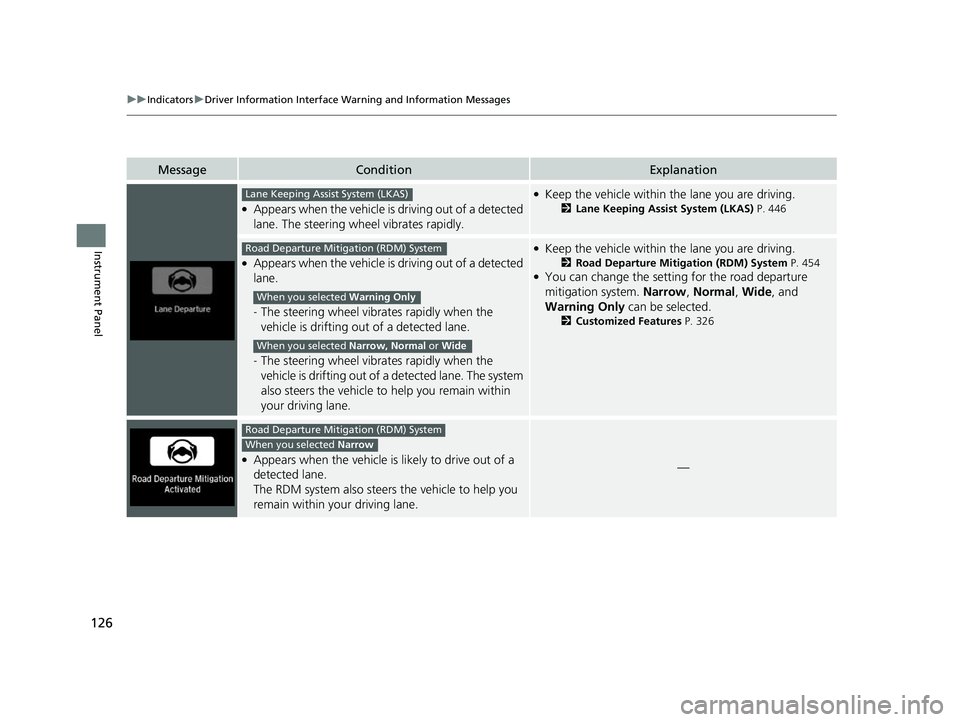
●Appears when the vehicle is driving out of a detected
lane. The steering wheel vibrates rapidly.
●Keep the vehicle within the lane you are driving.
2Lane Keeping Assist System (LKAS) P. 446
●Appears when the vehicle is driving out of a detected
lane.
-The steering wheel vibrates rapidly when the
vehicle is drifting out of a detected lane.
- The steering wheel vibrates rapidly when the
vehicle is drifting out of a detected lane. The system
also steers the vehicle to help you remain within
your driving lane.
●Keep the vehicle within the lane you are driving.
2 Road Departure Mitigation (RDM) System P. 454●You can change the setting for the road departure
mitigation system. Narrow, Normal , Wide , and
Warning Only can be selected.
2Customized Features P. 326
●Appears when the vehicle is likely to drive out of a
detected lane.
The RDM system also steers the vehicle to help you
remain within your driving lane.—
Lane Keeping Assist System (LKAS)
Road Departure Mitigation (RDM) System
When you selected Warning Only
When you selected Narrow, Normal or Wide
Road Departure Mitigation (RDM) System
When you selected Narrow
22 INSIGHT HMIN-31TXM6300.book 126 ページ 2021年2月24日 水曜日 午後3時45分
Page 133 of 609
132
uuGauges and Driver Information Interface uDriver Information Interface
Instrument Panel
Driver Information Interface
The driver information interface shows the odometer, trip meter, outside
temperature indicator, and other gauges.
It also displays important messages such as warnings and other helpful information.
■Accessing contents in the main display
Press the (home) button, then roll the le ft selector wheel to scroll to the content
you want to see. Press the left select or wheel to see detailed information.
■Switching the Display1Switching the Display
If a warning initially appear s, you can - after reading
it - press the (hom e) button to proceed
immediately to the cont ent or to any other
warning(s).
To go back to the previous screen, press the
(back) button.
To go back to the home screen, press the (home)
button.
You can edit, add, or delete the meter contents using
the audio/information screen.
2 Customizing the Meter P. 245
22 INSIGHT HMIN-31TXM6300.book 132 ページ 2021年2月24日 水曜日 午後3時45分
Page 142 of 609
Continued141
uuGauges and Driver Information Interface uDriver Information Interface
Instrument Panel
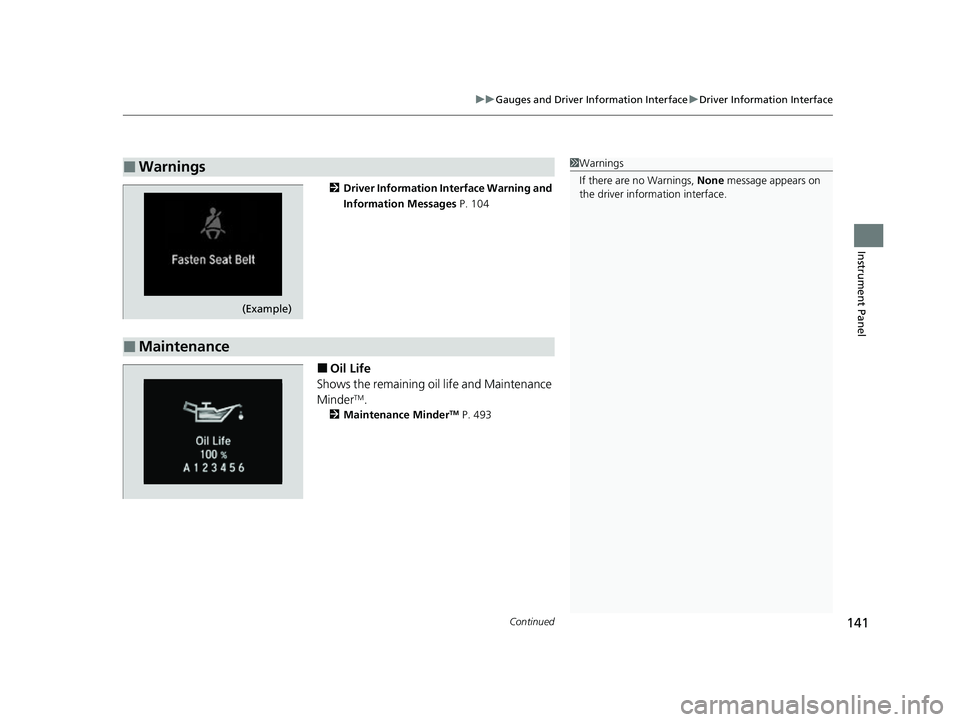
2 Driver Information Interface Warning and
Information Messages P. 104
■Oil Life
Shows the remaining oil life and Maintenance
Minder
TM.
2 Maintenance MinderTM P. 493
■Warnings1Warnings
If there are no Warnings, None message appears on
the driver information interface.
(Example)
■Maintenance
22 INSIGHT HMIN-31TXM6300.book 141 ページ 2021年2月24日 水曜日 午後3時45分
Page 164 of 609
Continued163
uuLocking and Unlocking the Doors uLocking/Unlocking the Doors from the Outside
Controls
To temporarily deactivate the function:
1. Set the power mode to OFF.
2. Open the driv er’s door.
3. Using the master door lock switch, operate
the lock as follows:
Lock Unlock Lock Unlock.
u The beeper sounds and the function is
deactivated.
To restore the function:
• Set the power mode to ON.
• Lock the vehicl e without using the auto lock
function.
• With the keyless remote on you, move out
of the auto lock function operation range.
• Open any door.1Locking the doors (Walk away auto lock ®)
The auto lock function does not operate when any of
the following conditions are met.
•The keyless remote is inside the vehicle.
•A door or the hood is not closed.•The power mode is set to any mode other than
OFF.
•The keyless remote is not located within a radius of
about 5 feet (1.5 m) from the vehicle when you get
out of the vehicle and close the doors.
Auto lock function operation stop beeper
After the auto lock function has been activated, the
auto lock operation stop beeper sounds for
approximately two seconds in the following cases.
•The keyless remote is put inside the vehicle through
a window.
•You are located too close to the vehicle.
•The keyless remote is put inside the trunk.
If the warning beeper sounds, check that you are
carrying the keyless remote. Then, open/close a door
and confirm the auto lock activation beeper sounds
once.
22 INSIGHT HMIN-31TXM6300.book 163 ページ 2021年2月24日 水曜日 午後3時45分
Page 178 of 609
177Continued
Controls
Opening and Closing the Windows
Opening/Closing the Power Windows
The power windows can be opened and closed when the power mode is in ON,
using the switches on the doors.
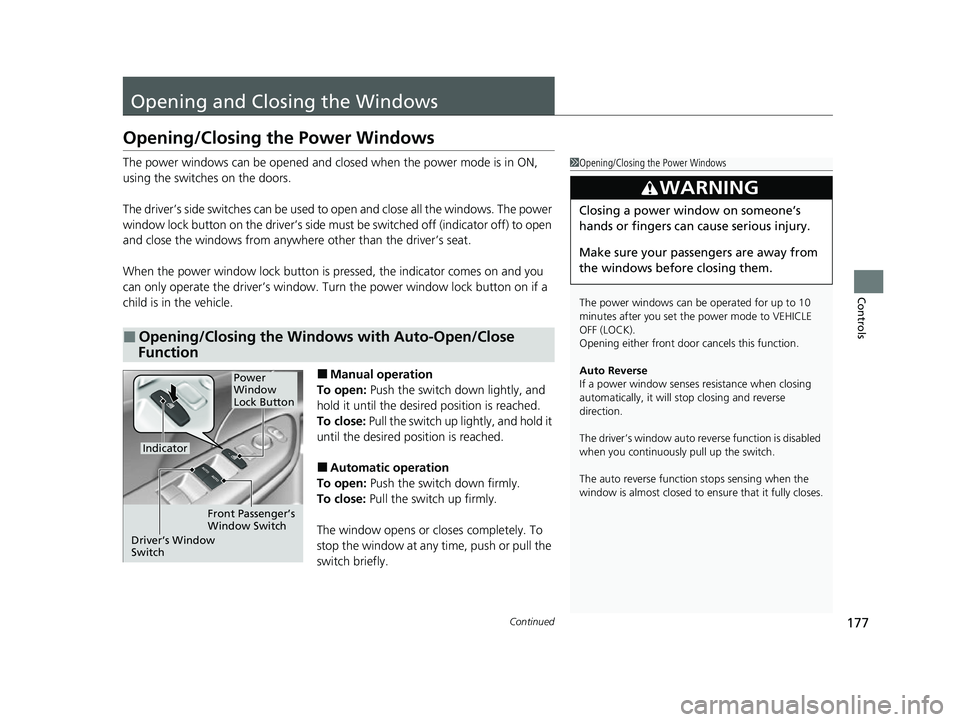
The driver’s side switches can be used to open and close all the windows. The power
window lock button on the driver’s side must be switched off (indicator off) to open
and close the windows from anywhere other than the driver’s seat.
When the power window lock button is pressed, the indicator comes on and you
can only operate the driver’s window. Turn the power window lock button on if a
child is in the vehicle.
■Manual operation
To open: Push the switch down lightly, and
hold it until the desired position is reached.
To close: Pull the switch up lightly, and hold it
until the desired position is reached.
■Automatic operation
To open: Push the switch down firmly.
To close: Pull the switch up firmly.
The window opens or closes completely. To
stop the window at any time, push or pull the
switch briefly.
■Opening/Closing the Windows with Auto-Open/Close
Function
1 Opening/Closing the Power Windows
The power windows can be operated for up to 10
minutes after you set the power mode to VEHICLE
OFF (LOCK).
Opening either front door cancels this function.
Auto Reverse
If a power window senses resistance when closing
automatically, it will stop closing and reverse
direction.
The driver’s window auto re verse function is disabled
when you continuously pull up the switch.
The auto reverse function stops sensing when the
window is almost closed to en sure that it fully closes.
3WARNING
Closing a power window on someone’s
hands or fingers can cause serious injury.
Make sure your passengers are away from
the windows before closing them.
Power
Window
Lock Button
Indicator
Driver’s Window
Switch Front Passenger’s
Window Switch
22 INSIGHT HMIN-31TXM6300.book 177 ページ 2021年2月24日 水曜日 午後3時45分
Page 181 of 609
180
Controls
Moonroof*
Opening/Closing the Moonroof
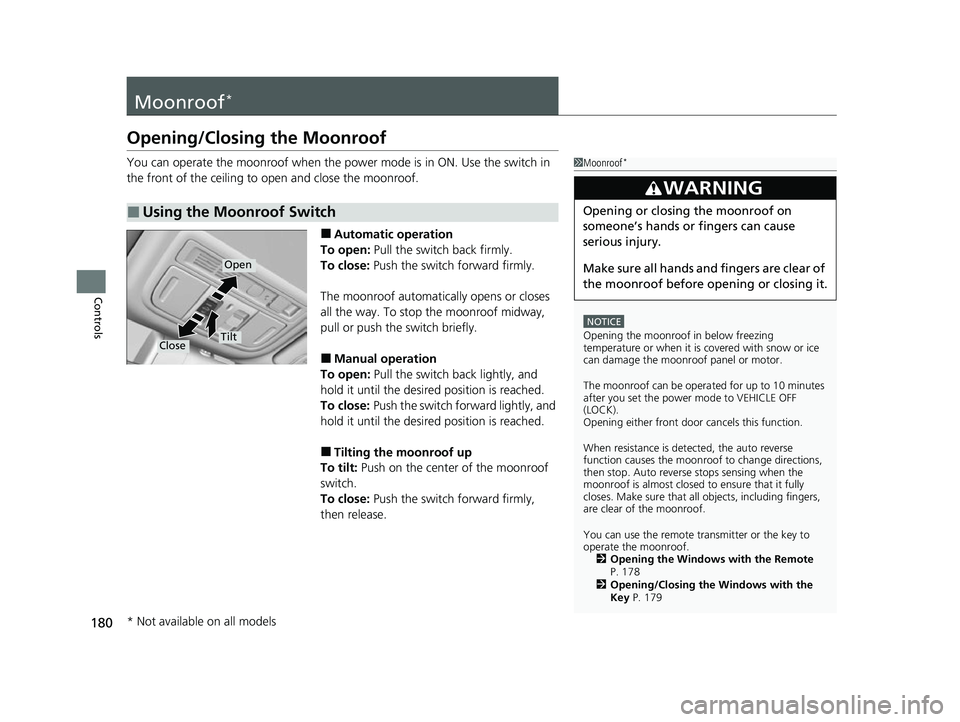
You can operate the moonroof when the power mode is in ON. Use the switch in
the front of the ceiling to open and close the moonroof.
■Automatic operation
To open: Pull the switch back firmly.
To close: Push the switch forward firmly.
The moonroof automatically opens or closes
all the way. To stop the moonroof midway,
pull or push the switch briefly.
■Manual operation
To open: Pull the switch back lightly, and
hold it until the desired position is reached.
To close: Push the switch forward lightly, and
hold it until the desired position is reached.
■Tilting the moonroof up
To tilt: Push on the center of the moonroof
switch.
To close: Push the switch forward firmly,
then release.
■Using the Moonroof Switch
1 Moonroof*
NOTICE
Opening the moonroof in below freezing
temperature or when it is covered with snow or ice
can damage the moonr oof panel or motor.
The moonroof can be opera ted for up to 10 minutes
after you set the power mode to VEHICLE OFF
(LOCK).
Opening either front door cancels this function.
When resistance is detected, the auto reverse
function causes the moonroof to change directions,
then stop. Auto reverse stops sensing when the
moonroof is almost closed to ensure that it fully
closes. Make sure that al l objects, including fingers,
are clear of the moonroof.
You can use the remote transmitter or the key to
operate the moonroof. 2 Opening the Windows with the Remote
P. 178
2 Opening/Closing the Windows with the
Key P. 179
3WARNING
Opening or closing the moonroof on
someone’s hands or fingers can cause
serious injury.
Make sure all hands and fingers are clear of
the moonroof before opening or closing it.
Open
CloseTilt
* Not available on all models
22 INSIGHT HMIN-31TXM6300.book 180 ページ 2021年2月24日 水曜日 午後3時45分
Page 183 of 609
182
uuOperating the Switches Around the Steering Wheel uPOWER Button
Controls
If you leave the vehicle for 30 to 60 minutes with the transmission in (P and the
power mode in ACCESSORY, the vehicle au tomatically goes into the mode to
VEHICLE OFF (LOCK) to avoid draining the 12-volt battery.
If you open the driver’s door when the powe r mode is set to ACCESSORY, a warning
beep sounds.
■Automatic Power Off
■Power Mode Reminder
22 INSIGHT HMIN-31TXM6300.book 182 ページ 2021年2月24日 水曜日 午後3時45分