warning HONDA INSIGHT 2022 Service Manual
[x] Cancel search | Manufacturer: HONDA, Model Year: 2022, Model line: INSIGHT, Model: HONDA INSIGHT 2022Pages: 609, PDF Size: 18.48 MB
Page 313 of 609
312
uuGeneral Information on the Audio System uHonda App License Agreement
Features
E. Information Collection and Storage
1. Information Collection , Use, Transmission and Storage of Data. Consent to Use of Data:
You agree that HONDA and PROVIDERS may
collect and use your information gathered in any manner as part of product support services related to the SOFTWARE or related services.
HONDA may share such information with third parties, including, without limitation, PROV IDERS, third party software and service s
suppliers, their affiliates and/or their design ated agents, solely to improve their products or to provide services or technologies to you.
HONDA, third party software and systems supp liers, their affiliates and/or their designated agent may disclose this information to others,
but not in a form that pe rsonally identifies you.
2. Information Storage.
Depending on the type of multimedia system you have in your VEHICLE, certain information may be stored for ease
of use of the SOFTWARE including, without limitation, search hi story, location history in certain applications, previous and saved
destinations, map locations within certain applications, and device numbers and contact information.
(a) Vehicle Health Information.
Your VEHICLE may remotely trans mit information regarding the status and health of your VEHICLE
(“VEHICLE INFORMATION”) to HONDA without notification to you. VEHICLE INFORMATION may contain VEHICLE maintenance and
malfunction status that is derived from VEHICLE diagnostic data and includes, but is not limited to, status of powered doors and windows,
battery life data, battery charging data, VEHICLE speed, coolant temperat ure, air compressor revolution, output power, warning codes,
diagnostic trouble codes, fuel injection volu me, and engine rotations per minute. VEHICL E HEALTH INFORMATION may be used by HON DA
for research and development, to deliver HO NDA SERVICES and information to you, and to contact you, and is retained only for a period
of time necessary to fulfill these goals.
(b) VEHICLE Geolocation Data (non-navigation/map based).
If you opt-in to geolocation-based SERVICES, your vehicle’s geolocation data
(latitude and longitude) will be automatically sent from your VEHICLE to HONDA and PROVIDERS.
(c) You understand that the inputting or uploading of information to your VEHICLE’s multimedia system or the SOFTWARE or SERVICES is
at your own risk and that HONDA is not resp onsible for unauthorized access to or use of any personal or other information. All information
uploaded to the SOFTWARE and SERVICES may be stored on your VEHI CLES’s multimedia system and you understand that the security and
safety of your VEHICLE’s multimedia system is your sole responsibility.
22 INSIGHT HMIN-31TXM6300.book 312 ページ 2021年2月24日 水曜日 午後3時45分
Page 328 of 609

327
uuCustomized Features u
Continued
Features
■Customization flow
Select Settings .
Automatic Date &
Time
Set Date
Set Time
System
Press the button.
Automatic Time Zone*
Time Format
Time Zone
Set Date & Time
Touch Panel Sensitivity
Day & Time
(Select time zone)
Language
Auto Daylight Saving Time
Date Format
Verbal Reminder
System Volumes
Reading/Warning
Unknown sources
Password
Select configuration
System Volumes
Config. of
Instrument Panel
Security
* Not available on all models
22 INSIGHT HMIN-31TXM6300.book 327 ページ 2021年2月24日 水曜日 午後3時45分
Page 331 of 609
330
uuCustomized Features u
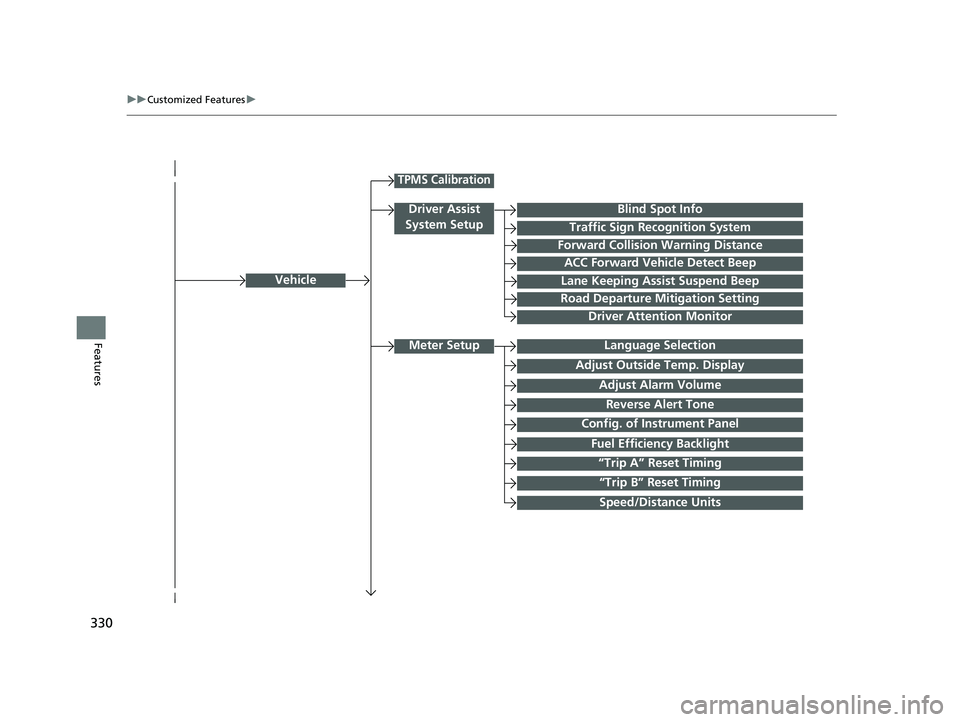
FeaturesLanguage Selection
Vehicle
Meter Setup
Adjust Outside Temp. Display
“Trip A” Reset Timing
“Trip B” Reset Timing
Reverse Alert Tone
Config. of Instrument Panel
Adjust Alarm Volume
Fuel Efficiency Backlight
TPMS Calibration
Driver Assist
System Setup
Traffic Sign Recognition System
Forward Collision Warning Distance
ACC Forward Vehicle Detect Beep
Lane Keeping Assist Suspend Beep
Road Departure Mitigation Setting
Driver Attention Monitor
Speed/Distance Units
Blind Spot Info
22 INSIGHT HMIN-31TXM6300.book 330 ページ 2021年2月24日 水曜日 午後3時45分
Page 335 of 609
334
uuCustomized Features u
Features
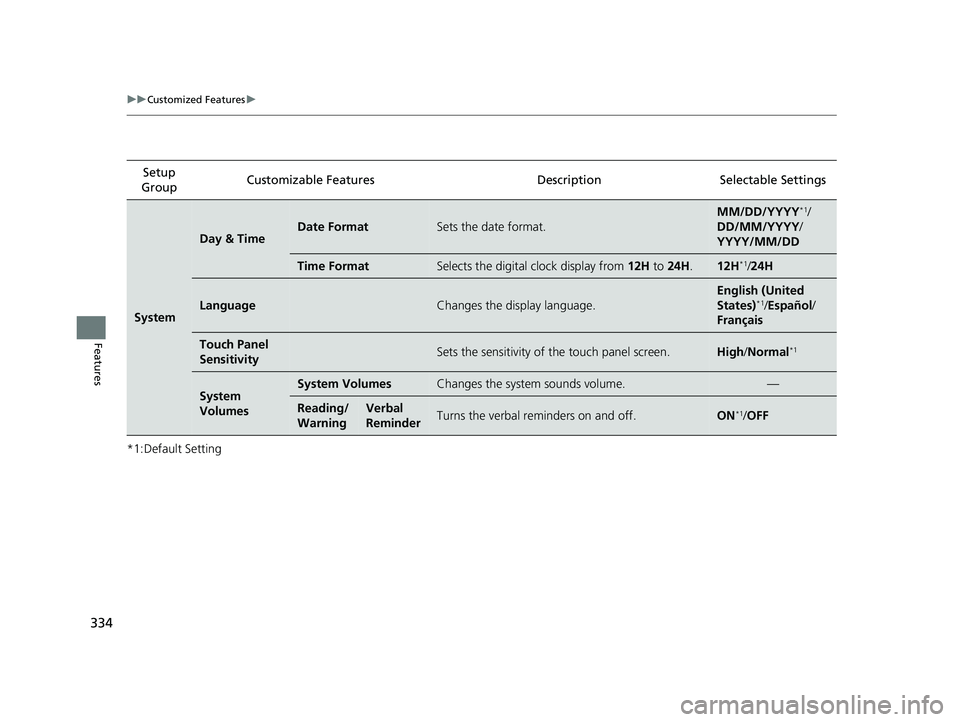
*1:Default SettingSetup
Group Customizable Features Desc
ription Selectable Settings
System
Day & TimeDate FormatSets the date format.
MM/DD/YYYY*1/
DD/MM/YYYY/
YYYY/MM/DD
Time FormatSelects the digital clock display from 12H to 24H .12H*1/24H
LanguageChanges the display language.
English (United
States)*1/Español /
Français
Touch Panel
SensitivitySets the sensitivity of the touch panel screen.High /Normal*1
System
VolumesSystem VolumesChanges the system sounds volume.—
Reading/
WarningVerbal
ReminderTurns the verbal reminders on and off.ON*1/ OFF
22 INSIGHT HMIN-31TXM6300.book 334 ページ 2021年2月24日 水曜日 午後3時45分
Page 340 of 609
339
uuCustomized Features u
Continued
Features
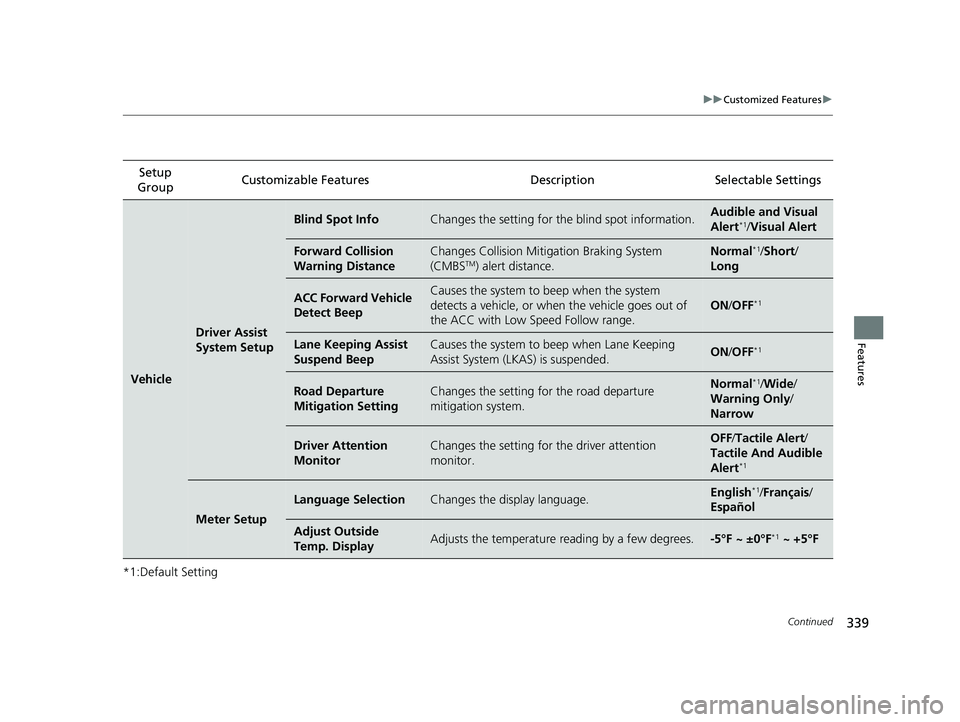
*1:Default SettingSetup
Group Customizable Features
DescriptionSelectable Settings
Vehicle
Driver Assist
System Setup
Blind Spot InfoChanges the setting for the blind spot information.Audible and Visual
Alert*1/Visual Alert
Forward Collision
Warning DistanceChanges Collision Mitigation Braking System
(CMBSTM) alert distance.
Normal*1/Short /
Long
ACC Forward Vehicle
Detect BeepCauses the system to beep when the system
detects a vehicle, or when the vehicle goes out of
the ACC with Low Speed Follow range.
ON /OFF*1
Lane Keeping Assist
Suspend BeepCauses the system to beep when Lane Keeping
Assist System (LKAS) is suspended.ON /OFF*1
Road Departure
Mitigation SettingChanges the setting fo r the road departure
mitigation system.Normal*1/ Wide /
Warning Only /
Narrow
Driver Attention
MonitorChanges the setting for the driver attention
monitor.OFF /Tactile Alert /
Tactile And Audible
Alert
*1
Meter Setup
Language SelectionChanges the display language.English*1/ Français /
Español
Adjust Outside
Temp. DisplayAdjusts the temperature reading by a few degrees.-5°F ~ ±0°F*1 ~ +5°F
22 INSIGHT HMIN-31TXM6300.book 339 ページ 2021年2月24日 水曜日 午後3時45分
Page 341 of 609
340
uuCustomized Features u
Features
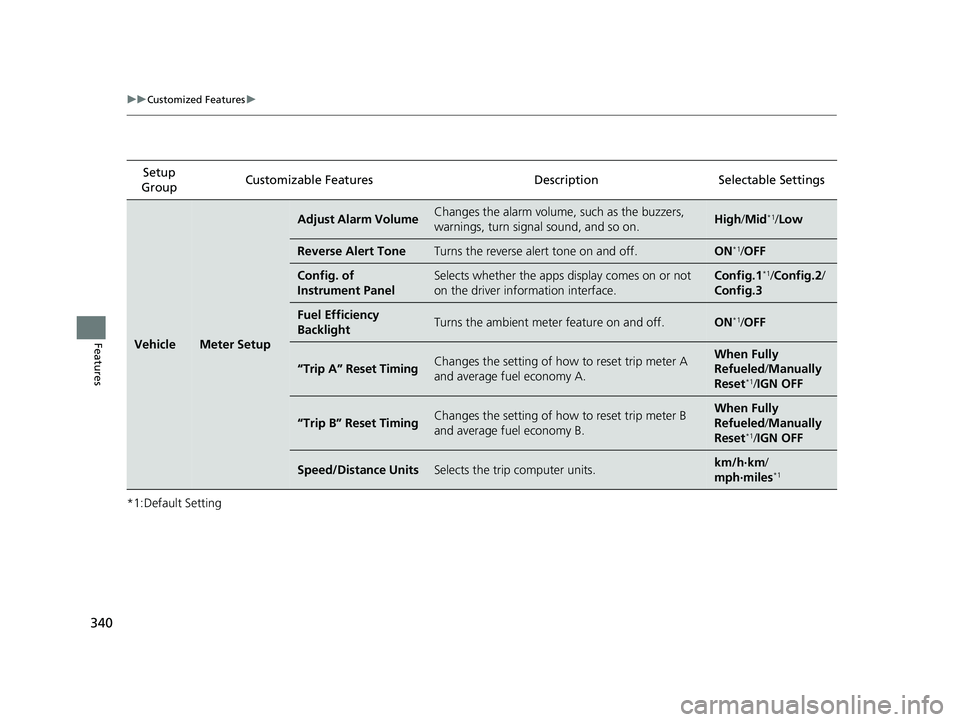
*1:Default SettingSetup
Group Customizable Features
DescriptionSelectable Settings
VehicleMeter Setup
Adjust Alarm VolumeChanges the alarm volume, such as the buzzers,
warnings, turn signal sound, and so on.High /Mid*1/Low
Reverse Alert ToneTurns the reverse alert tone on and off.ON*1/OFF
Config. of
Instrument PanelSelects whether the apps display comes on or not
on the driver info rmation interface.Config.1*1/Config.2 /
Config.3
Fuel Efficiency
BacklightTurns the ambient meter feature on and off.ON*1/ OFF
“Trip A” Reset TimingChanges the setting of how to reset trip meter A
and average fuel economy A.When Fully
Refueled /Manually
Reset
*1/ IGN OFF
“Trip B” Reset TimingChanges the setting of how to reset trip meter B
and average fuel economy B.When Fully
Refueled /Manually
Reset
*1/ IGN OFF
Speed/Distance UnitsSelects the trip computer units.km/h·km /
mph·miles*1
22 INSIGHT HMIN-31TXM6300.book 340 ページ 2021年2月24日 水曜日 午後3時45分
Page 380 of 609
379
uuBefore Driving uMaximum Load Limit
Continued
Driving
Maximum Load Limit
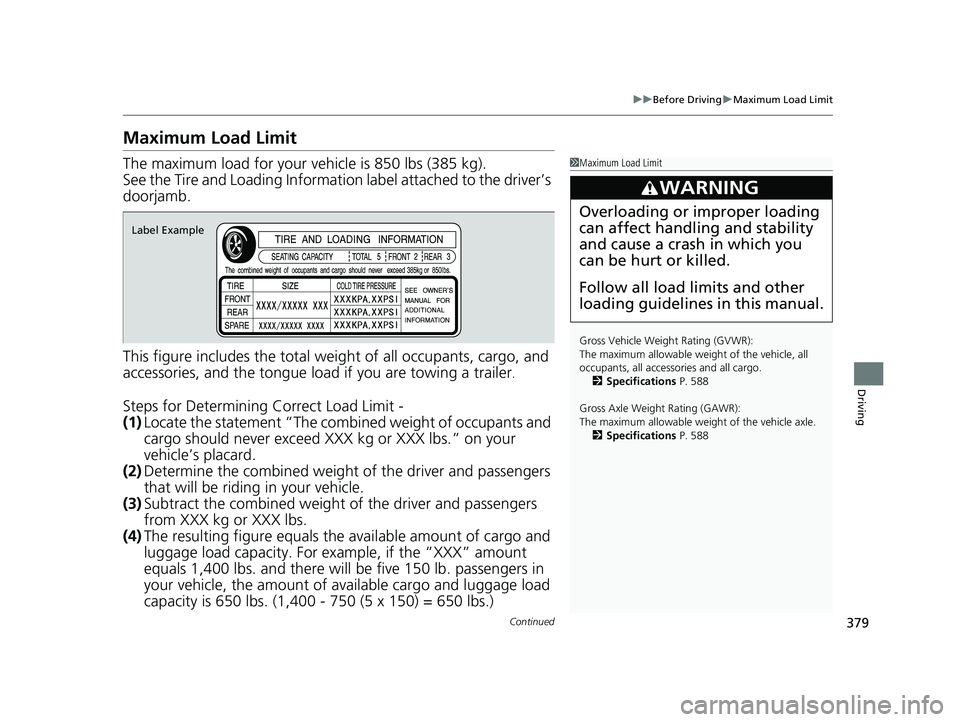
The maximum load for your ve hicle is 850 lbs (385 kg).
See the Tire and Loading Information label attached to the driver’s
doorjamb.
This figure includes the total weig ht of all occupants, cargo, and
accessories, and the tongue load if you are towing a trailer
.
Steps for Determining Correct Load Limit -
(1) Locate the statement “The combined weight of occupants and
cargo should never exceed XXX kg or XXX lbs.” on your
vehicle’s placard.
(2) Determine the combined weight of the driver and passengers
that will be riding in your vehicle.
(3) Subtract the combined weight of the driver and passengers
from XXX kg or XXX lbs.
(4) The resulting figure equals the available amount of cargo and
luggage load capacity. For example, if the “XXX” amount
equals 1,400 lbs. and there will be five 150 lb. passengers in
your vehicle, the am ount of available cargo and luggage load
capacity is 650 lbs. (1,400 - 750 (5 x 150) = 650 lbs.)
1 Maximum Load Limit
Gross Vehicle Weight Rating (GVWR):
The maximum allowable weight of the vehicle, all
occupants, all accesso ries and all cargo.
2 Specifications P. 588
Gross Axle Weight Rating (GAWR):
The maximum allowable weight of the vehicle axle. 2 Specifications P. 588
3WARNING
Overloading or improper loading
can affect handling and stability
and cause a crash in which you
can be hurt or killed.
Follow all load limits and other
loading guidelines in this manual.
Label Example
22 INSIGHT HMIN-31TXM6300.book 379 ページ 2021年2月24日 水曜日 午後3時45分
Page 384 of 609
Continued383
uuWhen Driving uTurning on the Power
Driving
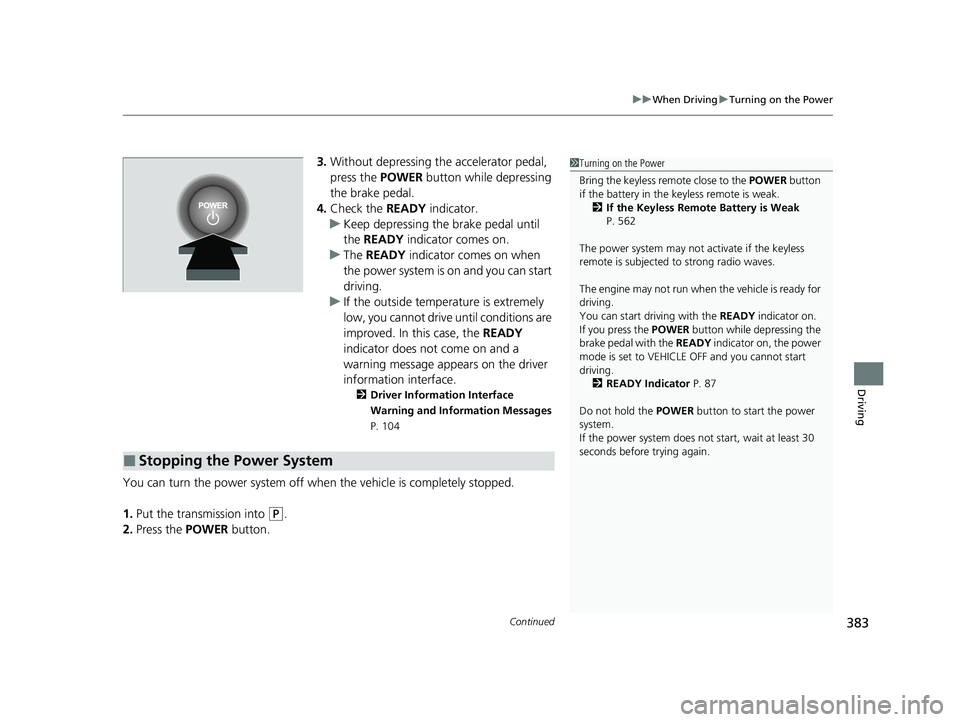
3. Without depressing the accelerator pedal,
press the POWER button while depressing
the brake pedal.
4. Check the READY indicator.
u Keep depressing the brake pedal until
the READY indicator comes on.
u The READY indicator comes on when
the power system is on and you can start
driving.
u If the outside temperature is extremely
low, you cannot drive until conditions are
improved. In this case, the READY
indicator does not come on and a
warning message appears on the driver
information interface.
2 Driver Information Interface
Warning and Information Messages
P. 104
You can turn the power system off when the vehicle is completely stopped.
1. Put the transmission into
(P.
2. Press the POWER button.
■Stopping the Power System
1Turning on the Power
Bring the keyless remote close to the POWER button
if the battery in the keyless remote is weak. 2 If the Keyless Remote Battery is Weak
P. 562
The power system may not activate if the keyless
remote is subjected to strong radio waves.
The engine may not run when the vehicle is ready for
driving.
You can start driving with the READY indicator on.
If you press the POWER button while depressing the
brake pedal with the READY indicator on, the power
mode is set to VEHICLE OFF and you cannot start
driving.
2 READY Indicator P. 87
Do not hold the POWER button to start the power
system.
If the power system does not start, wait at least 30
seconds before trying again.
22 INSIGHT HMIN-31TXM6300.book 383 ページ 2021年2月24日 水曜日 午後3時45分
Page 385 of 609
uuWhen Driving uTurning on the Power
384
Driving
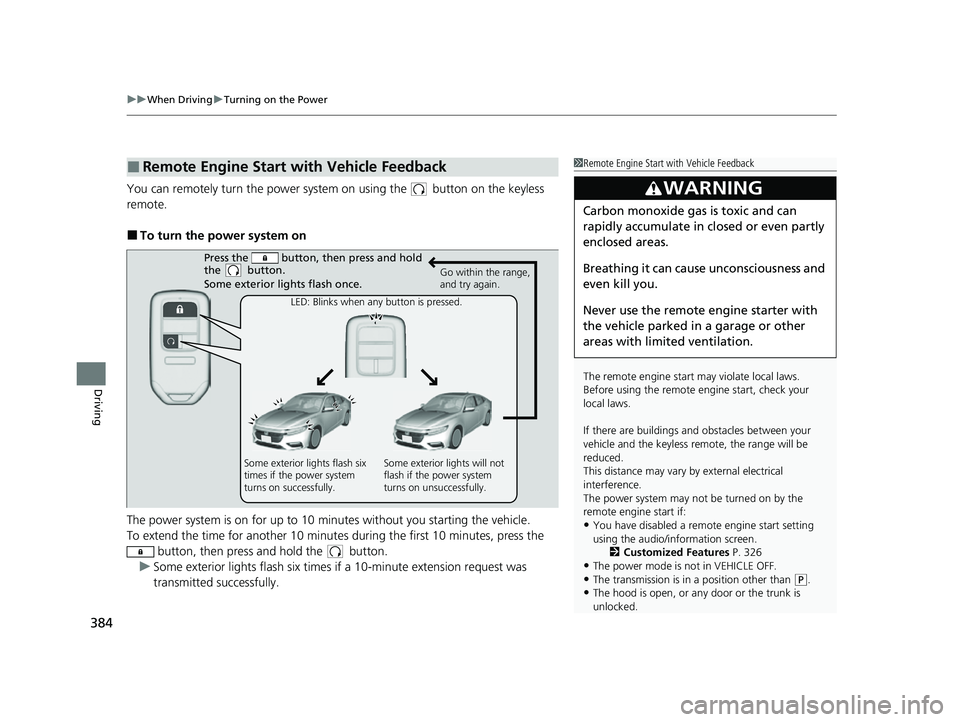
You can remotely turn the power system on using the button on the keyless
remote.
■To turn the power system on
The power system is on for up to 10 minutes without you starting the vehicle.
To extend the time for another 10 minute s during the first 10 minutes, press the
button, then press and hold the button.
u Some exterior lights flash six times if a 10-minute extension request was
transmitted successfully.
■Remote Engine Start with Vehicle Feedback1Remote Engine Start with Vehicle Feedback
The remote engine start may violate local laws.
Before using the remote e ngine start, check your
local laws.
If there are buildings an d obstacles between your
vehicle and the keyless re mote, the range will be
reduced.
This distance may vary by external electrical
interference.
The power system may not be turned on by the
remote engine start if:
•You have disabled a remo te engine start setting
using the audio/information screen. 2Customized Features P. 326
•The power mode is not in VEHICLE OFF.
•The transmission is in a position other than (P.•The hood is open, or any door or the trunk is
unlocked.
3WARNING
Carbon monoxide ga s is toxic and can
rapidly accumulate in closed or even partly
enclosed areas.
Breathing it can cause unconsciousness and
even kill you.
Never use the remote engine starter with
the vehicle parked in a garage or other
areas with limited ventilation.
Press the button, th en press and hold
the button.
Some exterior lights flash once.
Go within the range,
and try again.
LED: Blinks when any button is pressed.
Some exterior lights flash six
times if the power system
turns on successfully. Some exterior lights will not
flash if the power system
turns on unsuccessfully.
22 INSIGHT HMIN-31TXM6300.book 384 ページ 2021年2月24日 水曜日 午後3時45分
Page 392 of 609
391
uuWhen Driving uShifting
Continued
Driving
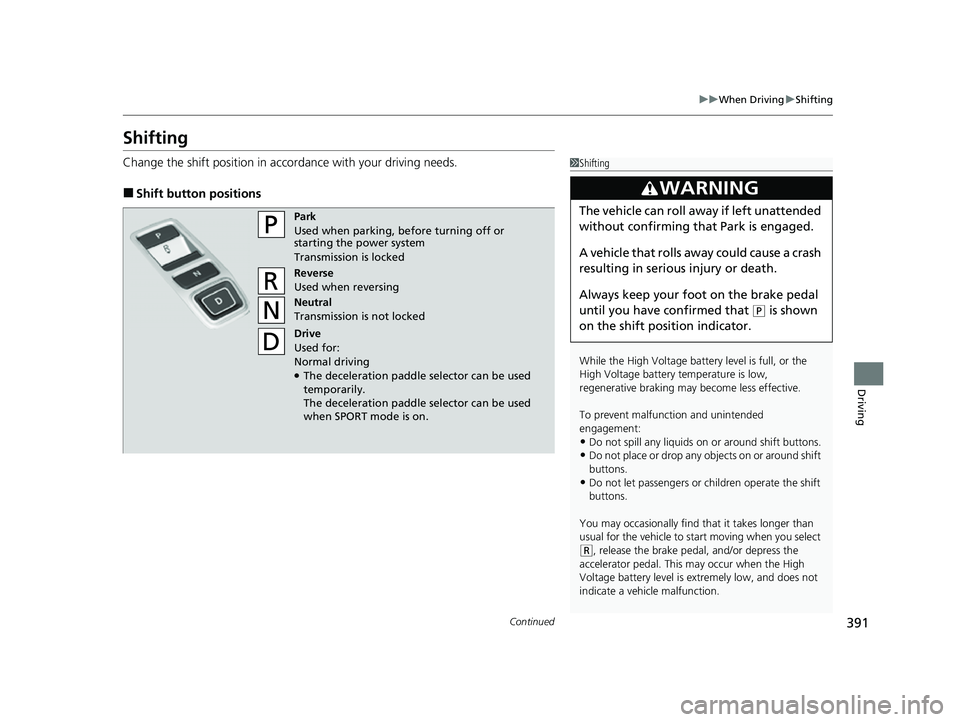
Shifting
Change the shift position in accordance with your driving needs.
■Shift button positions
1Shifting
While the High Voltage battery level is full, or the
High Voltage battery temperature is low,
regenerative braking ma y become less effective.
To prevent malfunc tion and unintended
engagement:
•Do not spill any liquids on or around shift buttons.•Do not place or drop any objects on or around shift
buttons.
•Do not let passengers or ch ildren operate the shift
buttons.
You may occasionally find th at it takes longer than
usual for the vehicle to start moving when you select
( R, release the brake peda l, and/or depress the
accelerator pedal. This may occur when the High
Voltage battery level is extremely low, and does not
indicate a vehicle malfunction.
3WARNING
The vehicle can roll aw ay if left unattended
without confirming th at Park is engaged.
A vehicle that rolls away could cause a crash
resulting in serious injury or death.
Always keep your foot on the brake pedal
until you have confirmed that
( P is shown
on the shift posi tion indicator.
Park
Used when parking, be fore turning off or
starting the power system
Transmission is locked
Reverse
Used when reversing
Neutral
Transmission is not locked
Drive
Used for:
Normal driving
●The deceleration paddle selector can be used
temporarily.
The deceleration paddle selector can be used
when SPORT mode is on.
22 INSIGHT HMIN-31TXM6300.book 391 ページ 2021年2月24日 水曜日 午後3時45分