change time HONDA INSIGHT 2022 Owner's Guide
[x] Cancel search | Manufacturer: HONDA, Model Year: 2022, Model line: INSIGHT, Model: HONDA INSIGHT 2022Pages: 609, PDF Size: 18.48 MB
Page 344 of 609
343
uuCustomized Features u
Continued
Features
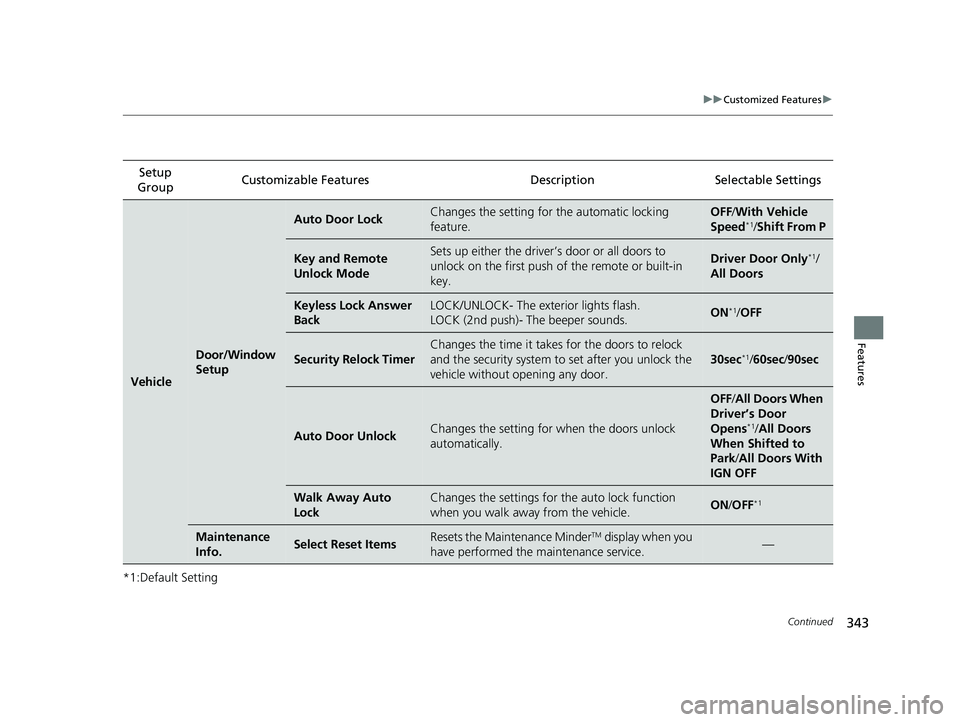
*1:Default SettingSetup
Group Customizable Features
DescriptionSelectable Settings
Vehicle
Door/Window
Setup
Auto Door LockChanges the setting for the automatic locking
feature.OFF /With Ve hicle
Speed*1/ Shift From P
Key and Remote
Unlock ModeSets up either the driver’s door or all doors to
unlock on the first push of the remote or built-in
key.Driver Door Only*1/
All Doors
Keyless Lock Answer
BackLOCK/UNLOCK- The exterior lights flash.
LOCK (2nd push)- The beeper sounds.ON*1/ OFF
Security Relock Timer
Changes the time it takes for the doors to relock
and the security system to set after you unlock the
vehicle without opening any door.
30sec*1/ 60sec /90sec
Auto Door UnlockChanges the setting for when the doors unlock
automatically.
OFF /All Doors When
Driver’s Door
Opens
*1/ All Doors
When Shifted to
Park/ All Doors With
IGN OFF
Walk Away Auto
LockChanges the settings for th e auto lock function
when you walk away from the vehicle.ON /OFF*1
Maintenance
Info.Select Reset ItemsResets the Maintenance MinderTM display when you
have performed the maintenance service.—
22 INSIGHT HMIN-31TXM6300.book 343 ページ 2021年2月24日 水曜日 午後3時45分
Page 368 of 609
Continued367
uuBluetooth ® HandsFreeLink ®u HFL Menus
Features
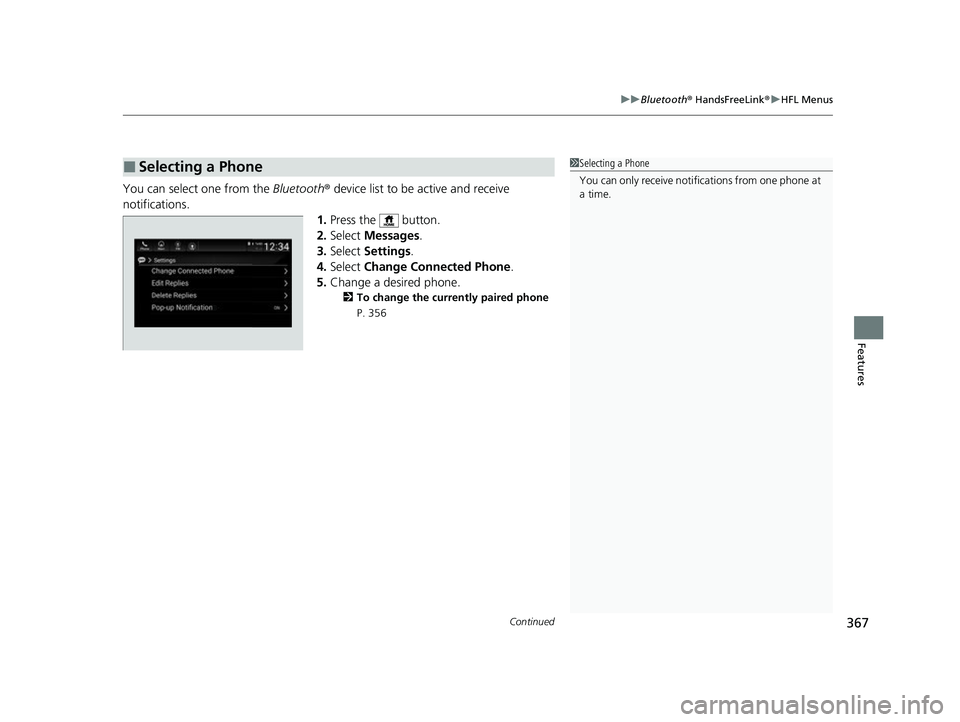
You can select one from the Bluetooth® device list to be active and receive
notifications. 1.Press the button.
2. Select Messages.
3. Select Settings .
4. Select Change Connected Phone .
5. Change a desired phone.
2 To change the currently paired phone
P. 356
■Selecting a Phone1 Selecting a Phone
You can only receive notifications from one phone at
a time.
22 INSIGHT HMIN-31TXM6300.book 367 ページ 2021年2月24日 水曜日 午後3時45分
Page 373 of 609
372
uuBluetooth ® HandsFreeLink ®u HondaLink ® Assist*
Features
HondaLink ® Assist*
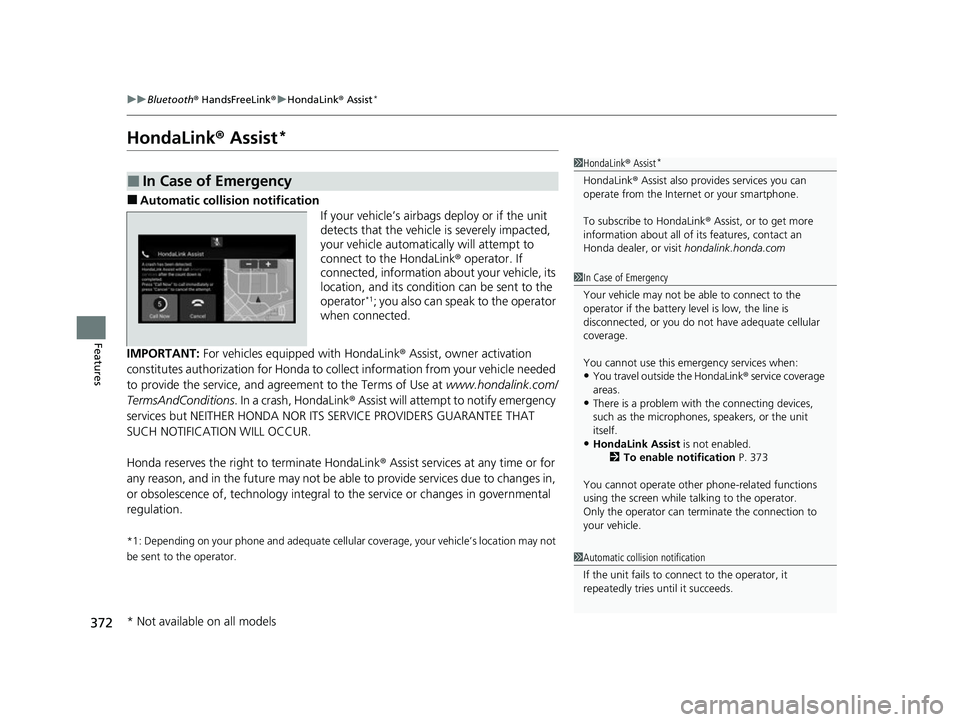
■Automatic collision notification
If your vehicle’s airbags deploy or if the unit
detects that the vehicle is severely impacted,
your vehicle automatically will attempt to
connect to the HondaLink® operator. If
connected, information about your vehicle, its
location, and its condition can be sent to the
operator
*1; you also can speak to the operator
when connected.
IMPORTANT: For vehicles equipp ed with HondaLink® Assist, owner activation
constitutes authorization for Honda to collect information from your vehicle needed
to provide the service, and agr eement to the Terms of Use at www.hondalink.com/
TermsAndConditions . In a crash, HondaLink ® Assist will attempt to notify emergency
services but NEITHER HONDA NOR ITS SERVICE PROVIDERS GUARANTEE THAT
SUCH NOTIFICATION WILL OCCUR.
Honda reserves the right to terminate HondaLink ® Assist services at any time or for
any reason, and in the future may not be ab le to provide services due to changes in,
or obsolescence of, technology integral to the service or changes in governmental
regulation.
*1: Depending on your phone and ad equate cellular coverage, your vehicle’s location may not
be sent to the operator.
■In Case of Emergency
1 HondaLink ® Assist*
HondaLink ® Assist also provides services you can
operate from the Intern et or your smartphone.
To subscribe to HondaLink ® Assist, or to get more
information about all of its features, contact an
Honda dealer, or visit hondalink.honda.com
1In Case of Emergency
Your vehicle may not be able to connect to the
operator if the battery level is low, the line is
disconnected, or you do not have adequate cellular
coverage.
You cannot use this emergency services when:
•You travel outside the HondaLink ® service coverage
areas.
•There is a problem with the connecting devices,
such as the microphones, speakers, or the unit
itself.
•HondaLink Assist is not enabled.
2 To enable notification P. 373
You cannot operate othe r phone-related functions
using the screen while talking to the operator.
Only the operator can terminate the connection to
your vehicle.
1 Automatic collision notification
If the unit fails to connect to the operator, it
repeatedly tries until it succeeds.
* Not available on all models
22 INSIGHT HMIN-31TXM6300.book 372 ページ 2021年2月24日 水曜日 午後3時45分
Page 399 of 609
398
uuWhen Driving uDeceleration Paddle Selector
Driving
Deceleration Paddle Selector
When you release the accelerator pedal, you can control the rate of deceleration
without releasing your hands from the steering wheel. Using the deceleration
paddle selector situated on the steering wheel, you can sequentially shift through
three stages of deceleration.
When descending a hill, you can use the deceleration paddle selector to help
maintain the rate of deceleration, thereby allowing you to keep a safe distance
between your vehicle and the vehicle ahead.
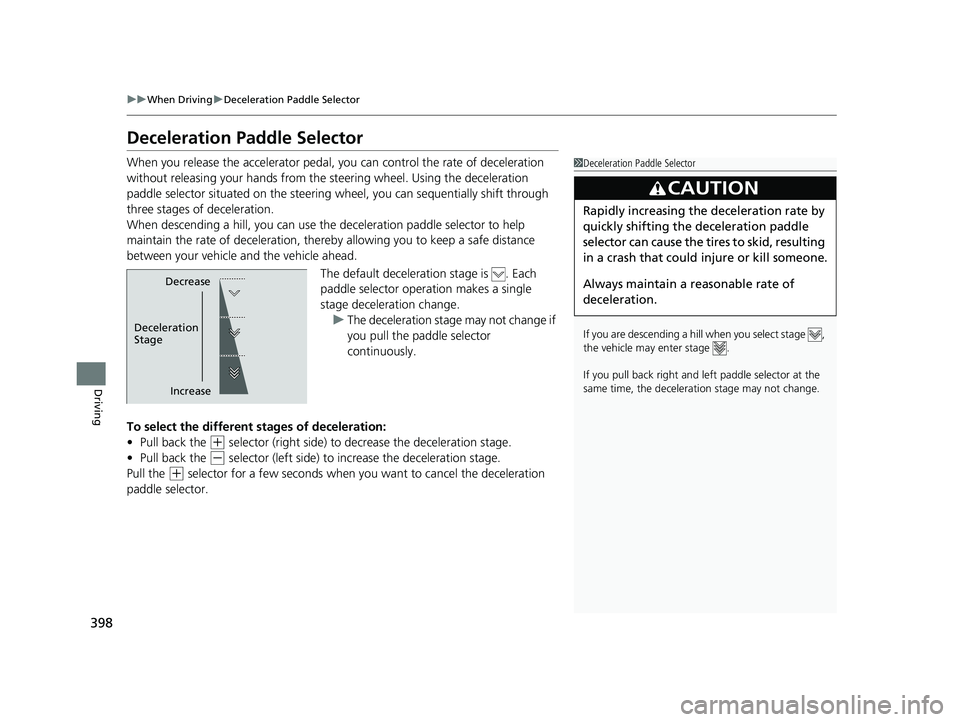
The default deceleration stage is . Each
paddle selector operation makes a single
stage deceleration change. u The deceleration stage may not change if
you pull the paddle selector
continuously.
To select the different stages of deceleration:
• Pull back the
(+ selector (right side) to decrease the deceleration stage.
• Pull back the
(- selector (left side) to increase the deceleration stage.
Pull the
(+ selector for a few seconds when yo u want to cancel the deceleration
paddle selector.
1 Deceleration Paddle Selector
If you are descending a hill when you select stage ,
the vehicle may enter stage .
If you pull back right and le ft paddle selector at the
same time, the deceleration stage may not change.
3CAUTION
Rapidly increasing the deceleration rate by
quickly shifting the deceleration paddle
selector can cause the tires to skid, resulting
in a crash that could injure or kill someone.
Always maintain a reasonable rate of
deceleration.
Decrease
Increase
Deceleration
Stage
22 INSIGHT HMIN-31TXM6300.book 398 ページ 2021年2月24日 水曜日 午後3時45分
Page 407 of 609
406
uuWhen Driving uTire Pressure Monitoring System (TPMS)
Driving
Tire Pressure Monitoring System (TPMS)
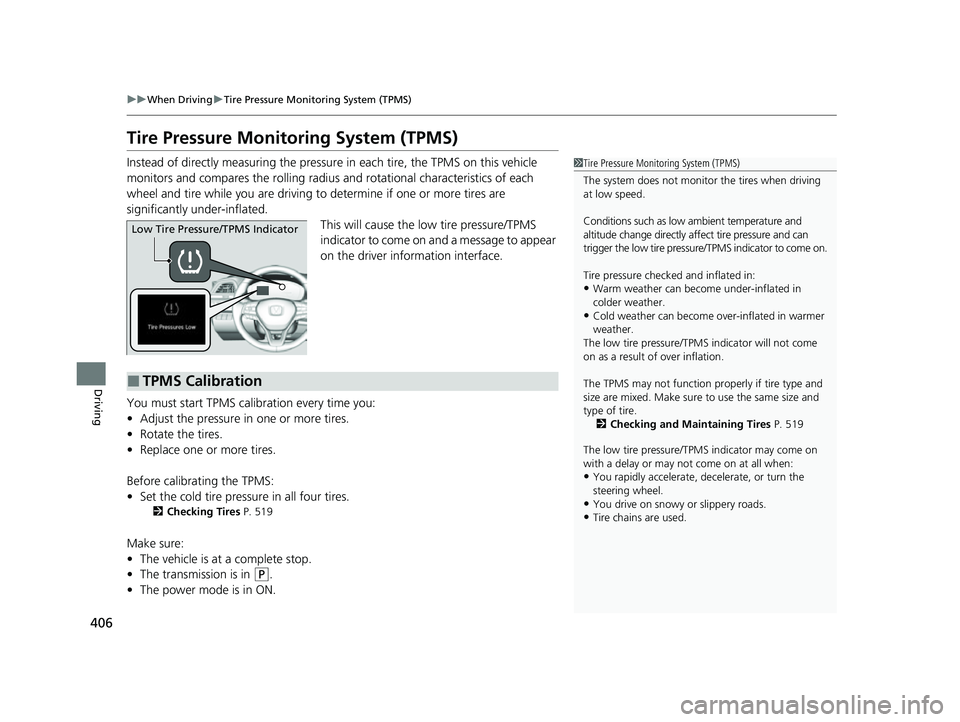
Instead of directly measuring the pressu re in each tire, the TPMS on this vehicle
monitors and compares the rolling radius and rotational characteristics of each
wheel and tire while you are driving to determine if one or more tires are
significantly under-inflated.
This will cause the low tire pressure/TPMS
indicator to come on and a message to appear
on the driver information interface.
You must start TPMS calibration every time you:
• Adjust the pressure in one or more tires.
• Rotate the tires.
• Replace one or more tires.
Before calibrating the TPMS:
• Set the cold tire pressu re in all four tires.
2Checking Tires P. 519
Make sure:
•The vehicle is at a complete stop.
• The transmission is in
(P.
• The power mode is in ON.
1Tire Pressure Monitoring System (TPMS)
The system does not monitor the tires when driving
at low speed.
Conditions such as low ambient temperature and
altitude change directly a ffect tire pressure and can
trigger the low tire pressure/TPMS indicator to come on.
Tire pressure checked and inflated in:
•Warm weather can beco me under-inflated in
colder weather.
•Cold weather can become over-inflated in warmer
weather.
The low tire pressure/TPMS indicator will not come
on as a result of over inflation.
The TPMS may not function pr operly if tire type and
size are mixed. Make sure to use the same size and
type of tire. 2 Checking and Maintaining Tires P. 519
The low tire pressure/TPMS indicator may come on
with a delay or may not come on at all when:
•You rapidly accelerate, decelerate, or turn the
steering wheel.
•You drive on snowy or slippery roads.•Tire chains are used.
Low Tire Pressure/TPMS Indicator
■TPMS Calibration
22 INSIGHT HMIN-31TXM6300.book 406 ページ 2021年2月24日 水曜日 午後3時45分
Page 413 of 609
uuWhen Driving uBlind spot information System
412
Driving
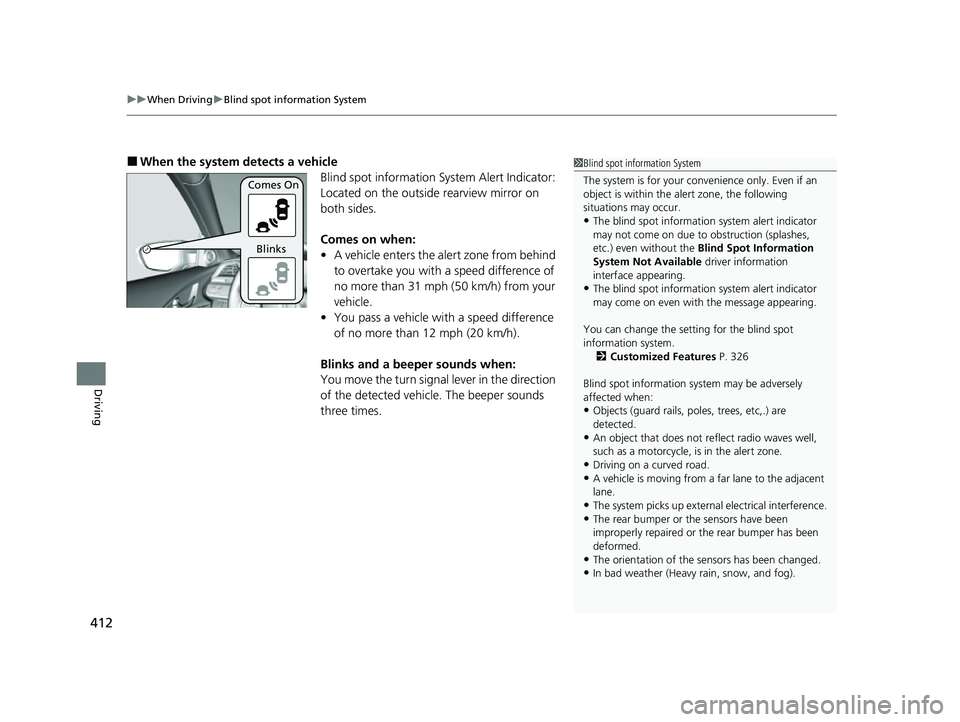
■When the system detects a vehicle
Blind spot information System Alert Indicator:
Located on the outside rearview mirror on
both sides.
Comes on when:
•A vehicle enters the alert zone from behind
to overtake you with a speed difference of
no more than 31 mph (50 km/h) from your
vehicle.
• You pass a vehicle with a speed difference
of no more than 12 mph (20 km/h).
Blinks and a beeper sounds when:
You move the turn signal lever in the direction
of the detected vehicle. The beeper sounds
three times.1 Blind spot information System
The system is for your convenience only. Even if an
object is within the alert zone, the following
situations may occur.
•The blind spot informatio n system alert indicator
may not come on due to obstruction (splashes,
etc.) even without the Blind Spot Information
System Not Available driver information
interface appearing.
•The blind spot informatio n system alert indicator
may come on even with the message appearing.
You can change the setting for the blind spot
information system. 2 Customized Features P. 326
Blind spot information sy stem may be adversely
affected when:
•Objects (guard rails, poles, trees, etc,.) are
detected.
•An object that does not re flect radio waves well,
such as a motorcycle, is in the alert zone.
•Driving on a curved road.
•A vehicle is moving from a far lane to the adjacent
lane.
•The system picks up external electrical interference.
•The rear bumper or the sensors have been
improperly repaired or the rear bumper has been
deformed.
•The orientation of the sensors has been changed.•In bad weather (Heavy rain, snow, and fog).
Comes On
Blinks
22 INSIGHT HMIN-31TXM6300.book 412 ページ 2021年2月24日 水曜日 午後3時45分
Page 440 of 609
439
uuHonda Sensing ®u Adaptive Cruise Control (ACC) with Low Speed Follow
Continued
Driving
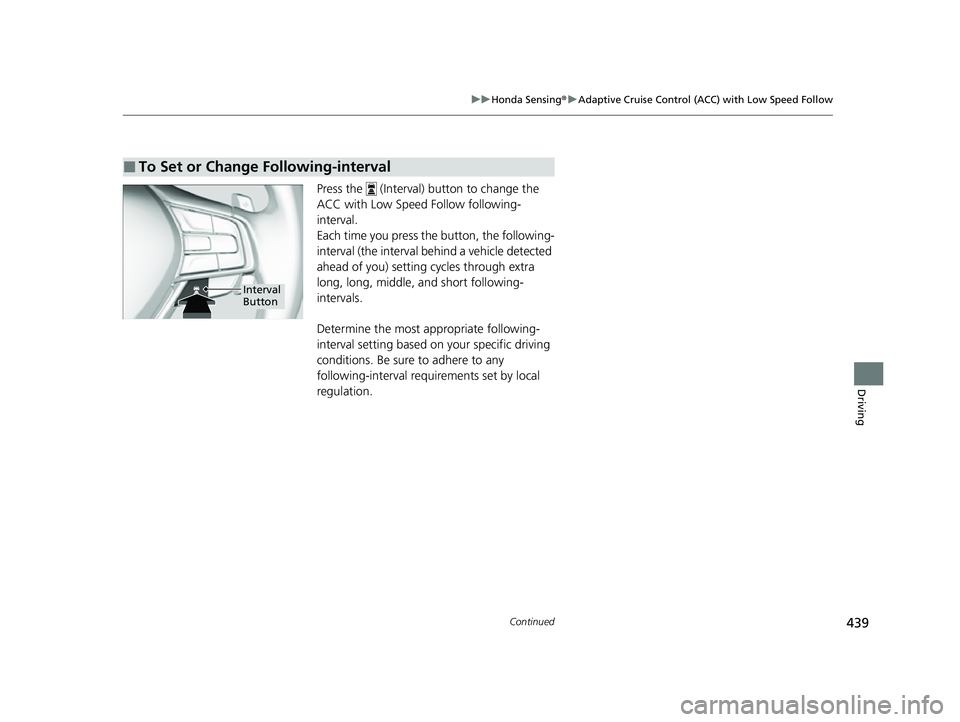
Press the (Interval) button to change the
ACC with Low Speed Follow following-
interval.
Each time you press th e button, the following-
interval (the interval behind a vehicle detected
ahead of you) setting cycles through extra
long, long, middle, and short following-
intervals.
Determine the most appropriate following-
interval setting based on your specific driving
conditions. Be sure to adhere to any
following-interval requirements set by local
regulation.
■To Set or Change Following-interval
Interval
Button
22 INSIGHT HMIN-31TXM6300.book 439 ページ 2021年2月24日 水曜日 午後3時45分
Page 450 of 609
Continued449
uuHonda Sensing ®u Lane Keeping Assist System (LKAS)
Driving
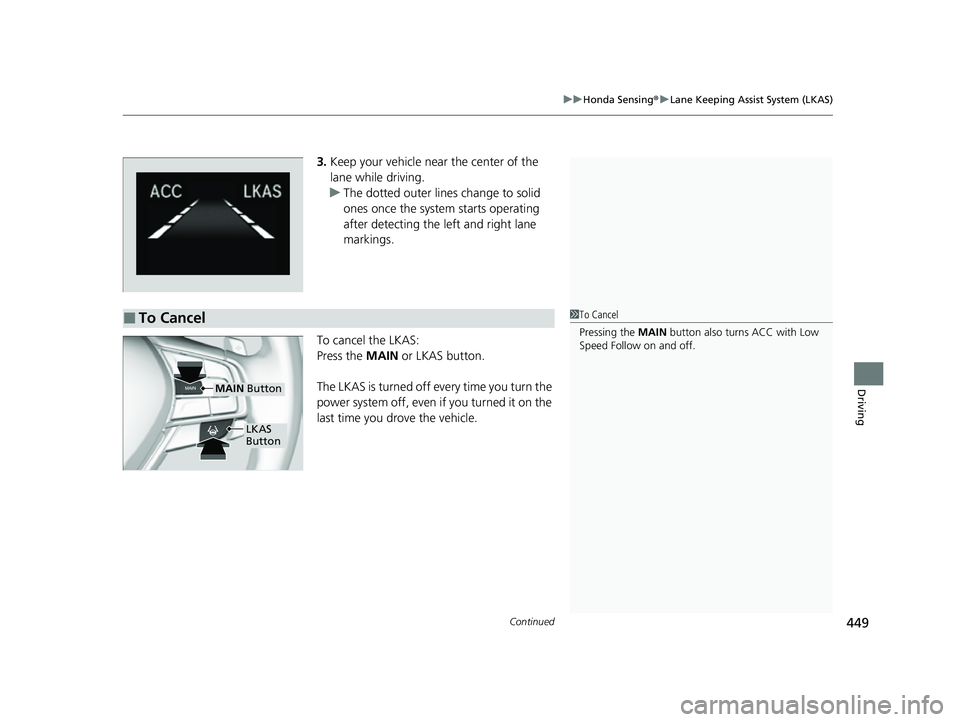
3. Keep your vehicle near the center of the
lane while driving.
u The dotted outer lines change to solid
ones once the system starts operating
after detecting the left and right lane
markings.
To cancel the LKAS:
Press the MAIN or LKAS button.
The LKAS is turned off every time you turn the
power system off, even if you turned it on the
last time you drove the vehicle.
■To Cancel1 To Cancel
Pressing the MAIN button also turns ACC with Low
Speed Follow on and off.
MAIN Button
LKAS
Button
22 INSIGHT HMIN-31TXM6300.book 449 ページ 2021年2月24日 水曜日 午後3時45分
Page 494 of 609
493
Maintenance
Maintenance MinderTM
If the engine oil life is less than 15%, you will see the Maintenance Minder messages
appear on the driver inform ation interface every time you set the power mode to
ON. The messages notify you when to change the engine oil, or when to bring your
vehicle to a dealer for indicated maintenance services.
22 INSIGHT HMIN-31TXM6300.book 493 ページ 2021年2月24日 水曜日 午後3時45分
Page 564 of 609
563
uuPower System Won’t StartuEmergency Power System Off
Handling the Unexpected
Emergency Power System Off
The POWER button may be used to turn the power system off due to an emergency
situation even while driving. If you must tu rn the power system off, do either of the
following operations:
• Press and hold the POWER button about for two seconds.
• Firmly press the POWER button three times.
The steering wheel will not lock. However, because turning off the power system
disables the power assist the power syst em provides to the steering and braking
systems, it will require significantly more physical effort and time to steer and slow
the vehicle. Use both feet on the brake pe dal to slow down the vehicle and stop
immediately in a safe place.
The transmission automa tically changes to
(P after the vehicle comes to a complete
stop. Then, the power mode changes to VEHICLE OFF.
1 Emergency Power System Off
Do not press the POWER button while driving unless
it is absolutely necessary for the power system to be
turned off.
If you press the POWER button while driving, the
beeper sounds.
22 INSIGHT HMIN-31TXM6300.book 563 ページ 2021年2月24日 水曜日 午後3時45分