USB port HONDA INSIGHT 2022 Owners Manual
[x] Cancel search | Manufacturer: HONDA, Model Year: 2022, Model line: INSIGHT, Model: HONDA INSIGHT 2022Pages: 609, PDF Size: 18.48 MB
Page 9 of 609
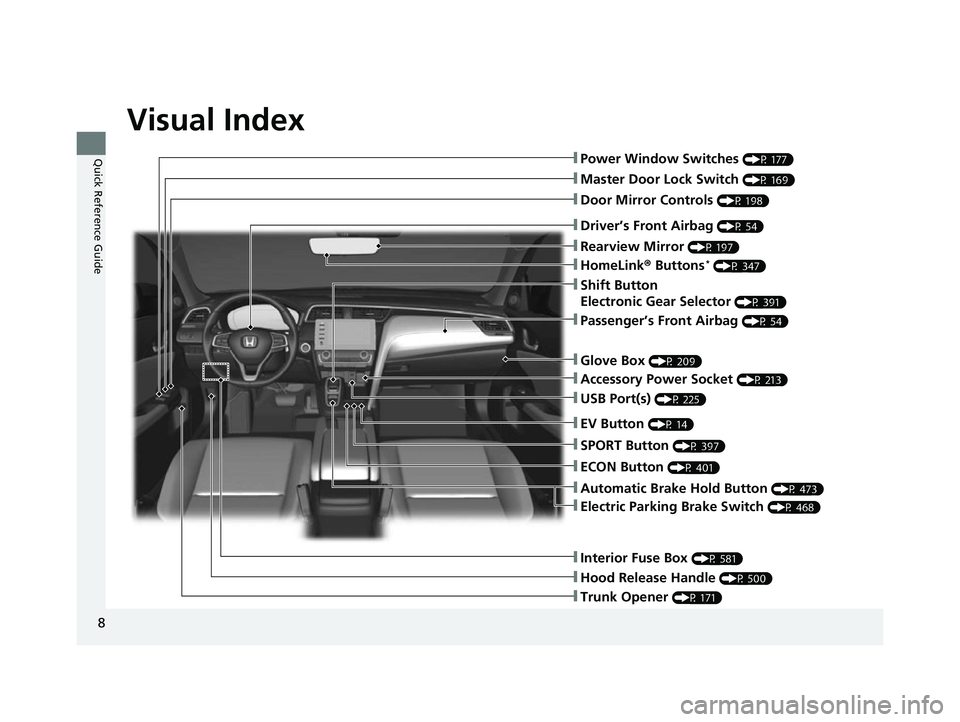
Visual Index
8
Quick Reference Guide❚Power Window Switches (P 177)
❚Master Door Lock Switch (P 169)
❚Door Mirror Controls (P 198)
❚Trunk Opener (P 171)
❚Interior Fuse Box (P 581)
❚Hood Release Handle (P 500)
❚Driver’s Front Airbag (P 54)
❚Rearview Mirror (P 197)
❚HomeLink® Buttons* (P 347)
❚Accessory Power Socket (P 213)
❚Passenger’s Front Airbag (P 54)
❚USB Port(s) (P 225)
❚Glove Box (P 209)
❚ECON Button (P 401)
❚SPORT Button (P 397)
❚EV Button (P 14)
❚Shift Button
Electronic Gear Selector
(P 391)
❚Automatic Brake Hold Button (P 473)
❚Electric Parking Brake Switch (P 468)
22 INSIGHT HMIN-31TXM6300.book 8 ページ 2021年2月24日 水曜日 午後3時45分
Page 224 of 609

223
Features
This chapter describes how to operate technology features.
Audio SystemAbout Your Audio System ................ 224
USB Ports ......................................... 225
Audio System Theft Protection ......... 226
Audio Remote Controls .................... 227
Audio System Basic Operation ........ 230
Audio/Information Screen ................ 231
System Updates ............................... 246
Adjusting the Sound ........................ 252
Display Setup ................................... 253
Voice Control Operation .................. 255
Playing AM/FM Radio ....................... 258 Playing SiriusXM
® Radio ................... 262
Playing an iPod ................................ 273
Playing a USB Flash Drive ................. 276
Playing Bluetooth ® Audio................. 279
HondaLink ®..................................... 281
HondaLink ® Service
*........................ 285
Wi-Fi Connection ............................. 290
AT&T Hotspot
*................................ 292
Siri ® Eyes Free .................................. 293
Apple CarPlay
TM............................... 294
Android AutoTM................................ 298
Audio Error Messages ...................... 302 General Information on the Audio
System ............................................. 304
Customized Features ........................ 326
HomeLink ® Universal Transceiver
*.. 346
Bluetooth ® HandsFreeLink® ............. 349
Refuel Recommend .......................... 374
* Not available on all models
22 INSIGHT HMIN-31TXM6300.book 223 ページ 2021年2月24日 水曜日 午後3時45分
Page 226 of 609
225
uuAudio System uUSB Ports
Features
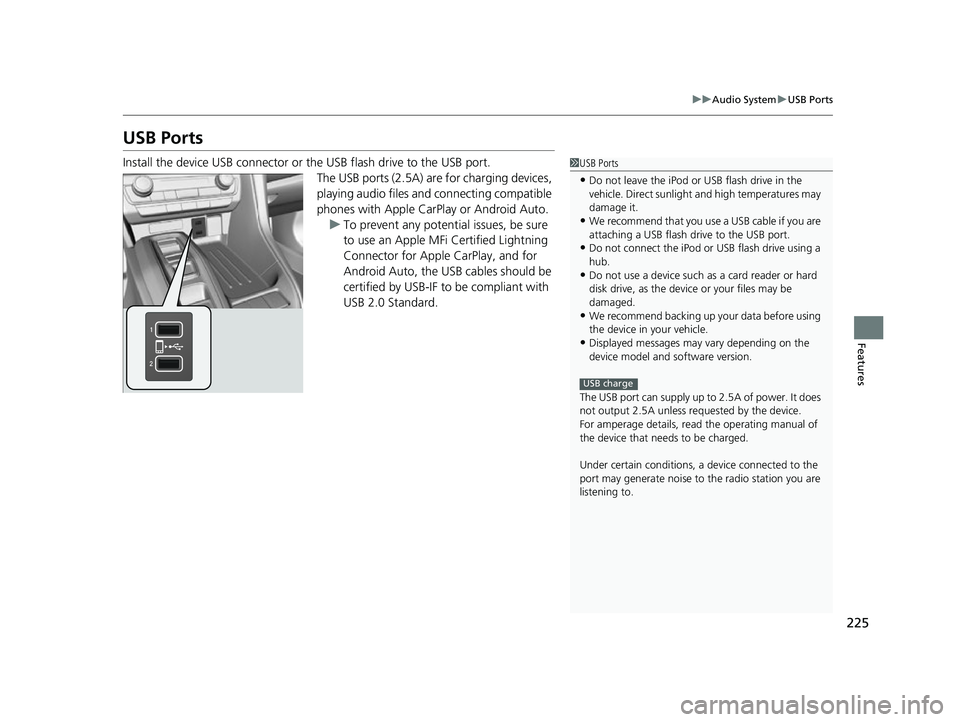
USB Ports
Install the device USB connector or the USB flash drive to the USB port.
The USB ports (2.5A) are for charging devices,
playing audio files and connecting compatible
phones with Apple CarPlay or Android Auto.
u To prevent any potenti al issues, be sure
to use an Apple MFi Certified Lightning
Connector for Apple CarPlay, and for
Android Auto, the USB cables should be
certified by USB-IF to be compliant with
USB 2.0 Standard.1 USB Ports
•Do not leave the iPod or USB flash drive in the
vehicle. Direct sunlight and high temperatures may
damage it.
•We recommend that you us e a USB cable if you are
attaching a USB flash drive to the USB port.
•Do not connect the iPod or USB flash drive using a
hub.
•Do not use a device such as a card reader or hard
disk drive, as the device or your files may be
damaged.
•We recommend backing up yo ur data before using
the device in your vehicle.
•Displayed messages may vary depending on the
device model and software version.
The USB port can supply up to 2.5A of power. It does
not output 2.5A unless requested by the device.
For amperage details, read the operating manual of
the device that ne eds to be charged.
Under certain condi tions, a device connected to the
port may generate noise to the radio station you are
listening to.
USB charge
22 INSIGHT HMIN-31TXM6300.book 225 ページ 2021年2月24日 水曜日 午後3時45分
Page 238 of 609
Continued237
uuAudio System Basic Operation uAudio/Information Screen
Features
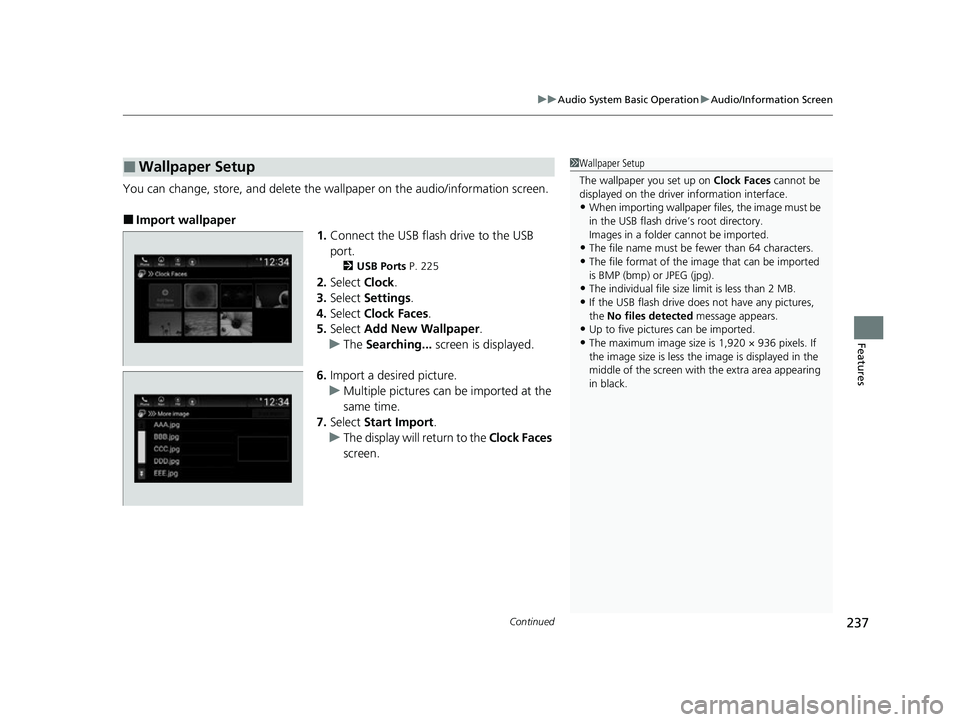
You can change, store, and delete the wa llpaper on the audio/information screen.
■Import wallpaper
1.Connect the USB flash drive to the USB
port.
2 USB Ports P. 225
2.Select Clock.
3. Select Settings .
4. Select Clock Faces .
5. Select Add New Wallpaper .
u The Searching... screen is displayed.
6. Import a desired picture.
u Multiple pictures can be imported at the
same time.
7. Select Start Import .
u The display will return to the Clock Faces
screen.
■Wallpaper Setup1 Wallpaper Setup
The wallpaper you set up on Clock Faces cannot be
displayed on the driver information interface.
•When importing wallpaper files, the image must be
in the USB flash drive’s root directory.
Images in a folder cannot be imported.
•The file name must be fewer than 64 characters.
•The file format of the im age that can be imported
is BMP (bmp) or JPEG (jpg).
•The individual file size limit is less than 2 MB.
•If the USB flash drive doe s not have any pictures,
the No files detected message appears.
•Up to five pictur es can be imported.
•The maximum image size is 1,920 × 936 pixels. If
the image size is less the image is displayed in the
middle of the screen with the extra area appearing
in black.
22 INSIGHT HMIN-31TXM6300.book 237 ページ 2021年2月24日 水曜日 午後3時45分
Page 251 of 609
uuAudio System Basic Operation uSystem Updates
250
Features
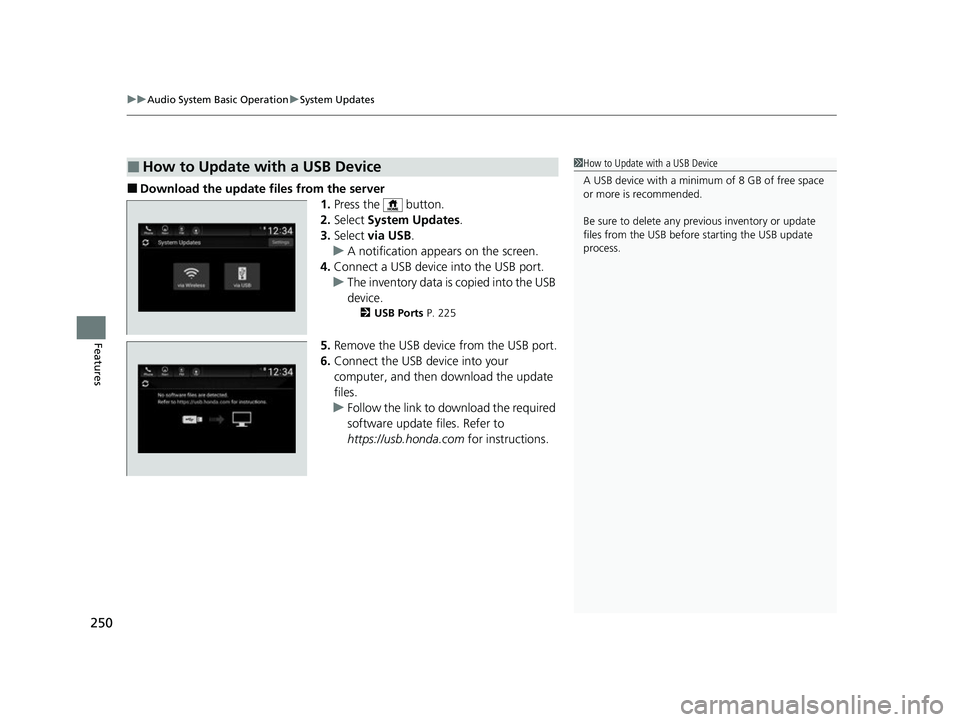
■Download the update files from the server
1.Press the button.
2. Select System Updates .
3. Select via USB .
u A notification appears on the screen.
4. Connect a USB device into the USB port.
u The inventory data is copied into the USB
device.
2 USB Ports P. 225
5.Remove the USB device from the USB port.
6. Connect the USB device into your
computer, and then download the update
files.
u Follow the link to download the required
software update files. Refer to
https://usb.honda.com for instructions.
■How to Update with a USB Device1How to Update with a USB Device
A USB device with a minimum of 8 GB of free space
or more is recommended.
Be sure to delete any pr evious inventory or update
files from the USB before starting the USB update
process.
22 INSIGHT HMIN-31TXM6300.book 250 ページ 2021年2月24日 水曜日 午後3時45分
Page 252 of 609
251
uuAudio System Basic Operation uSystem Updates
Features
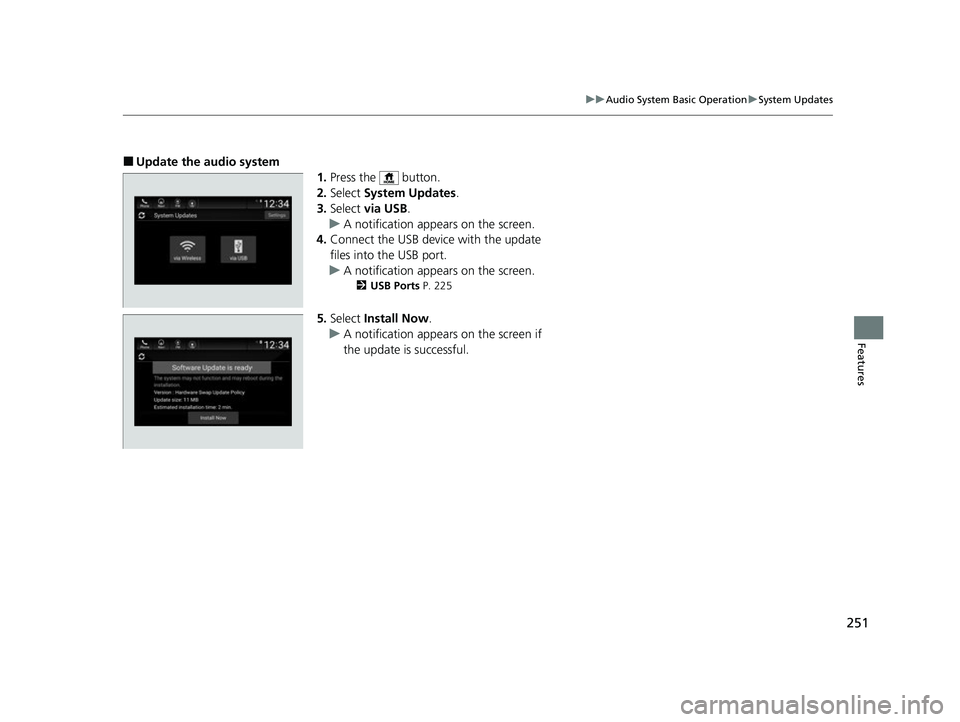
■Update the audio system
1.Press the button.
2. Select System Updates .
3. Select via USB .
u A notification appears on the screen.
4. Connect the USB device with the update
files into the USB port.
u A notification appears on the screen.
2 USB Ports P. 225
5.Select Install Now .
u A notification appears on the screen if
the update is successful.
22 INSIGHT HMIN-31TXM6300.book 251 ページ 2021年2月24日 水曜日 午後3時45分
Page 257 of 609
256
uuAudio System Basic Operation uVoice Control Operation
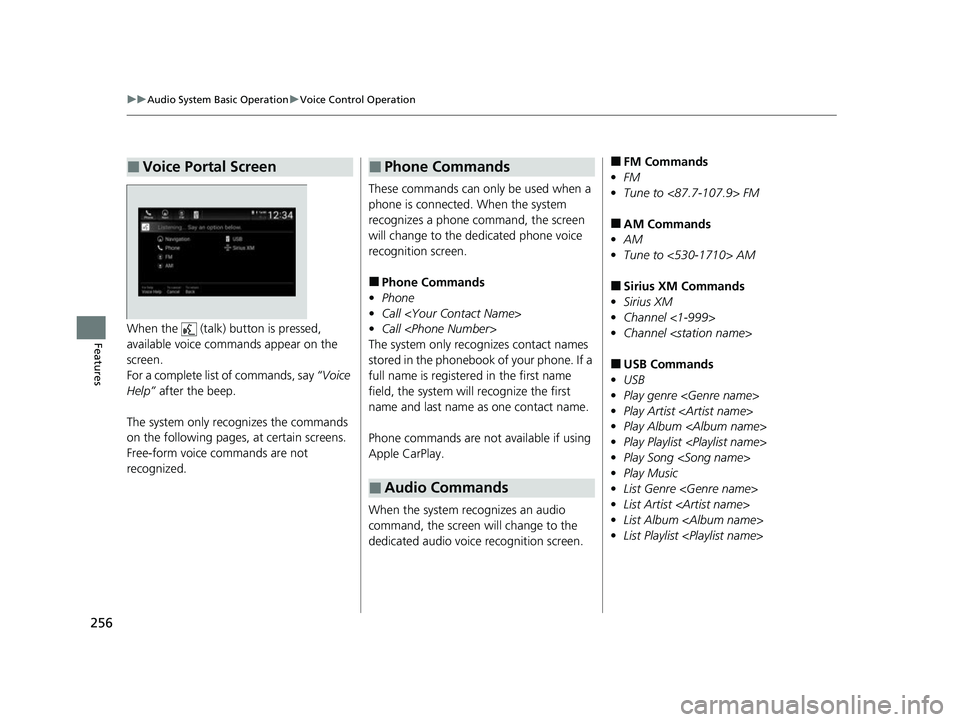
FeaturesWhen the (talk) button is pressed,
available voice commands appear on the
screen.
For a complete list of commands, say “Voice
Help” after the beep.
The system only reco gnizes the commands
on the following pages, at certain screens.
Free-form voice commands are not
recognized.
■Voice Portal Screen
These commands can only be used when a
phone is connected. When the system
recognizes a phone command, the screen
will change to the dedicated phone voice
recognition screen.
■Phone Commands
• Phone
• Call
• Call
The system only rec ognizes contact names
stored in the phonebook of your phone. If a
full name is registered in the first name
field, the system will recognize the first
name and last name as one contact name.
Phone commands are not available if using
Apple CarPlay.
When the system re cognizes an audio
command, the screen will change to the
dedicated audio voice recognition screen.
■Phone Commands
■Audio Commands
■FM Commands
• FM
• Tune to <87.7-107.9> FM
■AM Commands
• AM
• Tune to <530-1710> AM
■Sirius XM Commands
• Sirius XM
• Channel <1-999>
• Channel
■USB Commands
• USB
• Play genre
• Play Artist
• Play Album
• Play Playlist
• Play Song
• Play Music
• List Genre
• List Artist
• List Album
• List Playlist
22 INSIGHT HMIN-31TXM6300.book 256 ページ 2021年2月24日 水曜日 午後3時45分
Page 274 of 609
273
uuAudio System Basic Operation uPlaying an iPod
Continued
Features
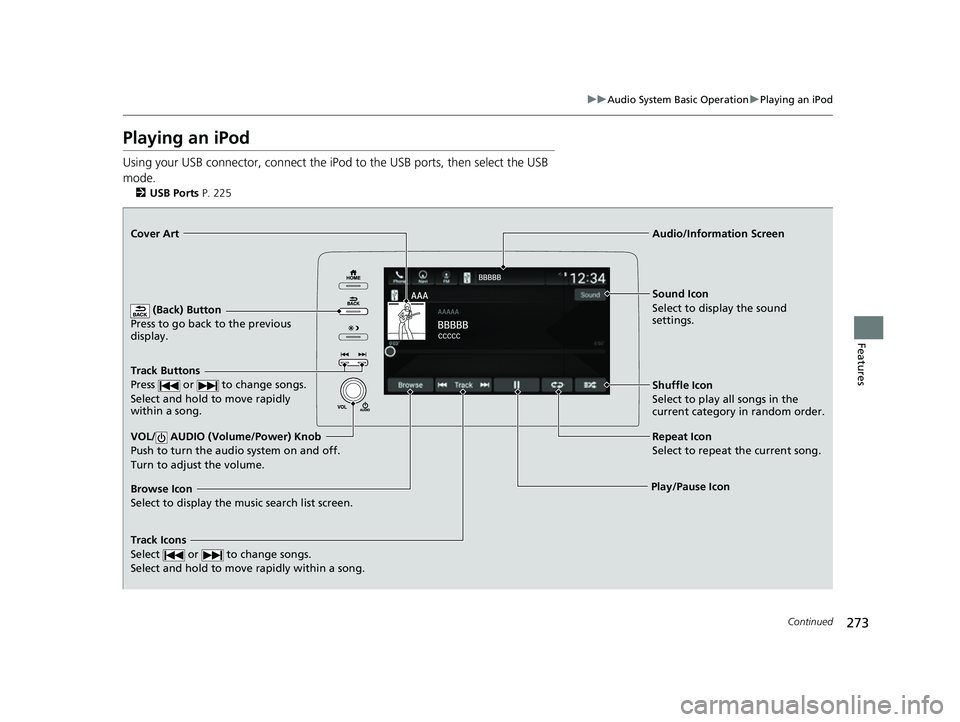
Playing an iPod
Using your USB connector, connect the iPod to the USB ports, then select the USB
mode.
2 USB Ports P. 225
(Back) Button
Press to go back to the previous
display.
Track Buttons
Press or to change songs.
Select and hold to move rapidly
within a song.
VOL/ AUDIO (Volume/Power) Knob
Push to turn the audio system on and off.
Turn to adjust the volume.
Cover Art Audio/Information Screen
Play/Pause Icon S
o un
d I
con
Select to display the sound
settings.
Shuffle Icon
Select to play all songs in the
current category in random order.
Track Icons
Select or to change songs.
Select and hold to move rapidly within a song.
Browse Icon
Select to display the music search list screen. Repeat Icon
Select to repeat the current song.
22 INSIGHT HMIN-31TXM6300.book 273 ページ 2021年2月24日 水曜日 午後3時45分
Page 277 of 609
276
uuAudio System Basic Operation uPlaying a USB Flash Drive
Features
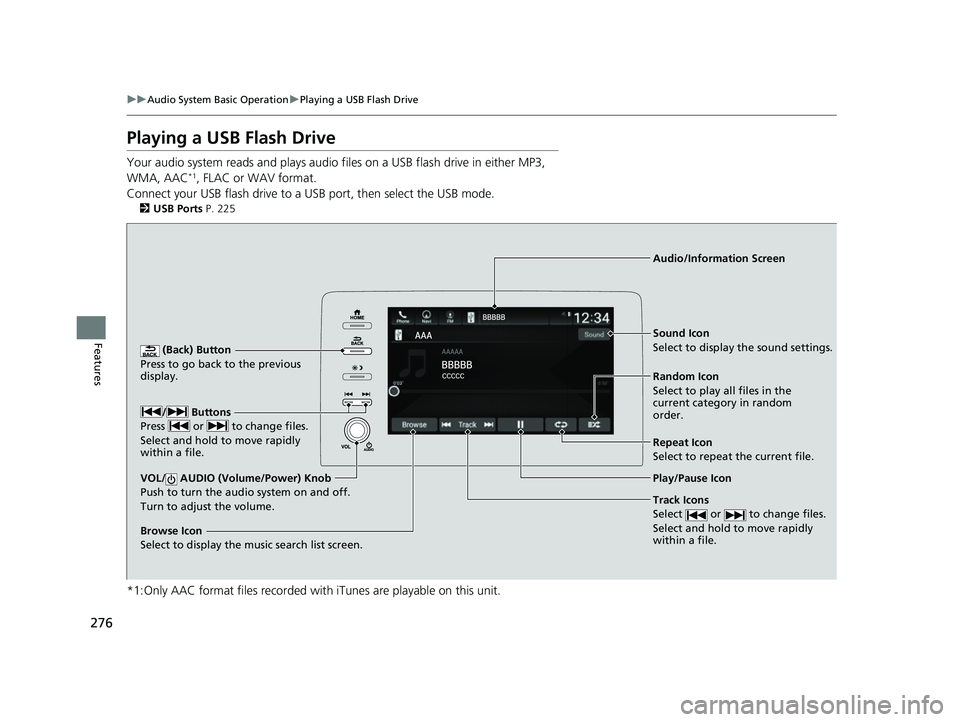
Playing a USB Flash Drive
Your audio system reads and plays audio f iles on a USB flash drive in either MP3,
WMA, AAC*1, FLAC or WAV format.
Connect your USB flash drive to a US B port, then select the USB mode.
2USB Ports P. 225
*1:Only AAC format files recorded with iTunes are playable on this unit.
(Back) Button
Press to go back to the previous
display.
Track Icons
Select or to change files.
Select and hold to move rapidly
within a file.
VOL/ AUDIO (Volume/Power) Knob
Push to turn the audi o system on and off.
Turn to adjust the volume.
Audio/Information Screen
Play/Pause Icon
/ Buttons
P r
ess or to change files.
Select and hold to move rapidly
within a file.
Random Icon
Select to play all files in the
current category in random
order. Sound Icon
Select to display the sound settings.
Browse Icon
Select to display the music search list screen.
Repeat Icon
Select to repeat the current file.
22 INSIGHT HMIN-31TXM6300.book 276 ページ 2021年2月24日 水曜日 午後3時45分
Page 295 of 609
294
uuAudio System Basic Operation uApple CarPlayTM
Features
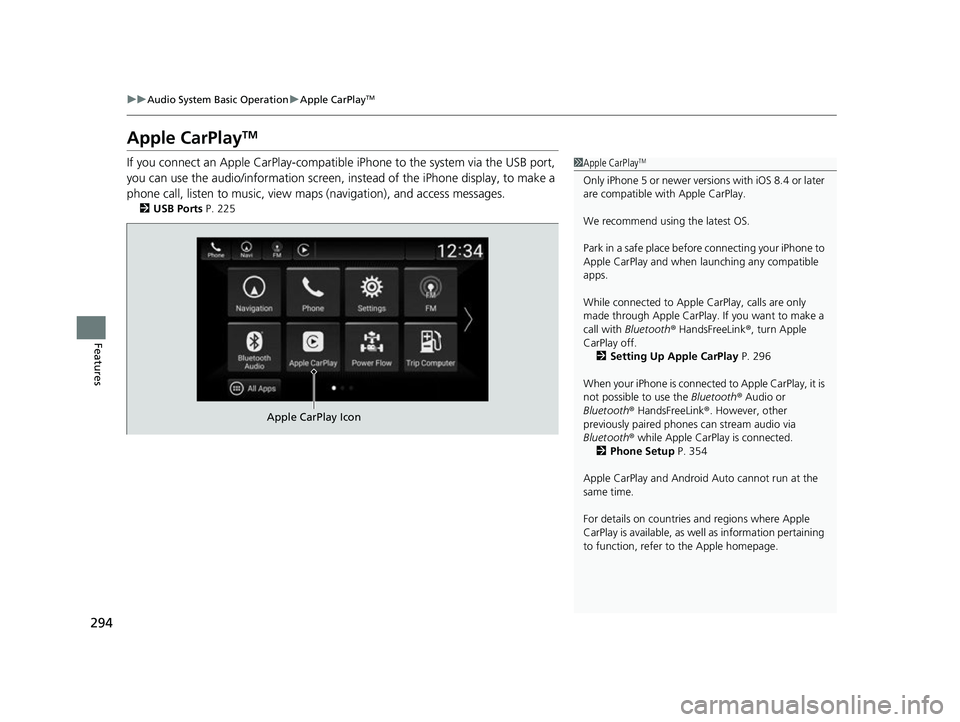
Apple CarPlayTM
If you connect an Apple CarPlay-compatible iPhone to the system via the USB port,
you can use the audio/information screen, instead of the iPhone display, to make a
phone call, listen to music, view ma ps (navigation), and access messages.
2USB Ports P. 225
1Apple CarPlayTM
Only iPhone 5 or newer versi ons with iOS 8.4 or later
are compatible with Apple CarPlay.
We recommend using the latest OS.
Park in a safe place before connecting your iPhone to
Apple CarPlay and when launching any compatible
apps.
While connected to Apple CarPlay, calls are only
made through Apple CarPlay. If you want to make a
call with Bluetooth ® HandsFreeLink ®, turn Apple
CarPlay off. 2 Setting Up Apple CarPlay P. 296
When your iPhone is connected to Apple CarPlay, it is
not possible to use the Bluetooth® Audio or
Bluetooth ® HandsFreeLink ®. However, other
previously paired phones can stream audio via
Bluetooth ® while Apple CarPlay is connected.
2 Phone Setup P. 354
Apple CarPlay and Android Auto cannot run at the
same time.
For details on c ountries and regions where Apple
CarPlay is available, as well as information pertaining
to function, refer to the Apple homepage.
Apple CarPlay Icon
22 INSIGHT HMIN-31TXM6300.book 294 ページ 2021年2月24日 水曜日 午後3時45分