light HONDA INTEGRA 1998 4.G Workshop Manual
[x] Cancel search | Manufacturer: HONDA, Model Year: 1998, Model line: INTEGRA, Model: HONDA INTEGRA 1998 4.GPages: 1681, PDF Size: 54.22 MB
Page 1235 of 1681
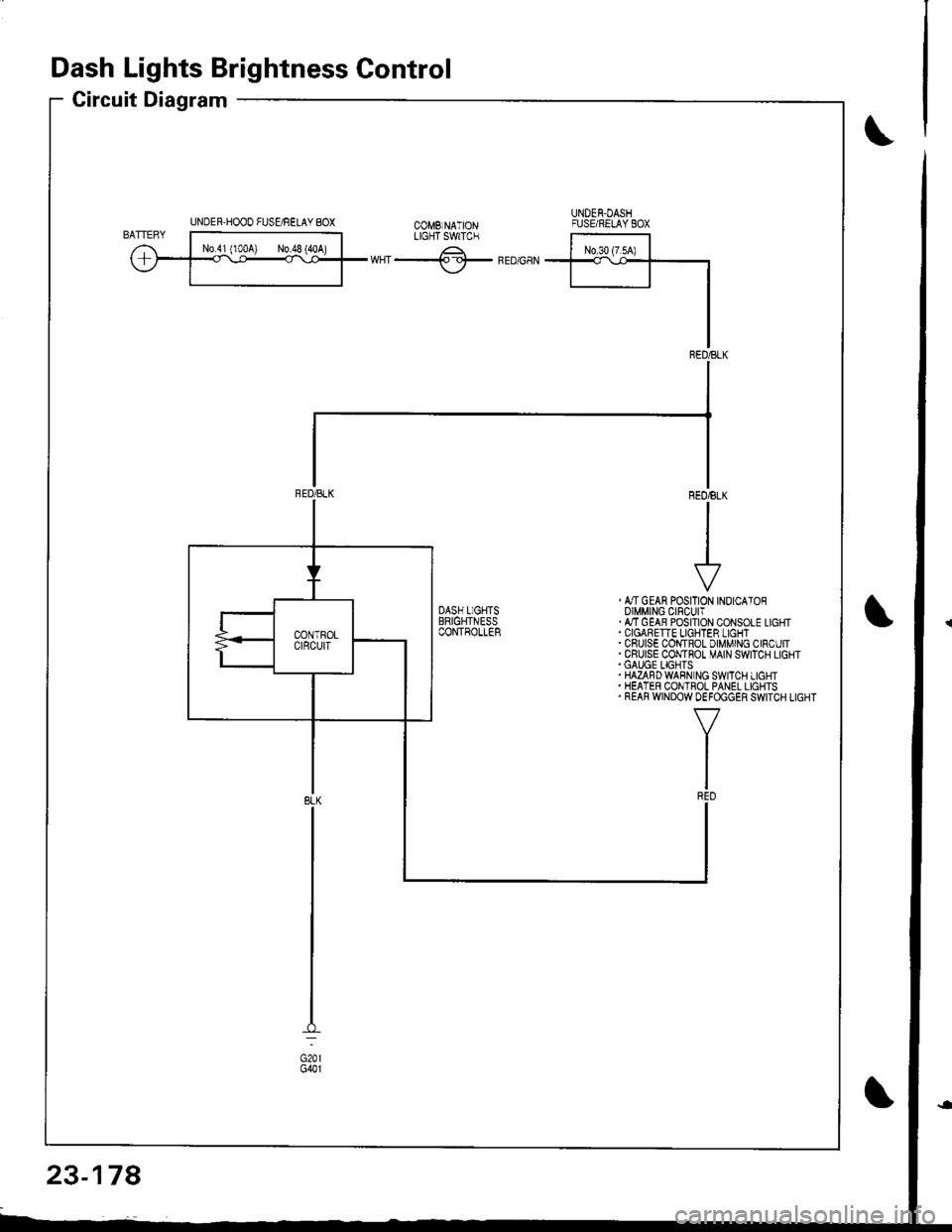
Dash Lights Brightness Control
Circuit Diagram
UNDER-HOOO FUSgRELAY 8OXUNDEN.DASHFUSE/RELAYEOXtX"f -.------^-;^*;;ilLrcrTswrc.
ffiwHT-lf-FEDGaN
, &TGEAN POSITION INOICATOROIMMING CIFCUIT.ATTGEAB POSITION CONSOLE LIGHT
. CRUISE COI,{TROL DIMMING CIRCUIT.CRUISE CONTHOT MAIN SWITCH LIGHT.GAUGE LIGHTS.HAZAFDWABN NG SWITCH LIGHT. HEATER CONTROL PANEL LIGHTS. REAR WINDOW DEFOGGER SWITCH LIGHT
23-178
Page 1236 of 1681
J
)
'1.
3.
NOTE: Be careful not to damage the controller and the
instrument panel.
Remove the instrument panel from the dashboard
(see page 23-126).
Remove the dash lights brightness controller from
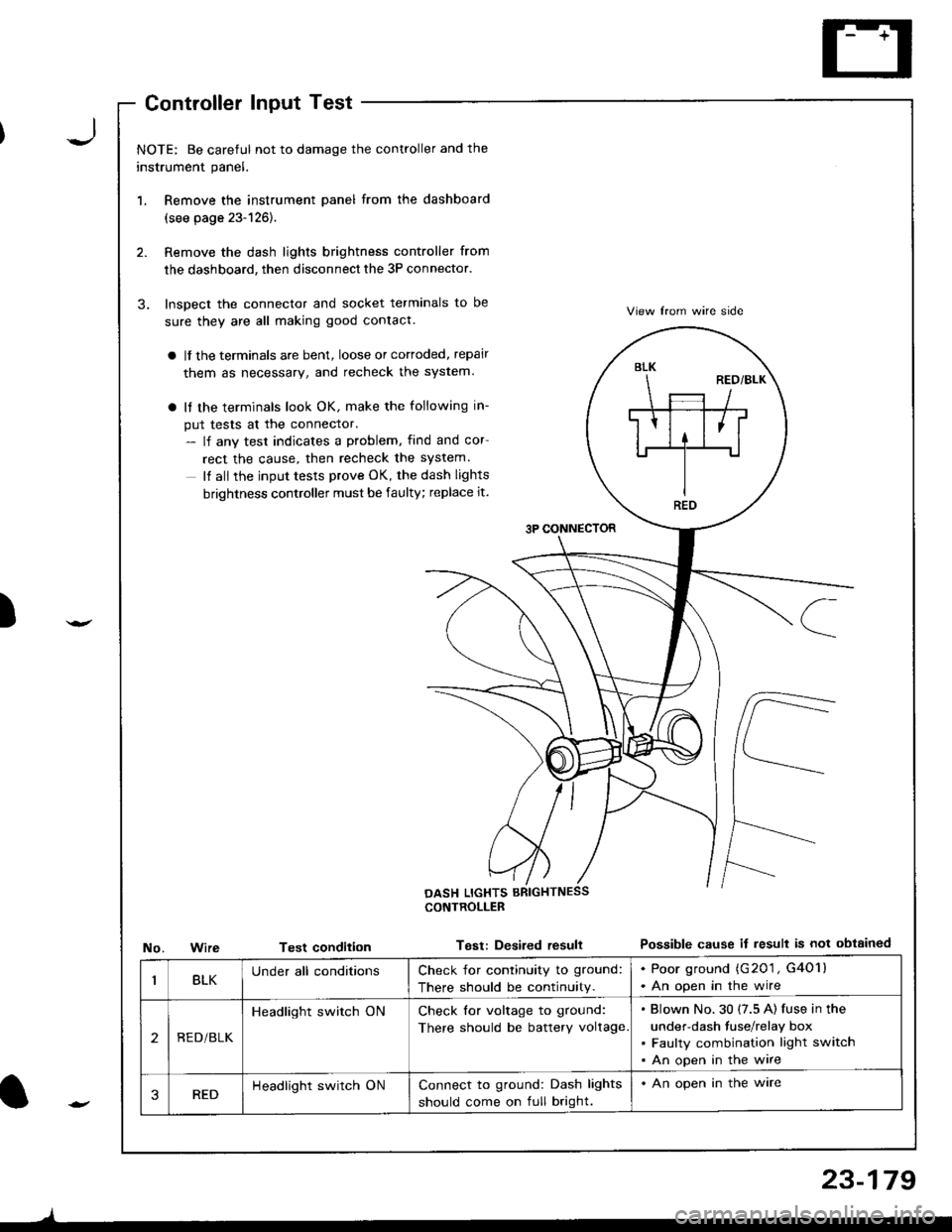
the dashboard, then disconnect the 3P connector.
Inspect the connector and socket terminals to be
sure they are all making good contact.
a lf the terminals are bent, loose or cortoded, repair
them as necessary, and recheck the system.
a It the terminals look OK, make the following in-
put tests at the connector.- lf any test indicates a problem, find and cor
rect the cause, then recheck the system.
It all the input tests prove OK, the dash lights
brightness controller must be faulty; replace it.
3P CONNECTOR
View lrom wire side
Possible cause if result is not obtainedNo.WireTest condition
CONTROLLEB
Test: Desired resull
BLK
REO
BLKUnder all conditionsCheck for continuity to ground:
There should be continuity.
. Poor ground (G201 , G4O1l. An open in the wire
2REDi BLK
Headlight switch ONCheck for voltage to ground:
There should be battery voltage
Blown No.30 (7.5 A) fuse in the
under-dash fuse/relay box
Faulty combination light switch
An open in the wire
3REDHeadlight switch ONConnect to ground: Dash lights
should come on full bright.
. An open in the ware
l-
)
23-179
Page 1237 of 1681
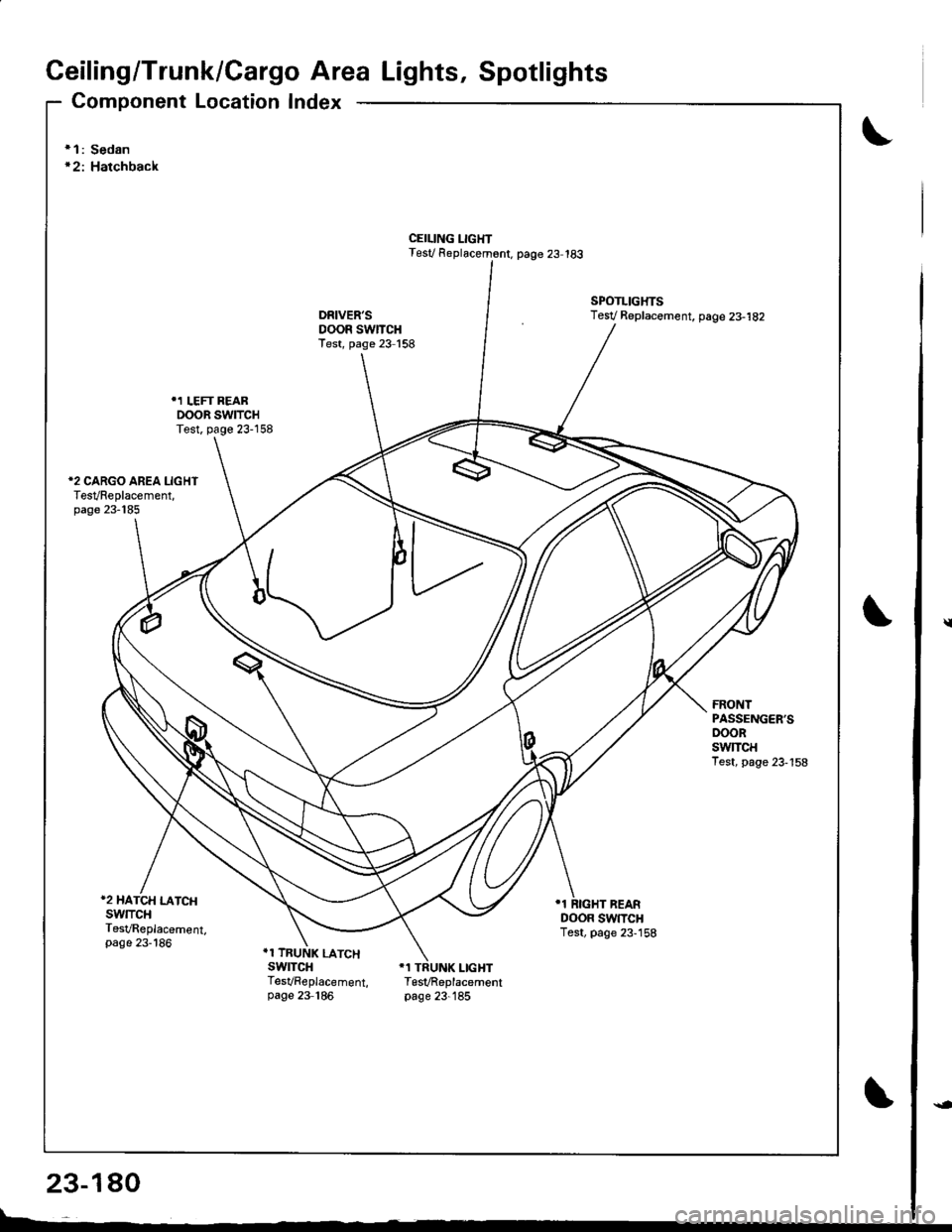
Ceiling/Trunk/Cargo Area Lights, Spotlights
Component Location Index
\* 1: Sedan'2: Hatchback
CEILING LIGHTTest/ R6placem6nt. page 23 183
SPOTLIGHTSTesV Replac€ment, page 23-182
FRONTPASSENGER'SDOORswlTcHTest, page 23-158
*2 HATCH LATCHSwlTCHTesVReplacement,page 23-186
DOOR SWTTCHTest, page 23-158
.1 TRUNK LATCHswrTcHTesVReplacement, TesVReplacementpage 23 186 page 23-185
\
23-180
l--
Page 1239 of 1681
Ceiling/Trunk/Cargo Area Lights, Spotlights
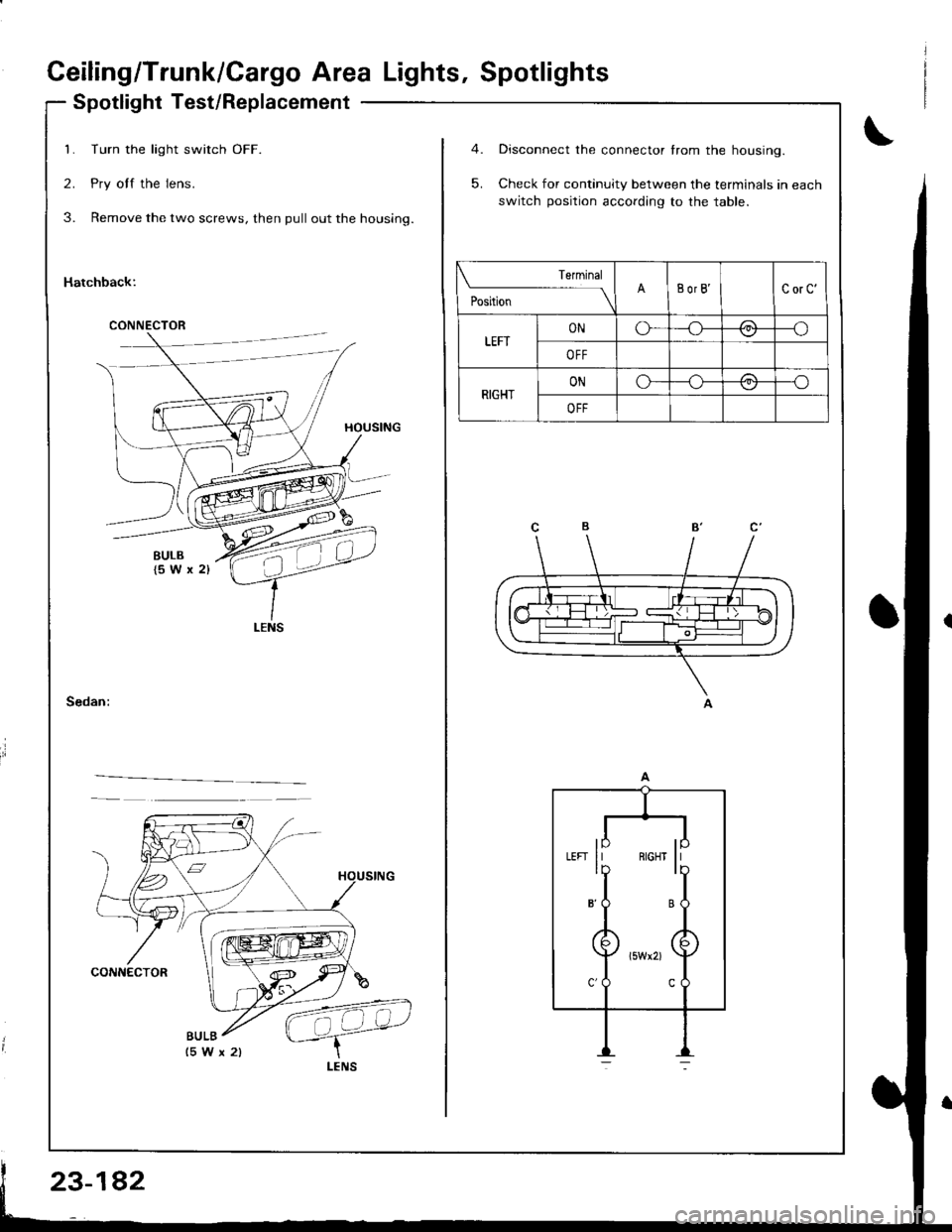
Spotlight Test/Replacement
Turn the light switch OFF.
Pry off the lens.
Remove the two screws, then pull out the housing.
Hatchback:
1
2
3
CONNECTOR
BULB
5.
Disconnect the connector from the housing.
Check for continuity between the terminals in each
switch position according to the table.
Terminal
;.ttr"
----l\BorB'CorC'
LEFTONo---o\:,,/
OFF
RIGHTONo-/-\-o
OFF
lp llLEFI II RIGH] IIlb ll
8'O B
Page 1240 of 1681
)
I
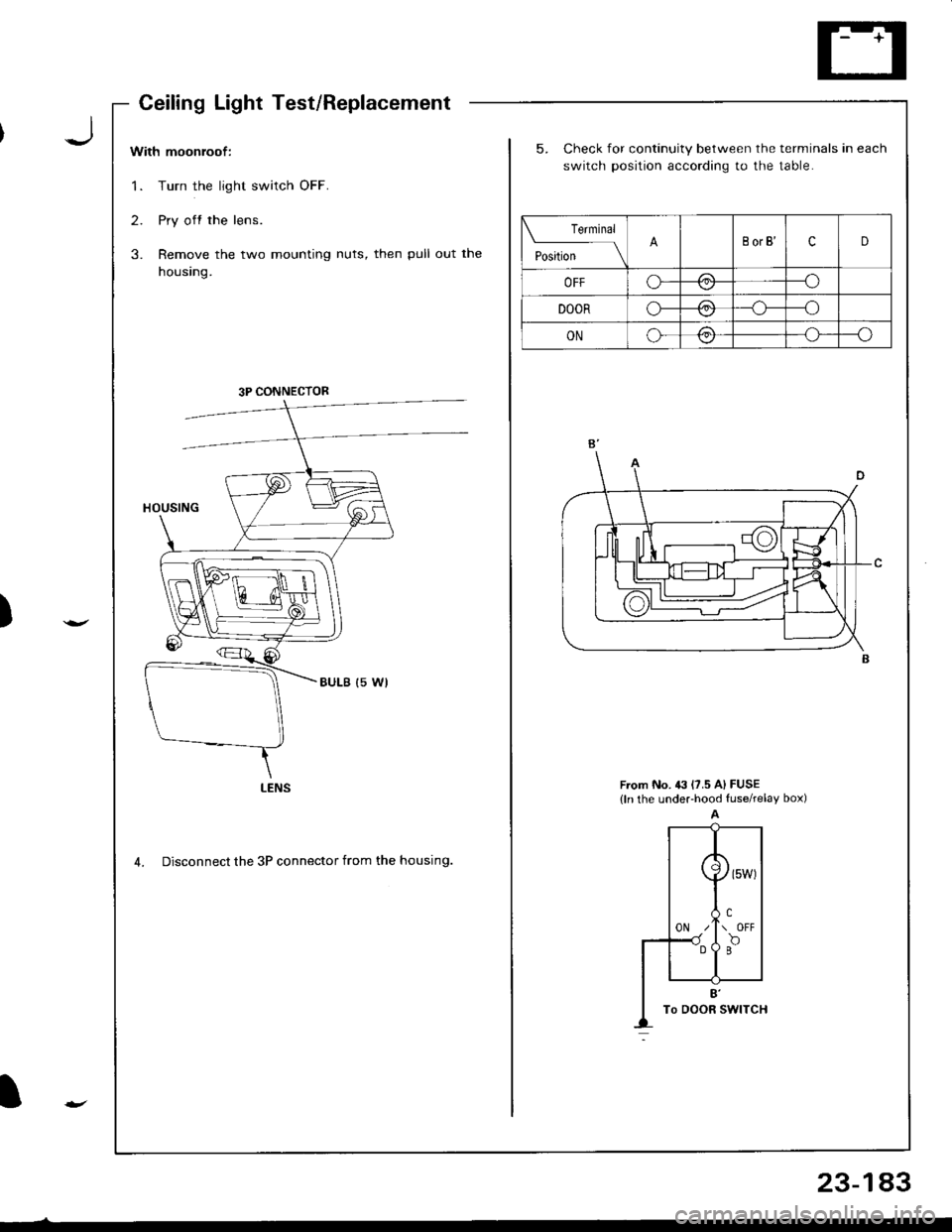
With moonroof:
1. Turn the light switch OFF.
2. Pry off the lens.
3. Remove the two mounting nuts, then pull out the
housing.
5. Check for continuity between the terminals in each
switch position according to the table.
From No. 43 l?.5 A) FUSE(ln the undeFhood fuserelay box)
4. Disconnect the 3P connector from the housing.
Teminal
t"",t*
-l\BorB'cD
OFFo---o\-/
DOORo-/:\--o\:./
ONo-/:\--o\:,/
3P CONNECTOR
LENS
CeilingLightTest/Replacement
23-183
Page 1241 of 1681
Ceiling/Trunk/Cargo Area Lights, Spotlights
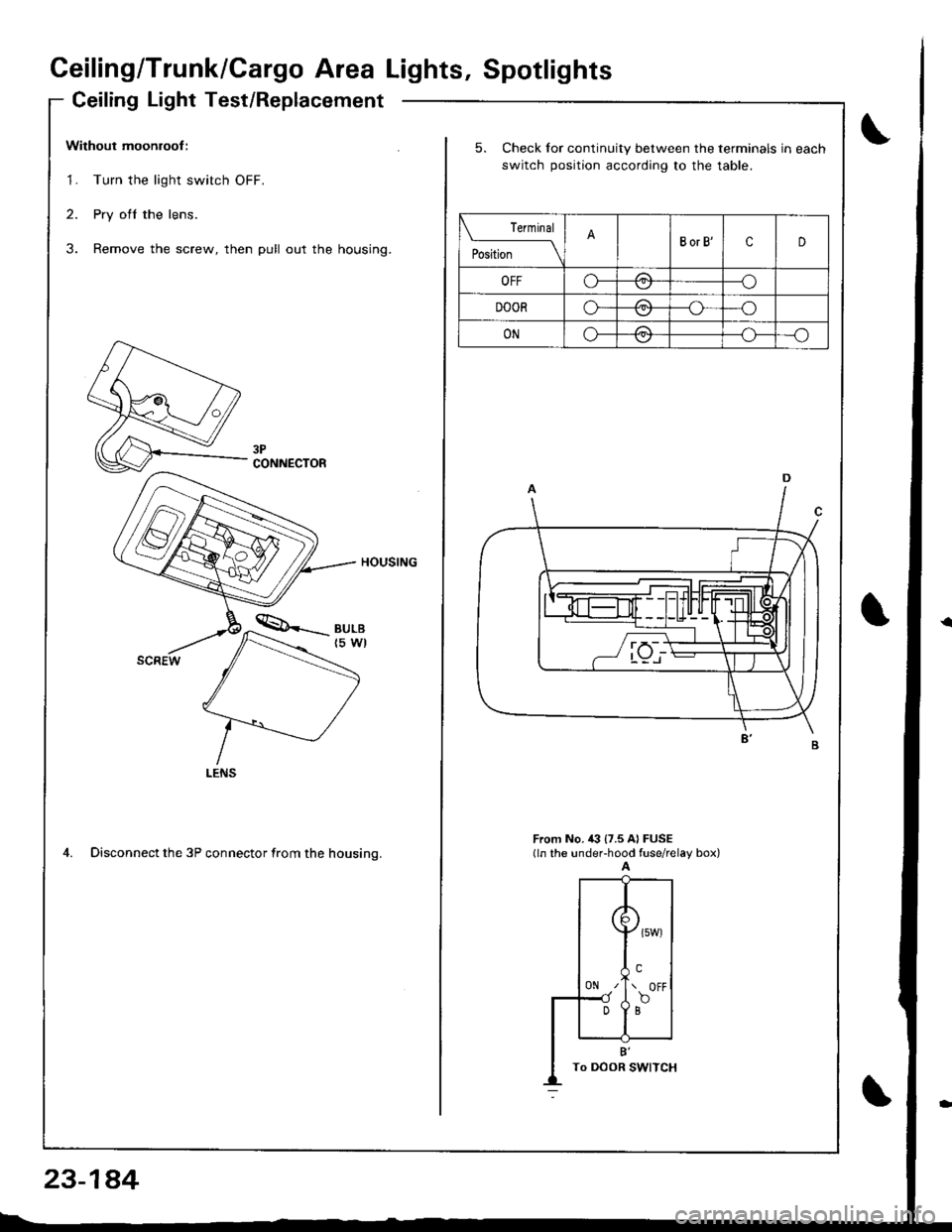
Ceiling Light Test/Replacement
Without moonroof :
1. Turn the light switch OFF.
2. Pry ofl the lens.
3. Remove the screw, then pull out the housing.
HOUSING
4. Disconnect the 3P connector from the housino.
CONNECTOR
23-1a4
5. Check for continuity between the terminals in each
switch position according to the table.
rermrnal
PositionBorB'cD
OFFo-/1--o
DOORo-/A--o
ONo-/a\--o\:,,/--{.J-
From No, i(} {7.5 A} FUSE(ln the under-hood fuse/relay box)A
({
0N z'
Dl
\>l
( owt
!.\. OFF
f,o
B'To DOOR I
Page 1242 of 1681
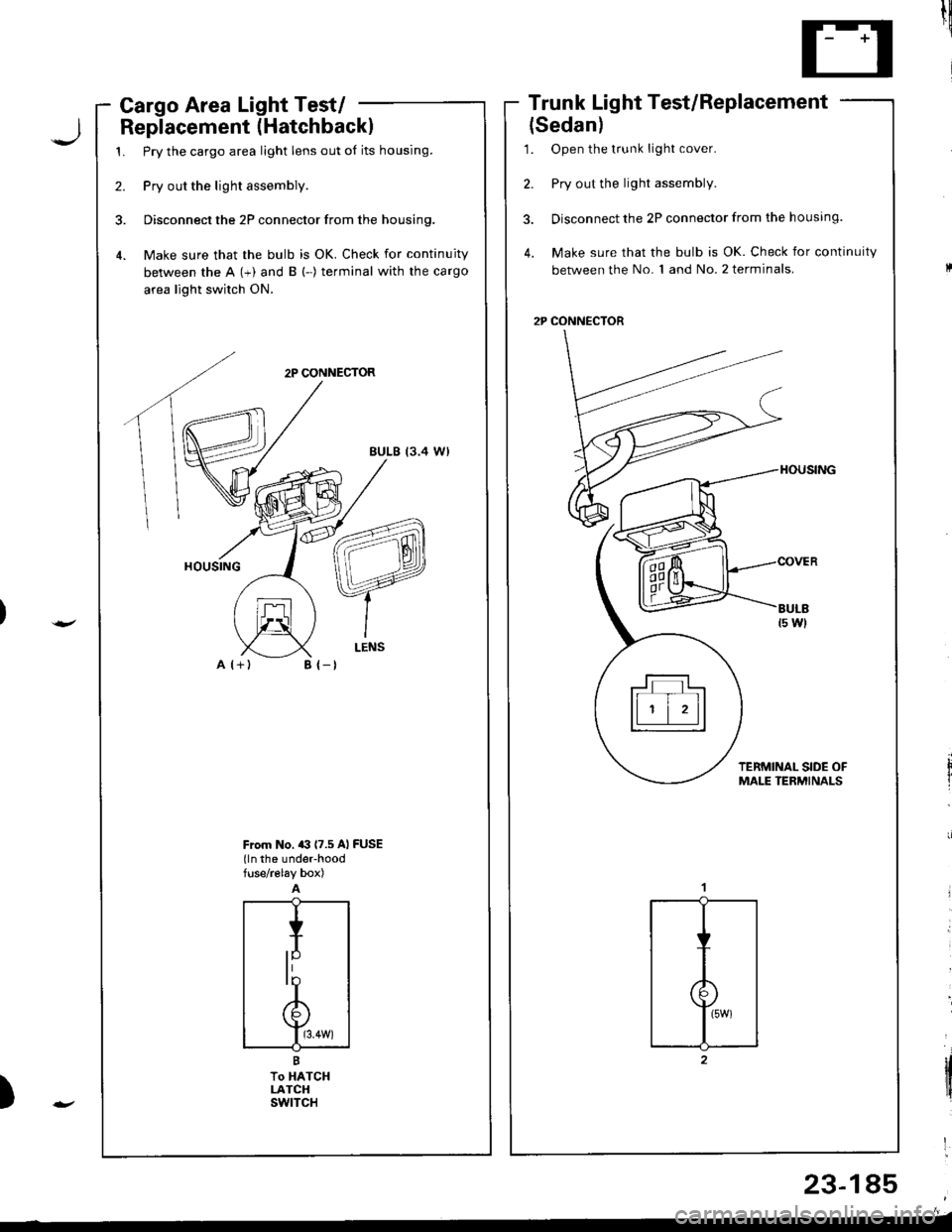
Cargo Area Light Test/ -
Replacement (Hatchbackl
1. Pry the cargo area light lens out of its housing.
2. Pry out the light assembly.
3. Disconnect the 2P connector from the housing.
4. Make sure that the bulb is OK. Check for continuity
between the A (+) and B (-) terminal with the cargo
area light switch ON.
2P CONNECTOR
EULB (3.4 W)
A l+)
Trunk Light Test/Replacement
{Sedan)
1. Open the t.unk light cover.
2. Pry out the light assembly.
3. Disconnect the 2P connector from the housing.
4. Make sure that the bulb is OK. Check for continuity
between the No. 1 and No. 2 terminals.
2P CONNECTOR
til!
'
tltirl
'
)
B {-t
From No. a3 (7.5 Al FUSE(ln the under-hoodfuse/r€lay box)
23-185
trTtll
ll ' | 'll
Page 1243 of 1681
Ceiling/Trunk/Cargo Area Lights, Spotlight
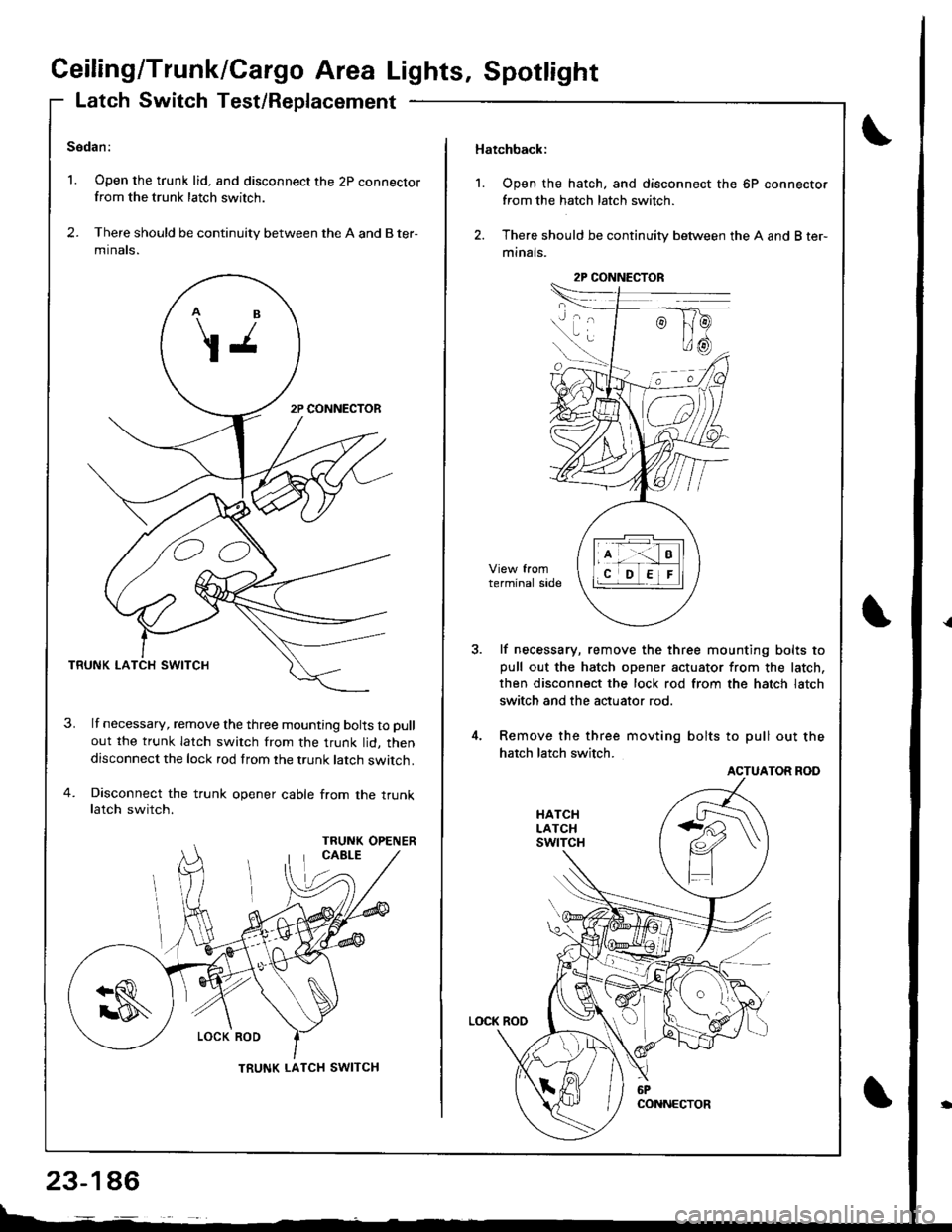
Latch Switch Test/Replacement
Sedan:
1. Open the trunk lid. and disconnect the 2p connectorfrom the trunk latch switch.
2. There should be continuity between the A and B ter-
mtnats.
TRUNK LA
lf necessary, remove the three mounting bolts to pull
out the trunk latch switch from the trunk lid, thendisconnect the lock rod from the trunk latch switch.
Disconnect the trunk opener cable from the truoklatch switch.
OO
TRUNK LATCH SWITCH
23-146
Hatchback:
1. Open the hatch, and disconnect the 6P connector
from the hatch latch switch.
2. There should be continuity between the A and B ter-
minals.
lf necessary, remove the three mounting bolts topull out the hatch opener actuator from the latch,
then disconnect the lock rod from the hatch latch
switch and the actuator rod.
Remove the three movting bolts to pull out the
hatch latch switch.
ACTUATOR ROD
2P CONNECTOR
Page 1244 of 1681
![HONDA INTEGRA 1998 4.G Workshop Manual Back-up Lights
Circuit Diagram
IGNITIONswlTcHUNOER.HOOD FUSEi RELAY BOX
EACK.UPLIGHTswtTcH/ / on lhe \r I ransnBgon I
GRN/BLK
IIJ
TRAILERL]GHT NGCONNECTOR
GRN/BLK
IzA arcx.upI P LIGHTS
f
r:zce21
I](/img/13/6069/w960_6069-1243.png "HONDA INTEGRA 1998 4.G Workshop Manual Back-up Lights
Circuit Diagram
IGNITIONswlTcHUNOER.HOOD FUSEi RELAY BOX
EACK.UPLIGHTswtTcH/ / on lhe \r I ransnBgon I
GRN/BLK
IIJ
TRAILERL]GHT NGCONNECTOR
GRN/BLK
IzA arcx.upI P LIGHTS
f
r:zce21
I")
Back-up Lights
Circuit Diagram
IGNITIONswlTcHUNOER.HOOD FUSEi RELAY BOX
EACK.UPLIGHTswtTcH/ / on lhe \r I ransnBgon I
GRN/BLK
IIJ
TRAILERL]GHT NGCONNECTOR
GRN/BLK
IzA arcx.upI P ' LIGHTS
f
r:zce'21
IBLK
II
I
G503
YEL
I
SnoriARr*r.r r*i(3;f;iil're' )V(oN h posirion [E )
l"
IGRN/BLK
23-147
)
I
Page 1245 of 1681
Back-up Lights
Test
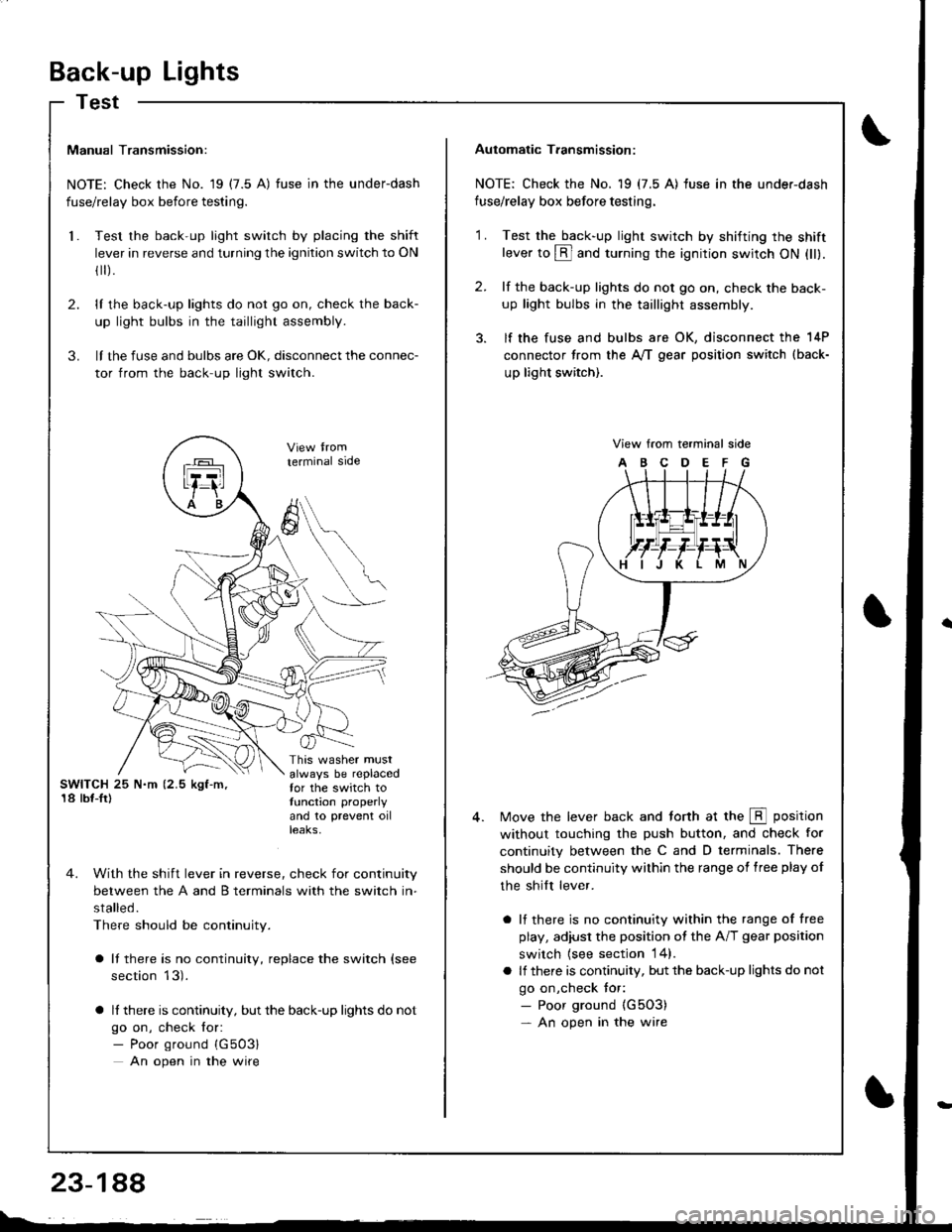
Manual Transmission:
NOTE: Check the No. 19 (7.5 A) fuse in the underdash
fuse/relay box before testing.
Test the back-up light switch by placing the shift
lever in reverse and turning the ignition switch to ON
fl r).
lI the back-up lights do not go on, check the back-
up light bulbs in the taillight assembly.
lI the fuse and bulbs are oK, disconnect the connec-
tor from the back-up light switch.
2.
3.
l.
SWITCH 25 N.m (2.5 kgf-m,'18 lbf-Ir)
This washer mustalways be replacedfor the switch totunction properly
and 10 prevent oilteaKs,
terminal side
4. With the shift lever in reverse, check for continuity
between the A and B terminals with the switch in-
stalled.
There should be continuity.
a It there is no continuity, replace the switch (see
section 13).
a lf there is continuity, but the back-up lights do not
go on, check for:- Poor ground {G503}
An open in the wire
A
6
Automatic T.ansmission:
NOTE: Check the No. 19 (7.5 A) fuse in the under-dash
fuse/relay box before testing.
2.
'1 .Test the back-up light swirch by shifting the shiftlever to @ and turning the ignition switch ON (ll).
lf the back-up lights do not go on, check the back-
up light bulbs in the taillight assembly.
lf the fuse and bulbs are OK, disconnect the 14P
connector from the A,/T gear position switch (back-
up light switch).
View from terminal side
ABCDEFG
Move the lever back and torth at the E position
without touching the push button, and check for
continuity between the C and D terminals. There
should be continuity within the range of free play of
the shilt lever.
a lf there is no continuity within the range of free
play, adiusl the position ot the A/T gear position
switch {see section 14}.
a lf there is continuity, but the back-up lights do not
go on,check tor:- Poor ground {G5O3)- An open in the wire