ECO mode HONDA ODYSSEY 1995 User Guide
[x] Cancel search | Manufacturer: HONDA, Model Year: 1995, Model line: ODYSSEY, Model: HONDA ODYSSEY 1995Pages: 240, PDF Size: 2.44 MB
Page 56 of 240
Seats
Passenger Seating
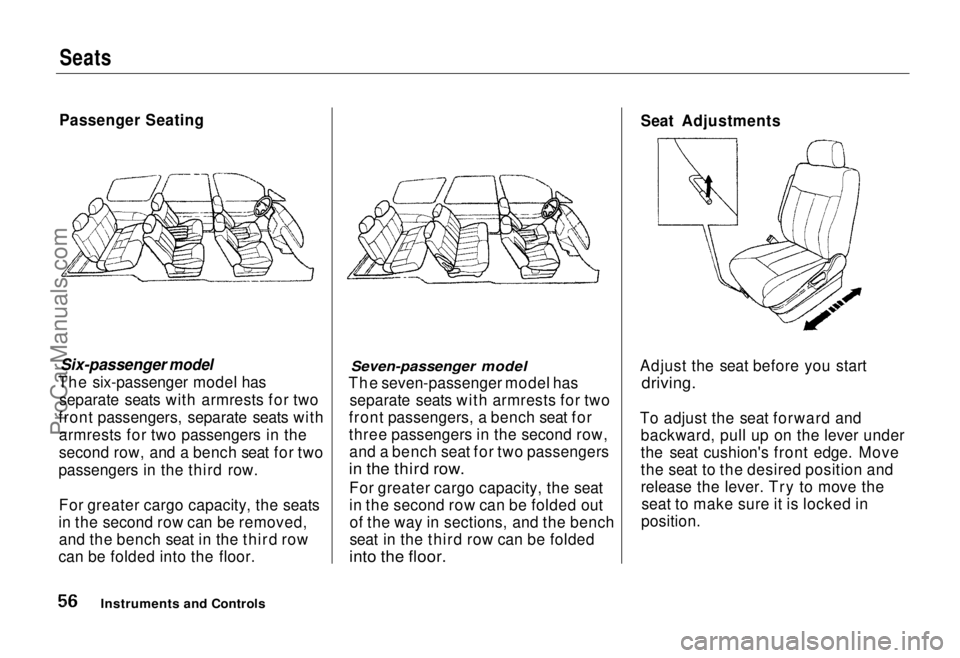
Six-passenger model
The six-passenger
model has
separate seats with armrests for two
front passengers, separate seats with armrests for two passengers in the
second row, and a bench seat for two
passengers in the third row.
For greater cargo capacity, the seats
in the second row can be removed, and the bench seat in the third row
can be folded into the floor.
Seven-passenger model
The seven-passenger
model has
separate seats with armrests for two
front passengers, a bench seat for
three passengers in the second row, and a bench seat for two passengers
in the third row.
For greater cargo capacity, the seat
in the second row can be folded outof the way in sections, and the bench
seat in the third row can be folded
into the floor.
Seat Adjustments
Adjust the seat before you start
driving.
To adjust the seat forward and backward, pull up on the lever under
the seat cushion's front edge. Move
the seat to the desired position and
release the lever. Try to move theseat to make sure it is locked in
position.
Instruments and ControlsProCarManuals.comMain Menu Table of Contents s t
Page 57 of 240
Seats
Adjust the seat-back before you start driving. The seat-backs should be in
an upright position for you and your
passengers to get the most protec-
tion from the seat belts.
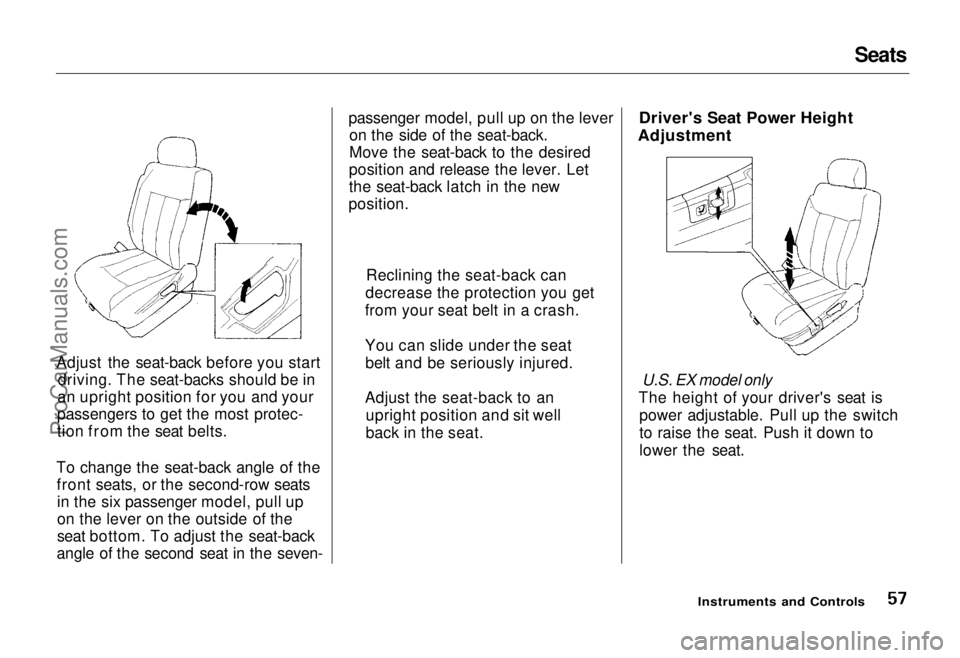
To change the seat-back angle of the front seats, or the second-row seatsin the six passenger model, pull up
on the lever on the outside of the
seat bottom. To adjust the seat-back
angle of the second seat in the seven- passenger model, pull up on the lever
on the side of the seat-back.
Move the seat-back to the desired
position and release the lever. Let
the seat-back latch in the new
position.
Driver's Seat Power Height
Adjustment
U.S. EX model only
The height of your driver's seat is power adjustable. Pull up the switch
to raise the seat. Push it down to
lower the seat.
Instruments and Controls
Reclining the seat-back can
decrease the protection you get
from your seat belt in a crash.
You can slide under the seat belt and be seriously injured.
Adjust the seat-back to an upright position and sit well
back in the seat.ProCarManuals.comMain Menu Table of Contents s t
Page 58 of 240
Seats
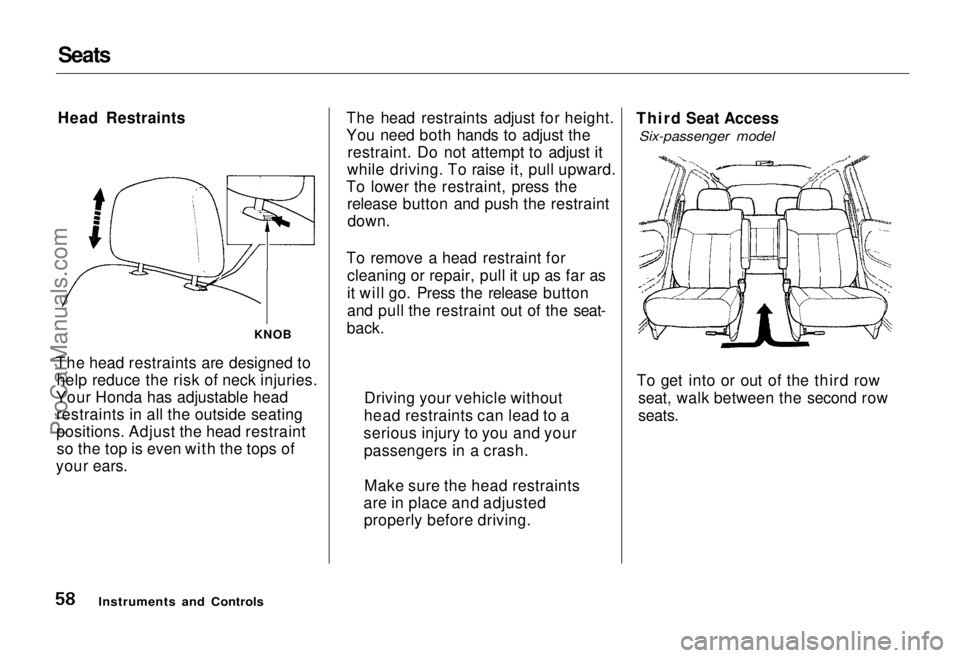
Head Restraints
The head restraints are designed to help reduce the risk of neck injuries.
Your Honda has adjustable head restraints in all the outside seating
positions. Adjust the head restraintso the top is even with the tops of
your ears. The head restraints adjust for height.
You need both hands to adjust the
restraint. Do not attempt to adjust it
while driving. To raise it, pull upward.
To lower the restraint, press the release button and push the restraintdown.
To remove a head restraint for cleaning or repair, pull it up as far as
it will go. Press the release button
and pull the restraint out of the seat-
back. Third Seat Access
Six-passenger model
To get into or out of the third row seat, walk between the second row
seats.
Instruments and Controls
KNOB
Driving your vehicle without
head restraints can lead to a
serious injury to you and your passengers in a crash.
Make sure the head restraints
are in place and adjusted properly before driving.ProCarManuals.comMain Menu Table of Contents s t
Page 59 of 240
Seats
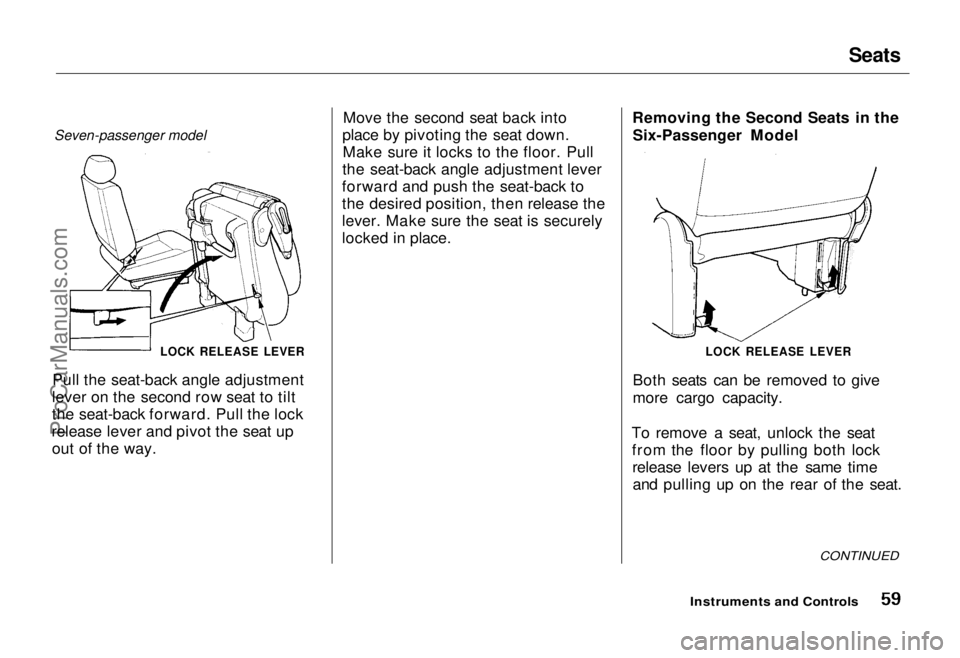
Seven-passenger model
LOCK RELEASE LEVER
Pull the seat-back angle adjustment
lever on the second row seat to tilt
the seat-back forward. Pull the lock
release lever and pivot the seat up out of the way. Move the second seat back into
place by pivoting the seat down. Make sure it locks to the floor. Pull
the seat-back angle adjustment lever
forward and push the seat-back to
the desired position, then release the
lever. Make sure the seat is securely
locked in place. Removing the Second Seats in the
Six-Passenger Model
Both seats can be removed to give
more cargo capacity.
To remove a seat, unlock the seat from the floor by pulling both lockrelease levers up at the same timeand pulling up on the rear of the seat.
CONTINUED
Instruments and Controls
LOCK RELEASE LEVERProCarManuals.comMain Menu Table of Contents s t
Page 60 of 240
Seats
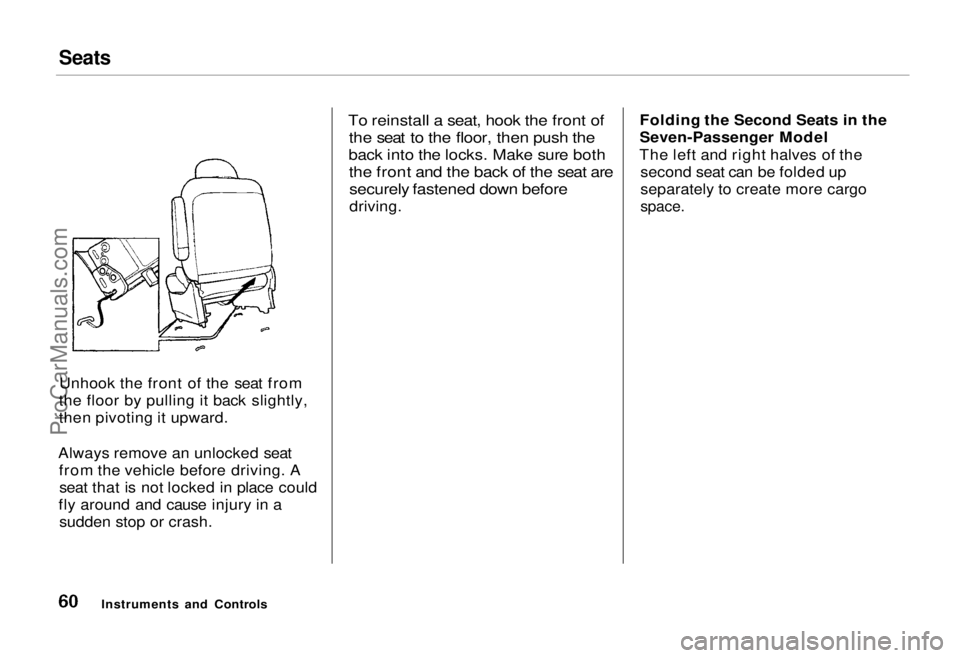
Unhook the front of the seat from
the floor by pulling it back slightly,
then pivoting it upward.
Always remove an unlocked seat from the vehicle before driving. Aseat that is not locked in place could
fly around and cause injury in a sudden stop or crash.
To reinstall a seat, hook the front of
the seat to the floor, then push the
back into the locks. Make sure both
the front and the back of the seat aresecurely fastened down before
driving. Folding the Second Seats in the
Seven-Passenger Model
The left and right halves of the second seat can be folded up
separately to create more cargo
space.
Instruments and ControlsProCarManuals.comMain Menu Table of Contents s t
Page 61 of 240
Seats
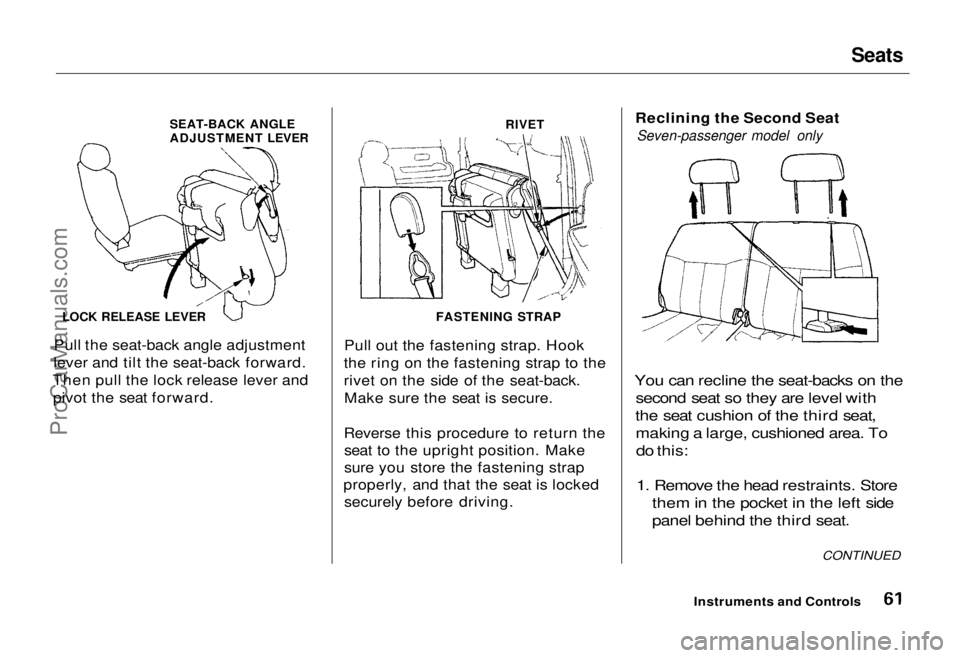
SEAT-BACK ANGLE
ADJUSTMENT LEVER
RIVET
LOCK RELEASE LEVER
Pull the seat-back angle adjustment
lever and tilt the seat-back forward.
Then pull the lock release lever and pivot the seat forward. Pull out the fastening strap. Hook
the ring on the fastening strap to the
rivet on the side of the seat-back. Make sure the seat is secure.
Reverse this procedure to return the seat to the upright position. Make
sure you store the fastening strap
properly, and that the seat is locked securely before driving. Reclining the Second Seat
Seven-passenger model only
You can recline the seat-backs on the second seat so they are level with
the seat cushion of the third seat, making a large, cushioned area. Todo this:
1. Remove the head restraints. Store them in the pocket in the left side
panel behind the third seat.
Instruments and Controls CONTINUED
FASTENING STRAPProCarManuals.comMain Menu Table of Contents s t
Page 62 of 240

Seats
ANGLE ADJUSTMENT LEVER
SLIDE LEVER
2. Lift the lever and slide the seat forward as far as it will go. Pull theseat-back angle adjustment lever
and pivot the seat-back backward.
Release the lever when the seat-
back is even with the cushion on
the third seat.
Reverse this procedure to return the second seat to the upright position.
Make sure you install the head
restraints before driving (see page 58). Folding the Third Seat in All
Models
To create more cargo space, you can fold the third seat into the floor
recess.
To fold the third seat:
1. Remove the head restraints. Store them in the pocket in the left side
panel.
KNOB
2. Unlock the seat-back by turning
the knob. Push the seat-back
forward.
Instruments and ControlsProCarManuals.comMain Menu Table of Contents s t
Page 79 of 240
Heating and Cooling
How to Use the System
This section covers the best way to use the system for ventilation,cooling, dehumidifying, defrosting
and heating. In most cases, the mode
and air source selections are only
recommendations. You may prefer different settings. Use mode to heat or cool the
interior more quickly, or to keep out
smoke and dust. Leaving the system
in the recirculation mode with the
A/C off can cause the windows to fog up. Switch to
mode as
soon as the interior reaches a
comfortable temperature or the
outside smoky, dusty condition
clears.
The engine must be running for the
heater and air conditioning to pro-
vide hot and cold air. The heater uses engine coolant to warm the air.If the engine is cold, it will be several
minutes before you feel warm air
circulating.
The air conditioning system does not depend on engine temperature. It
can produce cold air almost immedi-
ately.
Controlling Air Flow Direction
Air flows into the interior at three
levels: Toward the floor
through the dash vents and
toward the windshield and side
windows You select the air
flow level or combination of levels
with the five mode buttons.
Ventilation
Your car has a flow-through venti- lation system. Air enters the car
through vents in front of the wind-shield. It circulates through the
interior then exits through the rear side panels. This system provides
fresh air even when the car is standing still. To bring in outside air, press the button. Set the fan
at a comfortable speed.
CONTINUED
Comfort and Convenience FeaturesProCarManuals.comMain Menu Table of Contents s t
Page 101 of 240
Audio System
Operating the CD Player
(Optional)
A Compact Disc changer is available for your car. It holds up to six discs,
providing several hours of continu-ous programming. You operate the
CD changer with the same controls
used for the radio and cassette
player.
Load the desired CD's in the
magazine and load the magazine in
the changer according to the
instructions that came with the unit.
Your dealer has Genuine Honda accessory in-dash CD players
available that are operated by the
radio controls. If you have one of
these units, use the directions in this section (except for multi-disc
selection) to operate it. To operate the CD changer, the
ignition key must be in ACCESSORY (I) or ON (II). If you are listening to
a cassette tape, eject it before
playing a CD.
Press the CD button until "CD" appears on the display. Once in the
CD mode, the system will start to
play the first track of the first disc in the magazine.
When that disc ends, the next disc in the magazine is loaded and played.
After disc 6 has completed, the system will return to disc 1. To make
your own disc selection, push one of the six preset buttons. Your selection
will appear in the display and start
playing.
U.S. EX model
You can use the TUNE/SEEK switch while a disc is playing to
select passages and change tracks.
To move rapidly forward within a track, push up and hold the TUNE/SEEK switch. Push down and hold
the switch to move rapidly backward
within a track. You will hear a beep a
half second after you push the switch up or down. Keep pushing the
switch until you think the track has
advanced or returned to the desired
position. The disc will start playing
when you release the switch.
If you push the TUNE/SEEK switch
up and release it before you hear a
beep, the system will skip forward to the beginning of the next track on
that CD.
It will skip backward to the begin-
ning of the current track if you push
the switch down and release it.
Comfort and Convenience Features
CONTINUEDProCarManuals.comMain Menu Table of Contents s t
Page 103 of 240
Audio System
U.S. LX and Canadian EX models
You can use the TUNE/SEEK buttons while a disc is playing to select passages and change tracks.
To move rapidly forward within a track, push and hold the button.
Push and hold the button to
move rapidly backward within a
track. You will hear a beep a half second after you push the button.
Keep pushing the button until you
think the track has advanced or
returned to the desired position. The disc will start playing when you
release the button. If you push the button and
release it before you hear a beep, the system will skip forward to the
beginning of the next track on that
CD.
It will skip backward to the begin-
ning of the current track if you push the button and release it. If you push the RPT button on the
U.S. LX and Canadian EX models or
the A. SELECT/RPT button on the
U.S. EX model, the system will
continuously play the track you are
listening to. You will see RPT in the display. Push the switch again to
turn off the RPT (REPEAT) mode.
On U.S. EX model
You can get the CD player to randomly select tracks by pressing
A. SELECT/RPT until you see "A. SEL" in the display.
With this active, the system selects and plays the tracks randomly,
rather than sequentially, on each disc. When the system has played all
the tracks on that disc, it loads the
next disc and starts to play randomly.
The system continues to select and play tracks randomly on each of thesix discs until you press the
A. SELECT/RPT button again. To turn on random play mode while
the system is in the REPEAT mode,
turn off REPEAT mode first by
pressing the A. SELECT/RPT
button. Then, press the button againas explained above.
If you change modes to radio or
tape while a CD is playing, thenchange back to CD mode, thesame disc and track will play.
If you turn off the system while a CD is playing, either with the
PWR/VOL knob or by turning off
the ignition, the system will begin at the same disc and track when
you turn it back on.
If you try to select an empty slot in
the magazine, the system willselect and play the first track of
the next disc in the magazine.
To return to the radio function, press the CD button.
Comfort and Convenience FeaturesProCarManuals.comMain Menu Table of Contents s t