buttons HONDA ODYSSEY 1995 Owner's Manual
[x] Cancel search | Manufacturer: HONDA, Model Year: 1995, Model line: ODYSSEY, Model: HONDA ODYSSEY 1995Pages: 240, PDF Size: 2.44 MB
Page 102 of 240
Audio System
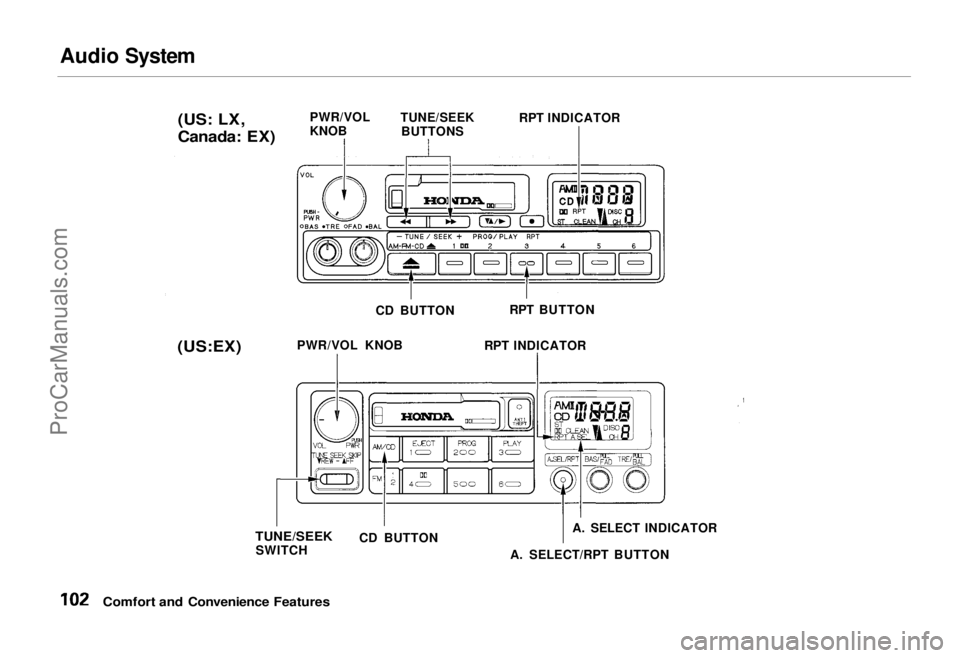
Comfort and Convenience Features (US: LX,
Canada: EX)
PWR/VOL
KNOB
TUNE/SEEK
BUTTONS RPT INDICATOR
CD BUTTON RPT BUTTON
PWR/VOL KNOB RPT INDICATOR
TUNE/SEEK
SWITCH CD BUTTON
A. SELECT INDICATOR
A. SELECT/RPT BUTTON
(US:EX)ProCarManuals.comMain Menu Table of Contents s t
Page 103 of 240
Audio System
U.S. LX and Canadian EX models
You can use the TUNE/SEEK buttons while a disc is playing to select passages and change tracks.
To move rapidly forward within a track, push and hold the button.
Push and hold the button to
move rapidly backward within a
track. You will hear a beep a half second after you push the button.
Keep pushing the button until you
think the track has advanced or
returned to the desired position. The disc will start playing when you
release the button. If you push the button and
release it before you hear a beep, the system will skip forward to the
beginning of the next track on that
CD.
It will skip backward to the begin-
ning of the current track if you push the button and release it. If you push the RPT button on the
U.S. LX and Canadian EX models or
the A. SELECT/RPT button on the
U.S. EX model, the system will
continuously play the track you are
listening to. You will see RPT in the display. Push the switch again to
turn off the RPT (REPEAT) mode.
On U.S. EX model
You can get the CD player to randomly select tracks by pressing
A. SELECT/RPT until you see "A. SEL" in the display.
With this active, the system selects and plays the tracks randomly,
rather than sequentially, on each disc. When the system has played all
the tracks on that disc, it loads the
next disc and starts to play randomly.
The system continues to select and play tracks randomly on each of thesix discs until you press the
A. SELECT/RPT button again. To turn on random play mode while
the system is in the REPEAT mode,
turn off REPEAT mode first by
pressing the A. SELECT/RPT
button. Then, press the button againas explained above.
If you change modes to radio or
tape while a CD is playing, thenchange back to CD mode, thesame disc and track will play.
If you turn off the system while a CD is playing, either with the
PWR/VOL knob or by turning off
the ignition, the system will begin at the same disc and track when
you turn it back on.
If you try to select an empty slot in
the magazine, the system willselect and play the first track of
the next disc in the magazine.
To return to the radio function, press the CD button.
Comfort and Convenience FeaturesProCarManuals.comMain Menu Table of Contents s t
Page 106 of 240
Theft Protection
On U.S. EX model Your car's audio system will disableitself if it is disconnected from
electrical power for any reason. Tomake it work again, the user must
enter a specific five-digit code in the
Preset buttons. Because there are
hundreds of number combinations
possible from five digits, making the system work without knowing the
exact code is nearly impossible.
You should have received a card that lists your audio system's code
number and serial number. It is best
to store this card in a safe place at
home, or to keep it in your wallet or
purse. In addition, you should write
the audio system's serial number in
this Owner's Manual. If you should
happen to lose the card, you must obtain the code number from your
Honda dealer. To do this, you will
need the system's serial number. If your car's battery is disconnected
or goes dead, the audio system will
disable itself. If this happens, you
will see "Code" in the frequency display the next time you turn on the
system. Use the Preset buttons to
enter the five-digit code. If it is
entered correctly, the radio will start
playing.
If you make a mistake entering the
code, do not start over or try to
correct your mistake. Complete the
five-digit sequence, then enter the correct code. You have three tries to
enter the correct code. If you are
unsuccessful in three attempts, you must then leave the system on for
one hour before trying again. You will have to store your favorite
stations in the Preset buttons after
the system begins working. Your original settings were lost when
power was disconnected.
Comfort and Convenience FeaturesProCarManuals.comMain Menu Table of Contents s t
Page 163 of 240
Battery
If you need to connect the battery to
a charger, disconnect both cables to
prevent damage to the car's electri-
cal system.
On the U.S. EX model
If your car's battery is disconnected
or goes dead, the audio system will
disable itself. The next time you turn
on the radio you will see "Code" in
the frequency display. Use the
Preset buttons to enter the five-digit
code (see page 106).
Charging the battery with the cables
connected can seriously damage your
car's electronic controls. Detach the
battery cables before connecting the
battery to a charger.
Maintenance
The battery gives off explosive
hydrogen gas during normal
operation.
A spark or flame can cause the battery to explode with enough
force to kill or seriously hurt you.
Wear protective clothing and a
face shield, or have a skilled mechanic do the battery
maintenance.
NOTICEProCarManuals.comMain Menu Table of Contents s t