dead battery HONDA ODYSSEY 1995 Owners Manual
[x] Cancel search | Manufacturer: HONDA, Model Year: 1995, Model line: ODYSSEY, Model: HONDA ODYSSEY 1995Pages: 240, PDF Size: 2.44 MB
Page 86 of 240
Audio System
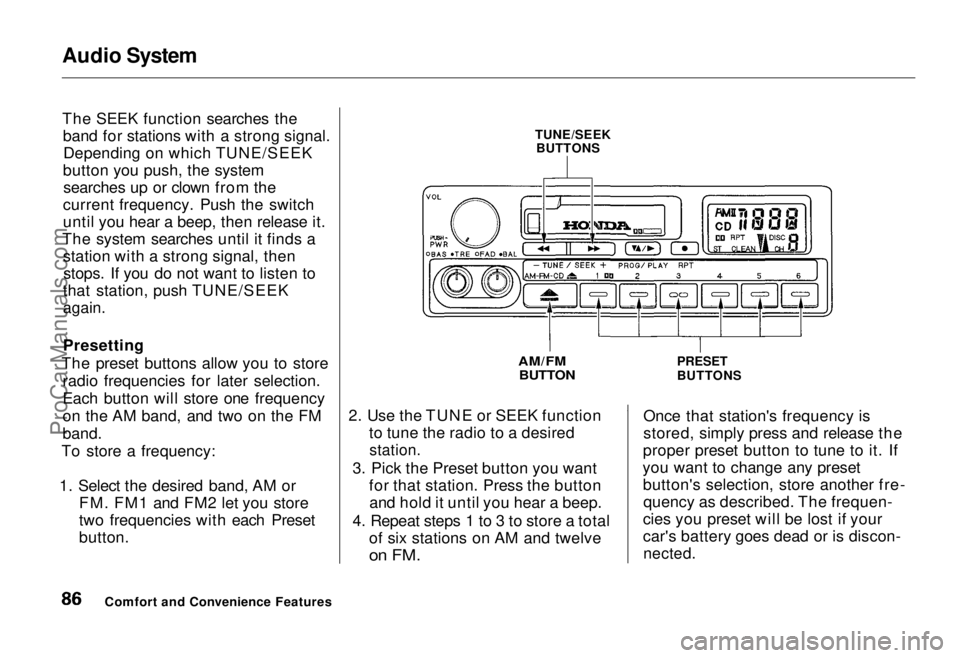
The SEEK function searches the
band for stations with a strong signal.Depending on which TUNE/SEEK
button you push, the system searches up or clown from the
current frequency. Push the switch
until you hear a beep, then release it.
The system searches until it finds a station with a strong signal, thenstops. If you do not want to listen to
that station, push TUNE/SEEK
again.
Presetting
The preset buttons allow you to store radio frequencies for later selection.
Each button will store one frequency
on the AM band, and two on the FM
band.
To store a frequency:
1. Select the desired band, AM or FM. FM1 and FM2 let you store
two frequencies with each Preset
button. 2. Use the TUNE or SEEK function
to tune the radio to a desired
station.
3. Pick the Preset button you want for that station. Press the buttonand hold it until you hear a beep.
4. Repeat steps 1 to 3 to store a total of six stations on AM and twelve
on FM.
Once that station's frequency is
stored, simply press and release the
proper preset button to tune to it. If
you want to change any preset button's selection, store another fre-quency as described. The frequen-
cies you preset will be lost if your
car's battery goes dead or is discon-
nected.
Comfort and Convenience Features TUNE/SEEK
BUTTONS
AM/FM BUTTON
PRESET
BUTTONSProCarManuals.comMain Menu Table of Contents s t
Page 95 of 240
Audio System
Once that station's frequency is
stored, simply press and release the
proper preset button to tune to it. If
you want to change any preset button's selection, store another fre-
quency as described. The frequen-
cies you preset will be lost if your
car's battery goes dead or is discon-
nected.
The AUTO SELECT function allows
you to find stations easily when youare in an unfamiliar area. Press the
AUTO SELECT button. The system automatically scans both bands to
find six strong stations on AM and twelve on FM, and stores their
frequencies in the Preset buttons.
You can then use the Preset buttons in the normal manner to select thosestations. "A SEL" stays displayed
next to the frequency as a reminder.
If you are in a remote area, AUTO
SELECT may not find enough stations to fill all the available
presets. If this is the case, you will see a "0" displayed when you press
any Preset button that does not have
a station stored. You cannot manually store radio
station frequencies in the Preset
buttons when AUTO SELECT is ON. If you do not like the stations found
by AUTO SELECT, you can still use
the TUNE or SEEK function to findother stations.
AUTO SELECT does not erase the stations you have manually preset.
When you return to your normal reception area, turn off AUTO
SELECT by pressing the buttonagain. The light goes out and the
Preset buttons can then select thestations you originally set.
Comfort and Convenience FeaturesProCarManuals.comMain Menu Table of Contents s t
Page 106 of 240
Theft Protection
On U.S. EX model Your car's audio system will disableitself if it is disconnected from
electrical power for any reason. Tomake it work again, the user must
enter a specific five-digit code in the
Preset buttons. Because there are
hundreds of number combinations
possible from five digits, making the system work without knowing the
exact code is nearly impossible.
You should have received a card that lists your audio system's code
number and serial number. It is best
to store this card in a safe place at
home, or to keep it in your wallet or
purse. In addition, you should write
the audio system's serial number in
this Owner's Manual. If you should
happen to lose the card, you must obtain the code number from your
Honda dealer. To do this, you will
need the system's serial number. If your car's battery is disconnected
or goes dead, the audio system will
disable itself. If this happens, you
will see "Code" in the frequency display the next time you turn on the
system. Use the Preset buttons to
enter the five-digit code. If it is
entered correctly, the radio will start
playing.
If you make a mistake entering the
code, do not start over or try to
correct your mistake. Complete the
five-digit sequence, then enter the correct code. You have three tries to
enter the correct code. If you are
unsuccessful in three attempts, you must then leave the system on for
one hour before trying again. You will have to store your favorite
stations in the Preset buttons after
the system begins working. Your original settings were lost when
power was disconnected.
Comfort and Convenience FeaturesProCarManuals.comMain Menu Table of Contents s t
Page 163 of 240
Battery
If you need to connect the battery to
a charger, disconnect both cables to
prevent damage to the car's electri-
cal system.
On the U.S. EX model
If your car's battery is disconnected
or goes dead, the audio system will
disable itself. The next time you turn
on the radio you will see "Code" in
the frequency display. Use the
Preset buttons to enter the five-digit
code (see page 106).
Charging the battery with the cables
connected can seriously damage your
car's electronic controls. Detach the
battery cables before connecting the
battery to a charger.
Maintenance
The battery gives off explosive
hydrogen gas during normal
operation.
A spark or flame can cause the battery to explode with enough
force to kill or seriously hurt you.
Wear protective clothing and a
face shield, or have a skilled mechanic do the battery
maintenance.
NOTICEProCarManuals.comMain Menu Table of Contents s t
Page 234 of 240
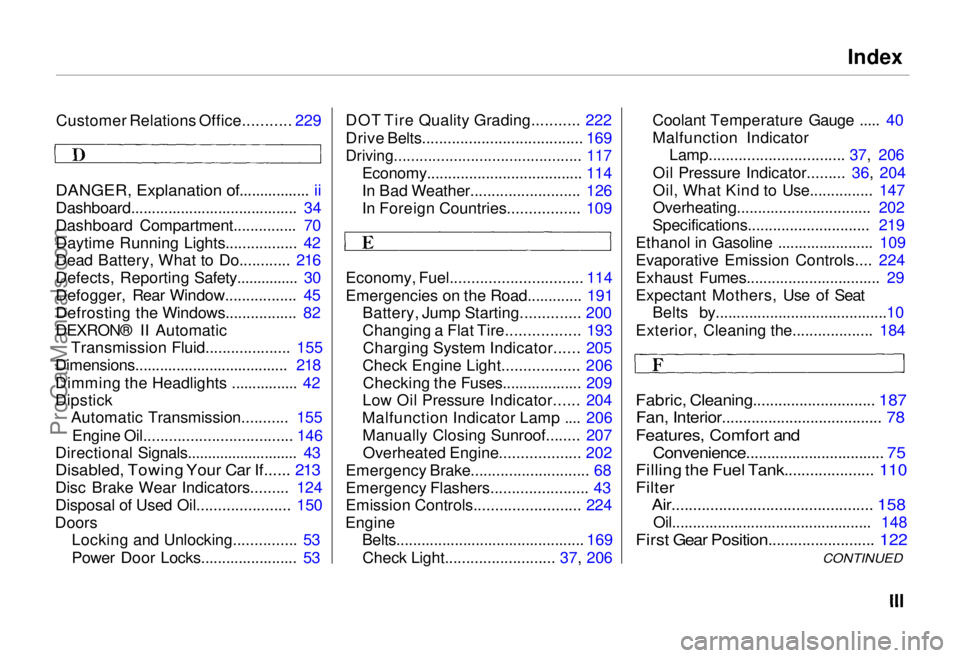
Index
Customer Relations Office........... 229
DANGER, Explanation of................. ii
Dashboard........................................ 34
Dashboard Compartment............... 70
Daytime Running Lights................. 42
Dead Battery, What to Do............ 216
Defects, Reporting Safety............... 30
Defogger, Rear Window................. 45
Defrosting the Windows................. 82
DEXRON® II Automatic Transmission Fluid.................... 155
Dimensions..................................... 218
Dimming the Headlights ................ 42
Dipstick Automatic Transmission........... 155
Engine Oil................................... 146
Directional Signals........................... 43
Disabled, Towing Your Car If...... 213
Disc Brake Wear Indicators......... 124
Disposal of Used Oil...................... 150
Doors Locking and Unlocking............... 53
Power Door Locks....................... 53 DOT Tire Quality Grading........... 222
Drive Belts...................................... 169
Driving............................................ 117
Economy..................................... 114
In Bad Weather.......................... 126
In Foreign Countries................. 109
Economy, Fuel............................... 114
Emergencies on the Road............. 191 Battery, Jump Starting.............. 200
Changing a Flat Tire................. 193
Charging System Indicator...... 205
Check Engine Light.................. 206 Checking the Fuses................... 209
Low Oil Pressure Indicator...... 204
Malfunction Indicator Lamp .... 206 Manually Closing Sunroof........ 207Overheated Engine................... 202
Emergency Brake............................ 68
Emergency Flashers....................... 43
Emission Controls......................... 224
Engine Belts............................................. 169
Check Light.......................... 37, 206 Coolant Temperature Gauge ..... 40
Malfunction Indicator
Lamp................................ 37, 206
Oil Pressure Indicator......... 36, 204
Oil, What Kind to Use............... 147
Overheating................................ 202
Specifications............................. 219
Ethanol in Gasoline ....................... 109
Evaporative Emission Controls.... 224
Exhaust Fumes................................ 29
Expectant Mothers, Use of Seat Belts by.........................................10
Exterior, Cleaning the................... 184
Fabric, Cleaning............................. 187
Fan, Interior...................................... 78
Features, Comfort and
Convenience................................. 75
Filling the Fuel Tank..................... 110
Filter Air............................................... 158
Oil................................................ 148
First Gear Position......................... 122
CONTINUEDProCarManuals.comMain Menu s t Main Menu s t
Page 238 of 240
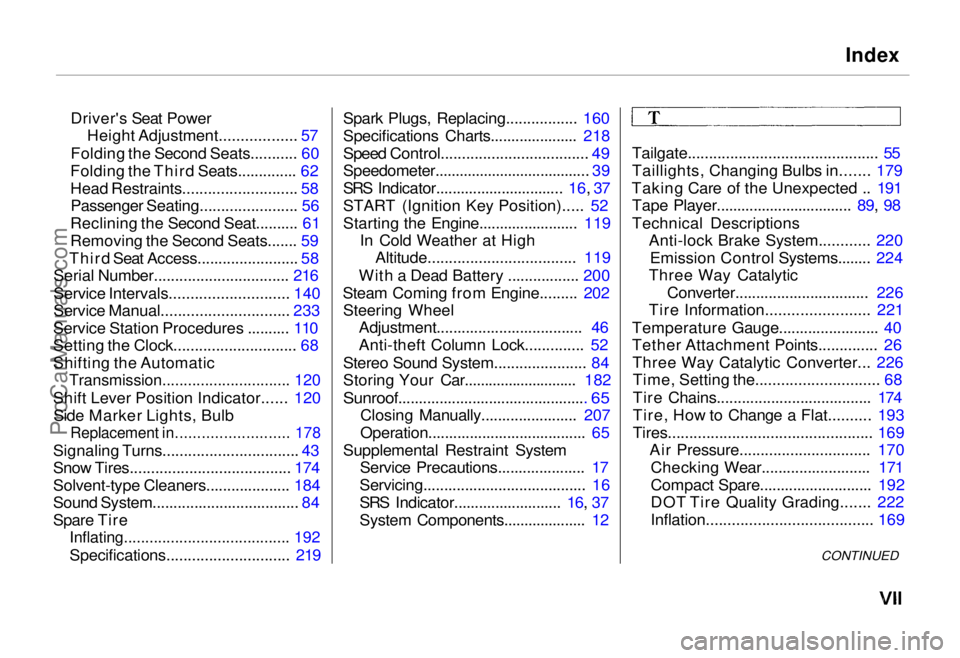
Index
Driver's Seat Power Height Adjustment.................. 57
Folding the Second Seats........... 60
Folding the Third Seats.............. 62
Head Restraints........................... 58
Passenger Seating....................... 56
Reclining the Second Seat.......... 61
Removing the Second Seats....... 59
Third Seat Access........................ 58
Serial Number................................ 216
Service Intervals............................ 140
Service Manual.............................. 233
Service Station Procedures .......... 110
Setting the Clock............................. 68
Shifting the Automatic
Transmission.............................. 120
Shift Lever Position Indicator...... 120 Side Marker Lights, Bulb
Replacement in.......................... 178
Signaling Turns................................ 43
Snow Tires...................................... 174
Solvent-type Cleaners.................... 184
Sound System................................... 84
Spare Tire
Inflating....................................... 192
Specifications............................. 219
Spark Plugs, Replacing................. 160
Specifications Charts..................... 218
Speed Control...................................
49
Speedometer......................................
39
SRS Indicator...............................
16,
37
START (Ignition
Key Position)..... 52
Starting the Engine........................ 119 In Cold Weather at HighAltitude................................... 119
With a Dead Battery ................. 200
Steam Coming from Engine......... 202 Steering Wheel Adjustment................................... 46
Anti-theft Column Lock.............. 52
Stereo Sound System...................... 84
Storing Your Car............................ 182
Sunroof.............................................. 65
Closing Manually....................... 207
Operation...................................... 65
Supplemental Restraint System Service Precautions..................... 17
Servicing....................................... 16
SRS Indicator.......................... 16, 37
System Components.................... 12 Tailgate............................................. 55
Taillights, Changing Bulbs in....... 179
Taking Care of the Unexpected .. 191 Tape Player................................. 89, 98
Technical Descriptions Anti-lock Brake System............ 220
Emission Control Systems........ 224
Three Way Catalytic
Converter................................ 226
Tire Information........................ 221
Temperature Gauge........................ 40
Tether Attachment Points.............. 26 Three Way Catalytic Converter... 226Time, Setting the............................. 68
Tire Chains..................................... 174
Tire, How to Change a Flat.......... 193
Tires................................................ 169 Air Pressure............................... 170
Checking Wear.......................... 171
Compact Spare........................... 192
DOT Tire Quality Grading....... 222
Inflation....................................... 169
CONTINUEDProCarManuals.comMain Menu s t