lights HONDA ODYSSEY 1995 Owners Manual
[x] Cancel search | Manufacturer: HONDA, Model Year: 1995, Model line: ODYSSEY, Model: HONDA ODYSSEY 1995Pages: 240, PDF Size: 2.44 MB
Page 5 of 240
Your Occupant Protection System
Your Honda is equipped with seat belts and other features that worktogether to protect you and your
passenger during a crash.
Seat belts are the most important
part of your occupant protection system. When worn properly, seat
belts can reduce the chance of serious injury or death in a crash.
For added protection during a severe
frontal collision, your Odyssey has a Supplemental Restraint System (SRS) with airbags for the driver and
a front seat passenger. Two indicator lights are also part of
your safety system. One reminds youto make sure you and your passen-
gers wear seat belts. The otheralerts you to a possible problem with
your supplemental restraint system (see page 16).
The seats, head restraints, and door locks also play a role in occupantsafety. For example, reclining the
seat-back can decrease the effec-
tiveness of your seat belt. Head
restraints can help protect your neck and head, especially during rear-end
impacts. Door locks help keep your doors from being accidentally
opened during a crash. To get the maximum protection from
your occupant protection system, check the following before you drive
away:
Everyone in the car is wearing aseat belt properly (see page 7). Infants and small children are
properly secured in child safety seats (see page 20). All doors and the tailgate are
closed and locked (see page 19). Seat-backs are upright and head
restraints are properly adjusted
(see pages 18 and 56).
There are no loose items that could be thrown around and hurtsomeone during a crash or sudden
stop (see page 19).
By following these guidelines, you
can reduce injuries to yourself and
your passengers in many crash situations. Remember, however, that
no safety system can prevent all
injuries or deaths that can occur in severe crashes.
Driver and Passenger SafetyProCarManuals.comMain Menu Table of Contents s t
Page 33 of 240
Instruments and Controls
This section gives information about the controls and displays thatcontribute to the daily operation of
your Honda. All the essential controls are within easy reach.
Control Locations............................ 34
Indicator Lights................................ 35
Gauges............................................. 39
Speedometer............................... 39
Trip Meter................................... 39
Odometer..................................... 39
Temperature Gauge................... 40
Fuel Gauge.................................. 40
Maintenance Required
Indicator................................... 40
Controls Near the Steering Wheel...................................... 41
Headlights...................................
42
Daytime Running
Lights............ 42
Instrument Panel Brightness.... 43
Turn Signals................................. 43
Windshield Wipers...................... 44
Windshield Washers................... 44 Rear Window Wiper and Washer...................................... 45
Hazard Warning.......................... 45
Rear Window Defogger.............. 45
Steering Wheel Adjustment....... 46
Steering Wheel Controls ................ 48 Cruise Control.............................. 48
Horn............................................. 51
Keys and Locks................................ 51
Keys............................................... 51
Ignition Switch............................. 52
Power Door Locks....................... 53Remote Transmitter.................... 54
Childproof Door Locks............... 54
Tailgate......................................... 55 Glove Box..................................... 55
Seats................................................. 56
Passenger Seating...................... 56
Seat Adjustments........................ 56
Driver's Seat Power HeightAdjustment.............................. 57
Head Restraints.......................... 58
Third Seat Access....................... 58 Removing the Second Seats
in the Six-Passenger Model.... 59
Folding the Second Seats in the Seven-Passenger
Model................................... 60
Reclining the Second Seat.......... 61
Folding the Third Seat in All Models...........................
62
Power Windows.............................. .
64
Sunroof............................................. 65
Mirrors............................................. 66
Adjusting the Power Mirrors.....
67
Parking Brake.................................
68
Digital Clock..................................... 68
Beverage Holder.............................. 69 Dashboard Compartment............... 70
Center Poket.................................... 71
Coin Box........................................... 71
Vanity Mirror................................... 71
Cigarette Lighter............................. 72
Ashtrays........................................... 72
Interior Lights.................................. 73
Ceiling Lights.............................. 73
Spotlights..................................... 73
Tailgate Light............................... 74 Courtesy Lights........................... 74
Instruments and ControlsProCarManuals.comMain Menu s t
Page 35 of 240
Indicator Lights
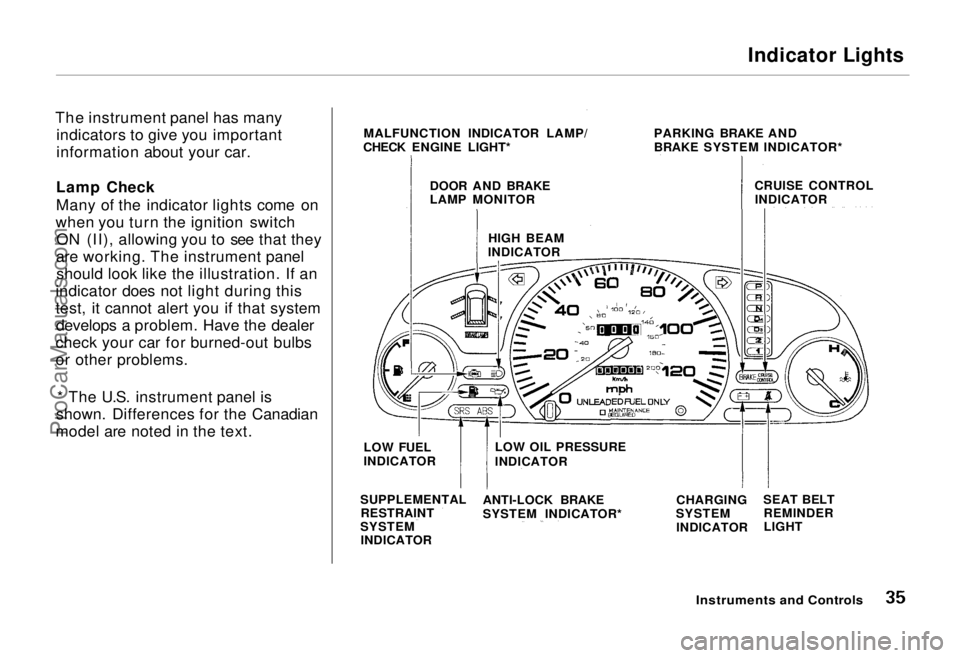
The instrument panel has many indicators to give you important
information about your car.
Lamp Check
Many of the indicator lights come on
when you turn the ignition switch ON (II), allowing you to see that they
are working. The instrument panel should look like the illustration. If an
indicator does not light during this
test, it cannot alert you if that system develops a problem. Have the dealer
check your car for burned-out bulbs
or other problems.
* The U.S. instrument panel is
shown. Differences for the Canadian
model are noted in the text.
Instruments and Controls
MALFUNCTION INDICATOR LAMP/
CHECK ENGINE LIGHT* PARKING BRAKE AND
BRAKE SYSTEM INDICATOR*
CRUISE CONTROLINDICATOR
DOOR AND BRAKE
LAMP MONITOR
HIGH BEAM
INDICATOR
LOW FUEL
INDICATOR
SUPPLEMENTAL RESTRAINT
SYSTEM INDICATOR LOW OIL PRESSURE
INDICATOR
ANTI-LOCK BRAKE
SYSTEM INDICATOR* CHARGING
SYSTEM
INDICATOR SEAT BELT
REMINDER
LIGHTProCarManuals.comMain Menu Table of Contents s t
Page 36 of 240
Indicator Lights
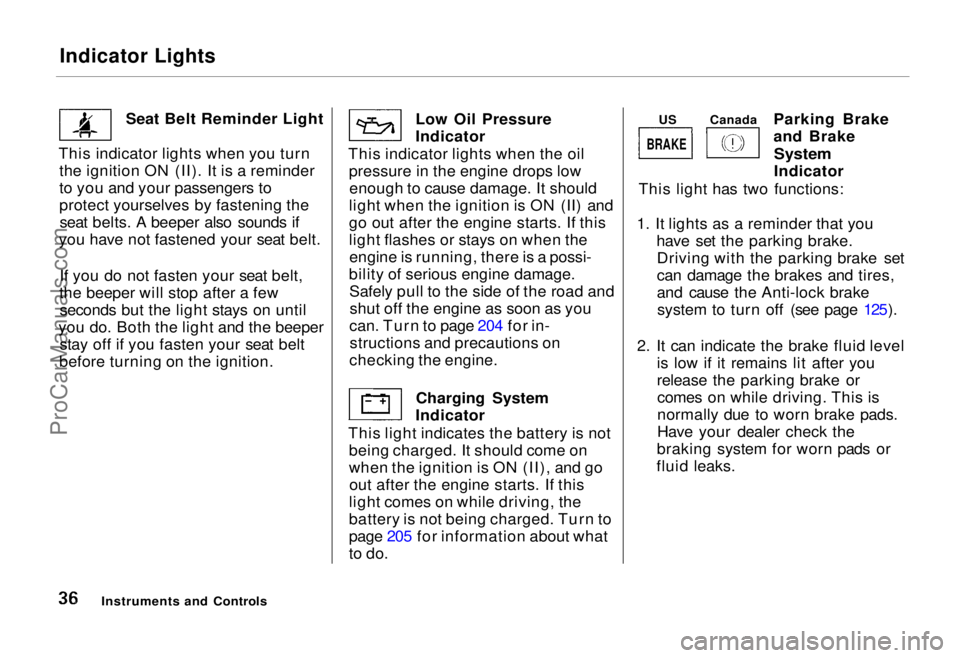
Seat Belt Reminder Light
This indicator lights when you turn the ignition ON (II). It is a reminder
to you and your passengers to
protect yourselves by fastening theseat belts. A beeper also sounds if
you have not fastened your seat belt.
If you do not fasten your seat belt,
the beeper will stop after a few seconds but the light stays on until
you do. Both the light and the beeper stay off if you fasten your seat belt
before turning on the ignition. Low Oil Pressure
Indicator
This indicator lights when the oil pressure in the engine drops lowenough to cause damage. It should
light when the ignition is ON (II) and
go out after the engine starts. If this
light flashes or stays on when the engine is running, there is a possi-
bility of serious engine damage. Safely pull to the side of the road andshut off the engine as soon as you
can. Turn to page 204 for in- structions and precautions on
checking the engine.
Charging System
Indicator
This light indicates the battery is not being charged. It should come on
when the ignition is ON (II), and goout after the engine starts. If this
light comes on while driving, the
battery is not being charged. Turn to
page 205 for information about what
to do. Parking Brake
and Brake
System
Indicator
This light has two functions:
1. It lights as a reminder that you have set the parking brake.Driving with the parking brake set
can damage the brakes and tires,
and cause the Anti-lock brakesystem to turn off (see page 125).
2. It can indicate the brake fluid level is low if it remains lit after you
release the parking brake orcomes on while driving. This is
normally due to worn brake pads.
Have your dealer check the
braking system for worn pads or
fluid leaks.
Instruments and Controls
BRAKE
US
CanadaProCarManuals.comMain Menu Table of Contents s t
Page 37 of 240
Indicator Lights
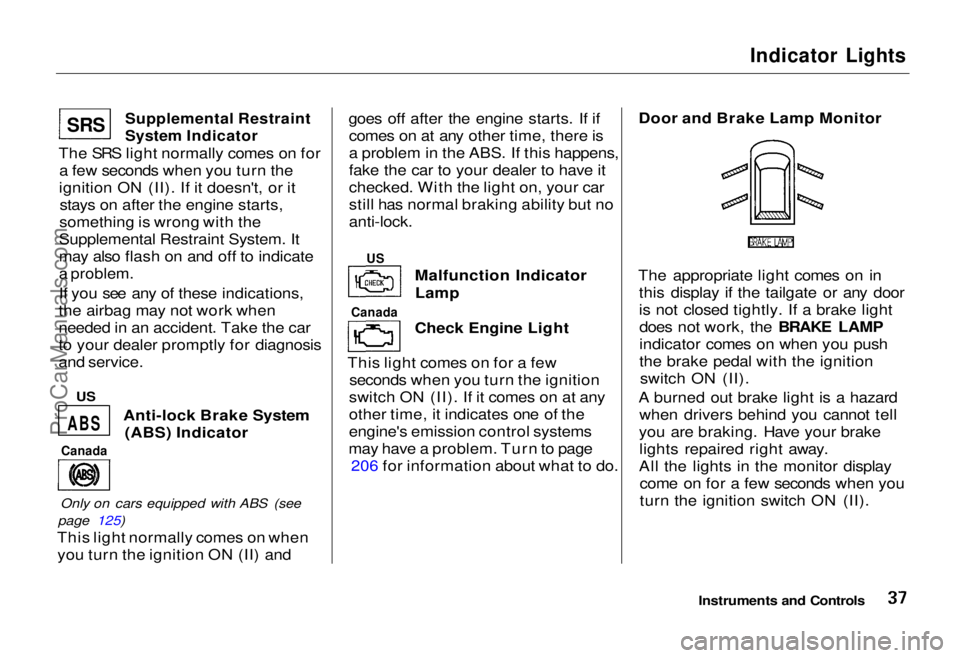
Supplemental Restraint
System Indicator
The SRS light normally comes on for a few seconds when you turn the
ignition ON (II). If it doesn't, or it stays on after the engine starts,
something is wrong with the
Supplemental Restraint System. It
may also flash on and off to indicate
a problem.
If you see any of these indications,
the airbag may not work when
needed in an accident. Take the car
to your dealer promptly for diagnosis
and service.
Anti-lock Brake System(ABS) Indicator
Only on cars equipped with ABS (see
page 125)
This light normally comes on when you turn the ignition ON (II) and goes off after the engine starts. If if
comes on at any other time, there is
a problem in the ABS. If this happens,
fake the car to your dealer to have it
checked. With the light on, your car
still has normal braking ability but no
anti-lock.
Malfunction IndicatorLamp
Check Engine Light
This light comes on for a few seconds when you turn the ignition
switch ON (II). If it comes on at any
other time, it indicates one of the
engine's emission control systems
may have a problem. Turn to page 206 for information about what to do. Door and Brake Lamp Monitor
The appropriate light comes on in this display if the tailgate or any door
is not closed tightly. If a brake lightdoes not work, the BRAKE LAMP
indicator comes on when you push
the brake pedal with the ignition switch ON (II).
A burned out brake light is a hazard when drivers behind you cannot tell
you are braking. Have your brake lights repaired right away.
All the lights in the monitor display come on for a few seconds when you
turn the ignition switch ON (II).
Instruments and Controls
Canada
ABS
Canada
US
SR
S
US
ProCarManuals.comMain Menu Table of Contents s t
Page 38 of 240
Indicator Lights
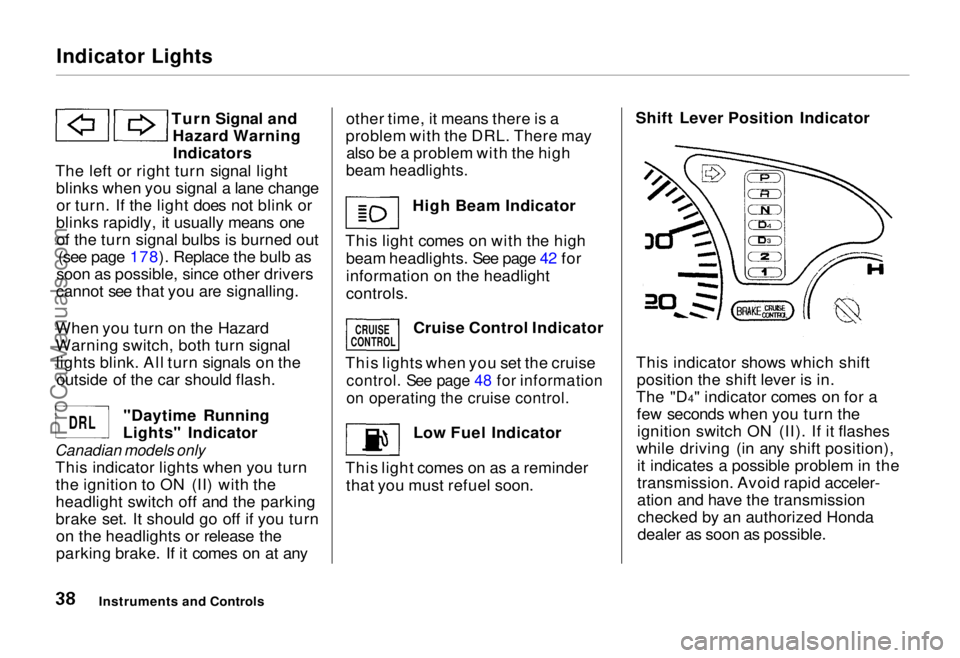
Turn Signal andHazard WarningIndicators
The left or right turn signal light blinks when you signal a lane changeor turn. If the light does not blink or
blinks rapidly, it usually means one of the turn signal bulbs is burned out (see page 178). Replace the bulb as
soon as possible, since other drivers
cannot see that you are signalling.
When you turn on the Hazard
Warning switch, both turn signal lights blink. All turn signals on theoutside of the car should flash.
"Daytime Running
Lights" Indicator
Canadian models only
This indicator lights when you turnthe ignition to ON (II) with the
headlight switch off and the parking
brake set. It should go off if you turnon the headlights or release the
parking brake. If it comes on at any other time, it means there is a
problem with the DRL. There may also be a problem with the high
beam headlights.
High Beam Indicator
This light comes on with the high beam headlights. See page 42 for
information on the headlight
controls.
Cruise Control Indicator
This lights when you set the cruise
control. See page 48 for information
on operating the cruise control.
Low Fuel Indicator
This light comes on as a reminder that you must refuel soon. Shift Lever Position Indicator
This indicator shows which shift position the shift lever is in.
The "D4" indicator comes on for a few seconds when you turn theignition switch ON (II). If it flashes
while driving (in any shift position), it indicates a possible problem in the
transmission. Avoid rapid acceler-
ation and have the transmissionchecked by an authorized Honda
dealer as soon as possible.
Instruments and Controls
CRUISE
CONTROL
DRL
ProCarManuals.comMain Menu Table of Contents s t
Page 41 of 240
Controls Near the Steering Wheel
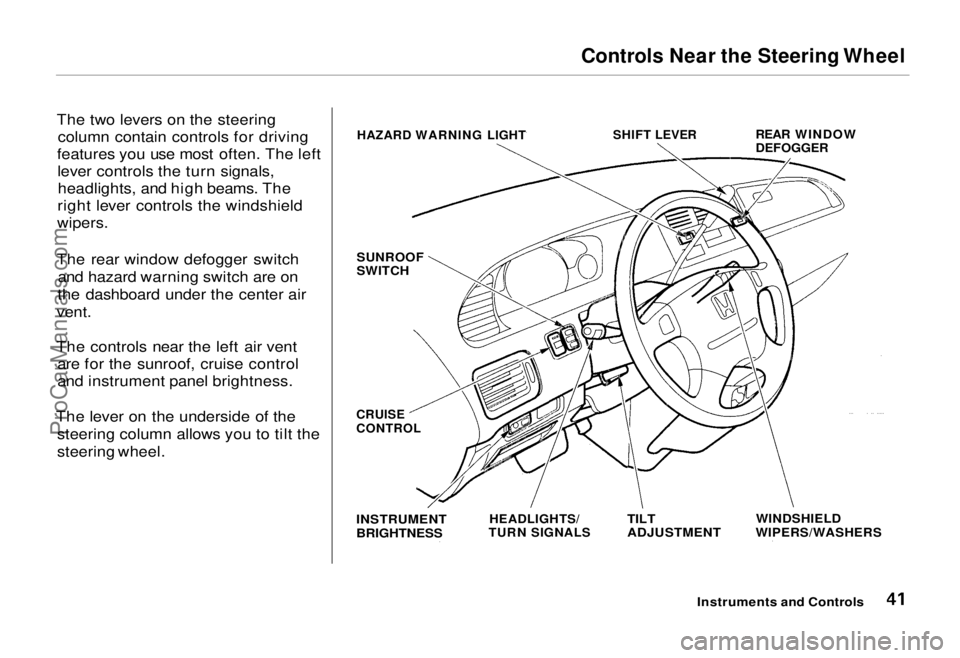
The two levers on the steering column contain controls for driving
features you use most often. The left lever controls the turn signals,headlights, and high beams. The
right lever controls the windshield
wipers.
The rear window defogger switch and hazard warning switch are on
the dashboard under the center air
vent.
The controls near the left air vent are for the sunroof, cruise control
and instrument panel brightness.
The lever on the underside of the steering column allows you to tilt the
steering wheel.
Instruments and Controls
HAZARD WARNING LIGHT
SHIFT LEVER
REAR WINDOW
DEFOGGER
SUNROOF
SWITCH
WINDSHIELD
WIPERS/WASHERS
TILT
ADJUSTMENT
HEADLIGHTS/
TURN SIGNALS
INSTRUMENT
BRIGHTNESS
CRUISE
CONTROLProCarManuals.comMain Menu Table of Contents s t
Page 42 of 240
Controls Near the Steering Wheel
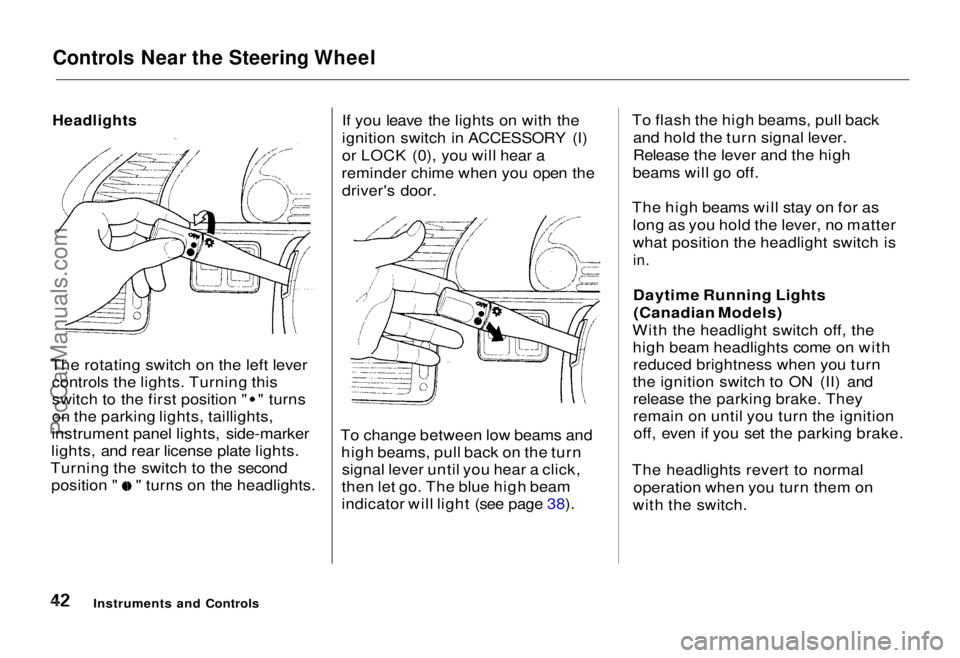
The rotating switch on the left lever controls the lights. Turning this switch to the first position " " turns
on the parking lights, taillights,
instrument panel lights, side-marker
lights, and rear license plate lights.
Turning the switch to the second position " " turns on the headlights. If you leave the lights on with the
ignition switch in ACCESSORY (I)
or LOCK (0), you will hear a
reminder chime when you open the driver's door.
To change between low beams and high beams, pull back on the turnsignal lever until you hear a click,
then let go. The blue high beam
indicator will light (see page 38). To flash the high beams, pull back
and hold the turn signal lever.
Release the lever and the high
beams will go off.
The high beams will stay on for as long as you hold the lever, no matter
what position the headlight switch is
in.
Daytime Running Lights(Canadian Models)
With the headlight switch off, the high beam headlights come on withreduced brightness when you turn
the ignition switch to ON (II) and release the parking brake. They
remain on until you turn the ignitionoff, even if you set the parking brake.
The headlights revert to normal operation when you turn them on
with the switch.
Instruments and Controls
HeadlightsProCarManuals.comMain Menu Table of Contents s t
Page 43 of 240
Controls Near the Steering Wheel
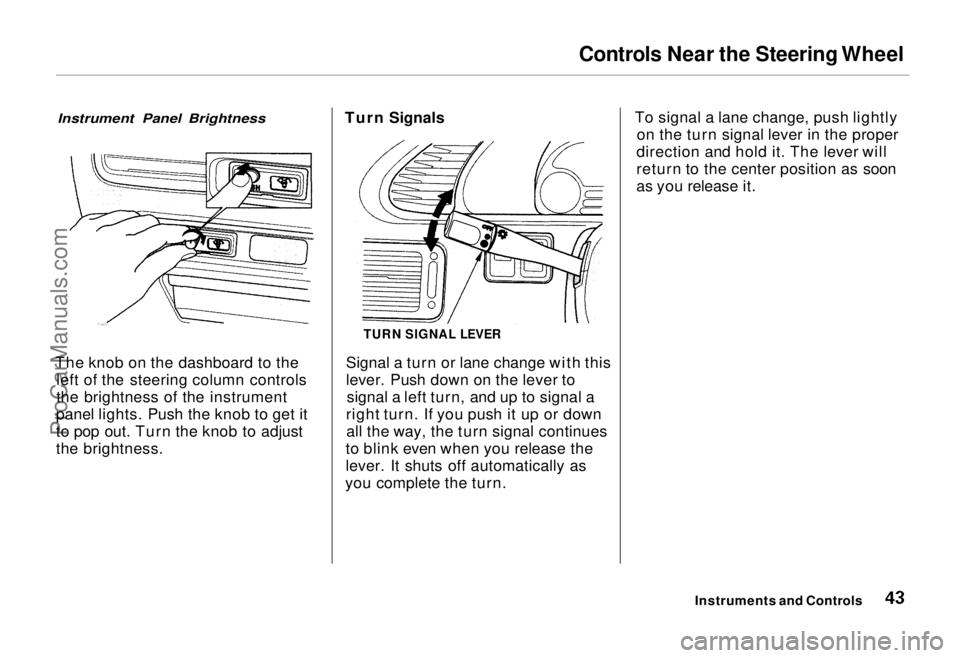
Instrument Panel Brightness
The knob on the dashboard to the left of the steering column controls
the brightness of the instrument
panel lights. Push the knob to get it
to pop out. Turn the knob to adjust
the brightness. Turn Signals
Signal a turn or lane change with this
lever. Push down on the lever tosignal a left turn, and up to signal a
right turn. If you push it up or down all the way, the turn signal continues
to blink even when you release the
lever. It shuts off automatically as
you complete the turn. To signal a lane change, push lightly
on the turn signal lever in the proper
direction and hold it. The lever will
return to the center position as soon
as you release it.
Instruments and Controls
TURN SIGNAL LEVERProCarManuals.comMain Menu Table of Contents s t
Page 45 of 240
Controls Near the Steering Wheel
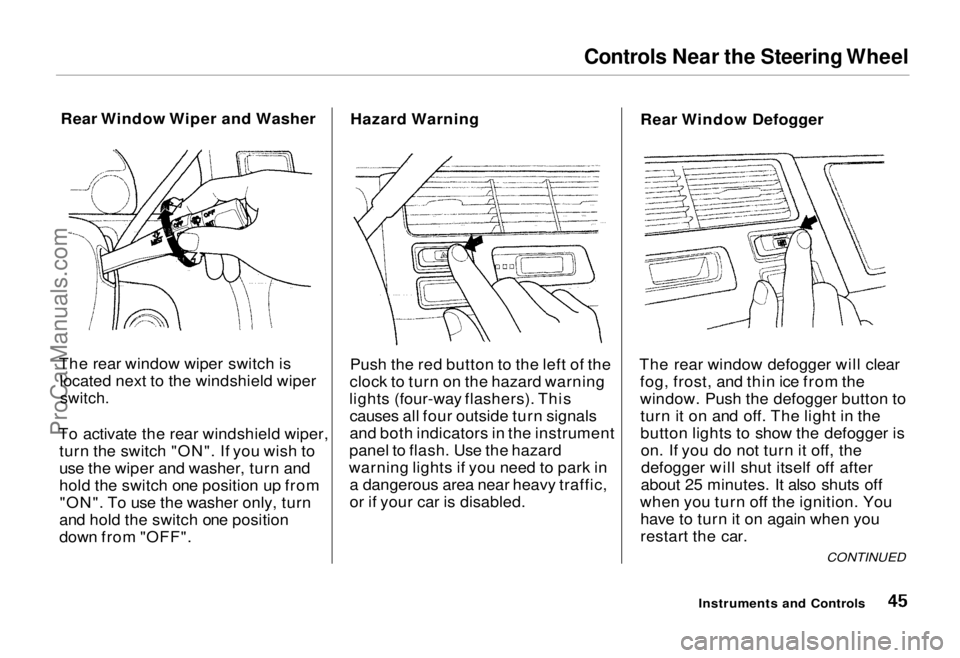
Rear Window Wiper and Washer
The rear window wiper switch is located next to the windshield wiper
switch.
To activate the rear windshield wiper, turn the switch "ON". If you wish to
use the wiper and washer, turn and
hold the switch one position up from"ON". To use the washer only, turn
and hold the switch one position
down from "OFF". Hazard Warning
Push the red button to the left of the
clock to turn on the hazard warning
lights (four-way flashers). This causes all four outside turn signals
and both indicators in the instrument
panel to flash. Use the hazard
warning lights if you need to park in a dangerous area near heavy traffic,
or if your car is disabled. Rear Window Defogger
The rear window defogger will clear fog, frost, and thin ice from the
window. Push the defogger button toturn it on and off. The light in the
button lights to show the defogger ison. If you do not turn it off, thedefogger will shut itself off after
about 25 minutes. It also shuts off
when you turn off the ignition. You have to turn it on again when you
restart the car.
Instruments and Controls
CONTINUEDProCarManuals.comMain Menu Table of Contents s t